Home › Utilities

 US
US
1 of 1 storefronts
Content in en-US
Content in en-US
Information
Preview 2 platforms
iPhone 7 images


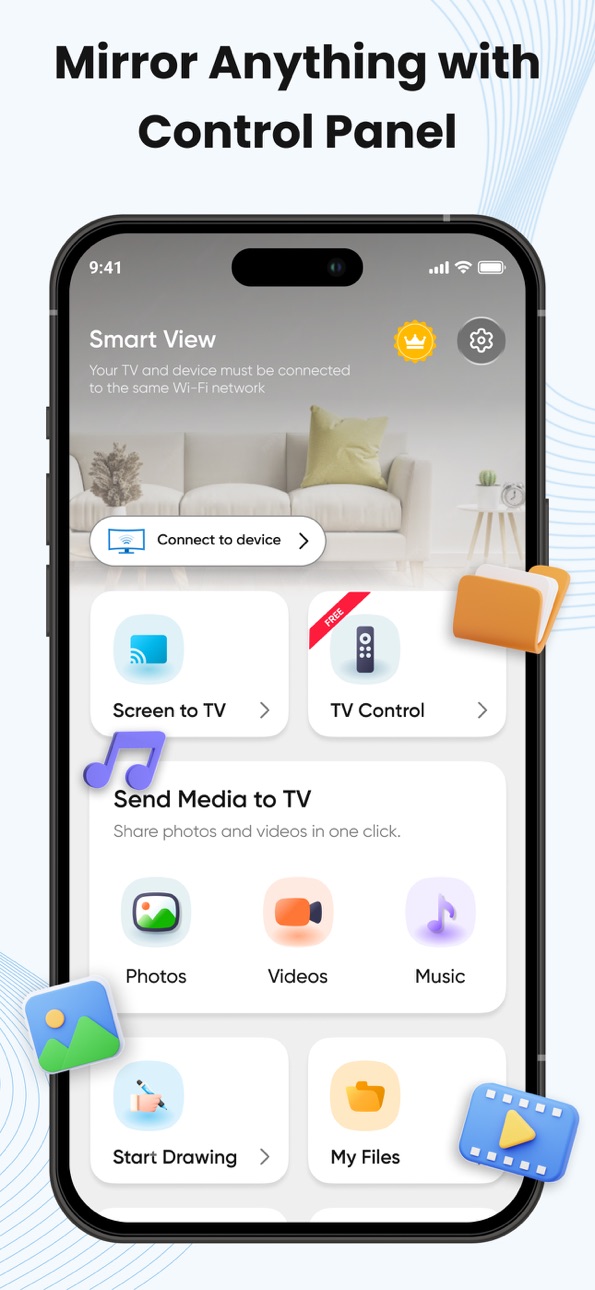


iPad 7 images


What’s New Version 10.0
Your screen mirroring experience just got better.
- New: TV Remote
- Faster screen casting performance
- Improved interface
- Stability improvements and bug fixes
Description
Smart View App Lets you enjoy multimedia content from your mobile and PC on your Smart TV as well as letting you control the Smart TV with your mobile. With Smart View you can easy to watch your favorite content on your TV.
Play content from your mobile
TV Assist, easy to connect your mobile to the TV and select videos, pictures, or even music. Your content will instantly play on the Smart View TV Cast.
Create Playlists
Create personalized playlists to access all of your favorite videos, photos, and music in one place.
Play content from your PC
Add content files or even a whole folder from your PC into Smart View, and play everything on the list in one go!
Features
• Smart Things Smart View App
• Mirror Smart View, Allshare, Allcast
• Phone screen on a large smart TV
• Support for all media files, pictures, videos, etc.
• Cast media files and mirror screen to TV and Windows
• Screen Mirroring - Smart Share - TV
• Cast photos, music & videos to Chromecast
• Cast To TV: Screen Mirroring for Smart TV
• Control your Remote, Smart Remote
• Watch your movies on Chromecast TV
• Easy to connect from the Smart Share App
How to use Mirroring
1. Make sure your phone/tablet and smart TV are connected to the same Wi-Fi network.
2. Enable “Wireless display” on your phone.
3. Enable “Miracast” on your smart TV.
4. Search and pair the device.
SmartThings
With Smart View, you can cast your photos on your TV. Easy cast music from your Chromecast app to your Smart TV. Cast your camera video to your TV screen! Smart share app for all smart TVs. Stream the phone's camera to Chromecast.
Smart Things Smart View app is the best smart view app. By using the SmartThings app, Smart View is a free screen mirroring, with Castto you can broadcast any files to your Smart TV. With SmartShare you can make screen mirroring of any photos, video files, audio, and other content to your Smart TV in real-time and without any delay.
Smart View Smart TV enables you to cast images, videos, and music to all TV or other DLNA Devices. With a smart TV cast, you can stream any content to your device. Smart Share is a screen casting that allows you to easily open any media on the big screen, including mobile games, photos, music, videos, and e-books.
With TV Cast you can control what you watch on your TV without interrupting the playback. Smart View's interface is pretty simple, designed so you never lose sight of whatever you're watching at that moment. All you have to do is connect your TV and smart device to the same network. After that, you're ready to start controlling playback.
All Screen Mirroring App smart view TV screen mirroring assistant for screencasting, Cast Phone to TV with Wi-Fi. Smart Share is the perfect casting app for all smart TVs without Wi-Fi just by using dongles or adaptors. SmartShare provides phone to TV, cast To TV, and TV mirror, all connected with the smart cast.
Smart View Screen Mirroring - use the Costo feature from supported applications. Smart View Free App is able to play games and videos with a screen mirror. Smart View - Cast Phone to TV based on Miracast TV mirror technology is your best choice!
Read our full Terms of Service and our Privacy Policy at:
Privacy Policy
https://smart-view.netlify.app/
Terms of use
https://smart-view.netlify.app/terms
EULA
https://smart-view.netlify.app/eula
In-App Purchases US pricing
All Access Subscription
Annual · Yearly$24.99
Weekly Plan · 7 days$6.99
One-Time Purchases
Lifetime Access$39.99
Capabilities
In-App Purchases
Accessibility
ipadiphonemacrealityDevicetvoswatch
Version history 19 versions
Build 885279668v10.02026-05-11 14:40:31
Your screen mirroring experience just got better.
- New: TV Remote
- Faster screen casting performance
- Improved interface
- Stability improvements and bug fixes
Build 881589560v9.02026-01-20 08:57:57
- Added PPT and PDF casting
- Fixed crashes
Build 880271215v8.02025-12-03 03:34:19
- Fixed Crashes
Build 880112538v7.02025-11-27 02:16:08
- Fixed crashes
Build 879892342v6.02025-11-20 01:06:26
- Important bug fixes
- Implemented Crashlytics to resolve crashes
Build 879367686v5.02025-10-31 22:32:03
- Fixed connection issue
Build 877539577v4.02025-10-28 16:37:04
- Brand new UI - Liquid Glass
- Smooth user experience
- Critical bug fixes
Build 877342820v3.02025-08-21 12:58:47
Fixed bugs in AirPlay connection
Build 877211776v2.02025-08-15 08:59:22
- Added AirPlay option in the app
- Added LG TV support
- Resolved crashes and bugs
Build 875163814v1.92025-06-04 06:22:20
- Bug fixed
Build 871791718v1.82025-05-28 17:03:13
- Fixed crash
- Improve performance
Build 870491032v1.72024-11-18 12:41:28
- Crusil bugs fixed
Build 869346492v1.62024-09-30 16:14:21
- Critical bug fixes
(Video and photo casting)
Build 867650956v1.52024-07-22 13:46:45
- Improve browser casting feature
Build 864319537v1.42024-07-05 21:56:15
- Improve performance
Build 862717072v1.32024-01-18 11:19:00
- Free premium features
- Improve performance
Build 860785527v1.22023-12-15 03:59:35
- Swipe media feature
- Improve performance
Build 860535272v1.12023-10-11 19:54:40
improve performance
Build 859024133v1.02023-10-04 23:01:38
Price history by region
Currency
Show
Columns
Search
Availability 1 of 1 storefronts
| Region | Language | Price | Ratings | Avg | Version |
|---|---|---|---|---|---|
| US | en-US | Free | 1.4k | 4.0 | 10.0 |
Change log 23 changes · US
✎
releaseNotes updated
Your screen mirroring experience just got better.
- New: TV Remote
- Faster screen casting performance
- Improved interface
- Stability improvements and bug fi
✎
description updated
Smart View App Lets you enjoy multimedia content from your mobile and PC on your Smart TV as well as letting you control the Smart TV with your mobile. With Sma
✎
subtitle updated
Wireless Display & Mirroring
✎
name updated
Smart View : Screen Cast
◆
Version 10.0 released
Your screen mirroring experience just got better.
- New: TV Remote
- Faster screen casting performance
- Improved interface
- Stability improvements and bug fixes
◆
Version 9.0 released
- Added PPT and PDF casting
- Fixed crashes
◆
Version 8.0 released
- Fixed Crashes
◆
Version 7.0 released
- Fixed crashes
◆
Version 6.0 released
- Important bug fixes
- Implemented Crashlytics to resolve crashes
◆
Version 5.0 released
- Fixed connection issue
◆
Version 4.0 released
- Brand new UI - Liquid Glass
- Smooth user experience
- Critical bug fixes
◆
Version 3.0 released
Fixed bugs in AirPlay connection
◆
Version 2.0 released
- Added AirPlay option in the app
- Added LG TV support
- Resolved crashes and bugs
◆
Version 1.9 released
- Bug fixed
◆
Version 1.8 released
- Fixed crash
- Improve performance
◆
Version 1.7 released
- Crusil bugs fixed
◆
Version 1.6 released
- Critical bug fixes
(Video and photo casting)
◆
Version 1.5 released
- Improve browser casting feature
◆
Version 1.4 released
- Improve performance
◆
Version 1.3 released
- Free premium features
- Improve performance
◆
Version 1.2 released
- Swipe media feature
- Improve performance
◆
Version 1.1 released
improve performance
◆
Version 1.0 released