Home › Business

 US
US
1 of 1 storefronts
Content in en-US
Content in en-US
Information
Apple ID6456040050
Bundle IDcom.razortracking.pocket
SellerSeller
Min iOS17.0
Min macOS14.0
Device familiesiphone, ipad
Released2025-04-21
Copyright© Razor Tracking
Privacy policyLink ↗
Preview 2 platforms
iPhone 5 images




iPad 5 images


What’s New Version 26.06.015
- Dash Cameras - View and filter your fleet's dash camera events right in the app.
- Document Glovebox - Tag, organize, download, and view documents on the go.
- Stability & polish - Faster image loading, smoother login, and numerous fixes across notifications, uploads, and text entry.
Description
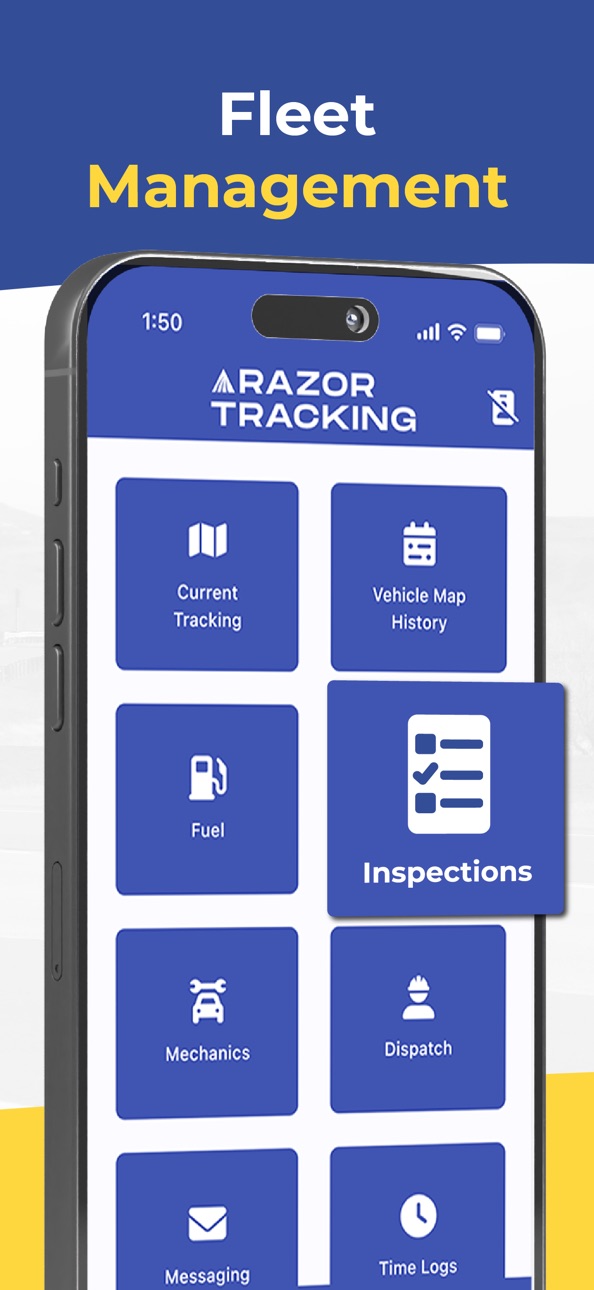
It’s smarter fleet management software to keep your business moving. Razor Tracking GO is built for business owners and fleet managers who need full control—anytime, anywhere. Whether you're in the field, on the road, in the office, or even on vacation, Razor Tracking GO keeps your operations running smoothly. Optimized for mobile with enhanced speed, usability, and responsiveness, it's your fleet—at your fingertips. Some of the new features include:
Dispatch Jobs. Upload files like receipts or photos of equipment.
Group Messaging. Send group or departmental messages to team members.
Fuel purchases. Upload photos of invoices or receipts when fueling for each vehicle.
Mobile Time Logs. Allows for time tracking of driver and/or equipment.
Vehicle Inspections. Search by vehicle and review past inspections.
Locate On Demand button. Ability to ping the device for the location of the AT230 On Demand Asset Tracker.
Plus, we have the original features our customers have come to know and love: GPS Tracking, Vehicle History, Weather Radar, System notifications, Search functions, and Vehicle Map History.
Are you ready to take control of your fleet like never before?
Join the satisfied businesses already using Razor Tracking to boost efficiency and promote safety. Call us today at 833-GO-RAZOR or email info@razortracking.com to get started.
Visit RazorTracking.com to explore powerful GPS fleet coordination tools built to move your business forward.
Accessibility
ipadiphonemacrealityDevicetvoswatch
Version history 22 versions
Build 887450271v26.06.0152026-07-01 17:43:04
- Dash Cameras - View and filter your fleet's dash camera events right in the app.
- Document Glovebox - Tag, organize, download, and view documents on the go.
- Stability & polish - Faster image loading, smoother login, and numerous fixes across notifications, uploads, and text entry.
Build 885191123v26.05.0042026-05-06 14:47:12
- stability and UI fixes for inspections and mechanics
- general improvements
Build 883852787v26.04.0162026-04-20 15:16:30
bug fixes
Build 883620172v26.03.0092026-03-22 23:29:34
app stability
Build 881790802v26.03.0072026-03-20 17:03:56
- Added DTCs to vehicle details
- Login autofill support
- Spanish translation improvements
- Fixed issues with screen rotation
- Fixed an issue swiping away the gallery
- General stability and performance improvements
Build 881501228v25.12.0132026-01-16 01:16:33
general improvements
Build 881053123v25.12.0122025-12-31 17:52:27
Improvements to login, messages, and fuel purchases.
Build 880525736v25.12.0072025-12-11 23:58:28
general fixes and improvements
Build 880324700v25.12.0032025-12-04 21:13:54
- fixed crash on login
Build 880057021v25.11.0152025-11-26 19:46:33
General improvements and bug fixes
Build 879916753v25.11.0142025-11-22 23:50:56
Location fields for fuel purchases are now optional.
Build 879788918v25.11.0092025-11-19 20:46:37
Bug fixes and improvements for maps, dispatch, fuel, inspections, and messaging.
Build 879468357v25.11.0012025-11-05 15:02:36
Bug fixes and quality of life improvements
Build 878572255v25.10.0082025-10-08 21:51:59
- fixed time zone issues in Vehicle Map History and Fuel Purchases
- fixed overlapped UI in Vehicle Map History
- fixed issues uploading images
- fixed issue retrieving details for On Demand devices
Build 877761076v25.09.0032025-09-09 02:15:47
- Upload attachments in Jobs and Fuel Purchases
- General improvements and bug fixes
Build 876520659v25.07.0132025-07-21 13:28:28
Messaging is now available in Razor Tracking GO.
Build 875541563v25.06.0062025-06-20 17:06:32
Fixed an issue with saved logins after 24 hours
Fixed layout issue with job notes
Fixed an issue refreshing departments and vehicle groups
Added more accurate error messages for different login errors
Build 875120556v25.05.0192025-06-06 15:43:06
Notes are now displayed for jobs.
Fix the wrong movement status appearing in vehicle details.
Misc UI improvements.
Build 874743395v25.05.0112025-05-14 14:52:29
Improvements:
- Job status changes display automatically after submission
- General UI improvements
Bug fixes:
- Fixed issue opening vehicle with cameras on map
- Fixed crash when navigating away from the app
- Fixed duplicate items in mechanics
Build 874568833v25.05.0062025-05-08 17:35:06
Improvements:
- Better user experience in Dispatch/Jobs.
- Odometer is now pre-filled when entering an inspection.
- More descriptive message when there are no failed inspections left.
Bug Fixes:
- Fixed an issue with saved logins after 24 hours.
- Fixed an issue attaching multiple images to an inspection.
- Fixed an issue where the end time for a job was displayed twice.
- Fixed an issue resolving inspections for certain user roles.
- Various UI fixes.
Build 874219113v25.04.0292025-04-23 11:30:34
- Fixed an issue in the Locate on Demand feature.
- Fixed an issue where the device ESN was displayed instead of the vehicle name.
Build 858852274v25.04.0272025-04-21 14:22:16
No pricing data captured yet — comparisons appear once the app has paid storefronts or in-app purchases.
Availability 1 of 1 storefronts
| Region | Language | Price | Ratings | Avg | Version |
|---|---|---|---|---|---|
| US | en-US | Free | 4 | 5.0 | 26.06.015 |
Change log 25 changes · US
✎
releaseNotes updated
- Dash Cameras - View and filter your fleet's dash camera events right in the app.
- Document Glovebox - Tag, organize, download, and view documents on the go.
✎
description updated
It’s smarter fleet management software to keep your business moving. Razor Tracking GO is built for business owners and fleet managers who need full control—any
✎
name updated
Razor Tracking GO
◆
Version 26.06.015 released
- Dash Cameras - View and filter your fleet's dash camera events right in the app.
- Document Glovebox - Tag, organize, download, and view documents on the go.
- Stability & polish - Faster image loading, smoother login, and numerous fixes
◆
Version 26.05.004 released
- stability and UI fixes for inspections and mechanics
- general improvements
◆
Version 26.04.016 released
bug fixes
◆
Version 26.03.009 released
app stability
◆
Version 26.03.007 released
- Added DTCs to vehicle details
- Login autofill support
- Spanish translation improvements
- Fixed issues with screen rotation
- Fixed an issue swiping away the gallery
- General stability and performance improvements
◆
Version 25.12.013 released
general improvements
◆
Version 25.12.012 released
Improvements to login, messages, and fuel purchases.
◆
Version 25.12.007 released
general fixes and improvements
◆
Version 25.12.003 released
- fixed crash on login
◆
Version 25.11.015 released
General improvements and bug fixes
◆
Version 25.11.014 released
Location fields for fuel purchases are now optional.
◆
Version 25.11.009 released
Bug fixes and improvements for maps, dispatch, fuel, inspections, and messaging.
◆
Version 25.11.001 released
Bug fixes and quality of life improvements
◆
Version 25.10.008 released
- fixed time zone issues in Vehicle Map History and Fuel Purchases
- fixed overlapped UI in Vehicle Map History
- fixed issues uploading images
- fixed issue retrieving details for On Demand devices
◆
Version 25.09.003 released
- Upload attachments in Jobs and Fuel Purchases
- General improvements and bug fixes
◆
Version 25.07.013 released
Messaging is now available in Razor Tracking GO.
◆
Version 25.06.006 released
Fixed an issue with saved logins after 24 hours
Fixed layout issue with job notes
Fixed an issue refreshing departments and vehicle groups
Added more accurate error messages for different login errors
◆
Version 25.05.019 released
Notes are now displayed for jobs.
Fix the wrong movement status appearing in vehicle details.
Misc UI improvements.
◆
Version 25.05.011 released
Improvements:
- Job status changes display automatically after submission
- General UI improvements
Bug fixes:
- Fixed issue opening vehicle with cameras on map
- Fixed crash when navigating away from the app
- Fixed duplicate items in mec
◆
Version 25.05.006 released
Improvements:
- Better user experience in Dispatch/Jobs.
- Odometer is now pre-filled when entering an inspection.
- More descriptive message when there are no failed inspections left.
Bug Fixes:
- Fixed an issue with saved logins after 24
◆
Version 25.04.029 released
- Fixed an issue in the Locate on Demand feature.
- Fixed an issue where the device ESN was displayed instead of the vehicle name.
◆
Version 25.04.027 released