Home › Productivity

 US
US
1 of 1 storefronts
Content in en-US
Content in en-US
Information
Apple ID6452720369
Bundle IDbiz.atk-jkeyboard
SellerSeller
Min iOS14.1
Min macOS11.0
Device familiesiphone, ipod
Released2025-08-07
Copyright© 2025 LEE JONGHEON
Privacy policyLink ↗
Preview 1 platform
iPhone 9 images



What’s New Version 1.1.5
- 이미지 수정 및 유아이수정
Description
A keyboard designed to make Japanese input easier – "Complete Japanese in just 2 taps."
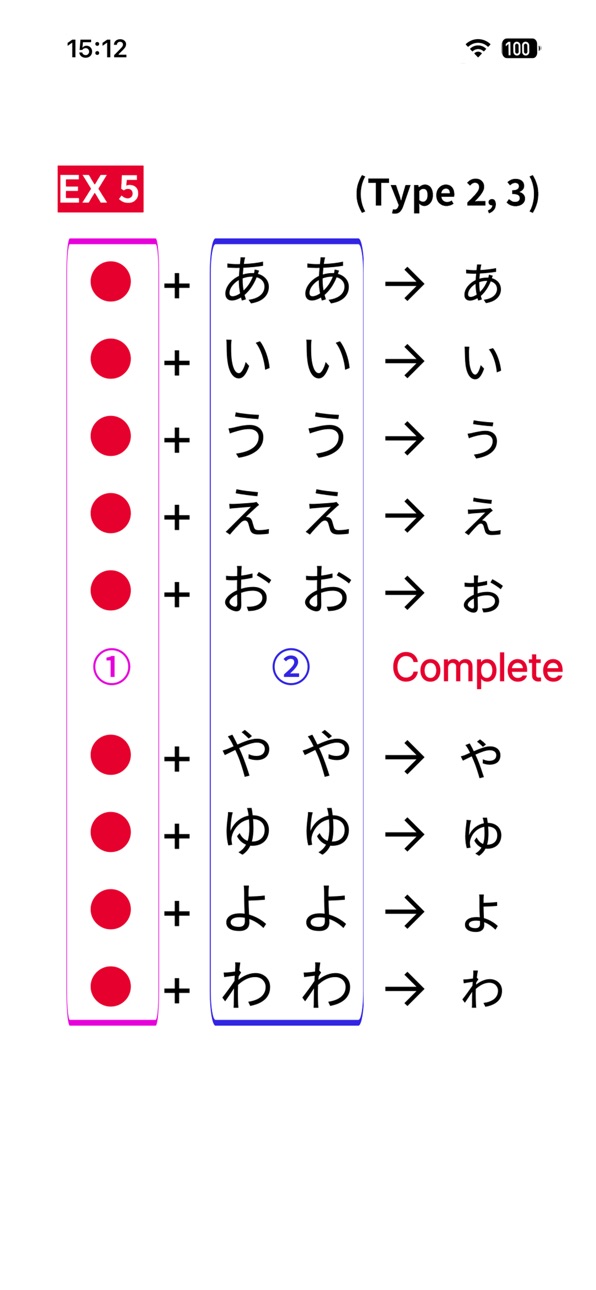
With our unique input algorithm, you can finish typing Hiragana and Katakana with only two taps.
Even beginners can type Japanese quickly and accurately.
[A Version - Type1] QWERTY-Based Keyboard
We have uniquely implemented a Japanese-exclusive QWERTY layout that existing Japanese keyboards could not provide!
With All2Tap, you can easily input Hiragana, Katakana, and numbers—just like using an English keyboard.
[K Version - Type2] Pad-Style Keyboard
An intuitive interface designed with a keypad-style layout.
Perfect for Japanese beginners or anyone not used to typing—easy and simple to use.
Easy Setup – Use as a System Keyboard
No need to launch a separate app.
Simply enable it in your system keyboard settings, and use All2Tap in all apps like WhatsApp, Messenger, or your browser.
※ Recommended For:
Those who find existing Japanese input methods (flick, multi-tap, etc.) inconvenient
Beginners just starting to learn Japanese
Advanced users who want faster and more accurate typing
Early adopters who want to try an innovative keyboard first
※ Additional Notes:
Works as a system keyboard and can be used in all apps
Japanese auto-complete will be added in a future update
日本語入力の新しいスタンダード、All2Tap(オールトゥーキー)
"All2Tap"は、従来の日本語キーボードの不便さを解消する革新的な入力方式を提供します。
遅くて複雑だった日本語入力を、今やたった「2打鍵」でスムーズに完了 !
※ 主な特徴
* たった2打で日本語入力が完了
独自の入力アルゴリズムにより、ひらがな・カタカナをわずか2打鍵で入力可能 !
初心者でもスピーディーで正確な入力ができます。
* QWERTY配列キーボード(Type 1)
従来の日本語キーボードでは不可能だった、独自の日本語QWERTY配列を実装 !
All2Tapなら、英語キーボードのように、ひらがな・カタカナ・数字を簡単に入力できます。
* パッド型キーボード(Type 2)
視覚的にわかりやすいパッド型インターフェースにより、
日本語初心者やタイピングに不慣れな方でも簡単に使えます。
* システムキーボードとして簡単に設定可能
別アプリを開く必要なし。システムキーボードとして設定すれば、
WhatsApp、メッセンジャー、ブラウザなどすべてのアプリで使用可能です。
※ こんな方におすすめ !
* フリック入力やマルチタップ入力に不便さを感じていた方
* 日本語学習を始めたばかりの初心者
* より高速かつ正確な日本語入力を求める中・上級者
* 新しい入力方式をいち早く試したいアーリーアダプター
※ その他の情報
* システムキーボードとして提供、すべてのアプリで使用可能
* 日本語の予測変換(オートコンプリート)機能は、今後のアップデートで追加予定 !
Developer Contact:
CallAnswer Co., Ltd.
76 Keunumul-ro, Mapo-gu
Mapo-gu, Seoul 04167
South Korea
Business Registration Number: 111-86-02748
Permit No.: 2023-Seoul Mapo-2082, Mapo District Office
Accessibility
ipadiphonemacrealityDevicetvoswatch
Version history 13 versions
Build 886820140v1.1.52026-06-16 04:11:32
- 이미지 수정 및 유아이수정
Build 886632162v1.1.42026-06-08 01:36:17
-테마별로 색깔 다르게 나오게 수정
Build 886572283v1.1.32026-06-06 21:08:12
- bug fix
Build 886192011v1.1.22026-05-28 04:35:06
- 가로모드 키보드 높이 수정
Build 885710634v1.1.12026-05-20 02:03:18
- UI 디자인 개선
- 두벌식 한글 키보드 추가
- 앱 이름 변경
Build 880629709v1.0.252025-12-14 09:46:52
- 키보드 type3 추가
- 하이라이트 추가
- 입력방식 몇가지 추가
Build 877798298v1.0.152025-09-08 00:35:22
- 이미지 변경
- 키보드 색상 변경
Build 877744906v1.0.132025-09-03 03:46:34
- 새로운 방식의 입력방식 히라가나/가타카나 총 66개를 추가
- [ —_~ ] 로 ~을 추가
- [々] 에서 [ゔ々] [ヴ々]로 더블탭으로 변경
Build 877738583v1.0.122025-09-01 11:46:33
- 이미지 변경
- 전화번호, 이메일, 유튜브링크, 인스타링크, 안내메세지 수정
- 낮은 아이폰 버전 에러 수정
Build 877471387v1.0.72025-08-27 05:07:03
- 이미지 변경
- 전화번호, 이메일, 유튜브링크, 인스타링크, 안내메세지 수정
Build 877099372v1.0.52025-08-09 06:32:23
- Delete버튼 간헐적으로 눌리지 않는 버그 수정
Build 877067680v1.0.42025-08-08 03:44:52
- 언어 변경 시 유아이 늘어나는 현상 수정
Build 858695289v1.0.02025-08-07 09:13:16
No pricing data captured yet — comparisons appear once the app has paid storefronts or in-app purchases.
Availability 1 of 1 storefronts
| Region | Language | Price | Ratings | Avg | Version |
|---|---|---|---|---|---|
| US | en-US | Free | 0 | — | 1.1.5 |
Change log 16 changes · US
✎
releaseNotes updated
- 이미지 수정 및 유아이수정
✎
description updated
A keyboard designed to make Japanese input easier – "Complete Japanese in just 2 taps."
With our unique input algorithm, you can finish typing Hiragana and Kata
✎
name updated
All2Tap Japanese Keyboard
◆
Version 1.1.5 released
- 이미지 수정 및 유아이수정
◆
Version 1.1.4 released
-테마별로 색깔 다르게 나오게 수정
◆
Version 1.1.3 released
- bug fix
◆
Version 1.1.2 released
- 가로모드 키보드 높이 수정
◆
Version 1.1.1 released
- UI 디자인 개선
- 두벌식 한글 키보드 추가
- 앱 이름 변경
◆
Version 1.0.25 released
- 키보드 type3 추가
- 하이라이트 추가
- 입력방식 몇가지 추가
◆
Version 1.0.15 released
- 이미지 변경
- 키보드 색상 변경
◆
Version 1.0.13 released
- 새로운 방식의 입력방식 히라가나/가타카나 총 66개를 추가
- [ —_~ ] 로 ~을 추가
- [々] 에서 [ゔ々] [ヴ々]로 더블탭으로 변경
◆
Version 1.0.12 released
- 이미지 변경
- 전화번호, 이메일, 유튜브링크, 인스타링크, 안내메세지 수정
- 낮은 아이폰 버전 에러 수정
◆
Version 1.0.7 released
- 이미지 변경
- 전화번호, 이메일, 유튜브링크, 인스타링크, 안내메세지 수정
◆
Version 1.0.5 released
- Delete버튼 간헐적으로 눌리지 않는 버그 수정
◆
Version 1.0.4 released
- 언어 변경 시 유아이 늘어나는 현상 수정
◆
Version 1.0.0 released