Home › Productivity

 US
US
 DEde-DE
 UAen-GB
 CZen-GB
 SKen-GB
 HUen-GB
 IEen-GB
 ITit
ITit AEen-GB
 AFen-GB
 ALen-GB
 AMen-GB
 ATde-DE
 AUen-AU
 AZen-GB
 BGen-GB
 BHen-GB
 CAen-CA
 CHde-CH
 CNzh-Hans-CN
 DKen-GB
 EEen-GB
 EGen-GB
 ESes-ES
 FIen-GB
 FJen-GB
 FMen-GB
 FRfr-FR
 GBen-GB
 GEen-GB
 GRen-GB
 HKzh-Hant-HK
 HRen-GB
 IDen-GB
 ILen-GB
 IQen-GB
 ISen-GB
 JOen-GB
 JPja
JPja KRko
KRko KWen-GB
 LBen-GB
 LTen-GB
 LVen-GB
 MDen-GB
 MKen-GB
 MMen-GB
 MOzh-Hant-HK
 MYen-GB
 NLnl
NLnl NOen-GB
 NRen-GB
 NZen-AU
 OMen-GB
 PGen-GB
 PLen-GB
 PTpt-PT
 PWen-GB
 QAen-GB
 ROen-GB
 RSen-GB
 SAen-GB
 SBen-GB
 SEsv
SEsv SGen-GB
 SIen-GB
 THen-GB
 TMen-GB
 TOen-GB
 TRen-GB
 TWzh-Hant-TWUSen-US
 VUen-GB
 XKen-GB
 YEen-GB
 ZAen-GB
75 of 75 storefronts
Content in en-US
Content in en-US
Information
Preview 2 platforms
iPhone 8 images




iPad 8 images


What’s New Version 2.11
• We’ve made small improvements to make everyday tracking smoother and more reliable
• The app now feels a little cleaner, faster and easier to use
• Thank you for using Utility Meter Log and sharing your feedback
Description
Log electricity, water, gas and household meter readings with confidence. Utility Meter Log keeps readings, bills, costs and custom meter history clear, visual and easy to update.
QUICK ACCESS
• Instantly access all meter locations and recent measurements from the main screen.
• Find the right meter in seconds with faster Spotlight search.
• Jump straight to the meter or trend you need with smoother navigation.
• Customise your tracking experience to suit your unique needs.
COUNTERS & MEASUREMENTS
• Quickly add new counter readings with a right swipe.
• Log new readings faster with Quick Add Reading actions.
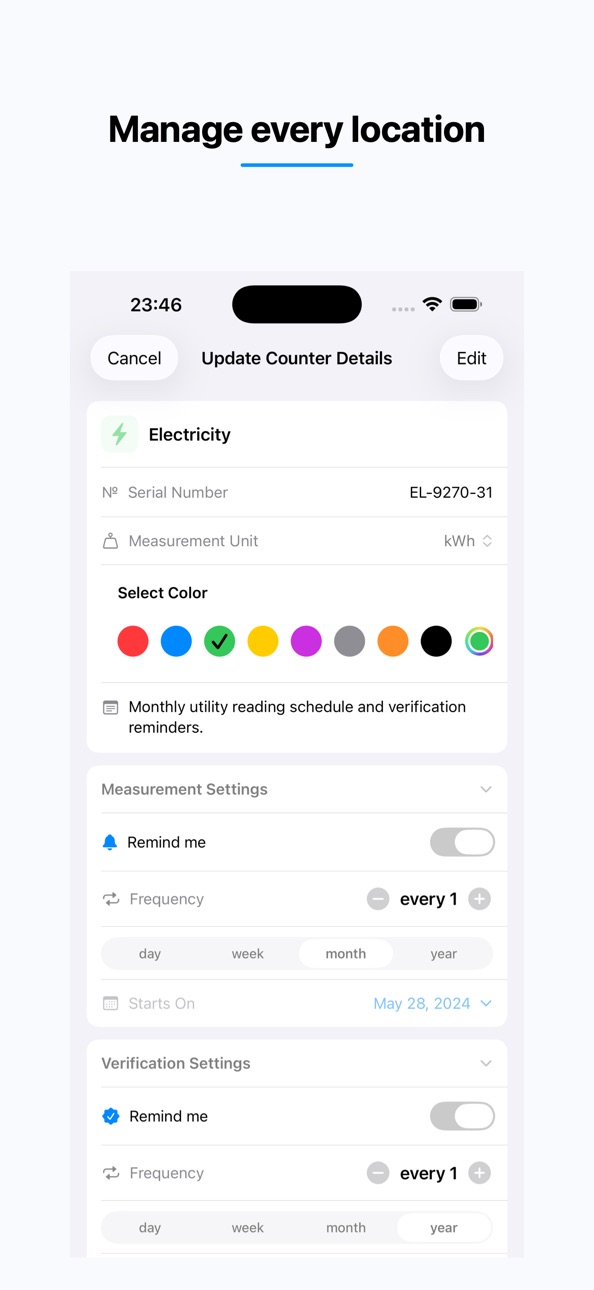
• Adjust counters and set reminders with ease.
• Customise meter parameters for precise measurements, including name, serial number, and unit of measurement.
• Add photos and notes to keep a clear history and evidence of your readings.
• Print or save professional PDF reports directly from the app.
REMINDERS
• Stay on track with personalised alerts for measurements and checkups.
• Configure notifications your way for maximum flexibility.
• Add widgets to your Home Screen to see upcoming measurements and reminders at a glance.
CHARTS
• Visualise your data to better understand usage and costs.
• Switch between reading and consumption views.
• Compare year-over-year consumption.
• Filter and customise chart types, and predict future expenses.
BACKUP & RESTORE
• Automatic daily backups.
• Restore your data anytime from iCloud.
• Set backup limits to save storage space.
Enjoy 21 days of Premium features for free from your first app launch.
After the trial, you can choose to continue with a subscription or keep using the free version.
PREMIUM FEATURES
• Unlimited locations
• Unlimited counters
• Unlimited measurements
• Advanced chart analytics
• Restore from backups
• Print reports and summaries
SUBSCRIPTIONS
You may purchase an auto-renewing subscription through an In-App Purchase.
• Subscriptions are charged to your iTunes account.
• Your subscription automatically renews unless cancelled at least 24 hours before the end of the current period.
• You can manage or cancel your subscription at any time in your iTunes Account Settings.
Available plans:
• 1-month subscription
• 1-year subscription
PERMISSIONS
To access all features, the app may request permission for:
• Photos – to add images of locations and measurements
• Notifications – to remind you about upcoming measurements and checkups
• Face ID – to securely protect your data
Read more about our Terms of Use and Privacy Policy.
EULA: https://today.superhost.sk/CT_TaC.pdf
Privacy Policy: https://today.superhost.sk/privacy.pdf
In-App Purchases US pricing
Pro Subscription
Premium (1 year) · Yearly$7.99
Premium (1 month) · Monthly$0.99
One-Time Purchases
Premium features$4.99
Capabilities
In-App Purchases
Accessibility
ipadiphonemacrealityDevicetvoswatch
Version history 25 versions
Build 885512588v2.112026-05-18 16:02:31
• We’ve made small improvements to make everyday tracking smoother and more reliable
• The app now feels a little cleaner, faster and easier to use
• Thank you for using Utility Meter Log and sharing your feedback
Build 885044618v2.102026-04-30 18:50:00
• Faster Spotlight search puts the right counter at your fingertips in seconds
• Quick Add Reading actions help you log new measurements with less effort
• Smoother navigation gets you straight to the counter or trend you want to check
• We keep refining Utility Meter Log to make everyday tracking feel faster, easier, and more polished
Build 883971661v2.92026-04-13 22:15:33
• New Verifications: track every counter check with dates and photo proof
• Notes for counters: never lose important details
• Faster, cleaner UI with improved accessibility
Build 881431119v2.82026-02-10 20:38:49
We update our app regularly to improve performance and reliability.
This update includes:
• Notes for measurements
• Option to exclude charts from PDF reports
• New language support: Dutch, Hungarian, Italian, Portuguese (Portugal), Romanian, Spanish, Swedish, and Turkish
• Bug fixes and performance improvements
Love the app? Rate us! Your feedback helps keep the app improving.
Build 880816077v2.72025-12-19 02:48:25
Bug fixes and performance improvements
Build 880104559v2.62025-12-08 20:25:13
Excel Export Is Here!
Export your measurements as Excel (.xlsx) files in addition to CSV. Ideal for reports, backups, and sharing with others.
Fixes & Improvements
- Enhanced accessibility across export screens
- Cleaner and more intuitive export interface
Build 879595054v2.52025-11-11 01:39:21
Smarter. Faster. More reliable than ever.
Version 2.5 introduces refined background operations, faster backups, and smoother accessibility.
New Functionality
- New languages supported: Czech and Polish.
- New print functionality for measurement reports.
Improvements
- Improved background refresh logic for accurate reminders and widget data.
- Enhanced backup performance with ZIP archive optimization.
- Faster launch.
- Polished accessibility.
- Various UI refinements for iOS 26 compatibility.
Stay on top of your consumption with ease. Access detailed history to make informed decisions — all conveniently at your fingertips.
Build 879082319v2.42025-10-25 12:51:16
iOS 26 ready. Faster. Smarter. More accessible than ever.
Build 878002753v2.32025-09-11 10:22:40
Improvements:
Smarter Backups – Backups are now stored as compressed ZIP archives to support measurement images and save space.
Version Indicator in Settings – Instantly see if you're using the Free or Premium version with a new visual status in Settings.
Build 877217859v2.22025-08-15 21:36:22
New Features:
* Photo Support for Measurements – You can now attach photos to your measurements — and yes, backups include them too!
* In-App Events – Track and celebrate special moments with a brand-new event system.
Improvements:
* Smoother UI Experience – Refined Create Measurement view, easier-to-read Measurements List, and clearer color selection in Counter Editor.
Build 876470264v2.12025-08-04 14:17:07
New Features
Backup & Restore
• Automatic daily backups for your data.
• Restore easily from a saved backup.
• View the latest backup date in Settings.
• Set your backup limit to manage storage efficiently.
iPad Support – Enjoy a fully optimized experience on iPad with improved layouts.
Accessibility Enhancements – Full support for VoiceOver, Large Text, Dark Mode, Audio Descriptions, and Reduce Motion for an inclusive experience.
Improvements
• Export Feature – Now exports as CSV for easier sharing and analysis.
• Small visual refinements for a more consistent look.
Build 874783437v2.02025-06-21 02:21:48
New Features:
- Custom Icons & Colors – Personalize your counters with unique icons and vibrant colors.
- Icons Library – Explore a new collection of icons to differentiate your meters visually.
- Smart Widgets – Stay on top of things with Upcoming Measurements and Summary widgets right on your Home Screen.
Improvements
- Refreshed Counter & Location Editors – Clean, intuitive, and easier to use than ever.
- Enhanced Counter Rows – Now showing your chosen icon and color for faster recognition.
- Better Translations – More accurate and user-friendly counter editing in your language.
Build 874449067v1.262025-05-05 00:14:38
This update contains bug fixes and stability improvements
Build 874165897v1.252025-04-22 08:49:07
This update includes performance optimizations, UI ipmrovements and bug fixes for a smoother experience.
Enjoy the improvements, and as always, thank you for your support!
Build 873251198v1.242025-03-19 20:25:06
This update includes performance optimizations, UI ipmrovements and bug fixes for a smoother experience.
Enjoy the improvements, and as always, thank you for your support!
Build 872297502v1.232025-02-19 11:02:16
This release improves overall app qualities and stability.
Build 871616604v1.222025-01-12 22:28:09
- The interface of saved alerts has been improved for easier use.
- Added the ability to enter measurements by selecting a saved reminder.
- Fixed duplicate reminders for daily measurements.
- Improved editing and deleting meter locations.
- Other small fixes to make the functionality more convenient.
Build 871145580v1.212024-12-16 13:02:08
- Minor UI improvements
- French language added
Build 870845944v1.202024-12-03 21:55:30
In this update, we've fixed some bugs and made performance improvements to keep things running smoothly.
Build 870347734v1.192024-11-19 11:47:59
Small Improvements: Made minor tweaks for a smoother experience.
Flashlight Bug Fix: Resolved an issue where the flashlight wasn't toggling correctly.
Badge Counter Bug Fix: Resolved the issue when the badge was not updated correctly.
Build 869620088v1.182024-10-10 17:10:06
Improved notification settings and scheduling to ensure you receive alerts accurately.
General performance enhancements and stability improvements for a smoother experience.
Build 869188292v1.172024-10-09 04:37:43
Improved notification settings and scheduling to ensure you receive alerts accurately.
General performance enhancements and stability improvements for a smoother experience.
Build 868415578v1.162024-08-23 00:49:33
We've been hard at work behind the scenes! This update includes important stability improvements and bug fixes to enhance your experience. We've also made some UI tweaks to improve clarity and usability, making the app even more user-friendly.
Build 866702529v1.142024-06-16 17:03:52
We've polished the app, fixed bugs, and optimized performance.
We added new features such as a manual for application to add more convenience, and the ability to hide unused counters but save consumption history, for all users added the ability to try premium functionality during 3 weeks.
Build 865101678v1.122024-04-12 13:54:26
Congratulations on the new features!
Now you can analyze your consumption by conveniently comparing similar periods across different years — it's all easy.
Price history by region
Currency
Show
Columns
Search
Availability 75 of 75 storefronts
| Region | Language | Price | Ratings | Avg | Version |
|---|---|---|---|---|---|
| DE | de-DE | Free | 15 | 4.3 | 2.11 |
| UA | en-GB | Free | 14 | 4.8 | 2.11 |
| CZ | en-GB | Free | 3 | 5.0 | 2.11 |
| SK | en-GB | Free | 3 | 5.0 | 2.11 |
| HU | en-GB | Free | 1 | 4.0 | 2.11 |
| IE | en-GB | Free | 1 | 5.0 | 2.11 |
| IT | it | Free | 1 | 1.0 | 2.11 |
| AE | en-GB | Free | 0 | — | 2.11 |
| AF | en-GB | Free | 0 | — | 2.11 |
| AL | en-GB | Free | 0 | — | 2.11 |
| AM | en-GB | Free | 0 | — | 2.11 |
| AT | de-DE | Free | 0 | — | 2.11 |
| AU | en-AU | Free | 0 | — | 2.11 |
| AZ | en-GB | Free | 0 | — | 2.11 |
| BG | en-GB | Free | 0 | — | 2.11 |
| BH | en-GB | Free | 0 | — | 2.11 |
| CA | en-CA | Free | 0 | — | 2.11 |
| CH | de-CH | Free | 0 | — | 2.11 |
| CN | zh-Hans-CN | Free | 0 | — | 2.11 |
| DK | en-GB | Free | 0 | — | 2.11 |
| EE | en-GB | Free | 0 | — | 2.11 |
| EG | en-GB | Free | 0 | — | 2.11 |
| ES | es-ES | Free | 0 | — | 2.11 |
| FI | en-GB | Free | 0 | — | 2.11 |
| FJ | en-GB | Free | 0 | — | 2.11 |
| FM | en-GB | Free | 0 | — | 2.11 |
| FR | fr-FR | Free | 0 | — | 2.11 |
| GB | en-GB | Free | 0 | — | 2.11 |
| GE | en-GB | Free | 0 | — | 2.11 |
| GR | en-GB | Free | 0 | — | 2.11 |
| HK | zh-Hant-HK | Free | 0 | — | 2.11 |
| HR | en-GB | Free | 0 | — | 2.11 |
| ID | en-GB | Free | 0 | — | 2.11 |
| IL | en-GB | Free | 0 | — | 2.11 |
| IQ | en-GB | Free | 0 | — | 2.11 |
| IS | en-GB | Free | 0 | — | 2.11 |
| JO | en-GB | Free | 0 | — | 2.11 |
| JP | ja | Free | 0 | — | 2.11 |
| KR | ko | Free | 0 | — | 2.11 |
| KW | en-GB | Free | 0 | — | 2.11 |
| LB | en-GB | Free | 0 | — | 2.11 |
| LT | en-GB | Free | 0 | — | 2.11 |
| LV | en-GB | Free | 0 | — | 2.11 |
| MD | en-GB | Free | 0 | — | 2.11 |
| MK | en-GB | Free | 0 | — | 2.11 |
| MM | en-GB | Free | 0 | — | 2.11 |
| MO | zh-Hant-HK | Free | 0 | — | 2.11 |
| MY | en-GB | Free | 0 | — | 2.11 |
| NL | nl | Free | 0 | — | 2.11 |
| NO | en-GB | Free | 0 | — | 2.11 |
| NR | en-GB | Free | 0 | — | 2.11 |
| NZ | en-AU | Free | 0 | — | 2.11 |
| OM | en-GB | Free | 0 | — | 2.11 |
| PG | en-GB | Free | 0 | — | 2.11 |
| PL | en-GB | Free | 0 | — | 2.11 |
| PT | pt-PT | Free | 0 | — | 2.11 |
| PW | en-GB | Free | 0 | — | 2.11 |
| QA | en-GB | Free | 0 | — | 2.11 |
| RO | en-GB | Free | 0 | — | 2.11 |
| RS | en-GB | Free | 0 | — | 2.11 |
| SA | en-GB | Free | 0 | — | 2.11 |
| SB | en-GB | Free | 0 | — | 2.11 |
| SE | sv | Free | 0 | — | 2.11 |
| SG | en-GB | Free | 0 | — | 2.11 |
| SI | en-GB | Free | 0 | — | 2.11 |
| TH | en-GB | Free | 0 | — | 2.11 |
| TM | en-GB | Free | 0 | — | 2.11 |
| TO | en-GB | Free | 0 | — | 2.11 |
| TR | en-GB | Free | 0 | — | 2.11 |
| TW | zh-Hant-TW | Free | 0 | — | 2.11 |
| US | en-US | Free | 0 | — | 2.11 |
| VU | en-GB | Free | 0 | — | 2.11 |
| XK | en-GB | Free | 0 | — | 2.11 |
| YE | en-GB | Free | 0 | — | 2.11 |
| ZA | en-GB | Free | 0 | — | 2.11 |
Change log 29 changes · US
✎
releaseNotes updated
• We’ve made small improvements to make everyday tracking smoother and more reliable
• The app now feels a little cleaner, faster and easier to use
• Thank you
✎
description updated
Log electricity, water, gas and household meter readings with confidence. Utility Meter Log keeps readings, bills, costs and custom meter history clear, visual
✎
subtitle updated
Water, Gas & Power usage
✎
name updated
Utility Meter Log – Tracker
◆
Version 2.11 released
• We’ve made small improvements to make everyday tracking smoother and more reliable
• The app now feels a little cleaner, faster and easier to use
• Thank you for using Utility Meter Log and sharing your feedback
◆
Version 2.10 released
• Faster Spotlight search puts the right counter at your fingertips in seconds
• Quick Add Reading actions help you log new measurements with less effort
• Smoother navigation gets you straight to the counter or trend you want to check
• We
◆
Version 2.9 released
• New Verifications: track every counter check with dates and photo proof
• Notes for counters: never lose important details
• Faster, cleaner UI with improved accessibility
◆
Version 2.8 released
We update our app regularly to improve performance and reliability.
This update includes:
• Notes for measurements
• Option to exclude charts from PDF reports
• New language support: Dutch, Hungarian, Italian, Portuguese (Portugal), Romani
◆
Version 2.7 released
Bug fixes and performance improvements
◆
Version 2.6 released
Excel Export Is Here!
Export your measurements as Excel (.xlsx) files in addition to CSV. Ideal for reports, backups, and sharing with others.
Fixes & Improvements
- Enhanced accessibility across export screens
- Cleaner and more intuitive
◆
Version 2.5 released
Smarter. Faster. More reliable than ever.
Version 2.5 introduces refined background operations, faster backups, and smoother accessibility.
New Functionality
- New languages supported: Czech and Polish.
- New print functionality for measur
◆
Version 2.4 released
iOS 26 ready. Faster. Smarter. More accessible than ever.
◆
Version 2.3 released
Improvements:
Smarter Backups – Backups are now stored as compressed ZIP archives to support measurement images and save space.
Version Indicator in Settings – Instantly see if you're using the Free or Premium version with a new visual stat
◆
Version 2.2 released
New Features:
* Photo Support for Measurements – You can now attach photos to your measurements — and yes, backups include them too!
* In-App Events – Track and celebrate special moments with a brand-new event system.
Improvements:
* Smoot
◆
Version 2.1 released
New Features
Backup & Restore
• Automatic daily backups for your data.
• Restore easily from a saved backup.
• View the latest backup date in Settings.
• Set your backup limit to manage storage efficiently.
iPad Support – Enjoy a fully opt
◆
Version 2.0 released
New Features:
- Custom Icons & Colors – Personalize your counters with unique icons and vibrant colors.
- Icons Library – Explore a new collection of icons to differentiate your meters visually.
- Smart Widgets – Stay on top of things with
◆
Version 1.26 released
This update contains bug fixes and stability improvements
◆
Version 1.25 released
This update includes performance optimizations, UI ipmrovements and bug fixes for a smoother experience.
Enjoy the improvements, and as always, thank you for your support!
◆
Version 1.24 released
This update includes performance optimizations, UI ipmrovements and bug fixes for a smoother experience.
Enjoy the improvements, and as always, thank you for your support!
◆
Version 1.23 released
This release improves overall app qualities and stability.
◆
Version 1.22 released
- The interface of saved alerts has been improved for easier use.
- Added the ability to enter measurements by selecting a saved reminder.
- Fixed duplicate reminders for daily measurements.
- Improved editing and deleting meter locations.
◆
Version 1.21 released
- Minor UI improvements
- French language added
◆
Version 1.20 released
In this update, we've fixed some bugs and made performance improvements to keep things running smoothly.
◆
Version 1.19 released
Small Improvements: Made minor tweaks for a smoother experience.
Flashlight Bug Fix: Resolved an issue where the flashlight wasn't toggling correctly.
Badge Counter Bug Fix: Resolved the issue when the badge was not updated correctly.
◆
Version 1.18 released
Improved notification settings and scheduling to ensure you receive alerts accurately.
General performance enhancements and stability improvements for a smoother experience.
◆
Version 1.17 released
Improved notification settings and scheduling to ensure you receive alerts accurately.
General performance enhancements and stability improvements for a smoother experience.
◆
Version 1.16 released
We've been hard at work behind the scenes! This update includes important stability improvements and bug fixes to enhance your experience. We've also made some UI tweaks to improve clarity and usability, making the app even more user-friend
◆
Version 1.14 released
We've polished the app, fixed bugs, and optimized performance.
We added new features such as a manual for application to add more convenience, and the ability to hide unused counters but save consumption history, for all users added the abi
◆
Version 1.12 released
Congratulations on the new features!
Now you can analyze your consumption by conveniently comparing similar periods across different years — it's all easy.