Home › Productivity

 US
US
1 of 1 storefronts
Content in en-US
Content in en-US
Information
Apple ID6451156267
Bundle IDcom.veevaz.Cloak
SellerSeller
Min iOS18.0
Min macOS15.0
Device familiesiphone, ipad
Released2025-12-10
Copyright© 2026 Ailton Vieira
Privacy policyLink ↗
Preview 2 platforms
iPhone 6 images


iPad 6 images



What’s New Version 1.6.0
- Cloak now speaks 5 more languages: Italian, Turkish, Traditional Chinese, Armenian, and Pashto.
- Apps no longer get stuck blocked after adding a new trusted area, or after a temporary pause ends.
Description
Cloak helps you control access to the apps that matter, automatically.
Create Modes that lock selected apps by place, schedule, or a manual switch. When you need access again, pause with one tap and let Cloak resume on your terms.
HOW IT WORKS
- Pick the apps you want controlled
- Create a Mode (Work, Focus, Personal, Travel…)
- Choose when it runs: trusted areas, restricted areas, schedule, or manual
TWO LOCK STYLES
- Basic Lock: apps stay visible but won’t open while a mode is active
- Advanced Lock: uses system behavior to make selected apps unavailable while active (iOS may adjust Home Screen layout when apps return)
TRUSTED AREAS, RESTRICTED AREAS & SCHEDULES
- Pause inside trusted places and lock again when you leave
- Lock inside restricted areas (for specific places you choose)
- Run on a repeating schedule (weekdays + time window)
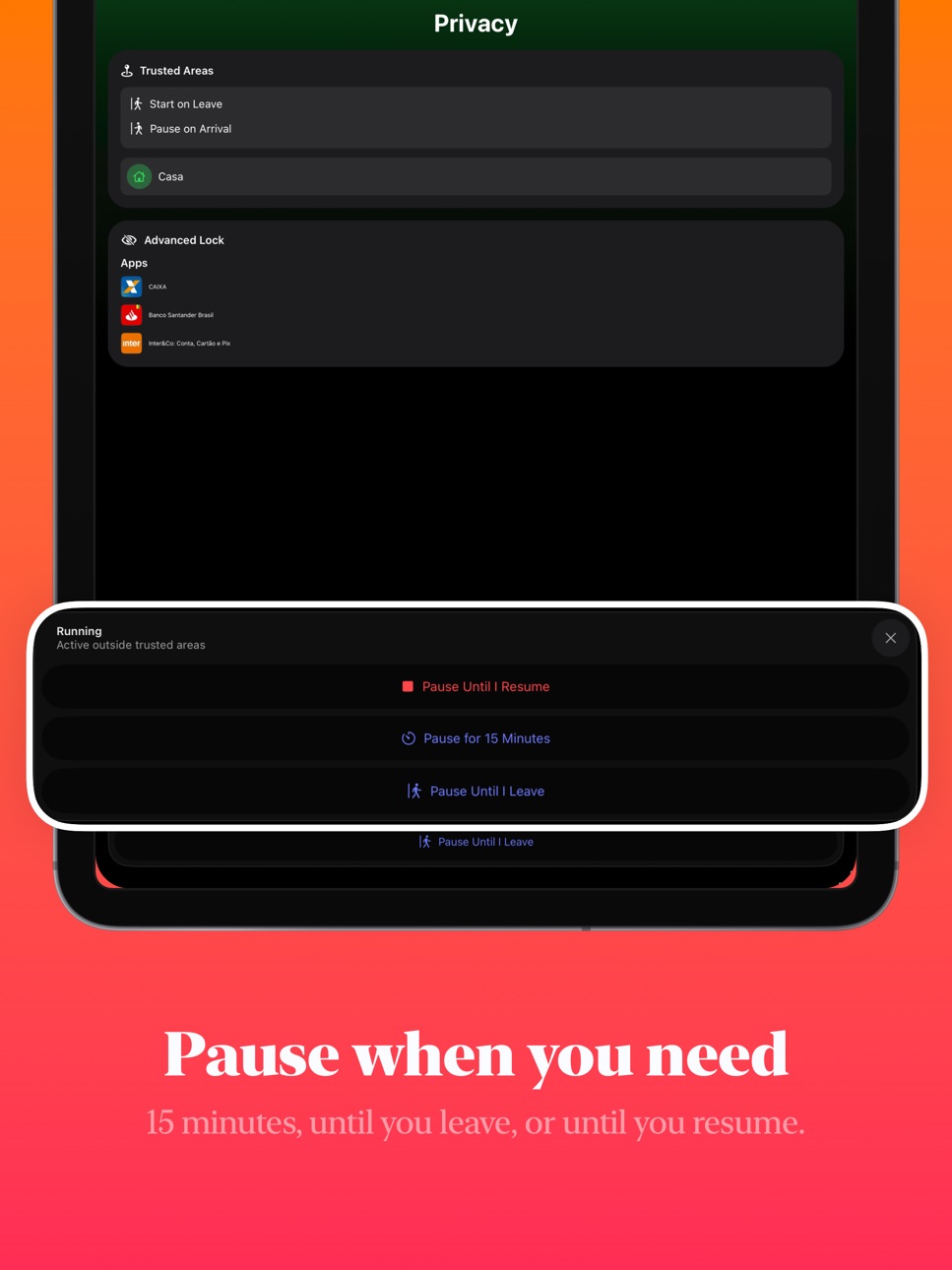
PAUSE WHEN YOU NEED TO
- Pause for 15 minutes
- Pause until you leave (temporary location hold)
- Pause until you resume manually
LOCK SCREEN STATUS
- See whether Cloak is active or paused
- View a countdown when paused (Live Activity) and resume quickly
NOTES & REQUIREMENTS
- Cloak uses Apple Screen Time controls to apply locks. You’ll be asked to grant Screen Time permission during setup.
- Location-based modes require location permission. iOS limits region monitoring (typically up to 20 areas per app).
- App selection limits can apply depending on the lock style and Apple system behavior.
Terms of Use: https://www.apple.com/legal/internet-services/itunes/dev/stdeula/
In-App Purchases US pricing
Cloak Premium Subscription
Premium Yearly · Yearly 7-day free trial$19.90
Premium Monthly · Monthly$1.99
Premium Yearly · Yearly 7-day free trial$29.90
Premium Yearly · Yearly 7-day free trial$39.90
Premium Monthly · Monthly$3.99
Premium Monthly · Monthly$4.99
Capabilities
In-App Purchases
Accessibility
ipadiphonemacrealityDevicetvoswatch
Version history 13 versions
Build 886078542v1.6.02026-05-25 19:41:51
- Cloak now speaks 5 more languages: Italian, Turkish, Traditional Chinese, Armenian, and Pashto.
- Apps no longer get stuck blocked after adding a new trusted area, or after a temporary pause ends.
Build 882299472v1.5.12026-02-09 18:40:38
- New Control Widget: start, pause, and resume manual modes directly from Control Center, the Lock Screen, and the Action button, without opening Cloak.
- Faster manual mode management with one-tap controls across iOS.
Build 882270637v1.5.02026-02-08 18:23:39
- New Control Widget: start, pause, and resume manual modes directly from Control Center, the Lock Screen, and the Action button, without opening Cloak.
- Faster manual mode management with one-tap controls across iOS.
Build 881167328v1.4.02026-01-07 16:57:09
- Meet Live Activity: it pins your pause countdown to the Lock Screen so you know exactly when to resume.
- Cloak now speaks 12 more languages: Danish, Persian (Iran), Polish, Vietnamese, English (UK), Portuguese (Portugal), Japanese, Korean, Dutch, Czech, Urdu, and Hindi.
Build 881056312v1.3.12025-12-29 10:35:33
- Bug fixes and improvements.
Build 880985602v1.3.02025-12-28 09:24:55
- Redeem offer codes directly in Settings.
- App Lock Grace Period: Unlock Cloak once and stay authenticated for a set time.
- Shortcuts now require authentication for added security.
- Improved Siri language support.
Build 880925295v1.2.12025-12-23 09:58:52
- Fixed critical issue preventing mode creation on iOS 18
Build 880744011v1.2.02025-12-21 20:05:35
- Free plan blocking limit increased
- Bug fixes and improvements
Build 879619047v1.1.02025-12-10 01:52:24
Major update with Modes system:
- Create multiple modes for different scenarios (focus, privacy, work)
- Activate modes by location, schedule, restricted areas, or manually
- In-app FAQ for quick troubleshooting
Build 880515112v1.1.12025-12-10 11:06:57
Fixes location permission
Build 878707037v0.0.22025-10-27 10:21:30
- Live Activity countdown when Cloak is paused
- Alternate icons keep Cloak discreet
Build 878393964v0.0.12025-09-24 19:21:39
• Updated app icon with a fresh, modern design
Build 858411361v0.0.02025-09-23 22:49:41
Price history by region
Currency
Show
Columns
Search
Availability 1 of 1 storefronts
| Region | Language | Price | Ratings | Avg | Version |
|---|---|---|---|---|---|
| US | en-US | Free | 10 | 4.8 | 1.6.0 |
Change log 17 changes · US
✎
releaseNotes updated
- Cloak now speaks 5 more languages: Italian, Turkish, Traditional Chinese, Armenian, and Pashto.
- Apps no longer get stuck blocked after adding a new trusted
✎
description updated
Cloak helps you control access to the apps that matter, automatically.
Create Modes that lock selected apps by place, schedule, or a manual switch. When you ne
✎
subtitle updated
Screen Time modes & automation
✎
name updated
Cloak: App Locker
◆
Version 1.6.0 released
- Cloak now speaks 5 more languages: Italian, Turkish, Traditional Chinese, Armenian, and Pashto.
- Apps no longer get stuck blocked after adding a new trusted area, or after a temporary pause ends.
◆
Version 1.5.1 released
- New Control Widget: start, pause, and resume manual modes directly from Control Center, the Lock Screen, and the Action button, without opening Cloak.
- Faster manual mode management with one-tap controls across iOS.
◆
Version 1.5.0 released
- New Control Widget: start, pause, and resume manual modes directly from Control Center, the Lock Screen, and the Action button, without opening Cloak.
- Faster manual mode management with one-tap controls across iOS.
◆
Version 1.4.0 released
- Meet Live Activity: it pins your pause countdown to the Lock Screen so you know exactly when to resume.
- Cloak now speaks 12 more languages: Danish, Persian (Iran), Polish, Vietnamese, English (UK), Portuguese (Portugal), Japanese, Korea
◆
Version 1.3.1 released
- Bug fixes and improvements.
◆
Version 1.3.0 released
- Redeem offer codes directly in Settings.
- App Lock Grace Period: Unlock Cloak once and stay authenticated for a set time.
- Shortcuts now require authentication for added security.
- Improved Siri language support.
◆
Version 1.2.1 released
- Fixed critical issue preventing mode creation on iOS 18
◆
Version 1.2.0 released
- Free plan blocking limit increased
- Bug fixes and improvements
◆
Version 1.1.1 released
Fixes location permission
◆
Version 1.1.0 released
Major update with Modes system:
- Create multiple modes for different scenarios (focus, privacy, work)
- Activate modes by location, schedule, restricted areas, or manually
- In-app FAQ for quick troubleshooting
◆
Version 0.0.2 released
- Live Activity countdown when Cloak is paused
- Alternate icons keep Cloak discreet
◆
Version 0.0.1 released
• Updated app icon with a fresh, modern design
◆
Version 0.0.0 released