Home › Health & Fitness

 US
US
1 of 1 storefronts
Content in en-US
Content in en-US
Information
Preview 2 platforms
iPhone 6 images



iPad 6 images


What’s New Version 1.11
The latest version includes bug fixes and performance improvements.
Description
Track your weight, BMI and take perfect progress photos with our AI assistant. Compare them side by side or make a progress video of the past period to see how you've changed.
A lot of people take progress photos to visualize their progress and keep motivated. Thousands of progress photos are taken every week and shared on the internet, but there is one problem: the majority of them are not really comparable. The before and after photos show different poses, the person is partly visible and/or the backgrounds are different.
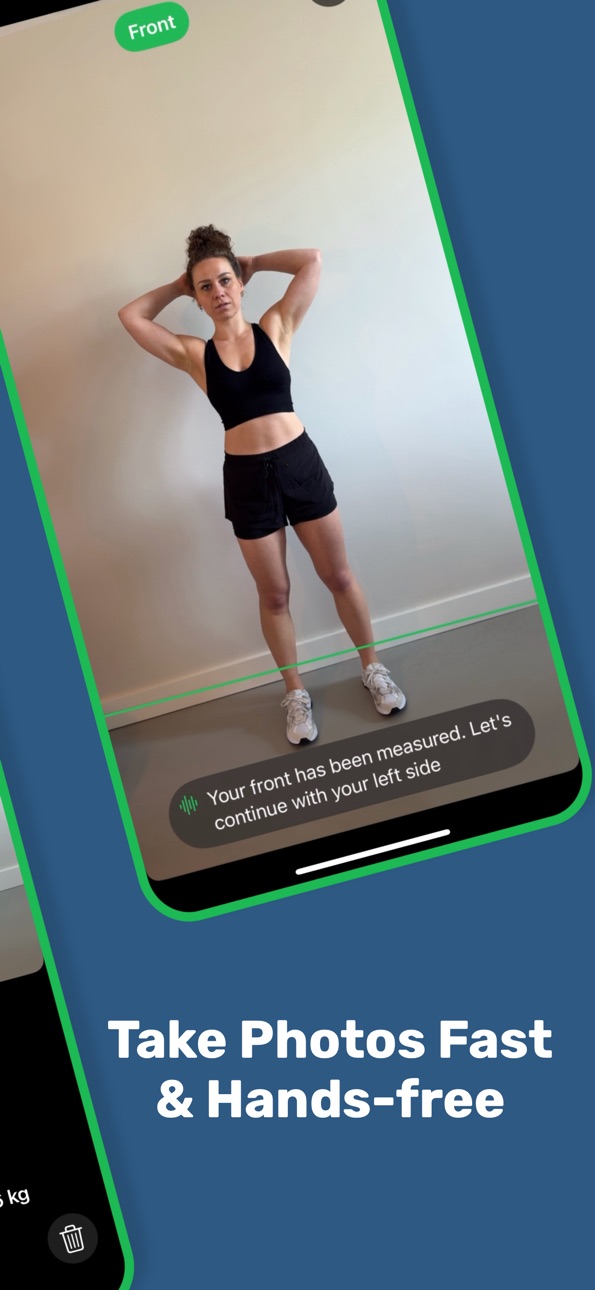
That’s why we created BitBody Shape. Our AI assistant tells you how to pose and takes perfect progress photos when you stand in front of the camera. You only have to follow the instructions. This, in combination with the option to change the backgrounds, results in progress photos that are truly comparable to each other.
PRIVACY
Your measurements stay on your device and are locked by default. They can be unlocked by your FaceID or passcode.
SCHEDULE MEASUREMENTS
Receive a notification to take a new measurement.
ADD MEASUREMENT
Fill in your weight and take perfect progress photos with our AI assistent.
VIEW PROGRESS
The progress of your weight and BMI are displayed in a chart and you can select a measurement to see the corresponding photos.
COMPARE MEASUREMENTS
Select two measurements and see the progress pictures side by side. Replace busy backgrounds with a color so you can fully focus on what’s important. You can even share the combined before and after picture or save it in your photos library.
CREATE PROGRESS VIDEO
Create a video of your progress and share it with whoever you want or save it in your photos library.
CHALLENGES
Start challenges to reach your goal weight in small steps.
TERMS OF USE
https://www.apple.com/legal/internet-services/itunes/dev/stdeula/
In-App Purchases US pricing
Access Subscription
Yearly Plan · Yearly 7-day free trial$24.99
Monthly Plan · Monthly$2.99
Capabilities
In-App Purchases
Accessibility
ipadiphonemacrealityDevicetvoswatch
Version history 12 versions
Build 883852281v1.112026-03-30 00:22:42
The latest version includes bug fixes and performance improvements.
Build 883072736v1.102026-03-25 12:50:45
We are happy to introduce:
- Custom Pose: you decide how you want to pose and we take the photos after the countdown is complete
- Improved Detection: take your progress photos faster than ever
Build 881098144v1.92025-12-31 06:26:45
Fixed: the camera failed to launch on some devices.
Build 880336551v1.82025-12-19 06:12:03
We are happy to introduce:
- New Lock Screen: all your data is now protected with your FaceID or Passcode and not just your photos
- Goal Weight: you can now set your goal weight which is visible in the weight/bmi graph
- Challenges: reach your goal weight in small steps
Build 878290569v1.72025-09-28 02:14:24
The latest version includes bug fixes and performance improvements.
Build 877755226v1.62025-09-04 07:10:47
The latest version includes bug fixes and performance improvements.
Build 876830772v1.52025-08-14 21:16:53
The latest version includes bug fixes and performance improvements.
Build 876608592v1.42025-07-28 23:08:24
You can now change the period of the charts.
Build 876257366v1.32025-07-20 09:37:02
You can now also use the front camera to take your progress pictures.
Build 875361440v1.22025-06-12 22:36:55
The latest version includes bug fixes and performance improvements.
Build 874802618v1.12025-06-05 18:35:11
The latest version includes bug fixes and performance improvements.
Build 858128307v1.02025-05-15 10:30:21
Price history by region
Currency
Show
Columns
Search
Availability 1 of 1 storefronts
| Region | Language | Price | Ratings | Avg | Version |
|---|---|---|---|---|---|
| US | en-US | Free | 0 | — | 1.11 |
Change log 16 changes · US
✎
releaseNotes updated
The latest version includes bug fixes and performance improvements.
✎
description updated
Track your weight, BMI and take perfect progress photos with our AI assistant. Compare them side by side or make a progress video of the past period to see how
✎
subtitle updated
BMI Calculator, Challenges
✎
name updated
Weight Tracker & Progress Pics
◆
Version 1.11 released
The latest version includes bug fixes and performance improvements.
◆
Version 1.10 released
We are happy to introduce:
- Custom Pose: you decide how you want to pose and we take the photos after the countdown is complete
- Improved Detection: take your progress photos faster than ever
◆
Version 1.9 released
Fixed: the camera failed to launch on some devices.
◆
Version 1.8 released
We are happy to introduce:
- New Lock Screen: all your data is now protected with your FaceID or Passcode and not just your photos
- Goal Weight: you can now set your goal weight which is visible in the weight/bmi graph
- Challenges: reach
◆
Version 1.7 released
The latest version includes bug fixes and performance improvements.
◆
Version 1.6 released
The latest version includes bug fixes and performance improvements.
◆
Version 1.5 released
The latest version includes bug fixes and performance improvements.
◆
Version 1.4 released
You can now change the period of the charts.
◆
Version 1.3 released
You can now also use the front camera to take your progress pictures.
◆
Version 1.2 released
The latest version includes bug fixes and performance improvements.
◆
Version 1.1 released
The latest version includes bug fixes and performance improvements.
◆
Version 1.0 released