Home › Utilities

 US
US
1 of 1 storefronts
Content in en-US
Content in en-US
Information
Apple ID6449722469
Bundle IDcom.learnframing.BigFoot
SellerSeller
Min iOS16.3
Min macOS13.2
Device familiesiphone, ipad
Released2023-10-10
Copyright© 2023 Learn Framing
Privacy policyLink ↗
Preview 2 platforms
iPhone 8 images




iPad 10 images


What’s New Version 1.3
Choose Feet, Inch, or Meters right from the Home Screen.
Description
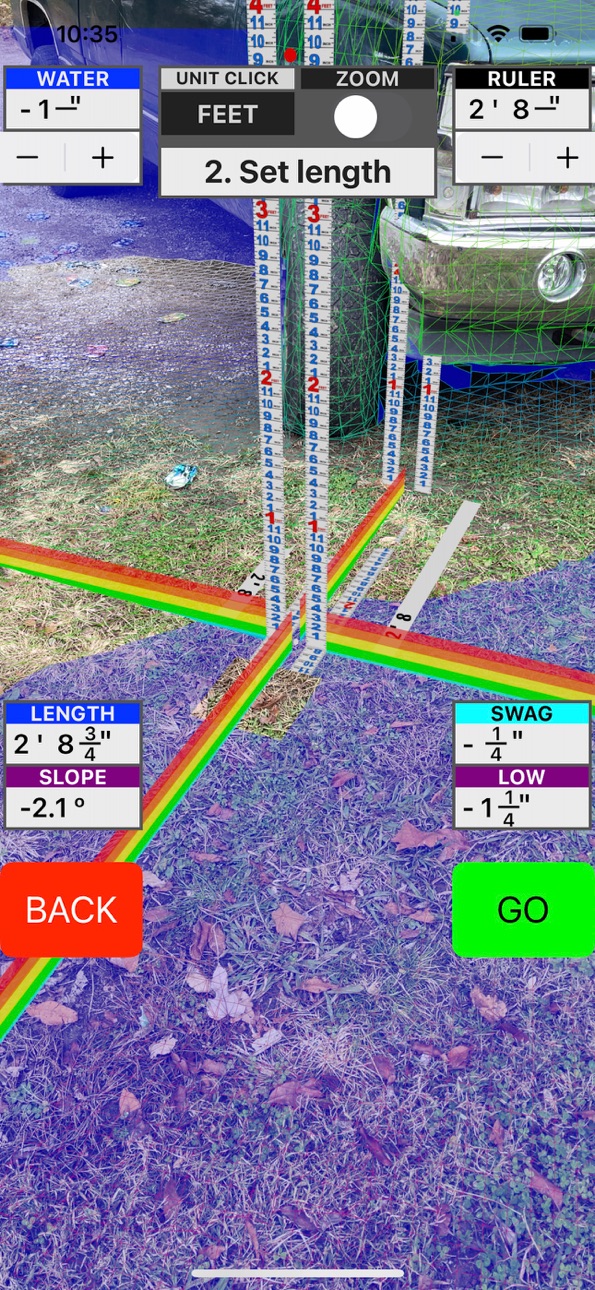
LiDAR, along with mixed reality technology lets you place two measuring sticks right in the scene from the camera. It accurately reads both the horizontal and vertical differences between the two points generating for you the run, the rise, the slope, and the deflection of the mid point. Easily dig ditches and install drains with precise slope. With a range to target up to 18 feet(6 meters), you can shoot grade right from your seat on the back-hoe(or whatever). A max range of 100 meters thanks to the device constantly updating its position with the Augmented Reality interface.
- Super fast start up each time, picks up where you left off.
- Single screen with Heads Up Display(HUD) for realtime operation.
- Auto Zoom toggles anytime.
- Six step navigation lets you advance one step at time forward with the "GO" button and the same for the "BACK" button.
GET STARTED
Step 1 - Set origin: Aim the red pointer for the target and tap "GO". Remember you are placing a measuring stick here, not a micrometer. If you are not satisfied, tap "BACK". It is real easy to do over.
Step 1 - Neutral: The measuring stick is now fixed but will still rotate to face you. This is a good time to adjust the "WATER" level ,if needed, with the stepper in the upper left-hand corner of the view. Notice how the water "puddles" so you can see low spots that might not be noticed. When you go up with the water level it advances one inch at a time. Notice how it "fills" the scene and wraps around irregular shapes with ease for easy marking. You can either watch your own hand in the scene, or you can guide an assistant to the right position.
Step 2 - Set length: Two more measuring sticks are now active. Stretch it to right place and tap "GO". You have a dashboard gauge in the upper right-hand corner for the "Ruler". This is the actual distance between the two points. In the bottom left-hand corner there is "LENGTH" which is the horizontal distance between the two points. Below it is the "SLOPE" which gives the angle in degrees between the two points. 0.6 degrees is 1/8 inch per foot. 1.2 degrees is 1/4 inch per foot. The bottom most gauge on the right is the "LEVEL". This is the vertical distance between the two points.
Step 2 - Neutral: Everything is frozen for closer inspection and evaluation.
Step 3 - Set Width: The width can be stretched in either direction off the baseline. The "SLOPE" gauge transforms to "WIDTH".
Step 3 - Neutral: Adjust the "HEIGHT" , if needed, with stepper in the upper right-hand corner. It increments one inch at a time. The box stays on top of the water. The two gauges in the bottom right corner are for "AREA"(represented in square feet or square meters), and the "VOLUME" one uses cubic yards, or cubic meters.
A LiDAR-equipped device is recommended.
Accessibility
ipadiphonemacrealityDevicetvoswatch
Version history 3 versions
Build 861973645v1.32023-12-11 19:11:02
Choose Feet, Inch, or Meters right from the Home Screen.
Build 861282656v1.12023-11-13 12:39:25
Brand new Dashboard keeps the critical metrics as close as possible to the action at the center of the view while minimizing interference with the rulers in the scene.
Build 857478380v1.02023-10-10 17:19:32
No pricing data captured yet — comparisons appear once the app has paid storefronts or in-app purchases.
Availability 1 of 1 storefronts
| Region | Language | Price | Ratings | Avg | Version |
|---|---|---|---|---|---|
| US | en-US | Free | 5 | 3.4 | 1.3 |
Change log 7 changes · US
✎
releaseNotes updated
Choose Feet, Inch, or Meters right from the Home Screen.
✎
description updated
LiDAR, along with mixed reality technology lets you place two measuring sticks right in the scene from the camera. It accurately reads both the horizontal and v
✎
subtitle updated
Measure Slope Telescope
✎
name updated
Precision Transit Level mini-X
◆
Version 1.3 released
Choose Feet, Inch, or Meters right from the Home Screen.
◆
Version 1.1 released
Brand new Dashboard keeps the critical metrics as close as possible to the action at the center of the view while minimizing interference with the rulers in the scene.
◆
Version 1.0 released