Home › Utilities

 US
US
1 of 1 storefronts
Content in en-US
Content in en-US
Information
Apple ID6449422062
Bundle IDcom.bokhary.SmartNotes
SellerSeller
Min iOS16.0
Min macOS13.0
Device familiesiphone, ipad
Released2023-06-16
Copyright© CalcMate 2023 - 2026
Privacy policyLink ↗
Preview 2 platforms
iPhone 10 images


iPad 2 images


What’s New Version 1.44
• New Spends section to track your expenses and income.
• Add transactions using natural language, like “20$ for lunch” or “500$ salary”.
• New Analytics tab to visualize your spending and income.
• Organize transactions with categories and tags.
• Fast and simple workflow for managing your finances.
• We’d love your feedback! Share your ideas or report issues at lazyboardapp+calcmate@gmail.com.
Description
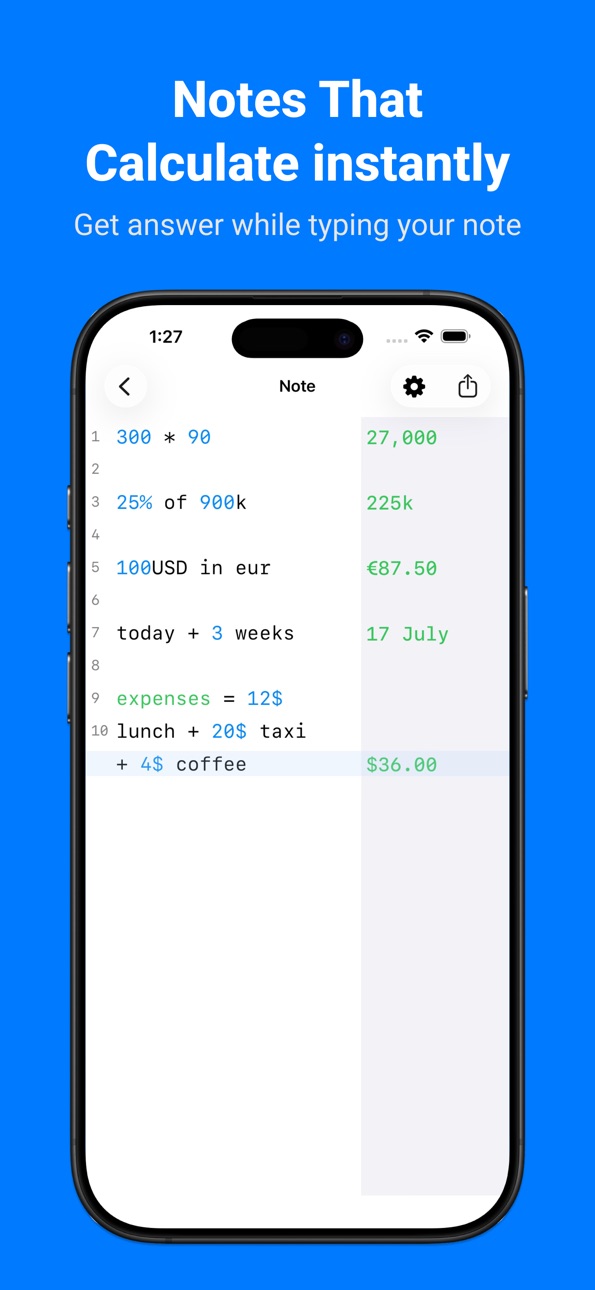
CalcMate is a powerful notepad with a built-in calculator that lets you write naturally while solving calculations instantly. Enter numbers, text, percentages, currencies, dates, and units—all in the same note.
Whether you’re calculating invoices, tracking expenses, creating budgets, or making quick estimates, CalcMate eliminates the need to switch between a notes app, calculator, and spreadsheet.
What you can do
• Perform calculations directly inside your notes.
• Calculate percentages, taxes, discounts, and tips.
• Convert currencies and units.
• Calculate dates and durations.
• Create invoices, budgets, bills, and shopping lists.
• Reference previous calculations and keep everything organized.
Try these examples
• 100 + 5 tip
• 1000$ + 20% fee
• 900$ + 20$ delivery + 1.5%
• 500 USD in EUR
• 10 BTC in USD
• Today + 5 days
• Tomorrow + 10 days
• 1 kg in lb
• subtotal — calculates the total of all previous lines
• line5 — uses the result from line 5
• # this is a comment
…and much more.
Features
• Smart note editor with live calculations
• Organize notes with folders
• Trash folder to restore or permanently delete notes
• iCloud sync across your Apple devices
• Optional custom number keyboard
• Optional running total displayed above the keyboard
We’d love your feedback
Have questions, suggestions, or need help?
Contact us at:
lazyboardapp+calcmate@gmail.com
In-App Purchases US pricing
One-Time Purchases
Buy me a coffee$0.99
Buy me 2 coffees$1.99
Buy Me a burger$4.99
Buy Me a pizza$9.99
Capabilities
In-App Purchases
Accessibility
ipadiphonemacrealityDevicetvoswatch
Version history 25 versions
Build 886581780v1.442026-07-03 07:54:25
• New Spends section to track your expenses and income.
• Add transactions using natural language, like “20$ for lunch” or “500$ salary”.
• New Analytics tab to visualize your spending and income.
• Organize transactions with categories and tags.
• Fast and simple workflow for managing your finances.
• We’d love your feedback! Share your ideas or report issues at lazyboardapp+calcmate@gmail.com.
Build 883977266v1.432026-04-01 17:32:17
- Minor improvements
Build 883600877v1.422026-03-23 08:34:49
- Minor improvements
Build 882894559v1.412026-03-11 09:12:38
- Fixed an issue where the editor scrolled up when entering input using the custom number pad.
- Moved the custom buttons to the bottom of the custom number pad on devices without a Home button.
Build 881079788v1.402026-01-29 19:50:51
- Fixed an issue where iCloud sync did not enable correctly
- Added support for notes backup
- Fixed incorrect calculations when text contains emojis
- Added "total" function to sum all previous "subtotal"
- You can now pull down on the Folders screen to sync iCloud data.
Build 879308389v1.392025-11-04 13:59:15
Added more settings to customize how answers are displayed:
- Option to toggle thousands separators (e.g., 1000 → 1,000)
- Option to toggle currency rounding (e.g., $12.449 → $12.50)
- Option to toggle notation for large numbers (K, M, G)
You can find these options under More → Editor Settings → Answer.
Build 878966340v1.382025-10-21 16:25:31
Added more settings to customize how answers are displayed:
- Option to toggle thousands separators (e.g., 1000 → 1,000)
- Option to toggle currency rounding (e.g., $12.449 → $12.50)
- Option to toggle notation for large numbers (K, M, G)
You can find these options under More → Editor Settings → Answer.
Build 878714578v1.372025-10-11 08:29:46
- Added support for Liquid Glass on iOS 26 devices.
- Add setting to disable autocorrect in note editor.
Build 876530967v1.362025-07-28 06:10:57
- Custom Variables: Group your favorite currencies, units, and percentages into a single list for quick access.
- ‘AC’ Button: Added to the toolbar for easy clearing.
- Extended Functions: Long-press the ×, %, 0, ., and ⌫ buttons to access more functions.
- Undo, Redo & Dismiss: Buttons added below the numeric keyboard for better control.
- iPad Landscape Support: Now fully supports landscape orientation on iPad.
- Insert Answer to Line: Tap a line to insert its answer into the latest line.
- Long-press on the answer to copy it alone or with the expression.
Build 876014750v1.352025-07-02 07:49:54
- Custom Variables: Group your favorite currencies, units, and percentages into a single list for quick access.
- ‘AC’ Button: Added to the toolbar for easy clearing.
- Extended Functions: Long-press the ×, %, 0, ., and ⌫ buttons to access more functions.
- Undo, Redo & Dismiss: Buttons added below the numeric keyboard for better control.
- iPad Landscape Support: Now fully supports landscape orientation on iPad.
- Insert Answer to Line: Tap a line to insert its answer into the latest line.
- Long-press on the answer to copy it alone or with the expression.
Build 875717478v1.342025-06-21 13:58:33
- Custom Variables: Group your favorite currencies, units, and percentages into a single list for quick access.
- ‘AC’ Button: Added to the toolbar for easy clearing.
- Extended Functions: Long-press the ×, %, 0, ., and ⌫ buttons to access more functions.
- Undo, Redo & Dismiss: Buttons added below the numeric keyboard for better control.
- iPad Landscape Support: Now fully supports landscape orientation on iPad.
- Insert Answer to Line: Tap a line to insert its answer into the latest line.
- Long-press on the answer to copy it alone or with the expression.
Build 874931395v1.332025-06-15 07:45:09
- Custom Variables: Group your favorite currencies, units, and percentages into a single list for quick access.
- ‘AC’ Button: Added to the toolbar for easy clearing.
- Extended Functions: Long-press the ×, %, 0, ., and ⌫ buttons to access more functions.
- Undo, Redo & Dismiss: Buttons added below the numeric keyboard for better control.
- iPad Landscape Support: Now fully supports landscape orientation on iPad.
- Insert Answer to Line: Tap a line to insert its answer into the latest line.
- Long-press on the answer to copy it alone or with the expression.
Build 874306148v1.322025-04-27 09:41:04
- Share your note as a styled image
- Fixed: 'subtotal' function with 'line{#number}' reference was not working
Build 874010097v1.312025-04-24 12:58:40
- Share your note as a styled image
- Fixed: 'subtotal' function with 'line{#number}' reference was not working
Build 873531365v1.302025-04-01 13:02:46
- Add a new black app icon. You can select it from More > App Icon.
Build 873280386v1.292025-03-22 19:09:13
- Adjusted custom function insertion by adding spaces before and after the function.
- Added support for changing the theme inside the app (More > Theme).
- Fixed a coloring issue when selecting the Black app icon in dark mode.
Build 873082851v1.282025-03-14 11:44:53
- Added more custom functions to the Number keyboard, including Currencies, Dates & Times, and Percentages, with seamless switching between them.
- Fixed a layout inconsistency when switching between the “abc” and “123” keyboards in iPad.
- Adjusted content width for better display on iPad devices.
Build 872571625v1.272025-02-18 21:18:46
- Add a tutorial to help you learn how to use CalcMate.
- Add haptic feedback when clicking on the number pad. You need to enable it from Editor Settings; it is off by default.
Build 869233816v1.262024-09-25 06:23:24
- Added TON cryptocurrency.
- Fixed an issue where the app would automatically jump to the last entry when typing numbers or symbols.
Build 869169596v1.252024-09-23 13:20:13
- Support live currency rates. You can also update them manually from Settings > Currencies.
Build 868126790v1.242024-09-03 14:18:42
- Support for Dynamic Variables: You can now define variables in CalcMate using equals, like `current tax = 20%`, and then use them in subsequent lines:
`current tax = 20%`
`$500 + current tax`
- Added the 'Colorize results based on value' feature, which sets the result text color to red if the line's value is negative and green if it's positive. This setting is disabled by default but can be enabled by going to More > Edit Settings or by clicking the Settings icon in the note editor.
Build 867559270v1.232024-07-28 12:21:42
- Two more new app icons and themes (Indigo and Black).
Build 867255287v1.222024-07-07 08:50:38
- Support Variables!, now you can add your variables and use them in CalcMate's editor. To add variables go to More > Global Variables.
You can hide variables list from More > Editor Settings > Show Variables list, default is true.
Build 866252528v1.212024-05-28 08:52:45
- Redesigned 'Total' label.
- Improved numbers keyboard.
Build 866223255v1.202024-05-27 08:37:17
- Redesigned 'Total' label.
- Improved numbers keyboard.
Price history by region
Currency
Show
Columns
Search
Availability 1 of 1 storefronts
| Region | Language | Price | Ratings | Avg | Version |
|---|---|---|---|---|---|
| US | en-US | Free | 91 | 4.9 | 1.44 |
Change log 29 changes · US
✎
releaseNotes updated
• New Spends section to track your expenses and income.
• Add transactions using natural language, like “20$ for lunch” or “500$ salary”.
• New Analytics tab to
✎
description updated
CalcMate is a powerful notepad with a built-in calculator that lets you write naturally while solving calculations instantly. Enter numbers, text, percentages,
✎
subtitle updated
Track Spending, Math & Notes
✎
name updated
CalcMate – Notes Calculator
◆
Version 1.44 released
• New Spends section to track your expenses and income.
• Add transactions using natural language, like “20$ for lunch” or “500$ salary”.
• New Analytics tab to visualize your spending and income.
• Organize transactions with categories and
◆
Version 1.43 released
- Minor improvements
◆
Version 1.42 released
- Minor improvements
◆
Version 1.41 released
- Fixed an issue where the editor scrolled up when entering input using the custom number pad.
- Moved the custom buttons to the bottom of the custom number pad on devices without a Home button.
◆
Version 1.40 released
- Fixed an issue where iCloud sync did not enable correctly
- Added support for notes backup
- Fixed incorrect calculations when text contains emojis
- Added "total" function to sum all previous "subtotal"
- You can now pull down on the Fol
◆
Version 1.39 released
Added more settings to customize how answers are displayed:
- Option to toggle thousands separators (e.g., 1000 → 1,000)
- Option to toggle currency rounding (e.g., $12.449 → $12.50)
- Option to toggle notation for large numbers (K, M, G)
◆
Version 1.38 released
Added more settings to customize how answers are displayed:
- Option to toggle thousands separators (e.g., 1000 → 1,000)
- Option to toggle currency rounding (e.g., $12.449 → $12.50)
- Option to toggle notation for large numbers (K, M, G)
◆
Version 1.37 released
- Added support for Liquid Glass on iOS 26 devices.
- Add setting to disable autocorrect in note editor.
◆
Version 1.36 released
- Custom Variables: Group your favorite currencies, units, and percentages into a single list for quick access.
- ‘AC’ Button: Added to the toolbar for easy clearing.
- Extended Functions: Long-press the ×, %, 0, ., and ⌫ buttons to access
◆
Version 1.35 released
- Custom Variables: Group your favorite currencies, units, and percentages into a single list for quick access.
- ‘AC’ Button: Added to the toolbar for easy clearing.
- Extended Functions: Long-press the ×, %, 0, ., and ⌫ buttons to access
◆
Version 1.34 released
- Custom Variables: Group your favorite currencies, units, and percentages into a single list for quick access.
- ‘AC’ Button: Added to the toolbar for easy clearing.
- Extended Functions: Long-press the ×, %, 0, ., and ⌫ buttons to access
◆
Version 1.33 released
- Custom Variables: Group your favorite currencies, units, and percentages into a single list for quick access.
- ‘AC’ Button: Added to the toolbar for easy clearing.
- Extended Functions: Long-press the ×, %, 0, ., and ⌫ buttons to access
◆
Version 1.32 released
- Share your note as a styled image
- Fixed: 'subtotal' function with 'line{#number}' reference was not working
◆
Version 1.31 released
- Share your note as a styled image
- Fixed: 'subtotal' function with 'line{#number}' reference was not working
◆
Version 1.30 released
- Add a new black app icon. You can select it from More > App Icon.
◆
Version 1.29 released
- Adjusted custom function insertion by adding spaces before and after the function.
- Added support for changing the theme inside the app (More > Theme).
- Fixed a coloring issue when selecting the Black app icon in dark mode.
◆
Version 1.28 released
- Added more custom functions to the Number keyboard, including Currencies, Dates & Times, and Percentages, with seamless switching between them.
- Fixed a layout inconsistency when switching between the “abc” and “123” keyboards in iPad.
-
◆
Version 1.27 released
- Add a tutorial to help you learn how to use CalcMate.
- Add haptic feedback when clicking on the number pad. You need to enable it from Editor Settings; it is off by default.
◆
Version 1.26 released
- Added TON cryptocurrency.
- Fixed an issue where the app would automatically jump to the last entry when typing numbers or symbols.
◆
Version 1.25 released
- Support live currency rates. You can also update them manually from Settings > Currencies.
◆
Version 1.24 released
- Support for Dynamic Variables: You can now define variables in CalcMate using equals, like `current tax = 20%`, and then use them in subsequent lines:
`current tax = 20%`
`$500 + current tax`
- Added the 'Colorize results based on val
◆
Version 1.23 released
- Two more new app icons and themes (Indigo and Black).
◆
Version 1.22 released
- Support Variables!, now you can add your variables and use them in CalcMate's editor. To add variables go to More > Global Variables.
You can hide variables list from More > Editor Settings > Show Variables list, default is true.
◆
Version 1.21 released
- Redesigned 'Total' label.
- Improved numbers keyboard.
◆
Version 1.20 released
- Redesigned 'Total' label.
- Improved numbers keyboard.