Home › Productivity

TimeAlign: Plan Track Align
Smart Time Blocking & Tracking
 US
US
1 of 1 storefronts
Content in en-US
Content in en-US
Information
Preview 2 platforms
iPhone 10 images

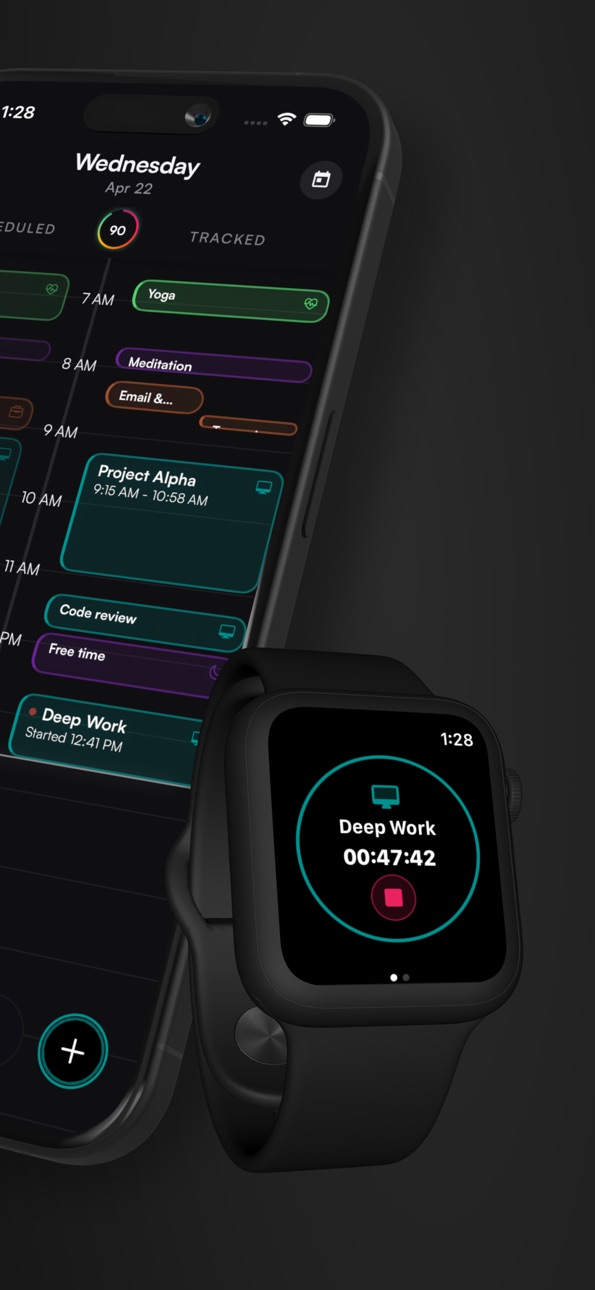


Apple Watch 4 images


What’s New Version 2.8.3
TimeAlign has gotten a major round of polish since the last App Store release.
This update makes onboarding clearer, faster, and more reliable, with a stronger Life Areas setup that helps connect your time to what actually matters: health, work, relationships, growth, recovery, and the areas you choose for yourself.
You can now start with ready-made Life Area frameworks, customize them to fit your real life, and use TimeAlign to better understand whether your calendar is matching your priorities.
Also new and improved:
- Multi-account Google support, so you can connect work, personal, or other Google accounts
- Smoother calendar connection flows
- Better loading, reliability, and performance
- Improved onboarding completion reliability
- Widget and tracking reliability improvements
- Continued polish across Apple Health, notifications, calendar sync, and setup flows
TimeAlign is built to help you close the gap between what you intend to do and where your time actually goes. Thanks for joining the movement and helping shape it.
Description
For anyone who feels their days slip away despite their best intentions. TimeAlign connects your calendar, goals, and health data into one intelligent system — showing you where your time actually goes vs. where you planned it, so you can close the gap.
TimeAlign turns goals into time blocks, tracks what really happens, and shows you the truth, minute by minute. Your Alignment Score reveals exactly where plans slip and why, so next week gets better automatically.
Why TimeAlign?
• One-Tap Tracking — Hit Start in the Tracking view. No fiddly timers.
• Feedback Loop — Compare planned vs. actual and instantly spot drift.
• Smart Suggestions — Personalized tips backed by your own data trends.
• Alignment Score & Streaks — Gamified metrics that reward follow-through.
• AI Clarity Coach — Ask questions about your patterns, get actionable answers.
• Deep Integrations — Two-way sync with Apple / Google Calendar, Apple Health, and wearables.
• Privacy First — Your data is encrypted, never sold, and always exportable.
How It Works
Plan — Set time and habit targets for every life area. Drag goals into your weekly calendar.
Track — One tap to start. TimeAlign logs what you're doing right now.
Align — See plan vs. reality side by side. Your Alignment Score tells the story.
Built For
• Entrepreneurs & creators chasing ambitious milestones
• Professionals fighting meeting overload & distraction creep
• Students balancing classes, study, fitness, and social life
• Anyone who's tried planners, habit trackers, or time-boxing — and wants one that actually sticks
Subscription Pricing & Terms
TimeAlign is free to download. Upgrade any time for unlimited goals, advanced analytics, and premium support.
Monthly — US $7.99 (14-day free trial, cancel anytime)
Annual — US $47.99 (Save 50% vs. monthly)
Payment is charged to your iTunes account at confirmation. Subscriptions renew automatically unless cancelled at least 24 hours before the current period ends. Manage or turn off auto-renew in Settings › Apple ID › Subscriptions. Unused trial time is forfeited upon purchase.
Privacy Policy — https://www.timealignapp.com/privacy
Terms of Service — https://www.timealignapp.com/terms-of-service
In-App Purchases US pricing
Subscription Group Subscription
TimeAlign Pro (Annual) · Yearly 14-day free trial$59.99
TimeAlign Pro (Early Bird) · Yearly 14-day free trial$34.99
TimeAlign Pro (Monthly) · Monthly 14-day free trial$7.99
TimeAlign Pro Student (Monthly) · Monthly 14-day free trial$4.99
TimeAlign Annual Subscription · Yearly 14-day free trial$47.99
Capabilities
In-App Purchases
Accessibility
ipadiphonemacrealityDevicetvoswatch
Version history 25 versions
Build 887660465v2.8.32026-07-01 16:27:02
TimeAlign has gotten a major round of polish since the last App Store release.
This update makes onboarding clearer, faster, and more reliable, with a stronger Life Areas setup that helps connect your time to what actually matters: health, work, relationships, growth, recovery, and the areas you choose for yourself.
You can now start with ready-made Life Area frameworks, customize them to fit your real life, and use TimeAlign to better understand whether your calendar is matching your priorities.
Also new and improved:
- Multi-account Google support, so you can connect work, personal, or other Google accounts
- Smoother calendar connection flows
- Better loading, reliability, and performance
- Improved onboarding completion reliability
- Widget and tracking reliability improvements
- Continued polish across Apple Health, notifications, calendar sync, and setup flows
TimeAlign is built to help you close the gap between what you intend to do and where your time actually goes. Thanks for joining the movement and helping shape it.
Build 886624707v2.5.12026-06-07 16:08:30
2.5.1
Adds bug fixes for calendar sync and AI chat
2.5.0
New Insights radar chart
TimeAlign now gives you a visual way to compare your scheduled time against your tracked time across life areas.
Radar editing
Focus your chart by hiding life areas that are not relevant right now.
Widget improvements
See more of your schedule, tracking, and alignment from outside the app.
Apple Watch upgrades
Activity and category colors are clearer and more consistent across Watch views.
Also included: smoother scheduling, more reliable weekly reports, and report export fixes.
Thank you for using TimeAlign. If you want to submit bugs, share feedback, or chat with the developers, join the Discord via the link in Settings.
Build 886597933v2.5.02026-06-06 16:17:32
New Insights radar chart
TimeAlign now gives you a visual way to compare your scheduled time against your tracked time across life areas.
Radar editing
Focus your chart by hiding life areas that are not relevant right now.
Widget improvements
See more of your schedule, tracking, and alignment from outside the app.
Apple Watch upgrades
Activity and category colors are clearer and more consistent across Watch views.
Also included: smoother scheduling, more reliable weekly reports, and report export fixes.
Thank you for using TimeAlign. If you want to submit bugs, share feedback, or chat with the developers, join the Discord via the link in Settings.
Build 886368615v2.4.12026-06-01 18:03:21
### What's New
**Get up to speed faster**
We've added a smart setup inbox that guides you through TimeAlign's most powerful features. Tap the bell icon to see personalized tips and finish setting up your ideal workflow.
**Track time in fewer taps**
Your most-used activities now appear at the top of the activity picker. No more scrolling through a long list—just tap and go.
**See your whole week at a glance**
The new Insights radar chart shows how your tracked time compares to what you planned across all your life areas. Spot patterns, adjust your schedule, and stay aligned.
**Smoother everywhere**
We've polished the onboarding experience with a step-by-step progress indicator, improved the notification inbox design, and fixed dozens of small bugs that were slowing you down.
**What we fixed**
- Alignment scores now calculate correctly
- Apple Health meditation sessions no longer duplicate in your timeline
- Post-tracking summaries appear reliably after every session
- Calendar blocks are easier to read (enforced minimum height)
- Tag colors work as expected
- Goals widget shows accurate progress
- Onboarding tour works smoothly start to finish
Build 884866777v2.2.02026-04-24 17:19:32
- Better Watch calendar navigation and a new Day Timeline view
- Smoother tracking controls and improved iPhone-Watch sync
- Performance, reliability, and visual polish throughout the app
Thank you for aligning your time and your continued patience/support as we improve and enhance the application.
Build 884697431v2.1.72026-04-20 19:12:08
Fixed App Store paywall bug
Build 884610573v2.1.62026-04-17 18:19:10
- We improved the tracking screen and made it feel more polished
- Added celebration animation when you stop longer sessions
- Added haptic feedback for tracking start and stop
- Improved trial and subscription flows with clearer expiry nudges
- Refined paywall behavior for a cleaner, less accidental close flow
- Behind the scenes, we made major reliability improvements to tracking, entitlements, and AI access
Build 884301280v2.1.42026-04-09 16:00:33
Paywall fixes for App Store version
Build 884254468v2.1.32026-04-08 15:44:24
1) Paywall / Trials / RevenueCat reliability
Hardened trial and paywall flows (eligibility, restore, edge cases)
Better resilience/observability so we can diagnose issues faster
Reduced “stale entitlement” issues when switching accounts/devices
2) Goals: ordering
Added goal sorting with drag-to-reorder and backend persistence
3) Calendar sync + mapping upgrades
Upgraded the calendar-to-category mapping system (Apple + Google)
More robust sync behavior (fewer deadlocks/“busy” errors)
Improved handling of recurring events and edge cases
4) UI modernization (less jank, more consistency)
Modernized a bunch of sheets/dialogs into a cleaner modal navigation pattern (thank you for the feedback
Improved touch targets and general interaction polish
5) Performance
Faster scrolling and list performance in core tabs (Tasks/Goals/Reports)
Startup + background performance improvements
6) Widgets + Notifications
Widget deep-link + configuration improvements
Notification handling fixes (especially weekly report flows)
7) Security + stability
Input sanitization improvements and general hardening across forms
Build 883855143v2.1.12026-03-28 16:26:32
Insights
Your Weekly Report has been redesigned as an Alignment Journey — a clearer view of how your week actually went, with daily scores and trends at a glance.
Onboarding
Completely redesigned onboarding experience with smoother animations, a more intuitive flow, and a new visual day graphic showing how TimeAlign works.
Life areas selection now starts with 3 recommended areas, with the option to add more — less overwhelming on first launch.
Streamlined survey and commitment flow so you get into the app faster.
Settings
Save button in Settings now sticks to the bottom of the screen so it's always accessible.
Paywall and Subscriptions
New paywall design with clearer plan options and trial information.
Smarter upgrade prompts when you hit free tier limits — no dead ends, just a clear path to unlock more.
Stability and Performance
Numerous bug fixes across tracking, calendar sync, and navigation.
Reduced redundant code for faster load times.
Improved test coverage for a more stable experience.
Build 883660696v2.0.132026-03-24 01:25:45
- Redesigned Tracking — New tracking screen with quick track, mid-session duration adjustment, and a cleaner timer experience.
- Smarter Goal Progress — Goal bars now show scheduled vs. tracked progress side by side so you can see if your week is on pace.
- Better Tag Management — Overhauled tag editor and journal verdicts for faster organization.
- Redesigned Onboarding — Enhanced first-run experience with in-app orientation to get you set up faster.
- Faster & Smoother — Quicker cold start, performance optimizations, and polish across the board.
Build 882925237v2.0.92026-03-14 10:31:47
What's New in TimeAlign
- Custom tag groups — organize tags your way
- Redesigned Apple Watch app with crown adjustment and voice search
- Swipe to edit and archive life areas
- Minute-based time target picker for goals
- Tags on tracked time blocks
- Cancel button on active tracking popup
- AI Chat reliability improvements
- Redesigned calendar settings layout
- Improved onboarding flow
- UI polish and design system refinements
- Crash and stability fixes (startup, auth, goal deletion)
- Calendar sync fixes (toggle, recurring events, DST)
- Performance improvements and faster app startup
Build 880219427v2.0.42026-01-02 13:24:40
- Onboarding and performance fixes
- Improving AI auto-categorization user flow
- Magnification accessibility improvements
Build 877560147v2.0.32025-08-26 06:39:39
- autocategorization on sync
- fix paywall issues
Build 877200906v2.0.22025-08-14 06:05:10
Bugfixes
Build 877073028v2.0.12025-08-10 09:08:39
various bug fixes to the onboarding and calendar operations
Build 874749232v2.02025-06-28 00:33:12
- AI-Assisted, Goal-Driven Scheduling: Let AI auto-build your ideal week based on your real goals and time availability.
- Apple Health Integration: Sync movement and wellness data directly into your planning and insights.
- Performance & Security Enhancements: Faster load times and upgraded data protection across the app.
Build 872419167v1.3.22025-02-12 01:49:42
New Features
- Goal-driven scheduling: easily drag-and-drop goal activities onto your calendar to schedule enough time to achieve your goals!
- Calendar Loading Enhancements: Improved calendar performance with buffering and caching.
Bug Fixes
- Fix preventing buggy timeblock modifications.
- Fix issue with timeblocks resetting to an uncategorized category.
Build 872063387v1.3.12025-01-30 08:40:17
Bug Fixes and performance enhancements
Build 871459765v1.3.02025-01-03 07:06:44
UX Improvements:
- Time left to schedule goals
- Time left to track goals
- "Anti-goals"
- Category Icons
- Decluttered side nav menu
- Weekly report notification
- New tracking complete summary
- Quick-begin tracking activity
- New improved Onboarding
Performance enhancements:
- Faster Initial load
- Faster insights loading
- More responsive scheduling
- Calendar sync improvements
Build 870027583v1.2.42024-10-30 09:52:11
- Sync multiple Google/Apple calendar accounts. You can now sync your personal AND work accounts.
- Goal-driven scheduling. Each Goal now has a pie chart that shows how much of that goal has been scheduled.
- Bug fixes and UX improvements.
Build 869526157v1.2.02024-10-07 11:00:59
- Goal-driven scheduling: visualize how much time you need to schedule each week to achieve your goals
- Weekly Alignment Reports
- Calendar sync improvements
- Bug fixes and misc. improvements
Build 868724967v1.1.32024-09-23 05:51:17
- Weekly Alignment Reports
- Bug fixes and improvements
Build 868698318v1.1.22024-09-03 07:50:36
Bug fixes and improvements
Build 867734359v1.1.12024-07-26 05:15:48
- Apple watch 'Now' widget
- Watch app Tracking view updated
- Adding multiple activities to a single goal
- Primary calendar bug fixed
- Bug fixes
Price history by region
Currency
Show
Columns
Search
Availability 1 of 1 storefronts
| Region | Language | Price | Ratings | Avg | Version |
|---|---|---|---|---|---|
| US | en-US | Free | 25 | 4.2 | 2.8.3 |
Change log 29 changes · US
✎
releaseNotes updated
TimeAlign has gotten a major round of polish since the last App Store release.
This update makes onboarding clearer, faster, and more reliable, with a stronger
✎
description updated
For anyone who feels their days slip away despite their best intentions. TimeAlign connects your calendar, goals, and health data into one intelligent system —
✎
subtitle updated
Smart Time Blocking & Tracking
✎
name updated
TimeAlign: Plan Track Align
◆
Version 2.8.3 released
TimeAlign has gotten a major round of polish since the last App Store release.
This update makes onboarding clearer, faster, and more reliable, with a stronger Life Areas setup that helps connect your time to what actually matters: health,
◆
Version 2.5.1 released
2.5.1
Adds bug fixes for calendar sync and AI chat
2.5.0
New Insights radar chart
TimeAlign now gives you a visual way to compare your scheduled time against your tracked time across life areas.
Radar editing
Focus your chart by hiding
◆
Version 2.5.0 released
New Insights radar chart
TimeAlign now gives you a visual way to compare your scheduled time against your tracked time across life areas.
Radar editing
Focus your chart by hiding life areas that are not relevant right now.
Widget improv
◆
Version 2.4.1 released
### What's New
**Get up to speed faster**
We've added a smart setup inbox that guides you through TimeAlign's most powerful features. Tap the bell icon to see personalized tips and finish setting up your ideal workflow.
**Track time in fe
◆
Version 2.2.0 released
- Better Watch calendar navigation and a new Day Timeline view
- Smoother tracking controls and improved iPhone-Watch sync
- Performance, reliability, and visual polish throughout the app
Thank you for aligning your time and your continued
◆
Version 2.1.7 released
Fixed App Store paywall bug
◆
Version 2.1.6 released
- We improved the tracking screen and made it feel more polished
- Added celebration animation when you stop longer sessions
- Added haptic feedback for tracking start and stop
- Improved trial and subscription flows with clearer expiry nud
◆
Version 2.1.4 released
Paywall fixes for App Store version
◆
Version 2.1.3 released
1) Paywall / Trials / RevenueCat reliability
Hardened trial and paywall flows (eligibility, restore, edge cases)
Better resilience/observability so we can diagnose issues faster
Reduced “stale entitlement” issues when switching accounts/dev
◆
Version 2.1.1 released
Insights
Your Weekly Report has been redesigned as an Alignment Journey — a clearer view of how your week actually went, with daily scores and trends at a glance.
Onboarding
Completely redesigned onboarding experience with smoother animati
◆
Version 2.0.13 released
- Redesigned Tracking — New tracking screen with quick track, mid-session duration adjustment, and a cleaner timer experience.
- Smarter Goal Progress — Goal bars now show scheduled vs. tracked progress side by side so you can see if your w
◆
Version 2.0.9 released
What's New in TimeAlign
- Custom tag groups — organize tags your way
- Redesigned Apple Watch app with crown adjustment and voice search
- Swipe to edit and archive life areas
- Minute-based time target picker for goals
- Tags on tracked t
◆
Version 2.0.4 released
- Onboarding and performance fixes
- Improving AI auto-categorization user flow
- Magnification accessibility improvements
◆
Version 2.0.3 released
- autocategorization on sync
- fix paywall issues
◆
Version 2.0.2 released
Bugfixes
◆
Version 2.0.1 released
various bug fixes to the onboarding and calendar operations
◆
Version 2.0 released
- AI-Assisted, Goal-Driven Scheduling: Let AI auto-build your ideal week based on your real goals and time availability.
- Apple Health Integration: Sync movement and wellness data directly into your planning and insights.
- Performance & S
◆
Version 1.3.2 released
New Features
- Goal-driven scheduling: easily drag-and-drop goal activities onto your calendar to schedule enough time to achieve your goals!
- Calendar Loading Enhancements: Improved calendar performance with buffering and caching.
Bug Fi
◆
Version 1.3.1 released
Bug Fixes and performance enhancements
◆
Version 1.3.0 released
UX Improvements:
- Time left to schedule goals
- Time left to track goals
- "Anti-goals"
- Category Icons
- Decluttered side nav menu
- Weekly report notification
- New tracking complete summary
- Quick-begin tracking activity
- New improv
◆
Version 1.2.4 released
- Sync multiple Google/Apple calendar accounts. You can now sync your personal AND work accounts.
- Goal-driven scheduling. Each Goal now has a pie chart that shows how much of that goal has been scheduled.
- Bug fixes and UX improvements.
◆
Version 1.2.0 released
- Goal-driven scheduling: visualize how much time you need to schedule each week to achieve your goals
- Weekly Alignment Reports
- Calendar sync improvements
- Bug fixes and misc. improvements
◆
Version 1.1.3 released
- Weekly Alignment Reports
- Bug fixes and improvements
◆
Version 1.1.2 released
Bug fixes and improvements
◆
Version 1.1.1 released
- Apple watch 'Now' widget
- Watch app Tracking view updated
- Adding multiple activities to a single goal
- Primary calendar bug fixed
- Bug fixes