Home › Utilities

 US
US
1 of 1 storefronts
Content in en-US
Content in en-US
Information
Preview 2 platforms
iPhone 5 images



iPad 5 images


What’s New Version 26.1.1
1. New functionality allowing you to add a hotspot for cellular backup of your internet service if there is an outage
2. Bug fixes
Description
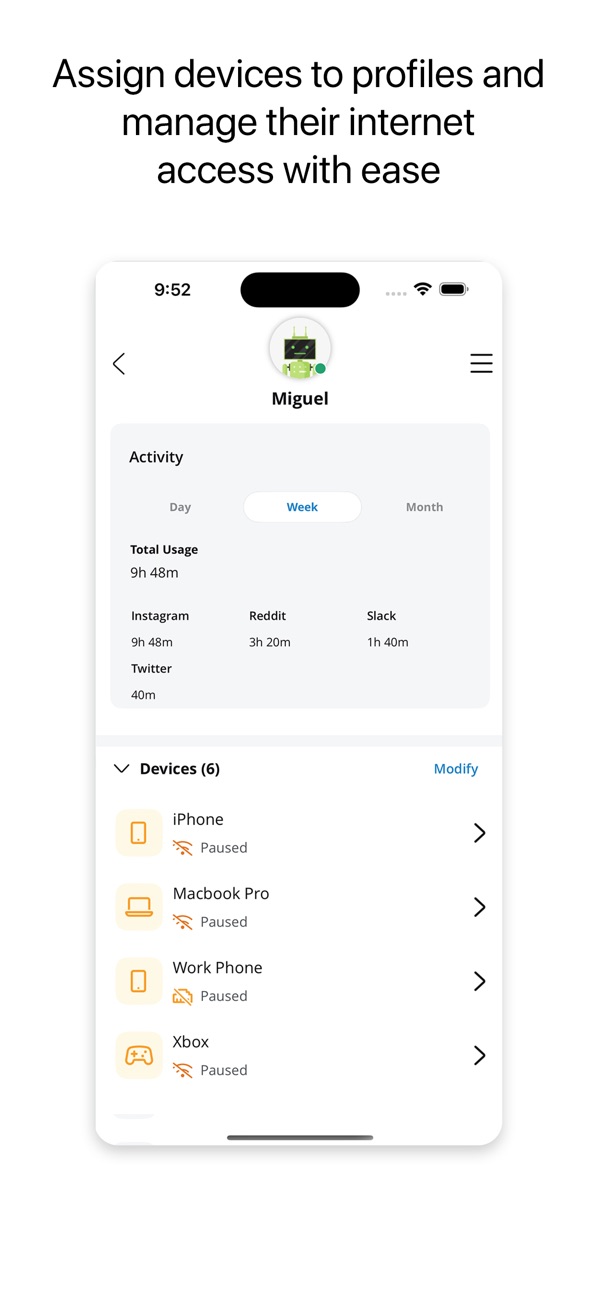
Manage all aspects of your home network with MTC Wi-Fi. Control your smart home from anywhere, with this easy-to-use application. MTC Wi-Fi provides subscribers with network security, parental controls, device management, and setting up guest networks. Verify your speeds with the bandwidth speed test feature and set up Amazon Alexa.
Accessibility
ipadiphonemacrealityDevicetvoswatch
Version history 14 versions
Build 883924492v26.1.12026-03-30 13:36:36
1. New functionality allowing you to add a hotspot for cellular backup of your internet service if there is an outage
2. Bug fixes
Build 881577892v25.4.22026-01-19 18:27:39
Bug Fixes
Build 878837666v25.3.22025-10-11 15:09:59
We redesigned MTC Wi-Fi to better assist you and greatly improve the experience. With a fresh new design and powerful new features, managing your internet is now quicker and easier than ever.
The all new design includes the following updates:
• Quick Links Carousel - Quickly find the most used features at the top of the home screen
• People Carousel - Easily see everyone's profiles and online status, also pause a profile right from the Home Screen
• New included avatars to enhance your people profiles experience
• ExperienceIQ and ProtectIQ Tiles - same functionality with a new UI, and now found directly on the home screen
• Dark Mode now supported
• And more enhancements found within the app experience
Build 878656815v25.3.12025-10-03 17:21:12
We redesigned CommandIQ to better assist you and greatly improve the experience. With a fresh new design and powerful new features, managing your internet is now quicker and easier than ever.
The all new design includes the following updates:
• Quick Links Carousel - Quickly find the most used features at the top of the home screen
• People Carousel - Easily see everyone's profiles and online status, also pause a profile right from the Home Screen
• New included avatars to enhance your people profiles experience
• ExperienceIQ and ProtectIQ Tiles - same functionality with a new UI, and now found directly on the home screen
• Dark Mode now supported
• And more enhancements found within the app experience
Build 875204695v25.2.02025-05-31 06:09:25
Bug fixes
Build 872960375v25.1.02025-03-04 14:17:43
Bug fixes
Build 871290381v24.4.22024-12-20 18:24:56
Added reboot from app for router and mesh
Support for third party gateways from CommandIQ
Build 868592199v24.3.02024-08-29 17:51:50
Added support for text size changes from device OS (can be changed in the Settings app, in Accessibility)
Build 866331226v24.2.02024-05-30 13:35:29
1. Self Install UI improvements and added Self Upgrade
2. Improved accessibility with ADA/WCAG conformant UI updates
Build 864225661v24.1.02024-03-05 20:53:23
Bug fixes
Build 861810344v23.4.02023-11-28 17:30:32
• Self Install, guided instructions for new subscribers installing a gateway
• Support for bandwidth speed tests up to 10Gbps
Build 859306047v23.3.02023-08-21 16:08:22
Bug fixes
Build 857295620v23.2.12023-05-23 17:50:16
• Secondary admin can remove themselves from the account
• Automatically changes Mbps to Gbps in Bandwidth Test
• Bug fixes
Build 856528296v23.1.02023-04-22 14:53:20
No pricing data captured yet — comparisons appear once the app has paid storefronts or in-app purchases.
Availability 1 of 1 storefronts
| Region | Language | Price | Ratings | Avg | Version |
|---|---|---|---|---|---|
| US | en-US | Free | 26 | 4.9 | 26.1.1 |
Change log 17 changes · US
✎
releaseNotes updated
1. New functionality allowing you to add a hotspot for cellular backup of your internet service if there is an outage
2. Bug fixes
✎
description updated
Manage all aspects of your home network with MTC Wi-Fi. Control your smart home from anywhere, with this easy-to-use application. MTC Wi-Fi provides subscribers
✎
name updated
MTC Wi-Fi
◆
Version 26.1.1 released
1. New functionality allowing you to add a hotspot for cellular backup of your internet service if there is an outage
2. Bug fixes
◆
Version 25.4.2 released
Bug Fixes
◆
Version 25.3.2 released
We redesigned MTC Wi-Fi to better assist you and greatly improve the experience. With a fresh new design and powerful new features, managing your internet is now quicker and easier than ever.
The all new design includes the following updat
◆
Version 25.3.1 released
We redesigned CommandIQ to better assist you and greatly improve the experience. With a fresh new design and powerful new features, managing your internet is now quicker and easier than ever.
The all new design includes the following updat
◆
Version 25.2.0 released
Bug fixes
◆
Version 25.1.0 released
Bug fixes
◆
Version 24.4.2 released
Added reboot from app for router and mesh
Support for third party gateways from CommandIQ
◆
Version 24.3.0 released
Added support for text size changes from device OS (can be changed in the Settings app, in Accessibility)
◆
Version 24.2.0 released
1. Self Install UI improvements and added Self Upgrade
2. Improved accessibility with ADA/WCAG conformant UI updates
◆
Version 24.1.0 released
Bug fixes
◆
Version 23.4.0 released
• Self Install, guided instructions for new subscribers installing a gateway
• Support for bandwidth speed tests up to 10Gbps
◆
Version 23.3.0 released
Bug fixes
◆
Version 23.2.1 released
• Secondary admin can remove themselves from the account
• Automatically changes Mbps to Gbps in Bandwidth Test
• Bug fixes
◆
Version 23.1.0 released