Home › Health & Fitness

 US
US
1 of 1 storefronts
Content in en-US
Content in en-US
Information
Preview 3 platforms
iPhone 6 images


iPad 6 images


Apple Watch 7 images




What’s New Version 2.22.0
Minor improvements and bug fixes.
Description
Catapult Vector
A Completely Reimagined User Experience.
Catapult Vector delivers real-time performance data from Catapult Vector devices, giving sports scientists and coaches immediate access to critical athlete metrics during training and games.
With an intuitive, redesigned interface, Catapult Vector makes it easier than ever to monitor, manage, and analyze athlete performance and health data live. Teams can make data-driven decisions to optimize performance and reduce injury risk.
Key Features:
• Efficient hardware setup and management
• Live performance data streaming from Catapult Vector devices*
• Real-time monitoring of athlete load, movement, and health metrics*
• Designed for both training sessions and games
• Easy-to-use interface for fast, informed decisions
Ideal for high-performance teams seeking a streamlined and powerful solution to athlete monitoring.
Supports S8, S7, X7 Vector devices.
Accessibility
ipadiphonemacrealityDevicetvoswatch
Version history 25 versions
Build 887720023v2.22.02026-07-06 14:52:56
Minor improvements and bug fixes.
Build 887133891v2.21.12026-06-24 00:02:54
Bug fixes and improvements
Build 886788608v2.20.02026-06-17 08:06:41
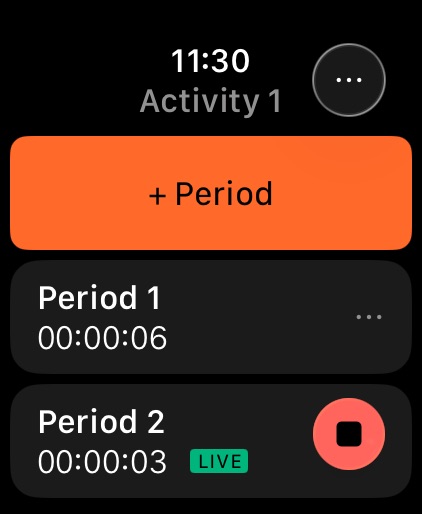
Introducing the Catapult Vector Watch App!
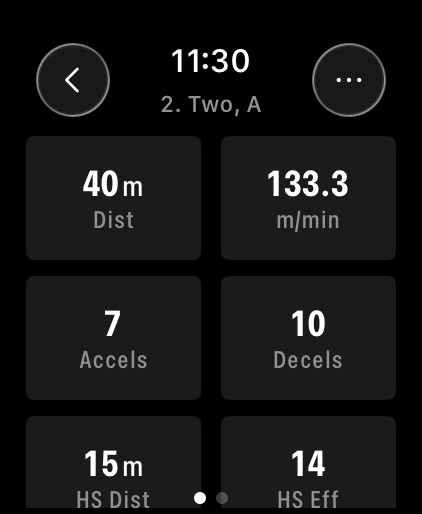
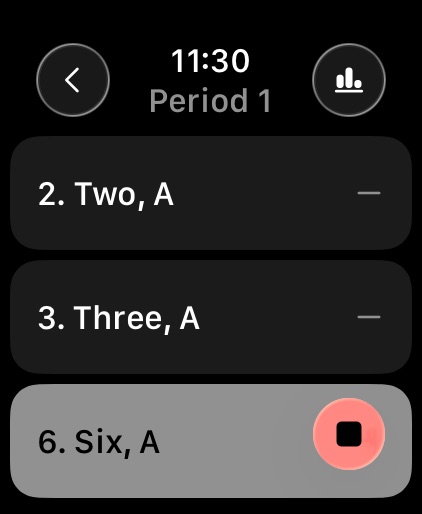
Update your mobile app to unlock our brand-new Catapult Vector Apple Watch app! Designed specifically to streamline high-performance Rehab and Return to Play environments, the new app allows you to stay actively engaged with your athletes hands-free on the field.
Key Watch Capabilities:
- Focused Group Tracking: Easily monitor up to 4 wearable devices simultaneously for targeted, small-group sessions.
- Run Live Activities: Create and manage Bluetooth activities right from your wrist with enhanced connection stability.
- Advanced Period Controls: Seamlessly run multiple training periods.
- Tailored Metrics: Customise your displayed parameters to focus exactly on the data points that matter most.
To get started: Once you've updated this app, open the Watch app on your iPhone to install Catapult Vector on your watch.
Build 886488177v2.19.02026-06-09 07:19:27
Performance improvements and stability updates.
Build 885906210v2.18.02026-05-25 13:40:13
Performance improvements and stability updates.
Build 885338176v2.17.02026-05-11 14:16:42
Performance improvements and stability updates.
Build 884880649v2.15.02026-04-29 01:23:28
Performance improvements and stability updates.
Build 884375901v2.14.12026-04-13 05:39:17
Bug fixes and improvements
Build 883769910v2.13.02026-03-31 04:38:48
Bug fixes and performance improvements.
Build 882841498v2.12.02026-03-16 04:57:09
Performance improvements and stability updates.
Build 882494490v2.9.02026-02-18 23:02:49
- Performance improvements and stability updates
- Preparing a new alarm workflow that will be rolling out to users soon
Build 880731140v2.8.02026-01-18 22:58:53
- Device Page Filters
You can now filter devices by position, team, and mapped/unmapped status. Making it significantly faster to find devices/athletes when setting alarms.
- Upload Performance Improvements
Navigating into the Uploads screen now default to today’s date, improving page load times and stability for large accounts (i.e American football teams with 100+ athletes).
- Remove Devices from Accounts
Users can now remove ("unprovision") wearable devices from their account directly in app. This keeps accounts tidy, prevents outdated devices lingering in rosters, and removes the persistent sync banner on unused devices.
- Clear Alarms
Alarms can now be cleared entirely, simplifying alarm management and removing the need to maintain unused placeholder alarms.
Build 880324609v2.7.12025-12-07 23:34:09
This update includes a small set of stability and performance fixes following our recent 2.7 release. No changes to the core experience.
Build 879917697v2.7.02025-11-24 03:13:01
Activity shell (OF+ feature parity) released to all users.
S8 Device Battery visible in app.
Device alarms that have already passed don’t show.
Slot map status breathe like devices when in dock.
Build 879538684v2.6.22025-11-10 00:37:08
Performance improvements and re-upload files feature.
Build 878971313v2.6.12025-10-30 02:33:13
See who’s missing uploads! You can now quickly pinpoint which athletes or devices are missing uploads. The connected devices screen now shows how long it’s been since the last upload for a device. This saves time figuring out who’s missing data or who's still in progress, especially for non live activities where we don’t yet know who should be in the session.
Simplified upload summary view - No more scrolling through endless lists to find stuck or failed uploads. The new summary view surfaces any raw files that need attention and shows where they are in the upload process - downloading to dock, uploading to cloud, or preparing in cloud. This gives users and support faster visibility into what’s happening and helps troubleshoot issues more efficiently.
Build 878421303v2.5.12025-09-29 06:33:55
Minor updates and performance improvements
Build 878118391v2.5.02025-09-18 00:17:28
- Slot Map (“Connected Devices”) View
No more guessing! Quickly diagnose device to dock connection issues with the new slot map. Click the devices icon from the dock banners for direct access. See video below
- View the assigned Athlete for each Raw File Upload
Full athlete names + jersey numbers are now visible against each upload page so you can figure out which athlete is missing data
- New Uploads Tab
We’ve moved uploads menu into the main navigation because the data shows us that users are using it and we want to make it easier to get to.
- Complete Means Complete
When an upload says “uploaded,” it’s really done athlete shows in the activity in the Editor, the data is graphable, and the raw files viewable in Manage Raw Files menu.
Build 877631576v2.4.02025-09-01 23:57:42
UI improvements and Vector core support
Build 877402087v2.3.12025-08-21 05:23:21
hotfix containing bug fix for Vector Core device registration
Build 876844657v2.3.02025-08-03 23:45:02
Bug fixes and improvements
Build 876449998v2.2.02025-07-17 07:59:48
- Activity State Preservation: Activities are now robustly saved across app closures and device locks, ensuring continuous progress.
- Session Re-authentication: Users will now be prompted to re-login if their session expires, preventing data loss and providing a clear path back into the app.
- Optimizations for Device alarm feedback logic.
- Refinements to device onboarding navigation, including clearer exit routes.
- Behind-the-scenes improvements with new analytics events for better future development.
Build 875992695v2.1.02025-07-01 21:40:18
A full list of registered Wearable Devices is now available from the hardware page
Introducing Device Alarms, a Wearable Device configuration that allows you to set a 'wake up' time for your Vector 8 devices.
Build 875808443v2.0.52025-06-25 08:26:51
Bug fixes and improvements
Build 875372550v2.0.32025-06-11 21:33:41
- First Time Setup UX improvements
- Wi-Fi configuration UX improvements
- Additional bug fixes and improvements
No pricing data captured yet — comparisons appear once the app has paid storefronts or in-app purchases.
Availability 1 of 1 storefronts
| Region | Language | Price | Ratings | Avg | Version |
|---|---|---|---|---|---|
| US | en-US | Free | 2 | 3.5 | 2.22.0 |
Change log 28 changes · US
✎
releaseNotes updated
Minor improvements and bug fixes.
✎
description updated
Catapult Vector
A Completely Reimagined User Experience.
Catapult Vector delivers real-time performance data from Catapult Vector devices, giving sports scien
✎
name updated
Catapult Vector
◆
Version 2.22.0 released
Minor improvements and bug fixes.
◆
Version 2.21.1 released
Bug fixes and improvements
◆
Version 2.20.0 released
Introducing the Catapult Vector Watch App!
Update your mobile app to unlock our brand-new Catapult Vector Apple Watch app! Designed specifically to streamline high-performance Rehab and Return to Play environments, the new app allows you to
◆
Version 2.19.0 released
Performance improvements and stability updates.
◆
Version 2.18.0 released
Performance improvements and stability updates.
◆
Version 2.17.0 released
Performance improvements and stability updates.
◆
Version 2.15.0 released
Performance improvements and stability updates.
◆
Version 2.14.1 released
Bug fixes and improvements
◆
Version 2.13.0 released
Bug fixes and performance improvements.
◆
Version 2.12.0 released
Performance improvements and stability updates.
◆
Version 2.9.0 released
- Performance improvements and stability updates
- Preparing a new alarm workflow that will be rolling out to users soon
◆
Version 2.8.0 released
- Device Page Filters
You can now filter devices by position, team, and mapped/unmapped status. Making it significantly faster to find devices/athletes when setting alarms.
- Upload Performance Improvements
Navigating into the Uploads scre
◆
Version 2.7.1 released
This update includes a small set of stability and performance fixes following our recent 2.7 release. No changes to the core experience.
◆
Version 2.7.0 released
Activity shell (OF+ feature parity) released to all users.
S8 Device Battery visible in app.
Device alarms that have already passed don’t show.
Slot map status breathe like devices when in dock.
◆
Version 2.6.2 released
Performance improvements and re-upload files feature.
◆
Version 2.6.1 released
See who’s missing uploads! You can now quickly pinpoint which athletes or devices are missing uploads. The connected devices screen now shows how long it’s been since the last upload for a device. This saves time figuring out who’s missing
◆
Version 2.5.1 released
Minor updates and performance improvements
◆
Version 2.5.0 released
- Slot Map (“Connected Devices”) View
No more guessing! Quickly diagnose device to dock connection issues with the new slot map. Click the devices icon from the dock banners for direct access. See video below
- View the assigned Athlet
◆
Version 2.4.0 released
UI improvements and Vector core support
◆
Version 2.3.1 released
hotfix containing bug fix for Vector Core device registration
◆
Version 2.3.0 released
Bug fixes and improvements
◆
Version 2.2.0 released
- Activity State Preservation: Activities are now robustly saved across app closures and device locks, ensuring continuous progress.
- Session Re-authentication: Users will now be prompted to re-login if their session expires, preventing da
◆
Version 2.1.0 released
A full list of registered Wearable Devices is now available from the hardware page
Introducing Device Alarms, a Wearable Device configuration that allows you to set a 'wake up' time for your Vector 8 devices.
◆
Version 2.0.5 released
Bug fixes and improvements
◆
Version 2.0.3 released
- First Time Setup UX improvements
- Wi-Fi configuration UX improvements
- Additional bug fixes and improvements