Home › Sports

 US
US
1 of 1 storefronts
Content in en-US
Content in en-US
Information
Apple ID6446697914
Bundle IDcom.garmin.xeroc
SellerSeller
Min iOS18.0
Min macOS15.0
Device familiesiphone
Released2023-10-04
Copyright© 2023 Garmin Ltd. or its subsidiaries
Privacy policyLink ↗
Preview 1 platform
iPhone 5 images



What’s New Version 2.3
- Cloud sync progressive sessions loading
- Add Barrel Contour on Rifle profile configuration
- Various bug fixes and improvements
Description
Use the ShotView™ app to connect to your Xero® C2 and C1 Pro chronograph.
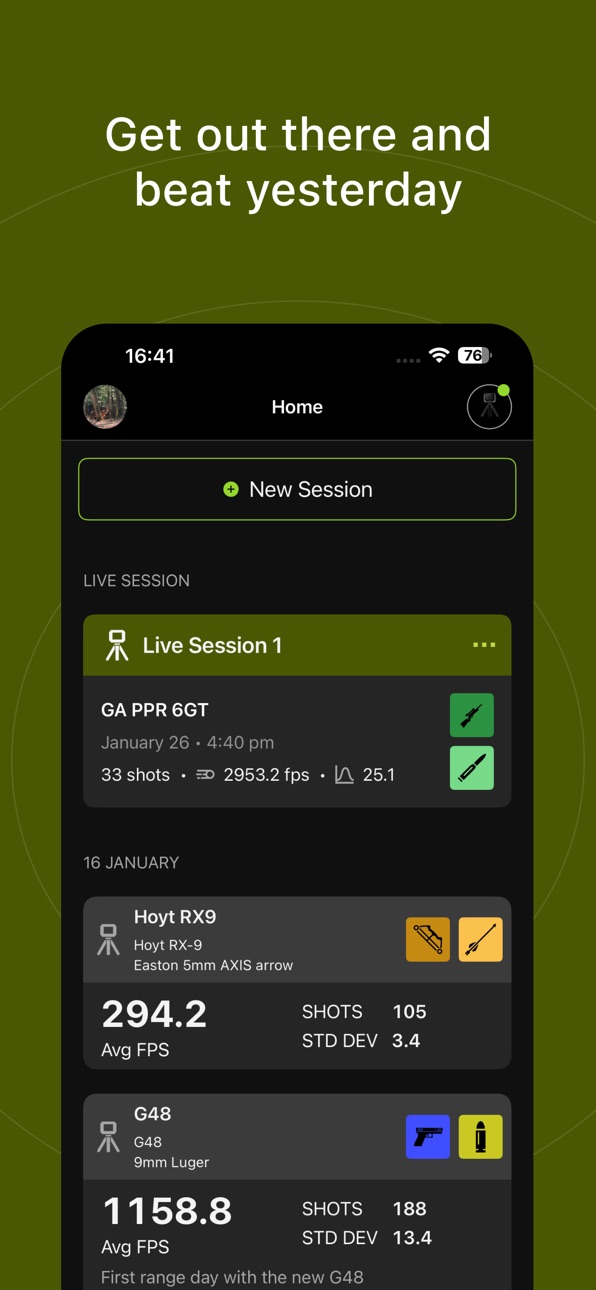
Connected to a C2 you can view live sessions with realtime muzzle velocity chart, resume any session and swap between live sessions. Edits in the session name and shot list will be synced between C2 and app.
Organize your platform and ammunition by creating configurable custom profiles and attach them to your sessions.
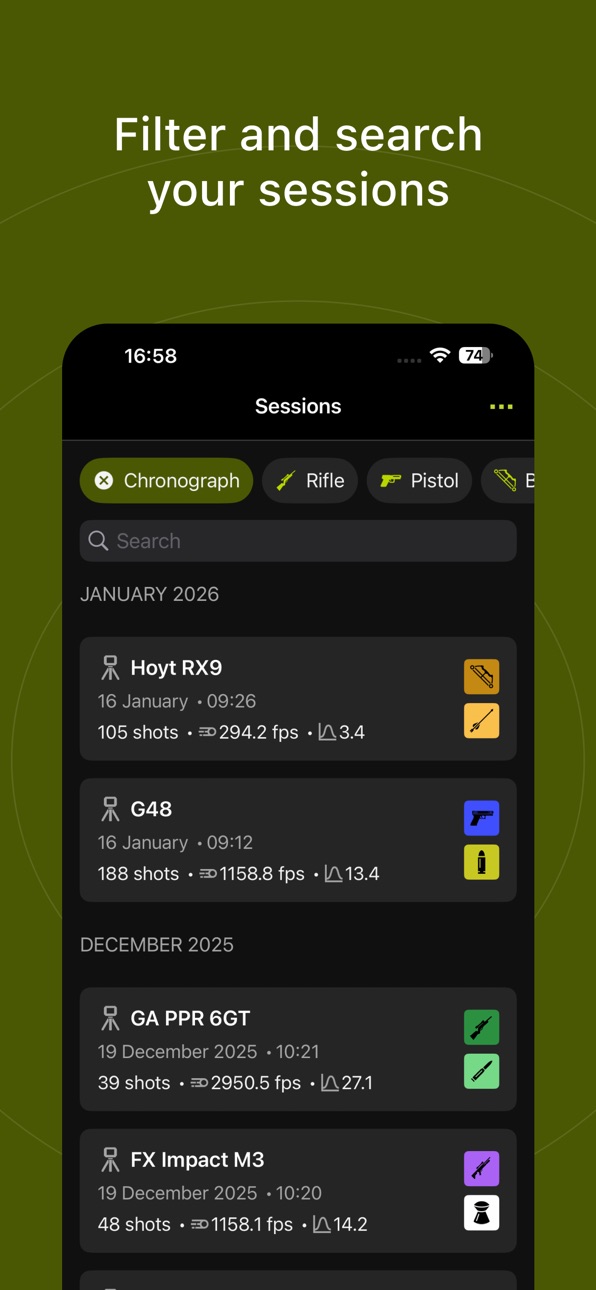
After a shooting session is completed, see your ballistic data on the app, where it is organized and easy to interpret. Analyze shot data, including speed, deviation, extreme spread, kinetic energy and more — and export the raw data to CSV format. Exclude cold bore shots and other outliers from session calculations as desired. Create custom names for each session, add notes for specific shots, and mark clean bore and cold bore attributes for each shot. Filter by weapon type to quickly access specific sessions for review.
The ShotView™ app can send and save your recorded shot and session data to the cloud. You can access and use saved data on other phones or back up your data for future use. A Garmin account is required to store your data in the cloud.
Accessibility
ipadiphonemacrealityDevicetvoswatch
Version history 13 versions
Build 886244808v2.32026-06-02 07:09:32
- Cloud sync progressive sessions loading
- Add Barrel Contour on Rifle profile configuration
- Various bug fixes and improvements
Build 884761966v2.2.22026-04-22 06:02:54
Fixed MAX and MIN values on chronograph session details
Build 884278773v2.2.12026-04-15 07:11:03
Give feedback on the app experience.
Set preferred language from the app.
Various bug fixes and improvements.
Build 883295800v2.22026-03-16 08:50:50
Firmware updates improvements.
When you have multiple chronographs connected you can pick the one to start or resume your session on.
Build 882338995v2.1.12026-02-11 05:59:06
Fixed swap sessions not working.
Build 881858525v2.12026-02-09 09:15:48
Updates in 2.1:
• See velocity chart on session details,
• See configuration details when tapping the config area in session details and live sessions,
• Turn radar on from the app after a lot of inactivity on device,
• Bug fixes and improvements.
Build 880836691v2.02026-01-15 07:56:44
C2 Chronograph support and new features for C2 devices:
• Live sessions with realtime muzzle velocity chart,
• Resume any session on a connected C2,
• Swap between live sessions,
• Configure platform and ammunition profiles in the app,
• Sync session name and shot edits between C2 and app,
• Cloud sync for C2 data and profiles.
Build 880608953v1.2.22025-12-19 08:30:31
Bug fixes
Build 875316178v1.2.12025-06-05 08:00:58
• Fixed issue with software updates not being sent to the C1 Chronograph in some cases.
• Added the ability to export Chronograph session data to Excel (previous version was CSV only).
• Performance improvements and bug fixes.
Build 863417498v1.12024-02-12 19:00:41
The ShotView™ app can send and save your recorded shot and session data to the cloud. You can access and use saved data on other phones or back up your data for future use. A Garmin account is required to store your data in the cloud.
Added export multiple sessions to Excel. You can do this from Sessions List > More Options > Export.
Build 861308924v1.0.22023-11-07 15:44:17
Visual update for excluded shots and shots marked for deletion.
Build 860732970v1.0.12023-10-17 19:11:45
Minor updates to delete shots and CSV export.
Build 855782957v1.02023-10-05 01:12:56
No pricing data captured yet — comparisons appear once the app has paid storefronts or in-app purchases.
Availability 1 of 1 storefronts
| Region | Language | Price | Ratings | Avg | Version |
|---|---|---|---|---|---|
| US | en-US | Free | 277 | 4.4 | 2.3 |
Change log 17 changes · US
✎
releaseNotes updated
- Cloud sync progressive sessions loading
- Add Barrel Contour on Rifle profile configuration
- Various bug fixes and improvements
✎
description updated
Use the ShotView™ app to connect to your Xero® C2 and C1 Pro chronograph.
Connected to a C2 you can view live sessions with realtime muzzle velocity chart, re
✎
subtitle updated
Shooting session information
✎
name updated
ShotView™
◆
Version 2.3 released
- Cloud sync progressive sessions loading
- Add Barrel Contour on Rifle profile configuration
- Various bug fixes and improvements
◆
Version 2.2.2 released
Fixed MAX and MIN values on chronograph session details
◆
Version 2.2.1 released
Give feedback on the app experience.
Set preferred language from the app.
Various bug fixes and improvements.
◆
Version 2.2 released
Firmware updates improvements.
When you have multiple chronographs connected you can pick the one to start or resume your session on.
◆
Version 2.1.1 released
Fixed swap sessions not working.
◆
Version 2.1 released
Updates in 2.1:
• See velocity chart on session details,
• See configuration details when tapping the config area in session details and live sessions,
• Turn radar on from the app after a lot of inactivity on device,
• Bug fixes and im
◆
Version 2.0 released
C2 Chronograph support and new features for C2 devices:
• Live sessions with realtime muzzle velocity chart,
• Resume any session on a connected C2,
• Swap between live sessions,
• Configure platform and ammunition profiles in the app,
◆
Version 1.2.2 released
Bug fixes
◆
Version 1.2.1 released
• Fixed issue with software updates not being sent to the C1 Chronograph in some cases.
• Added the ability to export Chronograph session data to Excel (previous version was CSV only).
• Performance improvements and bug fixes.
◆
Version 1.1 released
The ShotView™ app can send and save your recorded shot and session data to the cloud. You can access and use saved data on other phones or back up your data for future use. A Garmin account is required to store your data in the cloud.
Added
◆
Version 1.0.2 released
Visual update for excluded shots and shots marked for deletion.
◆
Version 1.0.1 released
Minor updates to delete shots and CSV export.
◆
Version 1.0 released