Home › Utilities

Information
Apple ID6444294006
Bundle IDcom.njoylab.In-My-Pocket
SellerSeller
Min iOS16.0
Min macOS13.0
Device familiesiphone, ipad
Released2025-03-20
Copyright© 2026 Emiliano Saurin
Privacy policyLink ↗
Preview 2 platforms
iPhone 5 images



iPad 5 images




What’s New Version 1.6
• NEW: Smart text suggestions powered by Apple Intelligence with explicit opt-in and dedicated Settings toggle
• NEW: Smart tab organization suggestions (name, icon, order) with manual Apply confirmation when Apple Intelligence is enabled
• IMPROVED: Smoother zoom and pan experience in image detail view
• NEW: Select and copy text directly from images in detail view
• IMPROVED: Better Markdown support with full rendering in preview/detail and improved dark mode readability
• NEW: Video field support with import from library, camera recording, preview, sharing, and secure storage
• NEW: Audio-to-text transcription for recordings, with transcript saved in field notes
• NEW: Automatic date detection in images with option to add reminders to your calendar
Description
he offline vault for your sensitive data.
ZERO CLOUD. 100% PRIVATE. FULL CONTROL.
Your information stays on your device unless YOU decide otherwise. No servers, no accounts, no tracking.
Store what matters most:
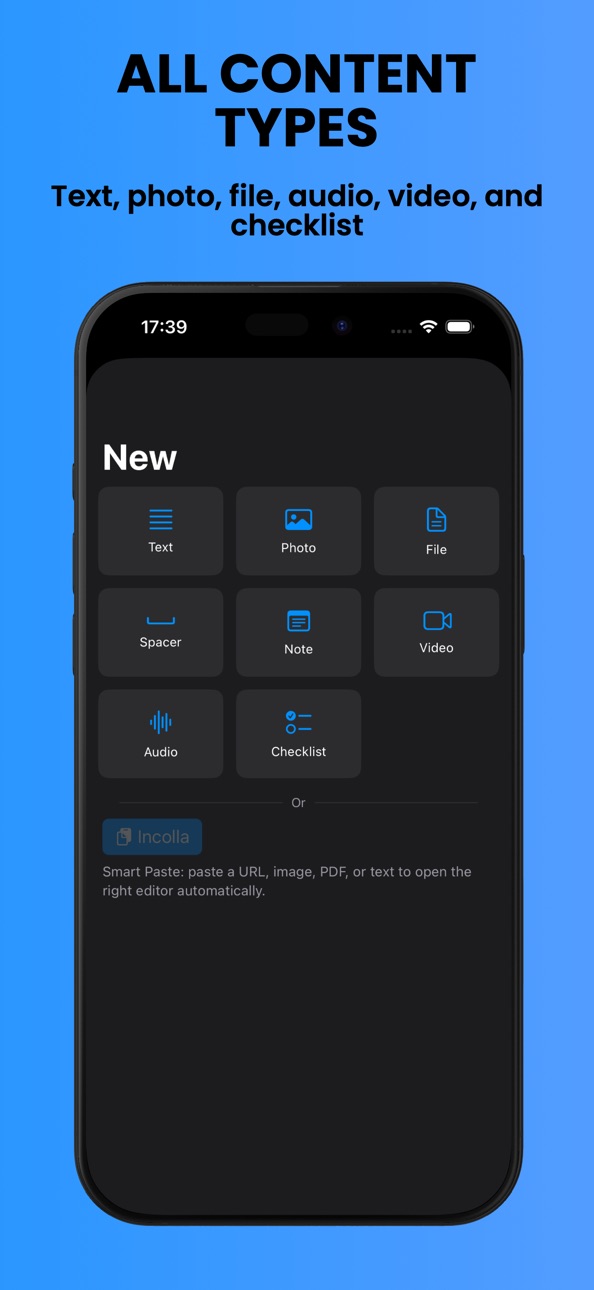
• Account numbers and IBANs
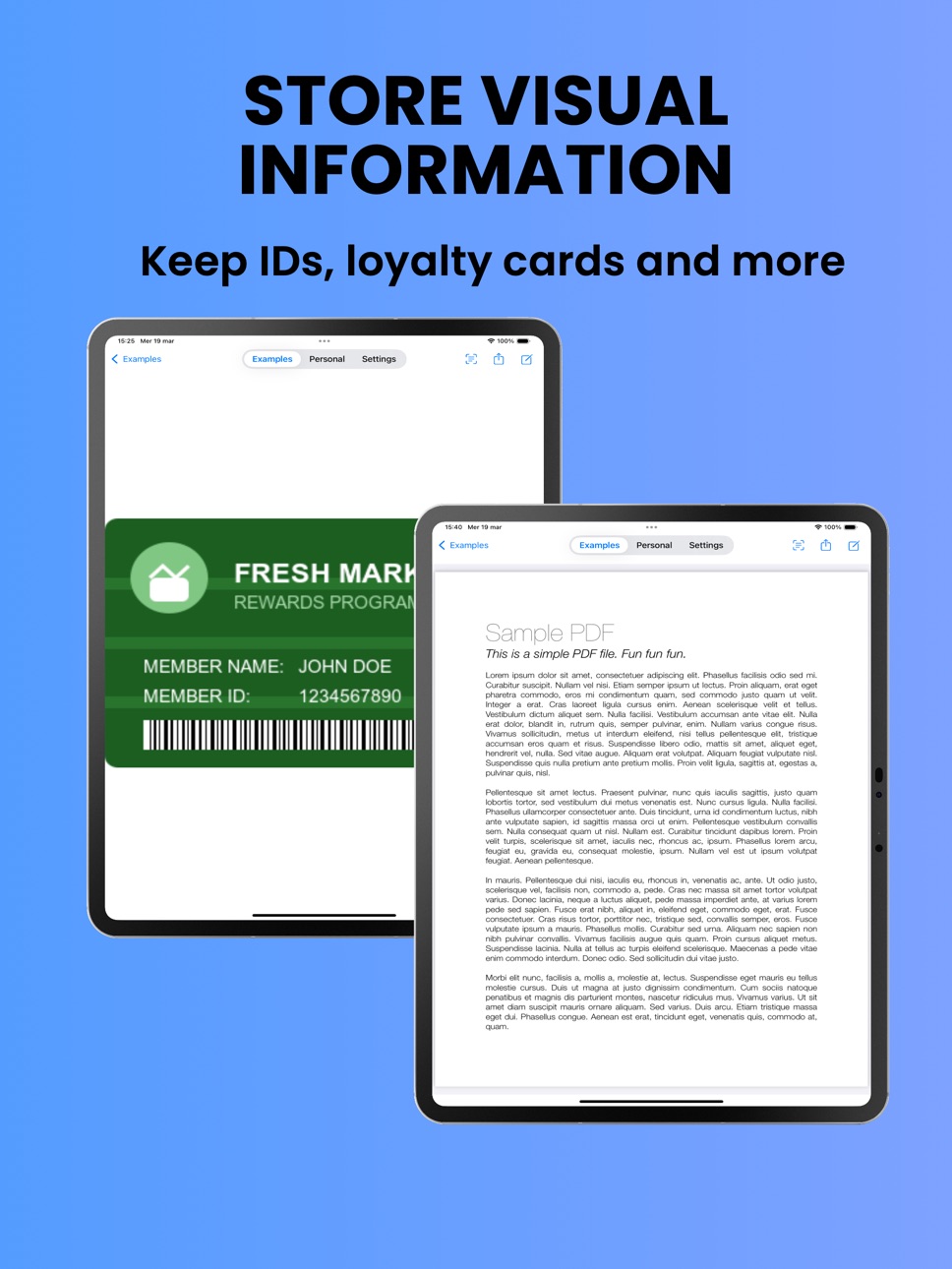
• Loyalty and membership cards
• Identity documents, PDFs, photos, and confidential files
• Notes, audio recordings with transcription, and dynamic lists
Built for privacy-conscious users:
• All data stored locally on YOUR device only
• No internet connection required or used
• Selective field-level protection
• Encrypted export/import for secure transfers
Organize fast with powerful tools:
• Custom tabs and sections
• Quick copy and QR code generation
• Smart reminders for important dates
• Camera capture and text copy from images
• Smart suggestions powered by Apple Intelligence
• Full Markdown support and iOS search integration
Transfer securely between YOUR devices:
End-to-end encrypted export/import helps you move to a new device or create backups without cloud intermediaries, using direct encrypted transfer under your control.
Built by an indie developer. Every piece of feedback matters
Missing a feature? Found a bug? Get in touch, your feedback shapes the app
Your pocket. Your vault. Your control
Capabilities
In-App Purchases
Accessibility
ipadiphonemacrealityDevicetvoswatch
Version history 8 versions
Build 882663104v1.62026-02-24 06:00:00
• NEW: Smart text suggestions powered by Apple Intelligence with explicit opt-in and dedicated Settings toggle
• NEW: Smart tab organization suggestions (name, icon, order) with manual Apply confirmation when Apple Intelligence is enabled
• IMPROVED: Smoother zoom and pan experience in image detail view
• NEW: Select and copy text directly from images in detail view
• IMPROVED: Better Markdown support with full rendering in preview/detail and improved dark mode readability
• NEW: Video field support with import from library, camera recording, preview, sharing, and secure storage
• NEW: Audio-to-text transcription for recordings, with transcript saved in field notes
• NEW: Automatic date detection in images with option to add reminders to your calendar
Build 878623319v1.52025-10-03 16:14:11
• NEW: Audio field type for voice memos and audio recordings (Pro feature)
• iOS 26 compatibility and optimizations
Build 877455552v1.42025-08-22 03:44:07
• NEW: Picklist field type for repetitive tasks. Auto-resets daily or at custom intervals. Perfect for tracking daily supplements, routines, or recurring checklists
• Cleaner, more intuitive interface
• Fixed minor bugs and improved stability
Build 877319251v1.32025-08-18 08:01:19
- Data Import/Export: Easily sync your data between devices with the new import and export functionality
- UI Improvements
- iOS 17 Compatibility
Build 877212279v1.2.12025-08-14 20:34:52
- Smart notifications: Never forget important dates! Set custom reminders for any field with flexible scheduling options and repeat settings
- Camera capture: Take photos directly within the app for instant documentation without leaving your workflow
- Colorful organization: Tag your fields with colors for better visual organization and quick identification
- Field notes: Add detailed comments and notes to any field for better context and organization
Some features require Pro upgrade to unlock all capabilities.
Build 877050689v1.22025-08-12 05:15:51
- Smart notifications: Never forget important dates! Set custom reminders for any field with flexible scheduling options and repeat settings
- Camera capture: Take photos directly within the app for instant documentation without leaving your workflow
- Colorful organization: Tag your fields with colors for better visual organization and quick identification
- Field notes: Add detailed comments and notes to any field for better context and organization
Some features require Pro upgrade to unlock all capabilities.
Build 873449933v1.12025-06-13 11:04:17
- Field Management - Move fields seamlessly between tabs
- Custom Icons (PRO) - Personalize your fields with custom icons
- Better Sharing - Enhanced file sharing experience
- Various fixes and performance improvements
Build 853237313v1.02025-03-20 21:57:48
No pricing data captured yet — comparisons appear once the app has paid storefronts or in-app purchases.
Availability 31 of 31 storefronts
| Region | Language | Price | Ratings | Avg | Version |
|---|---|---|---|---|---|
 US US | en-US | Free | 2 | 4.5 | 1.6 |
 IT IT | it | Free | 1 | 5.0 | 1.6 |
 AT AT | de-DE | Free | 0 | — | 1.6 |
 AU AU | en-AU | Free | 0 | — | 1.6 |
 BE BE | en-GB | Free | 0 | — | 1.6 |
 BG BG | en-GB | Free | 0 | — | 1.6 |
 CA CA | en-CA | Free | 0 | — | 1.6 |
 CH CH | de-CH | Free | 0 | — | 1.6 |
 CZ CZ | en-GB | Free | 0 | — | 1.6 |
 DE DE | de-DE | Free | 0 | — | 1.6 |
 DK DK | en-GB | Free | 0 | — | 1.6 |
 EE EE | en-GB | Free | 0 | — | 1.6 |
 ES ES | es-ES | Free | 0 | — | 1.6 |
 FI FI | en-GB | Free | 0 | — | 1.6 |
 FR FR | fr-FR | Free | 0 | — | 1.6 |
 GB GB | en-GB | Free | 0 | — | 1.6 |
 GR GR | en-GB | Free | 0 | — | 1.6 |
 HR HR | en-GB | Free | 0 | — | 1.6 |
 HU HU | en-GB | Free | 0 | — | 1.6 |
 IS IS | en-GB | Free | 0 | — | 1.6 |
 LT LT | en-GB | Free | 0 | — | 1.6 |
 LU LU | en-GB | Free | 0 | — | 1.6 |
 LV LV | en-GB | Free | 0 | — | 1.6 |
 NL NL | nl | Free | 0 | — | 1.6 |
 NO NO | en-GB | Free | 0 | — | 1.6 |
 PL PL | en-GB | Free | 0 | — | 1.6 |
 PT PT | pt-PT | Free | 0 | — | 1.6 |
 RO RO | en-GB | Free | 0 | — | 1.6 |
 SE SE | sv | Free | 0 | — | 1.6 |
 SI SI | en-GB | Free | 0 | — | 1.6 |
 SK SK | en-GB | Free | 0 | — | 1.6 |
Change log 12 changes · US
✎
releaseNotes updated
• NEW: Smart text suggestions powered by Apple Intelligence with explicit opt-in and dedicated Settings toggle
• NEW: Smart tab organization suggestions (name,
✎
description updated
he offline vault for your sensitive data.
ZERO CLOUD. 100% PRIVATE. FULL CONTROL.
Your information stays on your device unless YOU decide otherwise. No servers
✎
subtitle updated
Your data Your device No cloud
✎
name updated
In My Pocket - Private Storage
◆
Version 1.6 released
• NEW: Smart text suggestions powered by Apple Intelligence with explicit opt-in and dedicated Settings toggle
• NEW: Smart tab organization suggestions (name, icon, order) with manual Apply confirmation when Apple Intelligence is enabled
•
◆
Version 1.5 released
• NEW: Audio field type for voice memos and audio recordings (Pro feature)
• iOS 26 compatibility and optimizations
◆
Version 1.4 released
• NEW: Picklist field type for repetitive tasks. Auto-resets daily or at custom intervals. Perfect for tracking daily supplements, routines, or recurring checklists
• Cleaner, more intuitive interface
• Fixed minor bugs and improved stabili
◆
Version 1.3 released
- Data Import/Export: Easily sync your data between devices with the new import and export functionality
- UI Improvements
- iOS 17 Compatibility
◆
Version 1.2.1 released
- Smart notifications: Never forget important dates! Set custom reminders for any field with flexible scheduling options and repeat settings
- Camera capture: Take photos directly within the app for instant documentation without leaving you
◆
Version 1.2 released
- Smart notifications: Never forget important dates! Set custom reminders for any field with flexible scheduling options and repeat settings
- Camera capture: Take photos directly within the app for instant documentation without leaving you
◆
Version 1.1 released
- Field Management - Move fields seamlessly between tabs
- Custom Icons (PRO) - Personalize your fields with custom icons
- Better Sharing - Enhanced file sharing experience
- Various fixes and performance improvements
◆
Version 1.0 released