Home › Lifestyle

 US
US
USen-US AOen-GB
 ARes-MX
 BFen-GB
 BJen-GB
 BOes-MX
 BRpt-BR
 BWen-GB
 CDen-GB
 CGen-GB
 CIfr-FR
 CLes-MX
 CMfr-FR
 COes-MX
 CRes-MX
 CVen-GB
 DZen-GB
 GAfr-FR
 GHen-GB
 GMen-GB
 GWen-GB
 KEen-GB
 LRen-GB
 LYen-GB
 MAen-GB
 MGen-GB
 MLen-GB
 MUen-GB
 MWen-GB
 MXes-MX
 MZen-GB
 NAen-GB
 NEen-GB
 NGen-GB
 PAes-MX
 PYes-MX
 RWen-GB
 SCen-GB
 SLen-GB
 SNen-GB
 STen-GB
 SZen-GB
 TDen-GB
 TNen-GB
 TZen-GB
 UGen-GB
 UYen-GB
 ZMen-GB
 ZWen-GB
49 of 49 storefronts
Content in en-US
Content in en-US
Information
Preview 2 platforms
iPhone 5 images



iPad 5 images


What’s New Version 26.2.1
Bug Fixes
Description
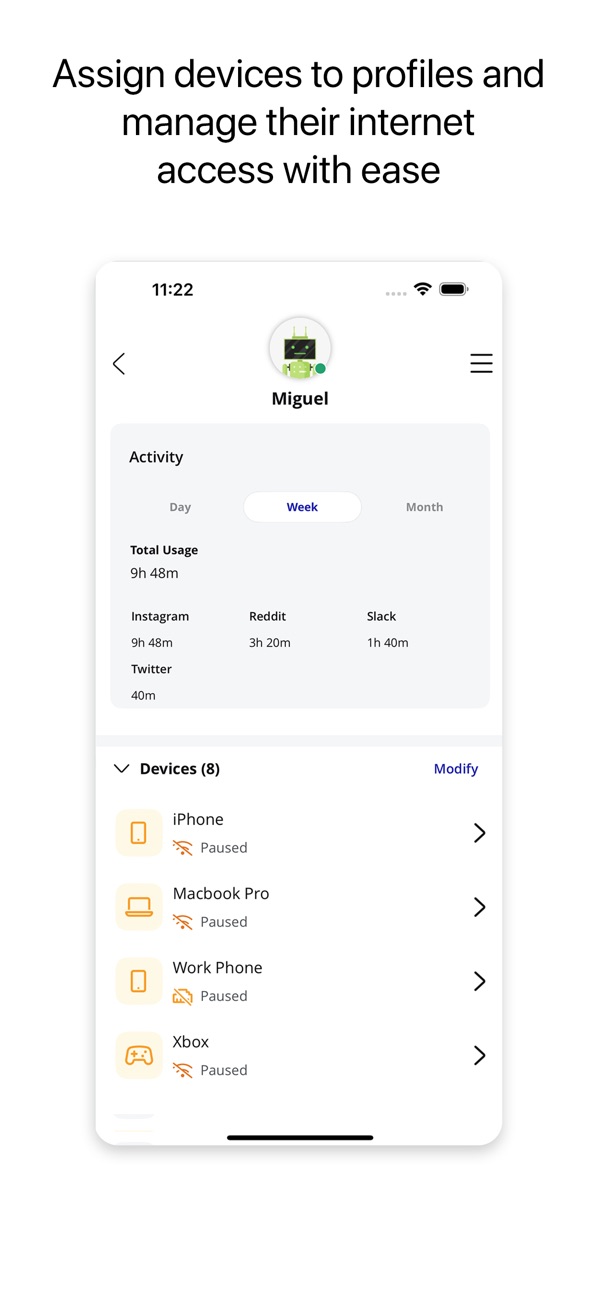
WCTA Managed WiFi is a Smart Home Mobile Application that allows subscribers to fully manage their home network. This app offers parental controls, network security, setting up guest Wi-Fi networks, and managing your SSID.
Accessibility
ipadiphonemacrealityDevicetvoswatch
Version history 16 versions
Build 887191159v26.2.12026-06-19 21:53:30
Bug Fixes
Build 883924182v26.1.12026-03-30 13:37:18
1. New functionality allowing you to add a hotspot for cellular backup of your internet service if there is an outage
2. Bug fixes
Build 881245513v25.4.22026-01-06 22:26:17
Bug Fixes
Build 878927478v25.3.22025-10-15 00:31:16
We redesigned WCTA Managed WiFi to better assist you and greatly improve the experience. With a fresh new design and powerful new features, managing your internet is now quicker and easier than ever.
The all new design includes the following updates:
• Quick Links Carousel - Quickly find the most used features at the top of the home screen
• People Carousel - Easily see everyone's profiles and online status, also pause a profile right from the Home Screen
• New included avatars to enhance your people profiles experience
• ExperienceIQ and ProtectIQ Tiles - same functionality with a new UI, and now found directly on the home screen
• Dark Mode now supported
• And more enhancements found within the app experience
Build 875173714v25.2.02025-05-29 21:09:14
Bug fixes
Build 872880286v25.1.02025-02-28 19:11:41
Bug fixes
Build 871236350v24.4.22024-12-18 18:17:13
Added reboot from app for router and mesh
Support for third party gateways from CommandIQ
Build 868528900v24.3.02024-08-27 17:25:34
Added support for text size changes from device OS (can be changed in the Settings app, in Accessibility)
Build 866138212v24.2.02024-05-22 22:35:21
1. Self Install UI improvements and added Self Upgrade
2. Improved accessibility with ADA/WCAG conformant UI updates
Build 863914202v24.1.02024-02-21 16:27:34
Bug fixes
Build 861617384v23.4.02023-11-20 23:32:22
• Self Install, guided instructions for new subscribers installing a gateway
• Support for bandwidth speed tests up to 10Gbps
Build 859107992v23.3.02023-08-11 17:23:20
Bug fixes
Build 857158554v23.2.12023-05-17 16:11:57
• Secondary admin can remove themselves from the account
• Automatically changes Mbps to Gbps in Bandwidth Test
• Bug fixes
Build 855166549v23.1.02023-02-24 14:20:17
Bug fixes
Build 853496169v22.4.12022-11-22 18:06:30
Bug fixes
Build 853199444v22.4.02022-11-14 21:46:54
No pricing data captured yet — comparisons appear once the app has paid storefronts or in-app purchases.
Availability 49 of 49 storefronts
| Region | Language | Price | Ratings | Avg | Version |
|---|---|---|---|---|---|
| US | en-US | Free | 7 | 4.9 | 26.2.1 |
| AO | en-GB | Free | 0 | — | 26.2.1 |
| AR | es-MX | Free | 0 | — | 26.2.1 |
| BF | en-GB | Free | 0 | — | 26.2.1 |
| BJ | en-GB | Free | 0 | — | 26.2.1 |
| BO | es-MX | Free | 0 | — | 26.2.1 |
| BR | pt-BR | Free | 0 | — | 26.2.1 |
| BW | en-GB | Free | 0 | — | 26.2.1 |
| CD | en-GB | Free | 0 | — | 26.2.1 |
| CG | en-GB | Free | 0 | — | 26.2.1 |
| CI | fr-FR | Free | 0 | — | 26.2.1 |
| CL | es-MX | Free | 0 | — | 26.2.1 |
| CM | fr-FR | Free | 0 | — | 26.2.1 |
| CO | es-MX | Free | 0 | — | 26.2.1 |
| CR | es-MX | Free | 0 | — | 26.2.1 |
| CV | en-GB | Free | 0 | — | 26.2.1 |
| DZ | en-GB | Free | 0 | — | 26.2.1 |
| GA | fr-FR | Free | 0 | — | 26.2.1 |
| GH | en-GB | Free | 0 | — | 26.2.1 |
| GM | en-GB | Free | 0 | — | 26.2.1 |
| GW | en-GB | Free | 0 | — | 26.2.1 |
| KE | en-GB | Free | 0 | — | 26.2.1 |
| LR | en-GB | Free | 0 | — | 26.2.1 |
| LY | en-GB | Free | 0 | — | 26.2.1 |
| MA | en-GB | Free | 0 | — | 26.2.1 |
| MG | en-GB | Free | 0 | — | 26.2.1 |
| ML | en-GB | Free | 0 | — | 26.2.1 |
| MU | en-GB | Free | 0 | — | 26.2.1 |
| MW | en-GB | Free | 0 | — | 26.2.1 |
| MX | es-MX | Free | 0 | — | 26.2.1 |
| MZ | en-GB | Free | 0 | — | 26.2.1 |
| NA | en-GB | Free | 0 | — | 26.2.1 |
| NE | en-GB | Free | 0 | — | 26.2.1 |
| NG | en-GB | Free | 0 | — | 26.2.1 |
| PA | es-MX | Free | 0 | — | 26.2.1 |
| PY | es-MX | Free | 0 | — | 26.2.1 |
| RW | en-GB | Free | 0 | — | 26.2.1 |
| SC | en-GB | Free | 0 | — | 26.2.1 |
| SL | en-GB | Free | 0 | — | 26.2.1 |
| SN | en-GB | Free | 0 | — | 26.2.1 |
| ST | en-GB | Free | 0 | — | 26.2.1 |
| SZ | en-GB | Free | 0 | — | 26.2.1 |
| TD | en-GB | Free | 0 | — | 26.2.1 |
| TN | en-GB | Free | 0 | — | 26.2.1 |
| TZ | en-GB | Free | 0 | — | 26.2.1 |
| UG | en-GB | Free | 0 | — | 26.2.1 |
| UY | en-GB | Free | 0 | — | 26.2.1 |
| ZM | en-GB | Free | 0 | — | 26.2.1 |
| ZW | en-GB | Free | 0 | — | 26.2.1 |
Change log 19 changes · US
✎
releaseNotes updated
Bug Fixes
✎
description updated
WCTA Managed WiFi is a Smart Home Mobile Application that allows subscribers to fully manage their home network. This app offers parental controls, network secu
✎
name updated
WCTA Managed WiFi
◆
Version 26.2.1 released
Bug Fixes
◆
Version 26.1.1 released
1. New functionality allowing you to add a hotspot for cellular backup of your internet service if there is an outage
2. Bug fixes
◆
Version 25.4.2 released
Bug Fixes
◆
Version 25.3.2 released
We redesigned WCTA Managed WiFi to better assist you and greatly improve the experience. With a fresh new design and powerful new features, managing your internet is now quicker and easier than ever.
The all new design includes the followi
◆
Version 25.2.0 released
Bug fixes
◆
Version 25.1.0 released
Bug fixes
◆
Version 24.4.2 released
Added reboot from app for router and mesh
Support for third party gateways from CommandIQ
◆
Version 24.3.0 released
Added support for text size changes from device OS (can be changed in the Settings app, in Accessibility)
◆
Version 24.2.0 released
1. Self Install UI improvements and added Self Upgrade
2. Improved accessibility with ADA/WCAG conformant UI updates
◆
Version 24.1.0 released
Bug fixes
◆
Version 23.4.0 released
• Self Install, guided instructions for new subscribers installing a gateway
• Support for bandwidth speed tests up to 10Gbps
◆
Version 23.3.0 released
Bug fixes
◆
Version 23.2.1 released
• Secondary admin can remove themselves from the account
• Automatically changes Mbps to Gbps in Bandwidth Test
• Bug fixes
◆
Version 23.1.0 released
Bug fixes
◆
Version 22.4.1 released
Bug fixes
◆
Version 22.4.0 released