Home › Navigation

 US
US
1 of 1 storefronts
Content in en-US
Content in en-US
Information
Preview 3 platforms
iPhone 7 images


iPad 7 images


Apple Watch 3 images


What’s New Version 2.69
- bug fixes
Description
With our app, measuring the area of spaces is even easier.
• Dual Mode Precision: Enjoy easy GPS-based or manual map-pointing measurements for accurate area calculations.
• Unmatched Accuracy: Rely on our high-precision GPS for consistently accurate measurements.
• Versatile Measurements: Switch effortlessly between area and distance measurements to suit diverse needs.
• Measurement Storage: Save and revisit your measurements anytime for convenience.
• Compass Navigation: Easily navigate to saved areas with our integrated compass feature.
• Data Sync: Log in to synchronize your data across multiple devices seamlessly.
• Data Export/Import: Share and receive measurements easily with GPX and KML format support.
• Customizable Units: Choose between metric and imperial units for your comfort.
• In-App Help Function: Easily learn about all app functions with our comprehensive in-app help feature.
• SOS Feature: Send SOS messages with your location in emergencies.
• Snapshot Feature: Quickly capture and save screenshots of your measurements.
• Sorted Measurements: Organize saved measurements by name, date, distance, or size.
• Location Accuracy: Select your preferred location accuracy for detailed or battery-saving measurements.
• Background Measuring: Continue measuring in the background for uninterrupted multitasking.
• Apple Watch Integration: Conveniently measure using your Apple Watch watch and sync with your phone.
• Multiple Map Views: Choose from normal, terrain, hybrid, or satellite maps for a tailored view.
One measuring option is just to start the app and walk around a space to measure the area on foot. This is the easiest method to use if you simply need square footage.
The other measuring option involves a little more planning. Sit on your comfy sofa, start our app, and in the custom map view, manually select the points/area to measure. This can come in handy if you want to measure your plot of land, or a physical area for future investment. On the other hand, if you are a farmer and you want to know the area of your planting fields, it's a great option for you as well. After taking the measurements, you can share them with your coworkers or friends. The app is extremely useful for a large number of specialists in various fields:
- Land surveyors
- City planners
- Farmers
- Landscape designers
- Construction surveys
- Facilities mapping
- Construction sites and building sites area
- Farm fencing
Some of the measurements include:
- Field area measurement in meters², kilometers², feet², nmi², yards² and acres.
- Distance measurement in meters, kilometers, nautical miles, feet & miles, yards
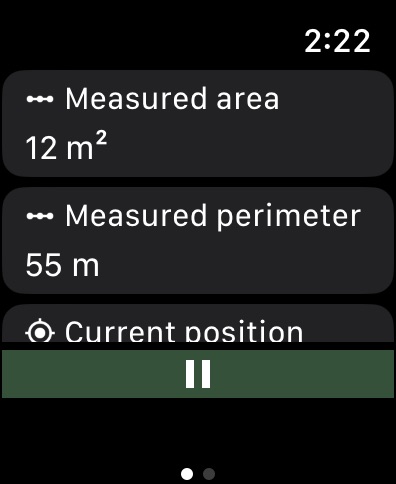
Our app comes with a brand new application for Apple Watch. You can easily make all measurements without using your phone and synchronize data afterwards to enjoy viewing your saved measurements on a bigger screen!
Recommendations
External Bluetooth GPS receiver is recommended if your built-in receiver is not accurate enough. We specifically recommend GARMIN GLO and GARMIN GLO 2 which gives the accuracy up to 0.3 m.
Our app can also come in handy when measuring distances, so if you are a runner, or you are planning a hiking trip, there’s nothing simpler than measuring the distances of your adventure with our app!
Our measurement algorithms are very accurate. They use both GPS positioning and a network connection to make your measurements even more accurate.
Important!: The accuracy of the application depends on the GPS sensor accuracy in a device - on most devices the accuracy is within +/- 5m. To improve accuracy, we encourage you to use more a precise GPS receiver, such as Garmin which provides accuracy to a few cm.
Privacy policy: https://mysticmobileapps.com/legal/privacy/mygpsareacalculator
Terms and conditions: https://mysticmobileapps.com/legal/terms/mygpsareacalculator
In-App Purchases US pricing
My GPS Area Calculator+ Subscription
Monthly GPS Area Calculator+ · Monthly$0.99
Annual GPS Area Calculator+ · Yearly$7.99
Capabilities
In-App Purchases
Accessibility
ipadiphonemacrealityDevicetvoswatch
Version history 25 versions
Build 887377908v2.692026-06-25 05:24:14
- bug fixes
Build 884710552v2.682026-04-21 05:50:54
- bug fixes
Build 884044101v2.672026-04-07 09:02:11
- bug fixes
Build 882533840v2.662026-02-18 07:36:44
- bug fixes
Build 881527730v2.652026-01-19 12:51:55
- bug fixes
Build 880033960v2.642025-11-25 13:57:31
- bug fixes
Build 878919821v2.632025-10-15 07:07:06
- bug fixes
Build 878733309v2.622025-10-08 07:00:10
- fixed issues with accessibility options
- bug fixes
Build 878595058v2.612025-10-03 08:46:19
- bug fixes
Build 878191598v2.602025-09-18 09:00:14
- bug fixes
Build 878115847v2.592025-09-16 06:52:47
- added cloud synchronization for users with premium
- bug fixes
Build 877571900v2.582025-08-27 08:34:03
- bug fixes
Build 876631711v2.572025-07-25 07:19:17
- bug fixes
Build 876377191v2.562025-07-16 08:31:03
- bug fixes
Build 874929277v2.552025-05-22 06:51:01
- bug fixes
Build 874734853v2.542025-05-15 12:34:00
- bug fixes
Build 873664468v2.532025-04-01 09:55:45
- bug fixes
Build 873548503v2.522025-03-27 08:44:53
- bug fixes
Build 873021730v2.512025-03-07 16:10:18
- bug fixes
Build 872263393v2.502025-02-06 15:14:38
- bug fixes
- added App language picker
Build 870925753v2.492024-12-23 13:17:06
- bug fixes
Build 870367246v2.482024-11-13 09:47:17
- bug fixes
Build 869726845v2.472024-10-17 07:43:39
- bug fixes
Build 869380847v2.462024-10-01 09:40:04
- bug fixes
Build 869060585v2.452024-09-18 10:30:52
- updated tutorials
- bug fixes
Price history by region
Currency
Show
Columns
Search
Availability 1 of 1 storefronts
| Region | Language | Price | Ratings | Avg | Version |
|---|---|---|---|---|---|
| US | en-US | Free | 10 | 4.5 | 2.69 |
Change log 29 changes · US
✎
releaseNotes updated
- bug fixes
✎
description updated
With our app, measuring the area of spaces is even easier.
• Dual Mode Precision: Enjoy easy GPS-based or manual map-pointing measurements for accurate are
✎
subtitle updated
Surface Area Calculator
✎
name updated
My GPS Area Calculator
◆
Version 2.69 released
- bug fixes
◆
Version 2.68 released
- bug fixes
◆
Version 2.67 released
- bug fixes
◆
Version 2.66 released
- bug fixes
◆
Version 2.65 released
- bug fixes
◆
Version 2.64 released
- bug fixes
◆
Version 2.63 released
- bug fixes
◆
Version 2.62 released
- fixed issues with accessibility options
- bug fixes
◆
Version 2.61 released
- bug fixes
◆
Version 2.60 released
- bug fixes
◆
Version 2.59 released
- added cloud synchronization for users with premium
- bug fixes
◆
Version 2.58 released
- bug fixes
◆
Version 2.57 released
- bug fixes
◆
Version 2.56 released
- bug fixes
◆
Version 2.55 released
- bug fixes
◆
Version 2.54 released
- bug fixes
◆
Version 2.53 released
- bug fixes
◆
Version 2.52 released
- bug fixes
◆
Version 2.51 released
- bug fixes
◆
Version 2.50 released
- bug fixes
- added App language picker
◆
Version 2.49 released
- bug fixes
◆
Version 2.48 released
- bug fixes
◆
Version 2.47 released
- bug fixes
◆
Version 2.46 released
- bug fixes
◆
Version 2.45 released
- updated tutorials
- bug fixes