Home › Productivity

 US
US
1 of 1 storefronts
Content in en-US
Content in en-US
Information
Preview 3 platforms
iPhone 5 images


iPad 7 images


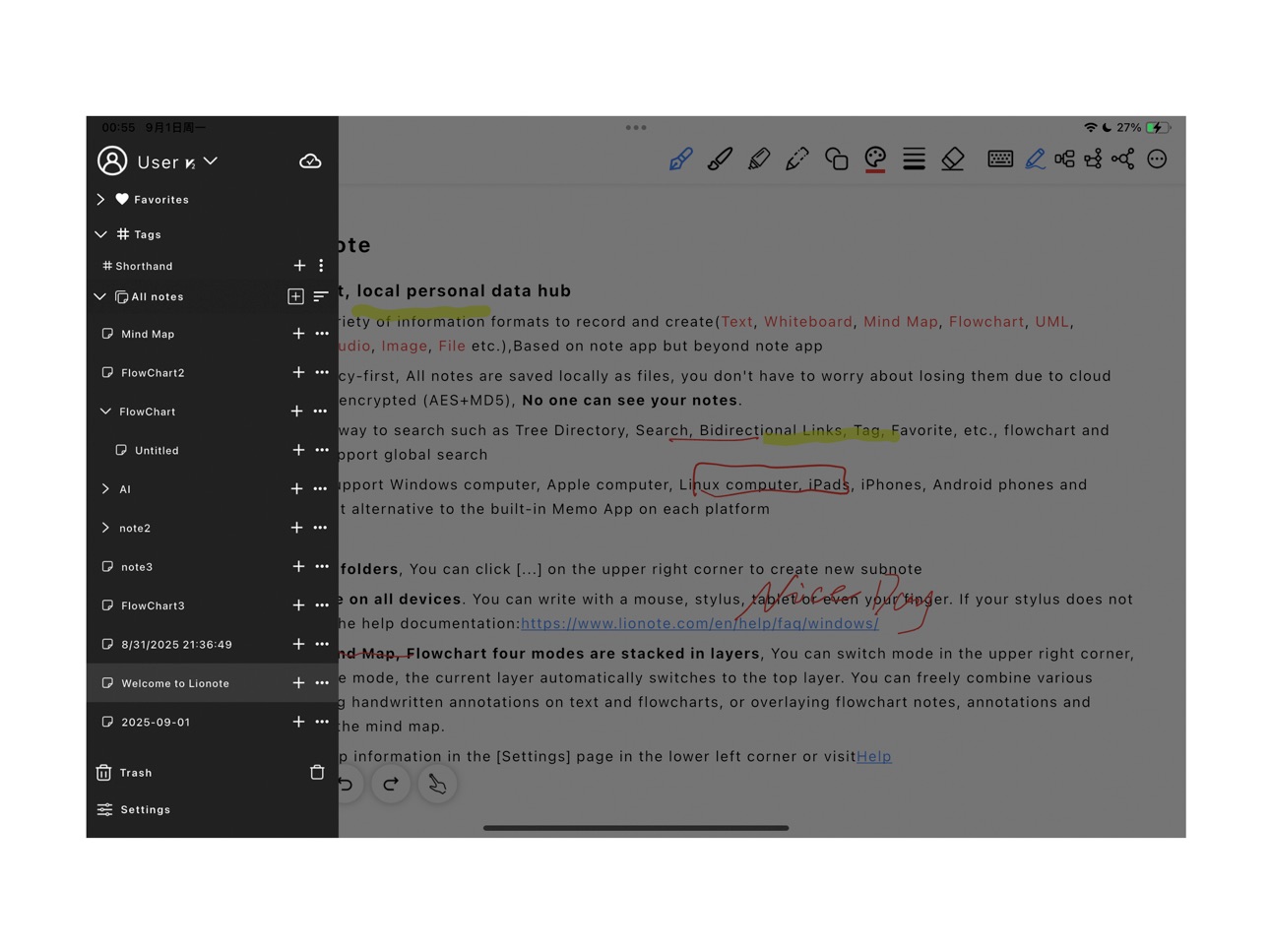
Mac 6 images


What’s New Version 3.8.7
1. Added Schedule Management
2. Added Stationery Settings
3. Supports sharing notes with friends
4. Supports Web Clipping (saving WeChat articles and web content)
5. Tags now support colors and categorization
6. Tags now support multi-level combined search
7. Supports exporting PDF annotations
8. Flowcharts now support curved lines and arrows in any direction
9. Mind maps now support adding multiple central topics
10. Supports reverse sorting
11. Optimized the Eraser tool
12. Each brush now supports custom colors and widths (automatically remembered)
13. Optimized UI styles and user interactions
14. Upgraded the Bi-directional Linking feature
15. Upgraded to a new encryption scheme: PBKDF2 + Random Salt + AES Multi-layer Encryption
16. Significantly optimized canvas performance, resolving lag issues on certain device models
17. Fixed various bugs
Description
Lionote is a freedom, privacy-first, local personal data hub, based on note app but beyond note app. Freely use a variety of information formats to record and create(Text, Whiteboard, Mind Map, Flowchart, UML, Markdown, AI assistant, Audio, Image, File, Schedule Management etc.). All notes are saved locally as files, you don't have to worry about losing them due to cloud server error. Sync is fully encrypted (PBKDF2+RandomSalt+AES), No one can see your notes
In-App Purchases US pricing
VIP1, one month Subscription
Subscription$0.69
VIP2, one month Subscription
Subscription$1.69
VIP3, one month Subscription
Subscription$6.29
VIP1, one year Subscription
Subscription$7.59
VIP2, one year Subscription
Subscription$17.90
VIP3, one year Subscription
Subscription$64.90
Capabilities
In-App Purchases
Accessibility
ipadiphonemacrealityDevicetvoswatch
Version history 25 versions
Build 887479607v3.8.72026-06-27 00:24:08
1. Added Schedule Management
2. Added Stationery Settings
3. Supports sharing notes with friends
4. Supports Web Clipping (saving WeChat articles and web content)
5. Tags now support colors and categorization
6. Tags now support multi-level combined search
7. Supports exporting PDF annotations
8. Flowcharts now support curved lines and arrows in any direction
9. Mind maps now support adding multiple central topics
10. Supports reverse sorting
11. Optimized the Eraser tool
12. Each brush now supports custom colors and widths (automatically remembered)
13. Optimized UI styles and user interactions
14. Upgraded the Bi-directional Linking feature
15. Upgraded to a new encryption scheme: PBKDF2 + Random Salt + AES Multi-layer Encryption
16. Significantly optimized canvas performance, resolving lag issues on certain device models
17. Fixed various bugs
Build 886591288v3.8.62026-06-06 15:47:38
1. Added Schedule Management
2. Added Stationery Settings
3. Supports sharing notes with friends
4. Supports Web Clipping (saving WeChat articles and web content)
5. Tags now support colors and categorization
6. Tags now support multi-level combined search
7. Supports exporting PDF annotations
8. Flowcharts now support curved lines and arrows in any direction
9. Mind maps now support adding multiple central topics
10. Supports reverse sorting
11. Optimized the Eraser tool
12. Each brush now supports custom colors and widths (automatically remembered)
13. Optimized UI styles and user interactions
14. Upgraded the Bi-directional Linking feature
15. Upgraded to a new encryption scheme: PBKDF2 + Random Salt + AES Multi-layer Encryption
16. Significantly optimized canvas performance, resolving lag issues on certain device models
17. Fixed various bugs
Build 886249353v3.8.52026-05-28 21:22:34
1. Added Schedule Management
2. Added Stationery Settings
3. Supports sharing notes with friends
4. Supports Web Clipping (saving WeChat articles and web content)
5. Tags now support colors and categorization
6. Tags now support multi-level combined search
7. Supports exporting PDF annotations
8. Flowcharts now support curved lines and arrows in any direction
9. Mind maps now support adding multiple central topics
10. Supports reverse sorting
11. Optimized the Eraser tool
12. Each brush now supports custom colors and widths (automatically remembered)
13. Optimized UI styles and user interactions
14. Upgraded the Bi-directional Linking feature
15. Upgraded to a new encryption scheme: PBKDF2 + Random Salt + AES Multi-layer Encryption
16. Significantly optimized canvas performance, resolving lag issues on certain device models
17. Fixed various bugs
Build 886203074v3.8.32026-05-27 19:11:14
1. Added Schedule Management
2. Added Stationery Settings
3. Supports sharing notes with friends
4. Supports Web Clipping (saving WeChat articles and web content)
5. Tags now support colors and categorization
6. Tags now support multi-level combined search
7. Supports exporting PDF annotations
8. Flowcharts now support curved lines and arrows in any direction
9. Mind maps now support adding multiple central topics
10. Supports reverse sorting
11. Optimized the Eraser tool
12. Each brush now supports custom colors and widths (automatically remembered)
13. Optimized UI styles and user interactions
14. Upgraded the Bi-directional Linking feature
15. Upgraded to a new encryption scheme: PBKDF2 + Random Salt + AES Multi-layer Encryption
16. Significantly optimized canvas performance, resolving lag issues on certain device models
17. Fixed various bugs
Build 886020709v3.8.22026-05-23 20:04:38
1. Added Schedule Management
2. Added Stationery Settings
3. Supports sharing notes with friends
4. Supports Web Clipping (saving WeChat articles and web content)
5. Tags now support colors and categorization
6. Tags now support multi-level combined search
7. Supports exporting PDF annotations
8. Flowcharts now support curved lines and arrows in any direction
9. Mind maps now support adding multiple central topics
10. Supports reverse sorting
11. Optimized the Eraser tool
12. Each brush now supports custom colors and widths (automatically remembered)
13. Optimized UI styles and user interactions
14. Upgraded the Bi-directional Linking feature
15. Upgraded to a new encryption scheme: PBKDF2 + Random Salt + AES Multi-layer Encryption
16. Significantly optimized canvas performance, resolving lag issues on certain device models
17. Fixed various bugs
Build 885468745v3.6.92026-05-11 03:05:27
1. Added Schedule Management
2. Added Stationery Settings
3. Supports sharing notes with friends
4. Supports Web Clipping (saving WeChat articles and web content)
5. Tags now support colors and categorization
6. Tags now support multi-level combined search
7. Supports exporting PDF annotations
8. Flowcharts now support curved lines and arrows in any direction
9. Mind maps now support adding multiple central topics
10. Supports reverse sorting
11. Optimized the Eraser tool
12. Each brush now supports custom colors and widths (automatically remembered)
13. Optimized UI styles and user interactions
14. Upgraded the Bi-directional Linking feature
15. Upgraded to a new encryption scheme: PBKDF2 + Random Salt + AES Multi-layer Encryption
16. Significantly optimized canvas performance, resolving lag issues on certain device models
17. Fixed various bugs
Build 885342555v3.6.82026-05-06 23:28:45
1. Added Schedule Management
2. Added Stationery Settings
3. Supports sharing notes with friends
4. Supports Web Clipping (saving WeChat articles and web content)
5. Tags now support colors and categorization
6. Tags now support multi-level combined search
7. Supports exporting PDF annotations
8. Flowcharts now support curved lines and arrows in any direction
9. Mind maps now support adding multiple central topics
10. Supports reverse sorting
11. Optimized the Eraser tool
12. Each brush now supports custom colors and widths (automatically remembered)
13. Optimized UI styles and user interactions
14. Upgraded the Bi-directional Linking feature
15. Upgraded to a new encryption scheme: PBKDF2 + Random Salt + AES Multi-layer Encryption
16. Significantly optimized canvas performance, resolving lag issues on certain device models
17. Fixed various bugs
Build 885237881v3.6.62026-05-05 09:57:21
1. Added Schedule Management
2. Added Stationery Settings
3. Supports sharing notes with friends
4. Supports Web Clipping (saving WeChat articles and web content)
5. Tags now support colors and categorization
6. Tags now support multi-level combined search
7. Supports exporting PDF annotations
8. Flowcharts now support curved lines and arrows in any direction
9. Mind maps now support adding multiple central topics
10. Supports reverse sorting
11. Optimized the Eraser tool
12. Each brush now supports custom colors and widths (automatically remembered)
13. Optimized UI styles and user interactions
14. Upgraded the Bi-directional Linking feature
15. Upgraded to a new encryption scheme: PBKDF2 + Random Salt + AES Multi-layer Encryption
16. Significantly optimized canvas performance, resolving lag issues on certain device models
17. Fixed various bugs
Build 881999483v3.6.02026-02-09 05:08:24
1. Optimized note synchronization
2. Automatically fixed note width after handwriting for consistency across different devices
3. Encrypted passwords support verification
4. Optimized document layout styles
5. Support for local area network clipboard sharing
6. Support for meeting minutes (automatic transcription of audio)
7. Note content search supports highlighting
8. Optimized AI assistant user experience
Build 880542919v3.5.62025-12-14 13:33:20
Add File center
Supports inserting freely movable images and text.
Supports setting user avatars.
Supports manual refresh by clicking.
Outline view updates in real time.
Faster synchronization speed.
Fix some bug
Build 879932784v3.5.32025-12-03 15:24:37
1. Add File center
2. Outline view auto sync
2. Fix some bug
Build 879872141v3.5.02025-11-20 07:00:18
1. Add File center
2. Outline view auto sync
2. Fix some bug
Build 878985725v3.4.12025-10-18 08:51:52
1 Support more language
2 Optimize support for Latex formulas
3 Fix some bug
Build 878118998v3.3.92025-09-24 04:39:16
1. Optimize support for Latex formulas
2. fix some bug
3. Optimize support for English
Build 877867525v3.3.82025-09-15 03:07:08
Some bug fix
Build 877784212v3.3.72025-09-04 20:18:08
some bug fix
Build 877684369v3.3.62025-09-02 12:23:05
Support more language
Build 877454614v3.3.52025-08-22 17:24:13
Build 877214459v3.3.42025-08-14 10:03:23
Build 877098871v3.3.22025-08-11 09:18:23
Build 875064654v3.3.02025-07-09 23:38:05
Build 874963535v3.2.02025-05-22 13:14:39
Build 874363755v3.1.12025-04-30 06:33:57
Build 873393116v3.0.02025-03-20 16:36:12
Build 872938887v2.9.92025-03-12 17:26:58
Price history by region
Currency
Show
Columns
Search
Availability 1 of 1 storefronts
| Region | Language | Price | Ratings | Avg | Version |
|---|---|---|---|---|---|
| US | en-US | Free | 0 | — | 3.8.7 |
Change log 29 changes · US
✎
releaseNotes updated
1. Added Schedule Management
2. Added Stationery Settings
3. Supports sharing notes with friends
4. Supports Web Clipping (saving WeChat articles and web conten
✎
description updated
Lionote is a freedom, privacy-first, local personal data hub, based on note app but beyond note app. Freely use a variety of information formats to record and
✎
subtitle updated
Text & Handwriting Note-Taking
✎
name updated
Lionote
◆
Version 3.8.7 released
1. Added Schedule Management
2. Added Stationery Settings
3. Supports sharing notes with friends
4. Supports Web Clipping (saving WeChat articles and web content)
5. Tags now support colors and categorization
6. Tags now support multi-level
◆
Version 3.8.6 released
1. Added Schedule Management
2. Added Stationery Settings
3. Supports sharing notes with friends
4. Supports Web Clipping (saving WeChat articles and web content)
5. Tags now support colors and categorization
6. Tags now support multi-level
◆
Version 3.8.5 released
1. Added Schedule Management
2. Added Stationery Settings
3. Supports sharing notes with friends
4. Supports Web Clipping (saving WeChat articles and web content)
5. Tags now support colors and categorization
6. Tags now support multi-level
◆
Version 3.8.3 released
1. Added Schedule Management
2. Added Stationery Settings
3. Supports sharing notes with friends
4. Supports Web Clipping (saving WeChat articles and web content)
5. Tags now support colors and categorization
6. Tags now support multi-level
◆
Version 3.8.2 released
1. Added Schedule Management
2. Added Stationery Settings
3. Supports sharing notes with friends
4. Supports Web Clipping (saving WeChat articles and web content)
5. Tags now support colors and categorization
6. Tags now support multi-level
◆
Version 3.6.9 released
1. Added Schedule Management
2. Added Stationery Settings
3. Supports sharing notes with friends
4. Supports Web Clipping (saving WeChat articles and web content)
5. Tags now support colors and categorization
6. Tags now support multi-level
◆
Version 3.6.8 released
1. Added Schedule Management
2. Added Stationery Settings
3. Supports sharing notes with friends
4. Supports Web Clipping (saving WeChat articles and web content)
5. Tags now support colors and categorization
6. Tags now support multi-leve
◆
Version 3.6.6 released
1. Added Schedule Management
2. Added Stationery Settings
3. Supports sharing notes with friends
4. Supports Web Clipping (saving WeChat articles and web content)
5. Tags now support colors and categorization
6. Tags now support multi-leve
◆
Version 3.6.0 released
1. Optimized note synchronization
2. Automatically fixed note width after handwriting for consistency across different devices
3. Encrypted passwords support verification
4. Optimized document layout styles
5. Support for local area network
◆
Version 3.5.6 released
Add File center
Supports inserting freely movable images and text.
Supports setting user avatars.
Supports manual refresh by clicking.
Outline view updates in real time.
Faster synchronization speed.
Fix some bug
◆
Version 3.5.3 released
1. Add File center
2. Outline view auto sync
2. Fix some bug
◆
Version 3.5.0 released
1. Add File center
2. Outline view auto sync
2. Fix some bug
◆
Version 3.4.1 released
1 Support more language
2 Optimize support for Latex formulas
3 Fix some bug
◆
Version 3.3.9 released
1. Optimize support for Latex formulas
2. fix some bug
3. Optimize support for English
◆
Version 3.3.8 released
Some bug fix
◆
Version 3.3.7 released
some bug fix
◆
Version 3.3.6 released
Support more language
◆
Version 3.3.5 released
◆
Version 3.3.4 released
◆
Version 3.3.2 released
◆
Version 3.3.0 released
◆
Version 3.2.0 released
◆
Version 3.1.1 released
◆
Version 3.0.0 released
◆
Version 2.9.9 released