Home › Weather

 US
US
1 of 1 storefronts
Content in en-US
Content in en-US
Information
Preview 2 platforms
iPhone 5 images



iPad 4 images


What’s New Version 3.1
New in 3.1:
* More stability fixes.
New in 3.0:
* Adopt the iOS 26 look and feel.
* Fix issues were a new bubble would only scroll partially into view.
* Use a more modern current location indicator.
* More stability fixes.
New in 2.9:
* Fixed a memory leak introduced with new menus.
* More stability fixes.
New in 2.8:
* Adjusted button sizes.
* More stability fixes.
New in 2.7:
* Bumped the iOS target to 14.0.
* Use more modern iOS 14+ menus.
* Use the iOS 14+ color picker.
* Favorite background photos are remembered again.
* More stability fixes.
New in 2.6:
* Fix a weather warning icon in the point forecast bubble appearing even if there is no warning.
* Fix transparency settings not appearing for the point forecast bubbles.
* Sync local forcast bubbles faster via iCloud.
* Bumped the iOS target to 12.0.
* Removed the home grown crash reporting. A crash might still be reported if the Apple option to share crash reports with developers is activated.
* More stability fixes
New in 2.5:
* Support for App Tracking Transparency
* Store favorites and open bubbles in iCloud
* Import the latest city and airport databases.
* More stability fixes
New in 2.4:
* More stability fixes
New in 2.3:
* Support iOS 13 dark mode
* New city database
* More stability fixes
New in 2.2:
* If subscribed to the extended forecast, the global cloud image updates every hour instead of every three hours
* New city database
* Fixed layout issues on newer devices
* Fixed favorite list weather only updating after pull-down refresh
New in 2.1.1:
* Not all ads were turned off by the no ads subscription.
* Changing bubble transparency did require to close bubbles before the change took effect
New in 2.1.0:
* iOS 11 compatibility
* iPad pro multitasking
* New city and airport databases
* Improved sharing
Thank you for letting us know what features you'd like to see. We'll do our best to include them in future updates!
Have Fun using Global Weather and Thank you for your feedback.
Description
GLOBAL WEATHER: The easiest way to get weather forecasts!
JUST TAP!
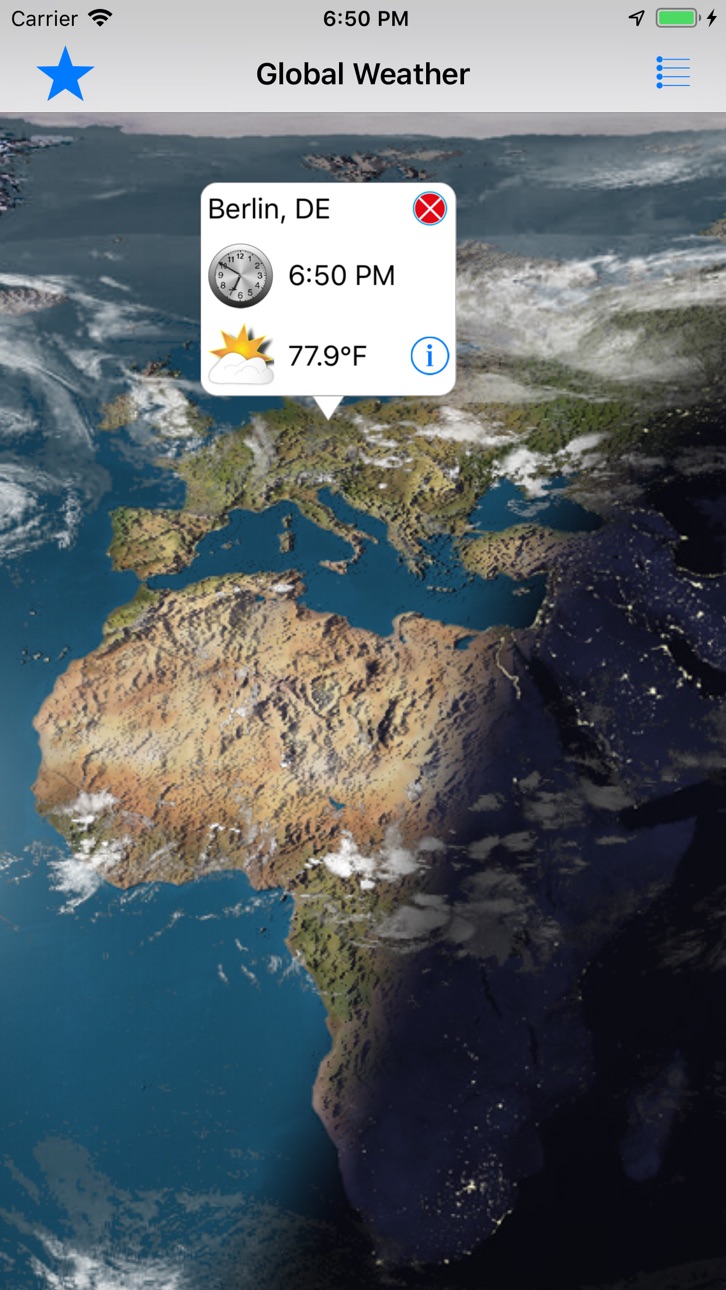
This is a unique, interactive, easy to use app for anywhere-weather on the go. Just tap the map anywhere in the world to get the weather instantly. That's all you need to do to get a forecast! The perfect app for travelers.
YOUR FUN INDIVIDUAL SCREEN
Don't like the Weather? Like Your Design! Use Your Photos! Select your own photos and create your own individual screen for your favorite locations. Make it yours!
A STUNNING EYE-CATCHER
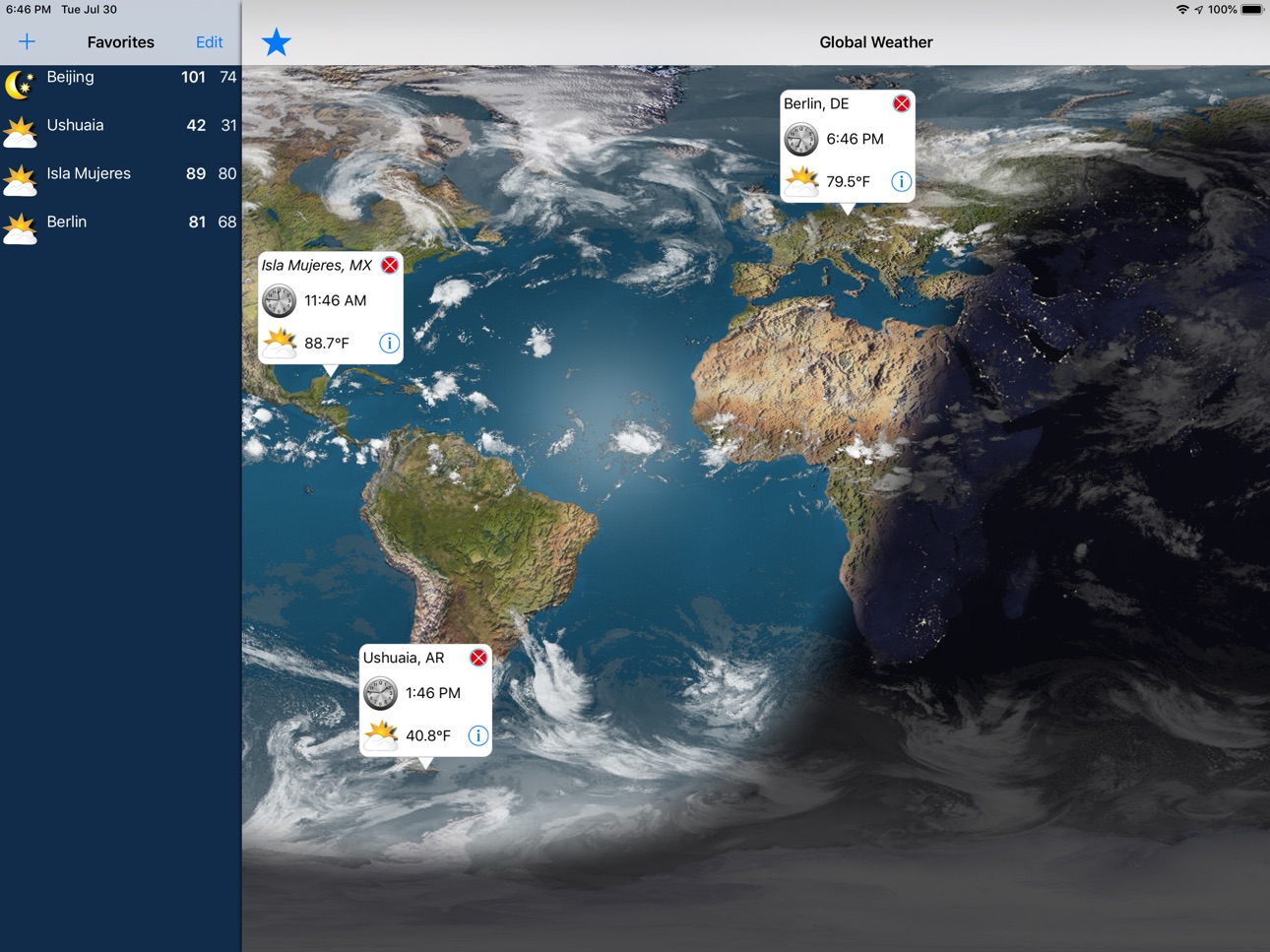
Enjoy a fascinating view from space showing our planet Earth with its worldwide clouds systems. Explore Global Weather's spectacular meteorological snapshot. Watch weather situations as they unfold around the world. A world-wide cloud formation view is available that refreshes every three hours.
CITY and AIRPORT SEARCH
You can navigate to all parts of the world, search for a city or an airport (ICAO, IATA code or name). Any city/town worldwide with a minimum of 1000 inhabitants can be searched directly in Global Weather. Or use the magnifier enabled by touching the screen for two seconds.
WORLD CLOCK
Analog and digital time is displayed in the bubble and can be turned on/off in settings.
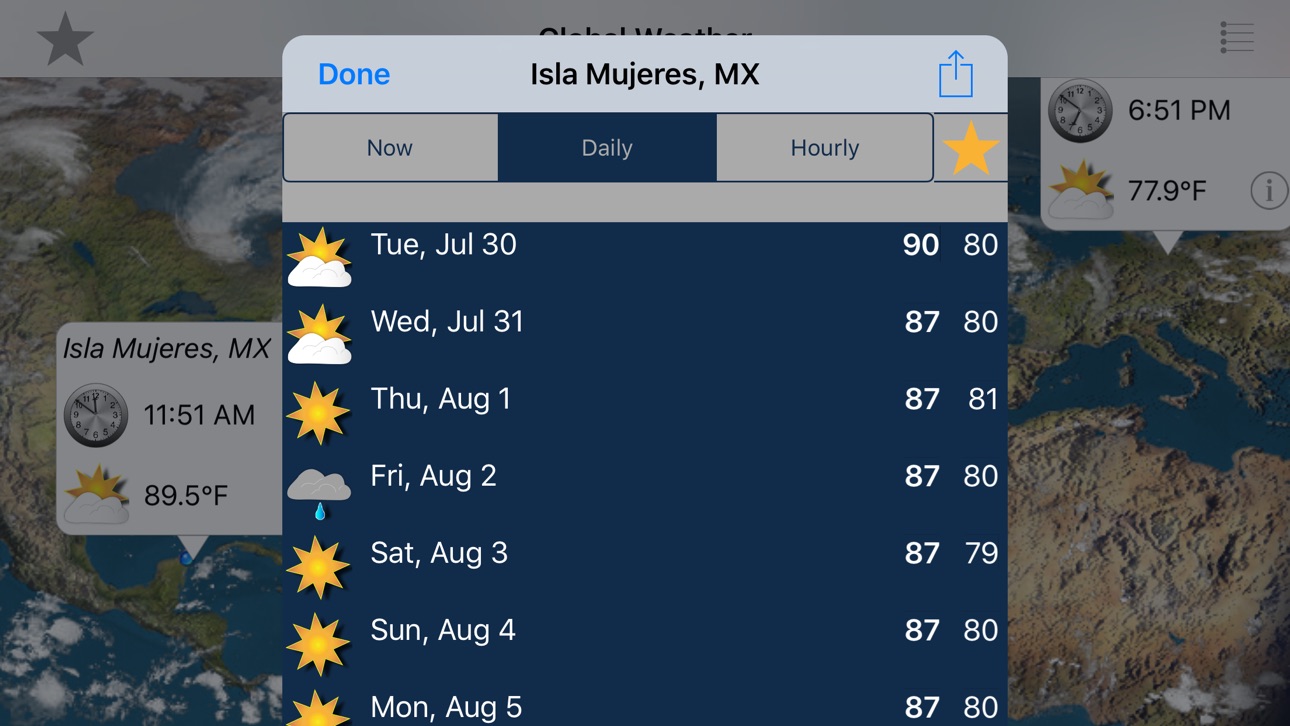
WEATHER DETAILS
Global Weather includes a wide range of professional features.
GPS
As opposed to most free weather apps we DO NOT track your GPS position to sell it for ad targeting.
UNIVERSAL APPLICATION:
Fully functional on iPad, iPhone, iPod at no additional costs!
Get Global Weather and get ready for any weather to come!
Why pay more?
SUBSCRIPTION GLOBAL WEATHER "EXTENDED FORECAST" AUTOMATICALLY RENEWS unless auto-renew is
turned off at least 24-hours before end of current period.
Price: USD 0,99/year
SUBSCRIPTION GLOBAL WEATHER "NO ADS" AUTOMATICALLY RENEWS unless auto-renew is
turned off at least 24-hours before end of current period.
Price: USD 1,99/year
Your iTunes account will automatically be charged at the same price for
renewal within 24-hours prior to end of current period unless you change
your subscription preferences in your account settings.
For additional information on how to manage your subscription please go
to http://goo.gl/CQHG5H
Please read these terms and conditions carefully before using "GLOBAL WEATHER".
https://goo.gl/7F4Jbm
In-App Purchases US pricing
Extended Forecast, Subscription
Extended Forecast · Yearly$1.49
GLOBAL WEATHER ad free Subscription
GLOBAL WEATHER No Ads · Yearly$1.99
Capabilities
In-App Purchases
Accessibility
ipadiphonemacrealityDevicetvoswatch
Version history 16 versions
Build 882094787v3.12026-02-03 13:18:06
New in 3.1:
* More stability fixes.
New in 3.0:
* Adopt the iOS 26 look and feel.
* Fix issues were a new bubble would only scroll partially into view.
* Use a more modern current location indicator.
* More stability fixes.
New in 2.9:
* Fixed a memory leak introduced with new menus.
* More stability fixes.
New in 2.8:
* Adjusted button sizes.
* More stability fixes.
New in 2.7:
* Bumped the iOS target to 14.0.
* Use more modern iOS 14+ menus.
* Use the iOS 14+ color picker.
* Favorite background photos are remembered again.
* More stability fixes.
New in 2.6:
* Fix a weather warning icon in the point forecast bubble appearing even if there is no warning.
* Fix transparency settings not appearing for the point forecast bubbles.
* Sync local forcast bubbles faster via iCloud.
* Bumped the iOS target to 12.0.
* Removed the home grown crash reporting. A crash might still be reported if the Apple option to share crash reports with developers is activated.
* More stability fixes
New in 2.5:
* Support for App Tracking Transparency
* Store favorites and open bubbles in iCloud
* Import the latest city and airport databases.
* More stability fixes
New in 2.4:
* More stability fixes
New in 2.3:
* Support iOS 13 dark mode
* New city database
* More stability fixes
New in 2.2:
* If subscribed to the extended forecast, the global cloud image updates every hour instead of every three hours
* New city database
* Fixed layout issues on newer devices
* Fixed favorite list weather only updating after pull-down refresh
New in 2.1.1:
* Not all ads were turned off by the no ads subscription.
* Changing bubble transparency did require to close bubbles before the change took effect
New in 2.1.0:
* iOS 11 compatibility
* iPad pro multitasking
* New city and airport databases
* Improved sharing
Thank you for letting us know what features you'd like to see. We'll do our best to include them in future updates!
Have Fun using Global Weather and Thank you for your feedback.
Build 881754671v3.02026-01-27 14:21:33
New in 3.0:
* Adopt the iOS 26 look and feel.
* Fix issues were a new bubble would only scroll partially into view.
* Use a more modern current location indicator.
* More stability fixes.
New in 2.9:
* Fixed a memory leak introduced with new menus.
* More stability fixes.
New in 2.8:
* Adjusted button sizes.
* More stability fixes.
New in 2.7:
* Bumped the iOS target to 14.0.
* Use more modern iOS 14+ menus.
* Use the iOS 14+ color picker.
* Favorite background photos are remembered again.
* More stability fixes.
New in 2.6:
* Fix a weather warning icon in the point forecast bubble appearing even if there is no warning.
* Fix transparency settings not appearing for the point forecast bubbles.
* Sync local forcast bubbles faster via iCloud.
* Bumped the iOS target to 12.0.
* Removed the home grown crash reporting. A crash might still be reported if the Apple option to share crash reports with developers is activated.
* More stability fixes
New in 2.5:
* Support for App Tracking Transparency
* Store favorites and open bubbles in iCloud
* Import the latest city and airport databases.
* More stability fixes
New in 2.4:
* More stability fixes
New in 2.3:
* Support iOS 13 dark mode
* New city database
* More stability fixes
New in 2.2:
* If subscribed to the extended forecast, the global cloud image updates every hour instead of every three hours
* New city database
* Fixed layout issues on newer devices
* Fixed favorite list weather only updating after pull-down refresh
New in 2.1.1:
* Not all ads were turned off by the no ads subscription.
* Changing bubble transparency did require to close bubbles before the change took effect
New in 2.1.0:
* iOS 11 compatibility
* iPad pro multitasking
* New city and airport databases
* Improved sharing
Thank you for letting us know what features you'd like to see. We'll do our best to include them in future updates!
Have Fun using Global Weather and Thank you for your feedback.
Build 865167013v2.92024-04-13 19:51:24
New in 2.9:
* Fixed a memory leak introduced with new menus.
* More stability fixes.
New in 2.8:
* Adjusted button sizes.
* More stability fixes.
New in 2.7:
* Bumped the iOS target to 14.0.
* Use more modern iOS 14+ menus.
* Use the iOS 14+ color picker.
* Favorite background photos are remembered again.
* More stability fixes.
New in 2.6:
* Fix a weather warning icon in the point forecast bubble appearing even if there is no warning.
* Fix transparency settings not appearing for the point forecast bubbles.
* Sync local forcast bubbles faster via iCloud.
* Bumped the iOS target to 12.0.
* Removed the home grown crash reporting. A crash might still be reported if the Apple option to share crash reports with developers is activated.
* More stability fixes
New in 2.5:
* Support for App Tracking Transparency
* Store favorites and open bubbles in iCloud
* Import the latest city and airport databases.
* More stability fixes
New in 2.4:
* More stability fixes
New in 2.3:
* Support iOS 13 dark mode
* New city database
* More stability fixes
New in 2.2:
* If subscribed to the extended forecast, the global cloud image updates every hour instead of every three hours
* New city database
* Fixed layout issues on newer devices
* Fixed favorite list weather only updating after pull-down refresh
New in 2.1.1:
* Not all ads were turned off by the no ads subscription.
* Changing bubble transparency did require to close bubbles before the change took effect
New in 2.1.0:
* iOS 11 compatibility
* iPad pro multitasking
* New city and airport databases
* Improved sharing
Thank you for letting us know what features you'd like to see. We'll do our best to include them in future updates!
Have Fun using Global Weather and Thank you for your feedback.
Build 863349266v2.82024-02-02 16:28:24
New in 2.8:
* Adjusted button sizes.
* More stability fixes.
New in 2.7:
* Bumped the iOS target to 14.0.
* Use more modern iOS 14+ menus.
* Use the iOS 14+ color picker.
* Favorite background photos are remembered again.
* More stability fixes.
New in 2.6:
* Fix a weather warning icon in the point forecast bubble appearing even if there is no warning.
* Fix transparency settings not appearing for the point forecast bubbles.
* Sync local forcast bubbles faster via iCloud.
* Bumped the iOS target to 12.0.
* Removed the home grown crash reporting. A crash might still be reported if the Apple option to share crash reports with developers is activated.
* More stability fixes
New in 2.5:
* Support for App Tracking Transparency
* Store favorites and open bubbles in iCloud
* Import the latest city and airport databases.
* More stability fixes
New in 2.4:
* More stability fixes
New in 2.3:
* Support iOS 13 dark mode
* New city database
* More stability fixes
New in 2.2:
* If subscribed to the extended forecast, the global cloud image updates every hour instead of every three hours
* New city database
* Fixed layout issues on newer devices
* Fixed favorite list weather only updating after pull-down refresh
New in 2.1.1:
* Not all ads were turned off by the no ads subscription.
* Changing bubble transparency did require to close bubbles before the change took effect
New in 2.1.0:
* iOS 11 compatibility
* iPad pro multitasking
* New city and airport databases
* Improved sharing
Thank you for letting us know what features you'd like to see. We'll do our best to include them in future updates!
Have Fun using Global Weather and Thank you for your feedback.
Build 863099387v2.72024-01-23 13:49:17
New in 2.7:
* Bumped the iOS target to 14.0.
* Use more modern iOS 14+ menus.
* Use the iOS 14+ color picker.
* Favorite background photos are remembered again.
* More stability fixes.
New in 2.6:
* Fix a weather warning icon in the point forecast bubble appearing even if there is no warning.
* Fix transparency settings not appearing for the point forecast bubbles.
* Sync local forcast bubbles faster via iCloud.
* Bumped the iOS target to 12.0.
* Removed the home grown crash reporting. A crash might still be reported if the Apple option to share crash reports with developers is activated.
* More stability fixes
New in 2.5:
* Support for App Tracking Transparency
* Store favorites and open bubbles in iCloud
* Import the latest city and airport databases.
* More stability fixes
New in 2.4:
* More stability fixes
New in 2.3:
* Support iOS 13 dark mode
* New city database
* More stability fixes
New in 2.2:
* If subscribed to the extended forecast, the global cloud image updates every hour instead of every three hours
* New city database
* Fixed layout issues on newer devices
* Fixed favorite list weather only updating after pull-down refresh
New in 2.1.1:
* Not all ads were turned off by the no ads subscription.
* Changing bubble transparency did require to close bubbles before the change took effect
New in 2.1.0:
* iOS 11 compatibility
* iPad pro multitasking
* New city and airport databases
* Improved sharing
Thank you for letting us know what features you'd like to see. We'll do our best to include them in future updates!
Have Fun using Global Weather and Thank you for your feedback.
Build 858211143v2.62023-07-03 15:20:45
* Fix a weather warning icon in the point forecast bubble appearing even if there is no warning.
* Fix transparency settings not appearing for the point forecast bubbles.
* Sync local forcast bubbles faster via iCloud.
* Bumped the iOS target to 12.0.
* Removed the home grown crash reporting. A crash might still be reported if the Apple option to share crash reports with developers is activated.
* More stability fixes
Build 840285414v2.52021-03-30 20:26:52
New in 2.5:
* Support for App Tracking Transparency
* Store favorites and open bubbles in iCloud
* Import the latest city and airport databases.
* More stability fixes
Build 834591683v2.42020-02-05 08:57:38
New in 2.4:
* More stability fixes
New in 2.3:
* Support iOS 13 dark mode
* New city database
* More stability fixes
New in 2.2:
* If subscribed to the extended forecast, the global cloud image updates every hour instead of every three hours
* New city database
* Fixed layout issues on newer devices
* Fixed favorite list weather only updating after pull-down refresh
New in 2.1.1:
* Not all ads were turned off by the no ads subscription.
* Changing bubble transparency did require to close bubbles before the change took effect
New in 2.1.0:
* iOS 11 compatibility
* iPad pro multitasking
* New city and airport databases
* Improved sharing
Thank you for letting us know what features you'd like to see. We'll do our best to include them in future updates!
Have Fun using Global Weather and Thank you for your feedback.
Build 833481533v2.32019-11-06 14:55:30
New in 2.3:
* Support iOS 13 dark mode
* New city database
* More stability fixes
New in 2.2:
* If subscribed to the extended forecast, the global cloud image updates every hour instead of every three hours
* New city database
* Fixed layout issues on newer devices
* Fixed favorite list weather only updating after pull-down refresh
New in 2.1.1:
* Not all ads were turned off by the no ads subscription.
* Changing bubble transparency did require to close bubbles before the change took effect
New in 2.1.0:
* iOS 11 compatibility
* iPad pro multitasking
* New city and airport databases
* Improved sharing
Thank you for letting us know what features you'd like to see. We'll do our best to include them in future updates!
Have Fun using Global Weather and Thank you for your feedback.
Build 826697727v2.22019-07-31 18:25:28
New in 2.2:
* If subscribed to the extended forecast, the global cloud image updates every hour instead of every three hours.
* New city database
* Fixed layout issues on newer devices
* Fixed favorite list weather only updating after pull-down refresh
New in 2.1.1:
* Not all ads were turned off by the no ads subscription.
* Changing bubble transparency did require to close bubbles before the change took effect.
New in 2.1.0:
* iOS 11 compatibility
* iPad pro multitasking
* New city and airport databases
* Improved sharing
Thank you for letting us know what features you'd like to see. We'll do our best to include them in future updates!
Have Fun using Global Weather and Thank you for your feedback.
Build 823879581v2.1.12017-10-03 01:34:26
New in 2.1.1:
• Not all ads were turned off by the no ads subscription.
• Changing bubble transparency did require do close bubbles before the change took effect.
New in 2.1.0:
• iOS 11 compatibility
• iPad pro multitasking
• New city and airport databases
• Improved sharing
Thank you for letting us know what features you'd like to see. We'll do our best to include them in future updates!
Have Fun using Global Weather and Thank you for your feedback.
Build 820463978v2.1.02017-09-22 12:27:39
New in 2.1.0:
• Better compatibility for new iOS releases
• iPad pro multitasking
• New city and airport databases
• Improved sharing
Thank you for letting us know what features you'd like to see. We'll do our best to include them in future updates!
Have Fun using Global Weather and Thank you for your feedback.
Build 319922635v2.0.12014-02-14 17:34:31
New in 2.0.1:
• Photos added for favorites can now be zoomed and scrolled. (per user's request)
• Now you can shuffle and put the favorites in the order you want and make your own order of
preference. (per user's request)
• Selecting a background color removes any photo.
New in 2.0.0:
This is a Major Upgrade. Almost everything is new. Check it out!
New YOUR FUN PERSONAL NIGHTSTAND:
Don't like the Weather? Like Your Design! Use Your Photos! Select your own photos and create your own personal nightstand for your favorite locations. Make it yours!
• Personalize favorites as nightstand: Design Your favorite. Use your photo, set up and memorize multiple favorite locations. Weather can be fun!
• Add your photo from the foto app.
• Save unlimited favorite locations (per user's request).
• Personalize colors for text/background
New:
• User-friendly new design with overview for any location worldwide
• 7-day and 24-hour weather forecasts in detail
• Current weather report with more details
• Animated sunset/sunrise
New data (per user's request):
• Today’s Hi/Lo Temperature (C° or F°)
• "Feels Like" temperature
• "Feels Like" Hi/lo Temperature
• Dew Point
• Probability of Precipitation
• Amount of Precipitation
• Ozone
• Warnings (North America only)
New:
• For all city or airport searches nearby distance is displayed. (per user's request)
New:
• iOS 7 look & feel
Thank you for letting us know what features you'd like to see. We'll do our best to include them in future updates!
Build 237612650v2.0.02013-12-16 23:28:09
This is a Major Upgrade. Almost everything is new. Check it out!
New YOUR FUN PERSONAL NIGHTSTAND:
Don't like the Weather? Like Your Design! Use Your Photos! Select your own photos and create your own personal nightstand for your favorite locations. Make it yours!
• Personalize favorites as nightstand: Design Your favorite. Use your photo, set up and memorize multiple favorite locations. Weather can be fun!
• Add your photo from the foto app.
• Save unlimited favorite locations (per user's request).
• Personalize colors for text/background
New:
• User-friendly new design with overview for any location worldwide
• 7-day and 24-hour weather forecasts in detail
• Current weather report with more details
• Animated sunset/sunrise
New data (per user's request):
• Today’s Hi/Lo Temperature (C° or F°)
• "Feels Like" temperature
• "Feels Like" Hi/lo Temperature
• Dew Point
• Probability of Precipitation
• Amount of Precipitation
• Ozone
• Warnings (North America only)
New:
• For all city or airport searches nearby distance is displayed. (per user's request)
New:
• iOS 7 look & feel
Thank you for letting us know what features you'd like to see. We'll do our best to include them in future updates!
Build 15482664v1.2.42013-06-13 19:08:15
+ Improved: local forecast is arranged by day.
+ Bug fixes.
Build 15176649v1.2.22013-05-09 17:00:30
Price history by region
Currency
Show
Columns
Search
Availability 1 of 1 storefronts
| Region | Language | Price | Ratings | Avg | Version |
|---|---|---|---|---|---|
| US | en-US | Free | 51 | 4.4 | 3.1 |
Change log 19 changes · US
✎
releaseNotes updated
New in 3.1:
* More stability fixes.
New in 3.0:
* Adopt the iOS 26 look and feel.
* Fix issues were a new bubble would only scroll partially into view.
* Use
✎
description updated
GLOBAL WEATHER: The easiest way to get weather forecasts!
JUST TAP!
This is a unique, interactive, easy to use app for anywhere-weather on the go. Just tap th
✎
name updated
Global-Weather
◆
Version 3.1 released
New in 3.1:
* More stability fixes.
New in 3.0:
* Adopt the iOS 26 look and feel.
* Fix issues were a new bubble would only scroll partially into view.
* Use a more modern current location indicator.
* More stability fixes.
New in 2.9:
◆
Version 3.0 released
New in 3.0:
* Adopt the iOS 26 look and feel.
* Fix issues were a new bubble would only scroll partially into view.
* Use a more modern current location indicator.
* More stability fixes.
New in 2.9:
* Fixed a memory leak introduced with
◆
Version 2.9 released
New in 2.9:
* Fixed a memory leak introduced with new menus.
* More stability fixes.
New in 2.8:
* Adjusted button sizes.
* More stability fixes.
New in 2.7:
* Bumped the iOS target to 14.0.
* Use more modern iOS 14+ menus.
* Use the i
◆
Version 2.8 released
New in 2.8:
* Adjusted button sizes.
* More stability fixes.
New in 2.7:
* Bumped the iOS target to 14.0.
* Use more modern iOS 14+ menus.
* Use the iOS 14+ color picker.
* Favorite background photos are remembered again.
* More stabilit
◆
Version 2.7 released
New in 2.7:
* Bumped the iOS target to 14.0.
* Use more modern iOS 14+ menus.
* Use the iOS 14+ color picker.
* Favorite background photos are remembered again.
* More stability fixes.
New in 2.6:
* Fix a weather warning icon in the poin
◆
Version 2.6 released
* Fix a weather warning icon in the point forecast bubble appearing even if there is no warning.
* Fix transparency settings not appearing for the point forecast bubbles.
* Sync local forcast bubbles faster via iCloud.
* Bumped the iOS targ
◆
Version 2.5 released
New in 2.5:
* Support for App Tracking Transparency
* Store favorites and open bubbles in iCloud
* Import the latest city and airport databases.
* More stability fixes
◆
Version 2.4 released
New in 2.4:
* More stability fixes
New in 2.3:
* Support iOS 13 dark mode
* New city database
* More stability fixes
New in 2.2:
* If subscribed to the extended forecast, the global cloud image updates every hour instead of every three
◆
Version 2.3 released
New in 2.3:
* Support iOS 13 dark mode
* New city database
* More stability fixes
New in 2.2:
* If subscribed to the extended forecast, the global cloud image updates every hour instead of every three hours
* New city database
* Fixed la
◆
Version 2.2 released
New in 2.2:
* If subscribed to the extended forecast, the global cloud image updates every hour instead of every three hours.
* New city database
* Fixed layout issues on newer devices
* Fixed favorite list weather only updating after pull
◆
Version 2.1.1 released
New in 2.1.1:
• Not all ads were turned off by the no ads subscription.
• Changing bubble transparency did require do close bubbles before the change took effect.
New in 2.1.0:
• iOS 11 compatibility
• iPad pro multitasking
• New city an
◆
Version 2.1.0 released
New in 2.1.0:
• Better compatibility for new iOS releases
• iPad pro multitasking
• New city and airport databases
• Improved sharing
Thank you for letting us know what features you'd like to see. We'll do our best to include them in futu
◆
Version 2.0.1 released
New in 2.0.1:
• Photos added for favorites can now be zoomed and scrolled. (per user's request)
• Now you can shuffle and put the favorites in the order you want and make your own order of
preference. (per user's request)
• Selecting a bac
◆
Version 2.0.0 released
This is a Major Upgrade. Almost everything is new. Check it out!
New YOUR FUN PERSONAL NIGHTSTAND:
Don't like the Weather? Like Your Design! Use Your Photos! Select your own photos and create your own personal nightstand for your favorite
◆
Version 1.2.4 released
+ Improved: local forecast is arranged by day.
+ Bug fixes.
◆
Version 1.2.2 released