Home › Productivity

 US
US
1 of 1 storefronts
Content in en-US
Content in en-US
Information
Apple ID594764457
Bundle IDcom.totoventures.worktime
SellerSeller
Min iOS17.0
Min macOS14.0
Device familiesiphone, ipad
Released2013-02-13
Copyright© 2013 Toto Ventures Inc
Privacy policyLink ↗
Preview 2 platforms
iPhone 7 images


iPad 7 images



What’s New Version 3.8.1
Bug fixes and performance improvements
Description
TRACKING WORK SHIFTS HAS NEVER BEEN EASIER.
Set your shift times. See them all at a glance. Set alerts to remind you. Add up your hours. Share your schedule with family and friends.
--------------------
Do you work random hours? Then this is the app for you. WorkTime is a shift calendar which tracks your work schedule with incredible ease.
Enter the time you work with just two taps. See your entire work schedule all on one screen. No more hunting around for that scrap of paper you wrote your upcoming shifts on.
FEATURES
• Unique time display calendar lets you see all your shifts at a single glance
• Quickly enter shift start times with just two taps
• Edit, Delete, or add your shifts to a list of common presets with a swipe
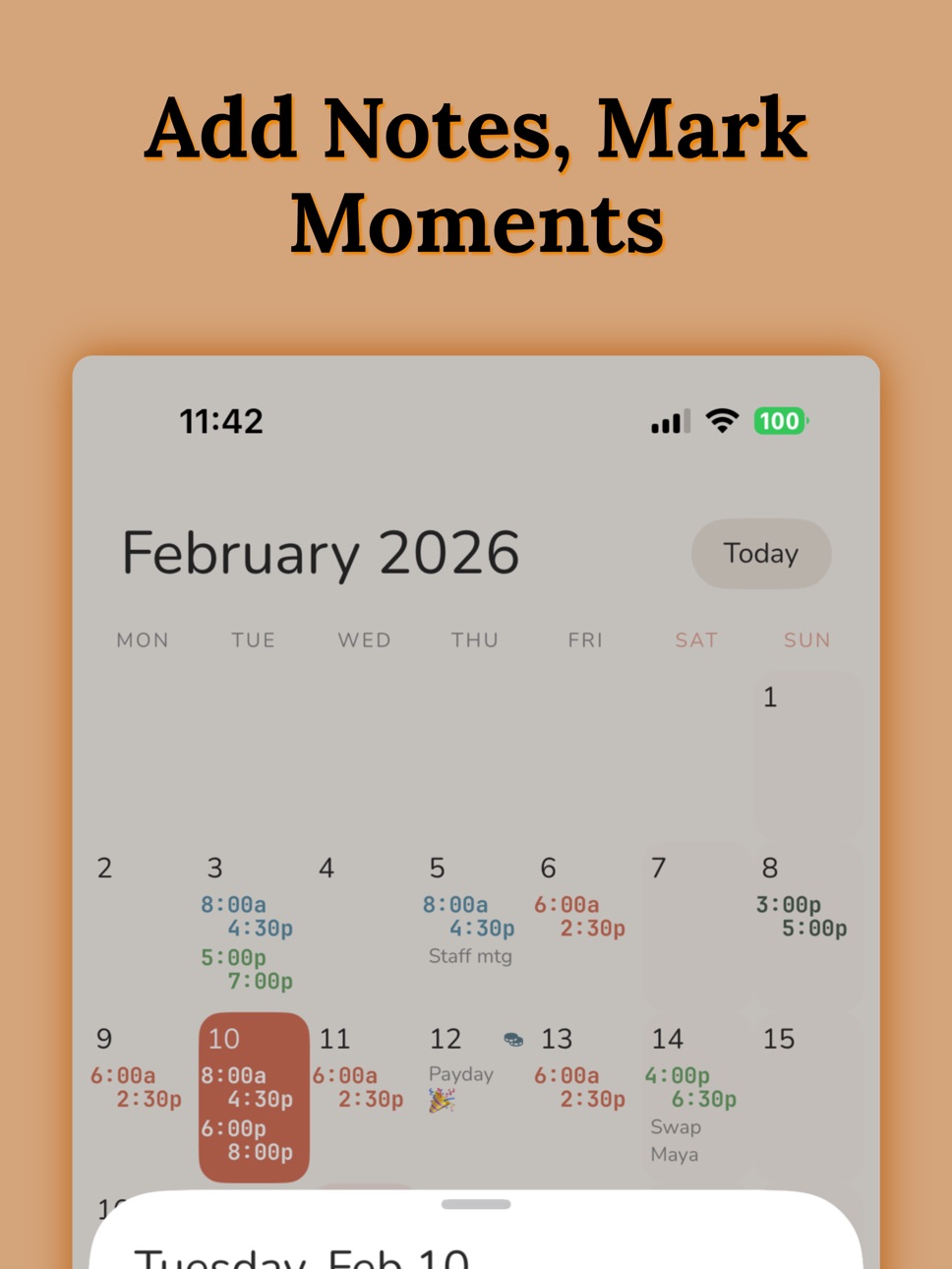
• Add notes and shifts to any day, past or present
• Share your schedule with family and friends through Facebook, Twitter or Email
• Save your schedule as a photo on your phone
• Share multiple months
PROFESSIONAL FEATURES
• Add End Times to your shifts
• Add unlimited jobs
• Add up your hours worked and your wage with the Hours Calculator
• Add alerts to remind you of an upcoming shift
• Ad free interface
--------------------
SET AND NEVER FORGET.
With the purchase of the pro upgrade, you can set alarms to remind you when you work. Choose an alarm time based on how much time you need to get ready, and let WorkTime remember your shifts for you.
--------------------
KEEP TRACK OF YOUR SHIFTS AND MUCH MORE.
WorkTime isn't just for jobs – it can be used to remind you of anything. Just create a job called To Do, or Chores, and set times and notes to remind you of places you need to be.
WorkTime is designed for people who work random hours and random days. If you work Monday to Friday, 9 to 5, you don't need this app. If you are a barista, a bartender, a waitress, a pizza delivery guy, or anyone who has to jot down their shifts - then WorkTime is the app for you.
Stop writing down your shift times on a used napkin. Let WorkTime make your life a little bit easier.
--------------------
SUBSCRIPTION INFO
WorkTime offers auto-renewable subscriptions to unlock all professional features. Payment will be charged to your Apple ID account at confirmation of purchase. Subscription automatically renews unless turned off at least 24 hours before the end of the current period. Your account will be charged for renewal within 24 hours prior to the end of the current period. Subscriptions may be managed and auto-renewal may be turned off by going to your Account Settings after purchase.
Privacy Policy: http://totoventures.com/privacy-policy
Terms of Use: http://totoventures.com/terms-of-use
Capabilities
In-App Purchases
Accessibility
ipadiphonemacrealityDevicetvoswatch
Version history 24 versions
Build 883671779v3.8.12026-03-23 21:58:43
Bug fixes and performance improvements
Build 883109375v3.82026-03-10 22:10:29
Bug fixes and performance improvements.
Build 882834641v3.7.32026-02-26 23:39:37
Bug fixes
Build 882676173v3.7.22026-02-22 21:28:19
Bug fixes
Build 882622452v3.7.12026-02-20 20:26:43
Bug fixes
Build 863972686v3.72026-02-19 03:57:18
WorkTime is back - redesigned and updated finally. Also fixed bugs and improved performance.
Build 812766890v3.62015-07-14 20:03:07
This update from Apple will improve the functionality of this app. No new features are included.
This update enables the cross-promotion screen pushing users to the new version of WorkTime. Please tap through and install the new WorkTime!
Build 811774181v3.52015-03-20 18:11:56
24 hour clock calculate hours bug fixed
Build 810777352v3.42014-11-26 18:26:34
3.4 - Bug fixes
3.3 - IMPORTANT: Wages are now managed in the Job screen. Tap a job, enter your wage and tap Save.
WorkTime 3.3 brings in full iOS 8 compatibility and an entirely new layout.
We have removed the bottom bar navigation and replaced it with a global top left button which can quickly let you calculate hours, manage your jobs and share your schedule.
Calculating hours is now much more user friendly. You can quickly see your hour and pay totals for each individual job or all jobs together.
Adding notes, presets and shifts is now much easier with our three button system right under your thumb. Tapping the star opens your preset menu, and tapping the + button just once will always take you to the shift addition screen.
We have added 24 hour clock full support as well.
We hope you like the changes, and there is much more to come!
Build 727062698v3.32014-10-08 05:43:35
IMPORTANT: Wages are now managed in the Job screen. Tap a job, enter your wage and tap Save.
WorkTime 3.3 brings in full iOS 8 compatibility and an entirely new layout.
We have removed the bottom bar navigation and replaced it with a global top left button which can quickly let you calculate hours, manage your jobs and share your schedule.
Calculating hours is now much more user friendly. You can quickly see your hour and pay totals for each individual job or all jobs together.
Adding notes, presets and shifts is now much easier with our three button system right under your thumb. Tapping the star opens your preset menu, and tapping the + button just once will always take you to the shift addition screen.
We have added 24 hour clock full support as well.
We hope you like the changes, and there is much more to come!
Build 576922634v3.22014-05-09 17:50:56
3.2 - Bug fixes
3.1 - Fixed iOS 7.0 screen alignment bugs
3.0 - Huge changes are finally here! NEW in WorkTime 3.0:
- iCloud sync between devices! All of your shifts on all of your devices!
- Manage Lunch Breaks! Set your break time and it will be subtracted from the Hours Calculator!
- All new design! From a new icon to a complete overhaul of our look, this is the cleanest, simplest WorkTime yet!
We hope you like it!
Build 562262921v3.12014-04-24 04:58:48
3.1 - Fixed iOS 7.0 screen alignment bugs
3.0 - Huge changes are finally here! NEW in WorkTime 3.0:
- iCloud sync between devices! All of your shifts on all of your devices!
- Manage Lunch Breaks! Set your break time and it will be subtracted from the Hours Calculator!
- All new design! From a new icon to a complete overhaul of our look, this is the cleanest, simplest WorkTime yet!
We hope you like it!
Build 551862682v3.02014-04-18 20:11:18
Huge changes are finally here! NEW in WorkTime 3.0:
- iCloud sync between devices! All of your shifts on all of your devices!
- Manage Lunch Breaks! Set your break time and it will be subtracted from the Hours Calculator!
- All new design! From a new icon to a complete overhaul of our look, this is the cleanest, simplest WorkTime yet!
We hope you like it!
Build 245192636v2.72013-12-20 21:20:06
bug fixes
analytics changes
Build 182972633v2.62013-12-02 12:09:23
Analytics network changes
Build 86452864v2.52013-11-05 07:25:51
ALL NEW FULLSCREEN CALENDAR.
See up to three full shifts on each date in the new sliding fullscreen view.
IMPROVED SHARING.
Share fullscreen calendar images which display more shifts in a better calendar.
ALL NEW WAGE CALCULATOR.
Now you can add up your hours, AND your pay.
ALSO IN THIS UPDATE
- Edit your notes
- New preset box
- Dozens of other experience improvements
Build 82992639v2.42013-10-16 18:47:07
Preset list bug fix
Build 21762652v2.32013-09-25 00:58:07
Updated for iOS 7.
More feature updates soon to come!
Build 15933991v2.22013-07-30 18:25:42
Fixed Hours Calculator bug affecting 24-hour devices.
Build 15854081v2.12013-07-18 17:08:35
ALL NEW PRESET SHIFT MENU.
Add common shifts to the new preset tab to allow for ultrafast shift addition. Setting your schedule now takes no time at all.
EDIT YOUR SHIFTS.
Make minor adjustments to your shifts without having to delete and re-add.
NEW SWIPE MENU.
Now a swipe across a shift allows you to edit, delete, or add it to your presets.
BUG FIXES.
No more iOS 5.1.1 crashes!
Build 15438244v2.02013-05-24 01:58:40
Introducing the all new Hours Calculator!
Add up your total hours worked for any job with just a couple taps. Select the start and end date for your pay period and see how many hours you worked.
Also in this update:
• Add shifts to past days
• View multiple jobs per day (exclusive to start times)
• Share past months
• New streamlined designs for Job colors and shift adding
Build 14975301v1.22013-04-16 00:48:40
You asked for it, you got it!
Now in PRO version:
– Shift end times
Now in FREE version:
– Add notes to past days
– New Help section
– Updated design
– Improved interface
– Bug fixes
Thanks for your support! We can’t wait to bring you even more features very soon. Let us know what you want in WorkTime by emailing us at contact@totoventures.com!
Build 14112418v1.12013-02-20 16:14:08
Minor bug fixes
Build 13547870v1.02013-02-12 15:29:35
No pricing data captured yet — comparisons appear once the app has paid storefronts or in-app purchases.
Availability 1 of 1 storefronts
| Region | Language | Price | Ratings | Avg | Version |
|---|---|---|---|---|---|
| US | en-US | Free | 104 | 3.4 | 3.8.1 |
Change log 28 changes · US
✎
releaseNotes updated
Bug fixes and performance improvements
✎
description updated
TRACKING WORK SHIFTS HAS NEVER BEEN EASIER.
Set your shift times. See them all at a glance. Set alerts to remind you. Add up your hours. Share your schedule wi
✎
subtitle updated
Work Schedule & Pay Tracker
✎
name updated
WorkTime: Shift Calendar
◆
Version 3.8.1 released
Bug fixes and performance improvements
◆
Version 3.8 released
Bug fixes and performance improvements.
◆
Version 3.7.3 released
Bug fixes
◆
Version 3.7.2 released
Bug fixes
◆
Version 3.7.1 released
Bug fixes
◆
Version 3.7 released
WorkTime is back - redesigned and updated finally. Also fixed bugs and improved performance.
◆
Version 3.6 released
This update from Apple will improve the functionality of this app. No new features are included.
This update enables the cross-promotion screen pushing users to the new version of WorkTime. Please tap through and install the new WorkTime!
◆
Version 3.5 released
24 hour clock calculate hours bug fixed
◆
Version 3.4 released
3.4 - Bug fixes
3.3 - IMPORTANT: Wages are now managed in the Job screen. Tap a job, enter your wage and tap Save.
WorkTime 3.3 brings in full iOS 8 compatibility and an entirely new layout.
We have removed the bottom bar navigation and
◆
Version 3.3 released
IMPORTANT: Wages are now managed in the Job screen. Tap a job, enter your wage and tap Save.
WorkTime 3.3 brings in full iOS 8 compatibility and an entirely new layout.
We have removed the bottom bar navigation and replaced it with a glob
◆
Version 3.2 released
3.2 - Bug fixes
3.1 - Fixed iOS 7.0 screen alignment bugs
3.0 - Huge changes are finally here! NEW in WorkTime 3.0:
- iCloud sync between devices! All of your shifts on all of your devices!
- Manage Lunch Breaks! Set your break time a
◆
Version 3.1 released
3.1 - Fixed iOS 7.0 screen alignment bugs
3.0 - Huge changes are finally here! NEW in WorkTime 3.0:
- iCloud sync between devices! All of your shifts on all of your devices!
- Manage Lunch Breaks! Set your break time and it will be subt
◆
Version 3.0 released
Huge changes are finally here! NEW in WorkTime 3.0:
- iCloud sync between devices! All of your shifts on all of your devices!
- Manage Lunch Breaks! Set your break time and it will be subtracted from the Hours Calculator!
- All new design!
◆
Version 2.7 released
bug fixes
analytics changes
◆
Version 2.6 released
Analytics network changes
◆
Version 2.5 released
ALL NEW FULLSCREEN CALENDAR.
See up to three full shifts on each date in the new sliding fullscreen view.
IMPROVED SHARING.
Share fullscreen calendar images which display more shifts in a better calendar.
ALL NEW WAGE CALCULATOR.
Now you
◆
Version 2.4 released
Preset list bug fix
◆
Version 2.3 released
Updated for iOS 7.
More feature updates soon to come!
◆
Version 2.2 released
Fixed Hours Calculator bug affecting 24-hour devices.
◆
Version 2.1 released
ALL NEW PRESET SHIFT MENU.
Add common shifts to the new preset tab to allow for ultrafast shift addition. Setting your schedule now takes no time at all.
EDIT YOUR SHIFTS.
Make minor adjustments to your shifts without having to delete and
◆
Version 2.0 released
Introducing the all new Hours Calculator!
Add up your total hours worked for any job with just a couple taps. Select the start and end date for your pay period and see how many hours you worked.
Also in this update:
• Add shifts to past
◆
Version 1.2 released
You asked for it, you got it!
Now in PRO version:
– Shift end times
Now in FREE version:
– Add notes to past days
– New Help section
– Updated design
– Improved interface
– Bug fixes
Thanks for your support! We can’t wait to bring y
◆
Version 1.1 released
Minor bug fixes
◆
Version 1.0 released