Home › Photo & Video

 US
US
1 of 1 storefronts
Content in en-US
Content in en-US
Information
Apple ID592119245
Bundle IDcom.JeffHarden.BeforeNAfter
SellerSeller
Min iOS14.0
Min macOS11.0
Device familiesiphone, ipad, ipod
Released2013-03-13
Copyright© Harden Consulting LLC
Privacy policyLink ↗
Preview 2 platforms
iPhone 7 images




iPad 3 images


What’s New Version 3.8
-Smoother GIF export
-Minor bug fixes
-Light/Dark mode support
-iPad support
Description
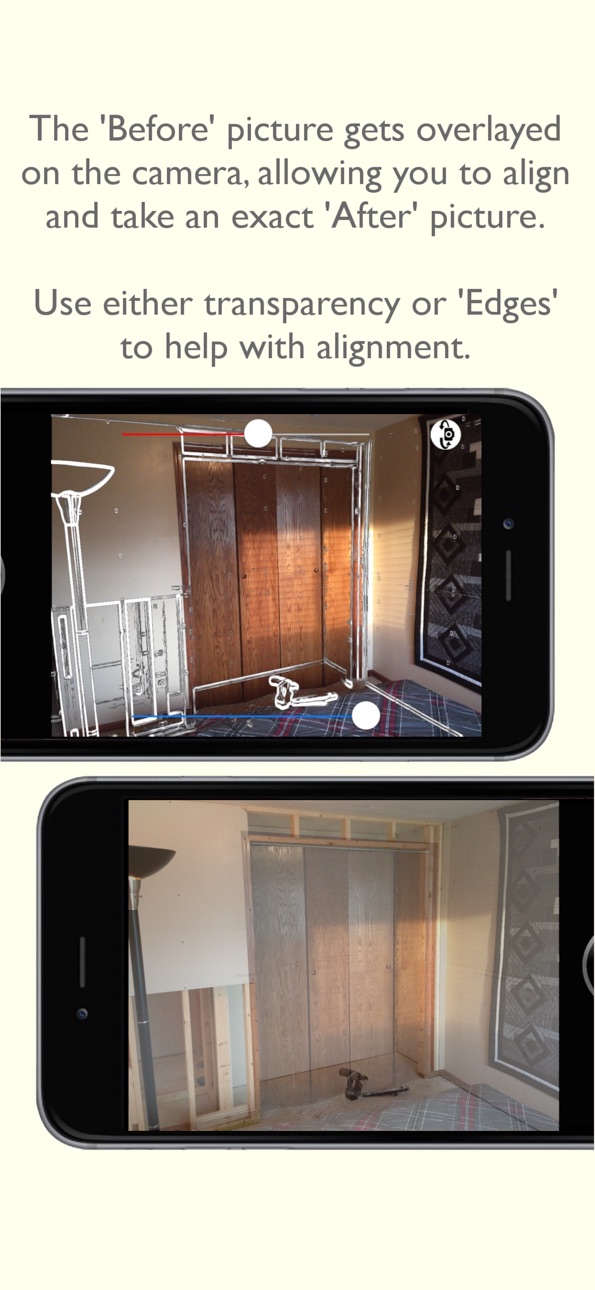
The only app of its kind! A very useful and powerful app. Ever wanted to take a before and after picture of a remodeling project, or perhaps weight loss or for any other countless situations? This app allows you to take a photo, then overlay that photo on top of the camera to help align your after shot, allowing one to view the differences perfectly. Use these effects to compare your photos.
Even if you have already taken a before picture, simply import it. The app will take over from here by overlaying it on the camera so you can easily take an 'After' photo and compare and share the results!
-X-Ray detail - pan around the image in an x-ray style vision.
-Slider - slide from left to right or top to bottom comparing the images, create a GIF!
-Fade - Fade back and forth between the photos, make it come to life by creating a GIF!
-Side By Side - share the photo with custom color backgrounds and stamps
-Tiles - have a series of images? Simply share a photo with all the photos together
-NEW! Inset - shrink down a before photo to be positioned in a smaller location on the screen, allowing you to create unique perspective 'After' shots
-Image Editor - tweak rotation, color, and many more attributes of a photo
-Re-Align - Didn't take the perfect after shot? No problem, adjust the image using this tool
This app gives you the ability to share the photos anywhere, and create animated GIFs to send to friends.
An optional subscription (every 3 months) subscription is available to remove ads for $.99 cents. Cancel anytime. Please view the End User License Agreement here: https://www.apple.com/legal/internet-services/itunes/dev/stdeula/
Capabilities
In-App Purchases
Accessibility
ipadiphonemacrealityDevicetvoswatch
Version history 16 versions
Build 887312085v3.82026-06-24 16:58:27
-Smoother GIF export
-Minor bug fixes
-Light/Dark mode support
-iPad support
Build 876814661v3.72025-07-30 00:56:40
-Minor bug fixes
Build 860705211v3.62023-10-16 19:24:20
-Removed video Ads based on reviews! And reduced how often Ads are shown, they can be dismissed within seconds instead of a full video
-NEW Added the ability to take a new 'After' photo farther out. Meaning you can shrink down and move the 'Before' photo on top of the camera! Compare these photos in the new Inset effect to view a previous photo taken from a farther back perspective.
-Added ability to remove ads with an optional subscription
-Photos are saved in full resolution to library
-Screenshots are saved in higher resolution
-Added support for importing HEIC images
-Bug fixes
Build 859312914v3.52023-08-23 20:02:48
-Removed video Ads based on reviews! And reduced how often Ads are shown, they can be dismissed within seconds instead of a full video
-NEW Added the ability to take a new 'After' photo farther out. Meaning you can shrink down and move the 'Before' photo on top of the camera! Compare these photos in the new Inset effect to view a previous photo taken from a farther back perspective.
-Added ability to remove ads with an optional subscription
-Photos are saved in full resolution to library
-Screenshots are saved in higher resolution
-Added support for importing HEIC images
-Bug fixes
Build 858385845v3.42023-07-25 13:57:38
-Added ability to remove ads
-Photos are saved in full resolution to library
-Screenshots are saved in higher resolution
-Added support for importing HEIC images
-Bug fixes
Build 853780463v3.32022-12-08 07:05:36
-Photos are saved in full resolution to library
-Screenshots are saved in higher resolution
-Added support for importing HEIC images
-Bug fixes
Build 853525885v3.22022-11-23 22:19:03
-Bug fixes
-Added support for importing HEIC images
Build 842100258v3.12021-05-07 01:38:27
-Fix for landscape photos not overlaying correctly when taking a photo
Build 841311102v3.02021-04-13 19:40:43
-Fix for Photo import permissions
-Support for new iPhones
Build 815036183v2.32015-12-11 19:39:22
-Brand new way to re-align photos
Build 813999450v2.22015-10-30 16:55:42
-Fixed bug with iOS 9
-Added ability to take a picture using the volume up button
-Added ability to select all photos when exporting or deleting
-Photos taken automatically get added to your Photos library
Build 812638809v2.12015-06-23 02:57:57
-Fixed issue with importing photos which caused other nasty bugs... It's squashed now.
Version 2.0 changes:
-Complete overhaul of design and functionality.
-Added ability to export GIFs for the Slider effect
-Added ability to share your images
-Added 4 new effects
-Added ability to realign and edit a photo
Build 812317798v2.02015-05-12 17:48:10
-Complete overhaul of design and functionality.
-Added ability to export GIFs for the Slider effect
-Added ability to share your images
-Added 4 new effects
-Added ability to realign and edit a photo
Build 23512731v1.22013-09-18 15:02:48
-Updated to support iOS 7
-Added button to flip camera to front facing camera
-Minor bug fixes
Build 14760229v1.12013-03-25 21:18:18
-Fixed bug that caused an image to be overwritten in certain circumstances
-Increased the size of images during selection
Build 13334452v1.02013-03-12 18:44:45
No pricing data captured yet — comparisons appear once the app has paid storefronts or in-app purchases.
Availability 1 of 1 storefronts
| Region | Language | Price | Ratings | Avg | Version |
|---|---|---|---|---|---|
| US | en-US | Free | 12 | 3.0 | 3.8 |
Change log 20 changes · US
✎
releaseNotes updated
-Smoother GIF export
-Minor bug fixes
-Light/Dark mode support
-iPad support
✎
description updated
The only app of its kind! A very useful and powerful app. Ever wanted to take a before and after picture of a remodeling project, or perhaps weight loss or for
✎
subtitle updated
Line up perfect after photos
✎
name updated
Before and After App
◆
Version 3.8 released
-Smoother GIF export
-Minor bug fixes
-Light/Dark mode support
-iPad support
◆
Version 3.7 released
-Minor bug fixes
◆
Version 3.6 released
-Removed video Ads based on reviews! And reduced how often Ads are shown, they can be dismissed within seconds instead of a full video
-NEW Added the ability to take a new 'After' photo farther out. Meaning you can shrink down and move the
◆
Version 3.5 released
-Removed video Ads based on reviews! And reduced how often Ads are shown, they can be dismissed within seconds instead of a full video
-NEW Added the ability to take a new 'After' photo farther out. Meaning you can shrink down and move the
◆
Version 3.4 released
-Added ability to remove ads
-Photos are saved in full resolution to library
-Screenshots are saved in higher resolution
-Added support for importing HEIC images
-Bug fixes
◆
Version 3.3 released
-Photos are saved in full resolution to library
-Screenshots are saved in higher resolution
-Added support for importing HEIC images
-Bug fixes
◆
Version 3.2 released
-Bug fixes
-Added support for importing HEIC images
◆
Version 3.1 released
-Fix for landscape photos not overlaying correctly when taking a photo
◆
Version 3.0 released
-Fix for Photo import permissions
-Support for new iPhones
◆
Version 2.3 released
-Brand new way to re-align photos
◆
Version 2.2 released
-Fixed bug with iOS 9
-Added ability to take a picture using the volume up button
-Added ability to select all photos when exporting or deleting
-Photos taken automatically get added to your Photos library
◆
Version 2.1 released
-Fixed issue with importing photos which caused other nasty bugs... It's squashed now.
Version 2.0 changes:
-Complete overhaul of design and functionality.
-Added ability to export GIFs for the Slider effect
-Added ability to share your im
◆
Version 2.0 released
-Complete overhaul of design and functionality.
-Added ability to export GIFs for the Slider effect
-Added ability to share your images
-Added 4 new effects
-Added ability to realign and edit a photo
◆
Version 1.2 released
-Updated to support iOS 7
-Added button to flip camera to front facing camera
-Minor bug fixes
◆
Version 1.1 released
-Fixed bug that caused an image to be overwritten in certain circumstances
-Increased the size of images during selection
◆
Version 1.0 released