Home › Education

 US
US
1 of 1 storefronts
Content in en-US
Content in en-US
Information
Apple ID588180598
Bundle IDcom.TouchAutism.SocialStories
SellerSeller
Min iOS9.0
Min macOS11.0
Device familiesiphone, ipad, ipod
Released2013-06-20
Copyright© 2012-2020 Touch Autism
Privacy policyLink ↗
Preview 2 platforms
iPhone 7 images


iPad 7 images



What’s New Version 5.2.2
Fixes big with large accessibility font sizes.
Description
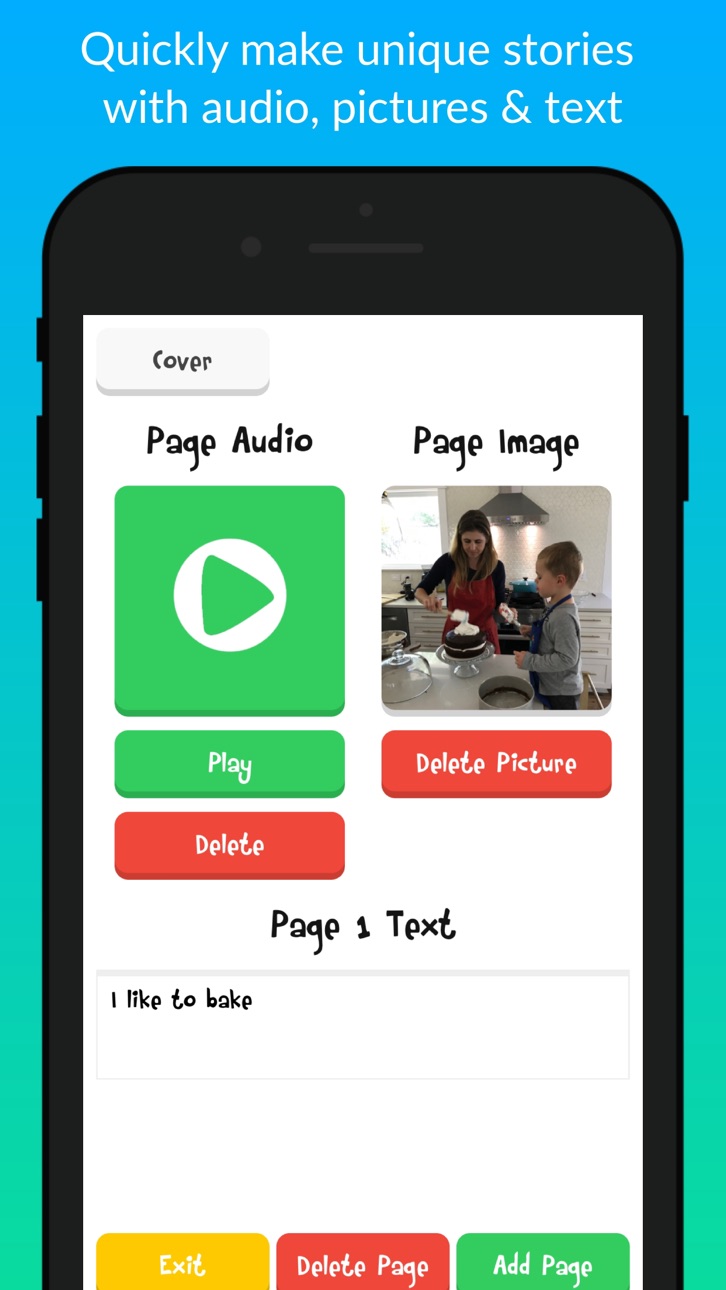
An amazing app for easily creating, sharing and printing educational social stories, visual schedules, and beautiful memories.
This is a very valuable tool for any teacher, SLP, OT, direct care staff or parent!
Children with special needs often need more direct instruction of social skills. Teaching social skills to any child may be easier and less stressful when visual supports, like social stories are used. The social stories found in this app explain accurate social information and ensures that your child will know what to expect in different situations.
Features:
• Easily create stories with pictures, recordings and text.
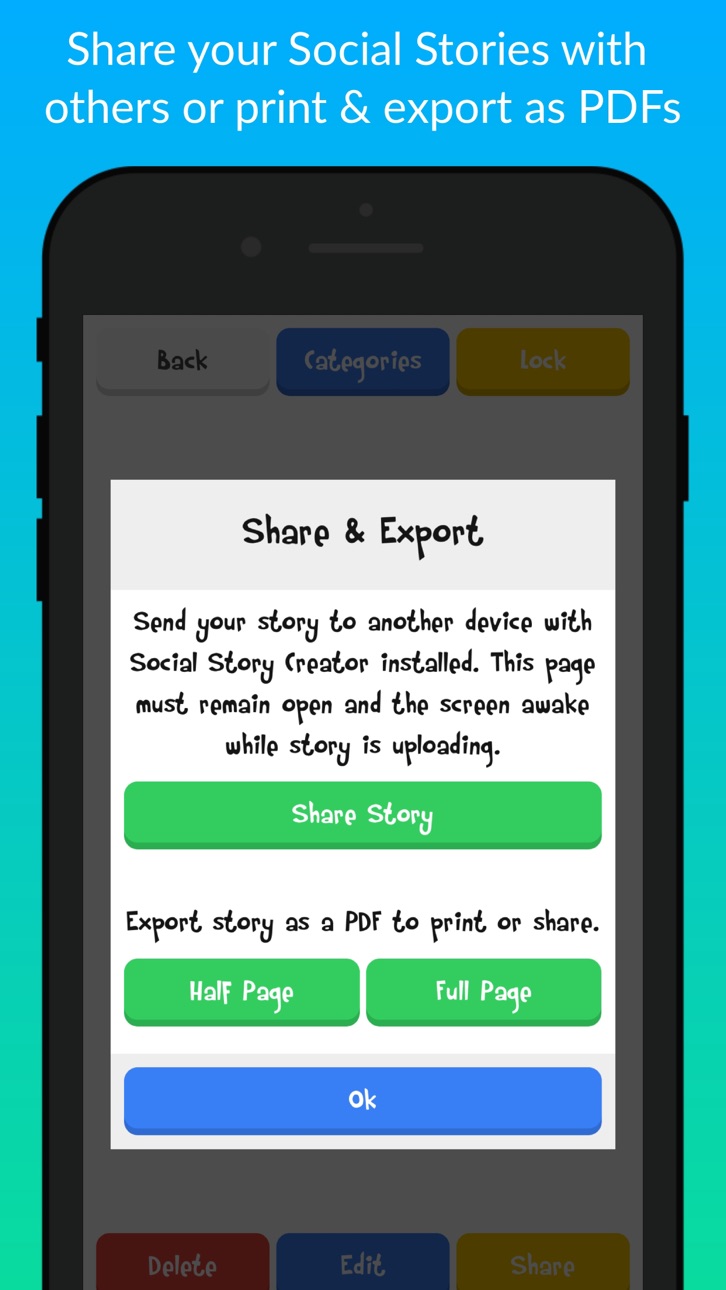
• Share and receive created stories with other users.
• Print PDFs of stories to have paper copies.
• Stories can be made in any language.
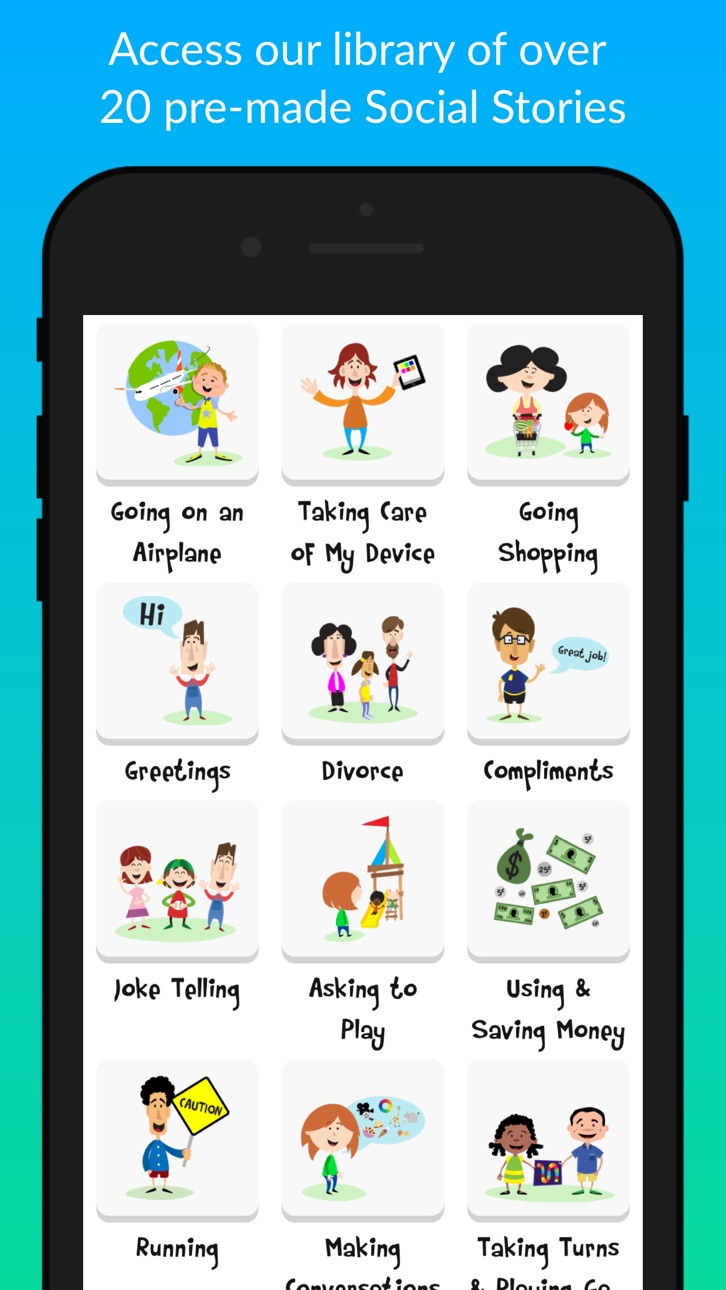
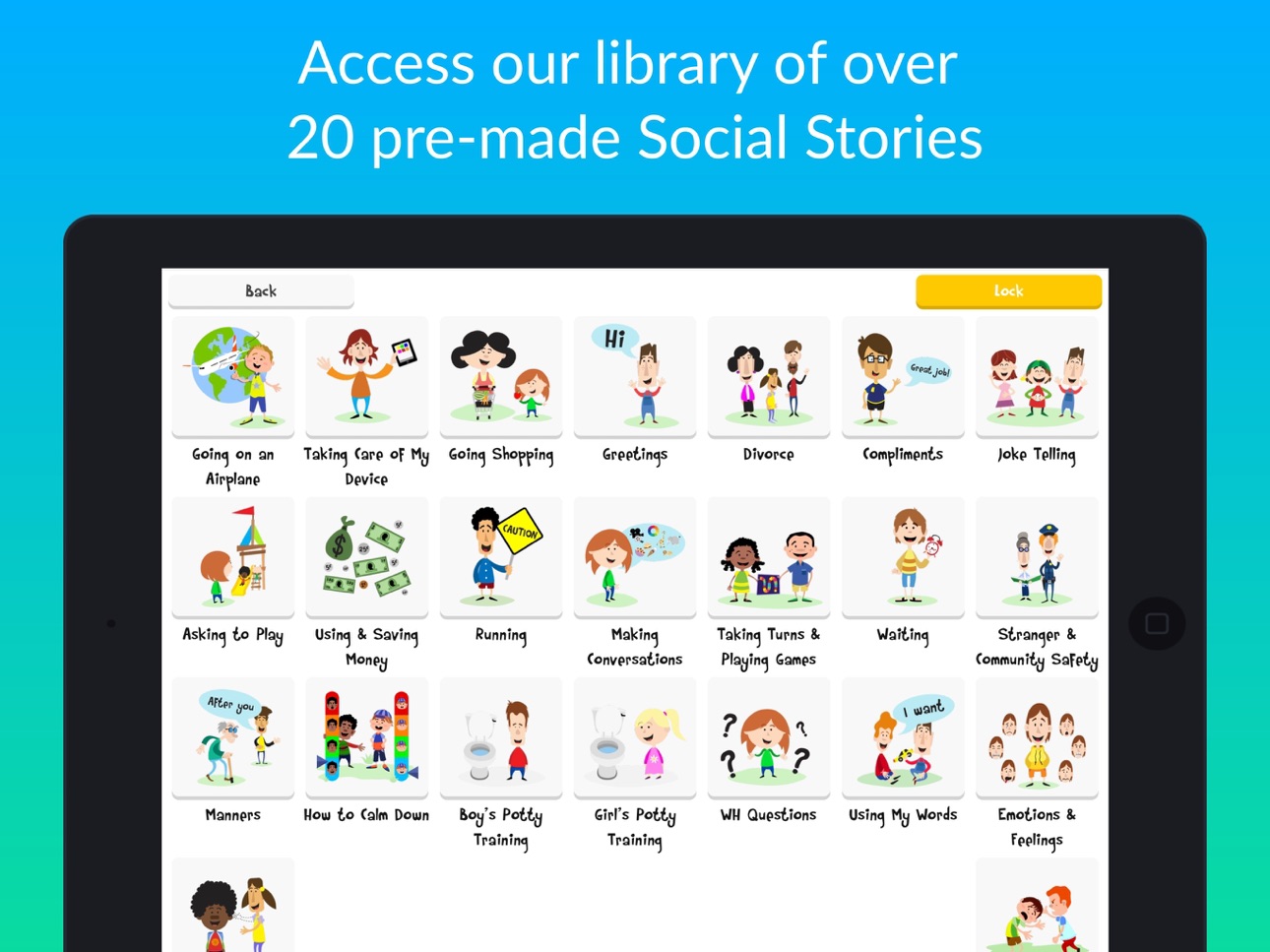
• Ability to purchase an entire library of over 20 pre-made social stories at one discounted price.
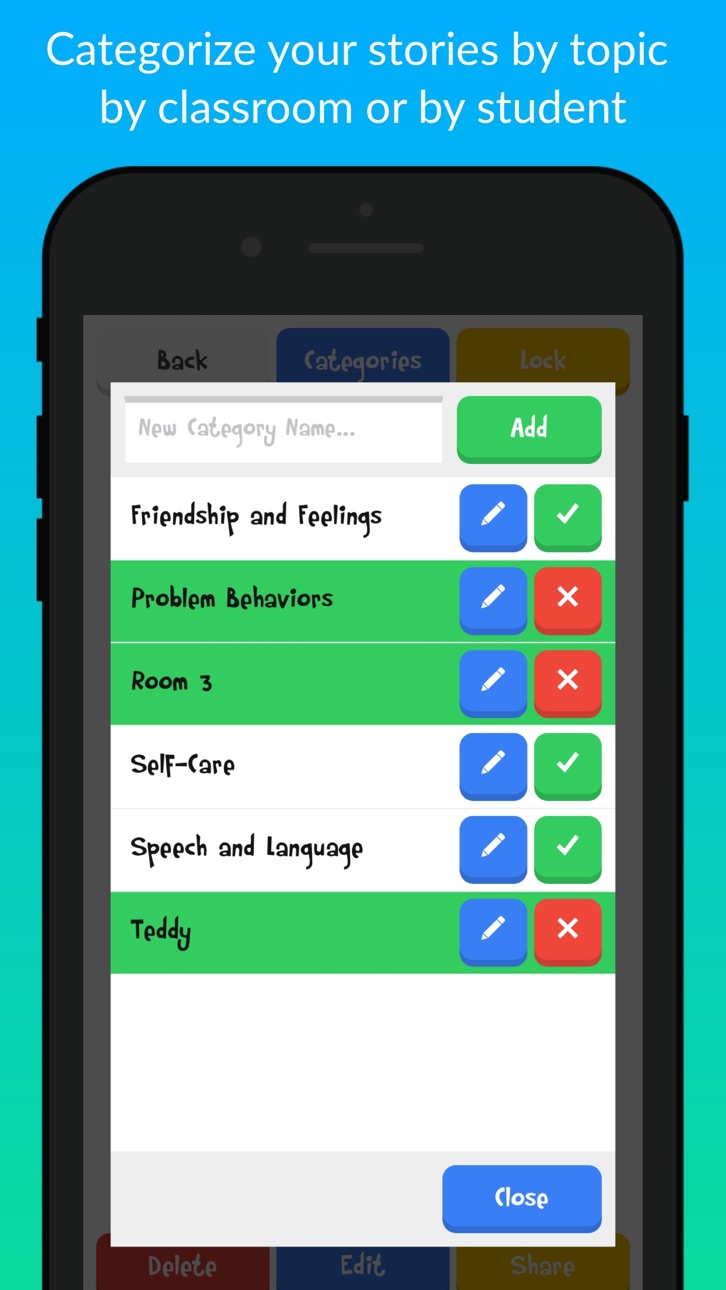
• Organize stories into categories for particular skills, students or classrooms.
• Lock students into categories or apps to limit access.
• Create and play stories offline (with no internet connection).
• Easy to use, intuitive format.
• Can be used to make visual schedules or other types of visual prompts.
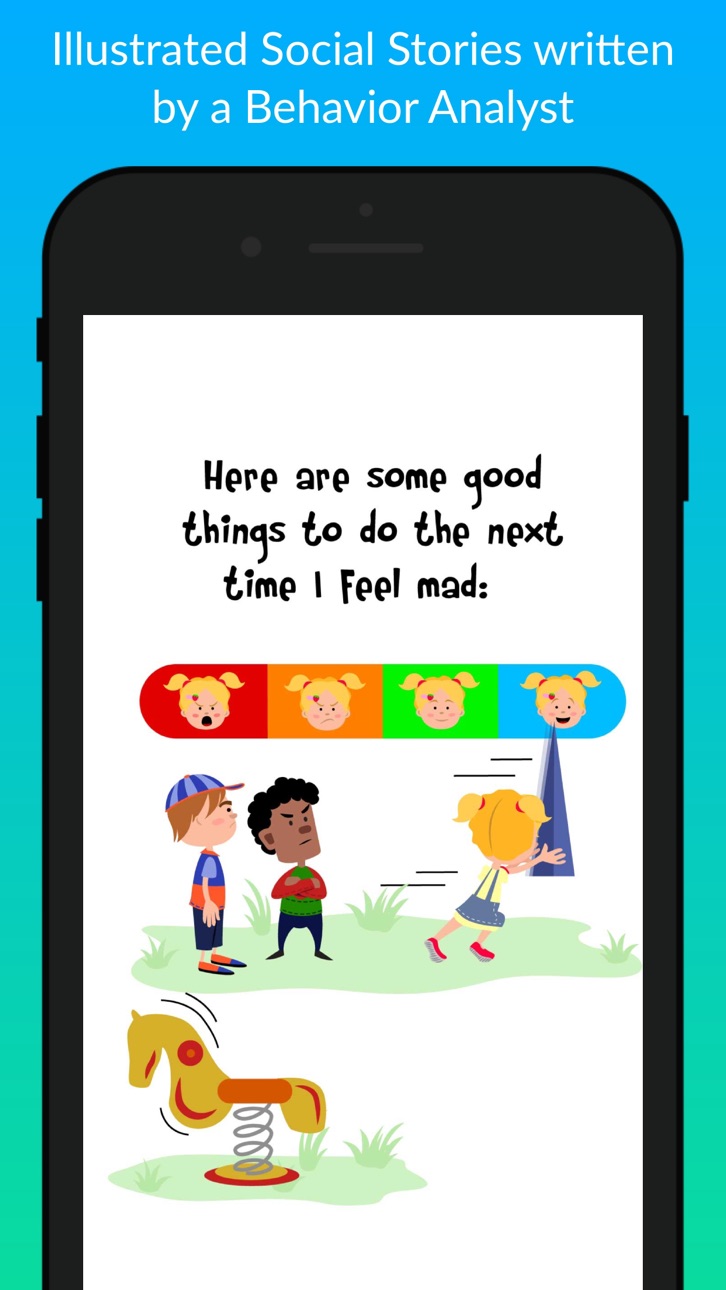
Social stories are an important type of visual support often used with children diagnosed with an autism spectrum disorder, Down syndrome or other special need. This social stories found in this app use simple text and descriptive pictures to explain the why and how of different social skills.
Social interactions may be especially difficult for children with an autism spectrum disorder, adhd, or other social delay. Many children, especially those diagnosed with an autism spectrum disorder, Down syndrome and other special need, often fail to pick up on social cues, making learning a social skill especially difficult. Social stories may increase awareness and maintenance of social skills.
Social stories were first defined by Carol Gray in 1991 and are commonly used to break down a task or social situation into small and easy to understand steps, often accompanied by descriptive pictures. Social stories are incredibly easy to implement and are used by many professionals for a wide range of behaviors.
See what our reviews are saying about us!
“Wonderful app!! I am able to upload my own photos, record my own voice, and design however the story for my child! I can also upload pre-made stories. Other apps cast $30-50 for the same awesome app! Thank you so much!!” –family games
“This was a great story app for my child” – Kennedml
“This app is great for my nephew who has autism, thank you!” – ImaniZG
“This app is really awesome” – yoursakar
“This app gives an excellent opportunity for a low price” –Sean Quigg
“I love the fact that you can customize this app to target a specific social skill.” – VPEslp25
Capabilities
In-App Purchases
Accessibility
ipadiphonemacrealityDevicetvoswatch
Version history 25 versions
Build 836261464v5.2.22020-06-04 03:15:10
Fixes big with large accessibility font sizes.
Build 836007284v5.2.02020-05-22 10:41:23
Support for sharing of larger stories
Updated to work on new device form factors
Build 824172887v5.1.152017-10-30 15:19:01
Version 5.1.15
• Fixed a bug with audio sometimes not stopping between pages.
Version 5.1.14
• Fixed a bug with printing the Greetings Social Story
Version 5.1.13
• Fixed a bug with viewing PDFs in iOS 8 & iOS 9
Version 5.1.12
• Fixed a bug with selecting images
• Minor performance improvements.
• Added support for iOS 8 and iOS 9 so that users with older devices can receive all our new improvements! :)
Version 5.1.11
• Now you can print any purchased pre-made Touch Autism stories with the Pro upgrade!
Version 5.1.10
• Minor layout tweak and bug fix.
Version 5.1.9
• Fixed issue with saving category image.
Version 5.1.8
• Bug fixes and performance updates.
Version 5.1.7
• Added the option to export story as a full or half page PDF.
This was one of our most requested features. When exporting a story you can now choose half page or full page PDFs.
Version 5.1.6
• Added delete story confirmation dialog
Added a confirmation dialog before a story is deleted to prevent accidentally deleting a story.
• Optimized images exported in PDFs
PDFs will now export as a smaller file size because the images are being optimized.
• Fixed bug with the camera
In the previous version, the camera didn't work properly on some devices.
• Fixed bug with downloading stories.
Fixed a bug where some users needed to click the download story link twice to download a story.
Version 5.1.4
• Fixed long story sharing bug.
In the previous version, some stories with more than 10 pages would have issues with sharing.
• Cleaned up the PDF sharing and printing functionality and added more sharing options.
The share and print PDF buttons have been combined into one, the new button opens a preview of the PDF, from the preview screen you have the option to print or share using one of many options such as email, airdrop, etc.
Version 5.1.2
• Fixes crash on load
If you had in-app purchases disabled, the app was crashing when opened.
Version 5.1.1
• Better photo selection options
Added option to select photos from albums not just recent photos.
Version 5.1
• Bug fixes
Fixes a bug with font sizing.
Version 5.0
• Change parent controls
You can now change the parent controls. You can pick between a simple math problem, Touch ID/Passcode or none at all.
• Lock the app to a story or category
The app can now be locked to a category or story to prevent your kiddos from having full access to the app.
• New font option
Are some of your kiddos having trouble reading our font? You can now change the font of the user created stories to Helvetica which is as easy to read as it gets.
• Printing stories updated
We improved the PDF creation process, it's faster, supports the new Helvetica font, and is easier to use.
• Swipe between story pages.
You can now swipe or tap to change the page when reading a story.
• Get all the pre-made stories at a discount
Would you like access to all our pre-made stories? You can purchase all the pre-made stories together and save 50%!
Build 823498925v5.1.132017-09-05 00:55:12
Version 5.1.13
• Fixed a bug with viewing PDFs in iOS 8 & iOS 9
Version 5.1.12
• Fixed a bug with selecting images
• Minor performance improvements.
• Added support for iOS 8 and iOS 9 so that users with older devices can receive all our new improvements! :)
Version 5.1.11
• Now you can print any purchased pre-made Touch Autism stories with the Pro upgrade!
Version 5.1.10
• Minor layout tweak and bug fix.
Version 5.1.9
• Fixed issue with saving category image.
Version 5.1.8
• Bug fixes and performance updates.
Version 5.1.7
• Added the option to export story as a full or half page PDF.
This was one of our most requested features. When exporting a story you can now choose half page or full page PDFs.
Version 5.1.6
• Added delete story confirmation dialog
Added a confirmation dialog before a story is deleted to prevent accidentally deleting a story.
• Optimized images exported in PDFs
PDFs will now export as a smaller file size because the images are being optimized.
• Fixed bug with the camera
In the previous version, the camera didn't work properly on some devices.
• Fixed bug with downloading stories.
Fixed a bug where some users needed to click the download story link twice to download a story.
Version 5.1.4
• Fixed long story sharing bug.
In the previous version, some stories with more than 10 pages would have issues with sharing.
• Cleaned up the PDF sharing and printing functionality and added more sharing options.
The share and print PDF buttons have been combined into one, the new button opens a preview of the PDF, from the preview screen you have the option to print or share using one of many options such as email, airdrop, etc.
Version 5.1.2
• Fixes crash on load
If you had in-app purchases disabled, the app was crashing when opened.
Version 5.1.1
• Better photo selection options
Added option to select photos from albums not just recent photos.
Version 5.1
• Bug fixes
Fixes a bug with font sizing.
Version 5.0
• Change parent controls
You can now change the parent controls. You can pick between a simple math problem, Touch ID/Passcode or none at all.
• Lock the app to a story or category
The app can now be locked to a category or story to prevent your kiddos from having full access to the app.
• New font option
Are some of your kiddos having trouble reading our font? You can now change the font of the user created stories to Helvetica which is as easy to read as it gets.
• Printing stories updated
We improved the PDF creation process, it's faster, supports the new Helvetica font, and is easier to use.
• Swipe between story pages.
You can now swipe or tap to change the page when reading a story.
• Get all the pre-made stories at a discount
Would you like access to all our pre-made stories? You can purchase all the pre-made stories together and save 50%!
Build 823219591v5.1.122017-08-08 20:09:21
Version 5.1.12
• Fixed a bug with selecting images
• Minor performance improvements.
• Added support for iOS 8 and iOS 9 so that users with older devices can receive all our new improvements! :)
Version 5.1.11
• Now you can print any purchased pre-made Touch Autism stories with the Pro upgrade!
Version 5.1.10
• Minor layout tweak and bug fix.
Version 5.1.9
• Fixed issue with saving category image.
Version 5.1.8
• Bug fixes and performance updates.
Version 5.1.7
• Added the option to export story as a full or half page PDF.
This was one of our most requested features. When exporting a story you can now choose half page or full page PDFs.
Version 5.1.6
• Added delete story confirmation dialog
Added a confirmation dialog before a story is deleted to prevent accidentally deleting a story.
• Optimized images exported in PDFs
PDFs will now export as a smaller file size because the images are being optimized.
• Fixed bug with the camera
In the previous version, the camera didn't work properly on some devices.
• Fixed bug with downloading stories.
Fixed a bug where some users needed to click the download story link twice to download a story.
Version 5.1.4
• Fixed long story sharing bug.
In the previous version, some stories with more than 10 pages would have issues with sharing.
• Cleaned up the PDF sharing and printing functionality and added more sharing options.
The share and print PDF buttons have been combined into one, the new button opens a preview of the PDF, from the preview screen you have the option to print or share using one of many options such as email, airdrop, etc.
Version 5.1.2
• Fixes crash on load
If you had in-app purchases disabled, the app was crashing when opened.
Version 5.1.1
• Better photo selection options
Added option to select photos from albums not just recent photos.
Version 5.1
• Bug fixes
Fixes a bug with font sizing.
Version 5.0
• Change parent controls
You can now change the parent controls. You can pick between a simple math problem, Touch ID/Passcode or none at all.
• Lock the app to a story or category
The app can now be locked to a category or story to prevent your kiddos from having full access to the app.
• New font option
Are some of your kiddos having trouble reading our font? You can now change the font of the user created stories to Helvetica which is as easy to read as it gets.
• Printing stories updated
We improved the PDF creation process, it's faster, supports the new Helvetica font, and is easier to use.
• Swipe between story pages.
You can now swipe or tap to change the page when reading a story.
• Get all the pre-made stories at a discount
Would you like access to all our pre-made stories? You can purchase all the pre-made stories together and save 50%!
Build 823068977v5.1.112017-07-31 15:42:24
Version 5.1.11
• Now you can print any purchased pre-made Touch Autism stories with the Pro upgrade!
Version 5.1.10
• Minor layout tweak and bug fix.
Version 5.1.9
• Fixed issue with saving category image.
Version 5.1.8
• Bug fixes and performance updates.
Version 5.1.7
• Added the option to export story as a full or half page PDF.
This was one of our most requested features. When exporting a story you can now choose half page or full page PDFs.
Version 5.1.6
• Added delete story confirmation dialog
Added a confirmation dialog before a story is deleted to prevent accidentally deleting a story.
• Optimized images exported in PDFs
PDFs will now export as a smaller file size because the images are being optimized.
• Fixed bug with the camera
In the previous version, the camera didn't work properly on some devices.
• Fixed bug with downloading stories.
Fixed a bug where some users needed to click the download story link twice to download a story.
Version 5.1.4
• Fixed long story sharing bug.
In the previous version, some stories with more than 10 pages would have issues with sharing.
• Cleaned up the PDF sharing and printing functionality and added more sharing options.
The share and print PDF buttons have been combined into one, the new button opens a preview of the PDF, from the preview screen you have the option to print or share using one of many options such as email, airdrop, etc.
Version 5.1.2
• Fixes crash on load
If you had in-app purchases disabled, the app was crashing when opened.
Version 5.1.1
• Better photo selection options
Added option to select photos from albums not just recent photos.
Version 5.1
• Bug fixes
Fixes a bug with font sizing.
Version 5.0
• Change parent controls
You can now change the parent controls. You can pick between a simple math problem, Touch ID/Passcode or none at all.
• Lock the app to a story or category
The app can now be locked to a category or story to prevent your kiddos from having full access to the app.
• New font option
Are some of your kiddos having trouble reading our font? You can now change the font of the user created stories to Helvetica which is as easy to read as it gets.
• Printing stories updated
We improved the PDF creation process, it's faster, supports the new Helvetica font, and is easier to use.
• Swipe between story pages.
You can now swipe or tap to change the page when reading a story.
• Get all the pre-made stories at a discount
Would you like access to all our pre-made stories? You can purchase all the pre-made stories together and save 50%!
Build 822949295v5.1.102017-07-19 17:40:54
Version 5.1.10
• Minor layout tweak and bug fix.
Version 5.1.9
• Fixed issue with saving category image.
Version 5.1.8
• Bug fixes and performance updates.
Version 5.1.7
• Added the option to export story as a full or half page PDF.
This was one of our most requested features. When exporting a story you can now choose half page or full page PDFs.
Version 5.1.6
• Added delete story confirmation dialog
Added a confirmation dialog before a story is deleted to prevent accidentally deleting a story.
• Optimized images exported in PDFs
PDFs will now export as a smaller file size because the images are being optimized.
• Fixed bug with the camera
In the previous version, the camera didn't work properly on some devices.
• Fixed bug with downloading stories.
Fixed a bug where some users needed to click the download story link twice to download a story.
Version 5.1.4
• Fixed long story sharing bug.
In the previous version, some stories with more than 10 pages would have issues with sharing.
• Cleaned up the PDF sharing and printing functionality and added more sharing options.
The share and print PDF buttons have been combined into one, the new button opens a preview of the PDF, from the preview screen you have the option to print or share using one of many options such as email, airdrop, etc.
Version 5.1.2
• Fixes crash on load
If you had in-app purchases disabled, the app was crashing when opened.
Version 5.1.1
• Better photo selection options
Added option to select photos from albums not just recent photos.
Version 5.1
• Bug fixes
Fixes a bug with font sizing.
Version 5.0
• Change parent controls
You can now change the parent controls. You can pick between a simple math problem, Touch ID/Passcode or none at all.
• Lock the app to a story or category
The app can now be locked to a category or story to prevent your kiddos from having full access to the app.
• New font option
Are some of your kiddos having trouble reading our font? You can now change the font of the user created stories to Helvetica which is as easy to read as it gets.
• Printing stories updated
We improved the PDF creation process, it's faster, supports the new Helvetica font, and is easier to use.
• Swipe between story pages.
You can now swipe or tap to change the page when reading a story.
• Get all the pre-made stories at a discount
Would you like access to all our pre-made stories? You can purchase all the pre-made stories together and save 50%!
Build 822902641v5.1.92017-07-14 20:26:31
Version 5.1.9
• Fixed issue with saving category image.
Version 5.1.8
• Bug fixes and performance updates.
Version 5.1.7
• Added the option to export story as a full or half page PDF.
This was one of our most requested features. When exporting a story you can now choose half page or full page PDFs.
Version 5.1.6
• Added delete story confirmation dialog
Added a confirmation dialog before a story is deleted to prevent accidentally deleting a story.
• Optimized images exported in PDFs
PDFs will now export as a smaller file size because the images are being optimized.
• Fixed bug with the camera
In the previous version, the camera didn't work properly on some devices.
• Fixed bug with downloading stories.
Fixed a bug where some users needed to click the download story link twice to download a story.
Version 5.1.4
• Fixed long story sharing bug.
In the previous version, some stories with more than 10 pages would have issues with sharing.
• Cleaned up the PDF sharing and printing functionality and added more sharing options.
The share and print PDF buttons have been combined into one, the new button opens a preview of the PDF, from the preview screen you have the option to print or share using one of many options such as email, airdrop, etc.
Version 5.1.2
• Fixes crash on load
If you had in-app purchases disabled, the app was crashing when opened.
Version 5.1.1
• Better photo selection options
Added option to select photos from albums not just recent photos.
Version 5.1
• Bug fixes
Fixes a bug with font sizing.
Version 5.0
• Change parent controls
You can now change the parent controls. You can pick between a simple math problem, Touch ID/Passcode or none at all.
• Lock the app to a story or category
The app can now be locked to a category or story to prevent your kiddos from having full access to the app.
• New font option
Are some of your kiddos having trouble reading our font? You can now change the font of the user created stories to Helvetica which is as easy to read as it gets.
• Printing stories updated
We improved the PDF creation process, it's faster, supports the new Helvetica font, and is easier to use.
• Swipe between story pages.
You can now swipe or tap to change the page when reading a story.
• Get all the pre-made stories at a discount
Would you like access to all our pre-made stories? You can purchase all the pre-made stories together and save 50%!
Build 822731169v5.1.82017-07-10 19:00:14
Version 5.1.8
• Bug fixes and performance updates.
Version 5.1.7
• Added the option to export story as a full or half page PDF.
This was one of our most requested features. When exporting a story you can now choose half page or full page PDFs.
Version 5.1.6
• Added delete story confirmation dialog
Added a confirmation dialog before a story is deleted to prevent accidentally deleting a story.
• Optimized images exported in PDFs
PDFs will now export as a smaller file size because the images are being optimized.
• Fixed bug with the camera
In the previous version, the camera didn't work properly on some devices.
• Fixed bug with downloading stories.
Fixed a bug where some users needed to click the download story link twice to download a story.
Version 5.1.4
• Fixed long story sharing bug.
In the previous version, some stories with more than 10 pages would have issues with sharing.
• Cleaned up the PDF sharing and printing functionality and added more sharing options.
The share and print PDF buttons have been combined into one, the new button opens a preview of the PDF, from the preview screen you have the option to print or share using one of many options such as email, airdrop, etc.
Version 5.1.2
• Fixes crash on load
If you had in-app purchases disabled, the app was crashing when opened.
Version 5.1.1
• Better photo selection options
Added option to select photos from albums not just recent photos.
Version 5.1
• Bug fixes
Fixes a bug with font sizing.
Version 5.0
• Change parent controls
You can now change the parent controls. You can pick between a simple math problem, Touch ID/Passcode or none at all.
• Lock the app to a story or category
The app can now be locked to a category or story to prevent your kiddos from having full access to the app.
• New font option
Are some of your kiddos having trouble reading our font? You can now change the font of the user created stories to Helvetica which is as easy to read as it gets.
• Printing stories updated
We improved the PDF creation process, it's faster, supports the new Helvetica font, and is easier to use.
• Swipe between story pages.
You can now swipe or tap to change the page when reading a story.
• Get all the pre-made stories at a discount
Would you like access to all our pre-made stories? You can purchase all the pre-made stories together and save 50%!
Build 821641838v5.1.72017-04-10 15:35:23
Version 5.1.7
• Added the option to export story as a full or half page PDF.
This was one of our most requested features. When exporting a story you can now choose half page or full page PDFs.
Version 5.1.6
• Added delete story confirmation dialog
Added a confirmation dialog before a story is deleted to prevent accidentally deleting a story.
• Optimized images exported in PDFs
PDFs will now export as a smaller file size because the images are being optimized.
• Fixed bug with the camera
In the previous version, the camera didn't work properly on some devices.
• Fixed bug with downloading stories.
Fixed a bug where some users needed to click the download story link twice to download a story.
Version 5.1.4
• Fixed long story sharing bug.
In the previous version, some stories with more than 10 pages would have issues with sharing.
• Cleaned up the PDF sharing and printing functionality and added more sharing options.
The share and print PDF buttons have been combined into one, the new button opens a preview of the PDF, from the preview screen you have the option to print or share using one of many options such as email, airdrop, etc.
Version 5.1.2
• Fixes crash on load
If you had in-app purchases disabled, the app was crashing when opened.
Version 5.1.1
• Better photo selection options
Added option to select photos from albums not just recent photos.
Version 5.1
• Bug fixes
Fixes a bug with font sizing.
Version 5.0
• Change parent controls
You can now change the parent controls. You can pick between a simple math problem, Touch ID/Passcode or none at all.
• Lock the app to a story or category
The app can now be locked to a category or story to prevent your kiddos from having full access to the app.
• New font option
Are some of your kiddos having trouble reading our font? You can now change the font of the user created stories to Helvetica which is as easy to read as it gets.
• Printing stories updated
We improved the PDF creation process, it's faster, supports the new Helvetica font, and is easier to use.
• Swipe between story pages.
You can now swipe or tap to change the page when reading a story.
• Get all the pre-made stories at a discount
Would you like access to all our pre-made stories? You can purchase all the pre-made stories together and save 50%!
Build 821546332v5.1.62017-04-04 17:17:07
Version 5.1.6
• Added delete story confirmation dialog
Added a confirmation dialog before a story is deleted to prevent accidentally deleting a story.
• Optimized images exported in PDFs
PDFs will now export as a smaller file size because the images are being optimized.
• Fixed bug with the camera
In the previous version, the camera didn't work properly on some devices.
• Fixed bug with downloading stories.
Fixed a bug where some users needed to click the download story link twice to download a story.
Version 5.1.4
• Fixed long story sharing bug.
In the previous version, some stories with more than 10 pages would have issues with sharing.
• Cleaned up the PDF sharing and printing functionality and added more sharing options.
The share and print PDF buttons have been combined into one, the new button opens a preview of the PDF, from the preview screen you have the option to print or share using one of many options such as email, airdrop, etc.
Version 5.1.2
• Fixes crash on load
If you had in-app purchases disabled, the app was crashing when opened.
Version 5.1.1
• Better photo selection options
Added option to select photos from albums not just recent photos.
Version 5.1
• Bug fixes
Fixes a bug with font sizing.
Version 5.0
• Change parent controls
You can now change the parent controls. You can pick between a simple math problem, Touch ID/Passcode or none at all.
• Lock the app to a story or category
The app can now be locked to a category or story to prevent your kiddos from having full access to the app.
• New font option
Are some of your kiddos having trouble reading our font? You can now change the font of the user created stories to Helvetica which is as easy to read as it gets.
• Printing stories updated
We improved the PDF creation process, it's faster, supports the new Helvetica font, and is easier to use.
• Swipe between story pages.
You can now swipe or tap to change the page when reading a story.
• Get all the pre-made stories at a discount
Would you like access to all our pre-made stories? You can purchase all the pre-made stories together and save 50%!
Build 821350440v5.1.42017-03-27 15:08:50
Version 5.1.4
• Fixed long story sharing bug.
In the previous version, some stories with more than 10 pages would have issues with sharing.
• Cleaned up the PDF sharing and printing functionality and added more sharing options.
The share and print PDF buttons have been combined into one, the new button opens a preview of the PDF, from the preview screen you have the option to print or share using one of many options such as email, airdrop, etc.
Version 5.1.2
• Fixes crash on load
If you had in-app purchases disabled, the app was crashing when opened.
Version 5.1.1
• Better photo selection options
Added option to select photos from albums not just recent photos.
Version 5.1
• Bug fixes
Fixes a bug with font sizing.
Version 5.0
• Change parent controls
You can now change the parent controls. You can pick between a simple math problem, Touch ID/Passcode or none at all.
• Lock the app to a story or category
The app can now be locked to a category or story to prevent your kiddos from having full access to the app.
• New font option
Are some of your kiddos having trouble reading our font? You can now change the font of the user created stories to Helvetica which is as easy to read as it gets.
• Printing stories updated
We improved the PDF creation process, it's faster, supports the new Helvetica font, and is easier to use.
• Swipe between story pages.
You can now swipe or tap to change the page when reading a story.
• Get all the pre-made stories at a discount
Would you like access to all our pre-made stories? You can purchase all the pre-made stories together and save 50%!
Build 819277515v5.1.22016-10-15 13:52:00
Version 5.1.2
• Fixes crash on load
If you had in-app purchases disabled, the app was crashing when opened.
Version 5.1.1
• Better photo selection options
Added option to select photos from albums not just recent photos.
Version 5.1
• Bug fixes
Fixes a bug with font sizing.
Version 5.0
• Change parent controls
You can now change the parent controls. You can pick between a simple math problem, Touch ID/Passcode or none at all.
• Lock the app to a story or category
The app can now be locked to a category or story to prevent your kiddos from having full access to the app.
• New font option
Are some of your kiddos having trouble reading our font? You can now change the font of the user created stories to Helvetica which is as easy to read as it gets.
• Printing stories updated
We improved the PDF creation process, it's faster, supports the new Helvetica font, and is easier to use.
• Swipe between story pages.
You can now swipe or tap to change the page when reading a story.
• Get all the pre-made stories at a discount
Would you like access to all our pre-made stories? You can purchase all the pre-made stories together and save 50%!
Build 819160399v5.1.12016-10-12 01:05:05
Version 5.1.1
• Better photo selection options
Added option to select photos from albums not just recent photos.
Version 5.1
• Bug fixes
Fixes a bug with font sizing.
Version 5.0
• Change parent controls
You can now change the parent controls. You can pick between a simple math problem, Touch ID/Passcode or none at all.
• Lock the app to a story or category
The app can now be locked to a category or story to prevent your kiddos from having full access to the app.
• New font option
Are some of your kiddos having trouble reading our font? You can now change the font of the user created stories to Helvetica which is as easy to read as it gets.
• Printing stories updated
We improved the PDF creation process, it's faster, supports the new Helvetica font, and is easier to use.
• Swipe between story pages.
You can now swipe or tap to change the page when reading a story.
• Get all the pre-made stories at a discount
Would you like access to all our pre-made stories? You can purchase all the pre-made stories together and save 50%!
Build 819136418v5.12016-10-03 15:23:55
Version 5.1
• Bug fixes
Fixes a bug with font sizing.
Version 5.0
• Change parent controls
You can now change the parent controls. You can pick between a simple math problem, Touch ID/Passcode or none at all.
• Lock the app to a story or category
The app can now be locked to a category or story to prevent your kiddos from having full access to the app.
• New font option
Are some of your kiddos having trouble reading our font? You can now change the font of the user created stories to Helvetica which is as easy to read as it gets.
• Printing stories updated
We improved the PDF creation process, it's faster, supports the new Helvetica font, and is easier to use.
• Swipe between story pages.
You can now swipe or tap to change the page when reading a story.
• Get all the pre-made stories at a discount
Would you like access to all our pre-made stories? You can purchase all the pre-made stories together and save 50%!
Build 816460618v5.02016-09-14 01:48:05
• Change parent controls
You can now change the parent controls. You can pick between a simple math problem, Touch ID/Passcode or none at all.
• Lock the app to a story or category
The app can now be locked to a category or story to prevent your kiddos from having full access to the app.
• New font option
Are some of your kiddos having trouble reading our font? You can now change the font of the user created stories to Helvetica which is as easy to read as it gets.
• Printing stories updated
We improved the PDF creation process, it's faster, supports the new Helvetica font, and is easier to use.
• Swipe between story pages.
You can now swipe or tap to change the page when reading a story.
• Get all the pre-made stories at a discount
Would you like access to all our pre-made stories? You can purchase all the pre-made stories together and save 50%!
Build 815053838v4.42015-12-11 22:03:03
Fixes a bug with the app orientation.
Build 814660123v4.32015-11-30 19:37:24
New story released about Airplane travel!
Build 813679067v4.22015-11-20 17:33:39
Fixes some bugs with iOS 9.
Build 813410100v4.12015-09-28 18:13:32
Version 4.1
Fixed bugs introduced with iOS 9 and fixed a couple of typos.
Version 4.0
Major update! We have added the ability to print stories and categorize stories. We've added 10 new pre-made stories and an option to buy them all at a bulk discount. Sharing and receiving stories is now a free feature, though only two stories can be stored without upgrading.
Build 812503703v4.02015-06-29 14:50:17
Major update! We have added the ability to print stories and categorize stories. We've added 10 new pre-made stories and an option to buy them all at a bulk discount. Sharing and receiving stories is now a free feature, though only two stories can be stored without upgrading.
Build 744352694v3.32014-10-21 00:07:23
Fixed bug with iOS 8 where images weren't showing up. No images were lost, updating to this version will make the images reappear. Thanks to everyone who emailed us with this issue.
Build 739262680v3.22014-10-09 18:46:49
Fixed a major bug with iOS 8 where images weren't showing up. Updating the app to this version will fix the no image bug. Sorry for the inconvenience.
Build 309262634v3.1.22014-01-21 22:47:13
New Sharing Feature!!!
• Pro users can now share user created social stories with other Pro users!
Minor Tweaks
• Added parental gate check when editing stories
• Audio files are now mp4 encoded which will conserve memory on your device(s)
• Fixed audio issue with sending stories created with older versions of the app
• If you close the app while editing a story, the story will now be saved
• Made saving and exiting while editing a story more intuitive
Build 286852677v3.1.12014-01-07 21:09:20
New Sharing Feature!!!
• Pro users can now share user created social stories with other Pro users!
Minor Tweaks
• Added parental gate check when editing stories
• Audio files are now mp4 encoded which will conserve memory on your device(s)
• Fixed audio issue with sending stories created with older versions of the app
• If you close the app while editing a story, the story will now be saved.
No pricing data captured yet — comparisons appear once the app has paid storefronts or in-app purchases.
Availability 1 of 1 storefronts
| Region | Language | Price | Ratings | Avg | Version |
|---|---|---|---|---|---|
| US | en-US | Free | 116 | 4.3 | 5.2.2 |
Change log 29 changes · US
✎
releaseNotes updated
Fixes big with large accessibility font sizes.
✎
description updated
An amazing app for easily creating, sharing and printing educational social stories, visual schedules, and beautiful memories.
This is a very valuable tool for
✎
subtitle updated
Easily Create, Print & Share
✎
name updated
Social Story Creator & Library
◆
Version 5.2.2 released
Fixes big with large accessibility font sizes.
◆
Version 5.2.0 released
Support for sharing of larger stories
Updated to work on new device form factors
◆
Version 5.1.15 released
Version 5.1.15
• Fixed a bug with audio sometimes not stopping between pages.
Version 5.1.14
• Fixed a bug with printing the Greetings Social Story
Version 5.1.13
• Fixed a bug with viewing PDFs in iOS 8 & iOS 9
Version 5.1.12
• Fixe
◆
Version 5.1.13 released
Version 5.1.13
• Fixed a bug with viewing PDFs in iOS 8 & iOS 9
Version 5.1.12
• Fixed a bug with selecting images
• Minor performance improvements.
• Added support for iOS 8 and iOS 9 so that users with older devices can receive all our
◆
Version 5.1.12 released
Version 5.1.12
• Fixed a bug with selecting images
• Minor performance improvements.
• Added support for iOS 8 and iOS 9 so that users with older devices can receive all our new improvements! :)
Version 5.1.11
• Now you can print any pur
◆
Version 5.1.11 released
Version 5.1.11
• Now you can print any purchased pre-made Touch Autism stories with the Pro upgrade!
Version 5.1.10
• Minor layout tweak and bug fix.
Version 5.1.9
• Fixed issue with saving category image.
Version 5.1.8
• Bug fixes a
◆
Version 5.1.10 released
Version 5.1.10
• Minor layout tweak and bug fix.
Version 5.1.9
• Fixed issue with saving category image.
Version 5.1.8
• Bug fixes and performance updates.
Version 5.1.7
• Added the option to export story as a full or half page PDF.
◆
Version 5.1.9 released
Version 5.1.9
• Fixed issue with saving category image.
Version 5.1.8
• Bug fixes and performance updates.
Version 5.1.7
• Added the option to export story as a full or half page PDF.
This was one of our most requested features. When
◆
Version 5.1.8 released
Version 5.1.8
• Bug fixes and performance updates.
Version 5.1.7
• Added the option to export story as a full or half page PDF.
This was one of our most requested features. When exporting a story you can now choose half page or full pag
◆
Version 5.1.7 released
Version 5.1.7
• Added the option to export story as a full or half page PDF.
This was one of our most requested features. When exporting a story you can now choose half page or full page PDFs.
Version 5.1.6
• Added delete story confirma
◆
Version 5.1.6 released
Version 5.1.6
• Added delete story confirmation dialog
Added a confirmation dialog before a story is deleted to prevent accidentally deleting a story.
• Optimized images exported in PDFs
PDFs will now export as a smaller file size because
◆
Version 5.1.4 released
Version 5.1.4
• Fixed long story sharing bug.
In the previous version, some stories with more than 10 pages would have issues with sharing.
• Cleaned up the PDF sharing and printing functionality and added more sharing options.
The sh
◆
Version 5.1.2 released
Version 5.1.2
• Fixes crash on load
If you had in-app purchases disabled, the app was crashing when opened.
Version 5.1.1
• Better photo selection options
Added option to select photos from albums not just recent photos.
Version 5.1
•
◆
Version 5.1.1 released
Version 5.1.1
• Better photo selection options
Added option to select photos from albums not just recent photos.
Version 5.1
• Bug fixes
Fixes a bug with font sizing.
Version 5.0
• Change parent controls
You can now change the parent c
◆
Version 5.1 released
Version 5.1
• Bug fixes
Fixes a bug with font sizing.
Version 5.0
• Change parent controls
You can now change the parent controls. You can pick between a simple math problem, Touch ID/Passcode or none at all.
• Lock the app to a story
◆
Version 5.0 released
• Change parent controls
You can now change the parent controls. You can pick between a simple math problem, Touch ID/Passcode or none at all.
• Lock the app to a story or category
The app can now be locked to a category or story to preve
◆
Version 4.4 released
Fixes a bug with the app orientation.
◆
Version 4.3 released
New story released about Airplane travel!
◆
Version 4.2 released
Fixes some bugs with iOS 9.
◆
Version 4.1 released
Version 4.1
Fixed bugs introduced with iOS 9 and fixed a couple of typos.
Version 4.0
Major update! We have added the ability to print stories and categorize stories. We've added 10 new pre-made stories and an option to buy them all at
◆
Version 4.0 released
Major update! We have added the ability to print stories and categorize stories. We've added 10 new pre-made stories and an option to buy them all at a bulk discount. Sharing and receiving stories is now a free feature, though only two stor
◆
Version 3.3 released
Fixed bug with iOS 8 where images weren't showing up. No images were lost, updating to this version will make the images reappear. Thanks to everyone who emailed us with this issue.
◆
Version 3.2 released
Fixed a major bug with iOS 8 where images weren't showing up. Updating the app to this version will fix the no image bug. Sorry for the inconvenience.
◆
Version 3.1.2 released
New Sharing Feature!!!
• Pro users can now share user created social stories with other Pro users!
Minor Tweaks
• Added parental gate check when editing stories
• Audio files are now mp4 encoded which will conserve memory on y
◆
Version 3.1.1 released
New Sharing Feature!!!
• Pro users can now share user created social stories with other Pro users!
Minor Tweaks
• Added parental gate check when editing stories
• Audio files are now mp4 encoded which will conserve memory on your device