Home › Navigation

 US
US
USen-US RUru
RUru AUen-AU
 CAen-CA
 GBen-GB
 BRpt-BR
 MXes-MX
 UAen-GB
 DEde-DE
 NOen-GB
 PHen-GB
 ZAen-GB
 GRen-GB
 IEen-GB
 NZen-AU
 SAen-GB
 SGen-GB
 CHde-CH
 IDen-GB
 SEsv
SEsv TRen-GB
 DKen-GB
 FRfr-FR
 GTes-MX
 HKzh-Hant-HK
 INen-GB
 ITit
ITit MYen-GB
 PEes-MX
 PLen-GB
 THen-GB
 AEen-GB
 BEen-GB
 BSen-GB
 COes-MX
 CRes-MX
 EEen-GB
 ESes-ES
 FIen-GB
 ILen-GB
 ISen-GB
 JPja
JPja KWen-GB
 KZen-GB
 NLnl
NLnl QAen-GB
 ROen-GB
 TWzh-Hant-TW
 VNen-GB
 AFen-GB
 AGen-GB
 AIen-GB
 ALen-GB
 AMen-GB
 AOen-GB
 ARes-MX
 ATde-DE
 AZen-GB
 BAen-GB
 BBen-GB
 BFen-GB
 BGen-GB
 BHen-GB
 BJen-GB
 BMen-GB
 BNen-GB
 BOes-MX
 BTen-GB
 BWen-GB
 BYen-GB
 BZen-GB
 CDen-GB
 CGen-GB
 CIfr-FR
 CLes-MX
 CMfr-FR
 CNzh-Hans-CN
 CVen-GB
 CYen-GB
 CZen-GB
 DMen-GB
 DOes-MX
 DZen-GB
 ECes-MX
 EGen-GB
 FJen-GB
 FMen-GB
 GAfr-FR
 GDen-GB
 GEen-GB
 GHen-GB
 GMen-GB
 GWen-GB
 GYen-GB
 HNes-MX
 HRen-GB
 HUen-GB
 IQen-GB
 JMen-GB
 JOen-GB
 KEen-GB
 KGen-GB
 KHen-GB
 KNen-GB
 KRko
KRko KYen-GB
 LAen-GB
 LBen-GB
 LCen-GB
 LKen-GB
 LRen-GB
 LTen-GB
 LUen-GB
 LVen-GB
 LYen-GB
 MAen-GB
 MDen-GB
 MEen-GB
 MGen-GB
 MKen-GB
 MLen-GB
 MMen-GB
 MNen-GB
 MOzh-Hant-HK
 MRen-GB
 MSen-GB
 MTen-GB
 MUen-GB
 MVen-GB
 MWen-GB
 MZen-GB
 NAen-GB
 NEen-GB
 NGen-GB
 NIes-MX
 NPen-GB
 NRen-GB
 OMen-GB
 PAes-MX
 PGen-GB
 PKen-GB
 PTpt-PT
 PWen-GB
 PYes-MX
 RSen-GB
 RWen-GB
 SBen-GB
 SCen-GB
 SIen-GB
 SKen-GB
 SLen-GB
 SNen-GB
 SRen-GB
 STen-GB
 SVes-MX
 SZen-GB
 TCen-GB
 TDen-GB
 TJen-GB
 TMen-GB
 TNen-GB
 TOen-GB
 TTen-GB
 TZen-GB
 UGen-GB
 UYen-GB
 UZen-GB
 VCen-GB
 VEes-MX
 VGen-GB
 VUen-GB
 XKen-GB
 YEen-GB
 ZMen-GB
 ZWen-GB
175 of 175 storefronts
Content in en-US
Content in en-US
Information
Preview 2 platforms
iPhone 10 images


iPad 10 images




What’s New Version 2.26
- Bug Fix: Resolved a camera capture issue affecting some devices on iOS 18 after updating to v2.25.
- Improvement: Refined the "Wi-Fi Only" upload alerts for better clarity and control.
Description
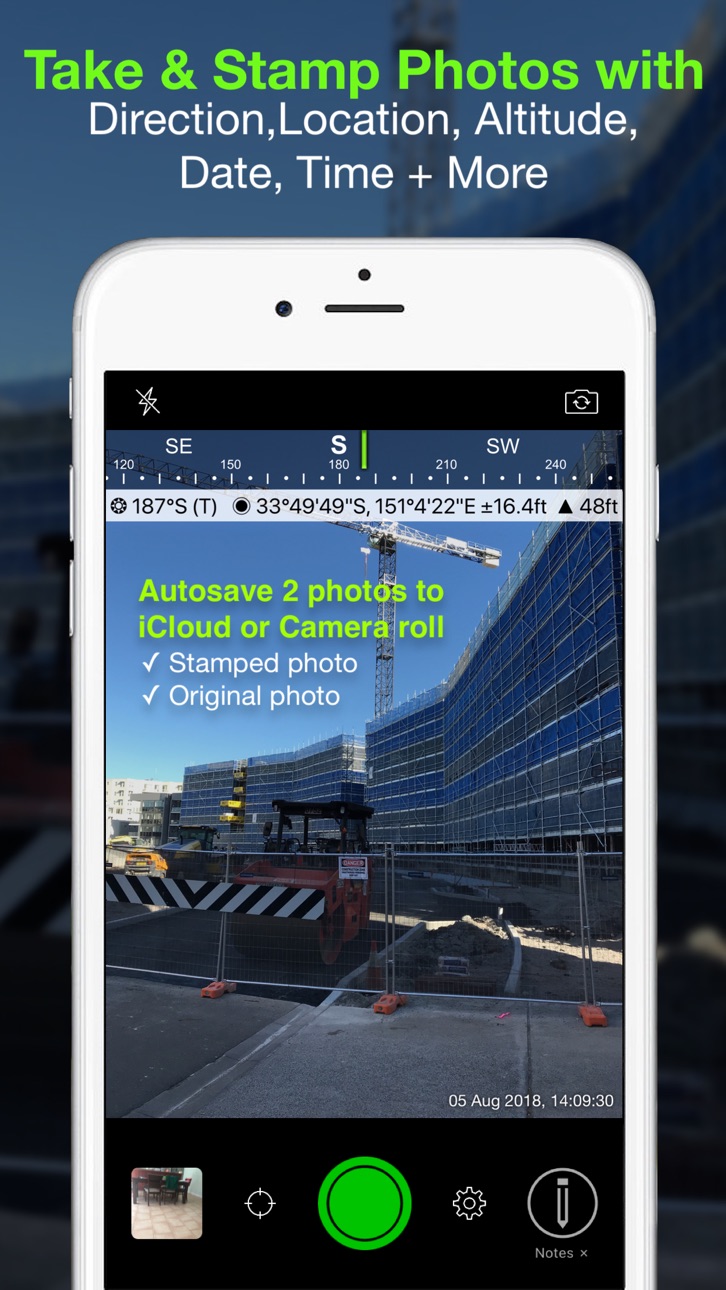
Solocator – The GPS Camera for Fieldwork and Photo Proof evidence. Overlay and stamp photos with location, direction, altitude, date & time taken. With the Industry Pack (in-app purchase), capture field notes including project name, photo description, company or username, and company logo.
Solocator is trusted by professionals, government agencies, and industries worldwide for reliable photo documentation.
TAILOR OVERLAY INFORMATION TO YOUR NEEDS
Capture & stamp on your photos:
+ GPS position (Latitude & Longitude in various formats) ± accuracy
+ UTM/MGRS coordinates (Industry Pack)
+ Street address (Industry Pack)
+ Direction – bearing
+ Altitude (MLS / HAE)
+ Tilt & Roll angles
+ Local date & time (based on GPS location)
+ Local time zone
+ UTC time
+ Compass display
+ Cardinal directions
+ Building facade direction, e.g. "North elevation"
+ Field Notes (Industry Pack)
+ Company Logo (Industry Pack)
AUTOSAVE PHOTOS TO iCLOUD & CAMERA ROLL
Autosave two photos at once: one stamped with the selected overlays and the other as an original high-resolution photo.
SORT, SEARCH, SHARE OR EMAIL
+ Photos are sorted by time, location, distance from current location and project name.
+ View photo direction and location in map view and navigate there.
+ Share photos individually or as a zip file via the share sheet.
+ Search for photos by date, date range or notes and street addresses.
+ Email photos including the following information:
- Exif metadata
- Compass direction
- GPS position ± accuracy
- Altitude
- Tilt & Roll
- Date & time taken
- Street address (Industry Pack)
- Cardinal Directions
- Elevation of building facade
- Links to maps so the receiver can navigate there easily
** INDUSTRY PACK ** (In-App Purchase) "One-off charge"
EDITABLE NOTES OVERLAY
Stamp photos with "Project name", "Description" & “Watermark”. The Project Name field can be used as a job or ticket number. The Watermark field is typically used for a company or username. You can also edit these fields later.
WATERMARK LOGO
Add your Company Logo to photos. Logo’s size, opacity, and position can be customised for both portrait and landscape photos. To get you started, a Solocator icon is included, which can be replaced.
CUSTOM EXPORT FILENAME
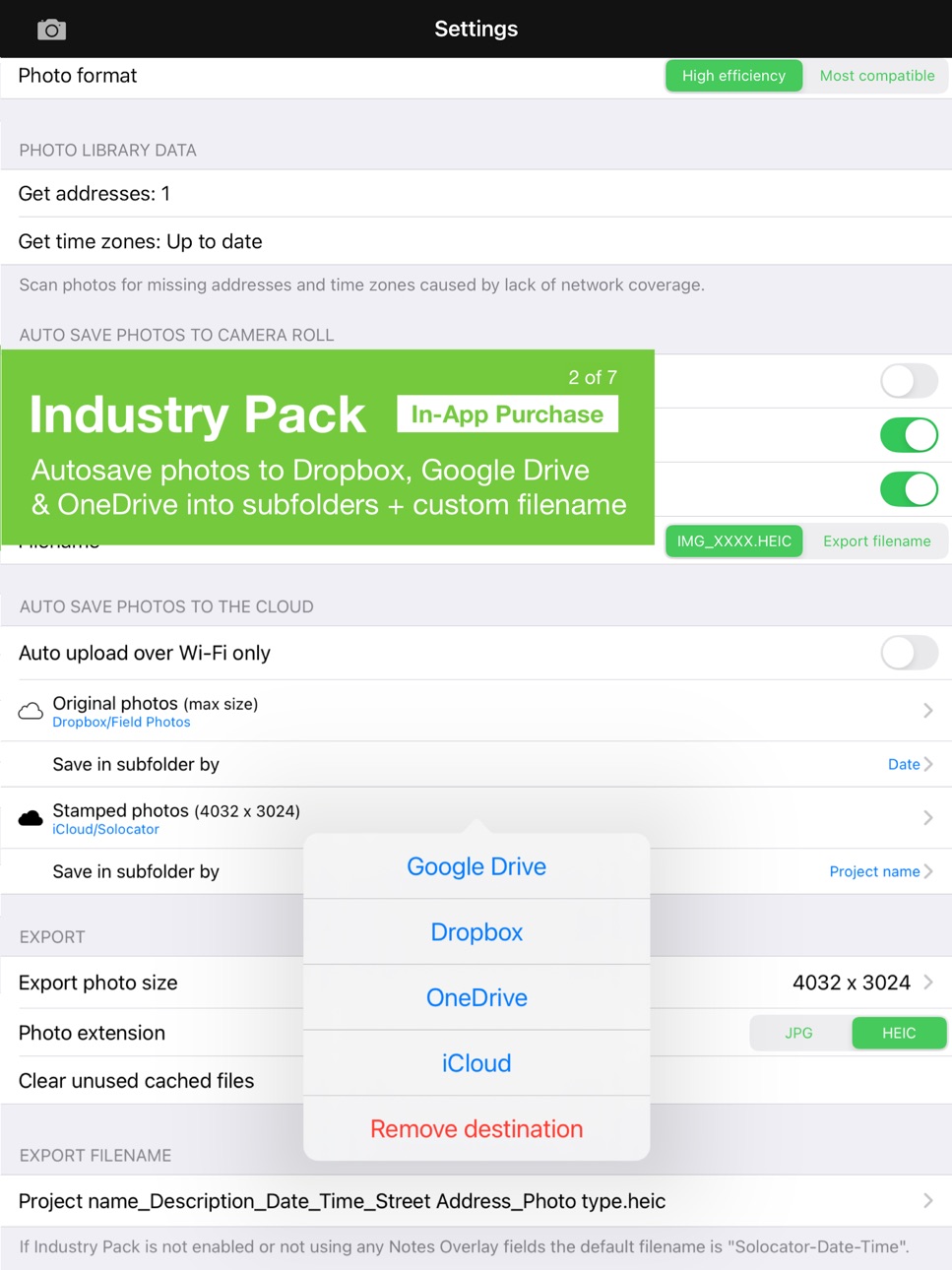
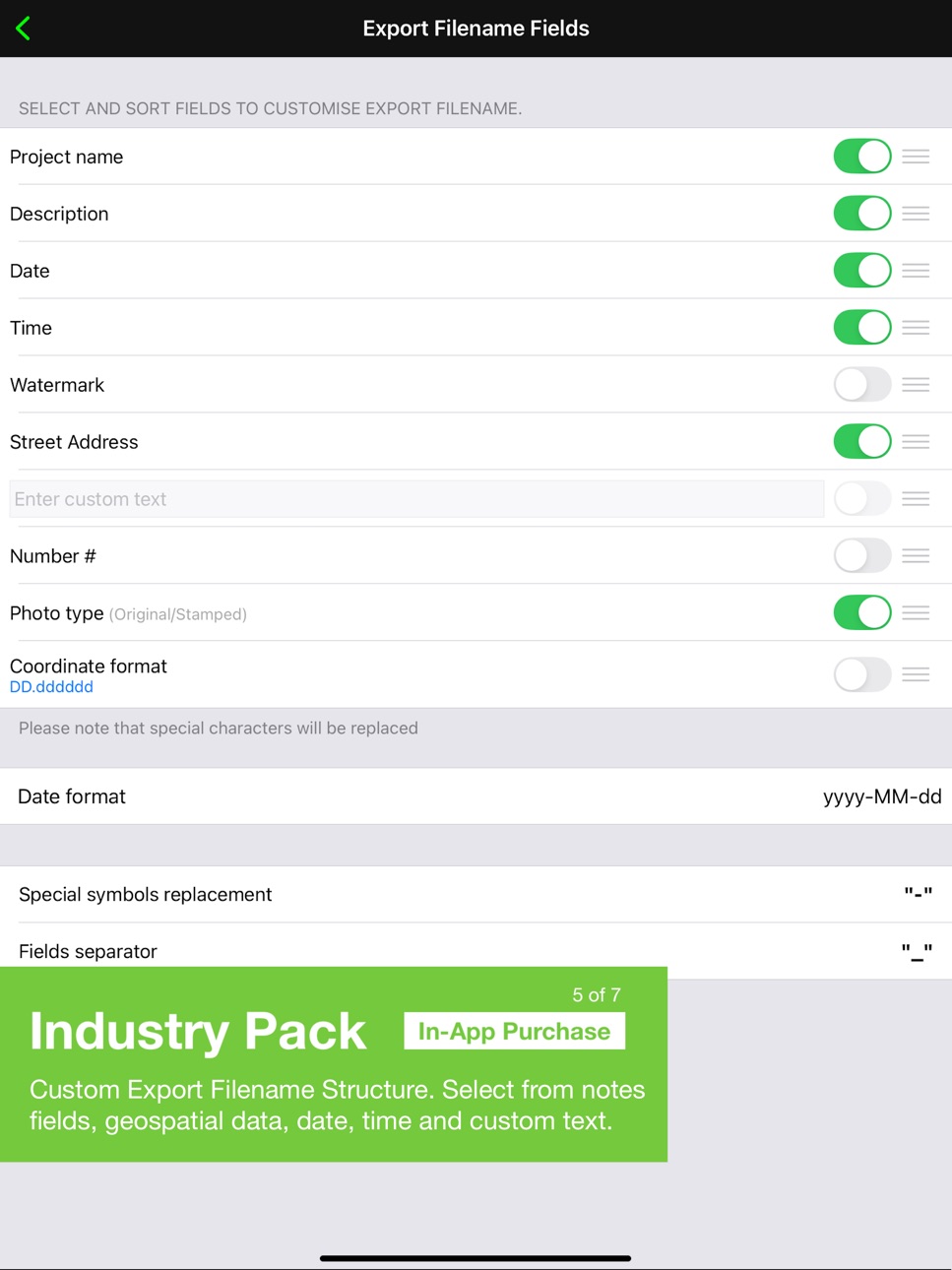
Define your photo export filename from a selection of fields: Project Name, Description, Watermark, Street Address, Date/Time, Number#, Custom text field, Photo type (original/stamped), and Coordinates (DD.dddddd, UTM, UTM Bands, MGRS).
AUTOSAVE OR EXPORT PHOTOS TO CLOUD STORAGE
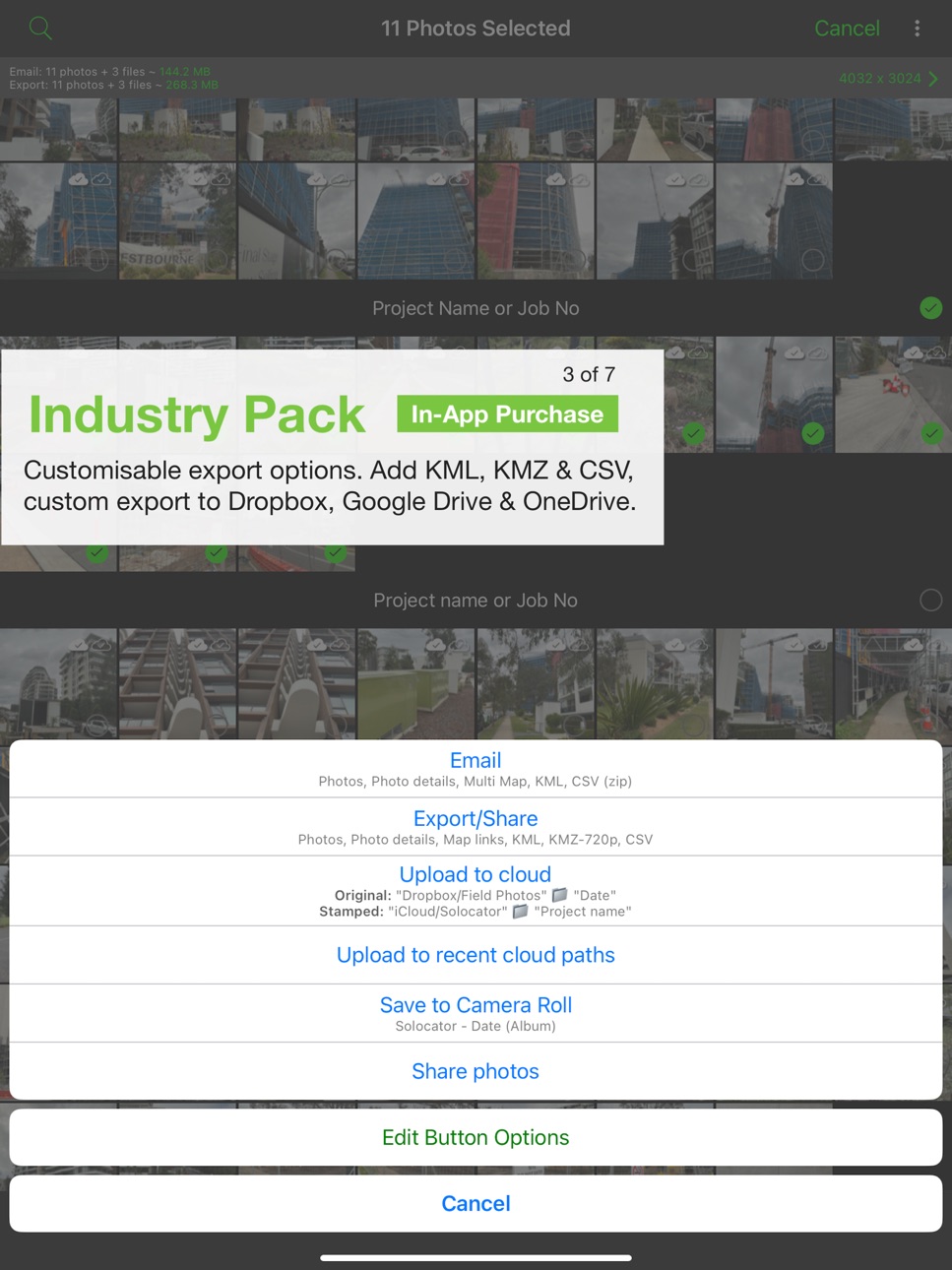
Autosave original and stamped photos to Google Drive, Dropbox, and OneDrive (Personal & For Business), including SharePoint Sites and Teams. You can also save photos in date or project name subfolders - automatically.
PHOTO DATA in KML, KMZ & CSV
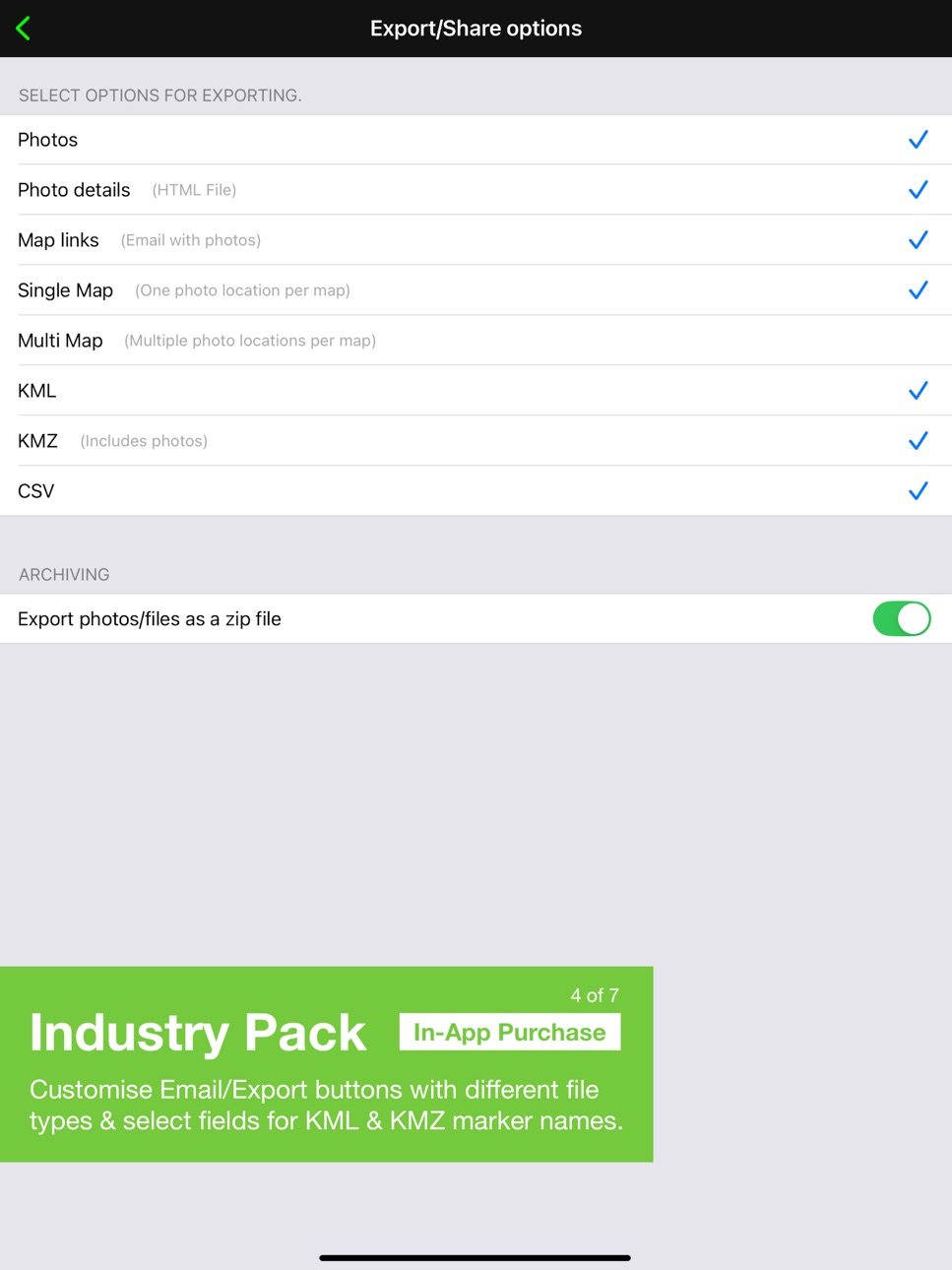
Along with photos, email or export photo data and notes in KML, KMZ or CSV formats. Both email and export buttons are customisable to suit your data requirements.
STREET ADDRESS & UTM/MGRS
Add street address to your overlay or use UTM/, UTM Bands & MGRS coordinate formats.
BATCH EDIT NOTES & OVERLAY FIELDS
Select photos from the library and edit Project Name, Description & Watermark fields in one go.
TRACK PHOTOS IN MAP VIEW
View photos by direction, the distance between photos, area of photos taken and distance to your added markers via imported KML files or dropped pins.
REFINE & LOCK GPS LOCATION
Ideal for those working in and around buildings; to improve your GPS location. You can also use it to lock the asset position you're photographing.
COMPACT VIEW
Switch off Compass, Building and Street modes and only show the GPS info bar for a more compact view.
VPP Customers: https://solocator.com/enterprise-app-for-mdms/
Terms of Use: https://www.apple.com/legal/internet-services/itunes/dev/stdeula/
In-App Purchases US pricing
One-Time Purchases
Industry Pack$5.99
Capabilities
In-App Purchases
Accessibility
ipadiphonemacrealityDevicetvoswatch
Version history 25 versions
Build 884081996v2.262026-04-04 22:19:14
- Bug Fix: Resolved a camera capture issue affecting some devices on iOS 18 after updating to v2.25.
- Improvement: Refined the "Wi-Fi Only" upload alerts for better clarity and control.
Build 883789212v2.252026-03-26 23:49:48
- Introducing Preset Notes. (Industry Pack)
If you frequently reuse the same Project Names, Descriptions, or Watermarks, the Preset Notes feature streamlines your workflow. Simply select from a pre-defined list instead of typing every time. You can build custom lists in advance, or let the app automatically save your recent entries as you type.
Learn more: https://solocator.com/article/how-to-add-select-preset-notes/
- OneDrive integration improvements.
- Added more details for error alerts.
Build 881442454v2.242026-01-14 04:57:07
- We've updated camera orientations for iOS 26 and multitasking on iPads.
- Added detailed descriptions for OneDrive errors.
- Improved OneDrive logout flow.
- Various minor fixes and improvements.
- Added a gradient over the camera view to indicate photo processing and saving.
Build 881397243v2.232026-01-11 23:37:42
- We've updated camera orientations for iOS 26 and multitasking on iPads.
- Added detailed descriptions for OneDrive errors.
- Improved OneDrive logout flow.
- Various minor fixes and improvements.
Build 877983557v2.222025-09-10 21:21:38
Improved Photo Export:
- Fixed an issue where duplicate photos were exported with the same filename.
- Enhanced color accuracy in exported photos.
- New option to apply stamped photo size and quality settings to original photos, or keep your device’s default maximum size.
OneDrive Improvements:
- Fixed a bug affecting autosaving or uploading photos after long periods of inactivity.
- Additional enhancements to improve reliability of autosaving to OneDrive and added more detail to error alerts if relevant.
Camera Controls & Permissions:
- Fixed a rare issue where the shutter button would trigger automatically.
- New setting to enable or disable using volume buttons as the shutter.
- Added direct links in settings for managing location and camera roll permissions.
Build 867934282v2.212025-08-13 03:09:46
STANDARD APP
- New Cardinal Capture Mode added.
- Support for user-defined suffixes in Building Capture Mode.
- Torch option added to flash button settings in the camera.
- Users can now select between MSL and HAE altitude systems.
- Added 3x3 grid overlay in the camera for better composition.
- Fixed an issue with date separators.
- Added/updated buttons for collecting location and time zone data when offline, especially for older app versions.
- Solocator app can now be accessible from the lock screen.
- Improved iCloud backups to support future device migration.
- Enhanced UI spacing, button sizes, and fixed various bugs.
- Added a Settings button to the photo library taskbar for quicker access.
- Added photo upload filter for iCloud.
- Streamlined "Save to Camera Roll" and "Share Photo" buttons.
- Introduced a "Recently Deleted" album, accessible via the extended menu in the Solocator photo library.
INDUSTRY PACK
- Support for watermark logo overlays, including options for size, position, and opacity (for both portrait and landscape photos).
- Increased notes field limit to 100 characters.
- Added new filename fields for export structure, including:
– Photo type (Stamped/Original)
– Coordinate formats
– Date formats
- Fixed a bug with field name separators.
- Subfolder selection is now preserved when changing cloud storage destinations.
- Added a photo filter in the photo library for cloud uploads.
- Reordered buttons in the action sheet; Edit options moved further down.
- Added a manual "Upload to Cloud" button using the current auto-save cloud destination..
- New "Upload to Recent Cloud Paths" button added, which can be hidden if not needed.
- The "Upload to Cloud" and "Save to Camera Roll" buttons are now customizable from the Edit button option settings.
- Added 1080p photo size support for KMZ file exports.
- Improved thumbnail photo preview from the map view.
Build 865893702v2.202024-05-14 01:24:31
- Added options for autosaving photos to your camera roll. You can save photos to a Solocator album or Solocator album with the addition of date or project name.
- Added option to enable or disable position accuracy.
- Customisable email and export buttons now include the selected KMZ photo size.
- Ul changes for editing notes fields from the Solocator photo library.
- Added nil date separator option.
- Added long date format and the addition of yellow in text color choices.
- Added warning when exporting/emailing files larger than device memory or storage that may lead to data loss.
- Bug Fix: an intermittent crash retrieving location data when taking a photo.
- Moved share action button to bottom taskbar when viewing individual photos.
Build 864047441v2.192024-02-27 11:36:11
- Added option to select photo extension JPG or HEIC.
- Added option to use passcode and biometrics to limit access to the app.
- Updated framework for using volume buttons as the shutter button.
- Added a selection of photo sizes for KMZ files in the customised email/export buttons section.
- Added option to auto save photos to the cloud via WIFI only.
- Fixed landscape orientation issue for iPad 8th Gen.
- Minor Ul improvements and Bug fixes.
Build 859389396v2.182023-08-26 07:38:48
- Option to share original photos from the Solocator app library.
- Option to save original photos to camera roll from Solocator app library.
- Increased camera range (180°) for landscape orientation.
- Added user-defined sort options for emailing.
- Added filename fields separator selection.
- UI changes to the Lock GPS Location screen.
- Bug fix for tilt readings.
- Option to rotate photo orientation in library edit if incorrectly captured.
- Added photo format options "high efficiency” or “most compatible” in settings.
- Export photo size fix for some devices.
- Screen size fix for iPad mini (6th gen).
Build 855560883v2.172023-03-24 21:24:50
- Added address format to batch editing of geospatial information.
- Added native mail app to export share sheet.
- Fixed an issue exporting zip files for some users.
- Fixed export photo sizes for iPad Air using iOS 12.
- Updated support for device display zoom.
- Minor camera UI improvements, including using volume buttons as a camera shutter.
- Project name subfolders now support special characters (e.g. #, /, >) when autosaving photos to the cloud.
Build 854707404v2.162023-02-01 21:48:59
What's new in v2.16
- Added option to edit/change geospatial information and formats after photos are taken.
- You can now batch edit Project Name & Description fields separately (Industry Pack).
Added the plumb indicator back into Solocator settings.
- Shutter animation on taking image.
- Grouped export photo size and quality together, plus added clear cache button for unused exported files.
Bug Fixes:
- Fixed an issue where some users experienced intermittently black/blank photos.
- Fixed photo quality bug.
- Fixed crash for Dropbox Pro users autosaving photos.
- Fixed issue with "remember zoom level" for some devices.
- Fixed crash when selecting between OneDrive destinations on iPad.
- Improved KMZ file export and fixed crash that some users experienced.
Build 851692906v2.152022-08-21 12:46:05
What’s new in v2.15
- Bug fix: File format issue for users downloading photos to computer via cable.
- Bug fix: Email attachment issue for Outlook users.
- Added filename format selection for autosaving photos to camera roll.
RECENT v2.14 UPDATE
New in Standard App
- Timer added to the camera with options for 5, 10 & 15 seconds delay.
- Added Tilt, Roll and Crosshair overlays in camera view plus option to stamp onto photos.
- Tilt and Roll added to EXIF metadata as well in email body text.
- Photos saved to the camera roll are now saved with the filename Solocator-Date-Time
- Added support for ultra wide angle camera within the pinch zoom. and tap between 0.5x, 1x and 2x pre-sets.
- New setting to remember camera zoom level.
- Search photos by date and date range.
- Option to select between nearest time zones when taking photos on and around time zone borders.
- Updated frameworks for Dropbox and GoogleDrive exports.
- Increased photo quality for maximum size photos.
- Updates for iOS 15
New in Industry Pack (In-App Purchase)
- Autosave photos to Microsoft OneDrive for Business including SharePoint Sites and Teams.
- Added status icons to camera UI to indicate photos uploading to cloud storage.
- Add or edit text before taking a photo. Tap Project name or Description field in camera to add/edit. Handy when notes are locked.
- Search Notes Overlay fields in Photo Library. Search for “text” in each of the note fields; Project Name, Description, Watermark and street address.
- Photos saved to the camera roll are now saved with Export filename.
- Added two new export/share button options: email map links (only) with photos and HTML file of photo details.
- Photo number# option added for export filenames to match photo marker titles in KMZ file export.
- Optimised KMZ export file Hierarchy to select/deselect photo directions or placemarks.
- Bug fix converting short distances between photos in map view.
- Fixed crashing when using MGRS coordinate format in certain situations.
- Time zone, Tilt and Roll added to CSV file export.
- Bug fix when unselecting photos in map view.
Build 840458798v2.142022-08-16 13:28:31
New in Standard App
- Timer added to the camera with options for 5, 10 & 15 seconds delay.
- Added Tilt, Roll and Crosshair overlays in camera view plus option to stamp onto photos.
- Tilt and Roll added to EXIF metadata as well in email body text.
- Photos saved to the camera roll are now saved with the filename Solocator-Date-Time
- Added support for ultra wide angle camera within the pinch zoom. and tap between 0.5x, 1x and 2x pre-sets.
- New setting to remember camera zoom level.
- Search photos by date and date range.
- Option to select between nearest time zones when taking photos on and around time zone borders.
- Updated frameworks for Dropbox and GoogleDrive exports.
- Increased photo quality for maximum size photos.
- Updates for iOS 15
New in Industry Pack (In-App Purchase)
- Autosave photos to Microsoft OneDrive for Business including SharePoint Sites and Teams.
- Added status icons to camera UI to indicate photos uploading to cloud storage.
- Add or edit text before taking a photo. Tap Project name or Description field in camera to add/edit. Handy when notes are locked.
- Search Notes Overlay fields in Photo Library. Search for “text” in each of the note fields; Project Name, Description, Watermark and street address.
- Photos saved to the camera roll are now saved with Export filename.
- Added two new export/share button options: email map links (only) with photos and HTML file of photo details.
- Photo number# option added for export filenames to match photo marker titles in KMZ file export.
- Optimised KMZ export file Hierarchy to select/deselect photo directions or placemarks.
- Bug fix converting short distances between photos in map view.
- Fixed crashing when using MGRS coordinate format in certain situations.
- Time zone, Tilt and Roll added to CSV file export.
- Bug fix when unselecting photos in map view.
Build 836142847v2.132020-12-19 23:51:17
- Subfolders are now supported for autosaving photos to iCloud.
- Camera UI bug fix for some devices when in zoomed mode and new iPhone sizes.
New in Industry Pack
- Added support for autosaving photos to OneDrive.
- Added a user defined export filename field.
- Added Street Address as an export filename field.
- User defined options for street address format.
- Alert for characters not supported for filename export.
- Addition of photo number when exporting photos with the same filename.
- User defined list to create photo marker titles in KML/KMZ file exports.
- Made improvements to KML/KMZ file export for Windows PC users, for both Google Earth & ArcGIS.
Build 835497818v2.122020-04-28 14:25:33
- Enhancements to camera zoom.
- Updated date & time format in email body to match format stamped on photos.
- Fixed date/time stamp when autosaving to camera roll using the standard app.
- Fixed crash when exporting KMZ files.
- Updated Dropbox SDK for customised exporting of photos/files.
Build 835327814v2.112020-03-31 02:49:28
Thanks for your quick feedback. We've made some enhancements and bug fixes:
- Fix for manually saving multiple photos to camera roll.
- Date label fix for crashing on launch for some users.
- Fixed flash issue for front facing camera on pre iOS 13 devices.
Build 834498053v2.102020-03-18 22:04:02
- Selection of date formats added
- UTC time format option
- Option to show local time time zone
- Background gradient to date, time and notes area with your choice of opacity (between 30%-40% is my favourite).
- Greater zoom for newer iPhones.
- Some bug fixes including; compass reading and emailing KMZ files.
NEW IN INDUSTRY PACK (In-App Purchase)
- User defined export filename. Select and order from Notes Overlay fields.
- Edit watermark and overlay format after photos are taken. (watermark cannot be edited to photos taken prior v2.10).
- Batch edit for Notes Overlay fields; Project Name, Description & Watermark.
- Updated Google Drive SDK for autosaving and exporting photos/files.
Build 833364625v2.92020-01-11 10:24:40
- Added street address overlay in the Lock GPS Screen map view for easier property selection.
- Added additional switch for emailing or exporting photos/files as a zip file under custom email/export selection lists. You can now continue emailing/ exporting without having to back to the settings screen to switch zip file option on or off.
- Various improvements and bug fixes.
Build 832812356v2.82019-10-11 00:19:23
- Bug fixes for crashes when viewing photos from library and editing watermark.
- Increased description field to 90 characters and watermark field to 35 characters as requested.
- Updates for iOS 13
Build 832648843v2.72019-09-06 20:15:38
- Fixed UI issue for plus size iPhones. Sorry for those who were affected by this issue.
- Now you can autosave original & stamped photos to iCloud.
- Fixed bug when locking app in landscape orientation.
- You can now select between date and time separately.
- Improved sorting of filenames in CSV file export.
- Filenames in exported CSV files now match photos.
- Changed Locked GPS alert notification.
- UI enhancements to support latest iPhones.
New in Industry Pack
Added autosave to Dropbox and Google Drive for both original and stamped photos. You can also save photos in date or project name subfolders - automatically.
Build 831190179v2.62019-09-03 23:00:02
V2.6
- Now you can autosave original & stamped photos to iCloud.
- Fixed bug when locking app in landscape orientation.
- You can now select between date and time separately.
- Improved sorting of filenames in CSV file export.
- Filenames in exported CSV files now match photos.
- Changed Locked GPS alert notification.
- UI enhancements to support latest iPhones.
New in Industry Pack
Added autosave to Dropbox and Google Drive for both original and stamped photos. You can also save photos in date or project name subfolders - automatically.
Build 829453847v2.52019-03-29 09:31:22
Version 2.5 has a number of improvements and fixes including the following:
■ Corrected time zones and improved caching for updating time based on user location.
■ Fixed an issue for some users with locked GPS positions.
■ Added extra functionality for handling photos when updating to new app versions, specifically for users with minimal device storage space.
■ Added option to email or export photos as a zip file. See archiving section in settings.
■ Added option to log out and switch between Google accounts when exporting/importing to and from Google Drive.
■ Added DMS.s coordinate format with one decimal place.
■ Fixes to CSV file export.
Thank you for your continued support and feedback.
Best Regards
John Civijovski
Build 817693223v2.42018-11-07 21:59:02
With v2.4 we’ve added a number of requested features in the standard app and in the Industry Pack including a feature called tracked photos.
NEW IN STANDARD APP
• User defined photo sizes for exporting/emailing.
• Approximate file size for emailing/exporting.
• Share photos via standard sharing options.
• Custom URL scheme - see Help/Info in settings.
• User defined font size for notes overlay.
• Fixed bug when deleting single photos.
• App now uses GPS location for time.
• Support for front facing (selfie) camera.
• Lock Capture Modes in camera view.
• Compass improvements.
• Support for 3D maps.
• Optimised for iPad.
NEW IN INDUSTRY PACK
• Lock notes overlay for taking photos with same info (extra tap on pencil in camera & turns red).
• Export and email multiple photo info in KML, KMZ or CSV formats.
• Export or email map with single or multiple photo locations.
• Customise what to email or export.
• Custom export to Dropbox & Google Drive.
• Support for other export/sharing options.
• New tracked photos in map view. View multiple photos by direction, distance between photos, area of photos taken and distance to user-added markers via KML files or dropped pins.
• View and deselect photos from map view before emailing, exporting or sharing.
• Added user defined distance interval for updating street address.
Thank you for your continued support and feedback. Also my apologies for the delayed release of this version as I did promise some of you that it would be out a lot earlier.
Best Regards
John Civijovski
Build 817590796v2.3.52016-06-05 04:50:44
- Fixed camera zoom - thanks Everton.
- Bug fixes.
Build 817399352v2.3.42016-05-18 17:43:18
This update has a number of bug fixes including an issue for some devices crashing when taking photos plus a crashing issue for iPhone 4 users when app starts up.
Thank you for all you who contacted me and for your patience.
Regards,
John Civijovski
Price history by region
Currency
Show
Columns
Search
App performance US
Availability 175 of 175 storefronts
| Region | Language | Price | Ratings | Avg | Version |
|---|---|---|---|---|---|
| US | en-US | USD 0.99 | 411 | 4.3 | 2.26 |
| RU | ru | RUB 99 | 137 | 3.7 | 2.26 |
| AU | en-AU | AUD 1.99 | 78 | 4.1 | 2.26 |
| CA | en-CA | CAD 0.99 | 60 | 4.0 | 2.26 |
| GB | en-GB | GBP 0.99 | 37 | 3.8 | 2.26 |
| BR | pt-BR | BRL 6.9 | 9 | 4.3 | 2.26 |
| MX | es-MX | MXN 19 | 7 | 3.7 | 2.26 |
| UA | en-GB | USD 0.99 | 6 | 4.8 | 2.26 |
| DE | de-DE | EUR 0.99 | 5 | 4.4 | 2.26 |
| NO | en-GB | NOK 9 | 5 | 4.4 | 2.26 |
| PH | en-GB | PHP 49 | 5 | 4.2 | 2.26 |
| ZA | en-GB | ZAR 19.99 | 5 | 4.8 | 2.26 |
| GR | en-GB | EUR 0.99 | 4 | 4.8 | 2.26 |
| IE | en-GB | EUR 0.99 | 4 | 4.8 | 2.26 |
| NZ | en-AU | NZD 1.99 | 4 | 5.0 | 2.26 |
| SA | en-GB | SAR 4.99 | 4 | 5.0 | 2.26 |
| SG | en-GB | SGD 0.98 | 4 | 2.8 | 2.26 |
| CH | de-CH | CHF 1 | 3 | 4.7 | 2.26 |
| ID | en-GB | IDR 19000 | 3 | 5.0 | 2.26 |
| SE | sv | SEK 9 | 3 | 5.0 | 2.26 |
| TR | en-GB | TRY 49.99 | 3 | 2.3 | 2.26 |
| DK | en-GB | DKK 9 | 2 | 5.0 | 2.26 |
| FR | fr-FR | EUR 0.99 | 2 | 3.0 | 2.26 |
| GT | es-MX | USD 0.99 | 2 | 5.0 | 2.26 |
| HK | zh-Hant-HK | HKD 8 | 2 | 2.5 | 2.26 |
| IN | en-GB | INR 99 | 2 | 3.0 | 2.26 |
| IT | it | EUR 0.99 | 2 | 4.5 | 2.26 |
| MY | en-GB | MYR 4.9 | 2 | 5.0 | 2.26 |
| PE | es-MX | PEN 4.9 | 2 | 4.5 | 2.26 |
| PL | en-GB | PLN 4.99 | 2 | 5.0 | 2.26 |
| TH | en-GB | THB 29 | 2 | 2.5 | 2.26 |
| AE | en-GB | AED 2.99 | 1 | 1.0 | 2.26 |
| BE | en-GB | EUR 0.99 | 1 | 4.0 | 2.26 |
| BS | en-GB | USD 0.99 | 1 | 5.0 | 2.26 |
| CO | es-MX | COP 4900 | 1 | 5.0 | 2.26 |
| CR | es-MX | USD 0.99 | 1 | 5.0 | 2.26 |
| EE | en-GB | EUR 0.99 | 1 | 5.0 | 2.26 |
| ES | es-ES | EUR 0.99 | 1 | 4.0 | 2.26 |
| FI | en-GB | EUR 0.99 | 1 | 5.0 | 2.26 |
| IL | en-GB | ILS 2.9 | 1 | 4.0 | 2.26 |
| IS | en-GB | USD 0.99 | 1 | 5.0 | 2.26 |
| JP | ja | JPY 150 | 1 | 3.0 | 2.26 |
| KW | en-GB | USD 0.99 | 1 | 1.0 | 2.26 |
| KZ | en-GB | KZT 499 | 1 | 5.0 | 2.26 |
| NL | nl | EUR 0.99 | 1 | 2.0 | 2.26 |
| QA | en-GB | QAR 2.99 | 1 | 5.0 | 2.26 |
| RO | en-GB | RON 4.99 | 1 | 1.0 | 2.26 |
| TW | zh-Hant-TW | TWD 30 | 1 | 5.0 | 2.26 |
| VN | en-GB | VND 29000 | 1 | 5.0 | 2.26 |
| AF | en-GB | USD 0.99 | 0 | — | 2.26 |
| AG | en-GB | USD 0.99 | 0 | — | 2.26 |
| AI | en-GB | USD 0.99 | 0 | — | 2.26 |
| AL | en-GB | USD 0.99 | 0 | — | 2.26 |
| AM | en-GB | USD 0.99 | 0 | — | 2.26 |
| AO | en-GB | USD 0.99 | 0 | — | 2.26 |
| AR | es-MX | USD 0.99 | 0 | — | 2.26 |
| AT | de-DE | EUR 0.99 | 0 | — | 2.26 |
| AZ | en-GB | USD 0.99 | 0 | — | 2.26 |
| BA | en-GB | EUR 0.99 | 0 | — | 2.26 |
| BB | en-GB | USD 0.99 | 0 | — | 2.26 |
| BF | en-GB | USD 0.99 | 0 | — | 2.26 |
| BG | en-GB | EUR 0.99 | 0 | — | 2.26 |
| BH | en-GB | USD 0.99 | 0 | — | 2.26 |
| BJ | en-GB | USD 0.99 | 0 | — | 2.26 |
| BM | en-GB | USD 0.99 | 0 | — | 2.26 |
| BN | en-GB | USD 0.99 | 0 | — | 2.26 |
| BO | es-MX | USD 0.99 | 0 | — | 2.26 |
| BT | en-GB | USD 0.99 | 0 | — | 2.26 |
| BW | en-GB | USD 0.99 | 0 | — | 2.26 |
| BY | en-GB | USD 0.99 | 0 | — | 2.26 |
| BZ | en-GB | USD 0.99 | 0 | — | 2.26 |
| CD | en-GB | USD 0.99 | 0 | — | 2.26 |
| CG | en-GB | USD 0.99 | 0 | — | 2.26 |
| CI | fr-FR | USD 0.99 | 0 | — | 2.26 |
| CL | es-MX | CLP 990 | 0 | — | 2.26 |
| CM | fr-FR | USD 0.99 | 0 | — | 2.26 |
| CN | zh-Hans-CN | CNY 8 | 0 | — | 2.26 |
| CV | en-GB | USD 0.99 | 0 | — | 2.26 |
| CY | en-GB | EUR 0.99 | 0 | — | 2.26 |
| CZ | en-GB | CZK 29 | 0 | — | 2.26 |
| DM | en-GB | USD 0.99 | 0 | — | 2.26 |
| DO | es-MX | USD 0.99 | 0 | — | 2.26 |
| DZ | en-GB | USD 0.99 | 0 | — | 2.26 |
| EC | es-MX | USD 0.99 | 0 | — | 2.26 |
| EG | en-GB | EGP 49.99 | 0 | — | 2.26 |
| FJ | en-GB | USD 0.99 | 0 | — | 2.26 |
| FM | en-GB | USD 0.99 | 0 | — | 2.26 |
| GA | fr-FR | USD 0.99 | 0 | — | 2.26 |
| GD | en-GB | USD 0.99 | 0 | — | 2.26 |
| GE | en-GB | USD 0.99 | 0 | — | 2.26 |
| GH | en-GB | USD 0.99 | 0 | — | 2.26 |
| GM | en-GB | USD 0.99 | 0 | — | 2.26 |
| GW | en-GB | USD 0.99 | 0 | — | 2.26 |
| GY | en-GB | USD 0.99 | 0 | — | 2.26 |
| HN | es-MX | USD 0.99 | 0 | — | 2.26 |
| HR | en-GB | EUR 0.99 | 0 | — | 2.26 |
| HU | en-GB | HUF 499 | 0 | — | 2.26 |
| IQ | en-GB | USD 0.99 | 0 | — | 2.26 |
| JM | en-GB | USD 0.99 | 0 | — | 2.26 |
| JO | en-GB | USD 0.99 | 0 | — | 2.26 |
| KE | en-GB | USD 0.99 | 0 | — | 2.26 |
| KG | en-GB | USD 0.99 | 0 | — | 2.26 |
| KH | en-GB | USD 0.99 | 0 | — | 2.26 |
| KN | en-GB | USD 0.99 | 0 | — | 2.26 |
| KR | ko | KRW 1100 | 0 | — | 2.26 |
| KY | en-GB | USD 0.99 | 0 | — | 2.26 |
| LA | en-GB | USD 0.99 | 0 | — | 2.26 |
| LB | en-GB | USD 0.99 | 0 | — | 2.26 |
| LC | en-GB | USD 0.99 | 0 | — | 2.26 |
| LK | en-GB | USD 0.99 | 0 | — | 2.26 |
| LR | en-GB | USD 0.99 | 0 | — | 2.26 |
| LT | en-GB | EUR 0.99 | 0 | — | 2.26 |
| LU | en-GB | EUR 0.99 | 0 | — | 2.26 |
| LV | en-GB | EUR 0.99 | 0 | — | 2.26 |
| LY | en-GB | USD 0.99 | 0 | — | 2.26 |
| MA | en-GB | USD 0.99 | 0 | — | 2.26 |
| MD | en-GB | USD 0.99 | 0 | — | 2.26 |
| ME | en-GB | EUR 0.99 | 0 | — | 2.26 |
| MG | en-GB | USD 0.99 | 0 | — | 2.26 |
| MK | en-GB | USD 0.99 | 0 | — | 2.26 |
| ML | en-GB | USD 0.99 | 0 | — | 2.26 |
| MM | en-GB | USD 0.99 | 0 | — | 2.26 |
| MN | en-GB | USD 0.99 | 0 | — | 2.26 |
| MO | zh-Hant-HK | USD 0.99 | 0 | — | 2.26 |
| MR | en-GB | USD 0.99 | 0 | — | 2.26 |
| MS | en-GB | USD 0.99 | 0 | — | 2.26 |
| MT | en-GB | EUR 0.99 | 0 | — | 2.26 |
| MU | en-GB | USD 0.99 | 0 | — | 2.26 |
| MV | en-GB | USD 0.99 | 0 | — | 2.26 |
| MW | en-GB | USD 0.99 | 0 | — | 2.26 |
| MZ | en-GB | USD 0.99 | 0 | — | 2.26 |
| NA | en-GB | USD 0.99 | 0 | — | 2.26 |
| NE | en-GB | USD 0.99 | 0 | — | 2.26 |
| NG | en-GB | NGN 1500 | 0 | — | 2.26 |
| NI | es-MX | USD 0.99 | 0 | — | 2.26 |
| NP | en-GB | USD 0.99 | 0 | — | 2.26 |
| NR | en-GB | USD 0.99 | 0 | — | 2.26 |
| OM | en-GB | USD 0.99 | 0 | — | 2.26 |
| PA | es-MX | USD 0.99 | 0 | — | 2.26 |
| PG | en-GB | USD 0.99 | 0 | — | 2.26 |
| PK | en-GB | PKR 300 | 0 | — | 2.26 |
| PT | pt-PT | EUR 0.99 | 0 | — | 2.26 |
| PW | en-GB | USD 0.99 | 0 | — | 2.26 |
| PY | es-MX | USD 0.99 | 0 | — | 2.26 |
| RS | en-GB | EUR 0.99 | 0 | — | 2.26 |
| RW | en-GB | USD 0.99 | 0 | — | 2.26 |
| SB | en-GB | USD 0.99 | 0 | — | 2.26 |
| SC | en-GB | USD 0.99 | 0 | — | 2.26 |
| SI | en-GB | EUR 0.99 | 0 | — | 2.26 |
| SK | en-GB | EUR 0.99 | 0 | — | 2.26 |
| SL | en-GB | USD 0.99 | 0 | — | 2.26 |
| SN | en-GB | USD 0.99 | 0 | — | 2.26 |
| SR | en-GB | USD 0.99 | 0 | — | 2.26 |
| ST | en-GB | USD 0.99 | 0 | — | 2.26 |
| SV | es-MX | USD 0.99 | 0 | — | 2.26 |
| SZ | en-GB | USD 0.99 | 0 | — | 2.26 |
| TC | en-GB | USD 0.99 | 0 | — | 2.26 |
| TD | en-GB | USD 0.99 | 0 | — | 2.26 |
| TJ | en-GB | USD 0.99 | 0 | — | 2.26 |
| TM | en-GB | USD 0.99 | 0 | — | 2.26 |
| TN | en-GB | USD 0.99 | 0 | — | 2.26 |
| TO | en-GB | USD 0.99 | 0 | — | 2.26 |
| TT | en-GB | USD 0.99 | 0 | — | 2.26 |
| TZ | en-GB | TZS 2900 | 0 | — | 2.26 |
| UG | en-GB | USD 0.99 | 0 | — | 2.26 |
| UY | en-GB | USD 0.99 | 0 | — | 2.26 |
| UZ | en-GB | USD 0.99 | 0 | — | 2.26 |
| VC | en-GB | USD 0.99 | 0 | — | 2.26 |
| VE | es-MX | USD 0.99 | 0 | — | 2.26 |
| VG | en-GB | USD 0.99 | 0 | — | 2.26 |
| VU | en-GB | USD 0.99 | 0 | — | 2.26 |
| XK | en-GB | EUR 0.99 | 0 | — | 2.26 |
| YE | en-GB | USD 0.99 | 0 | — | 2.26 |
| ZM | en-GB | USD 0.99 | 0 | — | 2.26 |
| ZW | en-GB | USD 0.99 | 0 | — | 2.26 |
Change log 29 changes · US
✎
releaseNotes updated
- Bug Fix: Resolved a camera capture issue affecting some devices on iOS 18 after updating to v2.25.
- Improvement: Refined the "Wi-Fi Only" upload alerts for b
✎
description updated
Solocator – The GPS Camera for Fieldwork and Photo Proof evidence. Overlay and stamp photos with location, direction, altitude, date & time taken. With the Indu
✎
subtitle updated
Stamped Photo Proof
✎
name updated
Solocator - GPS Field Camera
◆
Version 2.26 released
- Bug Fix: Resolved a camera capture issue affecting some devices on iOS 18 after updating to v2.25.
- Improvement: Refined the "Wi-Fi Only" upload alerts for better clarity and control.
◆
Version 2.25 released
- Introducing Preset Notes. (Industry Pack)
If you frequently reuse the same Project Names, Descriptions, or Watermarks, the Preset Notes feature streamlines your workflow. Simply select from a pre-defined list instead of typing every time.
◆
Version 2.24 released
- We've updated camera orientations for iOS 26 and multitasking on iPads.
- Added detailed descriptions for OneDrive errors.
- Improved OneDrive logout flow.
- Various minor fixes and improvements.
- Added a gradient over the camera view to
◆
Version 2.23 released
- We've updated camera orientations for iOS 26 and multitasking on iPads.
- Added detailed descriptions for OneDrive errors.
- Improved OneDrive logout flow.
- Various minor fixes and improvements.
◆
Version 2.22 released
Improved Photo Export:
- Fixed an issue where duplicate photos were exported with the same filename.
- Enhanced color accuracy in exported photos.
- New option to apply stamped photo size and quality settings to original photos, or keep yo
◆
Version 2.21 released
STANDARD APP
- New Cardinal Capture Mode added.
- Support for user-defined suffixes in Building Capture Mode.
- Torch option added to flash button settings in the camera.
- Users can now select between MSL and HAE altitude systems.
- Added
◆
Version 2.20 released
- Added options for autosaving photos to your camera roll. You can save photos to a Solocator album or Solocator album with the addition of date or project name.
- Added option to enable or disable position accuracy.
- Customisable email an
◆
Version 2.19 released
- Added option to select photo extension JPG or HEIC.
- Added option to use passcode and biometrics to limit access to the app.
- Updated framework for using volume buttons as the shutter button.
- Added a selection of photo sizes for KMZ
◆
Version 2.18 released
- Option to share original photos from the Solocator app library.
- Option to save original photos to camera roll from Solocator app library.
- Increased camera range (180°) for landscape orientation.
- Added user-defined sort options for e
◆
Version 2.17 released
- Added address format to batch editing of geospatial information.
- Added native mail app to export share sheet.
- Fixed an issue exporting zip files for some users.
- Fixed export photo sizes for iPad Air using iOS 12.
- Updated support f
◆
Version 2.16 released
What's new in v2.16
- Added option to edit/change geospatial information and formats after photos are taken.
- You can now batch edit Project Name & Description fields separately (Industry Pack).
Added the plumb indicator back into Solocat
◆
Version 2.15 released
What’s new in v2.15
- Bug fix: File format issue for users downloading photos to computer via cable.
- Bug fix: Email attachment issue for Outlook users.
- Added filename format selection for autosaving photos to camera roll.
RECENT v2.
◆
Version 2.14 released
New in Standard App
- Timer added to the camera with options for 5, 10 & 15 seconds delay.
- Added Tilt, Roll and Crosshair overlays in camera view plus option to stamp onto photos.
- Tilt and Roll added to EXIF metadata as well in email bo
◆
Version 2.13 released
- Subfolders are now supported for autosaving photos to iCloud.
- Camera UI bug fix for some devices when in zoomed mode and new iPhone sizes.
New in Industry Pack
- Added support for autosaving photos to OneDrive.
- Added a user defined e
◆
Version 2.12 released
- Enhancements to camera zoom.
- Updated date & time format in email body to match format stamped on photos.
- Fixed date/time stamp when autosaving to camera roll using the standard app.
- Fixed crash when exporting KMZ files.
- Updated Dr
◆
Version 2.11 released
Thanks for your quick feedback. We've made some enhancements and bug fixes:
- Fix for manually saving multiple photos to camera roll.
- Date label fix for crashing on launch for some users.
- Fixed flash issue for front facing camera on pre
◆
Version 2.10 released
- Selection of date formats added
- UTC time format option
- Option to show local time time zone
- Background gradient to date, time and notes area with your choice of opacity (between 30%-40% is my favourite).
- Greater zoom for newer iPho
◆
Version 2.9 released
- Added street address overlay in the Lock GPS Screen map view for easier property selection.
- Added additional switch for emailing or exporting photos/files as a zip file under custom email/export selection lists. You can now continue ema
◆
Version 2.8 released
- Bug fixes for crashes when viewing photos from library and editing watermark.
- Increased description field to 90 characters and watermark field to 35 characters as requested.
- Updates for iOS 13
◆
Version 2.7 released
- Fixed UI issue for plus size iPhones. Sorry for those who were affected by this issue.
- Now you can autosave original & stamped photos to iCloud.
- Fixed bug when locking app in landscape orientation.
- You can now select between date an
◆
Version 2.6 released
V2.6
- Now you can autosave original & stamped photos to iCloud.
- Fixed bug when locking app in landscape orientation.
- You can now select between date and time separately.
- Improved sorting of filenames in CSV file export.
- Filenames
◆
Version 2.5 released
Version 2.5 has a number of improvements and fixes including the following:
■ Corrected time zones and improved caching for updating time based on user location.
■ Fixed an issue for some users with locked GPS positions.
■ Added extra funct
◆
Version 2.4 released
With v2.4 we’ve added a number of requested features in the standard app and in the Industry Pack including a feature called tracked photos.
NEW IN STANDARD APP
• User defined photo sizes for exporting/emailing.
• Approximate file size fo
◆
Version 2.3.5 released
- Fixed camera zoom - thanks Everton.
- Bug fixes.
◆
Version 2.3.4 released
This update has a number of bug fixes including an issue for some devices crashing when taking photos plus a crashing issue for iPhone 4 users when app starts up.
Thank you for all you who contacted me and for your patience.
Regards,
John