Home › Finance

 US
US
1 of 1 storefronts
Content in en-US
Content in en-US
Information
Apple ID576207971
Bundle IDcom.BorsariTechnicalServices.MyAllowance
SellerSeller
Min iOS8.0
Min macOS11.0
Device familiesiphone, ipod
Released2012-11-20
Copyright© 2018 Borsari Technical Services
WebsiteLink ↗
Preview 1 platform
iPhone 5 images



What’s New Version 1.32
This update from Apple will improve the functionality of this app. No new features are included.
* Localization of currency formatting (e.g., 1,234.56 vs 1.234,56 vs 1'234.56, depending on region).
Description
'Spend Control' answers the following most basic of financial questions:
"How much can I safely spend today such that I can still meet my upcoming obligations and ultimately reach my desired goals?"
Or to put it more succinctly: "How much can I spend today without harming my future?"
And here's how it works:
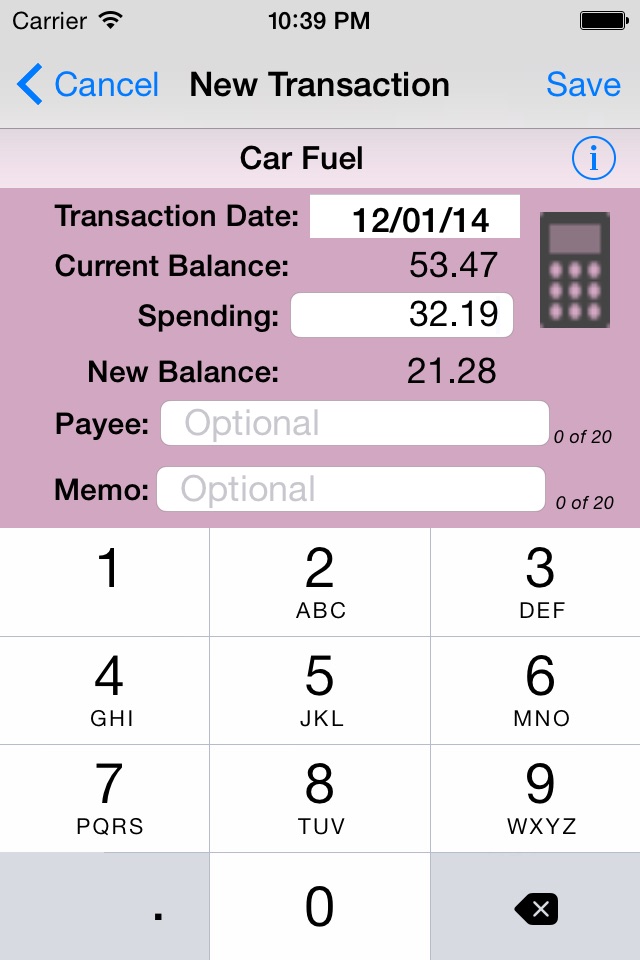
First you tell 'Spend Control' (in a user-friendly way) about your upcoming financial situation (your expected income over the next 12 months and how much of that income is already dedicated to such things as rent, utilities, car payments, savings, etc.) Given that information 'Spend Control' tells you how much is available for your “allowance” (i.e., discretionary spending money.) You then create a budget for that leftover allowance money at which point 'Spend Control' generates a virtual envelope for each category and seeds it with one week's allowance (an amount you can easily change.) Thereafter, the app will automatically, every day, feed each envelope with one day's allowance such that if you don't spend anything in that category your spendable amount will continue to grow. If you do spend something, you need only tap on the category, enter the amount spent and 'Spend Control' will subtract the amount from the appropriate envelope.
The process described above is the app's main function but there are other tools that further help you track and prioritize. For example, if you see an outfit you really want but don't yet have enough in your 'Clothing' envelope, you can choose (prioritize) to transfer money from another envelope, say, 'Entertainment' (as opposed to, say, 'Rent'.) Or you can use the tool called the 'Future Balances Calculator' to answer the question "If I hold off buying now, when will I have the necessary funds in that envelope?" or perhaps the question "How much will I have in my 'Paris Vacation' envelope when that date arrives?" 'Spend Control' also generates a number of reports, such as 'Current Budget' and 'Current Balances' which you can then email to yourself or to someone else.
Accessibility
ipadiphonemacrealityDevicetvoswatch
Version history 25 versions
Build 826885402v1.322018-05-09 06:51:51
This update from Apple will improve the functionality of this app. No new features are included.
* Localization of currency formatting (e.g., 1,234.56 vs 1.234,56 vs 1'234.56, depending on region).
Build 826877779v1.312018-05-01 15:13:17
* Localized calendar and date display so formatting is dependent on region.
* Modified future balance scheduling to allow for negative starting balances.
* Fixed several minor display issues.
Build 826870177v1.302018-04-30 15:42:39
* Localized calendar and date display so formatting is dependent on region.
* Modified future balance scheduling to allow for negative starting balances.
* Fixed several minor display issues.
Build 826780074v1.292018-04-29 14:59:00
* Localized calendar and date display so formatting is dependent on region.
* Modified future balance scheduling to allow for negative starting balances.
* Fixed several minor display issues.
IMPORTANT NOTE: If your device is using iOS 11.2, you may see a bug that is imbedded in that version of the operating system, namely a button in the upper right corner may become faded as if it is not enabled. Be aware that it is enabled (albeit faded) and this bug is fixed in iOS 11.3.
COMING SOON: Localization of currency format displays (e.g., "1,234.45" vs "1.234,56" depending on region).
Build 824545387v1.282017-11-20 16:43:29
* For regions where commas are used instead of decimal points, the numeric keyboard will still display commas but will be converted to decimal points for calculations and display.
Build 824042492v1.272017-10-20 19:22:44
* Fixed table header layout issue introduced in iOS11.
Build 822994758v1.262017-08-17 06:11:12
Added ability to calculate the optimum current envelope balance for meeting an upcoming obligation.
Build 822847331v1.252017-07-11 04:36:25
* Fixed bizarre calculator layout
Build 822483484v1.242017-06-18 23:28:05
* Fixed link error to Shopping List app in AppStore.
* Fixed minor coding error.
* Extended Setup instructions.
Build 818454921v1.232016-08-12 05:34:59
* Fix to minor "Select All" issue in Reports section.
Build 817080111v1.222016-08-09 04:19:58
* Negative envelope balances now display in red as an added visual alert.
Build 816529360v1.212016-03-18 12:27:51
Check out our latest free app called 'Shopping List'. You can find information about it in the 'More Apps by Borsari Tech' section under the 'More' tab.
Build 813164322v1.202016-01-12 06:06:13
* Updated to handle iOS 9 changes and varying screen sizes.
* Added reminder to send transaction report approximately every 90 days.
* Added Summary Report to report section.
* Fixed minor issue with text entry length and Save button.
* Removed weekly allowance option for those currently not using it and for all future users. It remains available for those currently using it. If in the future, however, it is switched off and remains off for 30 days, the option will become unavailable.
Build 812579449v1.192015-06-23 17:29:37
* Changed the app name to "Spend Control" in App Store and on user's home screen.
* Enhanced Reports section now generates consolidated reports.
Build 812443933v1.182015-06-03 05:09:21
NAME CHANGE: My Allowance --> Spend Control
'My Allowance' is going through a name change. You will notice throughout the app that the name 'My Allowance' no longer appears and all references are to its new name: SPEND CONTROL. The name 'My Allowance' still appears in the App Store as well as on your device but that will change with the next release. The icon will remain the same so you should have no trouble locating it on your device when the name changes.
There are several reasons for the change. Mainly it's an attempt to more closely embody in the name what the app actually does for the user; 'My Allowance' is a rather passive name while 'Spend Control' speaks to being a tool to be used to help control one's spending.
Another reason for the change is it would seem that 'My Allowance' sits in the App Store among dozens of apps aimed at children's allowances. And while I believe a child could easily use it, that's not its principal purpose.
People say they want to control their spending. So here is a tool to help them do just that...
Build 720812842v1.172015-05-12 06:05:32
New envelope/category named *Extra*: This new envelope is built-in and has a few different characteristics than the others:
* It cannot be deleted.
* Money cannot be spent from it, only transferred in and out (either between it and another envelope or between it and the external world).
* Unlike other envelopes, its balance cannot become negative.
* It does not have a daily budget amount feeding it; its only source is transfers, either directly by you or by the system.
* Its main purpose is to help support the following new feature called 'capping', also added in this version.
Capping: This new function (initially off but can be switched on in 'Settings') allows you to set individual cap amounts on envelope balances. Once the cap has been reached, the excess will be rerouted to the *Extra* envelope discussed above. Also any excess amounts being transferred into a capped envelope will be optionally rerouted to the *Extra* envelope (at your discretion).
External transfer tracking: Now when you initiate an external transfer, you can also add a memo and in the 'Reports' section a new button, 'External Transfers', reports all external transfers for the previous 90 days (but not including transfers made prior to this version).
Build 698912654v1.162014-09-20 07:29:47
* Added a calculator to the page entering a new spending transaction to assist with such things as calculating split amounts.
* Added a calculator to help estimate yearly income.
* Made 'Transfer' button more prominent.
* Minor bug fix.
* Minor interface changes.
Build 680762654v1.152014-08-26 16:38:23
- Fixed display issues if your allowance happens to be in the hundreds of thousands. ;^)
- Minor interface changes.
Build 611332699v1.142014-07-06 18:09:45
* When entering a payee name, each word now automatically begins with a uppercase letter.
* Sorting of Transactions is now case-insensitive.
Build 354002640v1.132014-05-01 05:38:41
* One of the new features is a "What's New" section providing information about these latest enhancements to 'My Allowance'.
* If you create an allowance budget but then don't use the app for two or more weeks, your spendable balances will be overinflated. 'My Allowance" will then remind you that you can reset any or all of your balances back to one week's allowance.
* Two new buttons have been added to the 'More' section to assist in both rating the app and gifting it to friends and family.
* The new icon accentuates the envelope concept.
* The new launch screen reminds that the main question this app answers is "How much can I safely spend today without harming my future?"
* The 'Reports' section has been given its own tab in order to give it more visibility and prominence.
* 'Frequently Asked Questions' (FAQ) now has a compact menu in order to make finding the answers much easier.
* You will also notice some changes to the user interface. While the functionality is the very much the same, the appearance of a number of screens has been updated in an ongoing attempt to make 'My Allowance' ever more user-friendly.
Build 333352670v1.122014-01-30 10:57:26
Updated to display properly in iOS7.
Converted fully to envelope paradigm.
If you have been using My Allowance for awhile and have entered many transactions you may have noticed the Transaction tab slow to react to your touch. I have taken steps to speed things up as well as alert you that activity is indeed occurring.
If you go more than two weeks without using My Allowance, you will be reminded that you can easily reset some or all of your envelope balances back to one week's allowance by using the 'Reset Current Balances' tool in the 'More' section.
If you are considering upgrading to a newer device but are concerned about losing your data, the new FAQ will direct you to the necessary steps.
Build 15575039v1.112013-06-24 05:52:29
* Fixed iPhone5 4" display issues.
* Introducing a new setting in which you can elect to automatically feed your allowance categories once a week rather than once a day (see More -> Settings).
DISCLAIMER: This weekly feature is for those who are used to the concept of a 'weekly allowance'. However, please be aware that there is no reason 'My Allowance' needs to be coordinated with when you physically provide yourself with allowance money. By using the recommended 'Daily' allocation, you can pace and prioritize your spending based on how much of your allowance can be safely spent 'today', no matter whether it be by cash, check or credit card and no matter when you "give yourself" the allowance.
Build 14784186v1.102013-03-31 13:10:53
* For those familiar with the old envelope method of managing one's finances, there is now a setting (under More -> Settings) that allows you to change the 'Piggy Bank' metaphor to a set of categorized envelopes.
Build 14478241v1.92013-03-13 04:56:08
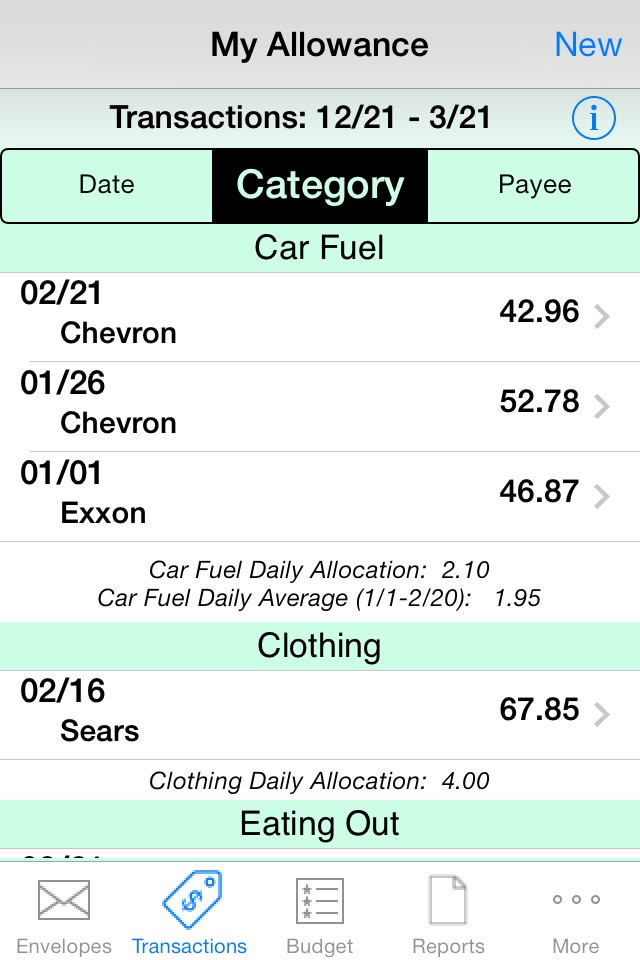
* Divided Transaction email report into three reports, sorted either by Date,
Category and Payee.
* Fixed footnote on singular categorized transactions resulting in erroneous report of zero daily allocation.
Build 14062450v1.82013-02-15 15:06:33
* Fixed spendable balance update issue when re-activated from background.
* Modified launch image.
No pricing data captured yet — comparisons appear once the app has paid storefronts or in-app purchases.
Availability 1 of 1 storefronts
| Region | Language | Price | Ratings | Avg | Version |
|---|---|---|---|---|---|
| US | en-US | Free | 7 | 5.0 | 1.32 |
Change log 29 changes · US
✎
releaseNotes updated
This update from Apple will improve the functionality of this app. No new features are included.
* Localization of currency formatting (e.g., 1,234.56 vs 1.234
✎
description updated
'Spend Control' answers the following most basic of financial questions:
"How much can I safely spend today such that I can still meet my upcoming obligations
✎
subtitle updated
What can I safely spend today?
✎
name updated
Spend.Control
◆
Version 1.32 released
This update from Apple will improve the functionality of this app. No new features are included.
* Localization of currency formatting (e.g., 1,234.56 vs 1.234,56 vs 1'234.56, depending on region).
◆
Version 1.31 released
* Localized calendar and date display so formatting is dependent on region.
* Modified future balance scheduling to allow for negative starting balances.
* Fixed several minor display issues.
◆
Version 1.30 released
* Localized calendar and date display so formatting is dependent on region.
* Modified future balance scheduling to allow for negative starting balances.
* Fixed several minor display issues.
◆
Version 1.29 released
* Localized calendar and date display so formatting is dependent on region.
* Modified future balance scheduling to allow for negative starting balances.
* Fixed several minor display issues.
IMPORTANT NOTE: If your device is using iOS 11.
◆
Version 1.28 released
* For regions where commas are used instead of decimal points, the numeric keyboard will still display commas but will be converted to decimal points for calculations and display.
◆
Version 1.27 released
* Fixed table header layout issue introduced in iOS11.
◆
Version 1.26 released
Added ability to calculate the optimum current envelope balance for meeting an upcoming obligation.
◆
Version 1.25 released
* Fixed bizarre calculator layout
◆
Version 1.24 released
* Fixed link error to Shopping List app in AppStore.
* Fixed minor coding error.
* Extended Setup instructions.
◆
Version 1.23 released
* Fix to minor "Select All" issue in Reports section.
◆
Version 1.22 released
* Negative envelope balances now display in red as an added visual alert.
◆
Version 1.21 released
Check out our latest free app called 'Shopping List'. You can find information about it in the 'More Apps by Borsari Tech' section under the 'More' tab.
◆
Version 1.20 released
* Updated to handle iOS 9 changes and varying screen sizes.
* Added reminder to send transaction report approximately every 90 days.
* Added Summary Report to report section.
* Fixed minor issue with text entry length and Save button.
* Rem
◆
Version 1.19 released
* Changed the app name to "Spend Control" in App Store and on user's home screen.
* Enhanced Reports section now generates consolidated reports.
◆
Version 1.18 released
NAME CHANGE: My Allowance --> Spend Control
'My Allowance' is going through a name change. You will notice throughout the app that the name 'My Allowance' no longer appears and all references are to its new name: SPEND CONTROL. The name '
◆
Version 1.17 released
New envelope/category named *Extra*: This new envelope is built-in and has a few different characteristics than the others:
* It cannot be deleted.
* Money cannot be spent from it, only transferred in and out (either between it and anothe
◆
Version 1.16 released
* Added a calculator to the page entering a new spending transaction to assist with such things as calculating split amounts.
* Added a calculator to help estimate yearly income.
* Made 'Transfer' button more prominent.
* Minor bug fix.
◆
Version 1.15 released
- Fixed display issues if your allowance happens to be in the hundreds of thousands. ;^)
- Minor interface changes.
◆
Version 1.14 released
* When entering a payee name, each word now automatically begins with a uppercase letter.
* Sorting of Transactions is now case-insensitive.
◆
Version 1.13 released
* One of the new features is a "What's New" section providing information about these latest enhancements to 'My Allowance'.
* If you create an allowance budget but then don't use the app for two or more weeks, your spendable balances will
◆
Version 1.12 released
Updated to display properly in iOS7.
Converted fully to envelope paradigm.
If you have been using My Allowance for awhile and have entered many transactions you may have noticed the Transaction tab slow to react to your touch. I have tak
◆
Version 1.11 released
* Fixed iPhone5 4" display issues.
* Introducing a new setting in which you can elect to automatically feed your allowance categories once a week rather than once a day (see More -> Settings).
DISCLAIMER: This weekly feature is for thos
◆
Version 1.10 released
* For those familiar with the old envelope method of managing one's finances, there is now a setting (under More -> Settings) that allows you to change the 'Piggy Bank' metaphor to a set of categorized envelopes.
◆
Version 1.9 released
* Divided Transaction email report into three reports, sorted either by Date,
Category and Payee.
* Fixed footnote on singular categorized transactions resulting in erroneous report of zero daily allocation.
◆
Version 1.8 released
* Fixed spendable balance update issue when re-activated from background.
* Modified launch image.