Home › Navigation

 US
US
1 of 1 storefronts
Content in en-US
Content in en-US
Information
Preview 2 platforms
iPhone 7 images


iPad 6 images




What’s New Version 4.44.0
- You can now specify the entry IC, exit IC, and transit JCT when searching for a route.
- You can now search by voice using the microphone button during location searches.
- You can now sort location search results by proximity.
Description
CAR NAVITIME is an elegantly designed car navigation app with offline navigation features.
Maps and spot information are regularly updated with the latest information,
and the navigation offered by the app takes into account traffic congestion in real time.
◆Monthly subscriptions include a one-month trial period for first-time users only◆
【Special Features of CAR NAVITIME】
■3D Sky View display mode that allows users to view the map over a large area
■"Vehicle management" feature that allows users to keep various records of their car
■Search for routes that are suited for trucks and motorcycles
■Traffic camera notifications that encourage safe driving
■Search for routes and receive real-time route diversion suggestions based on the latest traffic information and projections of future traffic volume
■Search for routes & voice-based navigation in areas where your device does not have network connection
■The latest maps & spot information
■Display traffic information on basic maps
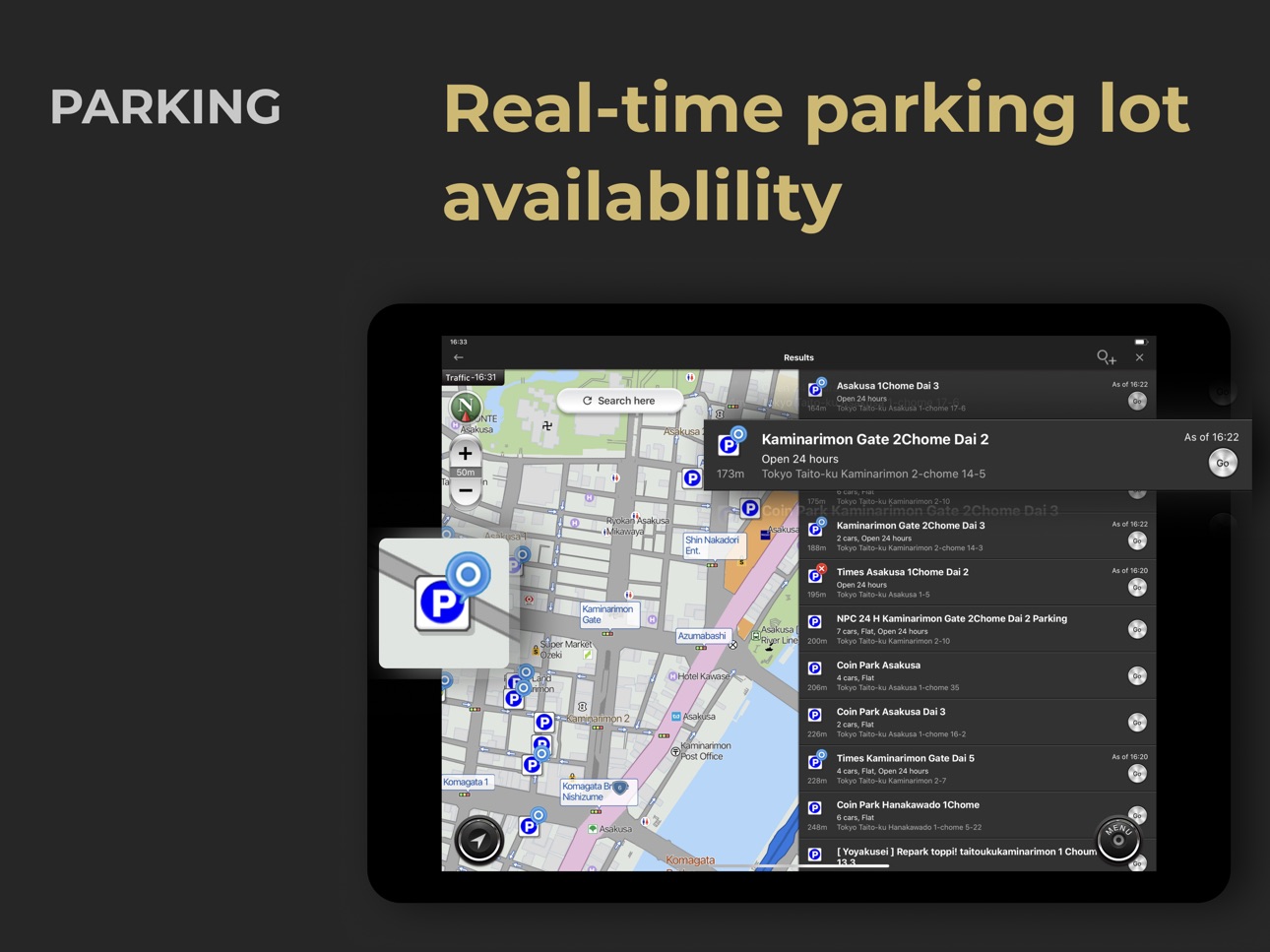
■Real-time information on parking lot availability and gasoline prices
■Convenient display and use of maps on the big screen of iPads
■For other features, please visit the NAVITIME page from the link below
http://products.navitime.co.jp/service/carnavitime/ios_sp.html
※1 Information on parking lot availability is only shown for supported parking lots.
※2 Gasoline prices are only shown for gas stations that provide this information.
■In-app Purchases
- Subscription Plans
・Annual subscriptions cost 5,700 yen per year.
・The subscription fee will be charged to your iTunes account after you have completed the purchase.
・Subscriptions will be automatically renewed unless they are terminated at least 24 hours prior to the end of the current subscription period.
・Subscription fees in the event of an automatic renewal will be charged no earlier than 24 hours prior to the end of the current subscription period.
・Subscriptions can be managed by users at any time, and the automatic renewal of subscriptions can be disabled in their account settings.
・To disable automatic renewal or change its settings: Go to the "Settings" app > "My Apple ID" > "iTunes &App Store" > "Apple ID" > "View Apple ID" > "Subscriptions."
・Users may not cancel their subscription or request a refund when the current subscription period is still in effect.
- Access
・30 days (600 yen)
■Regarding the rewards information published
・This information is provided by NAVITIME JAPAN Co., Ltd. The information provided bears no relation to Apple Inc. in any way. Apple Inc. shall not be liable for any disputes arising from the use of the information provided.
■Privacy Policy
Please refer to the following page for our privacy policy.
https://iphone.carnavitime.driveapp.navitime.jp/iphone_carnavitime/article/article?type=15
■Terms of Service
Please refer to the following page for our terms of service.
https://iphone.carnavitime.driveapp.navitime.jp/iphone_carnavitime/article/article?type=44
■Important Notes
・Navigation assistance is not available for devices that do not support GPS, such as iPod touch and iPad Wi-Fi.
・Please refrain from using your mobile device or focusing excessively on the screen while driving, which can be very dangerous.
・Our company shall not be liable for any damages arising from accidents, etc., that users incur from following the directions suggested by this service.
・Please note that this app does not support route searches for large passenger vehicles (such as sightseeing buses).
・This app utilizes GPS in the background during navigation.
The continuous use of GPS in the background of your device may drain its battery significantly.
Capabilities
In-App Purchases
Accessibility
ipadiphonemacrealityDevicetvoswatch
Version history 25 versions
Build 887375346v4.44.02026-07-02 08:11:54
- You can now specify the entry IC, exit IC, and transit JCT when searching for a route.
- You can now search by voice using the microphone button during location searches.
- You can now sort location search results by proximity.
Build 886661135v4.43.02026-06-22 02:59:34
Added a setting to search for routes with shorter distances than before.
Build 886517852v4.42.12026-06-08 05:46:05
- Added a notification if the device volume is low when changing the navigation volume.
- Fixed an issue where the back button could not return to the previous level during address searches on iPad.
- Fixed an issue where announcements occurred during background mode while taxi trip recording was active but not navigating.
Build 885841947v4.42.02026-05-27 03:56:09
Added support for U-turn restriction map display and U-turn preferred routes.
- Enabled U-turn restriction sections to be displayed on the map.
- Enabled searching for routes that actively utilize U-turns.
Build 885659799v4.41.12026-05-18 05:16:12
- Enabled taxi driving records to be recorded even when the app is in the background.
- Fixed an issue where route search could fail when roadside destination was set.
- Fixed an issue where the layout could break on iPad.
- Fixed an issue on iPad where detailed genres could not be selected in genre search.
- Fixed an issue where intersection names were not displayed on the map when the language was set to English.
Build 884703228v4.41.02026-04-27 05:02:54
Added the ability to search for gas stations with the latest price information.
Improved performance on iPad.
- Fixed an issue to allow selecting whether a point on the map is on a highway or a local road.
- Fixed other minor display and operational bugs.
Other minor improvements.
- Made button selection using the knob more intuitive on CarPlay.
- Improved road selection when editing route search results.
Build 883624217v4.40.02026-04-16 00:59:14
Optimized for the iPad's large screen.
- Seamlessly perform operations from spot search to route search on the map.
- More intuitive route editing via drag-and-drop and other operations.
- Added shortcuts to useful functions for each profession at the bottom of the screen.
Build 882813759v4.39.22026-03-03 07:27:59
Minor bug fixes.
Build 882392467v4.39.12026-02-16 06:58:57
Minor bug fixes.
Build 882001739v4.39.02026-02-05 01:04:06
Support for bus-only/priority lane regulatory zone displays has been added.
Build 881690037v4.38.12026-01-23 10:00:20
Minor bug fixes.
Build 880987198v4.38.02026-01-19 07:55:50
Route search with expressway toll caps is now available.
Build 880598660v4.37.22025-12-17 07:10:12
Minor bug fixes.
Build 879931856v4.37.12025-11-25 08:31:01
You can now set Highway/Free for each segment, Stop at the curbside of the destination, and Time spent at transit point directly from the route search screen.
Build 879548085v4.37.02025-11-13 09:01:01
You can now set Highway/Free for each segment, Stop at the curbside of the destination, and Time spent at transit point directly from the route search screen.
Build 879265478v4.36.22025-10-29 08:09:07
Minor bug fixes.
Build 878942092v4.36.12025-10-20 08:46:53
You can now change the departure point, waypoint, or destination by tapping the corresponding pin or map area on the route search results screen.
Build 878765835v4.36.02025-10-09 11:07:22
- Taxi drivers can now search for LP gas stations.
- You can now search for categories using free keywords on the category search screen.
Build 878427081v4.35.22025-09-29 12:08:14
Added “Frequency of Use” to the sorting options for My spots.
Build 877984584v4.35.12025-09-16 05:23:54
Minor bug fixes.
Build 877637885v4.35.02025-09-01 03:56:45
Road closures are now displayed on the map
- Supports restrictions such as road closures or pedestrian-only periods on roads not covered by VICS information
- Display settings can be toggled from the map menu
Build 877053870v4.34.12025-08-18 05:30:18
Minor bug fixes.
Build 876800345v4.34.02025-07-31 05:07:57
- Added a “multiple destination search” feature that allows you to search for routes to up to five locations at once and compare routes and fares.
- Added an “outing map” feature that allows you to search for popular cool spots and driving destinations.
Build 876244374v4.33.12025-07-22 03:45:00
Minor bug fixes.
Build 875825629v4.33.02025-07-07 05:07:33
Minor bug fixes.
No pricing data captured yet — comparisons appear once the app has paid storefronts or in-app purchases.
Availability 1 of 1 storefronts
| Region | Language | Price | Ratings | Avg | Version |
|---|---|---|---|---|---|
| US | en-US | Free | 18 | 4.2 | 4.44.0 |
Change log 29 changes · US
✎
releaseNotes updated
- You can now specify the entry IC, exit IC, and transit JCT when searching for a route.
- You can now search by voice using the microphone button during locati
✎
description updated
CAR NAVITIME is an elegantly designed car navigation app with offline navigation features.
Maps and spot information are regularly updated with the latest infor
✎
subtitle updated
GPS navigation with dash cam
✎
name updated
CAR NAVITIME
◆
Version 4.44.0 released
- You can now specify the entry IC, exit IC, and transit JCT when searching for a route.
- You can now search by voice using the microphone button during location searches.
- You can now sort location search results by proximity.
◆
Version 4.43.0 released
Added a setting to search for routes with shorter distances than before.
◆
Version 4.42.1 released
- Added a notification if the device volume is low when changing the navigation volume.
- Fixed an issue where the back button could not return to the previous level during address searches on iPad.
- Fixed an issue where announcements occu
◆
Version 4.42.0 released
Added support for U-turn restriction map display and U-turn preferred routes.
- Enabled U-turn restriction sections to be displayed on the map.
- Enabled searching for routes that actively utilize U-turns.
◆
Version 4.41.1 released
- Enabled taxi driving records to be recorded even when the app is in the background.
- Fixed an issue where route search could fail when roadside destination was set.
- Fixed an issue where the layout could break on iPad.
- Fixed an issue
◆
Version 4.41.0 released
Added the ability to search for gas stations with the latest price information.
Improved performance on iPad.
- Fixed an issue to allow selecting whether a point on the map is on a highway or a local road.
- Fixed other minor display and op
◆
Version 4.40.0 released
Optimized for the iPad's large screen.
- Seamlessly perform operations from spot search to route search on the map.
- More intuitive route editing via drag-and-drop and other operations.
- Added shortcuts to useful functions for each profes
◆
Version 4.39.2 released
Minor bug fixes.
◆
Version 4.39.1 released
Minor bug fixes.
◆
Version 4.39.0 released
Support for bus-only/priority lane regulatory zone displays has been added.
◆
Version 4.38.1 released
Minor bug fixes.
◆
Version 4.38.0 released
Route search with expressway toll caps is now available.
◆
Version 4.37.2 released
Minor bug fixes.
◆
Version 4.37.1 released
You can now set Highway/Free for each segment, Stop at the curbside of the destination, and Time spent at transit point directly from the route search screen.
◆
Version 4.37.0 released
You can now set Highway/Free for each segment, Stop at the curbside of the destination, and Time spent at transit point directly from the route search screen.
◆
Version 4.36.2 released
Minor bug fixes.
◆
Version 4.36.1 released
You can now change the departure point, waypoint, or destination by tapping the corresponding pin or map area on the route search results screen.
◆
Version 4.36.0 released
- Taxi drivers can now search for LP gas stations.
- You can now search for categories using free keywords on the category search screen.
◆
Version 4.35.2 released
Added “Frequency of Use” to the sorting options for My spots.
◆
Version 4.35.1 released
Minor bug fixes.
◆
Version 4.35.0 released
Road closures are now displayed on the map
- Supports restrictions such as road closures or pedestrian-only periods on roads not covered by VICS information
- Display settings can be toggled from the map menu
◆
Version 4.34.1 released
Minor bug fixes.
◆
Version 4.34.0 released
- Added a “multiple destination search” feature that allows you to search for routes to up to five locations at once and compare routes and fares.
- Added an “outing map” feature that allows you to search for popular cool spots and driving
◆
Version 4.33.1 released
Minor bug fixes.
◆
Version 4.33.0 released
Minor bug fixes.