Home › Utilities

 US
US
 NLnl
NLnl BEen-GB
 LUen-GB
 GBen-GBUSen-US
 DEde-DE
 AUen-AU
 FRfr-FR
 ITit
ITit CAen-CA
 CHde-CH
 HUen-GB
 JPja
JPja NOen-GB
 SEsv
SEsv PHen-GB
 ATde-DE
 ESes-ES
 IDen-GB
 ILen-GB
 NZen-AU
 PTpt-PT
 ROen-GB
 SAen-GB
 TWzh-Hant-TW
 ZAen-GB
 CRes-MX
 CZen-GB
 DKen-GB
 FIen-GB
 HKzh-Hant-HK
 IEen-GB
 INen-GB
 KRko
KRko PLen-GB
 RUru
RUru AEen-GB
 AFen-GB
 AGen-GB
 AIen-GB
 ALen-GB
 AMen-GB
 AOen-GB
 ARes-MX
 AZen-GB
 BAen-GB
 BBen-GB
 BFen-GB
 BGen-GB
 BHen-GB
 BJen-GB
 BMen-GB
 BNen-GB
 BOes-MX
 BRpt-BR
 BSen-GB
 BTen-GB
 BWen-GB
 BYen-GB
 BZen-GB
 CDen-GB
 CGen-GB
 CIfr-FR
 CLes-MX
 CMfr-FR
 CNzh-Hans-CN
 COes-MX
 CVen-GB
 CYen-GB
 DMen-GB
 DOes-MX
 DZen-GB
 ECes-MX
 EEen-GB
 EGen-GB
 FJen-GB
 FMen-GB
 GAfr-FR
 GDen-GB
 GEen-GB
 GHen-GB
 GMen-GB
 GRen-GB
 GTes-MX
 GWen-GB
 GYen-GB
 HNes-MX
 HRen-GB
 IQen-GB
 ISen-GB
 JMen-GB
 JOen-GB
 KEen-GB
 KGen-GB
 KHen-GB
 KNen-GB
 KWen-GB
 KYen-GB
 KZen-GB
 LAen-GB
 LBen-GB
 LCen-GB
 LKen-GB
 LRen-GB
 LTen-GB
 LVen-GB
 LYen-GB
 MAen-GB
 MDen-GB
 MEen-GB
 MGen-GB
 MKen-GB
 MLen-GB
 MMen-GB
 MNen-GB
 MOzh-Hant-HK
 MRen-GB
 MSen-GB
 MTen-GB
 MUen-GB
 MVen-GB
 MWen-GB
 MXes-MX
 MYen-GB
 MZen-GB
 NAen-GB
 NEen-GB
 NGen-GB
 NIes-MX
 NPen-GB
 NRen-GB
 OMen-GB
 PAes-MX
 PEes-MX
 PGen-GB
 PKen-GB
 PWen-GB
 PYes-MX
 QAen-GB
 RSen-GB
 RWen-GB
 SBen-GB
 SCen-GB
 SGen-GB
 SIen-GB
 SKen-GB
 SLen-GB
 SNen-GB
 SRen-GB
 STen-GB
 SVes-MX
 SZen-GB
 TCen-GB
 TDen-GB
 THen-GB
 TJen-GB
 TMen-GB
 TNen-GB
 TOen-GB
 TRen-GB
 TTen-GB
 TZen-GB
 UAen-GB
 UGen-GB
 UYen-GB
 UZen-GB
 VCen-GB
 VEes-MX
 VGen-GB
 VNen-GB
 VUen-GB
 XKen-GB
 YEen-GB
 ZMen-GB
 ZWen-GB
175 of 175 storefronts
Content in en-US
Content in en-US
Information
Preview 2 platforms
iPhone 8 images




iPad 9 images




What’s New Version 3.3.1
Yet another bug fix release.
We hope that for now the opening of GPX files works for everybody.
Description
A powerful GPX file reader for the iPhone or the iPad.
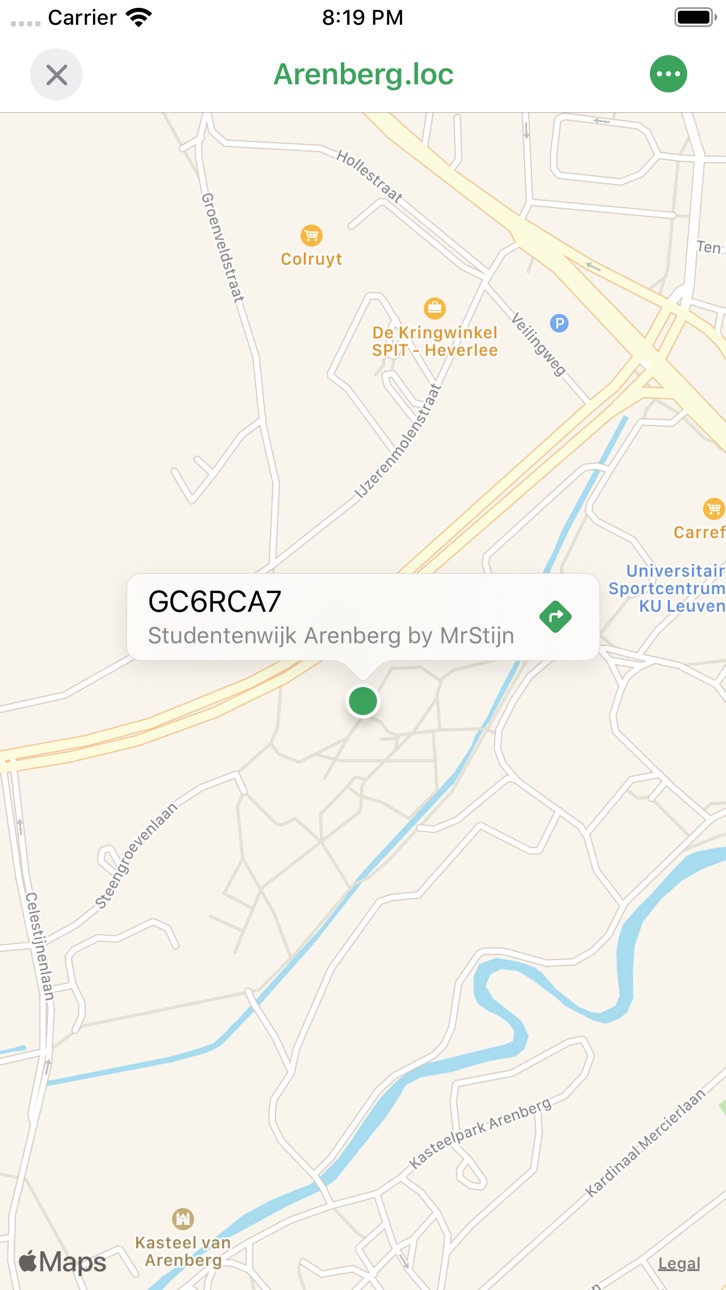
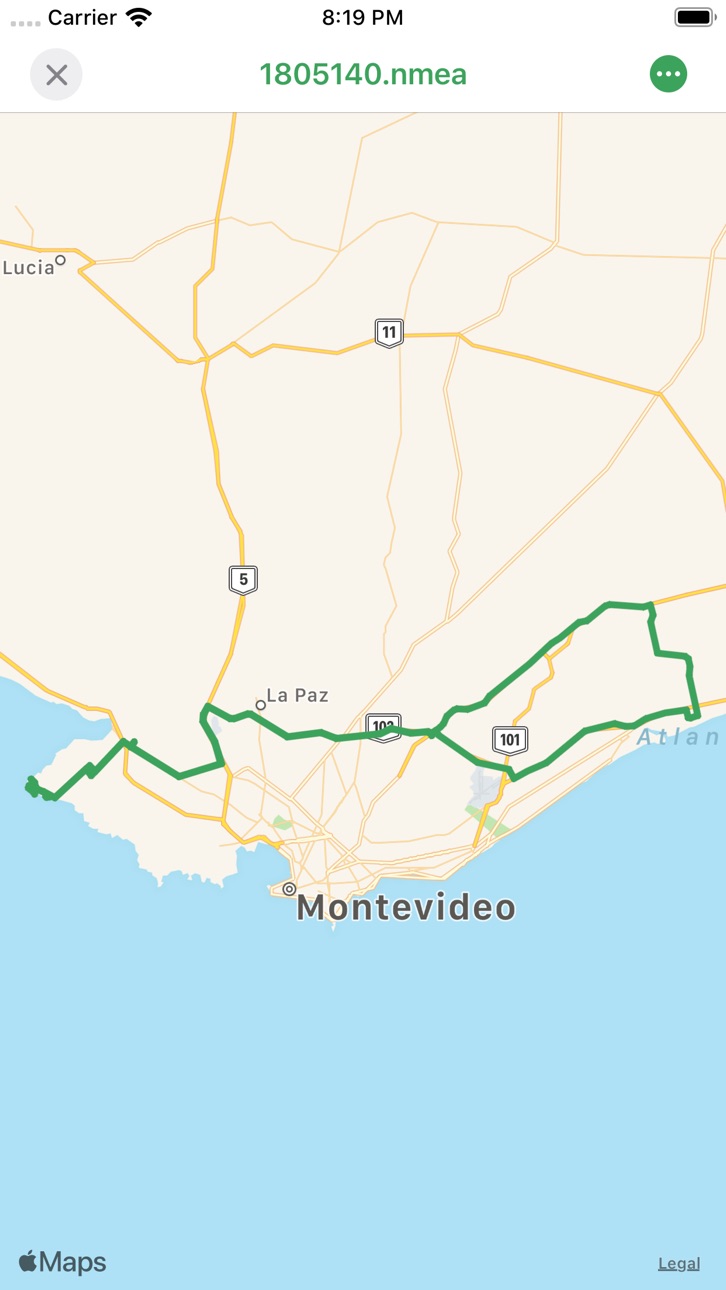
* Tracks, Routes & Waypoints - View your tracks, routes & waypoints in GPX Reader.
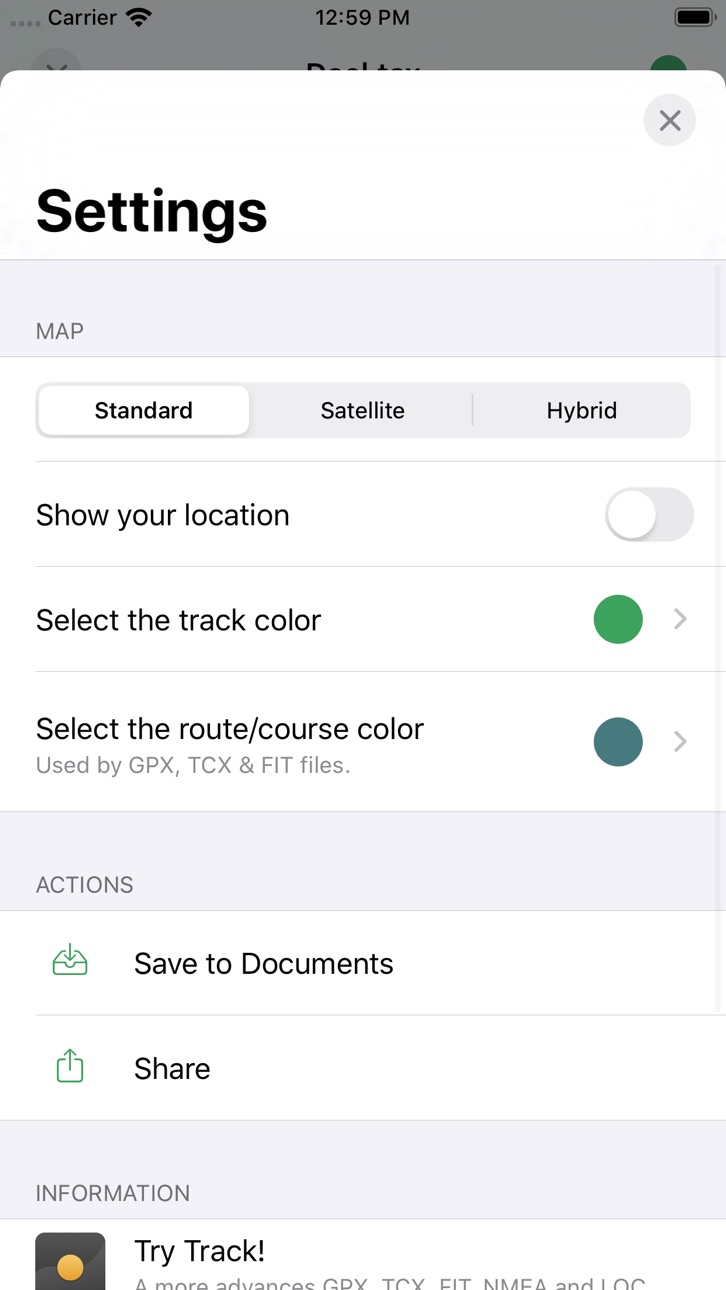
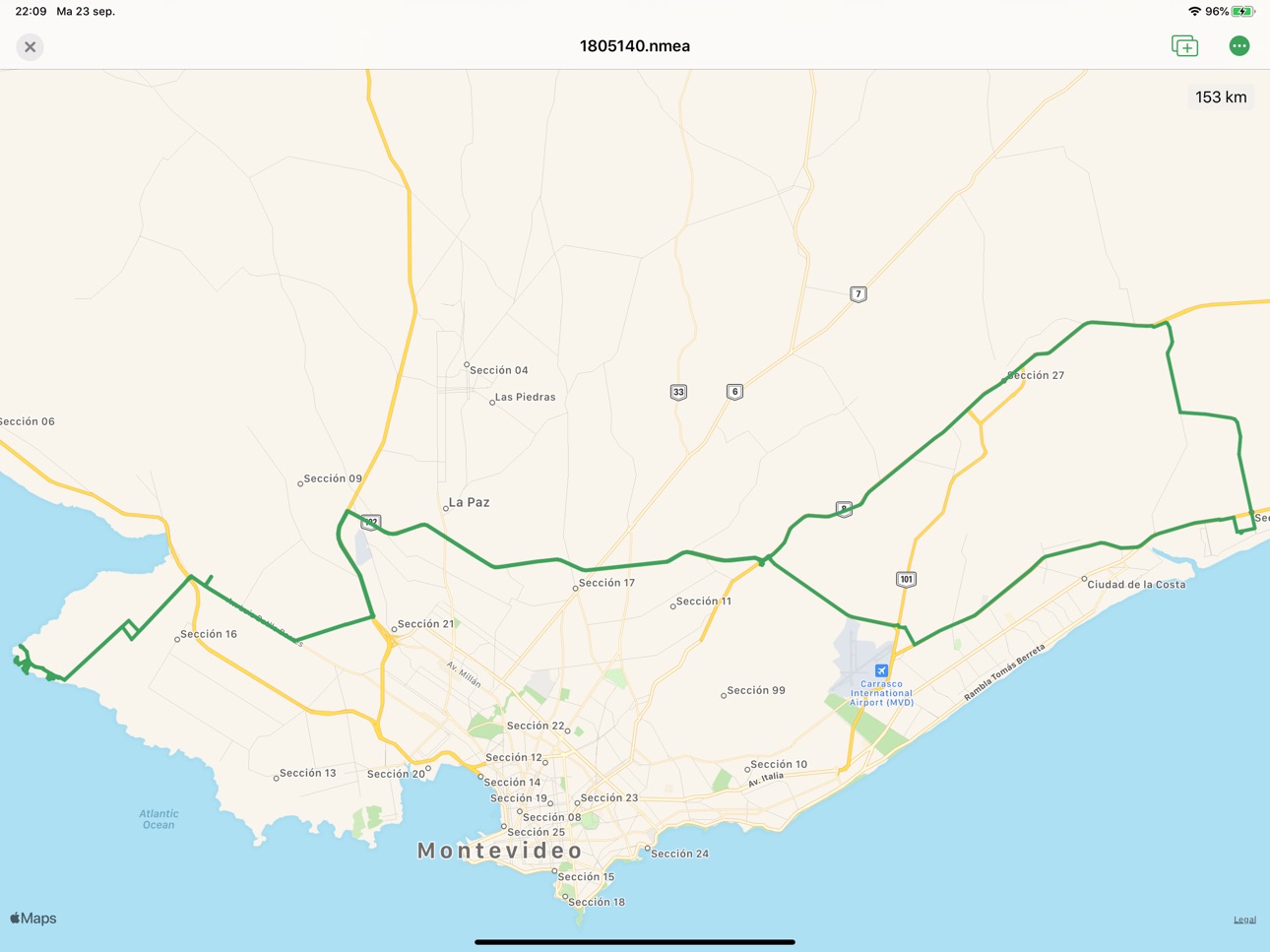
* Maps - Open your GPX file in GPX Reader and check out the tracks on Maps. Set the map type to map, satellite or hybrid.
* Safari & other apps - Open GPX files by clicking a link in Safari or any other external appilication.
* Multiple file Support - Open your TCX, GPX, LOC, NMEA & TRACK files in GPX Reader.
* Sync your files to iCloud with the easy to use document browser.
Accessibility
ipadiphonemacrealityDevicetvoswatch
Version history 24 versions
Build 833026000v3.3.12019-10-03 22:17:20
Yet another bug fix release.
We hope that for now the opening of GPX files works for everybody.
Build 832983102v3.32019-10-01 08:42:42
Another month. Another release with some small changes:
* We made it possible to change the route / course color independent of the track color. Thank you Ingemar for the remark.
* Cleanup the drawing of the lines on the map.
* Make sure the review popup triggers all the time. Sorry for the inconvenience...
Enjoy!
Build 832936403v3.2.12019-09-26 16:20:11
Whoopsie...
We made GPX Reader back available for devices with an iOS version lower than 13.
Sorry for the inconvenience.
Build 832891160v3.22019-09-25 22:26:51
Thanks to some feedback of our awesome users we were able to fix a few bugs.
* You should now be able to open every file type with GPX Reader. Let me know how it works out!
* We improved the navigation bar background.
And as a little extra we added support for multi window on iPad. Hope you like it! (This will only work when you're running iOS 13)
Build 832783329v3.12019-09-17 18:32:39
Apparently we forgot the distance marker during our revamp. Well, it's back!
We also made it possible to choose your custom color for the track. Finally!
We hope you enjoy these improvements, more to come later!
Build 832743884v3.02019-09-13 17:20:19
Hi there, we finally got around to do some major updates to GPX Reader. Here is what changed:
* Improved the design to match the latest iOS updates.
* Added support for loc, track & nmea file formats.
* Rework the home screen to show your recent documents and make it more easy to browse them.
* Improved handoff, accessibility & state restoration.
I hope you enjoy GPX Reader!
Build 824298933v2.52017-11-07 17:12:37
- Support iPhone X
- Update the crash reporting tools.
Build 819258349v2.42017-10-03 22:07:31
Fixed the Dropbox integration. Please unlink from Dropbox and reauthorise in order to get it back up and running.
Enjoy the app!
Build 818114742v2.32016-07-13 15:07:27
Hi again. Sorry for the long delay, but I finally got around to fix some bugs and add some small features.
Here what I did:
- Fixed a bug where it wasn't possible to show the directions for a waypoint.
- Fixed a bug where the route toggle switch wasn't visible.
- Make it possible to use split view on the iPad.
- Make iPad Pro compatible.
- Show a nicer distance label.
Build 813293150v2.2.62015-09-17 23:50:04
I fixed the iCloud integration, it should now work as designed.
Build 813174847v2.2.52015-09-01 16:48:24
This update fixes some minor parsing bugs. Should be a-okay now!
You will still be able to import files from http instead of https with an upcoming OS.
Build 812098639v2.2.42015-04-08 15:09:00
We now use the filename given by the headers to correctly parse the gpx or tcx filename when you import a file from an url.
Build 812038352v2.2.32015-03-28 19:26:23
Fixed a crash at startup for iOS 7 devices.
Build 811657878v2.2.22015-03-19 00:56:35
Fixed a nasty crash at startup.
Thanks to the help of some test users I was able to tackle this issue because I couldn't reproduce this myself. Many thanks to Neil, Noel and Kurt.
Build 811102778v2.2.12014-12-09 21:46:11
Finally iPhone 6/6+ users can use GPX Reader at it's sharpest. I forgot to change something and therefore this wasn't the case before. Oops...
When you have a waypoint in you're GPX file, you'll now be able to open the waypoint in the Maps application in order to get it's directions. This can be handy if you're into geocaching.
Hope you like it. And if you're still having issues, don't forget to contact me on my website.
Build 776722738v2.22014-11-06 00:47:08
For this version of GPX Reader I updated all the icons so that they would be perfect on the big iPhones. And while doing that I made some small design changes to the folder view in order to better display the difference between a GPX/TCX file and a folder.
Next to this there were also some minor bugs fixed reported by some users. Here is a small overview:
- There was a problem displaying the annotation on the map. This is fixed and while doing it I change the marker style.
- Another nasty bug is that saving to iCloud became impossible. And therefore opening from iCloud was useless. This also, is fixed.
I hope you enjoy GPX Reader, and if you would like to use it on your Mac, check out the Mac App Store.
Build 716713280v2.12014-10-08 14:35:53
This version of GPX Reader will have full iOS 8 compatibility. I added a feature called handoff so you can easily open GPX/TCX files from your iPad (or on OS X with the soon to be released desktop version update) when you just opened them on you iPhone or iPad.
I also updated the icon to be more iOS 8 like. Way better, don't you think?
\o/
Hope you still like GPX Reader. If you are experiencing some issues, go to my website and tell me! I'd love to hear from you.
Build 279222639v2.0.12014-01-02 05:39:49
Fixed some small UI bugs that eventually ended up in a crash. So they had to be fixed.
Build 85903627v2.02013-11-07 17:00:25
Added some design improvements for iOS 7. And more data is shown on the screens so GPX Reader becomes even more useful for everybody out there!
Here are some more improvements:
- Parsing should be even faster
- More GPX & TCX parsing bug fixes thanks to some feedback of you guys!
Hope you like this application! Please leave me a note if you have some cool idea's I should implement!
Build 12181583v1.32012-11-24 16:37:01
☉Fix rotation bug with slide view
☉ Extension capitalization bug
☉Hide popover when file is parsed on the map
☉Open the current GPX/TCX file in another application on your device
☉When tapping the menu bar zoom to the current track without the user location
☉Show the total track distance of the current log
Build 11374432vv1.22012-10-12 19:57:15
- Optimized images
- Remove terrain setting
- Compatibility with iOS 6 & iPhone 5
- Delete file from iCloud implemented
- Show current location
- Tap on the title bar to zoom to the user location
Build 9983890v1.12012-09-07 15:13:26
- Open/Save files to iCloud & share your files between iPad/iPhone
- Open files directly from Dropbox
- Fixed some minor UI bugs
Build 9648058v1.0.12012-08-01 20:58:16
- Fix green navigation bar bug
Build 9308440v1.02012-07-23 15:40:45
Price history by region
Currency
Show
Columns
Search
Availability 175 of 175 storefronts
| Region | Language | Price | Ratings | Avg | Version |
|---|---|---|---|---|---|
| NL | nl | EUR 1.99 | 47 | 4.4 | 3.3.1 |
| BE | en-GB | EUR 1.99 | 45 | 3.7 | 3.3.1 |
| LU | en-GB | EUR 1.99 | 28 | 4.3 | 3.3.1 |
| GB | en-GB | GBP 1.99 | 26 | 3.6 | 3.3.1 |
| US | en-US | USD 1.99 | 21 | 4.3 | 3.3.1 |
| DE | de-DE | EUR 1.99 | 20 | 4.4 | 3.3.1 |
| AU | en-AU | AUD 2.99 | 10 | 4.4 | 3.3.1 |
| FR | fr-FR | EUR 1.99 | 10 | 4.7 | 3.3.1 |
| IT | it | EUR 1.99 | 9 | 4.6 | 3.3.1 |
| CA | en-CA | CAD 2.99 | 6 | 3.7 | 3.3.1 |
| CH | de-CH | CHF 2 | 4 | 4.0 | 3.3.1 |
| HU | en-GB | HUF 999 | 4 | 4.8 | 3.3.1 |
| JP | ja | JPY 300 | 4 | 2.5 | 3.3.1 |
| NO | en-GB | NOK 29 | 4 | 4.0 | 3.3.1 |
| SE | sv | SEK 29 | 4 | 3.3 | 3.3.1 |
| PH | en-GB | PHP 129 | 3 | 4.7 | 3.3.1 |
| AT | de-DE | EUR 1.99 | 2 | 5.0 | 3.3.1 |
| ES | es-ES | EUR 1.99 | 2 | 5.0 | 3.3.1 |
| ID | en-GB | IDR 29000 | 2 | 5.0 | 3.3.1 |
| IL | en-GB | ILS 7.9 | 2 | 5.0 | 3.3.1 |
| NZ | en-AU | NZD 3.99 | 2 | 3.0 | 3.3.1 |
| PT | pt-PT | EUR 1.99 | 2 | 4.5 | 3.3.1 |
| RO | en-GB | RON 9.99 | 2 | 5.0 | 3.3.1 |
| SA | en-GB | SAR 9.99 | 2 | 3.5 | 3.3.1 |
| TW | zh-Hant-TW | TWD 60 | 2 | 5.0 | 3.3.1 |
| ZA | en-GB | ZAR 39.99 | 2 | 1.5 | 3.3.1 |
| CR | es-MX | USD 1.99 | 1 | 5.0 | 3.3.1 |
| CZ | en-GB | CZK 49 | 1 | 4.0 | 3.3.1 |
| DK | en-GB | DKK 19 | 1 | 5.0 | 3.3.1 |
| FI | en-GB | EUR 1.99 | 1 | 3.0 | 3.3.1 |
| HK | zh-Hant-HK | HKD 18 | 1 | 3.0 | 3.3.1 |
| IE | en-GB | EUR 1.99 | 1 | 1.0 | 3.3.1 |
| IN | en-GB | INR 199 | 1 | 1.0 | 3.3.1 |
| KR | ko | KRW 3300 | 1 | 3.0 | 3.3.1 |
| PL | en-GB | PLN 9.99 | 1 | 1.0 | 3.3.1 |
| RU | ru | RUB 199 | 1 | 5.0 | 3.3.1 |
| AE | en-GB | AED 7.99 | 0 | — | 3.3.1 |
| AF | en-GB | USD 1.99 | 0 | — | 3.3.1 |
| AG | en-GB | USD 1.99 | 0 | — | 3.3.1 |
| AI | en-GB | USD 1.99 | 0 | — | 3.3.1 |
| AL | en-GB | USD 1.99 | 0 | — | 3.3.1 |
| AM | en-GB | USD 1.99 | 0 | — | 3.3.1 |
| AO | en-GB | USD 1.99 | 0 | — | 3.3.1 |
| AR | es-MX | USD 1.99 | 0 | — | 3.3.1 |
| AZ | en-GB | USD 1.99 | 0 | — | 3.3.1 |
| BA | en-GB | EUR 1.99 | 0 | — | 3.3.1 |
| BB | en-GB | USD 1.99 | 0 | — | 3.3.1 |
| BF | en-GB | USD 1.99 | 0 | — | 3.3.1 |
| BG | en-GB | EUR 1.99 | 0 | — | 3.3.1 |
| BH | en-GB | USD 1.99 | 0 | — | 3.3.1 |
| BJ | en-GB | USD 1.99 | 0 | — | 3.3.1 |
| BM | en-GB | USD 1.99 | 0 | — | 3.3.1 |
| BN | en-GB | USD 1.99 | 0 | — | 3.3.1 |
| BO | es-MX | USD 1.99 | 0 | — | 3.3.1 |
| BR | pt-BR | BRL 12.9 | 0 | — | 3.3.1 |
| BS | en-GB | USD 1.99 | 0 | — | 3.3.1 |
| BT | en-GB | USD 1.99 | 0 | — | 3.3.1 |
| BW | en-GB | USD 1.99 | 0 | — | 3.3.1 |
| BY | en-GB | USD 1.99 | 0 | — | 3.3.1 |
| BZ | en-GB | USD 1.99 | 0 | — | 3.3.1 |
| CD | en-GB | USD 1.99 | 0 | — | 3.3.1 |
| CG | en-GB | USD 1.99 | 0 | — | 3.3.1 |
| CI | fr-FR | USD 1.99 | 0 | — | 3.3.1 |
| CL | es-MX | CLP 1990 | 0 | — | 3.3.1 |
| CM | fr-FR | USD 1.99 | 0 | — | 3.3.1 |
| CN | zh-Hans-CN | CNY 15 | 0 | — | 3.3.1 |
| CO | es-MX | COP 9900 | 0 | — | 3.3.1 |
| CV | en-GB | USD 1.99 | 0 | — | 3.3.1 |
| CY | en-GB | EUR 1.99 | 0 | — | 3.3.1 |
| DM | en-GB | USD 1.99 | 0 | — | 3.3.1 |
| DO | es-MX | USD 1.99 | 0 | — | 3.3.1 |
| DZ | en-GB | USD 1.99 | 0 | — | 3.3.1 |
| EC | es-MX | USD 1.99 | 0 | — | 3.3.1 |
| EE | en-GB | EUR 1.99 | 0 | — | 3.3.1 |
| EG | en-GB | EGP 99.99 | 0 | — | 3.3.1 |
| FJ | en-GB | USD 1.99 | 0 | — | 3.3.1 |
| FM | en-GB | USD 1.99 | 0 | — | 3.3.1 |
| GA | fr-FR | USD 1.99 | 0 | — | 3.3.1 |
| GD | en-GB | USD 1.99 | 0 | — | 3.3.1 |
| GE | en-GB | USD 1.99 | 0 | — | 3.3.1 |
| GH | en-GB | USD 1.99 | 0 | — | 3.3.1 |
| GM | en-GB | USD 1.99 | 0 | — | 3.3.1 |
| GR | en-GB | EUR 1.99 | 0 | — | 3.3.1 |
| GT | es-MX | USD 1.99 | 0 | — | 3.3.1 |
| GW | en-GB | USD 1.99 | 0 | — | 3.3.1 |
| GY | en-GB | USD 1.99 | 0 | — | 3.3.1 |
| HN | es-MX | USD 1.99 | 0 | — | 3.3.1 |
| HR | en-GB | EUR 1.99 | 0 | — | 3.3.1 |
| IQ | en-GB | USD 1.99 | 0 | — | 3.3.1 |
| IS | en-GB | USD 1.99 | 0 | — | 3.3.1 |
| JM | en-GB | USD 1.99 | 0 | — | 3.3.1 |
| JO | en-GB | USD 1.99 | 0 | — | 3.3.1 |
| KE | en-GB | USD 1.99 | 0 | — | 3.3.1 |
| KG | en-GB | USD 1.99 | 0 | — | 3.3.1 |
| KH | en-GB | USD 1.99 | 0 | — | 3.3.1 |
| KN | en-GB | USD 1.99 | 0 | — | 3.3.1 |
| KW | en-GB | USD 1.99 | 0 | — | 3.3.1 |
| KY | en-GB | USD 1.99 | 0 | — | 3.3.1 |
| KZ | en-GB | KZT 999 | 0 | — | 3.3.1 |
| LA | en-GB | USD 1.99 | 0 | — | 3.3.1 |
| LB | en-GB | USD 1.99 | 0 | — | 3.3.1 |
| LC | en-GB | USD 1.99 | 0 | — | 3.3.1 |
| LK | en-GB | USD 1.99 | 0 | — | 3.3.1 |
| LR | en-GB | USD 1.99 | 0 | — | 3.3.1 |
| LT | en-GB | EUR 1.99 | 0 | — | 3.3.1 |
| LV | en-GB | EUR 1.99 | 0 | — | 3.3.1 |
| LY | en-GB | USD 1.99 | 0 | — | 3.3.1 |
| MA | en-GB | USD 1.99 | 0 | — | 3.3.1 |
| MD | en-GB | USD 1.99 | 0 | — | 3.3.1 |
| ME | en-GB | EUR 1.99 | 0 | — | 3.3.1 |
| MG | en-GB | USD 1.99 | 0 | — | 3.3.1 |
| MK | en-GB | USD 1.99 | 0 | — | 3.3.1 |
| ML | en-GB | USD 1.99 | 0 | — | 3.3.1 |
| MM | en-GB | USD 1.99 | 0 | — | 3.3.1 |
| MN | en-GB | USD 1.99 | 0 | — | 3.3.1 |
| MO | zh-Hant-HK | USD 1.99 | 0 | — | 3.3.1 |
| MR | en-GB | USD 1.99 | 0 | — | 3.3.1 |
| MS | en-GB | USD 1.99 | 0 | — | 3.3.1 |
| MT | en-GB | EUR 1.99 | 0 | — | 3.3.1 |
| MU | en-GB | USD 1.99 | 0 | — | 3.3.1 |
| MV | en-GB | USD 1.99 | 0 | — | 3.3.1 |
| MW | en-GB | USD 1.99 | 0 | — | 3.3.1 |
| MX | es-MX | MXN 39 | 0 | — | 3.3.1 |
| MY | en-GB | MYR 9.9 | 0 | — | 3.3.1 |
| MZ | en-GB | USD 1.99 | 0 | — | 3.3.1 |
| NA | en-GB | USD 1.99 | 0 | — | 3.3.1 |
| NE | en-GB | USD 1.99 | 0 | — | 3.3.1 |
| NG | en-GB | NGN 3200 | 0 | — | 3.3.1 |
| NI | es-MX | USD 1.99 | 0 | — | 3.3.1 |
| NP | en-GB | USD 1.99 | 0 | — | 3.3.1 |
| NR | en-GB | USD 1.99 | 0 | — | 3.3.1 |
| OM | en-GB | USD 1.99 | 0 | — | 3.3.1 |
| PA | es-MX | USD 1.99 | 0 | — | 3.3.1 |
| PE | es-MX | PEN 9.9 | 0 | — | 3.3.1 |
| PG | en-GB | USD 1.99 | 0 | — | 3.3.1 |
| PK | en-GB | PKR 500 | 0 | — | 3.3.1 |
| PW | en-GB | USD 1.99 | 0 | — | 3.3.1 |
| PY | es-MX | USD 1.99 | 0 | — | 3.3.1 |
| QA | en-GB | QAR 7.99 | 0 | — | 3.3.1 |
| RS | en-GB | EUR 1.99 | 0 | — | 3.3.1 |
| RW | en-GB | USD 1.99 | 0 | — | 3.3.1 |
| SB | en-GB | USD 1.99 | 0 | — | 3.3.1 |
| SC | en-GB | USD 1.99 | 0 | — | 3.3.1 |
| SG | en-GB | SGD 2.98 | 0 | — | 3.3.1 |
| SI | en-GB | EUR 1.99 | 0 | — | 3.3.1 |
| SK | en-GB | EUR 1.99 | 0 | — | 3.3.1 |
| SL | en-GB | USD 1.99 | 0 | — | 3.3.1 |
| SN | en-GB | USD 1.99 | 0 | — | 3.3.1 |
| SR | en-GB | USD 1.99 | 0 | — | 3.3.1 |
| ST | en-GB | USD 1.99 | 0 | — | 3.3.1 |
| SV | es-MX | USD 1.99 | 0 | — | 3.3.1 |
| SZ | en-GB | USD 1.99 | 0 | — | 3.3.1 |
| TC | en-GB | USD 1.99 | 0 | — | 3.3.1 |
| TD | en-GB | USD 1.99 | 0 | — | 3.3.1 |
| TH | en-GB | THB 79 | 0 | — | 3.3.1 |
| TJ | en-GB | USD 1.99 | 0 | — | 3.3.1 |
| TM | en-GB | USD 1.99 | 0 | — | 3.3.1 |
| TN | en-GB | USD 1.99 | 0 | — | 3.3.1 |
| TO | en-GB | USD 1.99 | 0 | — | 3.3.1 |
| TR | en-GB | TRY 99.99 | 0 | — | 3.3.1 |
| TT | en-GB | USD 1.99 | 0 | — | 3.3.1 |
| TZ | en-GB | TZS 5900 | 0 | — | 3.3.1 |
| UA | en-GB | USD 1.99 | 0 | — | 3.3.1 |
| UG | en-GB | USD 1.99 | 0 | — | 3.3.1 |
| UY | en-GB | USD 1.99 | 0 | — | 3.3.1 |
| UZ | en-GB | USD 1.99 | 0 | — | 3.3.1 |
| VC | en-GB | USD 1.99 | 0 | — | 3.3.1 |
| VE | es-MX | USD 1.99 | 0 | — | 3.3.1 |
| VG | en-GB | USD 1.99 | 0 | — | 3.3.1 |
| VN | en-GB | VND 59000 | 0 | — | 3.3.1 |
| VU | en-GB | USD 1.99 | 0 | — | 3.3.1 |
| XK | en-GB | EUR 1.99 | 0 | — | 3.3.1 |
| YE | en-GB | USD 1.99 | 0 | — | 3.3.1 |
| ZM | en-GB | USD 1.99 | 0 | — | 3.3.1 |
| ZW | en-GB | USD 1.99 | 0 | — | 3.3.1 |
Reviews 18 reviews · US
★★★★★
Useless
Open a GPX file and all it shows are straight lines between waypoints, useless.
Xmyz1232020-09-17
★★★★★
No Labels
The map plots all of my points but doesn't label them. I have no idea what point is what.
Jesse Biter2016-06-05
★★★★★
Great Dropbox integration, missing major feature
I like how easy it is to use and to transfer files to it via iCloud and Dropbox or just a simple URL.
Please add functions to "zoom to my current location" and show the direction I'm facing.
I used it today to follow a GPX bike route between Essen and Duisburg and it worked great for that except I had to manually move the map around to find myself after I had traveled a bit.
Steven Vance2015-09-18
★★★★★
Useless for driving
Sorry but I had high hopes for this app. It loads GPX files but it just draws a straight line between the waypoints instead of mapping them onto a route map for driving. This may work for open terrain but that's not what GPS is usually used for in the real world!
nrsmeredith2015-04-24
★★★★★
Pretty good, but....
Screen orientation is only in landscape mode, no portrait ? Has to be an oversight. Hope it gets addressed soon. I hate the green banner, just takes up valuable real-estate; for what we really want to see..... The map!
Positives: the app does what it says. Good looking map and the .gpx file overlays perfectly. I used it today to track a 325mi trip I planned out in Garmin BaseCamp. This app read it and kept up with the live location flawlessly.
Top_Speed12015-04-20
★★★★★
UPDATE: Crashes in iOS 8.1 and 8.2
3/12/15 Update: Still crashes at launch in 8.2.
Was working great in iOS8, updated to 8.1 and crashes before the app can load. Support website has been down for days. #fail
Ed McVinny2015-03-12
★★★★★
Don't Upgrade to 8.1
8.0 worked. I was hoping for a fix with some of the settings, so I upgraded. Now it crashes before it loads. I shoulda read the earlier review. Wish I could indicate 0 stars.
Kurt Barker2015-02-12
★★★★★
Crashes now
Was working great. Liked this app now just crashes please update soon!
wrightwoodfilms2014-11-21
★★★★★
New Update
It was working great until I updated the app yesterday, now it doesn't work
Cutler34822014-10-09
★★★★★
Great App
Really great app. Works well and is useful. Would like to see iCloud Drive integration and the ability to star files for offline use. Would also be nice to see a few stats like elevation gained or average speed. Keep up the good work!
Seanndaly2014-10-08
★★★★★
crashes
when I try to load a gpx file, the app immediately crashes on my 5S iPhone. This is the only reason I bought the app, so a complete fail...
cyclerbob2013-12-04
★★★★★
Exactly what I was looking for
I am an adventure motorcyclist who often follows downloaded GPS tracks. My Garmin is great for navigating them, but when in a hotel I often want to review the next days tracks on a larger screen. This app allows me to pull a GPX file out of my Dropbox for review on my iPad.
klinquist2013-11-04
★★★★★
Not for off-line use
It has an intuitive interface; easily integrates with Dropbox (and I guess iCloud and URLs as well).
But be aware that there is very little off-line capability. i.e. you can only open a new GPX file if you have on-line access; it seems that there is no ability to store GPX files on the iPhone. If you have a file loaded with no internet connectivity, then obviously the satellite imagery will not update, but since the GPS receiver should work, you should be able to determine whether or not you are following the pre-assigned path. However, until you get internet access again, this will be the o
Norm2122013-06-08
★★★★★
Bum GPX has no map integration
Useless app. I load a GPX track from a weekend ride. I get straight lines between the points instead of the roads I covered. Useless. Please give me $1.99 back and the 10 minutes out of my life.
riverwizard2013-06-06
★★★★★
Great addition to Apple maps
GPX Reader is a great addition to Apple Maps. For over 10 years I have logged my GPS tracks, when on vacation, or riding my motorcycle. I logged most tracks with a Garmin eTrex, and recorded, viewed, draw, and play back my tracks with GARtrip, on my home computer or laptop. A problem with GARtrip, is that it does not interface easily with map software, so it can be difficult to draw your track on a map, but it does let you export your track to other formats like GPX. I have exported most of my old tracks to GPX format and stored them in Dropbox. Now when I return to an area that I had been to
Micro Wizard2013-05-14
★★★★★
waypoint pin names
i can not get waypoints to show waypoint name. does this app have that funtion with out it i am just looking at pins on a map.
ic1uc12013-01-01
★★★★★
Simple and Functional
The app does at it advertises. Handles GPX and TCX files. The "Open..In" feature allowing you to open maps from other apps works great. The interface is simple and elegant. It also works nicely on the iPad. Only suggestion to the developer would be to make the track in a more evident color.
jonoogle2012-09-02
Change log 27 changes · US
✎
releaseNotes updated
Yet another bug fix release.
We hope that for now the opening of GPX files works for everybody.
✎
description updated
A powerful GPX file reader for the iPhone or the iPad.
* Tracks, Routes & Waypoints - View your tracks, routes & waypoints in GPX Reader.
* Maps - Open your
✎
name updated
GPX Reader
◆
Version 3.3.1 released
Yet another bug fix release.
We hope that for now the opening of GPX files works for everybody.
◆
Version 3.3 released
Another month. Another release with some small changes:
* We made it possible to change the route / course color independent of the track color. Thank you Ingemar for the remark.
* Cleanup the drawing of the lines on the map.
* Make sure t
◆
Version 3.2.1 released
Whoopsie...
We made GPX Reader back available for devices with an iOS version lower than 13.
Sorry for the inconvenience.
◆
Version 3.2 released
Thanks to some feedback of our awesome users we were able to fix a few bugs.
* You should now be able to open every file type with GPX Reader. Let me know how it works out!
* We improved the navigation bar background.
And as a little extr
◆
Version 3.1 released
Apparently we forgot the distance marker during our revamp. Well, it's back!
We also made it possible to choose your custom color for the track. Finally!
We hope you enjoy these improvements, more to come later!
◆
Version 3.0 released
Hi there, we finally got around to do some major updates to GPX Reader. Here is what changed:
* Improved the design to match the latest iOS updates.
* Added support for loc, track & nmea file formats.
* Rework the home screen to show your
◆
Version 2.5 released
- Support iPhone X
- Update the crash reporting tools.
◆
Version 2.4 released
Fixed the Dropbox integration. Please unlink from Dropbox and reauthorise in order to get it back up and running.
Enjoy the app!
◆
Version 2.3 released
Hi again. Sorry for the long delay, but I finally got around to fix some bugs and add some small features.
Here what I did:
- Fixed a bug where it wasn't possible to show the directions for a waypoint.
- Fixed a bug where the route toggle
◆
Version 2.2.6 released
I fixed the iCloud integration, it should now work as designed.
◆
Version 2.2.5 released
This update fixes some minor parsing bugs. Should be a-okay now!
You will still be able to import files from http instead of https with an upcoming OS.
◆
Version 2.2.4 released
We now use the filename given by the headers to correctly parse the gpx or tcx filename when you import a file from an url.
◆
Version 2.2.3 released
Fixed a crash at startup for iOS 7 devices.
◆
Version 2.2.2 released
Fixed a nasty crash at startup.
Thanks to the help of some test users I was able to tackle this issue because I couldn't reproduce this myself. Many thanks to Neil, Noel and Kurt.
◆
Version 2.2.1 released
Finally iPhone 6/6+ users can use GPX Reader at it's sharpest. I forgot to change something and therefore this wasn't the case before. Oops...
When you have a waypoint in you're GPX file, you'll now be able to open the waypoint in the Map
◆
Version 2.2 released
For this version of GPX Reader I updated all the icons so that they would be perfect on the big iPhones. And while doing that I made some small design changes to the folder view in order to better display the difference between a GPX/TCX fi
◆
Version 2.1 released
This version of GPX Reader will have full iOS 8 compatibility. I added a feature called handoff so you can easily open GPX/TCX files from your iPad (or on OS X with the soon to be released desktop version update) when you just opened them o
◆
Version 2.0.1 released
Fixed some small UI bugs that eventually ended up in a crash. So they had to be fixed.
◆
Version 2.0 released
Added some design improvements for iOS 7. And more data is shown on the screens so GPX Reader becomes even more useful for everybody out there!
Here are some more improvements:
- Parsing should be even faster
- More GPX & TCX parsing bu
◆
Version 1.3 released
☉Fix rotation bug with slide view
☉ Extension capitalization bug
☉Hide popover when file is parsed on the map
☉Open the current GPX/TCX file in another application on your device
☉When tapping the menu bar zoom to the current track without
◆
Version v1.2 released
- Optimized images
- Remove terrain setting
- Compatibility with iOS 6 & iPhone 5
- Delete file from iCloud implemented
- Show current location
- Tap on the title bar to zoom to the user location
◆
Version 1.1 released
- Open/Save files to iCloud & share your files between iPad/iPhone
- Open files directly from Dropbox
- Fixed some minor UI bugs
◆
Version 1.0.1 released
- Fix green navigation bar bug
◆
Version 1.0 released