Home › Utilities

 US
US
1 of 1 storefronts
Content in en-US
Content in en-US
Information
Apple ID532487317
Bundle IDorg.marxy.wsprwatcher
SellerSeller
Min iOS17.6
Min macOS14.0
Device familiesiphone, ipad
Released2012-06-11
Copyright© 2012-2026 Peter Marks
Privacy policyLink ↗
Preview 2 platforms
iPhone 10 images




iPad 6 images


What’s New Version 4.36
Performance improvement.
Description
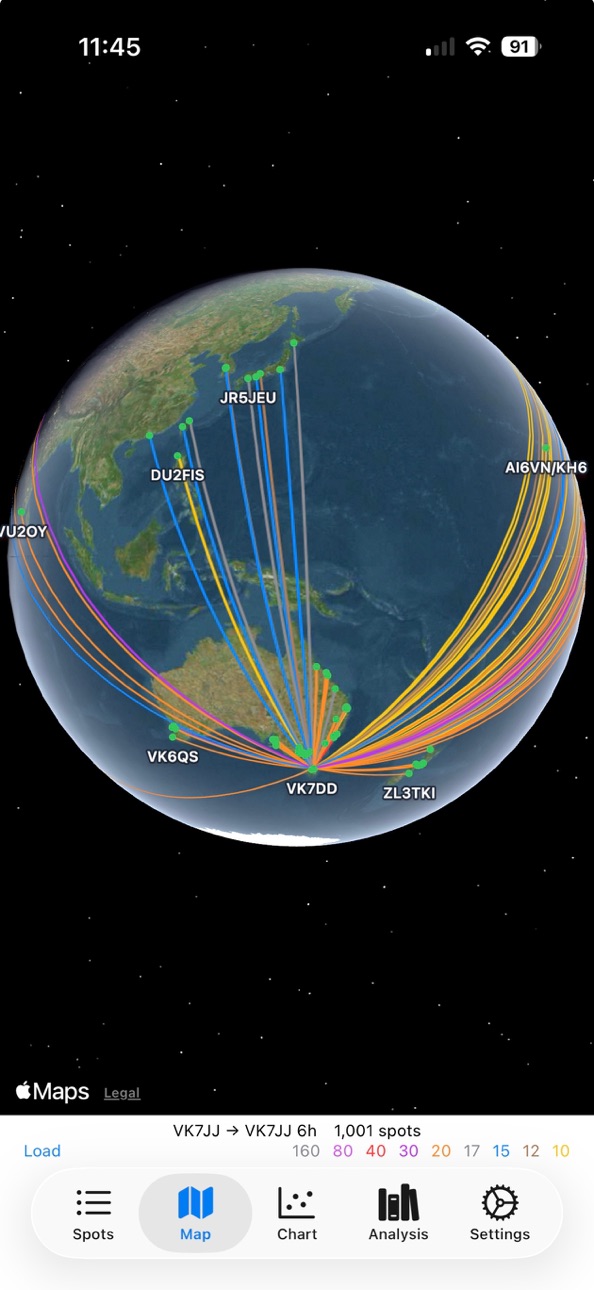
Utility for ham radio users of WSPRnet. Quickly shows who can hear you and details of each spot.
Tap a spot in the table to look up the call on QRZ.com.
Export produces as tab delimited CSV file that can be sent to Numbers for sorting, filtering and graphing beyond what is in the app itself.
Accessibility
ipadiphonemacrealityDevicetvoswatch
Version history 25 versions
Build 886960965v4.362026-06-15 16:12:57
Performance improvement.
Build 884919935v4.33.42026-04-28 02:44:00
Fixed sun overlay on the non-globe version of the map. The difference is night and day! (I had them swapped).
Build 884349380v4.33.32026-04-10 17:02:03
Removed Sentry crash and hang reporting. Found a few things which was great.
Build 881838190v4.33.22026-01-26 07:08:10
Fixed bug where WSPRnet API data source always got all bands.
Build 881820778v4.33.12026-01-25 19:08:40
* Bug fix
* Removed TimebaseDB as it's not available
Build 881654827v4.332026-01-20 07:19:31
Avoid a hang starting up with large numbers of spots.
Build 881263561v4.322026-01-07 05:52:37
Fixed some possible hangs while parsing large amounts of data. This version has some crash reporting built-in for the first time to help me better track issues.
Build 881062999v4.312025-12-29 08:03:32
Bug fix.
Build 880426322v4.302025-12-08 02:51:48
New feature "head2head" which compares WSPR reception SNR between two stations. It finds transmissions that were received by both stations and prints the SNR reported by each. This is a good way to directly compare reception of two stations or two antennas.
Build 880253678v4.292025-12-02 17:21:25
No longer starts audio session on launch.
Build 879819458v4.282025-11-17 18:25:22
Spots are shown on a globe of the world by default.
This can be turned off if you like.
Build 879279746v4.272025-10-28 20:30:20
* New loading status view that can be cancelled
* Improved pull to refresh operation
* Fix dot size bug on spots per over chart
* New option to choose which Charts to show (or none)
* Filter settings have a set to default button
* WSPR tone generator fixed
Build 878977159v4.262025-10-16 22:39:32
* Fix iPad bug where spot search wasn't visible
* Improved grey line overlay on map
* New feature: In spot info window, tap a callsign to search for that callsign both Tx and Rx in WSPRnet API
Build 878730797v4.252025-10-08 13:27:29
* A bug fix that should stop a crash we've had
* New liquid glass icon
Build 878326111v4.242025-09-23 17:00:08
Built for iOS 26.
Performance improvement.
Build 877313196v4.232025-08-17 14:24:09
Fixes Reverse Beacon Network display
Changes to analysis display - more coming in the future.
Build 876985044v4.222025-08-05 20:57:41
* Reorganising settings.
* New feature to get my grid square.
* New setting to show or hide the UTC clock
* Move clock and bands to the bottom on iPad
Build 876784262v4.212025-07-29 11:27:43
* Charts hide if the screen is too vertically short to fit everything
* Charts plot up to the current time rather than just the loaded data so you can see if reports have stopped.
* New filter for maximum distance
Build 876280438v4.202025-07-10 18:07:44
* New filter setting to only show spots transmitting less than an amount of power
* Make it clear that the time at the bottom on iPhone is UTC
Build 875983718v4.192025-06-30 10:53:58
* Doesn't allow WSPR generation without a locator
* More diagnostic info in feedback email
Minor changes.
Build 873596753v4.182025-03-28 16:28:23
Fixes a bug where some spots did not appear on the map.
Build 872586441v4.172025-02-18 17:56:52
Adds FreeData mode activity reporting. FreeData is an offshoot of the FreeDV digital voice mode.
Build 870439374v4.162024-11-15 06:04:31
Sorts the band buttons.
Fixed a bug where it showed the past callsigns during loading.
Build 868941724v4.152024-09-12 00:48:53
Tapping the maidenhead grid square in a spot info alert will take you to that location on the map.
Build 866810924v4.142024-06-19 10:27:54
WSPRnet is very slow at the moment. This version increases the timeout to 360 seconds. There is a setting where you can change this as required.
No pricing data captured yet — comparisons appear once the app has paid storefronts or in-app purchases.
Availability 1 of 1 storefronts
| Region | Language | Price | Ratings | Avg | Version |
|---|---|---|---|---|---|
| US | en-US | Free | 73 | 4.8 | 4.36 |
Change log 29 changes · US
✎
releaseNotes updated
Performance improvement.
✎
description updated
Utility for ham radio users of WSPRnet. Quickly shows who can hear you and details of each spot.
Tap a spot in the table to look up the call on QRZ.com.
Expor
✎
subtitle updated
Shows WSPRnet & PSKreporter
✎
name updated
WSPR watch
◆
Version 4.36 released
Performance improvement.
◆
Version 4.33.4 released
Fixed sun overlay on the non-globe version of the map. The difference is night and day! (I had them swapped).
◆
Version 4.33.3 released
Removed Sentry crash and hang reporting. Found a few things which was great.
◆
Version 4.33.2 released
Fixed bug where WSPRnet API data source always got all bands.
◆
Version 4.33.1 released
* Bug fix
* Removed TimebaseDB as it's not available
◆
Version 4.33 released
Avoid a hang starting up with large numbers of spots.
◆
Version 4.32 released
Fixed some possible hangs while parsing large amounts of data. This version has some crash reporting built-in for the first time to help me better track issues.
◆
Version 4.31 released
Bug fix.
◆
Version 4.30 released
New feature "head2head" which compares WSPR reception SNR between two stations. It finds transmissions that were received by both stations and prints the SNR reported by each. This is a good way to directly compare reception of two stations
◆
Version 4.29 released
No longer starts audio session on launch.
◆
Version 4.28 released
Spots are shown on a globe of the world by default.
This can be turned off if you like.
◆
Version 4.27 released
* New loading status view that can be cancelled
* Improved pull to refresh operation
* Fix dot size bug on spots per over chart
* New option to choose which Charts to show (or none)
* Filter settings have a set to default button
* WSPR tone
◆
Version 4.26 released
* Fix iPad bug where spot search wasn't visible
* Improved grey line overlay on map
* New feature: In spot info window, tap a callsign to search for that callsign both Tx and Rx in WSPRnet API
◆
Version 4.25 released
* A bug fix that should stop a crash we've had
* New liquid glass icon
◆
Version 4.24 released
Built for iOS 26.
Performance improvement.
◆
Version 4.23 released
Fixes Reverse Beacon Network display
Changes to analysis display - more coming in the future.
◆
Version 4.22 released
* Reorganising settings.
* New feature to get my grid square.
* New setting to show or hide the UTC clock
* Move clock and bands to the bottom on iPad
◆
Version 4.21 released
* Charts hide if the screen is too vertically short to fit everything
* Charts plot up to the current time rather than just the loaded data so you can see if reports have stopped.
* New filter for maximum distance
◆
Version 4.20 released
* New filter setting to only show spots transmitting less than an amount of power
* Make it clear that the time at the bottom on iPhone is UTC
◆
Version 4.19 released
* Doesn't allow WSPR generation without a locator
* More diagnostic info in feedback email
Minor changes.
◆
Version 4.18 released
Fixes a bug where some spots did not appear on the map.
◆
Version 4.17 released
Adds FreeData mode activity reporting. FreeData is an offshoot of the FreeDV digital voice mode.
◆
Version 4.16 released
Sorts the band buttons.
Fixed a bug where it showed the past callsigns during loading.
◆
Version 4.15 released
Tapping the maidenhead grid square in a spot info alert will take you to that location on the map.
◆
Version 4.14 released
WSPRnet is very slow at the moment. This version increases the timeout to 360 seconds. There is a setting where you can change this as required.