Home › Utilities

 US
US
1 of 1 storefronts
Content in en-US
Content in en-US
Information
Apple ID518654104
Bundle IDcom.fengstyle.workingTimeEnLite
SellerSeller
Min iOS15.6
Min macOS12.5
Device familiesiphone, ipad, ipod
Released2012-04-19
Copyright© FengStyle
Privacy policyLink ↗
Preview 2 platforms
iPhone 5 images


iPad 5 images


What’s New Version 4.0
What's new
1. Supporting Multi-Person shift table and editing
2. Supporting one or all person on displaying shift calendar
Description
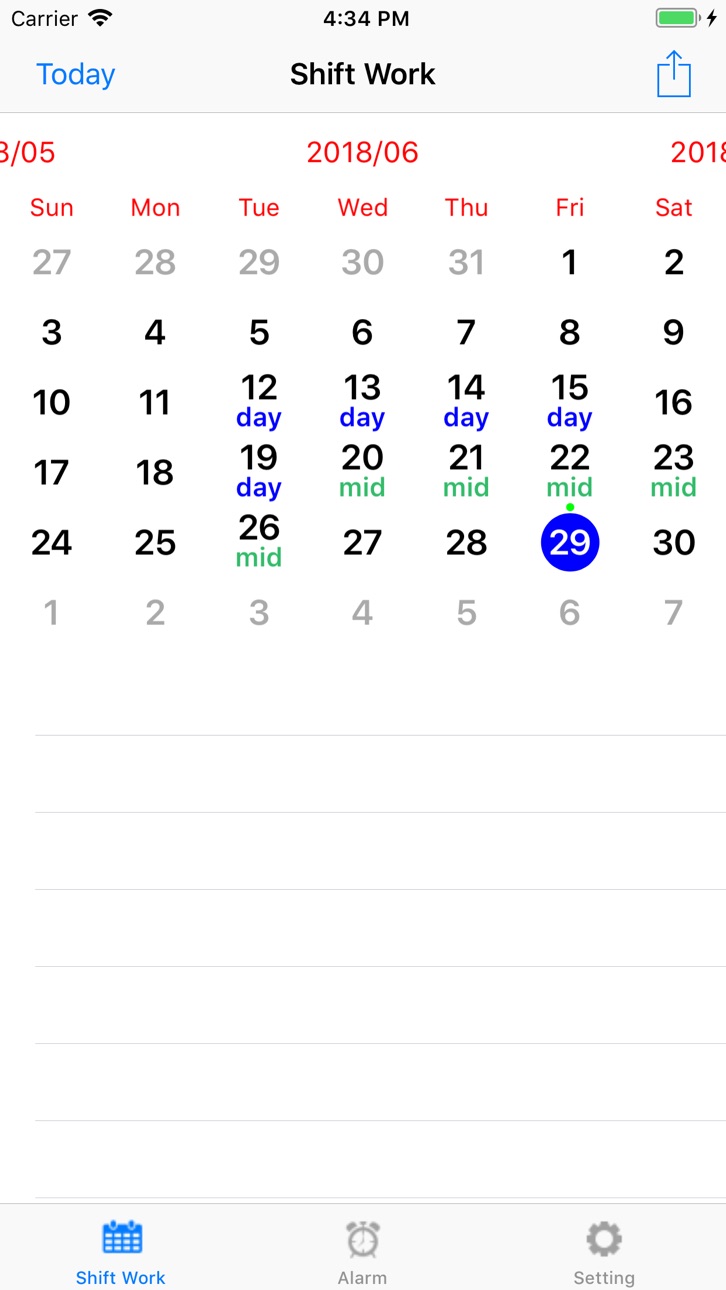
Shift Schedule - Professional Shift Management Tool
* Smart scheduling app designed for shift workers
Key Features:
• Intuitive Calendar Interface - Clear daily schedule display
• Multi-Person Management - Team scheduling with multiple staff support
• Custom Shifts - Set shift names, colors, and overtime pay
• Smart Editing - Dual PickerView for quick staff-shift assignment
• Salary Calculator - Auto-calculate overtime pay and total salary
• Reminder System - Work reminders with custom ringtones
• Universal App - Perfect support for iPhone and iPad
• Multi-Language - 9 language interfaces supported
Perfect for:
• Healthcare workers, Security guards
• Restaurant staff, Factory workers
• 24-hour shift workers
• Team managers and HR personnel
Accessibility
ipadiphonemacrealityDevicetvoswatch
Version history 15 versions
Build 827716317v4.02025-08-07 20:18:32
What's new
1. Supporting Multi-Person shift table and editing
2. Supporting one or all person on displaying shift calendar
Build 821270196v3.42017-03-10 22:24:14
This update from Apple will improve the functionality of this app. No new features are included.
1. Support 4.7 and 5.5 inch iPhone solution.
2. Fixed some issues.
Build 819150934v3.2.22016-10-03 19:39:46
Fixed some bugs for calendar UI and editing problem.
Build 819047479v3.2.12016-09-27 01:27:47
1. Support iOS 10
2. Change calendar UI
Build 811517631v3.1.22015-01-19 18:55:17
What's new
1. fixed the issue while updating from old version which may be caused duplicating data.
Build 791952674v3.1.12014-11-13 02:39:16
What's New
1. Support iOS8
2. Add today extension to show the last 8 days of shift working time calendar
3. Fix the issue of alarm problem
Build 16684347v1.92013-09-04 00:52:15
What's new
1. Fixed the issue of not working when it's first running in iPhone 4 , iPhone 4S and iPod Touch 4.
Build 15496965v1.82013-05-31 01:09:32
What's New
1. The iCloud set disabled in default.
2. Fixed the calculating error on extra payment calculation.
ps. If you got some trouble , and you can't fix it. We recommend you copy your backup file to your PC, then uninstall it and re-install it. It will be working. And this version will not enable iCould in default , so it will work fine normally.
Build 15039986v1.7.12013-04-15 04:41:51
What's new
1. Fixed the crash issue when you add new shift type in iOS 5.1
2. Fixed the crash issue when you save event after your edited.
Build 14437695v1.72013-03-06 19:52:46
What's new
1. Add iCloud switch
2. More colors for shift type text
3. bugs fixed
4. If you upgrade from v1.4, it will convert old data to new version data. If you had updated , and missed your data, you could restore your old data from 1.4.backup or 1.5.backup file which you could find in [Setting] -> [Backup/Restore].
Note: This time we add a switch for you to enable or disable the iCloud data sync, If you switch from enable to disable , it will copy the data from iCloud to local host as your database, but if you switch iCloud from disable to enable , it will remove all your local host database, and it will get the data from iCloud, because we have to protect the data correctly, so we have to limite the switch mechanism.
Build 14184634v1.62013-02-22 02:17:04
What's new
1. Fixed the bug of black screen while app launching.
2. Support backup and restore shift calendar.
3. Over time payment calculated by date range.
Build 14020464v1.52013-02-14 04:05:22
What's new
1. Support iCloud, you could edit your shift calendar in your iPhone , then all of your iDevice will get the same record from the iCloud.
2. Support iPad resolution.
3. Fixed the bug of alarms.
**Note**
If you have different shift calendars in your iDevices with the same Apple ID, before this update, you should uninstall others , you could just keep the only one shift calendar with your Apple ID. Otherwise , you may get the mixed all of your shift calendar data! Please remind it!
Build 11156451v1.42012-10-05 00:20:13
What's new
Add support for iOS6 and iPhone 5.
Build 8483875v1.3.12012-06-09 16:02:53
What's new
1. Fix the bug when creating new event may cause app crashing.
2. Change the limitation of the lite version, you can maximize adding 30 days, if you want to use for a long time, you can clear the old data or reset data.
Build 7501954v1.22012-04-19 14:01:23
No pricing data captured yet — comparisons appear once the app has paid storefronts or in-app purchases.
Availability 1 of 1 storefronts
| Region | Language | Price | Ratings | Avg | Version |
|---|---|---|---|---|---|
| US | en-US | Free | 1 | 1.0 | 4.0 |
Change log 18 changes · US
✎
releaseNotes updated
What's new
1. Supporting Multi-Person shift table and editing
2. Supporting one or all person on displaying shift calendar
✎
description updated
Shift Schedule - Professional Shift Management Tool
* Smart scheduling app designed for shift workers
Key Features:
• Intuitive Calendar Interface -
✎
name updated
Power Shift work Calendar
◆
Version 4.0 released
What's new
1. Supporting Multi-Person shift table and editing
2. Supporting one or all person on displaying shift calendar
◆
Version 3.4 released
This update from Apple will improve the functionality of this app. No new features are included.
1. Support 4.7 and 5.5 inch iPhone solution.
2. Fixed some issues.
◆
Version 3.2.2 released
Fixed some bugs for calendar UI and editing problem.
◆
Version 3.2.1 released
1. Support iOS 10
2. Change calendar UI
◆
Version 3.1.2 released
What's new
1. fixed the issue while updating from old version which may be caused duplicating data.
◆
Version 3.1.1 released
What's New
1. Support iOS8
2. Add today extension to show the last 8 days of shift working time calendar
3. Fix the issue of alarm problem
◆
Version 1.9 released
What's new
1. Fixed the issue of not working when it's first running in iPhone 4 , iPhone 4S and iPod Touch 4.
◆
Version 1.8 released
What's New
1. The iCloud set disabled in default.
2. Fixed the calculating error on extra payment calculation.
ps. If you got some trouble , and you can't fix it. We recommend you copy your backup file to your PC, then uninstall it an
◆
Version 1.7.1 released
What's new
1. Fixed the crash issue when you add new shift type in iOS 5.1
2. Fixed the crash issue when you save event after your edited.
◆
Version 1.7 released
What's new
1. Add iCloud switch
2. More colors for shift type text
3. bugs fixed
4. If you upgrade from v1.4, it will convert old data to new version data. If you had updated , and missed your data, you could restore your old data from 1.4.
◆
Version 1.6 released
What's new
1. Fixed the bug of black screen while app launching.
2. Support backup and restore shift calendar.
3. Over time payment calculated by date range.
◆
Version 1.5 released
What's new
1. Support iCloud, you could edit your shift calendar in your iPhone , then all of your iDevice will get the same record from the iCloud.
2. Support iPad resolution.
3. Fixed the bug of alarms.
**Note**
If you have differen
◆
Version 1.4 released
What's new
Add support for iOS6 and iPhone 5.
◆
Version 1.3.1 released
What's new
1. Fix the bug when creating new event may cause app crashing.
2. Change the limitation of the lite version, you can maximize adding 30 days, if you want to use for a long time, you can clear the old data or reset data.
◆
Version 1.2 released