Home › Utilities

 US
US
1 of 1 storefronts
Content in en-US
Content in en-US
Information
Apple ID511271604
Bundle IDorg.smartdisk.smartdiskfree
SellerSeller
Min iOS11.0
Min macOS11.0
Device familiesiphone, ipad, ipod
Released2012-03-23
CopyrightCopyright © 2023 SMARTDISK ORG. All rights reserved.
Privacy policyLink ↗
Preview 2 platforms
iPhone 5 images
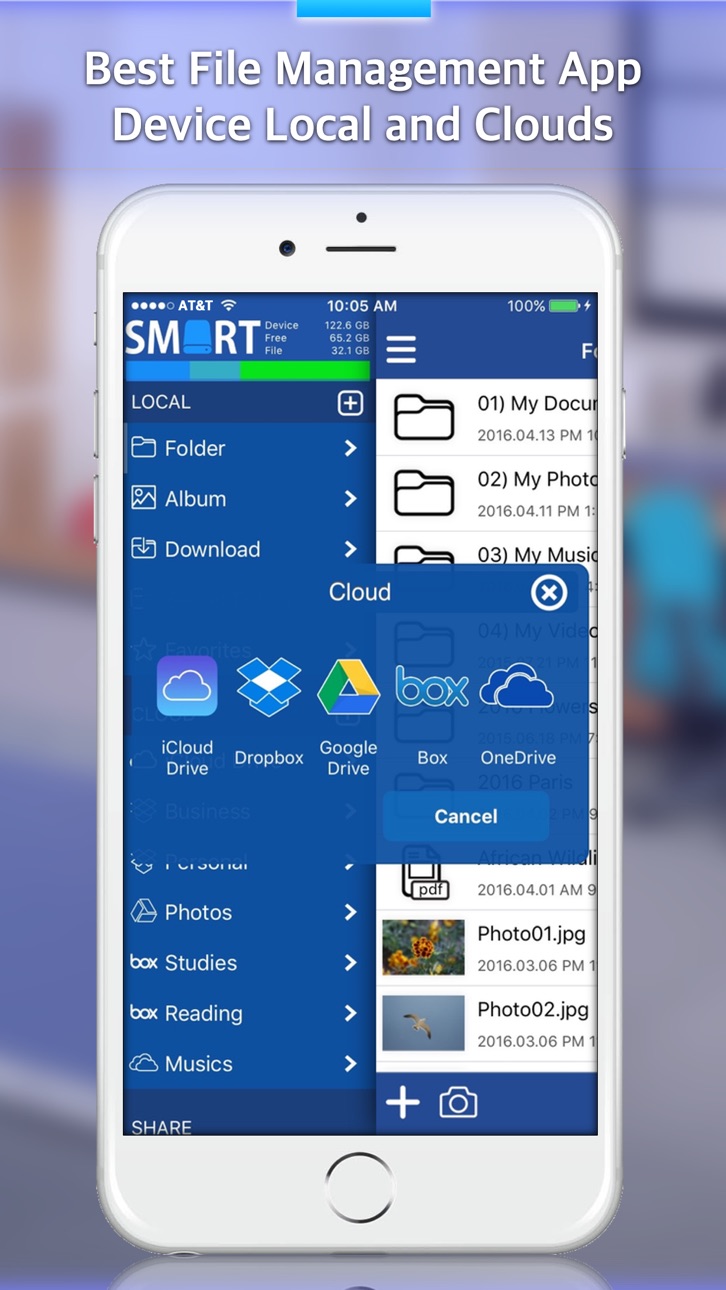


iPad 5 images


What’s New Version 8.5
Support iOS 15.x and iOS 16.x
Google Drive Security Policy Update
Description
File Explorer is a wonderful local and cloud file manager that enables you to manage files on your mobil device.
You can management your device files and cloud files. Supported iCloud Drive, Dropbox, Google Drive, Box, OneDrive.
You can send cloud file shared link to your friend.
You can play the music, video files and read documents files, manage them and export them to your computer.
You can take new photo, video and voice files.
You can use video convert and audio convert.
- Video file to MP3 file. (ex; mp4, mov, m4v -> mp3)
- Video file to MP4 file. (ex; mov, m4v -> mp4)
You can to do file sharing from your device with web sharing and ftp sharing via wifi network.
# Multi Account Cloud Drive Service Support
- iCloud Drive
- Dropbox
- Google Drive
- Box
- OneDrive
# File sharing
- Disk Mounter
- HTTP Web Sharing
- FTP Sharing.
# MP3 Convert
Audio and Video files (WAV, M4A, MP4, MOV, M4V, etc) can be converted to MP3 files extracted just audio.
# MP4 Convert
Various video files (MOV, M4V, etc) can be converted to MP4 video files.
# Photo and Video Edit
All photos and video can be rotated and flipped.
# Music Album Artwork
Picture of music album can be changed and chosen from photo album of the smart phone.
# Secret Folder
Any important data can be saved and kept safely in "Secret Folder".
"Secret Folder" provides safe locking system, which consists of password and Touch ID.
# Music Player
You can play all of music files saved in your smart phone. Especially the streaming is maintaining at sleep mode or using other apps.
# Camera
You can take photos during video record and the screen is wider than original iPhone camera.
It is involving various functions like resolution, flash and autofocus.
# Voice Recorder
You can record voice anytime and anywhere you want. Especially recording is maintaining at sleep mode or using other apps.
# Text Editor
You can simply create text file and make your important notes.
# Folder
Most basic data will be saved in the section “Folder”, as well as the functions of camera, voice record and media player are also used in Folder.
# Album
Section “Album" manages all photos and videos. You can also take and save photos in Album as well as the saved files can be copied in other sections.
# Download
If you input internet address, it opens the web page with built in Safari web browser. You can download any files linked from web sites.
# Favorites
You can set often used files or folders with star shaped button, and you can find and use the data easily in this section.
# iCloud Drive
All apple devices and Window system that have iCloud Drive can synchronize all datas through Explorer App.
# Disk Mounter
You can mount the saved files in your smart phone to Mac or Window PC conveniently.
You can install disk mounter program on your Mac / PC from http://www.smartdisk.org for free.
# HTTP Sharing
You can share and manage the files in your smart phone on the web browser through HTTP server.
# FTP Sharing
You can share and manage the files in your smart phone on the web browser through FTP server.
# iTunes Folder
You can manage the files in the app through iTunes program.
# File Zipping and Unzipping
You can zip and unzip the files or folders.
# File Export
Smart Disk Explorer supports exporting functions such as printing, mailing, opening other apps, and saving image files as photos in album.
# App Lock Passcode
The locking system will be automatically activated to protect your important data when you close the app. It supports Touch ID for convenience and safe.
Capabilities
In-App Purchases
Accessibility
ipadiphonemacrealityDevicetvoswatch
Version history 25 versions
Build 854084912v8.52023-03-15 21:09:15
Support iOS 15.x and iOS 16.x
Google Drive Security Policy Update
Build 838095430v8.02020-10-11 14:28:06
Bugfix for Google Drive
Bugfix for Movie Player
iOS 11.x or later required
Build 832964212v7.92019-09-30 00:49:23
iOS 13.x Support.
Build 830810615v7.82019-03-31 16:45:36
Bugfix for Google Drive.
Build 830480703v7.72019-03-04 23:41:33
Bug fix.
Build 830180154v7.62019-02-02 23:53:13
Bugfix for FTP and HTTP.
Build 829855986v7.52019-01-31 13:00:36
Some Bug Fix
Added Functions
- Add New Local
- Share Extension
Build 827755984v7.22018-07-04 03:51:57
Bug Fix for Cloud Register
Build 826345931v7.12018-03-18 18:46:36
Bug fix.
Build 825634427v7.02018-01-15 17:53:39
Support iPhone X
Support iOS 11.x
Bug fix.
Build 824195064v6.22017-10-30 16:37:19
Debug for iOS 9.3
Build 824107554v6.12017-10-22 19:00:12
Support for iOS 11
Debug for Dropbox
Debug for Google Drive
Build 823997082v6.02017-10-13 00:25:56
Support for iOS 11
Debug for Dropbox
Debug for Google Drive
Build 822569324v5.82017-06-19 21:08:36
Bug fixed.
Build 822456401v5.72017-06-07 20:02:20
Bug fix for Checking for 3D Touch Availability.
Build 819529428v5.62016-10-31 18:39:32
Bug fixed for File List Bounce.
Bug fixed for QLPreviewController Navigation Bar.
Build 819053009v5.52016-09-27 19:17:16
Optimized for iOS 10.
Camera critical bug fixed.
Support 3D Touch.
Build 818813007v5.02016-09-12 15:28:35
Support 3D Touch (Quick Actions, Peek and Pop)
Bugfix for iPad
Build 818748834v4.62016-09-06 13:35:24
Bugfix.
Build 818688631v4.52016-08-30 23:49:49
- Bug Fix
- Added Albumbook Viewer
Build 818610953v4.22016-08-24 18:43:21
Bug fix for URL Schemes (We have thank you to Paul Mcmahon)
Build 817831364v4.12016-06-21 00:23:08
Bug Fixed in iPhone 6 Plus
Build 817648261v4.02016-06-05 20:31:54
# Bug Fixed
- Very few appear the camera focus error
# App Icon Changed
Build 817397788v3.32016-05-25 03:25:25
Features Change : Download => Downloads
Bug Fixed
Build 817368361v3.22016-05-13 05:18:21
Bug Fixed
# Fixed bug in Video Player
# Fixed bug in Camera Focus
No pricing data captured yet — comparisons appear once the app has paid storefronts or in-app purchases.
Availability 1 of 1 storefronts
| Region | Language | Price | Ratings | Avg | Version |
|---|---|---|---|---|---|
| US | en-US | Free | 35 | 3.6 | 8.5 |
Change log 29 changes · US
✎
releaseNotes updated
Support iOS 15.x and iOS 16.x
Google Drive Security Policy Update
✎
description updated
File Explorer is a wonderful local and cloud file manager that enables you to manage files on your mobil device.
You can management your device files and cloud
✎
subtitle updated
File Manager & Cloud Manager
✎
name updated
File Explorer (File Manager)
◆
Version 8.5 released
Support iOS 15.x and iOS 16.x
Google Drive Security Policy Update
◆
Version 8.0 released
Bugfix for Google Drive
Bugfix for Movie Player
iOS 11.x or later required
◆
Version 7.9 released
iOS 13.x Support.
◆
Version 7.8 released
Bugfix for Google Drive.
◆
Version 7.7 released
Bug fix.
◆
Version 7.6 released
Bugfix for FTP and HTTP.
◆
Version 7.5 released
Some Bug Fix
Added Functions
- Add New Local
- Share Extension
◆
Version 7.2 released
Bug Fix for Cloud Register
◆
Version 7.1 released
Bug fix.
◆
Version 7.0 released
Support iPhone X
Support iOS 11.x
Bug fix.
◆
Version 6.2 released
Debug for iOS 9.3
◆
Version 6.1 released
Support for iOS 11
Debug for Dropbox
Debug for Google Drive
◆
Version 6.0 released
Support for iOS 11
Debug for Dropbox
Debug for Google Drive
◆
Version 5.8 released
Bug fixed.
◆
Version 5.7 released
Bug fix for Checking for 3D Touch Availability.
◆
Version 5.6 released
Bug fixed for File List Bounce.
Bug fixed for QLPreviewController Navigation Bar.
◆
Version 5.5 released
Optimized for iOS 10.
Camera critical bug fixed.
Support 3D Touch.
◆
Version 5.0 released
Support 3D Touch (Quick Actions, Peek and Pop)
Bugfix for iPad
◆
Version 4.6 released
Bugfix.
◆
Version 4.5 released
- Bug Fix
- Added Albumbook Viewer
◆
Version 4.2 released
Bug fix for URL Schemes (We have thank you to Paul Mcmahon)
◆
Version 4.1 released
Bug Fixed in iPhone 6 Plus
◆
Version 4.0 released
# Bug Fixed
- Very few appear the camera focus error
# App Icon Changed
◆
Version 3.3 released
Features Change : Download => Downloads
Bug Fixed
◆
Version 3.2 released
Bug Fixed
# Fixed bug in Video Player
# Fixed bug in Camera Focus