Home › Reference

Information
Preview 3 platforms
iPhone 8 images


iPad 4 images


Apple Watch 4 images



What’s New Version 3.3.3
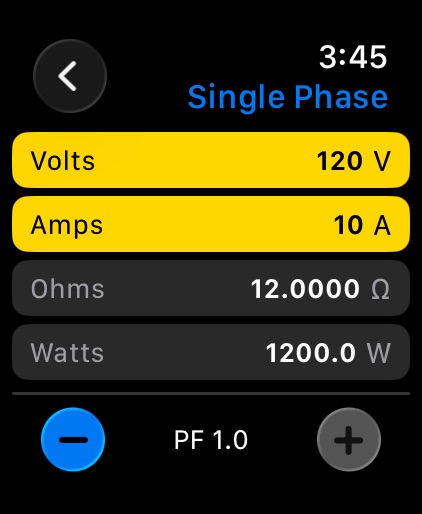
APPLE WATCH SUPPORT! Plus three phase total watt entry with back calculation added
Description
A precision electrical calculator for electricians, engineers, students, and AV/lighting pros — built for iPhone, iPad, and Mac.
Single-Phase Calculator
Enter any two of Volts, Amps, Watts, or Ohms and the app solves the other two instantly. Results are displayed on a classic Ohm's Law pie chart with a live readout hub, so you can see the relationship between values at a glance.
Three-Phase Calculator
A spreadsheet-style grid for balanced or unbalanced three-phase loads. Enter per-leg voltage, current, or power and the app fills in the rest, including line and phase totals. Toggle between Delta and Wye/Star configurations — the math adjusts automatically.
Power Factor
A collapsible PF panel on both screens lets you apply any power factor from 0 to 1. Real Power, Apparent Power (VA), and Reactive Power (VAR) are calculated and clearly labeled. Your PF setting is remembered between sessions.
NEC-Compliant Breaker Sizing
Full Load Amps (FLA) and recommended breaker sizes are calculated automatically using NEC sizing rules, so you can spec circuits with confidence.
Visualization Mode
Tap Visualize from any calculation to see five live, interactive diagrams powered by your current values:
Delta wiring topology
Wye / Star wiring topology
Bus-bar distribution view
Phasor diagram with power triangle (P, Q, S, and PF angle)
Dashboard — an all-in-one overview combining schematic, per-leg cards, and KPI readouts
Print & Share
Send any visualization straight to AirPrint as a clean, light-mode page — handy for job folders, submittals, or classroom handouts.
Universal & Responsive
One app, every Apple device. Optimized layouts for iPhone portrait, iPhone landscape, iPad split-view, and Mac Catalyst, with full dark-mode support and high-contrast yellow input cells for readability on the job site.
Keyboard & Input Polish
Tap-to-select-all on any field, a Done bar above the keyboard, and auto-scroll that keeps the focused field visible while you type.
Accessibility
ipadiphonemacrealityDevicetvoswatch
Version history 9 versions
Build 886617161v3.3.32026-06-07 16:08:33
APPLE WATCH SUPPORT! Plus three phase total watt entry with back calculation added
Build 885535901v3.0.02026-05-11 23:20:50
What's New in 3.0
A full ground-up refresh of OHM's Law Calculator, rebuilt for modern iPhone, iPad, and Mac.
Redesigned single-phase calculator — enlarged Ohm's Law pie chart with a clean inner hub, four pinned input fields, and live recalculation as you type.
Spreadsheet-style three-phase grid — enter per-leg values in a clear tabular layout, with totals that fit on screen in both portrait and landscape.
Delta and Wye topology toggle — switch between three-phase configurations with the math handled correctly for each.
Power Factor support — collapsible PF disclosure on both single- and three-phase screens, with the Watts row labeled with the active PF (e.g. "Real Power (PF @ 0.85)"). Your PF setting persists across launches.
Visualization mode — five interactive diagrams accessible from any calculation: Delta, Wye/Star, Bus-bar, Phasor (power triangle), and a full Dashboard view.
Print from visualization — send any diagram straight to AirPrint, optimized for light-mode output.
NEC-compliant breaker sizing — automatic, code-aware breaker recommendations.
Truly universal layout — side-by-side landscape views, responsive iPad and Mac Catalyst scaling, and rotation through every orientation.
Keyboard polish — Done bar, tap-to-select-all, and the focused field auto-scrolls above the keyboard.
Dark mode throughout, with high-contrast yellow input cells for readability in the field.
Build 860935196v2.12023-10-24 16:52:13
New version adds support for additional devices and resolvers some on screen keyboard issues
Build 811995728v1.512015-03-21 19:14:03
This update from Apple will improve the functionality of this app. No new features are included.
Adjusts visuals to be more like iOS 8
Build 734962893v1.52014-10-10 00:20:23
New Version adds support for Widgets! Now you can add OHM's Law Calc to the Notifications area in the Today view. Access a "Quick LAW" version right from the lock screen on ANY iOS device! Now calculating Volts, Amps and Watts is even quicker and more convenient!
Build 712362671v1.42014-09-26 17:05:10
Updated to support all the different versions of iPhone (4s --> 6+)
Updated UI elements for cleaner look
Updated UI for cleaner rotation
Updated with support for iOS 8
Build 11611524v1.32012-10-24 21:17:42
1. Found and removed a restriction that kept the app from opening in landscape mode
2. Added the ability to tap any field and have the system automatically select the proper ohm's law wedge. For example, for volts and amps, simply tap on volts, enter your value and then tap on Amps and enter your value. It's that simple!
3. Added a field for Full Load Amps in Three Phase
4. Added a readout for Phase to Phase resistance, which calculates the series-parallel circuit caused by a three phase load when attempting to measure the resistance between one phase (of the load) and the other (eg, putting one probe on L1 and one probe on L2, or L1 & L3 or L2 & L3).
5. Changed the iPhone and iPad "tap on text" behavior to auto select the text in the text box so the user can either type new information in (without having to erase the old first) or select done to leave the old information in the box (in case the user tapped there by mistake)
6. Added support for iOS 6
Build 6241196v1.12012-02-08 01:29:21
Updated the keyboard handling to shift the screen to insure the data being entered is always visible.
Found and fixed a formatting issue switching between portrait and landscape
Build 6047968v1.02012-01-31 00:01:11
Price history by region
Currency
Show
Columns
Search
Availability 17 of 17 storefronts
| Region | Language | Price | Ratings | Avg | Version |
|---|---|---|---|---|---|
 US US | en-US | USD 1.99 | 3 | 4.0 | 3.3.3 |
 AU AU | en-AU | AUD 2.99 | 0 | — | 3.3.3 |
 CA CA | en-CA | CAD 2.99 | 0 | — | 3.3.3 |
 CD CD | en-GB | USD 1.99 | 0 | — | 3.3.3 |
 CG CG | en-GB | USD 1.99 | 0 | — | 3.3.3 |
 GA GA | fr-FR | USD 1.99 | 0 | — | 3.3.3 |
 HN HN | es-MX | USD 1.99 | 0 | — | 3.3.3 |
 KR KR | ko | KRW 3300 | 0 | — | 3.3.3 |
 LV LV | en-GB | EUR 1.99 | 0 | — | 3.3.3 |
 MA MA | en-GB | USD 1.99 | 0 | — | 3.3.3 |
 MG MG | en-GB | USD 1.99 | 0 | — | 3.3.3 |
 MO MO | zh-Hant-HK | USD 1.99 | 0 | — | 3.3.3 |
 NE NE | en-GB | USD 1.99 | 0 | — | 3.3.3 |
 RW RW | en-GB | USD 1.99 | 0 | — | 3.3.3 |
 SV SV | es-MX | USD 1.99 | 0 | — | 3.3.3 |
 TD TD | en-GB | USD 1.99 | 0 | — | 3.3.3 |
 ZA ZA | en-GB | ZAR 39.99 | 0 | — | 3.3.3 |
Change log 12 changes · US
✎
releaseNotes updated
APPLE WATCH SUPPORT! Plus three phase total watt entry with back calculation added
✎
description updated
A precision electrical calculator for electricians, engineers, students, and AV/lighting pros — built for iPhone, iPad, and Mac.
Single-Phase Calculator
Enter
✎
name updated
OHMs Law Calc
◆
Version 3.3.3 released
APPLE WATCH SUPPORT! Plus three phase total watt entry with back calculation added
◆
Version 3.0.0 released
What's New in 3.0
A full ground-up refresh of OHM's Law Calculator, rebuilt for modern iPhone, iPad, and Mac.
Redesigned single-phase calculator — enlarged Ohm's Law pie chart with a clean inner hub, four pinned input fields, and live rec
◆
Version 2.1 released
New version adds support for additional devices and resolvers some on screen keyboard issues
◆
Version 1.51 released
This update from Apple will improve the functionality of this app. No new features are included.
Adjusts visuals to be more like iOS 8
◆
Version 1.5 released
New Version adds support for Widgets! Now you can add OHM's Law Calc to the Notifications area in the Today view. Access a "Quick LAW" version right from the lock screen on ANY iOS device! Now calculating Volts, Amps and Watts is even qu
◆
Version 1.4 released
Updated to support all the different versions of iPhone (4s --> 6+)
Updated UI elements for cleaner look
Updated UI for cleaner rotation
Updated with support for iOS 8
◆
Version 1.3 released
1. Found and removed a restriction that kept the app from opening in landscape mode
2. Added the ability to tap any field and have the system automatically select the proper ohm's law wedge. For example, for volts and amps, simply tap o
◆
Version 1.1 released
Updated the keyboard handling to shift the screen to insure the data being entered is always visible.
Found and fixed a formatting issue switching between portrait and landscape
◆
Version 1.0 released