Home › Photo & Video

 US
US
1 of 1 storefronts
Content in en-US
Content in en-US
Information
Preview 2 platforms
iPhone 5 images



iPad 5 images


What’s New Version 8.0
Hi there, Videograders!
VideoGrade 8 is here with support for iOS 13!
Thank you very much for using VideoGrade. Keep sending your comments and requests to videograde@flainezapps.com
Description
Make your movies look exactly the way you want with VideoGrade, a powerful, flexible and easy to use color grading editor for video. Universal app, optimized for all the retina displays. http://videogradeapp.com/
VideoGrade is a color grading tool for your videos. It features high quality filters that will let you adjust the image on your videos in any way you can imagine. VideoGrade is built with freedom in mind: you will have total control over each of the filters. Whether you want to radically change the look of your videos, correct defects like color cast or poor lighting or subtly enhance them, VideoGrade has the tools you need.
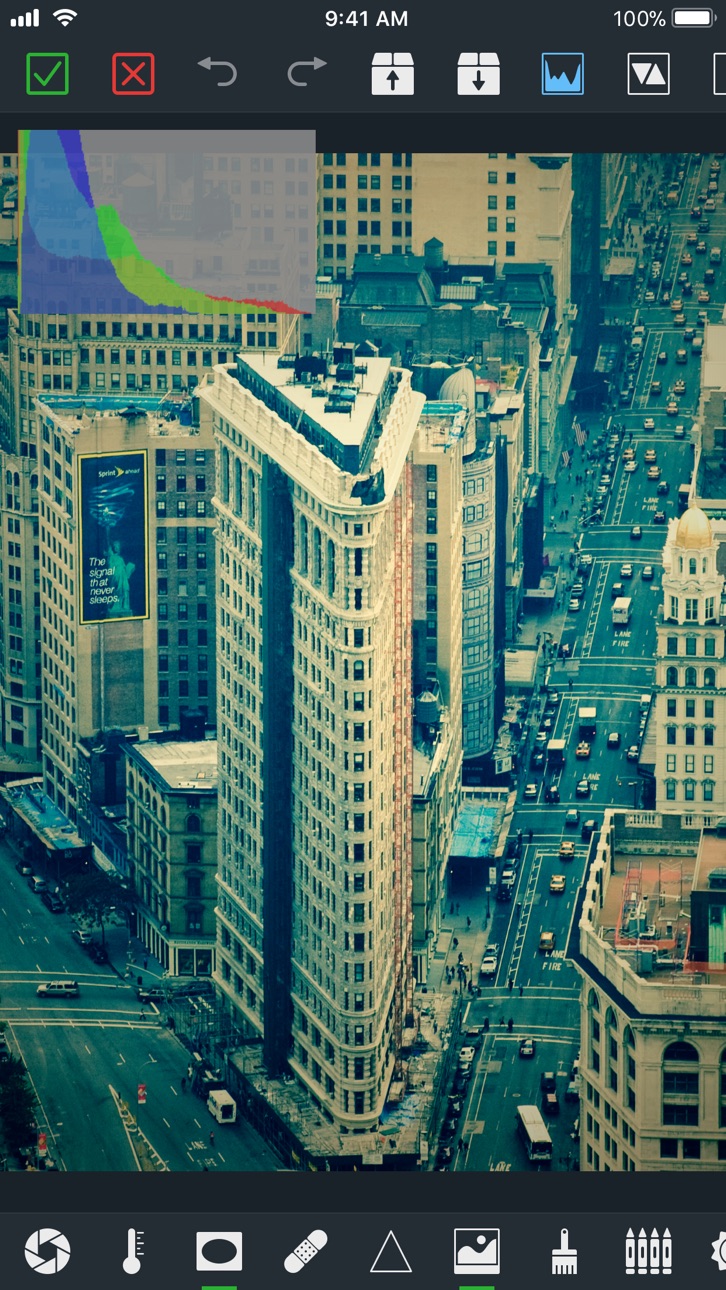
VideoGrade gives you all the information you need while editing: real-time previews of how the video will look like, color channels histogram, clipping previews and split screen mode for comparing the edited video with the original.
All the freedom VideoGrade gives is presented in a clean, beautiful and easy to use interface. After just a few minutes, you will become familiar with everything VideoGrade offers.
Under the hood, VideoGrade features a powerful render engine that takes maximum advantage of your device to process HD videos quickly.
Download VideoGrade now and surprise everybody with the quality and look of your videos!
MAIN FEATURES
+ Color correct any video recorded with (or synchronized to) your device easily.
+ All the filters that you will need to enhance or radically transform your videos.
+ Real-time previews, color histograms, clipping previews and split modes for comparison.
+ Capture frames from your videos and save them as images.
+ Export your videos in Full HD, HD or choose between the other export presets.
Each update gets better! Stay tuned for new features and improvements.
INCLUDED FILTERS
Exposure, Contrast, Vibrance, Temperature, Vignette, Recovery, Sharpness, Monochrome, Brightness, Saturation, Effects, Channel mixer, Tint, Hue, Levels, Bloom, Posterize, Rotation.
SUPPORT
Questions? Problems? Suggestions? I would love to hear from you! Please send me an email to videograde@flainezapps.com. Note that if you leave a support question in the comments, I will not be able to write you back, so just shoot me an email instead.
=====
"One of VideoGrade's best qualities is that it doesn't sacrifice simplicity for function or vice versa." - Gizmodo
"VideoGrade is now an essential app for iOS videographers." - Cult of the Mac
"VideoGrade is the best low-cost color correction app currently available for iOS." - Filmmaking with the iPad and the iPhone
=====
In-App Purchases US pricing
One-Time Purchases
Generous tip$0.99
Awesome tip$1.99
Amazing tip$4.99
Stellar tip$9.99
Unbelievable tip!$19.99
Capabilities
In-App Purchases
Accessibility
ipadiphonemacrealityDevicetvoswatch
Version history 20 versions
Build 833637632v8.02019-11-21 06:07:26
Hi there, Videograders!
VideoGrade 8 is here with support for iOS 13!
Thank you very much for using VideoGrade. Keep sending your comments and requests to videograde@flainezapps.com
Build 828610305v7.0.02018-09-17 18:09:28
Hi there, Videograders!
VideoGrade 7 is here, ready for iOS 12!
7.0.0
== ADDED ==
- Support for iOS 12.
- Presets are now available on the Photos Extension. Presets are shared between the VideoGrade app and the VideoGrade Photos Extension.
- New filter: Pixellate.
== IMPROVED ==
- Big speed improvements.
== FIXED ==
- Fixed several bugs, including a problem that could crash the app when using the Channel Mixer on an iPhone X.
Thank you very much for using VideoGrade. The next version is being developed as you read this, so keep sending your comments and requests to videograde@flainezapps.com
Build 824282588v6.0.42017-11-20 18:53:42
Hi there, Videograders!
VideoGrade 6 was a big release with a variety of additions, improvements and fixes. Version 6.0.4 puts some finishing touches to the release.
6.0.4
== ADDED ==
- A "What's New" screen that will keep you informed about new features as they are introduced.
== IMPROVED ==
- Minor performance and quality improvements.
6.0.3
== FIXED ==
- Fixed an issue that could cause some videos to export with very bad quality when the source video had a low bitrate.
6.0.2
== FIXED ==
- Fixed and issue introduced in version 6. that prevented the Presets and the Batch Queue functionalities from working correctly. Sorry for the inconveniences!
6.0.0
== ADDED ==
- Undo / Redo operations.
- New effects: Bloom and Posterize.
- Added a Reset button to each adjustment panel.
== IMPROVED ==
- Updated for iOS 11: It takes advantage of many of the latest and greatest iOS features.
- Updated for the iPhone X screen.
- Adjustment panels can now be dismissed by swiping down or left. They can also be dismissed by tapping on the Preview Area.
- On the iPad, it is not possible to collapse or expand the different editing panels.
- Improved video and audio quality.
- Improved metadata management.
== FIXED ==
- Fixed an issue that could render some videos with the wrong size.
- Fixed an issue that prevented Live Photos taken with iOS 11 from being processed correctly.
Thank you very much for using VideoGrade. The next version is being developed as you read this, so keep sending your comments and requests to videograde@flainezapps.com
Build 824263431v6.0.32017-11-03 15:39:03
Hi there, Videograders!
VideoGrade 6 was a big release with a variety of additions, improvements and fixes. Version 6.0.3 refines some rough edges of the release.
6.0.3
== FIXED ==
- Fixed an issue that could cause some videos to export with very bad quality when the source video had a low bitrate.
6.0.2
== FIXED ==
- Fixed and issue introduced in version 6. that prevented the Presets and the Batch Queue functionalities from working correctly. Sorry for the inconveniences!
6.0.0
== ADDED ==
- Undo / Redo operations.
- New effects: Bloom and Posterize.
- Added a Reset button to each adjustment panel.
== IMPROVED ==
- Updated for iOS 11: It takes advantage of many of the latest and greatest iOS features.
- Updated for the iPhone X screen.
- Adjustment panels can now be dismissed by swiping down or left. They can also be dismissed by tapping on the Preview Area.
- On the iPad, it is not possible to collapse or expand the different editing panels.
- Improved video and audio quality.
- Improved metadata management.
== FIXED ==
- Fixed an issue that could render some videos with the wrong size.
- Fixed an issue that prevented Live Photos taken with iOS 11 from being processed correctly.
Thank you very much for using VideoGrade. The next version is being developed as you read this, so keep sending your comments and requests to videograde@flainezapps.com
Build 824232992v6.0.22017-11-01 20:02:55
VideoGrade 6.0.2
== FIXED ==
- Fixed and issue introduced in version 6. that prevented the Presets and the Batch Queue functionalities from working correctly. Sorry for the inconveniences!
VideoGrade 6.0.0
Hi there, Videograders!
VideoGrade 6 is here with a variety of additions, improvements and fixes.
== ADDED ==
- Undo / Redo operations.
- New effects: Bloom and Posterize.
- Added a Reset button to each adjustment panel.
== IMPROVED ==
- Updated for iOS 11: It takes advantage of many of the latest and greatest iOS features.
- Updated for the iPhone X screen.
- Adjustment panels can now be dismissed by swiping down or left. They can also be dismissed by tapping on the Preview Area.
- On the iPad, it is not possible to collapse or expand the different editing panels.
- Improved video and audio quality.
- Improved metadata management.
== FIXED ==
- Fixed an issue that could render some videos with the wrong size.
- Fixed an issue that prevented Live Photos taken with iOS 11 from being processed correctly.
Thank you very much for using VideoGrade. The next version is being developed as you read this, so keep sending your comments and requests to videograde@flainezapps.com
Build 824125841v6.0.02017-10-30 19:01:30
Hi there, Videograders!
VideoGrade 6 is here with a variety of additions, improvements and fixes.
== ADDED ==
- Undo / Redo operations.
- New effects: Bloom and Posterize.
- Added a Reset button to each adjustment panel.
== IMPROVED ==
- Updated for iOS 11: It takes advantage of many of the latest and greatest iOS features.
- Updated for the iPhone X screen.
- Adjustment panels can now be dismissed by swiping down or left. They can also be dismissed by tapping on the Preview Area.
- On the iPad, it is not possible to collapse or expand the different editing panels.
- Improved video and audio quality.
- Improved metadata management.
== FIXED ==
- Fixed an issue that could render some videos with the wrong size.
- Fixed an issue that prevented Live Photos taken with iOS 11 from being processed correctly.
Thank you very much for using VideoGrade. The next version is being developed as you read this, so keep sending your comments and requests to videograde@flainezapps.com
Build 821490377v5.1.02017-03-28 05:11:59
Hi there, Videograders!
VideoGrade 5 was a big release that left no parts of the app untouched. Unfortunately, that means that some of the things didn't quite work as intended. This update fixes many of those things and improves others.
Thanks a lot for all the feedback received! New versions are developing as you read this, so keep sending your comments and requests to videograde@flainezapps.com
== IMPROVED ==
- VideoGrade 5 will now load presets created with older VideoGrade versions.
- The Tint editor now displays the values of the tint strength in numeric format.
- Small UI tweaks.
== FIXED ==
- A crash that could happen when trying to load an iCloud video without Internet connection.
- A crash that could happen when canceling the Video Export Options screen.
- A crash that could happen when saving a video to the Photo Library.
Release notes for VideoGrade 5 were:
5.0.0:
VideoGrade 5 is a major upgrade. The app incorporates many new features and improvements. Some of the highlights are:
- Updated for iOS 10: It takes advantage of many of the latest and greatest iOS features.
- Added Levels adjustment filter.
- Added Hue adjustment filter.
- Added Noise Reduction filter.
- Added options for rotating videos or photos.
- Added support for Live Photos.
- Added support for all the screen sizes and orientations.
- Added support for multitasking on the iPad.
- Added support for 3D Touch Quick Launch actions.
- Added a Photos Extension: You can now run VideoGrade directly from the Photos app.
- Improved workflow and UI.
- Improved Vignette filter.
- Improved Saturation filter.
- Improved Brightness filter.
- Improved integration with your Photos Library.
- Stability and performance improvements.
Thank you very much for using VideoGrade. New features are still in development and they will be included soon, so don’t hesitate to send your feedback, suggestions and requests to videograde@flainezapps.com .
Build 818809851v5.0.02017-03-14 05:22:22
5.0.0:
VideoGrade 5 is a major upgrade. The app incorporates many new features and improvements. Some of the highlights are:
- Updated for iOS 10: It takes advantage of many of the latest and greatest iOS features.
- Added Levels adjustment filter.
- Added Hue adjustment filter.
- Added Noise Reduction filter.
- Added options for rotating videos or photos.
- Added support for Live Photos.
- Added support for all the screen sizes and orientations.
- Added support for multitasking on the iPad.
- Added support for 3D Touch Quick Launch actions.
- Added a Photos Extension: You can now run VideoGrade directly from the Photos app.
- Improved workflow and UI.
- Improved Vignette filter.
- Improved Saturation filter.
- Improved Brightness filter.
- Improved integration with your Photos Library.
- Stability and performance improvements.
Thank you very much for using VideoGrade. New features are still in development and they will be included soon, so don’t hesitate to send your feedback, suggestions and requests to videograde@flainezapps.com .
Build 813721019v4.0.32015-10-17 03:23:16
4.0.3:
- Improved performance and stability.
- Error corrections.
4.0.0:
VideoGrade 4 is a major upgrade. The app incorporates many new features and improvements. Some of the highlights are:
- Updated for iOS 9: It takes advantage of many of the latest and greatest iOS features.
- Better integration with your Photos Library.
- VideoGrade can now edit your photos in addition to your videos.
- Added “precision sliders” to help you obtain exactly the results you want.
- UI Improvements.
- Stability and performance improvements.
Thank you very much for using VideoGrade. New features are still in development and they will be included soon, so don’t hesitate to send your feedback, suggestions and requests to videograde@flainezapps.com .
Build 813548783v4.0.22015-10-07 00:20:53
4.0.2:
- Improved performance and stability.
- Error corrections.
4.0.0:
VideoGrade 4 is a major upgrade. The app incorporates many new features and improvements. Some of the highlights are:
- Updated for iOS 9: It takes advantage of many of the latest and greatest iOS features.
- Better integration with your Photos Library.
- VideoGrade can now edit your photos in addition to your videos.
- Added “precision sliders” to help you obtain exactly the results you want.
- UI Improvements.
- Stability and performance improvements.
Thank you very much for using VideoGrade. New features are still in development and they will be included soon, so don’t hesitate to send your feedback, suggestions and requests to videograde@flainezapps.com .
Build 813344665v4.0.12015-09-17 22:48:45
4.0.1:
VideoGrade 4 is a major upgrade. The app incorporates many new features and improvements. Some of the highlights are:
- Updated for iOS 9: It takes advantage of many of the latest and greatest iOS features.
- Better integration with your Photos Library.
- VideoGrade can now edit your photos in addition to your videos.
- Added “precision sliders” to help you obtain exactly the results you want.
- UI Improvements.
- Stability and performance improvements.
Thank you very much for using VideoGrade. New features are still in development and they will be included soon, so don’t hesitate to send your feedback, suggestions and requests to videograde@flainezapps.com .
Build 811548091v3.1.02015-01-22 00:06:05
3.1.0:
- Added a Tint filter.
- Added a batch processing queue: Edit videos, add them to the queue and export all of them at once.
- Exported videos now conserve the metadata from the original clip.
- Improvements to the Realtime Preview.
- Improvements to the UI.
- Bug fixes.
3.0.1:
Bugfixes
3.0.0:
VideoGrade 3 is a major upgrade. The app has been rebuilt from the ground up, incorporating several new features and improvements. Some of the highlights are:
- Updated for iOS 8: It takes advantage of many of the latest and greatest iOS features.
- Redesigned UI: A brand new visual look, accompanied by an improved workflow that will make editing your videos easier and faster than ever.
- New render engine: It provides improved quality and faster processing.
- Live Real-time Preview: Now you can check how your video will look like in motion before rendering
- New filters have been added and many of the existing ones improved.
Thank you very much for waiting so long for this update. New features are still in development and they will be included soon. VideoGrade is going to be updated on a more frequent basis now, so don’t hesitate to send your feedback, suggestions and requests to videograde@flainezapps.com .
Build 811390629v3.0.12014-12-20 02:27:03
3.0.1:
Bugfixes
3.0.0:
VideoGrade 3 is a major upgrade. The app has been rebuilt from the ground up, incorporating several new features and improvements. Some of the highlights are:
- Updated for iOS 8: It takes advantage of many of the latest and greatest iOS features.
- Redesigned UI: A brand new visual look, accompanied by an improved workflow that will make editing your videos easier and faster than ever.
- New render engine: It provides improved quality and faster processing.
- Live Real-time Preview: Now you can check how your video will look like in motion before rendering
- New filters have been added and many of the existing ones improved.
Thank you very much for waiting so long for this update. New features are still in development and they will be included soon. VideoGrade is going to be updated on a more frequent basis now, so don’t hesitate to send your feedback, suggestions and requests to videograde@flainezapps.com .
Build 784092794v3.0.02014-12-09 20:46:02
VideoGrade 3 is a major upgrade. The app has been rebuilt from the ground up, incorporating several new features and improvements. Some of the highlights are:
- Updated for iOS 8: It takes advantage of many of the latest and greatest iOS features.
- Redesigned UI: A brand new visual look, accompanied by an improved workflow that will make editing your videos easier and faster than ever.
- New render engine: It provides improved quality and faster processing.
- Live Real-time Preview: Now you can check how your video will look like in motion before rendering
- New filters have been added and many of the existing ones improved.
Thank you very much for waiting so long for this update. New features are still in development and they will be included soon. VideoGrade is going to be updated on a more frequent basis now, so don’t hesitate to send your feedback, suggestions and requests to videograde@flainezapps.com .
Build 16735272v2.0.22013-09-11 00:41:48
2.0.2:
Bugfixes and improvements.
2.0.1:
Improved compatibility with high-quality video.
2.0.0:
VideoGrade 2 is a major release with several changes and improvements! Some of the most important are:
+ Redesigned UI: Easier and faster to use, with bigger preview area.
+ Support for the iPhone 5 and the new iPad Retina display.
+ Improved quality of all the filters.
+ Added new filters: Exposure, Vibrance and Channel Mixer.
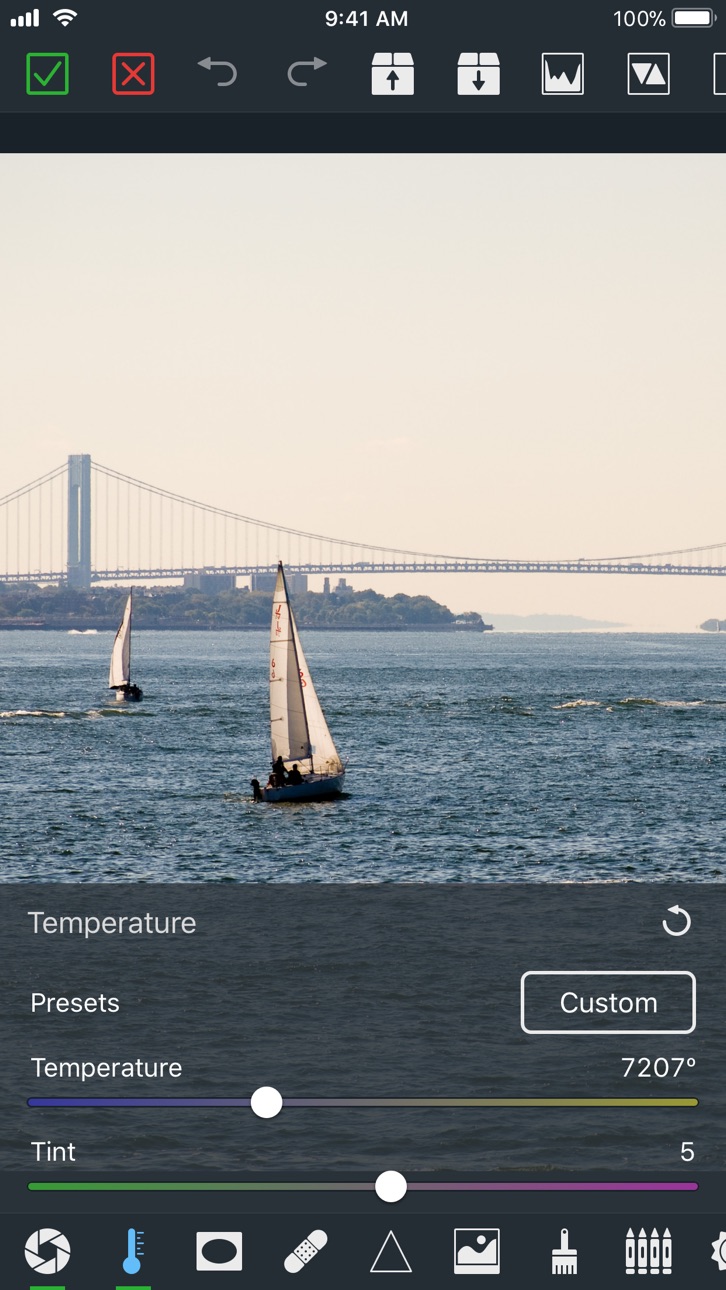
+ Added "Temperature" presets for the most common situations.
+ Added the ability to trim clips and capture video frames, saving them as images.
+ Added a split screen mode to compare the adjusted video with the original one.
+ Added the ability to display a color histogram and highlight "clipping" areas.
+ Fully optimized for iOS 6.
New updates are coming! Send your feedback and help make the app even better!
Build 15208609v2.0.12013-04-30 18:33:40
2.0.1:
Improved compatibility with high-quality video.
2.0.0:
VideoGrade 2 is a major release with several changes and improvements! Some of the most important are:
+ Redesigned UI: Easier and faster to use, with bigger preview area.
+ Support for the iPhone 5 and the new iPad Retina display.
+ Improved quality of all the filters.
+ Added new filters: Exposure, Vibrance and Channel Mixer.
+ Added "Temperature" presets for the most common situations.
+ Added the ability to trim clips and capture video frames, saving them as images.
+ Added a split screen mode to compare the adjusted video with the original one.
+ Added the ability to display a color histogram and highlight "clipping" areas.
+ Fully optimized for iOS 6.
New updates are coming! Send your feedback and help make the app even better!
Build 14742024v2.0.02013-04-15 20:32:48
VideoGrade 2 is a major release with several changes and improvements! Some of the most important are:
✭ Redesigned UI: Easier and faster to use, with bigger preview area.
✭ Support for the iPhone 5 and the new iPad Retina display.
✭ Improved quality of all the filters.
✭ Added new filters: Exposure, Vibrance and Channel Mixer.
✭ Added "Temperature" presets for the most common situations.
✭ Added the ability to trim clips and capture video frames, saving them as images.
✭ Added a split screen mode to compare the adjusted video with the original one.
✭ Added the ability to display a color histogram and highlight "clipping" areas.
✭ Fully optimized for iOS 6.
New updates are coming! Send your feedback and help make the app even better!
Build 10747074v1.1.12012-09-21 13:57:16
1.1.1:
- Compatibility with iOS 6
1.1.0:
- VideoGrade is now Universal. Enjoy it on your iPad!
- Improved support for Full HD.
Build 6543494v1.1.02012-02-24 02:40:04
- VideoGrade is now Universal. Enjoy it on your iPad!
- Improved support for Full HD.
Build 5742621v1.0.02012-01-12 17:21:04
Price history by region
Currency
Show
Columns
Search
Availability 1 of 1 storefronts
| Region | Language | Price | Ratings | Avg | Version |
|---|---|---|---|---|---|
| US | en-US | USD 5.99 | 1.5k | 4.8 | 8.0 |
Change log 24 changes · US
✎
releaseNotes updated
Hi there, Videograders!
VideoGrade 8 is here with support for iOS 13!
Thank you very much for using VideoGrade. Keep sending your comments and requests to vi
✎
description updated
Make your movies look exactly the way you want with VideoGrade, a powerful, flexible and easy to use color grading editor for video. Universal app, optimized fo
✎
subtitle updated
Color Editor for Video
✎
name updated
VideoGrade
◆
Version 8.0 released
Hi there, Videograders!
VideoGrade 8 is here with support for iOS 13!
Thank you very much for using VideoGrade. Keep sending your comments and requests to videograde@flainezapps.com
◆
Version 7.0.0 released
Hi there, Videograders!
VideoGrade 7 is here, ready for iOS 12!
7.0.0
== ADDED ==
- Support for iOS 12.
- Presets are now available on the Photos Extension. Presets are shared between the VideoGrade app and the VideoGrade Photos Extensio
◆
Version 6.0.4 released
Hi there, Videograders!
VideoGrade 6 was a big release with a variety of additions, improvements and fixes. Version 6.0.4 puts some finishing touches to the release.
6.0.4
== ADDED ==
- A "What's New" screen that will keep you informed a
◆
Version 6.0.3 released
Hi there, Videograders!
VideoGrade 6 was a big release with a variety of additions, improvements and fixes. Version 6.0.3 refines some rough edges of the release.
6.0.3
== FIXED ==
- Fixed an issue that could cause some videos to export
◆
Version 6.0.2 released
VideoGrade 6.0.2
== FIXED ==
- Fixed and issue introduced in version 6. that prevented the Presets and the Batch Queue functionalities from working correctly. Sorry for the inconveniences!
VideoGrade 6.0.0
Hi there, Videograders!
Video
◆
Version 6.0.0 released
Hi there, Videograders!
VideoGrade 6 is here with a variety of additions, improvements and fixes.
== ADDED ==
- Undo / Redo operations.
- New effects: Bloom and Posterize.
- Added a Reset button to each adjustment panel.
== IMPROVED ==
◆
Version 5.1.0 released
Hi there, Videograders!
VideoGrade 5 was a big release that left no parts of the app untouched. Unfortunately, that means that some of the things didn't quite work as intended. This update fixes many of those things and improves others.
◆
Version 5.0.0 released
5.0.0:
VideoGrade 5 is a major upgrade. The app incorporates many new features and improvements. Some of the highlights are:
- Updated for iOS 10: It takes advantage of many of the latest and greatest iOS features.
- Added Levels adjustmen
◆
Version 4.0.3 released
4.0.3:
- Improved performance and stability.
- Error corrections.
4.0.0:
VideoGrade 4 is a major upgrade. The app incorporates many new features and improvements. Some of the highlights are:
- Updated for iOS 9: It takes advantage of many
◆
Version 4.0.2 released
4.0.2:
- Improved performance and stability.
- Error corrections.
4.0.0:
VideoGrade 4 is a major upgrade. The app incorporates many new features and improvements. Some of the highlights are:
- Updated for iOS 9: It takes advantage of many
◆
Version 4.0.1 released
4.0.1:
VideoGrade 4 is a major upgrade. The app incorporates many new features and improvements. Some of the highlights are:
- Updated for iOS 9: It takes advantage of many of the latest and greatest iOS features.
- Better integration with
◆
Version 3.1.0 released
3.1.0:
- Added a Tint filter.
- Added a batch processing queue: Edit videos, add them to the queue and export all of them at once.
- Exported videos now conserve the metadata from the original clip.
- Improvements to the Realtime Preview
◆
Version 3.0.1 released
3.0.1:
Bugfixes
3.0.0:
VideoGrade 3 is a major upgrade. The app has been rebuilt from the ground up, incorporating several new features and improvements. Some of the highlights are:
- Updated for iOS 8: It takes advantage of many of th
◆
Version 3.0.0 released
VideoGrade 3 is a major upgrade. The app has been rebuilt from the ground up, incorporating several new features and improvements. Some of the highlights are:
- Updated for iOS 8: It takes advantage of many of the latest and greatest iOS
◆
Version 2.0.2 released
2.0.2:
Bugfixes and improvements.
2.0.1:
Improved compatibility with high-quality video.
2.0.0:
VideoGrade 2 is a major release with several changes and improvements! Some of the most important are:
+ Redesigned UI: Easier and faster
◆
Version 2.0.1 released
2.0.1:
Improved compatibility with high-quality video.
2.0.0:
VideoGrade 2 is a major release with several changes and improvements! Some of the most important are:
+ Redesigned UI: Easier and faster to use, with bigger preview area.
+
◆
Version 2.0.0 released
VideoGrade 2 is a major release with several changes and improvements! Some of the most important are:
✭ Redesigned UI: Easier and faster to use, with bigger preview area.
✭ Support for the iPhone 5 and the new iPad Retina display.
✭ Impro
◆
Version 1.1.1 released
1.1.1:
- Compatibility with iOS 6
1.1.0:
- VideoGrade is now Universal. Enjoy it on your iPad!
- Improved support for Full HD.
◆
Version 1.1.0 released
- VideoGrade is now Universal. Enjoy it on your iPad!
- Improved support for Full HD.
◆
Version 1.0.0 released