Home › Business

 US
US
1 of 1 storefronts
Content in en-US
Content in en-US
Information
Preview 3 platforms
iPhone 10 images




iPad 10 images




Apple Watch 5 images


What’s New Version 11.4
New view for inactive jobs
bug fixes
Description
Discover with myWork how easy it can be to maintain your digital timesheet.
With just one click the recording is started and you can concentrate on what really counts - your work!
myWork is designed so that it can be stopped during recording and does not drain your battery. The next time you start the app, you'll return to the corresponding place and see at a glance how much work time you've already recorded.
Main functions:
- Create and manage multiple, independent jobs / projects / customers
- Versatile working time models for exact overtime calculations.
- Stopwatch function for daily recording of working time
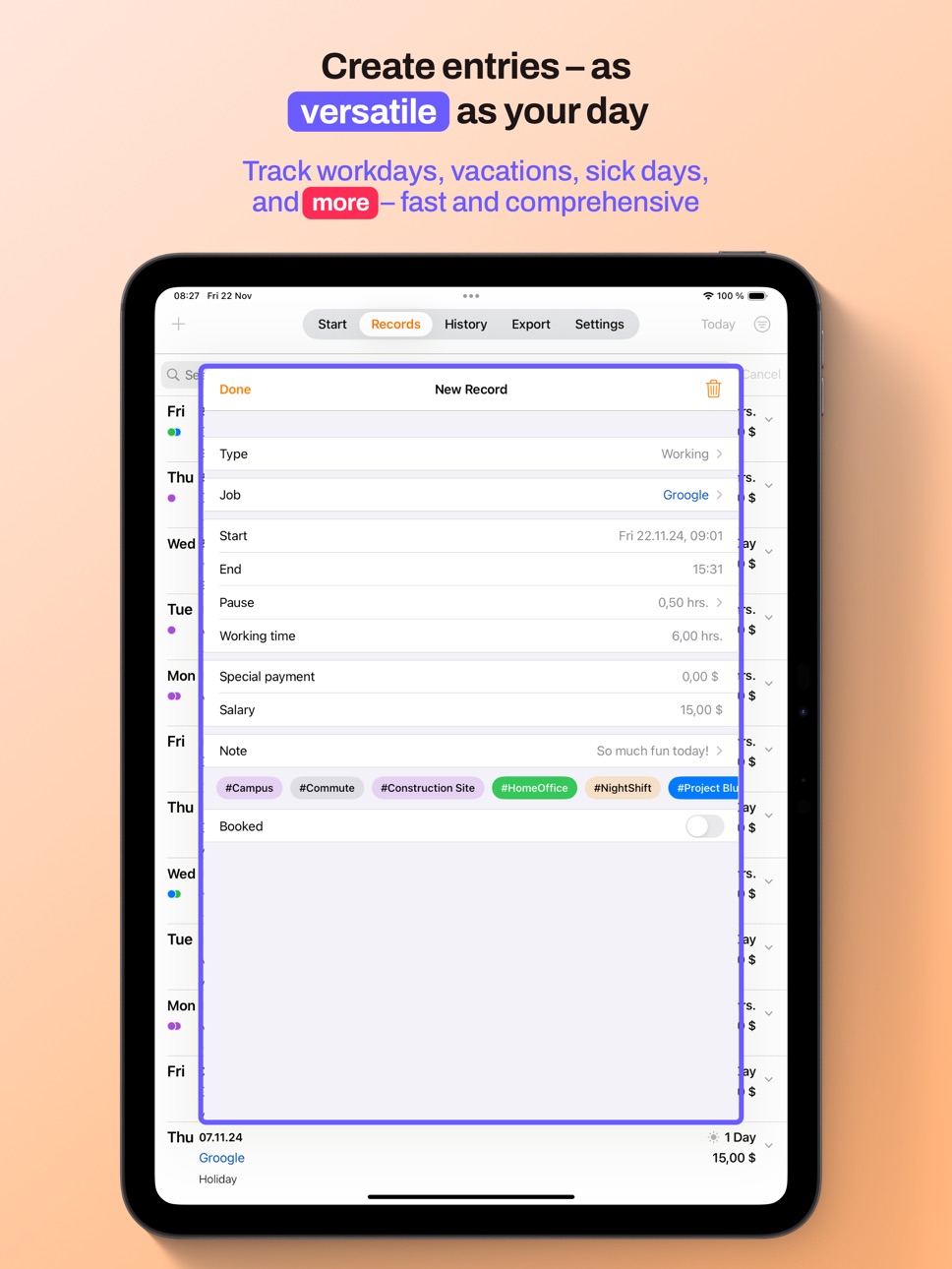
- Quick, manual recording of activities such as holidays, public holidays, illness, short-time work and much more...
- Location-based automatic starting and stopping of time recording
- Automatic pause function
- iCloud synchronization
- Apple Watch Support
- Overview of the most important data such as planned working time, overtime, earnings and much more directly at the start
- Intelligent search and filter function
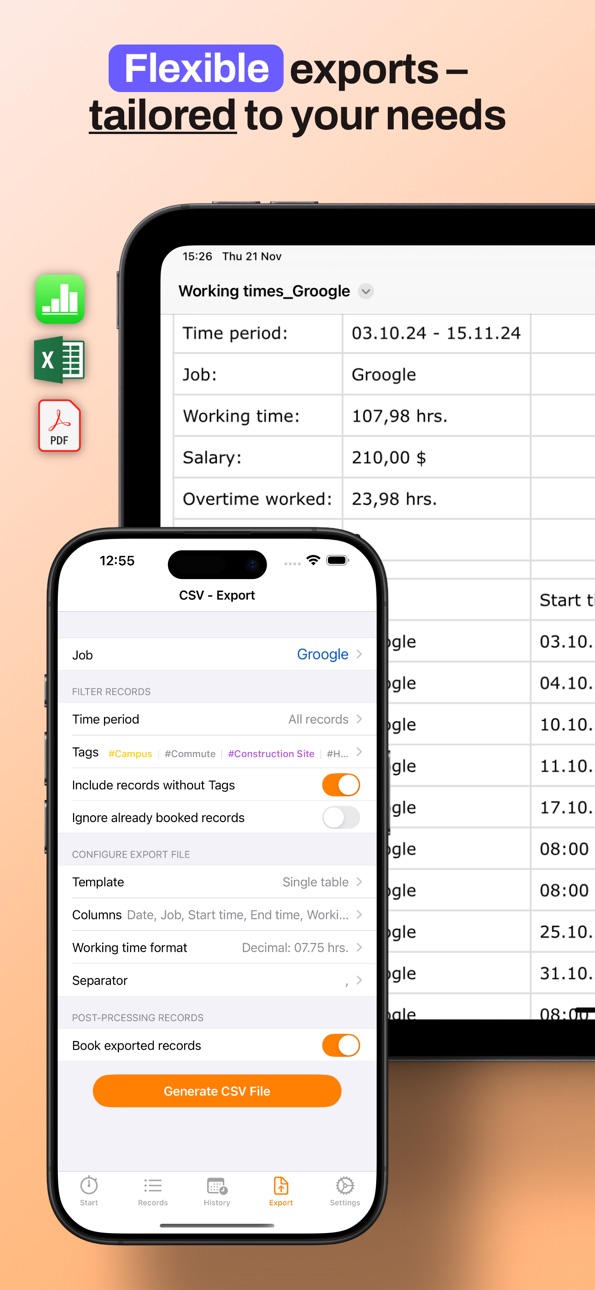
- Template based and easily configurable export of your times
- Creating a standard job for quick startup
- Integrated vacation days management
- Clear presentation of year, month and week views
- Memo function during recording
- dark mode
Of course, data protection is a top priority!
With the exception of the optional synchronization and backup features, all data remains local to your device. No servers, no transfer to third parties!
You may purchase an auto-renewing subscription through an In-App Purchase.
• Auto-renewable subscription
• Your subscription will be charged to your iTunes account at confirmation of purchase and will automatically renew (at the duration selected) unless auto-renew is turned off at least 24 hours before the end of the current period.
• Current subscription may not be cancelled during the active subscription period; however, you can manage your subscription and/or turn off auto-renewal by visiting your iTunes Account Settings after purchase
• Privacy policy and terms of use: https://www.apple.com/legal/internet-services/itunes/dev/stdeula/
You have further questions? - I would be happy to receive an e-mail.
Capabilities
In-App Purchases
Accessibility
ipadiphonemacrealityDevicetvoswatch
Version history 25 versions
Build 875944945v11.42025-07-03 05:54:37
New view for inactive jobs
bug fixes
Build 870893406v11.32025-06-27 13:20:38
Bugfixes
Build 870832230v11.22024-12-04 06:32:47
Bug fixes and performance improvements
Build 870779954v11.12024-12-02 08:23:37
- Data optimization
- Bugfix in Export
Build 870018578v112024-11-27 15:40:49
- Introduction of tags for grouping records - whether home office, projects or special activities
- Improvement of the Mac version
- Improvements in absence planning
- Optimization of performance
- Modernization of the icons
- Further minor bug fixes
Build 865128334v10.12024-04-11 15:37:07
Bugfixes
Build 863844302v10.02024-03-27 06:28:13
Improvements and Bugfixes
Build 863186145v9.142024-01-31 08:18:53
Smaller bugfixes and improvements
Build 862645980v9.132024-01-03 12:47:17
Small bugfix for calculation of week hours.
Build 862627903v9.122024-01-02 18:17:20
Little bugfix in calculating the first calendar week of the year.
Build 862099399v9.112023-12-22 07:55:12
New: Copy a job
Smaller bug fixes
Build 861774680v9.102023-11-28 06:04:43
Bugfix in iPad layout
Build 861552781v9.92023-11-27 07:25:13
- Optimization of automatic breaks
- Improvements in the time picker
- Color selection under iOS 17
- Minor bug fixes
Build 859501531v9.82023-08-31 15:44:54
Added French as supported language
Build 858924064v9.72023-08-08 12:12:08
New product pages and App symbols
Build 858556592v9.62023-08-03 06:22:01
- Improvements in the automatic time clock
- Automatic break tracking outside the workplace
- Merging time entries
- Stabilizations in the export feature
- User interface enhancements
- Minor bug fixes
Build 854906121v9.52023-02-13 10:26:12
- New format: Man-Days
- Smaller bug fixes
Build 853995010v9.42022-12-20 16:58:58
Little bug fixes in navigation
Build 851902165v9.22022-12-03 07:56:44
Improvements
- Bug fixes in export
- Filters are now reset when exiting the app
- General improvements to the user interface
- Update in Dropbox framework to support the new authorization method.
New personalization options
- Setting to round single values instead of totals
- New AppIcons that can be selected in the settings.
New section for the full version
- New page with the overview of all Pro features
- Alternative payment model for the full version
- Possibility to test the full version for three days free of charge and without obligation
Translated with www.DeepL.com/Translator (free version)
Build 853696031v9.32022-12-03 15:33:20
Improvements
- Bug fixes in export
- Filters are now reset when exiting the app
- General improvements to the user interface
- Update in Dropbox framework to support the new authorization method.
New personalization options
- Setting to round single values instead of totals
- New AppIcons that can be selected in the settings.
New section for the full version
- New page with the overview of all Pro features
- Alternative payment model for the full version
- Possibility to test the full version for three days free of charge and without obligation
Build 848069092v9.12022-04-03 17:26:03
Small bug fixed and layout improvements.
Build 847516952v9.02022-03-27 18:39:45
Thanks for the great feedback!
In this update, the Apple Watch support is added.
- Start, pause and stop the tracking right from your wrist
- Beautiful complications which nicely integrate in your preferred watch face
Build 845088328v8.52021-11-02 14:52:03
Thanks for the feedback!
This update improves the filter and search functionality
Build 844712590v8.42021-10-20 15:27:38
Thanks for the feedback!
- Improved automatic time clock on iOS 15
- New field "working days" in history
- Minor layout improvements
Build 843575099v8.32021-08-19 08:37:43
This update contains the following improvements and bug fixes
- Better support of working time models in the copy function
- Bug fixes in the display when recording overtime compensations
- Future overtime compensation is now deducted directly from current overtime if it is marked as "booked".
No pricing data captured yet — comparisons appear once the app has paid storefronts or in-app purchases.
Availability 1 of 1 storefronts
| Region | Language | Price | Ratings | Avg | Version |
|---|---|---|---|---|---|
| US | en-US | Free | 15 | 4.9 | 11.4 |
Change log 29 changes · US
✎
releaseNotes updated
New view for inactive jobs
bug fixes
✎
description updated
Discover with myWork how easy it can be to maintain your digital timesheet.
With just one click the recording is started and you can concentrate on what really
✎
subtitle updated
Overtimes, Salary, Automatic
✎
name updated
myWork - Time tracking
◆
Version 11.4 released
New view for inactive jobs
bug fixes
◆
Version 11.3 released
Bugfixes
◆
Version 11.2 released
Bug fixes and performance improvements
◆
Version 11.1 released
- Data optimization
- Bugfix in Export
◆
Version 11 released
- Introduction of tags for grouping records - whether home office, projects or special activities
- Improvement of the Mac version
- Improvements in absence planning
- Optimization of performance
- Modernization of the icons
- Further minor
◆
Version 10.1 released
Bugfixes
◆
Version 10.0 released
Improvements and Bugfixes
◆
Version 9.14 released
Smaller bugfixes and improvements
◆
Version 9.13 released
Small bugfix for calculation of week hours.
◆
Version 9.12 released
Little bugfix in calculating the first calendar week of the year.
◆
Version 9.11 released
New: Copy a job
Smaller bug fixes
◆
Version 9.10 released
Bugfix in iPad layout
◆
Version 9.9 released
- Optimization of automatic breaks
- Improvements in the time picker
- Color selection under iOS 17
- Minor bug fixes
◆
Version 9.8 released
Added French as supported language
◆
Version 9.7 released
New product pages and App symbols
◆
Version 9.6 released
- Improvements in the automatic time clock
- Automatic break tracking outside the workplace
- Merging time entries
- Stabilizations in the export feature
- User interface enhancements
- Minor bug fixes
◆
Version 9.5 released
- New format: Man-Days
- Smaller bug fixes
◆
Version 9.4 released
Little bug fixes in navigation
◆
Version 9.3 released
Improvements
- Bug fixes in export
- Filters are now reset when exiting the app
- General improvements to the user interface
- Update in Dropbox framework to support the new authorization method.
New personalization options
- Setting to r
◆
Version 9.2 released
Improvements
- Bug fixes in export
- Filters are now reset when exiting the app
- General improvements to the user interface
- Update in Dropbox framework to support the new authorization method.
New personalization options
- Setting to r
◆
Version 9.1 released
Small bug fixed and layout improvements.
◆
Version 9.0 released
Thanks for the great feedback!
In this update, the Apple Watch support is added.
- Start, pause and stop the tracking right from your wrist
- Beautiful complications which nicely integrate in your preferred watch face
◆
Version 8.5 released
Thanks for the feedback!
This update improves the filter and search functionality
◆
Version 8.4 released
Thanks for the feedback!
- Improved automatic time clock on iOS 15
- New field "working days" in history
- Minor layout improvements
◆
Version 8.3 released
This update contains the following improvements and bug fixes
- Better support of working time models in the copy function
- Bug fixes in the display when recording overtime compensations
- Future overtime compensation is now deducted direc