Home › Travel

UK Roads - Traffic & Cameras
Live Traffic Reports & Cameras
 US
US
1 of 1 storefronts
Content in en-US
Content in en-US
Information
Preview 2 platforms
iPhone 7 images


iPad 5 images


What’s New Version 8.0
- Updated User Interface for iOS26
- Now remembers if you have selected large or small traffic camera images on the "Favourites" tab.
Description
The ONLY app to show live traffic incidents, roadworks and 4,700+ cameras covering England, Scotland and Wales. One time purchase, no subscription required. The app was updated during December 2025.
KEY FEATURES
Live traffic incidents, roadworks and traffic cams covering:
- England: Traffic England for all motorways and main trunk roads: 2,000+ cameras
- Scotland: Traffic Scotland: 304 cameras
- Wales: Traffic Wales: 250 cameras
- London: TfL: 911 VIDEO cameras (currently not working due to TfL cyber attack)
- Manchester: 63 cameras
- Tyne & Wear: 261 cameras
- Essex: 35 cameras
- Derbyshire: 8 cameras
- Tamar Crossing Bridge: 2 cameras
- Tamar Torpoint Ferry: 2 cameras
- Today screen widget to show at a glance the nearest current traffic incidents
- Optimised for all iPhone and iPad models.
- Dark Mode throughout the app (iOS13+).
- Sharing: you can easily share traffic camera images (and videos for TfL cameras) with your Twitter followers, Facebook friends or via email etc.
LIST VIEW
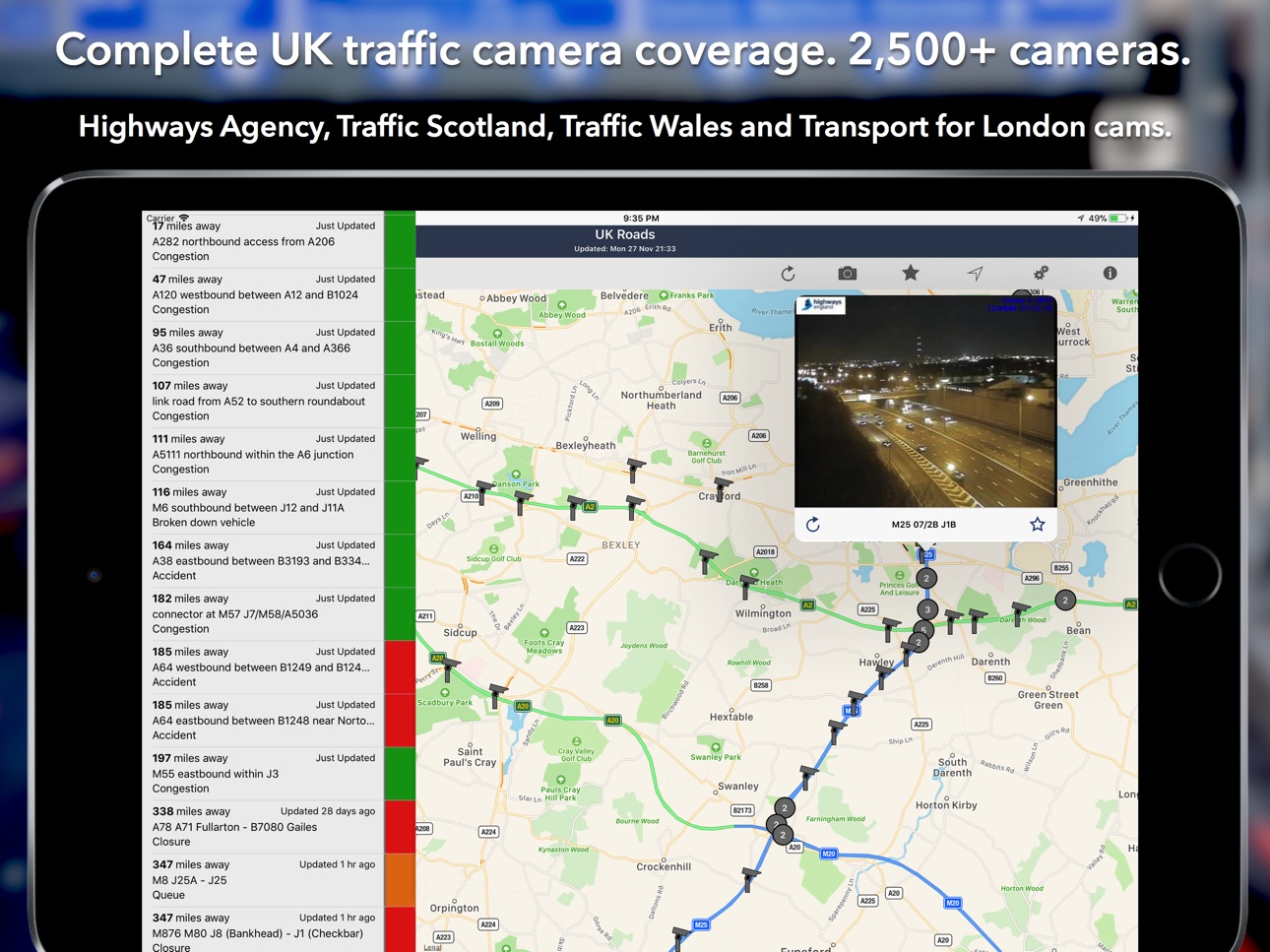
- Shows current incidents in order of distance from your current location (closest incidents are shown first).
- Each incident is colour-coded to indicate the severity of the delay.
- You can quickly see the distance the incident is from you, the road name,
the type of incident and when the incident info was updated.
- The detail view for each incident shows the description of the incident together with a map showing the exact location of the incident.
MAP VIEW
- Shows current incidents and traffic cams.
- Each incident is colour coded as well as being represented by an icon showing the incident type.
- Clicking on an incident displays more detail right there on the map.
- The map view can also show live traffic camera images.
TRAFFIC CAMS
- Toggle show/hide the cameras on the map.
- Touch a camera icon on the map to view a live camera image.
TRAFFIC CAM FAVOURITES
- Save your favourite cameras for quick access to see how clear/congested your usual routes are.
TODAY WIDGET
- Shows at a glance the nearest current traffic incidents without launching the app.
PERSONALISE
- Toggle traffic information on the map.
- Toggle auto refresh of camera images (will refresh every 10 seconds).
- Toggle always show map on app launch.
- You can configure which incidents are displayed according to the severity of the delay caused.
- Miles or Kilometres setting.
ICONS AND COLOUR CODING
- The icons on the map show the type of incident so you can see at a glance both the incident type and severity (indicated by the colour of the icon).
The incident icons currently available are:
- Accident: ambulance icon
- Congestion: standard congestion sign (3 cars) icon
- Breakdown: car with bonnet raised icon
- Signal Failure: traffic signal icon
- Event (such as football match, concert): a calendar event icon
- Snow or flooding: the appropriate icon
- Other/Hazard/Incident: standard hazard (exclamation mark) icon
Incidents are colour coded accruing to severity:
- Red: severe; delays of one hour or more, or road/exit closed
- Orange: medium; delays 15 minutes or more
- Green: minor; delays less than 15 minutes
CONTACT
- Email me for feature requests/bug reports etc. I would love to hear from you!
- Follow @ukroadsapp on Twitter for latest news on the app.
Accessibility
ipadiphonemacrealityDevicetvoswatch
Version history 25 versions
Build 880384229v8.02025-12-08 21:57:38
- Updated User Interface for iOS26
- Now remembers if you have selected large or small traffic camera images on the "Favourites" tab.
Build 869086216v7.92024-09-18 09:51:53
- Fixed a bug which caused the iPad app to crash when viewing a traffic camera
Build 868991152v7.82024-09-15 14:09:28
- Fixed a bug which caused the app to crash when viewing a traffic camera
Build 854299065v7.72023-01-10 23:29:15
-Minor fixes and enhancements.
Build 850437411v7.62022-09-23 22:32:43
- Updated for iOS16 (include map upgrade).
- Increased the size of the Favorites screen on the iPad (based on user feedback).
- Fix for buttons not appearing on the map toolbar with the Bold Text Accessibility option enabled.
Build 839908233v7.52021-01-06 19:42:20
- Fix for crash when showing incidents on the iPad.
Build 839837249v7.42021-01-03 16:43:11
- Fix for intermittent crashing on the iPad (when viewing an incident).
- Fix for crash when sharing traffic camera images on the iPad.
Build 836581091v7.312020-06-25 21:27:12
Fix for buttons not appearing on the map toolbar when Bold Text Accessibility option enabled.
Build 834722751v7.12020-02-14 21:01:56
- Camera Sharing: you can now easily share traffic camera images (and videos for TfL cameras) with your Twitter followers, Facebook friends or via email etc. Press the sharing button on the camera screen to get started.
- Increased the size of the Favourites screen on the iPad (based on user feedback).
Build 833752194v7.02020-02-07 22:25:43
- Dark Mode throughout the app (iOS13+).
- New cameras for the Greater Manchester area.
- Disabled the "pull out" gesture on the iPad in portrait mode (following user feedback). Please use in landscape mode if you want to see the incident list.
Build 829524727v6.32018-12-05 21:18:30
-Updated for iOS12
-Updated for new iPhones (XS, XS Max and XR)
Build 825062661v6.22017-11-29 18:37:41
-Fix for map view toolbar not displaying on non iOS11 devices.
6.0
-Updated for iOS11 and the new iPhone X (looks and works brilliantly on the iPhone X!!).
-Option to use miles or kilometres.
-New iPad toolbar.
-Various performance improvements and fixes.
Build 824726259v6.02017-11-28 19:20:13
-Updated for iOS11 and the new iPhone X (looks and works brilliantly on the iPhone X!!).
-Option to use miles or kilometres.
-New iPad toolbar.
-Various performance improvements and fixes.
Build 820810831v5.22017-02-06 16:58:56
5.2:
-Bug fix for showing map on launch.
5.1:
New Features:
-Search function on the list screen (also filters on the map screen).
-New setting to enable auto refresh of camera images (will refresh every 10 seconds).
-New setting to always show map on app launch.
-Additional incident icons on map: collision, car fire, police incident.
Bug Fixes:
-Fix formatting of incident description on detail view.
As always I really appreciate your reviews, so please keep them coming, it's especially important after a new release as all ratings are reset. Thanks :-)
Build 820719084v5.12017-02-01 22:23:44
New Features:
-Search function on the list screen (also filters on the map screen).
-New setting to enable auto refresh of camera images (will refresh every 10 seconds).
-New setting to always show map on app launch.
-Additional incident icons on map: collision, car fire, police incident.
Bug Fixes:
-Fix formatting of incident description on detail view.
As always I really appreciate your reviews, so please keep them coming, it's especially important after a new release as all ratings are reset. Thanks :-)
Build 818776325v5.02016-09-22 21:42:21
Major update with some great new features:
-Camera Favourites: you can now save cameras on your usual routes for quick access from the new Favourites tab. You can re-order the list so they are ordered according to your journey. There is an option to see the images either small or large.
-New "Today Widget" to show at a glance the nearest current traffic incidents without launching the app. To enable the widget on iOS 10, swipe left on the lock screen and tap "Edit, then scroll down and add the new UK Roads widget.
-Updated for iOS 10 compatibility.
As ever, your great reviews keep the updates coming. If you like this update please take a minute to leave a review, it really does help!
Build 816656944v4.32016-03-29 20:57:46
-Now includes roadworks information with an additional setting to specify severity of roadworks to display.
If you are finding the app useful I would really appreciate a review; if you have any specific feedback please send me an email, thanks!
Build 816552067v4.22016-03-01 20:35:27
- The Transport for London traffic cameras now display nearly live video clips. The videos give a better indication of the actual traffic flow compared to static images. Each clip is five seconds long and they will normally update every five minutes.
- Traffic cam images/videos can now be refreshed using the new refresh button on the camera screen.
- New icon for wind on the map.
Build 816009705v4.12016-01-20 22:11:01
The app now includes all Highways Agency England traffic cameras! These cameras cover the main motorways and trunk roads in England.
- Includes all Highways Agency traffic cameras.
- Includes all Tyne & Wear traffic cameras.
- Camera clustering: due to the large number of cameras on the map it was necessary to cluster the cameras when zoomed out (for performance reasons).
- Improved stability of camera switching on and off (as reported by one reviewer).
- New map icons for snow and flooding.
Build 13743510v4.02016-01-12 20:17:50
Major update for January 2016:
***Many apologies for the poor service over the past couple of weeks. This was caused by a problem with one of my data feeds.***
- Traffic feeds and cameras now working after a problem over the Christmas period.
- Fully optimised for the various iPhone screen sizes. Looks great on the iPhone 6 and 6 Plus!
- Traffic flow information now available in the map view (iOS9 only).
Build 11627507v3.12012-11-03 14:22:40
- Traffic Incidents displayed from Traffic Wales
- Live traffic camera images from Traffic Wales (199 cameras)
Build 10919641v3.02012-09-24 20:05:19
- Fix for change in Highways Agency data feed
- iPhone 5 Optimisation. The app now akes advantage of the taller screen by displaying a taller incident list, and a taller map.
- iOS 6 Compatible
Many apologies for the problems with the app over the last few days. This was due to the Highways Agency changing their data feed without informing the data users.
Build 9583841v2.212012-08-03 00:22:45
- Added Traffic Scotland traffic cams (222 cameras)
- Uses new TFL traffic cam feed (386 cameras)
Build 8589851v2.22012-06-21 00:26:57
UK Roads is now a Universal App - designed for both the iPhone and the iPad
The iPad version is optimised for the larger iPad screen, both portrait and landscape modes. It also takes full advantage of the Retina display on the new iPad.
Build 7976843v2.12012-05-29 17:48:00
Traffic cams added for:
- The Scottish road network: 222 cameras
- Newcastle: 60 cameras
- Tyne Tunnel: 8 cameras
- Leeds: 35 cameras
- Bradford: 26 cameras
- Sheffield: 28 cameras
If you are finding the app useful, please leave a rating/review.
Contact me from within the app for feature requests/bug reports etc. I would love to hear from you!
Thanks for your support.
Price history by region
Currency
Show
Columns
Search
Availability 1 of 1 storefronts
| Region | Language | Price | Ratings | Avg | Version |
|---|---|---|---|---|---|
| US | en-US | USD 1.99 | 3 | 3.3 | 8.0 |
Change log 29 changes · US
✎
releaseNotes updated
- Updated User Interface for iOS26
- Now remembers if you have selected large or small traffic camera images on the "Favourites" tab.
✎
description updated
The ONLY app to show live traffic incidents, roadworks and 4,700+ cameras covering England, Scotland and Wales. One time purchase, no subscription required. The
✎
subtitle updated
Live Traffic Reports & Cameras
✎
name updated
UK Roads - Traffic & Cameras
◆
Version 8.0 released
- Updated User Interface for iOS26
- Now remembers if you have selected large or small traffic camera images on the "Favourites" tab.
◆
Version 7.9 released
- Fixed a bug which caused the iPad app to crash when viewing a traffic camera
◆
Version 7.8 released
- Fixed a bug which caused the app to crash when viewing a traffic camera
◆
Version 7.7 released
-Minor fixes and enhancements.
◆
Version 7.6 released
- Updated for iOS16 (include map upgrade).
- Increased the size of the Favorites screen on the iPad (based on user feedback).
- Fix for buttons not appearing on the map toolbar with the Bold Text Accessibility option enabled.
◆
Version 7.5 released
- Fix for crash when showing incidents on the iPad.
◆
Version 7.4 released
- Fix for intermittent crashing on the iPad (when viewing an incident).
- Fix for crash when sharing traffic camera images on the iPad.
◆
Version 7.31 released
Fix for buttons not appearing on the map toolbar when Bold Text Accessibility option enabled.
◆
Version 7.1 released
- Camera Sharing: you can now easily share traffic camera images (and videos for TfL cameras) with your Twitter followers, Facebook friends or via email etc. Press the sharing button on the camera screen to get started.
- Increased the size
◆
Version 7.0 released
- Dark Mode throughout the app (iOS13+).
- New cameras for the Greater Manchester area.
- Disabled the "pull out" gesture on the iPad in portrait mode (following user feedback). Please use in landscape mode if you want to see the incident l
◆
Version 6.3 released
-Updated for iOS12
-Updated for new iPhones (XS, XS Max and XR)
◆
Version 6.2 released
-Fix for map view toolbar not displaying on non iOS11 devices.
6.0
-Updated for iOS11 and the new iPhone X (looks and works brilliantly on the iPhone X!!).
-Option to use miles or kilometres.
-New iPad toolbar.
-Various performance improv
◆
Version 6.0 released
-Updated for iOS11 and the new iPhone X (looks and works brilliantly on the iPhone X!!).
-Option to use miles or kilometres.
-New iPad toolbar.
-Various performance improvements and fixes.
◆
Version 5.2 released
5.2:
-Bug fix for showing map on launch.
5.1:
New Features:
-Search function on the list screen (also filters on the map screen).
-New setting to enable auto refresh of camera images (will refresh every 10 seconds).
-New setting to alway
◆
Version 5.1 released
New Features:
-Search function on the list screen (also filters on the map screen).
-New setting to enable auto refresh of camera images (will refresh every 10 seconds).
-New setting to always show map on app launch.
-Additional incident ic
◆
Version 5.0 released
Major update with some great new features:
-Camera Favourites: you can now save cameras on your usual routes for quick access from the new Favourites tab. You can re-order the list so they are ordered according to your journey. There is an
◆
Version 4.3 released
-Now includes roadworks information with an additional setting to specify severity of roadworks to display.
If you are finding the app useful I would really appreciate a review; if you have any specific feedback please send me an email, th
◆
Version 4.2 released
- The Transport for London traffic cameras now display nearly live video clips. The videos give a better indication of the actual traffic flow compared to static images. Each clip is five seconds long and they will normally update every fiv
◆
Version 4.1 released
The app now includes all Highways Agency England traffic cameras! These cameras cover the main motorways and trunk roads in England.
- Includes all Highways Agency traffic cameras.
- Includes all Tyne & Wear traffic cameras.
- Camera clust
◆
Version 4.0 released
Major update for January 2016:
***Many apologies for the poor service over the past couple of weeks. This was caused by a problem with one of my data feeds.***
- Traffic feeds and cameras now working after a problem over the Christmas per
◆
Version 3.1 released
- Traffic Incidents displayed from Traffic Wales
- Live traffic camera images from Traffic Wales (199 cameras)
◆
Version 3.0 released
- Fix for change in Highways Agency data feed
- iPhone 5 Optimisation. The app now akes advantage of the taller screen by displaying a taller incident list, and a taller map.
- iOS 6 Compatible
Many apologies for the problems with the app
◆
Version 2.21 released
- Added Traffic Scotland traffic cams (222 cameras)
- Uses new TFL traffic cam feed (386 cameras)
◆
Version 2.2 released
UK Roads is now a Universal App - designed for both the iPhone and the iPad
The iPad version is optimised for the larger iPad screen, both portrait and landscape modes. It also takes full advantage of the Retina display on the new iPad.
◆
Version 2.1 released
Traffic cams added for:
- The Scottish road network: 222 cameras
- Newcastle: 60 cameras
- Tyne Tunnel: 8 cameras
- Leeds: 35 cameras
- Bradford: 26 cameras
- Sheffield: 28 cameras
If you are finding the app useful, please leave a rating/r