Home › Music

 US
US
1 of 1 storefronts
Content in en-US
Content in en-US
Information
Preview 3 platforms
iPhone 10 images


iPad 10 images


Apple Watch 7 images



What’s New Version 4.9.3
This update includes important fixes for edited song titles reverting to their original names and a launch issue. It also brings you the new features introduced in Anytune 4.9.
Sync Imported Audio Files
You can now choose where imported media files are stored in Anytune Settings. Keep files “On This Device” and manage them yourself, or choose “iCloud Drive” to sync imported audio files across your devices using iCloud. You still control whether your Anytune data syncs through Anytune Cloud.
Rich Text Lyrics
Anytune now supports rich text lyrics. Customize your textual tabs and scrolling lyrics with formatting such as color, size, and emphasis. Highlight lyric text in Anytune and use the formatter, or paste rich text from another app.
New Tune Info
Tap a song title in the player to open the new Tune Info screen. View and edit song details more easily, and quickly access actions such as adding songs to playlists and copying marks.
This release also includes many bug fixes and user experience improvements.
Description
Transform Your Music Journey with Anytune™! Discover a new way to learn, practice, and teach music with Anytune™ – the ultimate music practice app. Learn faster, transcribe easier, and play along at your pace to make practice more fun. A complete suite of tools to practice better.
For over a decade, Anytune has been changing the lives of musical artists worldwide. With tons of user-requested features, Anytune gives you unparalleled power over your practice sessions, making it easier than ever to learn new songs, perfect challenging pieces, and enhance your musical skills.
Anytune is perfect for singers, dancers, and musicians of all kinds. Adjust the tempo, choose the perfect pitch, repeat loops, and set marks to master every note.
HEAR IT FROM MUSICIANS
• “Anytune takes you right to the music, it is a game changer … moves everything out of your way … makes you a much better musician.” - Peter Martin
• “Anytune is my priceless personal trainer, helping me practice parts, songs, or an entire setlist. It organizes my playlists, slows down tricky sections while remembering detune settings, and with LiveMix I can learn Anything, Anytime, Anywhere.” - Phil Soussan
***** “Great App - Anytune Pro is the most-used app on my iPad. It’s the best thing for learning tunes that would be too fast or too out of tune to learn easily. Saves me a lot of time. I love it!”
***** “The Best!!! - Worth absolutely every penny. Other similar apps don’t come close to the quality of this one! It will slow things down to a crawl without a loss of quality. Looping and pitch adjusting at the touch of a finger. If you’re looking for better you won’t find it!”
GET STARTED FOR FREE
Download Anytune today and discover why it’s a game-changer for musicians worldwide. The free version is fully functional with options for advanced Pro+ features.
FEATURES
Discover what makes Anytune the top-rated music practice app:
• Practice at your pace by easily adjusting tempo without affecting pitch, with amazing HQ audio quality down to 0.05x
• Adjust the pitch (± 24.0 semitones) of your music to your instrument or transcribe directly into a different key
• Use marks and loops to break down the song and use advanced looping for focused, efficient practice
• Visualize your song to find the part you want quickly and easily
• Organize tracks into playlists for efficient practice sessions with Shuffle
• Import your music from the Files app, Dropbox, WiFi, Paste from AudioCopy, and Open-In
• Record and analyze your performance to correct mistakes before they become habits
• Play songs directly from your Apple Music Library, import audio files, and extract audio from video files
• Display lyrics or textual TABs that scroll to your music
• Audible and Visual Count-In
• Step-it-Up Loop Interval Trainer
• Transcribe Mode to easily work through a song
• ReFrame™ Audio Isolation to solo and mute vocals or instruments
• Pinpoint your instrument in the song with FineTouch™ EQ
• Feel as though you’re playing in the band with LiveMix™
• Queue up a mark for playback with Play Next
• Fade-In or Fade-Out music when playing or pausing
• Gain and Pan Control
• Custom Skins to customize the look
Need a little more? Additional EXPORT AND REMOTE CONTROL & WATCH APP Add-ons are available.
Anytune cannot play DRM-protected songs, including songs through subscription services like Apple Music.
CONNECT WITH US
See us on YouTube: AnytuneApp
Like us on Facebook: /Anytune
Follow us on X (formerly Twitter) or Instagram: @AnytuneApp
Contact us with your questions and suggestions!
Anytune is a Universal App. Buy it once for all your iOS devices.
Anytune (Mac) is available separately from the Mac App Store.
Learn new songs and perfect your technique faster and more efficiently.
In-App Purchases US pricing
One-Time Purchases
Promo$0.00
Export Tuned Tracks Add On$4.99
Remote Control & Watch app$4.99
Capabilities
In-App Purchases
Accessibility
ipadiphonemacrealityDevicetvoswatch
Version history 25 versions
Build 887716093v4.9.32026-07-06 00:50:03
This update includes important fixes for edited song titles reverting to their original names and a launch issue. It also brings you the new features introduced in Anytune 4.9.
Sync Imported Audio Files
You can now choose where imported media files are stored in Anytune Settings. Keep files “On This Device” and manage them yourself, or choose “iCloud Drive” to sync imported audio files across your devices using iCloud. You still control whether your Anytune data syncs through Anytune Cloud.
Rich Text Lyrics
Anytune now supports rich text lyrics. Customize your textual tabs and scrolling lyrics with formatting such as color, size, and emphasis. Highlight lyric text in Anytune and use the formatter, or paste rich text from another app.
New Tune Info
Tap a song title in the player to open the new Tune Info screen. View and edit song details more easily, and quickly access actions such as adding songs to playlists and copying marks.
This release also includes many bug fixes and user experience improvements.
Build 886685646v4.9.22026-06-09 12:36:53
This update adds highly requested features, helpful enhancements, and many improvements inspired by your feedback. Thank you for helping make Anytune better.
Sync Imported Audio Files
You can now choose where imported media files are stored in Anytune Settings. Keep files “On This Device” and manage them yourself, or choose “iCloud Drive” to sync imported audio files across your devices using iCloud. You still control whether your Anytune data syncs through Anytune Cloud.
Rich Text Lyrics
Anytune now supports rich text lyrics. Customize your textual tabs and scrolling lyrics with formatting such as color, size, and emphasis. Highlight lyric text in Anytune and use the formatter, or paste rich text from another app.
New Tune Info
Tap a song title in the player to open the new Tune Info screen. View and edit song details more easily, and quickly access actions such as adding songs to playlists and copying marks.
This release also includes many bug fixes and user experience improvements.
Build 886546707v4.9.12026-06-08 03:03:54
This update adds highly requested features, helpful enhancements, and many improvements inspired by your feedback. Thank you for helping make Anytune better.
Sync Imported Audio Files
You can now choose where imported media files are stored in Anytune Settings. Keep files “On This Device” and manage them yourself, or choose “iCloud Drive” to sync imported audio files across your devices using iCloud. You still control whether your Anytune data syncs through Anytune Cloud.
Rich Text Lyrics
Anytune now supports rich text lyrics. Customize your textual tabs and scrolling lyrics with formatting such as color, size, and emphasis. Highlight lyric text in Anytune and use the formatter, or paste rich text from another app.
New Tune Info
Tap a song title in the player to open the new Tune Info screen. View and edit song details more easily, and quickly access actions such as adding songs to playlists and copying marks.
This release also includes many bug fixes and user experience improvements.
Build 878721919v4.9.02026-06-02 18:23:17
This update adds highly requested features, helpful enhancements, and many improvements inspired by your feedback. Thank you for helping make Anytune better.
Sync Imported Audio Files
You can now choose where imported media files are stored in Anytune Settings. Keep files “On This Device” and manage them yourself, or choose “iCloud Drive” to sync imported audio files across your devices using iCloud. You still control whether your Anytune data syncs through Anytune Cloud.
Rich Text Lyrics
Anytune now supports rich text lyrics. Customize your textual tabs and scrolling lyrics with formatting such as color, size, and emphasis. Highlight lyric text in Anytune and use the formatter, or paste rich text from another app.
New Tune Info
Tap a song title in the player to open the new Tune Info screen. View and edit song details more easily, and quickly access actions such as adding songs to playlists and copying marks.
This release also includes many bug fixes and user experience improvements.
Build 878546169v4.8.52025-10-02 19:57:12
We’ve updated Anytune to ensure a smooth experience on the latest iOS and iPadOS releases. This update also fixes:
• An iPad issue where the player is unloaded and the Tunes list is empty on restart
• A problem where sharing from the Files app to Anytune may fail on iOS 26
• A crash affecting some users
We’re committed to keeping Anytune fully compatible with new devices and system updates. If you notice anything unexpected, please reach out. Your feedback helps us improve Anytune for musicians everywhere.
Build 877599654v4.8.42025-09-16 09:52:30
We’ve updated Anytune to ensure a smooth experience on the latest iOS and iPadOS releases. We’re committed to keeping Anytune fully compatible with new devices and system updates. If you notice anything unexpected, please reach out—we value your feedback and it helps us continue improving the best practice tool for musicians.
Build 877031136v4.8.32025-08-11 16:41:06
This update resolves a crash that surfaced in the previous update.
The previous update included many helpful enhancements and improvements:
New Features and Enhancements:
• Choose Light or Dark appearance in Anytune, independent of your device’s system setting
• AirPlay button returns to the volume control for easy access
• Improved behaviour with playback setting allowing other apps to play audio simultaneously with Anytune
• Added keyboard shortcuts for: Reset Music Settings, Toggle Tempo, Toggle Pitch
• Added ReFrame shortcuts to Enable, Solo, Mute, and Display the ReFrame view
Fixes and Stability Improvements:
• Fixed issue where the Apple Watch app played the wrong song
• Improved behavior when adding marks or foregrounding the marks/tunes list on iPad
• Fixed display issues when rotating iPhone to and from landscape
• Opening a song into Anytune now properly brings the app to the foreground
• Resolved ATCFG export file naming issue
• Fixed visual corruption in sliders
• Removed duplicate search bar
• Fixed text overflow in the song notes box
• Improved volume control robustness from the Watch app
Build 875120450v4.8.22025-07-28 14:51:29
This update brings helpful enhancements and improvements:
New Features and Enhancements:
• Choose Light or Dark appearance in Anytune, independent of your device’s system setting
• AirPlay button returns to the volume control for easy access
• Improved behaviour with playback setting allowing other apps to play audio simultaneously with Anytune
• Added keyboard shortcuts for: Reset Music Settings, Toggle Tempo, Toggle Pitch
• Added ReFrame shortcuts to Enable, Solo, Mute, and Display the ReFrame view
Fixes and Stability Improvements:
• Fixed issue where the Apple Watch app played the wrong song
• Improved behavior when adding marks or foregrounding the marks/tunes list on iPad
• Fixed display issues when rotating iPhone to and from landscape
• Opening a song into Anytune now properly brings the app to the foreground
• Resolved ATCFG export file naming issue
• Fixed visual corruption in sliders
• Removed duplicate search bar
• Fixed text overflow in the song notes box
• Improved volume control robustness from the Watch app
Build 872758780v4.8.12025-02-27 01:18:09
Unlock the power of Anytune on your Apple Watch! The Anytune Watch app is here!
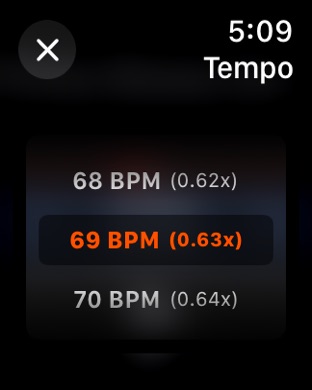
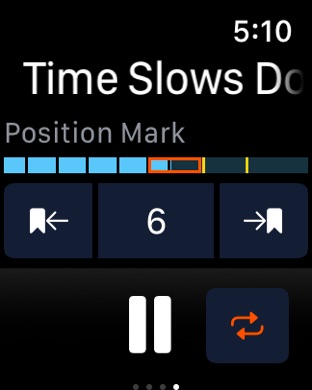
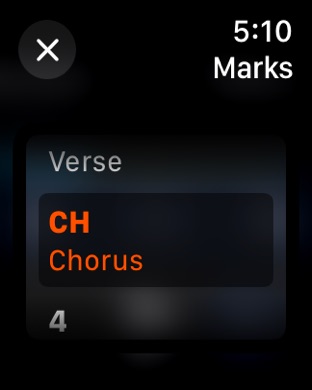
Now control Anytune on your iPhone from your wrist. Select songs from your playlists, adjust tempo, set tempo presets, jump to marks, loop sections, and tap in to set the perfect tempo for an audible count-in — keeping you focussed on your music, not your phone.
Perfect for dance teachers and all musical artists!
• Browse your Anytune playlists and select songs
• Customize nine tempo presets
• See your song position and navigate to markers with ease
• Tap-in the tempo for the perfect count-in
• Adjust volume and add Anytune to your watch face for quick access
Available with the Remote Control & Watch app in-app purchase. Try it for free now!
Also still new
Introducing Anytune Count-In to start in time for a perfect entrance.
Our new Count-In feature combines visual and audible cues, ensuring you begin in perfect sync with the music, no matter where you jump into the song.
Anytune uses your chosen time signature and the song’s tempo (BPM) to display and play a count-down so you can start playback with perfect timing.
Start by setting Count-In as the default action in Playback Settings, replacing the old Delayed Play feature. Then, customize your Count-In experience by selecting the number of bars, enabling or disabling the accompanying sound. Adjust the time signature and BPM directly in Tune Info. Count-In supports any and unusual time signatures like 5/4 (3+2).
When Count-In is enabled, pressing play triggers the countdown. You can also access Count-In and Tap-In by long-pressing or right-clicking the play button, while maintaining normal play/pause functionality for the button.
Tap-In lets you set the playback tempo by tapping the beats of a bar. You can use Tap-In to start playback directly or initiate the Count-In after tapping in.
See anytune.app/count-in for more info.
Build 868531547v4.8.02025-02-18 20:26:25
Unlock the power of Anytune on your Apple Watch! The Anytune Watch app is here!
Now control Anytune on your iPhone from your wrist. Select songs from your playlists, adjust tempo, set tempo presets, jump to marks, loop sections, and tap in to set the perfect tempo for an audible count-in — keeping you focussed on your music, not your phone.
Perfect for dance teachers and all musical artists!
• Browse your Anytune playlists and select songs
• Customize nine tempo presets
• See your song position and navigate to markers with ease
• Tap-in the tempo for the perfect count-in
• Adjust volume and add Anytune to your watch face for quick access
Available with the Remote Control & Watch app in-app purchase. Try it for free now!
Also still new
Introducing Anytune Count-In to start in time for a perfect entrance.
Our new Count-In feature combines visual and audible cues, ensuring you begin in perfect sync with the music, no matter where you jump into the song.
Anytune uses your chosen time signature and the song’s tempo (BPM) to display and play a count-down so you can start playback with perfect timing.
Start by setting Count-In as the default action in Playback Settings, replacing the old Delayed Play feature. Then, customize your Count-In experience by selecting the number of bars, enabling or disabling the accompanying sound. Adjust the time signature and BPM directly in Tune Info. Count-In supports any and unusual time signatures like 5/4 (3+2).
When Count-In is enabled, pressing play triggers the countdown. You can also access Count-In and Tap-In by long-pressing or right-clicking the play button, while maintaining normal play/pause functionality for the button.
Tap-In lets you set the playback tempo by tapping the beats of a bar. You can use Tap-In to start playback directly or initiate the Count-In after tapping in.
See anytune.app/count-in for more info.
Build 867411564v4.7.32024-08-14 20:48:42
Introducing Anytune Count-In to start in time for a perfect entrance.
Our new Count-In feature combines visual and audible cues, ensuring you begin in perfect sync with the music, no matter where you jump into the song.
Anytune uses your chosen time signature and the song’s tempo (BPM) to display and play a count-down so you can start playback with perfect timing.
Start by setting Count-In as the default action in Playback Settings, replacing the old Delayed Play feature. Then, customize your Count-In experience by selecting the number of bars, enabling or disabling the accompanying sound. Adjust the time signature and BPM directly in Tune Info. Count-In supports any and unusual time signatures like 5/4 (3+2).
When Count-In is enabled, pressing play triggers the countdown. You can also access Count-In and Tap-In by long-pressing or right-clicking the play button, while maintaining normal play/pause functionality for the button.
Tap-In lets you set the playback tempo by tapping the beats of a bar. You can use Tap-In to start playback directly or initiate the Count-In after tapping in.
See anytune.app/count-in for more info.
This update includes enhancements to the lyrics text size controls, now featuring size display and added auto-repeat functionality.
We have also implemented stability improvements and bug fixes, including:
• Enhanced count-in skin support
• Consistent count-in settings and behavior across songs
• Clearer warning messages
• Ability to cancel syncing to the music library
• Improved iCloud backup recovery across device restarts
• Sort order for numerical values
Build 867035733v4.7.22024-07-10 16:17:04
Introducing Anytune Count-In to start in time for a perfect entrance.
Our new Count-In feature combines visual and audible cues, ensuring you begin in perfect sync with the music, no matter where you jump into the song.
Anytune uses your chosen time signature and the song’s tempo (BPM) to display and play a count-down so you can start playback with perfect timing.
Start by setting Count-In as the default action in Playback Settings, replacing the old Delayed Play feature. Then, customize your Count-In experience by selecting the number of bars, enabling or disabling the accompanying sound. Adjust the time signature and BPM directly in Tune Info. Count-In supports any and unusual time signatures like 5/4 (3+2).
When Count-In is enabled, pressing play triggers the countdown. You can also access Count-In and Tap-In by long-pressing or right-clicking the play button, while maintaining normal play/pause functionality for the button.
Tap-In lets you set the playback tempo by tapping the beats of a bar. You can use Tap-In to start playback directly or initiate the Count-In after tapping in.
See anytune.app/count-in for more info.
This update includes enhancements to the lyrics text size controls, now featuring size display and added auto-repeat functionality.
We have also implemented stability improvements and bug fixes, including:
• Enhanced count-in skin support
• Consistent count-in settings and behavior across songs
• Clearer warning messages
• Ability to cancel syncing to the music library
• Improved iCloud backup recovery across device restarts
Build 866583888v4.7.12024-06-12 02:07:55
Introducing Anytune Count-In to start in time for a perfect entrance.
Our new Count-In feature combines visual and audible cues, ensuring you begin in perfect sync with the music, no matter where you jump into the song.
Anytune uses your chosen time signature and the song’s tempo (BPM) to display and play a count-down so you can start playback with perfect timing.
Start by setting Count-In as the default action in Playback Settings, replacing the old Delayed Play feature. Then, customize your Count-In experience by selecting the number of bars, enabling or disabling the accompanying sound. Adjust the time signature and BPM directly in Tune Info. Count-In supports any and unusual time signatures like 5/4 (3+2).
When Count-In is enabled, pressing play triggers the countdown. You can also access Count-In and Tap-In by long-pressing or right-clicking the play button, while maintaining normal play/pause functionality for the button.
Tap-In lets you set the playback tempo by tapping the beats of a bar. You can use Tap-In to start playback directly or initiate the Count-In after tapping in.
See anytune.app/count-in for more info.
We added stability improvements and bug fixes including:
- added MIDI fine pitch adjustments
- fix for song not playable
- lyric scrolling issue across songs
- smoothed waveform scrolling on intel Macs
Build 857995727v4.7.02024-06-05 02:31:21
Introducing Anytune Count-In to start in time for a perfect entrance.
Our new Count-In feature combines visual and audible cues, ensuring you begin in perfect sync with the music, no matter where you jump into the song.
Anytune uses your chosen time signature and the song’s tempo (BPM) to display and play a count-down so you can start playback with perfect timing.
Start by setting Count-In as the default action in Playback Settings, replacing the old Delayed Play feature. Then, customize your Count-In experience by selecting the number of bars, enabling or disabling the accompanying sound. Adjust the time signature and BPM directly in Tune Info. Count-In supports any and unusual time signatures like 5/4 (3+2).
When Count-In is enabled, pressing play triggers the countdown. You can also access Count-In and Tap-In by long-pressing or right-clicking the play button, while maintaining normal play/pause functionality for the button.
Tap-In lets you set the playback tempo by tapping the beats of a bar. You can use Tap-In to start playback directly or initiate the Count-In after tapping in.
See anytune.app/count-in for more info.
We added stability improvements and bug fixes including:
- added MIDI fine pitch adjustments
- fix for song not playable
- lyric scrolling issue across songs
Build 855943414v4.6.32023-04-08 12:21:43
Stability improvements and bug fixes
Build 854368810v4.6.22023-01-26 15:34:30
Stability improvements and bug fixes
Build 851425055v4.6.12022-09-28 13:55:30
Anytune rebranded. New app icon and logo!
Added the ability to sort playlist by file name to play songs in the album order.
Updates supporting iOS 16.
Redesigned the Help screen.
Added new messaging system to share info about releases, new features, critical issues, pro tips and more.
Stability improvements and bug fixes.
Build 846914870v4.62022-02-07 00:33:33
Stability improvements and bug fixes including:
- restore purchase prompt
- midi control in background
Build 845931912v4.5.42021-12-15 01:45:07
Stability improvements and bug fixes including:
- crashes on launch
- remote control arrow keys failing when backgrounded
Build 844999887v4.5.32021-11-22 14:07:49
Stability improvements and bug fixes including the incessant Restore Purchases dialogue.
Build 840714806v4.5.22021-03-09 14:02:52
We added bug fixes to make Anytune more stable including:
• Fixed download button for Free Jam with Legends tracks and marks
• Fixed a hang when restoring a particular backup instance
• Fixed a hang when searching for the currently playing song
Build 840163485v4.5.12021-02-16 20:37:03
We are making Anytune even better with
many stability improvements and bug fixes including:
・Correct inaccurate message prompts
・Fixed playback glitch at the beginning of some songs
・Fixed analysis bug and added robustness
・Fixed and enhanced file sharing
・Fixed playlist moving
・Improved split screen and keyboard handling
・Virtual MIDI support
・and many more, this is a big fix update.
Build 839103152v4.52020-12-07 16:29:32
Share audio directly to Anytune from other apps like Voice Memos, Music Memos and GarageBand.
Easily see where your songs are with new Music Library and Imported Tunes lists.
Export multiple Imported audile files including recordings. Tap Edit to select multiple songs in the Imported Tunes list.
Simplified Skip Mark toggle.
WiFi Import now includes MOV and M4V.
Many display fixes including issues with portrait mode, text boxes and panels.
Stability improvements and bug fixes.
Build 838031368v4.4.72020-10-03 01:34:44
Stability improvements and bug fixes:
- Fix analyzer crash for m4a files
- Fix demo mode for remote control
Build 836227827v4.4.62020-09-17 15:37:47
Stability improvements and bug fixes:
- Updates for iOS 14
- Fix persistent keyboard shortcut bar
- Fix WiFi upload page
Price history by region
Currency
Show
Columns
Search
Availability 1 of 1 storefronts
| Region | Language | Price | Ratings | Avg | Version |
|---|---|---|---|---|---|
| US | en-US | USD 14.99 | 8.2k | 4.9 | 4.9.3 |
Change log 29 changes · US
✎
releaseNotes updated
This update includes important fixes for edited song titles reverting to their original names and a launch issue. It also brings you the new features introduced
✎
description updated
Transform Your Music Journey with Anytune™! Discover a new way to learn, practice, and teach music with Anytune™ – the ultimate music practice app. Learn faster
✎
subtitle updated
Isolate, Transpose, Slow Down
✎
name updated
Anytune Pro+: Studio Tools
◆
Version 4.9.3 released
This update includes important fixes for edited song titles reverting to their original names and a launch issue. It also brings you the new features introduced in Anytune 4.9.
Sync Imported Audio Files
You can now choose where imported me
◆
Version 4.9.2 released
This update adds highly requested features, helpful enhancements, and many improvements inspired by your feedback. Thank you for helping make Anytune better.
Sync Imported Audio Files
You can now choose where imported media files are store
◆
Version 4.9.1 released
This update adds highly requested features, helpful enhancements, and many improvements inspired by your feedback. Thank you for helping make Anytune better.
Sync Imported Audio Files
You can now choose where imported media files are store
◆
Version 4.9.0 released
This update adds highly requested features, helpful enhancements, and many improvements inspired by your feedback. Thank you for helping make Anytune better.
Sync Imported Audio Files
You can now choose where imported media files are store
◆
Version 4.8.5 released
We’ve updated Anytune to ensure a smooth experience on the latest iOS and iPadOS releases. This update also fixes:
• An iPad issue where the player is unloaded and the Tunes list is empty on restart
• A problem where sharing from the Files
◆
Version 4.8.4 released
We’ve updated Anytune to ensure a smooth experience on the latest iOS and iPadOS releases. We’re committed to keeping Anytune fully compatible with new devices and system updates. If you notice anything unexpected, please reach out—we value
◆
Version 4.8.3 released
This update resolves a crash that surfaced in the previous update.
The previous update included many helpful enhancements and improvements:
New Features and Enhancements:
• Choose Light or Dark appearance in Anytune, independent of your de
◆
Version 4.8.2 released
This update brings helpful enhancements and improvements:
New Features and Enhancements:
• Choose Light or Dark appearance in Anytune, independent of your device’s system setting
• AirPlay button returns to the volume control for easy acce
◆
Version 4.8.1 released
Unlock the power of Anytune on your Apple Watch! The Anytune Watch app is here!
Now control Anytune on your iPhone from your wrist. Select songs from your playlists, adjust tempo, set tempo presets, jump to marks, loop sections, and tap in
◆
Version 4.8.0 released
Unlock the power of Anytune on your Apple Watch! The Anytune Watch app is here!
Now control Anytune on your iPhone from your wrist. Select songs from your playlists, adjust tempo, set tempo presets, jump to marks, loop sections, and tap in
◆
Version 4.7.3 released
Introducing Anytune Count-In to start in time for a perfect entrance.
Our new Count-In feature combines visual and audible cues, ensuring you begin in perfect sync with the music, no matter where you jump into the song.
Anytune uses your c
◆
Version 4.7.2 released
Introducing Anytune Count-In to start in time for a perfect entrance.
Our new Count-In feature combines visual and audible cues, ensuring you begin in perfect sync with the music, no matter where you jump into the song.
Anytune uses your c
◆
Version 4.7.1 released
Introducing Anytune Count-In to start in time for a perfect entrance.
Our new Count-In feature combines visual and audible cues, ensuring you begin in perfect sync with the music, no matter where you jump into the song.
Anytune uses your c
◆
Version 4.7.0 released
Introducing Anytune Count-In to start in time for a perfect entrance.
Our new Count-In feature combines visual and audible cues, ensuring you begin in perfect sync with the music, no matter where you jump into the song.
Anytune uses your c
◆
Version 4.6.3 released
Stability improvements and bug fixes
◆
Version 4.6.2 released
Stability improvements and bug fixes
◆
Version 4.6.1 released
Anytune rebranded. New app icon and logo!
Added the ability to sort playlist by file name to play songs in the album order.
Updates supporting iOS 16.
Redesigned the Help screen.
Added new messaging system to share info about releases, new
◆
Version 4.6 released
Stability improvements and bug fixes including:
- restore purchase prompt
- midi control in background
◆
Version 4.5.4 released
Stability improvements and bug fixes including:
- crashes on launch
- remote control arrow keys failing when backgrounded
◆
Version 4.5.3 released
Stability improvements and bug fixes including the incessant Restore Purchases dialogue.
◆
Version 4.5.2 released
We added bug fixes to make Anytune more stable including:
• Fixed download button for Free Jam with Legends tracks and marks
• Fixed a hang when restoring a particular backup instance
• Fixed a hang when searching for the currently playing
◆
Version 4.5.1 released
We are making Anytune even better with
many stability improvements and bug fixes including:
・Correct inaccurate message prompts
・Fixed playback glitch at the beginning of some songs
・Fixed analysis bug and added robustness
・Fixed and enhan
◆
Version 4.5 released
Share audio directly to Anytune from other apps like Voice Memos, Music Memos and GarageBand.
Easily see where your songs are with new Music Library and Imported Tunes lists.
Export multiple Imported audile files including recordings. Tap
◆
Version 4.4.7 released
Stability improvements and bug fixes:
- Fix analyzer crash for m4a files
- Fix demo mode for remote control
◆
Version 4.4.6 released
Stability improvements and bug fixes:
- Updates for iOS 14
- Fix persistent keyboard shortcut bar
- Fix WiFi upload page