Home › Navigation

Speed Cameras Spain & Portugal
Detector GPS Traffic Alerts
 US
US
1 of 1 storefronts
Content in en-US
Content in en-US
Information
Preview 3 platforms
iPhone 7 images



iPad 6 images


Apple Watch 10 images


What’s New Version 22.4.4
- Many fixes and improvements
- CarPlay options menu on iPhone, you can change the CarPlay options also from there
- Route recording export option to several file formats
In previous versions:
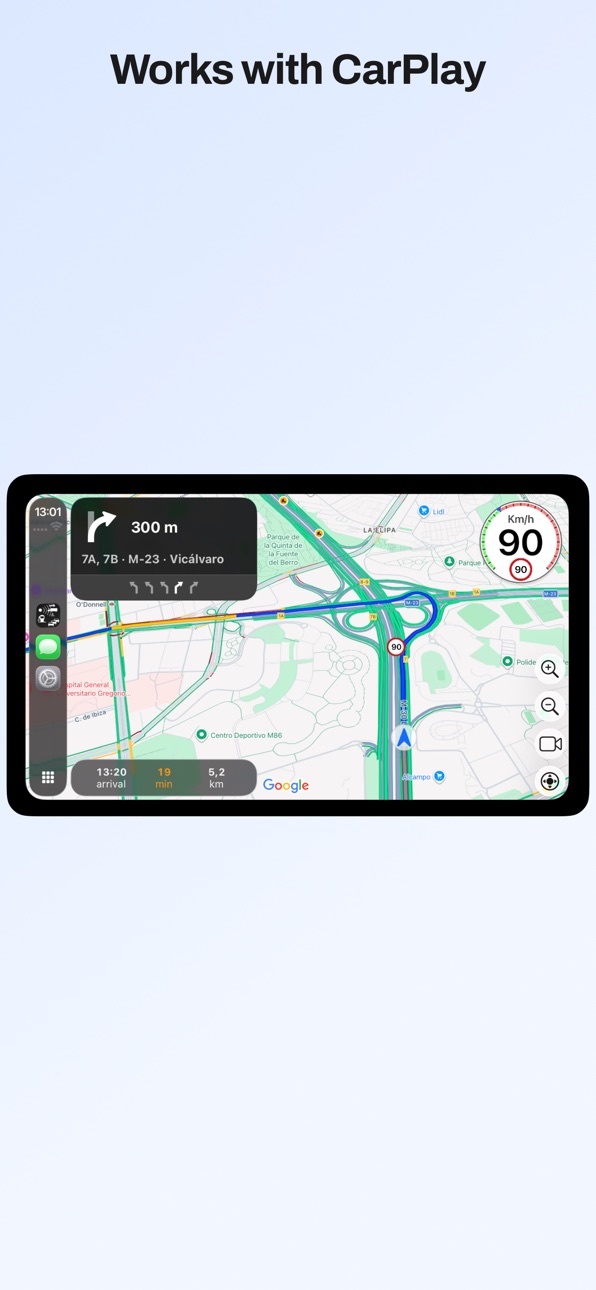
- CarPlay with map in Ultra version
- Support for CarPlay metadata (maneuvers, lane guidance and more information) in the instrument cluster or in the HUD in units which support these features
- All CarPlay scenes available: standard, dashboard and instrument cluster with metadata
- Upcoming maneuvers in CarPlay displayed, as many as your units supports
- Navigation alerts in CarPlay for warnings in your way (configured by default to be shown when the app is in background in CarPlay, only in Ultra version)
- Support for iOS 26
- New gestures for CarPlay in iOS 26 and in units which support gestures
New shortcuts for your automations:
- Navigate to a favorite location
- Navigate a route from your location going through its waypoints
- Navigate to an address you provide
- Open the detector in background
- Activate / silence the navigation voice
- Activate / silence the detector voice and sounds
- Open a route and show its traffic cameras or gas stations ordered by price
- Open favorite gas stations ordered by price
- Open the traffic map
Route recorder:
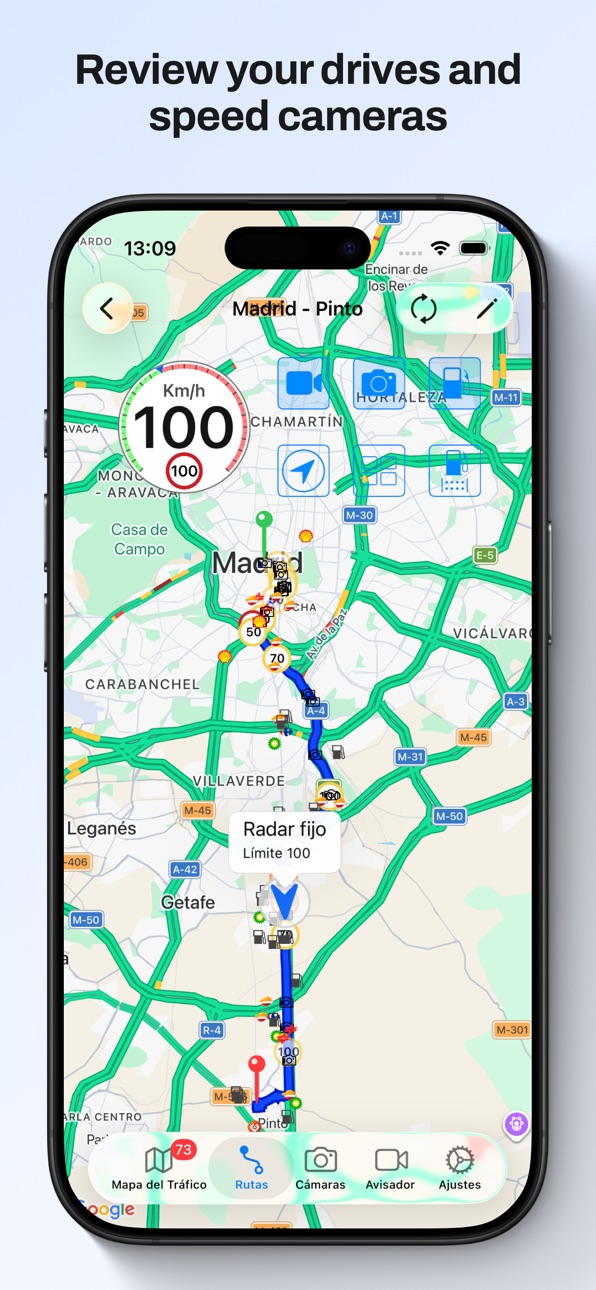
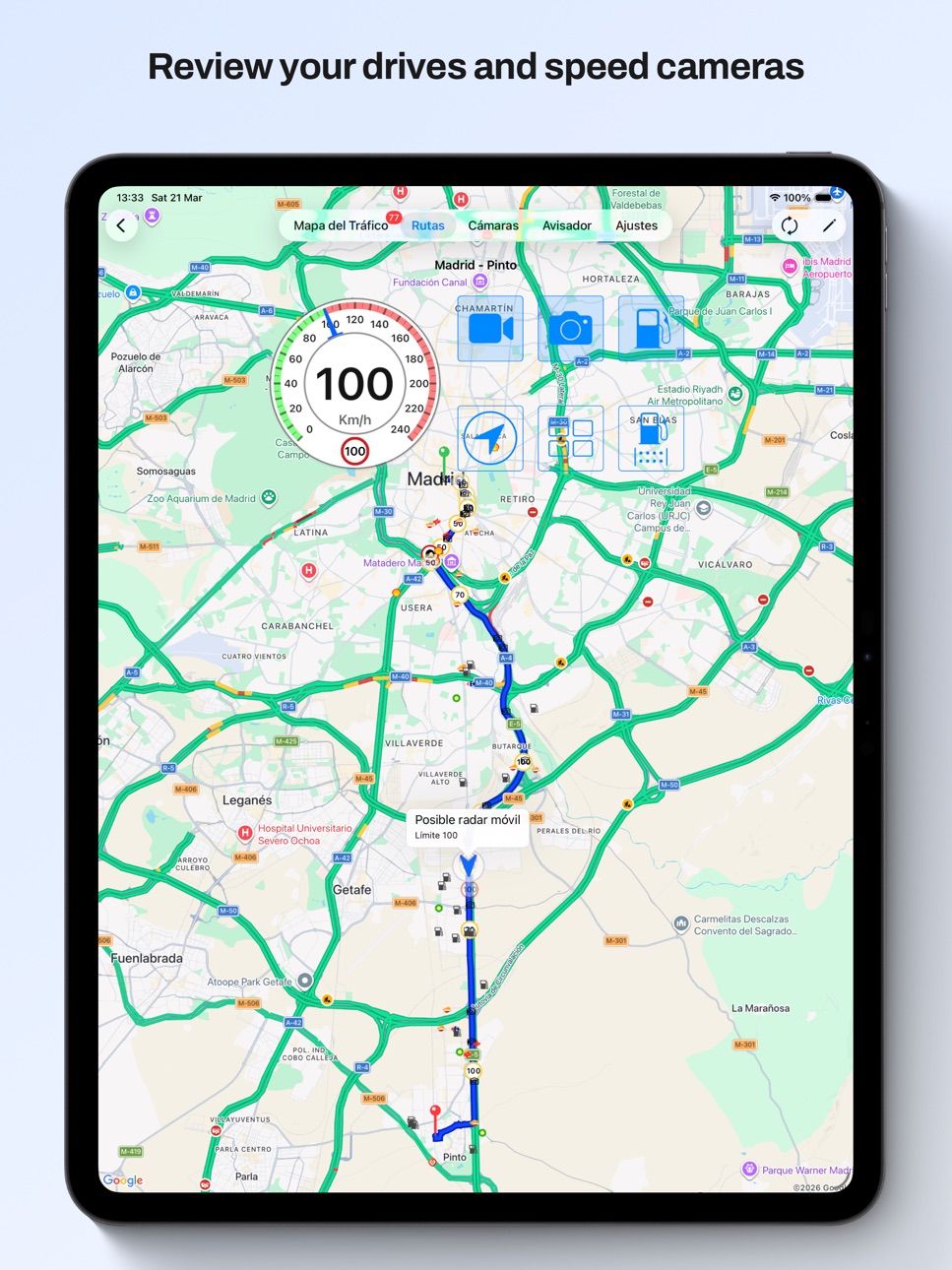
- When the app is started it records your path with the speed you have
- You can check the speed you had when going through a speed camera or in any point
- You can check the traffic cameras and gas stations with the price
- Distance and duration of each route
- You can configure for how many days the routes are kept, and the minimum distance and duration to save them
- You can disable the recording completely
- This data is kept in your device, it is not sent anywhere
Route planner:
- You can plan a route, with intermediate waypoints, to check the speed cameras you will find in it taking into account the direction in which you shall pass them
- Speed limits of the route
- You can launch the navigation from the route, the best option will be calculated taking into account the waypoints it has
- You can check the traffic cameras and gas stations with their price
Navigation:
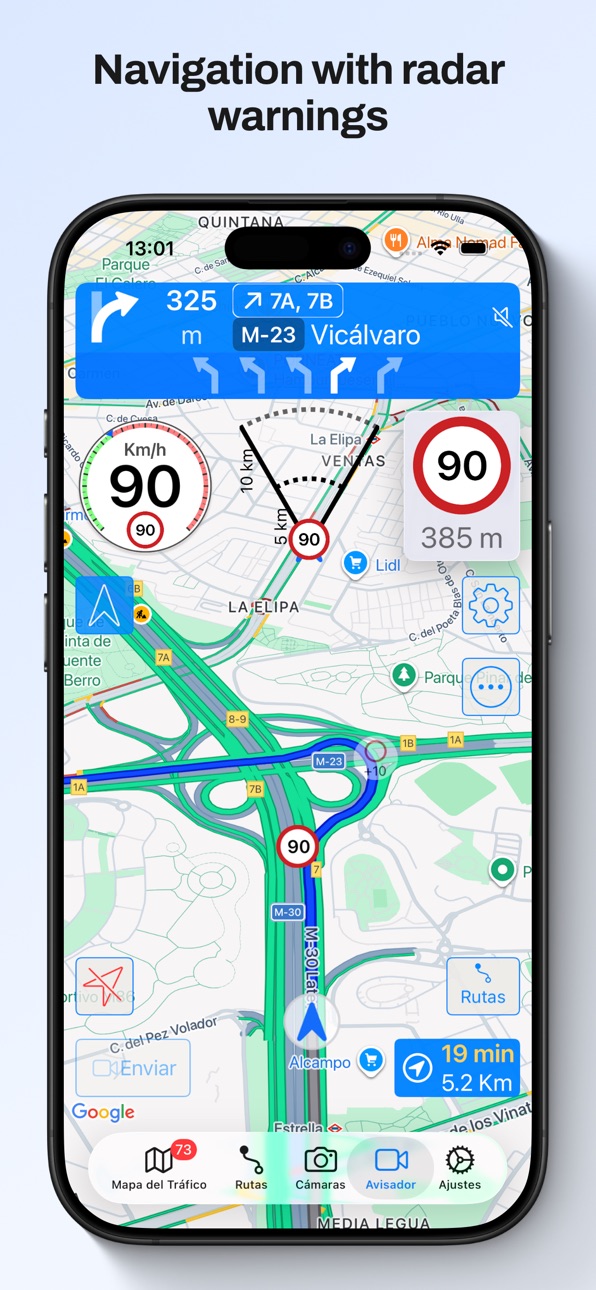
- Navigation integrated with speed camera warnings and traffic map. All in the same screen, no need to use several apps
- Warnings of only the speed cameras with are in your route (configurable). Avoid false positives from nearby roads
- Speed limits when navigating
- Indication of the lanes to follow
- Spoken instructions together with speed camera warnings
- Navigation instructions in the Watch with indication of the lanes to follow
- Notifications for the navigation instructions
Others:
- CarPlay with map in Ultra version
- CarPlay with a list of the following warnings in pro version
- You can choose the voice for the warnings and navigation according to the voices you have downloaded in your device
- You can choose a different warning sound for hidden speed cameras
- Shortcut to stop the detector
- Shortcuts for the Watch app
- Gas price: on the "Traffic Map", in "Routes" sorted by price, make your list of favorites to read their price quickly
Description
Enjoy driving with the best navigator, speed camera detector, real-time traffic information and gas prices. Forget about fines and drive with peace of mind.
MAIN FEATURES
- 100% legal speed camera detector
- Turn by turn GPS navigation, with lane guidance, spoken instructions, speed limits, and the speed camera detector fully integrated into the navigation
- Automatic route recorder. Shows the total distance and time spent traveling the route, speed at each point and speed cameras you passed. Check the speed you were having when passing speed cameras or anywhere
- Route planner. Create routes in advance to check their speed limits and the speed cameras you will find in them
- Traffic cameras and gas stations with their prices in route recordings and planned routes
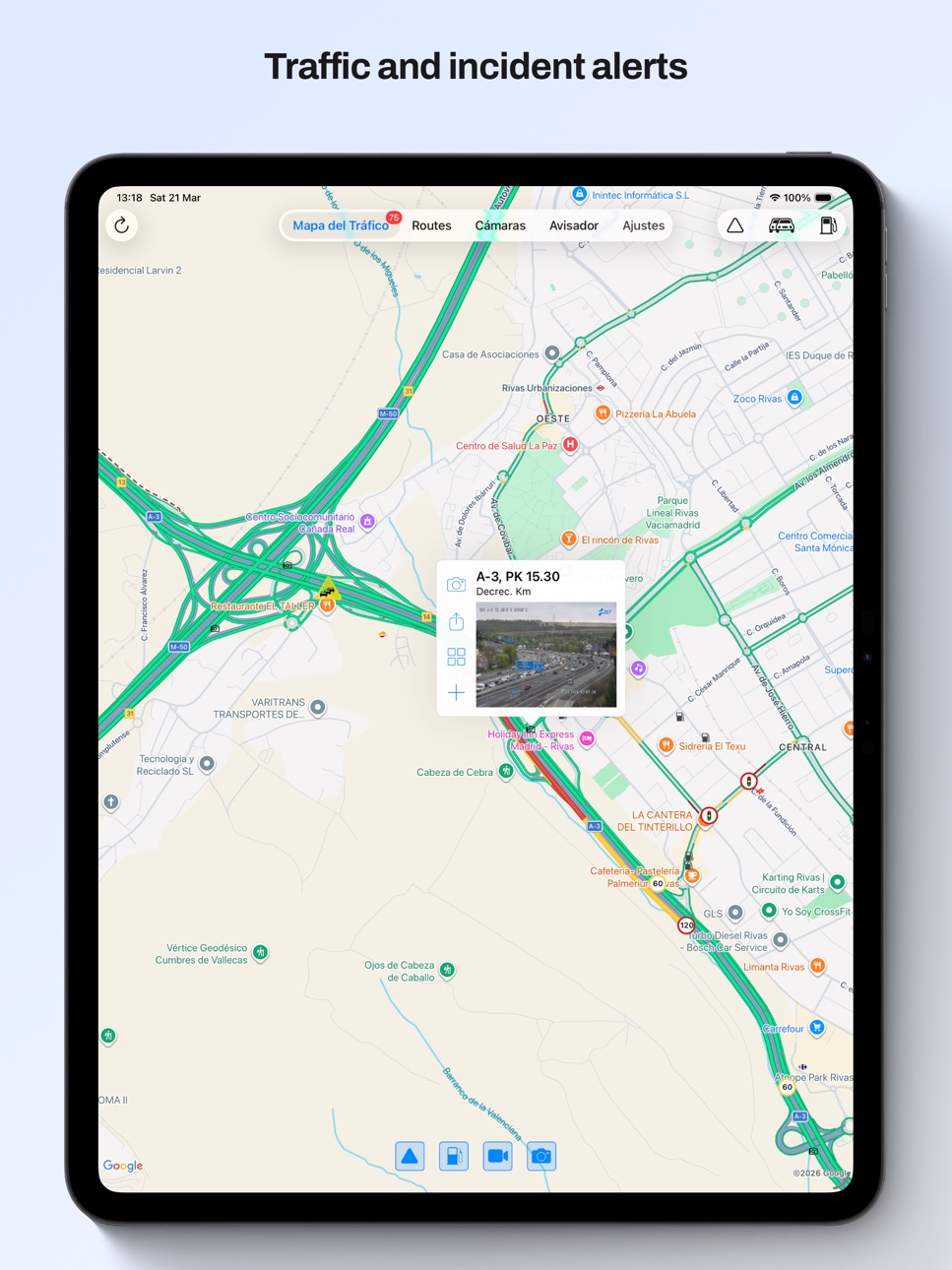
- Real-time traffic information
- Traffic cameras from the DGT and other administrations
- Watch App
- No user account or registration, just open the app and that's it
The speed camera database covers Spain, Portugal and Andorra, and the price of gasoline covers Spain.
THE BEST SPEED CAMERA DETECTOR:
- CarPlay
- Warnings only in the direction you are moving
- Mean speed in section speed cameras
- Options to silence the warnings if your speed is OK
- Manual or automatic (depending on your speed) warning distance
- Automatic speed camera updates
- Voice, sound and vibration warnings, also in your Apple Watch
- Map with real time traffic or view with no map, only with the speedometer
- Sound mixed with what you're listening to on your iPhone, through your car's hands-free kit or iPhone speakers
- Works in the foreground or background (use it alongside other apps)
- Fully configurable, portrait and landscape mode, night mode
- All speed cameras in Spain, Portugal and Andorra
NAVIGATION:
- Turn by turn navigation integrated with speed camera warnings and traffic map. All in the same screen, no need to use several apps
- Warnings of only the speed cameras with are in your route (configurable). Avoid false positives from nearby roads
- Speed limits when navigating
- Indications of the lanes to follow when changing direction
- Spoken instructions together with speed camera warnings
ROUTES
- Automatic route recorder. Check the speed you were going when passing speed cameras or at any location
- Configure when it records or disable it. This data is saved on your device and is not sent anywhere
- Route planner. check speed limits and the speed cameras you will encounter taking into account the direction in which you will pass them
- Launch navigation from a recording or a planned route
- Traffic cameras and gas stations with their prices in route recordings and planned routes
TRAFFIC MAP:
- Map with real time traffic and incidents
- Traffic cameras: Organize them in mosaics and favorites.
- Zoom in to see gas stations with their prices, cameras and speed cameras
GAS PRICE:
- Find gas stations on the Traffic Map (zoom in) or in Routes
- Tap and hold for a second on the Traffic Map to find nearby gas stations ordered by price.
- Create your gas station favorite list to check their prices easily
IMPORTANT:
- The speed camera detector and navigation use the GPS continuously. Using it in the foreground or background can drain the battery quickly.
- To use the speed camera detector and navigation you need a GPS device: all iPhones have it. iPads with 3G have it but not WiFi ones.
Terms and Conditions: http://www.littlemousesoftware.com/terms-conditions
Privacy Policy: http://www.littlemousesoftware.com/skip-traffic-privacy
Capabilities
In-App Purchases
Accessibility
ipadiphonemacrealityDevicetvoswatch
Version history 25 versions
Build 887159112v22.4.42026-06-21 19:49:29
- Many fixes and improvements
- CarPlay options menu on iPhone, you can change the CarPlay options also from there
- Route recording export option to several file formats
In previous versions:
- CarPlay with map in Ultra version
- Support for CarPlay metadata (maneuvers, lane guidance and more information) in the instrument cluster or in the HUD in units which support these features
- All CarPlay scenes available: standard, dashboard and instrument cluster with metadata
- Upcoming maneuvers in CarPlay displayed, as many as your units supports
- Navigation alerts in CarPlay for warnings in your way (configured by default to be shown when the app is in background in CarPlay, only in Ultra version)
- Support for iOS 26
- New gestures for CarPlay in iOS 26 and in units which support gestures
New shortcuts for your automations:
- Navigate to a favorite location
- Navigate a route from your location going through its waypoints
- Navigate to an address you provide
- Open the detector in background
- Activate / silence the navigation voice
- Activate / silence the detector voice and sounds
- Open a route and show its traffic cameras or gas stations ordered by price
- Open favorite gas stations ordered by price
- Open the traffic map
Route recorder:
- When the app is started it records your path with the speed you have
- You can check the speed you had when going through a speed camera or in any point
- You can check the traffic cameras and gas stations with the price
- Distance and duration of each route
- You can configure for how many days the routes are kept, and the minimum distance and duration to save them
- You can disable the recording completely
- This data is kept in your device, it is not sent anywhere
Route planner:
- You can plan a route, with intermediate waypoints, to check the speed cameras you will find in it taking into account the direction in which you shall pass them
- Speed limits of the route
- You can launch the navigation from the route, the best option will be calculated taking into account the waypoints it has
- You can check the traffic cameras and gas stations with their price
Navigation:
- Navigation integrated with speed camera warnings and traffic map. All in the same screen, no need to use several apps
- Warnings of only the speed cameras with are in your route (configurable). Avoid false positives from nearby roads
- Speed limits when navigating
- Indication of the lanes to follow
- Spoken instructions together with speed camera warnings
- Navigation instructions in the Watch with indication of the lanes to follow
- Notifications for the navigation instructions
Others:
- CarPlay with map in Ultra version
- CarPlay with a list of the following warnings in pro version
- You can choose the voice for the warnings and navigation according to the voices you have downloaded in your device
- You can choose a different warning sound for hidden speed cameras
- Shortcut to stop the detector
- Shortcuts for the Watch app
- Gas price: on the "Traffic Map", in "Routes" sorted by price, make your list of favorites to read their price quickly
Build 887002238v22.4.32026-06-18 17:28:17
- Many fixes and improvements
- CarPlay options menu on iPhone, you can change the CarPlay options also from there
- Route recording export option to several file formats
In previous versions:
- CarPlay with map in Ultra version
- Support for CarPlay metadata (maneuvers, lane guidance and more information) in the instrument cluster or in the HUD in units which support these features
- All CarPlay scenes available: standard, dashboard and instrument cluster with metadata
- Upcoming maneuvers in CarPlay displayed, as many as your units supports
- Navigation alerts in CarPlay for warnings in your way (configured by default to be shown when the app is in background in CarPlay, only in Ultra version)
- Support for iOS 26
- New gestures for CarPlay in iOS 26 and in units which support gestures
New shortcuts for your automations:
- Navigate to a favorite location
- Navigate a route from your location going through its waypoints
- Navigate to an address you provide
- Open the detector in background
- Activate / silence the navigation voice
- Activate / silence the detector voice and sounds
- Open a route and show its traffic cameras or gas stations ordered by price
- Open favorite gas stations ordered by price
- Open the traffic map
Route recorder:
- When the app is started it records your path with the speed you have
- You can check the speed you had when going through a speed camera or in any point
- You can check the traffic cameras and gas stations with the price
- Distance and duration of each route
- You can configure for how many days the routes are kept, and the minimum distance and duration to save them
- You can disable the recording completely
- This data is kept in your device, it is not sent anywhere
Route planner:
- You can plan a route, with intermediate waypoints, to check the speed cameras you will find in it taking into account the direction in which you shall pass them
- Speed limits of the route
- You can launch the navigation from the route, the best option will be calculated taking into account the waypoints it has
- You can check the traffic cameras and gas stations with their price
Navigation:
- Navigation integrated with speed camera warnings and traffic map. All in the same screen, no need to use several apps
- Warnings of only the speed cameras with are in your route (configurable). Avoid false positives from nearby roads
- Speed limits when navigating
- Indication of the lanes to follow
- Spoken instructions together with speed camera warnings
- Navigation instructions in the Watch with indication of the lanes to follow
- Notifications for the navigation instructions
Others:
- CarPlay with map in Ultra version
- CarPlay with a list of the following warnings in pro version
- You can choose the voice for the warnings and navigation according to the voices you have downloaded in your device
- You can choose a different warning sound for hidden speed cameras
- Shortcut to stop the detector
- Shortcuts for the Watch app
- Gas price: on the "Traffic Map", in "Routes" sorted by price, make your list of favorites to read their price quickly
Build 886442195v22.4.22026-06-08 19:27:14
- Many fixes and improvements
- CarPlay options menu on iPhone, you can change the CarPlay options also from there
- Route recording export option to several file formats
In previous versions:
- CarPlay with map in Ultra version
- Support for CarPlay metadata (maneuvers, lane guidance and more information) in the instrument cluster or in the HUD in units which support these features
- All CarPlay scenes available: standard, dashboard and instrument cluster with metadata
- Upcoming maneuvers in CarPlay displayed, as many as your units supports
- Navigation alerts in CarPlay for warnings in your way (configured by default to be shown when the app is in background in CarPlay, only in Ultra version)
- Support for iOS 26
- New gestures for CarPlay in iOS 26 and in units which support gestures
New shortcuts for your automations:
- Navigate to a favorite location
- Navigate a route from your location going through its waypoints
- Navigate to an address you provide
- Open the detector in background
- Activate / silence the navigation voice
- Activate / silence the detector voice and sounds
- Open a route and show its traffic cameras or gas stations ordered by price
- Open favorite gas stations ordered by price
- Open the traffic map
Route recorder:
- When the app is started it records your path with the speed you have
- You can check the speed you had when going through a speed camera or in any point
- You can check the traffic cameras and gas stations with the price
- Distance and duration of each route
- You can configure for how many days the routes are kept, and the minimum distance and duration to save them
- You can disable the recording completely
- This data is kept in your device, it is not sent anywhere
Route planner:
- You can plan a route, with intermediate waypoints, to check the speed cameras you will find in it taking into account the direction in which you shall pass them
- Speed limits of the route
- You can launch the navigation from the route, the best option will be calculated taking into account the waypoints it has
- You can check the traffic cameras and gas stations with their price
Navigation:
- Navigation integrated with speed camera warnings and traffic map. All in the same screen, no need to use several apps
- Warnings of only the speed cameras with are in your route (configurable). Avoid false positives from nearby roads
- Speed limits when navigating
- Indication of the lanes to follow
- Spoken instructions together with speed camera warnings
- Navigation instructions in the Watch with indication of the lanes to follow
- Notifications for the navigation instructions
Others:
- CarPlay with map in Ultra version
- CarPlay with a list of the following warnings in pro version
- You can choose the voice for the warnings and navigation according to the voices you have downloaded in your device
- You can choose a different warning sound for hidden speed cameras
- Shortcut to stop the detector
- Shortcuts for the Watch app
- Gas price: on the "Traffic Map", in "Routes" sorted by price, make your list of favorites to read their price quickly
Build 885975032v22.4.12026-05-22 00:49:57
- Many fixes and improvements
- CarPlay options menu on iPhone, you can change the CarPlay options also from there
- Route recording export option to several file formats
In previous versions:
- CarPlay with map in Ultra version
- Support for CarPlay metadata (maneuvers, lane guidance and more information) in the instrument cluster or in the HUD in units which support these features
- All CarPlay scenes available: standard, dashboard and instrument cluster with metadata
- Upcoming maneuvers in CarPlay displayed, as many as your units supports
- Navigation alerts in CarPlay for warnings in your way (configured by default to be shown when the app is in background in CarPlay, only in Ultra version)
- Support for iOS 26
- New gestures for CarPlay in iOS 26 and in units which support gestures
New shortcuts for your automations:
- Navigate to a favorite location
- Navigate a route from your location going through its waypoints
- Navigate to an address you provide
- Open the detector in background
- Activate / silence the navigation voice
- Activate / silence the detector voice and sounds
- Open a route and show its traffic cameras or gas stations ordered by price
- Open favorite gas stations ordered by price
- Open the traffic map
Route recorder:
- When the app is started it records your path with the speed you have
- You can check the speed you had when going through a speed camera or in any point
- You can check the traffic cameras and gas stations with the price
- Distance and duration of each route
- You can configure for how many days the routes are kept, and the minimum distance and duration to save them
- You can disable the recording completely
- This data is kept in your device, it is not sent anywhere
Route planner:
- You can plan a route, with intermediate waypoints, to check the speed cameras you will find in it taking into account the direction in which you shall pass them
- Speed limits of the route
- You can launch the navigation from the route, the best option will be calculated taking into account the waypoints it has
- You can check the traffic cameras and gas stations with their price
Navigation:
- Navigation integrated with speed camera warnings and traffic map. All in the same screen, no need to use several apps
- Warnings of only the speed cameras with are in your route (configurable). Avoid false positives from nearby roads
- Speed limits when navigating
- Indication of the lanes to follow
- Spoken instructions together with speed camera warnings
- Navigation instructions in the Watch with indication of the lanes to follow
- Notifications for the navigation instructions
Others:
- CarPlay with map in Ultra version
- CarPlay with a list of the following warnings in pro version
- You can choose the voice for the warnings and navigation according to the voices you have downloaded in your device
- You can choose a different warning sound for hidden speed cameras
- Shortcut to stop the detector
- Shortcuts for the Watch app
- Gas price: on the "Traffic Map", in "Routes" sorted by price, make your list of favorites to read their price quickly
Build 885771761v22.4.02026-05-19 20:34:23
- Many fixes and improvements
- CarPlay options menu on iPhone, you can change the CarPlay options also from there
- Route recording export option to several file formats
In previous versions:
- CarPlay with map in Ultra version
- Support for CarPlay metadata (maneuvers, lane guidance and more information) in the instrument cluster or in the HUD in units which support these features
- All CarPlay scenes available: standard, dashboard and instrument cluster with metadata
- Upcoming maneuvers in CarPlay displayed, as many as your units supports
- Navigation alerts in CarPlay for warnings in your way (configured by default to be shown when the app is in background in CarPlay, only in Ultra version)
- Support for iOS 26
- New gestures for CarPlay in iOS 26 and in units which support gestures
New shortcuts for your automations:
- Navigate to a favorite location
- Navigate a route from your location going through its waypoints
- Navigate to an address you provide
- Open the detector in background
- Activate / silence the navigation voice
- Activate / silence the detector voice and sounds
- Open a route and show its traffic cameras or gas stations ordered by price
- Open favorite gas stations ordered by price
- Open the traffic map
Route recorder:
- When the app is started it records your path with the speed you have
- You can check the speed you had when going through a speed camera or in any point
- You can check the traffic cameras and gas stations with the price
- Distance and duration of each route
- You can configure for how many days the routes are kept, and the minimum distance and duration to save them
- You can disable the recording completely
- This data is kept in your device, it is not sent anywhere
Route planner:
- You can plan a route, with intermediate waypoints, to check the speed cameras you will find in it taking into account the direction in which you shall pass them
- Speed limits of the route
- You can launch the navigation from the route, the best option will be calculated taking into account the waypoints it has
- You can check the traffic cameras and gas stations with their price
Navigation:
- Navigation integrated with speed camera warnings and traffic map. All in the same screen, no need to use several apps
- Warnings of only the speed cameras with are in your route (configurable). Avoid false positives from nearby roads
- Speed limits when navigating
- Indication of the lanes to follow
- Spoken instructions together with speed camera warnings
- Navigation instructions in the Watch with indication of the lanes to follow
- Notifications for the navigation instructions
Others:
- CarPlay with map in Ultra version
- CarPlay with a list of the following warnings in pro version
- You can choose the voice for the warnings and navigation according to the voices you have downloaded in your device
- You can choose a different warning sound for hidden speed cameras
- Shortcut to stop the detector
- Shortcuts for the Watch app
- Gas price: on the "Traffic Map", in "Routes" sorted by price, make your list of favorites to read their price quickly
Build 884923006v22.3.72026-04-27 20:57:27
- Fixes and improvements
In previous versions:
- CarPlay with map in Ultra version
- Support for CarPlay metadata (maneuvers, lane guidance and more information) in the instrument cluster or in the HUD in units which support these features
- All CarPlay scenes available: standard, dashboard and instrument cluster with metadata
- Upcoming maneuvers in CarPlay displayed, as many as your units supports
- Navigation alerts in CarPlay for warnings in your way (configured by default to be shown when the app is in background in CarPlay, only in Ultra version)
- Support for iOS 26
- New gestures for CarPlay in iOS 26 and in units which support gestures
New shortcuts for your automations:
- Navigate to a favorite location
- Navigate a route from your location going through its waypoints
- Navigate to an address you provide
- Open the detector in background
- Activate / silence the navigation voice
- Activate / silence the detector voice and sounds
- Open a route and show its traffic cameras or gas stations ordered by price
- Open favorite gas stations ordered by price
- Open the traffic map
Route recorder:
- When the app is started it records your path with the speed you have
- You can check the speed you had when going through a speed camera or in any point
- You can check the traffic cameras and gas stations with the price
- Distance and duration of each route
- You can configure for how many days the routes are kept, and the minimum distance and duration to save them
- You can disable the recording completely
- This data is kept in your device, it is not sent anywhere
Route planner:
- You can plan a route, with intermediate waypoints, to check the speed cameras you will find in it taking into account the direction in which you shall pass them
- Speed limits of the route
- You can launch the navigation from the route, the best option will be calculated taking into account the waypoints it has
- You can check the traffic cameras and gas stations with their price
Navigation:
- Navigation integrated with speed camera warnings and traffic map. All in the same screen, no need to use several apps
- Warnings of only the speed cameras with are in your route (configurable). Avoid false positives from nearby roads
- Speed limits when navigating
- Indication of the lanes to follow
- Spoken instructions together with speed camera warnings
- Navigation instructions in the Watch with indication of the lanes to follow
- Notifications for the navigation instructions
Others:
- CarPlay with map in Ultra version
- CarPlay with a list of the following warnings in pro version
- You can choose the voice for the warnings and navigation according to the voices you have downloaded in your device
- You can choose a different warning sound for hidden speed cameras
- Shortcut to stop the detector
- Shortcuts for the Watch app
- Gas price: on the "Traffic Map", in "Routes" sorted by price, make your list of favorites to read their price quickly
Build 883613423v22.3.62026-03-24 16:06:21
- Fixes and improvements
In previous versions:
- CarPlay with map in Ultra version
- Support for CarPlay metadata (maneuvers, lane guidance and more information) in the instrument cluster or in the HUD in units which support these features
- All CarPlay scenes available: standard, dashboard and instrument cluster with metadata
- Upcoming maneuvers in CarPlay displayed, as many as your units supports
- Navigation alerts in CarPlay for warnings in your way (configured by default to be shown when the app is in background in CarPlay, only in Ultra version)
- Support for iOS 26
- New gestures for CarPlay in iOS 26 and in units which support gestures
New shortcuts for your automations:
- Navigate to a favorite location
- Navigate a route from your location going through its waypoints
- Navigate to an address you provide
- Open the detector in background
- Activate / silence the navigation voice
- Activate / silence the detector voice and sounds
- Open a route and show its traffic cameras or gas stations ordered by price
- Open favorite gas stations ordered by price
- Open the traffic map
Route recorder:
- When the app is started it records your path with the speed you have
- You can check the speed you had when going through a speed camera or in any point
- You can check the traffic cameras and gas stations with the price
- Distance and duration of each route
- You can configure for how many days the routes are kept, and the minimum distance and duration to save them
- You can disable the recording completely
- This data is kept in your device, it is not sent anywhere
Route planner:
- You can plan a route, with intermediate waypoints, to check the speed cameras you will find in it taking into account the direction in which you shall pass them
- Speed limits of the route
- You can launch the navigation from the route, the best option will be calculated taking into account the waypoints it has
- You can check the traffic cameras and gas stations with their price
Navigation:
- Navigation integrated with speed camera warnings and traffic map. All in the same screen, no need to use several apps
- Warnings of only the speed cameras with are in your route (configurable). Avoid false positives from nearby roads
- Speed limits when navigating
- Indication of the lanes to follow
- Spoken instructions together with speed camera warnings
- Navigation instructions in the Watch with indication of the lanes to follow
- Notifications for the navigation instructions
Others:
- CarPlay with map in Ultra version
- CarPlay with a list of the following warnings in pro version
- You can choose the voice for the warnings and navigation according to the voices you have downloaded in your device
- You can choose a different warning sound for hidden speed cameras
- Shortcut to stop the detector
- Shortcuts for the Watch app
- Gas price: on the "Traffic Map", in "Routes" sorted by price, make your list of favorites to read their price quickly
Build 883067326v22.3.52026-03-06 18:10:19
- Fixes and improvements
In previous versions:
- CarPlay with map in Ultra version
- Support for CarPlay metadata (maneuvers, lane guidance and more information) in the instrument cluster or in the HUD in units which support these features
- All CarPlay scenes available: standard, dashboard and instrument cluster with metadata
- Upcoming maneuvers in CarPlay displayed, as many as your units supports
- Navigation alerts in CarPlay for warnings in your way (configured by default to be shown when the app is in background in CarPlay, only in Ultra version)
- Support for iOS 26
- New gestures for CarPlay in iOS 26 and in units which support gestures
New shortcuts for your automations:
- Navigate to a favorite location
- Navigate a route from your location going through its waypoints
- Navigate to an address you provide
- Open the detector in background
- Activate / silence the navigation voice
- Activate / silence the detector voice and sounds
- Open a route and show its traffic cameras or gas stations ordered by price
- Open favorite gas stations ordered by price
- Open the traffic map
Route recorder:
- When the app is started it records your path with the speed you have
- You can check the speed you had when going through a speed camera or in any point
- You can check the traffic cameras and gas stations with the price
- Distance and duration of each route
- You can configure for how many days the routes are kept, and the minimum distance and duration to save them
- You can disable the recording completely
- This data is kept in your device, it is not sent anywhere
Route planner:
- You can plan a route, with intermediate waypoints, to check the speed cameras you will find in it taking into account the direction in which you shall pass them
- Speed limits of the route
- You can launch the navigation from the route, the best option will be calculated taking into account the waypoints it has
- You can check the traffic cameras and gas stations with their price
Navigation:
- Navigation integrated with speed camera warnings and traffic map. All in the same screen, no need to use several apps
- Warnings of only the speed cameras with are in your route (configurable). Avoid false positives from nearby roads
- Speed limits when navigating
- Indication of the lanes to follow
- Spoken instructions together with speed camera warnings
- Navigation instructions in the Watch with indication of the lanes to follow
- Notifications for the navigation instructions
Others:
- CarPlay with map in Ultra version
- CarPlay with a list of the following warnings in pro version
- You can choose the voice for the warnings and navigation according to the voices you have downloaded in your device
- You can choose a different warning sound for hidden speed cameras
- Shortcut to stop the detector
- Shortcuts for the Watch app
- Gas price: on the "Traffic Map", in "Routes" sorted by price, make your list of favorites to read their price quickly
Build 882912696v22.3.42026-03-01 19:28:02
- Fixes and improvements
In previous versions:
- CarPlay with map in Ultra version
- Support for CarPlay metadata (maneuvers, lane guidance and more information) in the instrument cluster or in the HUD in units which support these features
- All CarPlay scenes available: standard, dashboard and instrument cluster with metadata
- Upcoming maneuvers in CarPlay displayed, as many as your units supports
- Navigation alerts in CarPlay for warnings in your way (configured by default to be shown when the app is in background in CarPlay, only in Ultra version)
- Support for iOS 26
- New gestures for CarPlay in iOS 26 and in units which support gestures
New shortcuts for your automations:
- Navigate to a favorite location
- Navigate a route from your location going through its waypoints
- Navigate to an address you provide
- Open the detector in background
- Activate / silence the navigation voice
- Activate / silence the detector voice and sounds
- Open a route and show its traffic cameras or gas stations ordered by price
- Open favorite gas stations ordered by price
- Open the traffic map
Route recorder:
- When the app is started it records your path with the speed you have
- You can check the speed you had when going through a speed camera or in any point
- You can check the traffic cameras and gas stations with the price
- Distance and duration of each route
- You can configure for how many days the routes are kept, and the minimum distance and duration to save them
- You can disable the recording completely
- This data is kept in your device, it is not sent anywhere
Route planner:
- You can plan a route, with intermediate waypoints, to check the speed cameras you will find in it taking into account the direction in which you shall pass them
- Speed limits of the route
- You can launch the navigation from the route, the best option will be calculated taking into account the waypoints it has
- You can check the traffic cameras and gas stations with their price
Navigation:
- Navigation integrated with speed camera warnings and traffic map. All in the same screen, no need to use several apps
- Warnings of only the speed cameras with are in your route (configurable). Avoid false positives from nearby roads
- Speed limits when navigating
- Indication of the lanes to follow
- Spoken instructions together with speed camera warnings
- Navigation instructions in the Watch with indication of the lanes to follow
- Notifications for the navigation instructions
Others:
- CarPlay with map in Ultra version
- CarPlay with a list of the following warnings in pro version
- You can choose the voice for the warnings and navigation according to the voices you have downloaded in your device
- You can choose a different warning sound for hidden speed cameras
- Shortcut to stop the detector
- Shortcuts for the Watch app
- Gas price: on the "Traffic Map", in "Routes" sorted by price, make your list of favorites to read their price quickly
Build 882683936v22.3.32026-02-23 16:30:40
- Fixes and improvements
In previous versions:
- CarPlay with map in Ultra version
- Support for CarPlay metadata (maneuvers, lane guidance and more information) in the instrument cluster or in the HUD in units which support these features
- All CarPlay scenes available: standard, dashboard and instrument cluster with metadata
- Upcoming maneuvers in CarPlay displayed, as many as your units supports
- Navigation alerts in CarPlay for warnings in your way (configured by default to be shown when the app is in background in CarPlay, only in Ultra version)
- Support for iOS 26
- New gestures for CarPlay in iOS 26 and in units which support gestures
New shortcuts for your automations:
- Navigate to a favorite location
- Navigate a route from your location going through its waypoints
- Navigate to an address you provide
- Open the detector in background
- Activate / silence the navigation voice
- Activate / silence the detector voice and sounds
- Open a route and show its traffic cameras or gas stations ordered by price
- Open favorite gas stations ordered by price
- Open the traffic map
Route recorder:
- When the app is started it records your path with the speed you have
- You can check the speed you had when going through a speed camera or in any point
- You can check the traffic cameras and gas stations with the price
- Distance and duration of each route
- You can configure for how many days the routes are kept, and the minimum distance and duration to save them
- You can disable the recording completely
- This data is kept in your device, it is not sent anywhere
Route planner:
- You can plan a route, with intermediate waypoints, to check the speed cameras you will find in it taking into account the direction in which you shall pass them
- Speed limits of the route
- You can launch the navigation from the route, the best option will be calculated taking into account the waypoints it has
- You can check the traffic cameras and gas stations with their price
Navigation:
- Navigation integrated with speed camera warnings and traffic map. All in the same screen, no need to use several apps
- Warnings of only the speed cameras with are in your route (configurable). Avoid false positives from nearby roads
- Speed limits when navigating
- Indication of the lanes to follow
- Spoken instructions together with speed camera warnings
- Navigation instructions in the Watch with indication of the lanes to follow
- Notifications for the navigation instructions
Others:
- CarPlay with map in Ultra version
- CarPlay with a list of the following warnings in pro version
- You can choose the voice for the warnings and navigation according to the voices you have downloaded in your device
- You can choose a different warning sound for hidden speed cameras
- Shortcut to stop the detector
- Shortcuts for the Watch app
- Gas price: on the "Traffic Map", in "Routes" sorted by price, make your list of favorites to read their price quickly
Build 882056360v22.3.22026-02-02 16:54:07
- Many improvements when automatically and manually recalculating routes
- Fixes and improvements
In previous versions:
- CarPlay with map in Ultra version
- Support for CarPlay metadata (maneuvers, lane guidance and more information) in the instrument cluster or in the HUD in units which support these features
- All CarPlay scenes available: standard, dashboard and instrument cluster with metadata
- Upcoming maneuvers in CarPlay displayed, as many as your units supports
- Navigation alerts in CarPlay for warnings in your way (configured by default to be shown when the app is in background in CarPlay, only in Ultra version)
- Support for iOS 26
- New gestures for CarPlay in iOS 26 and in units which support gestures
New shortcuts for your automations:
- Navigate to a favorite location
- Navigate a route from your location going through its waypoints
- Navigate to an address you provide
- Open the detector in background
- Activate / silence the navigation voice
- Activate / silence the detector voice and sounds
- Open a route and show its traffic cameras or gas stations ordered by price
- Open favorite gas stations ordered by price
- Open the traffic map
Route recorder:
- When the app is started it records your path with the speed you have
- You can check the speed you had when going through a speed camera or in any point
- You can check the traffic cameras and gas stations with the price
- Distance and duration of each route
- You can configure for how many days the routes are kept, and the minimum distance and duration to save them
- You can disable the recording completely
- This data is kept in your device, it is not sent anywhere
Route planner:
- You can plan a route, with intermediate waypoints, to check the speed cameras you will find in it taking into account the direction in which you shall pass them
- Speed limits of the route
- You can launch the navigation from the route, the best option will be calculated taking into account the waypoints it has
- You can check the traffic cameras and gas stations with their price
Navigation:
- Navigation integrated with speed camera warnings and traffic map. All in the same screen, no need to use several apps
- Warnings of only the speed cameras with are in your route (configurable). Avoid false positives from nearby roads
- Speed limits when navigating
- Indication of the lanes to follow
- Spoken instructions together with speed camera warnings
- Navigation instructions in the Watch with indication of the lanes to follow
- Notifications for the navigation instructions
Others:
- CarPlay with map in Ultra version
- CarPlay with a list of the following warnings in pro version
- You can choose the voice for the warnings and navigation according to the voices you have downloaded in your device
- You can choose a different warning sound for hidden speed cameras
- Shortcut to stop the detector
- Shortcuts for the Watch app
- Gas price: on the "Traffic Map", in "Routes" sorted by price, make your list of favorites to read their price quickly
Build 881468590v22.3.12026-01-22 15:41:44
- New estimated time of arrival view with colors to indicate the status of traffic in iPhone
- Fixes and improvements
In previous versions:
- CarPlay with map in Ultra version
- Support for CarPlay metadata (maneuvers, lane guidance and more information) in the instrument cluster or in the HUD in units which support these features
- All CarPlay scenes available: standard, dashboard and instrument cluster with metadata
- Upcoming maneuvers in CarPlay displayed, as many as your units supports
- Navigation alerts in CarPlay for warnings in your way (configured by default to be shown when the app is in background in CarPlay, only in Ultra version)
- Support for iOS 26
- New gestures for CarPlay in iOS 26 and in units which support gestures
New shortcuts for your automations:
- Navigate to a favorite location
- Navigate a route from your location going through its waypoints
- Navigate to an address you provide
- Open the detector in background
- Activate / silence the navigation voice
- Activate / silence the detector voice and sounds
- Open a route and show its traffic cameras or gas stations ordered by price
- Open favorite gas stations ordered by price
- Open the traffic map
Route recorder:
- When the app is started it records your path with the speed you have
- You can check the speed you had when going through a speed camera or in any point
- You can check the traffic cameras and gas stations with the price
- Distance and duration of each route
- You can configure for how many days the routes are kept, and the minimum distance and duration to save them
- You can disable the recording completely
- This data is kept in your device, it is not sent anywhere
Route planner:
- You can plan a route, with intermediate waypoints, to check the speed cameras you will find in it taking into account the direction in which you shall pass them
- Speed limits of the route
- You can launch the navigation from the route, the best option will be calculated taking into account the waypoints it has
- You can check the traffic cameras and gas stations with their price
Navigation:
- Navigation integrated with speed camera warnings and traffic map. All in the same screen, no need to use several apps
- Warnings of only the speed cameras with are in your route (configurable). Avoid false positives from nearby roads
- Speed limits when navigating
- Indication of the lanes to follow
- Spoken instructions together with speed camera warnings
- Navigation instructions in the Watch with indication of the lanes to follow
- Notifications for the navigation instructions
Others:
- CarPlay with map in Ultra version
- CarPlay with a list of the following warnings in pro version
- You can choose the voice for the warnings and navigation according to the voices you have downloaded in your device
- You can choose a different warning sound for hidden speed cameras
- Shortcut to stop the detector
- Shortcuts for the Watch app
- Gas price: on the "Traffic Map", in "Routes" sorted by price, make your list of favorites to read their price quickly
Build 881392735v22.3.02026-01-12 16:45:24
- Simplification and improvement of visual instructions when navigating
- Graphic redesign to improve navigation and displaying alerts
- Fixed a doble tap in CarPlay which could remove all zoom
- Many other fixes and improvements
In previous versions:
- CarPlay with map in Ultra version
- Support for CarPlay metadata (maneuvers, lane guidance and more information) in the instrument cluster or in the HUD in units which support these features
- All CarPlay scenes available: standard, dashboard and instrument cluster with metadata
- Upcoming maneuvers in CarPlay displayed, as many as your units supports
- Navigation alerts in CarPlay for warnings in your way (configured by default to be shown when the app is in background in CarPlay, only in Ultra version)
- Support for iOS 26
- New gestures for CarPlay in iOS 26 and in units which support gestures
New shortcuts for your automations:
- Navigate to a favorite location
- Navigate a route from your location going through its waypoints
- Navigate to an address you provide
- Open the detector in background
- Activate / silence the navigation voice
- Activate / silence the detector voice and sounds
- Open a route and show its traffic cameras or gas stations ordered by price
- Open favorite gas stations ordered by price
- Open the traffic map
Route recorder:
- When the app is started it records your path with the speed you have
- You can check the speed you had when going through a speed camera or in any point
- You can check the traffic cameras and gas stations with the price
- Distance and duration of each route
- You can configure for how many days the routes are kept, and the minimum distance and duration to save them
- You can disable the recording completely
- This data is kept in your device, it is not sent anywhere
Route planner:
- You can plan a route, with intermediate waypoints, to check the speed cameras you will find in it taking into account the direction in which you shall pass them
- Speed limits of the route
- You can launch the navigation from the route, the best option will be calculated taking into account the waypoints it has
- You can check the traffic cameras and gas stations with their price
Navigation:
- Navigation integrated with speed camera warnings and traffic map. All in the same screen, no need to use several apps
- Warnings of only the speed cameras with are in your route (configurable). Avoid false positives from nearby roads
- Speed limits when navigating
- Indication of the lanes to follow
- Spoken instructions together with speed camera warnings
- Navigation instructions in the Watch with indication of the lanes to follow
- Notifications for the navigation instructions
Others:
- CarPlay with map in Ultra version
- CarPlay with a list of the following warnings in pro version
- You can choose the voice for the warnings and navigation according to the voices you have downloaded in your device
- You can choose a different warning sound for hidden speed cameras
- Shortcut to stop the detector
- Shortcuts for the Watch app
- Gas price: on the "Traffic Map", in "Routes" sorted by price, make your list of favorites to read their price quickly
Build 880737045v22.2.22025-12-17 15:07:26
- Fixes and improvements
In previous versions:
- CarPlay with map in Ultra version
- Support for CarPlay metadata (maneuvers, lane guidance and more information) in the instrument cluster or in the HUD in units which support these features
- All CarPlay scenes available: standard, dashboard and instrument cluster with metadata
- Upcoming maneuvers in CarPlay displayed, as many as your units supports
- Navigation alerts in CarPlay for warnings in your way (configured by default to be shown when the app is in background in CarPlay, only in Ultra version)
- Support for iOS 26
- New gestures for CarPlay in iOS 26 and in units which support gestures
New shortcuts for your automations:
- Navigate to a favorite location
- Navigate a route from your location going through its waypoints
- Navigate to an address you provide
- Open the detector in background
- Activate / silence the navigation voice
- Activate / silence the detector voice and sounds
- Open a route and show its traffic cameras or gas stations ordered by price
- Open favorite gas stations ordered by price
- Open the traffic map
Route recorder:
- When the app is started it records your path with the speed you have
- You can check the speed you had when going through a speed camera or in any point
- You can check the traffic cameras and gas stations with the price
- Distance and duration of each route
- You can configure for how many days the routes are kept, and the minimum distance and duration to save them
- You can disable the recording completely
- This data is kept in your device, it is not sent anywhere
Route planner:
- You can plan a route, with intermediate waypoints, to check the speed cameras you will find in it taking into account the direction in which you shall pass them
- Speed limits of the route
- You can launch the navigation from the route, the best option will be calculated taking into account the waypoints it has
- You can check the traffic cameras and gas stations with their price
Navigation:
- Navigation integrated with speed camera warnings and traffic map. All in the same screen, no need to use several apps
- Warnings of only the speed cameras with are in your route (configurable). Avoid false positives from nearby roads
- Speed limits when navigating
- Indication of the lanes to follow
- Spoken instructions together with speed camera warnings
- Navigation instructions in the Watch with indication of the lanes to follow
- Notifications for the navigation instructions
Others:
- CarPlay with map in Ultra version
- CarPlay with a list of the following warnings in pro version
- You can choose the voice for the warnings and navigation according to the voices you have downloaded in your device
- You can choose a different warning sound for hidden speed cameras
- Shortcut to stop the detector
- Shortcuts for the Watch app
- Gas price: on the "Traffic Map", in "Routes" sorted by price, make your list of favorites to read their price quickly
Build 880532103v22.2.12025-12-15 14:07:53
- Fixes and improvements
In previous versions:
- CarPlay with map in Ultra version
- Support for CarPlay metadata (maneuvers, lane guidance and more information) in the instrument cluster or in the HUD in units which support these features
- All CarPlay scenes available: standard, dashboard and instrument cluster with metadata
- Upcoming maneuvers in CarPlay displayed, as many as your units supports
- Navigation alerts in CarPlay for warnings in your way (configured by default to be shown when the app is in background in CarPlay, only in Ultra version)
- Support for iOS 26
- New gestures for CarPlay in iOS 26 and in units which support gestures
New shortcuts for your automations:
- Navigate to a favorite location
- Navigate a route from your location going through its waypoints
- Navigate to an address you provide
- Open the detector in background
- Activate / silence the navigation voice
- Activate / silence the detector voice and sounds
- Open a route and show its traffic cameras or gas stations ordered by price
- Open favorite gas stations ordered by price
- Open the traffic map
Route recorder:
- When the app is started it records your path with the speed you have
- You can check the speed you had when going through a speed camera or in any point
- You can check the traffic cameras and gas stations with the price
- Distance and duration of each route
- You can configure for how many days the routes are kept, and the minimum distance and duration to save them
- You can disable the recording completely
- This data is kept in your device, it is not sent anywhere
Route planner:
- You can plan a route, with intermediate waypoints, to check the speed cameras you will find in it taking into account the direction in which you shall pass them
- Speed limits of the route
- You can launch the navigation from the route, the best option will be calculated taking into account the waypoints it has
- You can check the traffic cameras and gas stations with their price
Navigation:
- Navigation integrated with speed camera warnings and traffic map. All in the same screen, no need to use several apps
- Warnings of only the speed cameras with are in your route (configurable). Avoid false positives from nearby roads
- Speed limits when navigating
- Indication of the lanes to follow
- Spoken instructions together with speed camera warnings
- Navigation instructions in the Watch with indication of the lanes to follow
- Notifications for the navigation instructions
Others:
- CarPlay with map in Ultra version
- CarPlay with a list of the following warnings in pro version
- You can choose the voice for the warnings and navigation according to the voices you have downloaded in your device
- You can choose a different warning sound for hidden speed cameras
- Shortcut to stop the detector
- Shortcuts for the Watch app
- Gas price: on the "Traffic Map", in "Routes" sorted by price, make your list of favorites to read their price quickly
Build 880084903v22.2.02025-11-26 16:58:04
- While navigating in CarPlay, when tapping the search button, new quick options to see route alternatives or to directly switch to a faster route if one is available
- Colored estimated time of arrival according to traffic conditions in CarPlay
- Improvements in the navigation view when coming from background in iPhone
- Advanced settings for navigation: you can choose to display 5 route alternatives insted of 3 when initiating navigation in iPhone
- Fixes and improvements
In previous versions:
- CarPlay with map in Ultra version
- Support for CarPlay metadata (maneuvers, lane guidance and more information) in the instrument cluster or in the HUD in units which support these features
- All CarPlay scenes available: standard, dashboard and instrument cluster with metadata
- Upcoming maneuvers in CarPlay displayed, as many as your units supports
- Navigation alerts in CarPlay for warnings in your way (configured by default to be shown when the app is in background in CarPlay, only in Ultra version)
- Support for iOS 26
- New gestures for CarPlay in iOS 26 and in units which support gestures
New shortcuts for your automations:
- Navigate to a favorite location
- Navigate a route from your location going through its waypoints
- Navigate to an address you provide
- Open the detector in background
- Activate / silence the navigation voice
- Activate / silence the detector voice and sounds
- Open a route and show its traffic cameras or gas stations ordered by price
- Open favorite gas stations ordered by price
- Open the traffic map
Route recorder:
- When the app is started it records your path with the speed you have
- You can check the speed you had when going through a speed camera or in any point
- You can check the traffic cameras and gas stations with the price
- Distance and duration of each route
- You can configure for how many days the routes are kept, and the minimum distance and duration to save them
- You can disable the recording completely
- This data is kept in your device, it is not sent anywhere
Route planner:
- You can plan a route, with intermediate waypoints, to check the speed cameras you will find in it taking into account the direction in which you shall pass them
- Speed limits of the route
- You can launch the navigation from the route, the best option will be calculated taking into account the waypoints it has
- You can check the traffic cameras and gas stations with their price
Navigation:
- Navigation integrated with speed camera warnings and traffic map. All in the same screen, no need to use several apps
- Warnings of only the speed cameras with are in your route (configurable). Avoid false positives from nearby roads
- Speed limits when navigating
- Indication of the lanes to follow
- Spoken instructions together with speed camera warnings
- Navigation instructions in the Watch with indication of the lanes to follow
- Notifications for the navigation instructions
Others:
- CarPlay with map in Ultra version
- CarPlay with a list of the following warnings in pro version
- You can choose the voice for the warnings and navigation according to the voices you have downloaded in your device
- You can choose a different warning sound for hidden speed cameras
- Shortcut to stop the detector
- Shortcuts for the Watch app
- Gas price: on the "Traffic Map", in "Routes" sorted by price, make your list of favorites to read their price quickly
Build 879620904v22.1.12025-11-09 21:43:17
- Fixes and improvements
In previous versions:
- CarPlay with map in Ultra version
- Support for CarPlay metadata (maneuvers, lane guidance and more information) in the instrument cluster or in the HUD in units which support these features
- All CarPlay scenes available: standard, dashboard and instrument cluster with metadata
- Upcoming maneuvers in CarPlay displayed, as many as your units supports
- Navigation alerts in CarPlay for warnings in your way (configured by default to be shown when the app is in background in CarPlay, only in Ultra version)
- Support for iOS 26
- New gestures for CarPlay in iOS 26 and in units which support gestures
New shortcuts for your automations:
- Navigate to a favorite location
- Navigate a route from your location going through its waypoints
- Navigate to an address you provide
- Open the detector in background
- Activate / silence the navigation voice
- Activate / silence the detector voice and sounds
- Open a route and show its traffic cameras or gas stations ordered by price
- Open favorite gas stations ordered by price
- Open the traffic map
Route recorder:
- When the app is started it records your path with the speed you have
- You can check the speed you had when going through a speed camera or in any point
- You can check the traffic cameras and gas stations with the price
- Distance and duration of each route
- You can configure for how many days the routes are kept, and the minimum distance and duration to save them
- You can disable the recording completely
- This data is kept in your device, it is not sent anywhere
Route planner:
- You can plan a route, with intermediate waypoints, to check the speed cameras you will find in it taking into account the direction in which you shall pass them
- Speed limits of the route
- You can launch the navigation from the route, the best option will be calculated taking into account the waypoints it has
- You can check the traffic cameras and gas stations with their price
Navigation:
- Navigation integrated with speed camera warnings and traffic map. All in the same screen, no need to use several apps
- Warnings of only the speed cameras with are in your route (configurable). Avoid false positives from nearby roads
- Speed limits when navigating
- Indication of the lanes to follow
- Spoken instructions together with speed camera warnings
- Navigation instructions in the Watch with indication of the lanes to follow
- Notifications for the navigation instructions
Others:
- CarPlay with map in Ultra version
- CarPlay with a list of the following warnings in pro version
- You can choose the voice for the warnings and navigation according to the voices you have downloaded in your device
- You can choose a different warning sound for hidden speed cameras
- Map centering in the direction you are moving
- Configuration of how the map is centered when giving a warning
- Shortcut to stop the detector
- Shortcuts for the Watch app
- Watch app with support for always on screen
- You can silence the iPhone from the Apple Watch app in order to get the warnings with just the vibration of the Watch. Sound is automatically turned on when you use the app again or at any moment with the buttons in the Watch or iPhone
- Incidents, gas stations, cameras and speed cams are clustered in the Traffic Map according to the zoom level you are using. That way, the map is not full of objects which don't allow you to see the traffic
- Gas price: on the "Traffic Map", in "Routes" sorted by price, make your list of favorites to read their price quickly
Build 879495222v22.1.02025-11-06 06:02:25
- Support for CarPlay metadata (maneuvers, lane guidance and more information) in the instrument cluster or in the HUD in units which support these features
- All CarPlay scenes available: standard, dashboard and instrument cluster with metadata
- Upcoming maneuvers in CarPlay displayed, as many as your units supports
- Many fixes and improvements
In previous versions:
- CarPlay with map in Ultra version
- Navigation alerts in CarPlay for warnings in your way (configured by default to be shown when the app is in background in CarPlay, only in Ultra version)
- Support for iOS 26
- New gestures for CarPlay in iOS 26 and in units which support gestures
New shortcuts for your automations:
- Navigate to a favorite location
- Navigate a route from your location going through its waypoints
- Navigate to an address you provide
- Open the detector in background
- Activate / silence the navigation voice
- Activate / silence the detector voice and sounds
- Open a route and show its traffic cameras or gas stations ordered by price
- Open favorite gas stations ordered by price
- Open the traffic map
Route recorder:
- When the app is started it records your path with the speed you have
- You can check the speed you had when going through a speed camera or in any point
- You can check the traffic cameras and gas stations with the price
- Distance and duration of each route
- You can configure for how many days the routes are kept, and the minimum distance and duration to save them
- You can disable the recording completely
- This data is kept in your device, it is not sent anywhere
Route planner:
- You can plan a route, with intermediate waypoints, to check the speed cameras you will find in it taking into account the direction in which you shall pass them
- Speed limits of the route
- You can launch the navigation from the route, the best option will be calculated taking into account the waypoints it has
- You can check the traffic cameras and gas stations with their price
Navigation:
- Navigation integrated with speed camera warnings and traffic map. All in the same screen, no need to use several apps
- Warnings of only the speed cameras with are in your route (configurable). Avoid false positives from nearby roads
- Speed limits when navigating
- Indication of the lanes to follow
- Spoken instructions together with speed camera warnings
- Navigation instructions in the Watch with indication of the lanes to follow
- Notifications for the navigation instructions
Others:
- CarPlay with map in Ultra version
- CarPlay with a list of the following warnings in pro version
- You can choose the voice for the warnings and navigation according to the voices you have downloaded in your device
- You can choose a different warning sound for hidden speed cameras
- Map centering in the direction you are moving
- Configuration of how the map is centered when giving a warning
- Shortcut to stop the detector
- Shortcuts for the Watch app
- Watch app with support for always on screen
- You can silence the iPhone from the Apple Watch app in order to get the warnings with just the vibration of the Watch. Sound is automatically turned on when you use the app again or at any moment with the buttons in the Watch or iPhone
- Incidents, gas stations, cameras and speed cams are clustered in the Traffic Map according to the zoom level you are using. That way, the map is not full of objects which don't allow you to see the traffic
- Gas price: on the "Traffic Map", in "Routes" sorted by price, make your list of favorites to read their price quickly
Build 878899938v22.0.32025-10-26 14:54:48
- Navigation alerts in CarPlay for warnings in your way (configured by default to be shown when the app is in background in CarPlay, only in Ultra version)
- Improved performance in background: less resources and battery consumed
- Improved notification configuration
- Fixes and improvements
In previous versions:
- CarPlay with map in Ultra version
- Support for iOS 26
- New gestures for CarPlay in iOS 26 and in units which support gestures
- Support for Instrument Cluster in CarPlay in units which support this feature
New shortcuts for your automations:
- Navigate to a favorite location
- Navigate a route from your location going through its waypoints
- Navigate to an address you provide
- Open the detector in background
- Activate / silence the navigation voice
- Activate / silence the detector voice and sounds
- Open a route and show its traffic cameras or gas stations ordered by price
- Open favorite gas stations ordered by price
- Open the traffic map
Route recorder:
- When the app is started it records your path with the speed you have
- You can check the speed you had when going through a speed camera or in any point
- You can check the traffic cameras and gas stations with the price
- Distance and duration of each route
- You can configure for how many days the routes are kept, and the minimum distance and duration to save them
- You can disable the recording completely
- This data is kept in your device, it is not sent anywhere
Route planner:
- You can plan a route, with intermediate waypoints, to check the speed cameras you will find in it taking into account the direction in which you shall pass them
- Speed limits of the route
- You can launch the navigation from the route, the best option will be calculated taking into account the waypoints it has
- You can check the traffic cameras and gas stations with their price
Navigation:
- Navigation integrated with speed camera warnings and traffic map. All in the same screen, no need to use several apps
- Warnings of only the speed cameras with are in your route (configurable). Avoid false positives from nearby roads
- Speed limits when navigating
- Indication of the lanes to follow
- Spoken instructions together with speed camera warnings
- Navigation instructions in the Watch with indication of the lanes to follow
- Notifications for the navigation instructions
Others:
- CarPlay with map in Ultra version
- CarPlay with a list of the following warnings in pro version
- You can choose the voice for the warnings and navigation according to the voices you have downloaded in your device
- You can choose a different warning sound for hidden speed cameras
- Map centering in the direction you are moving
- Configuration of how the map is centered when giving a warning
- Shortcut to stop the detector
- Shortcuts for the Watch app
- Watch app with support for always on screen
- You can silence the iPhone from the Apple Watch app in order to get the warnings with just the vibration of the Watch. Sound is automatically turned on when you use the app again or at any moment with the buttons in the Watch or iPhone
- Incidents, gas stations, cameras and speed cams are clustered in the Traffic Map according to the zoom level you are using. That way, the map is not full of objects which don't allow you to see the traffic
- Gas price: on the "Traffic Map", in "Routes" sorted by price, make your list of favorites to read their price quickly
Build 878656936v22.0.22025-10-03 21:55:42
- Improved navigation lines when the zoom is high
- You can update a route in planned routes with the update button, you don't have to create the route again
- Many fixes and improvements
In previous versions:
- CarPlay with map in Ultra version
- Support for iOS 26
- New gestures for CarPlay in iOS 26 and in units which support gestures
- Support for Instrument Cluster in CarPlay in units which support this feature
New shortcuts for your automations:
- Navigate to a favorite location
- Navigate a route from your location going through its waypoints
- Navigate to an address you provide
- Open the detector in background
- Activate / silence the navigation voice
- Activate / silence the detector voice and sounds
- Open a route and show its traffic cameras or gas stations ordered by price
- Open favorite gas stations ordered by price
- Open the traffic map
Route recorder:
- When the app is started it records your path with the speed you have
- You can check the speed you had when going through a speed camera or in any point
- You can check the traffic cameras and gas stations with the price
- Distance and duration of each route
- You can configure for how many days the routes are kept, and the minimum distance and duration to save them
- You can disable the recording completely
- This data is kept in your device, it is not sent anywhere
Route planner:
- You can plan a route, with intermediate waypoints, to check the speed cameras you will find in it taking into account the direction in which you shall pass them
- Speed limits of the route
- You can launch the navigation from the route, the best option will be calculated taking into account the waypoints it has
- You can check the traffic cameras and gas stations with their price
Navigation:
- Navigation integrated with speed camera warnings and traffic map. All in the same screen, no need to use several apps
- Warnings of only the speed cameras with are in your route (configurable). Avoid false positives from nearby roads
- Speed limits when navigating
- Indication of the lanes to follow
- Spoken instructions together with speed camera warnings
- Navigation instructions in the Watch with indication of the lanes to follow
- Notifications for the navigation instructions
Others:
- CarPlay with map in Ultra version
- CarPlay with a list of the following warnings in pro version
- You can choose the voice for the warnings and navigation according to the voices you have downloaded in your device
- You can choose a different warning sound for hidden speed cameras
- Map centering in the direction you are moving
- Configuration of how the map is centered when giving a warning
- Shortcut to stop the detector
- Shortcuts for the Watch app
- Watch app with support for always on screen
- You can silence the iPhone from the Apple Watch app in order to get the warnings with just the vibration of the Watch. Sound is automatically turned on when you use the app again or at any moment with the buttons in the Watch or iPhone
- Incidents, gas stations, cameras and speed cams are clustered in the Traffic Map according to the zoom level you are using. That way, the map is not full of objects which don't allow you to see the traffic
- Gas price: on the "Traffic Map", in "Routes" sorted by price, make your list of favorites to read their price quickly
Build 878474859v22.0.12025-09-27 14:40:23
- You can now send warnings from the map in CarPlay
- You can now initiate the navigation by tapping and holding on the map in iPhone
- Many fixes and improvements
In previous versions:
- CarPlay with map in Ultra version
- Support for iOS 26
- New gestures for CarPlay in iOS 26 and in units which support gestures
- Support for Instrument Cluster in CarPlay in units which support this feature
New shortcuts for your automations:
- Navigate to a favorite location
- Navigate a route from your location going through its waypoints
- Navigate to an address you provide
- Open the detector in background
- Activate / silence the navigation voice
- Activate / silence the detector voice and sounds
- Open a route and show its traffic cameras or gas stations ordered by price
- Open favorite gas stations ordered by price
- Open the traffic map
Route recorder:
- When the app is started it records your path with the speed you have
- You can check the speed you had when going through a speed camera or in any point
- You can check the traffic cameras and gas stations with the price
- Distance and duration of each route
- You can configure for how many days the routes are kept, and the minimum distance and duration to save them
- You can disable the recording completely
- This data is kept in your device, it is not sent anywhere
Route planner:
- You can plan a route, with intermediate waypoints, to check the speed cameras you will find in it taking into account the direction in which you shall pass them
- Speed limits of the route
- You can launch the navigation from the route, the best option will be calculated taking into account the waypoints it has
- You can check the traffic cameras and gas stations with their price
Navigation:
- Navigation integrated with speed camera warnings and traffic map. All in the same screen, no need to use several apps
- Warnings of only the speed cameras with are in your route (configurable). Avoid false positives from nearby roads
- Speed limits when navigating
- Indication of the lanes to follow
- Spoken instructions together with speed camera warnings
- Navigation instructions in the Watch with indication of the lanes to follow
- Notifications for the navigation instructions
Others:
- CarPlay with map in Ultra version
- CarPlay with a list of the following warnings in pro version
- You can choose the voice for the warnings and navigation according to the voices you have downloaded in your device
- You can choose a different warning sound for hidden speed cameras
- Map centering in the direction you are moving
- Configuration of how the map is centered when giving a warning
- Shortcut to stop the detector
- Shortcuts for the Watch app
- Watch app with support for always on screen
- You can silence the iPhone from the Apple Watch app in order to get the warnings with just the vibration of the Watch. Sound is automatically turned on when you use the app again or at any moment with the buttons in the Watch or iPhone
- Incidents, gas stations, cameras and speed cams are clustered in the Traffic Map according to the zoom level you are using. That way, the map is not full of objects which don't allow you to see the traffic
- Gas price: on the "Traffic Map", in "Routes" sorted by price, make your list of favorites to read their price quickly
Build 878136816v22.0.02025-09-16 15:11:37
- Support for iOS 26
- New gestures for CarPlay in iOS 26 and in units which support gestures
- Support for Instrument Cluster in CarPlay in units which support this feature
- Many fixes and improvements
In previous versions:
- CarPlay with map in Ultra version
New shortcuts for your automations:
- Navigate to a favorite location
- Navigate a route from your location going through its waypoints
- Navigate to an address you provide
- Open the detector in background
- Activate / silence the navigation voice
- Activate / silence the detector voice and sounds
- Open a route and show its traffic cameras or gas stations ordered by price
- Open favorite gas stations ordered by price
- Open the traffic map
Route recorder:
- When the app is started it records your path with the speed you have
- You can check the speed you had when going through a speed camera or in any point
- You can check the traffic cameras and gas stations with the price
- Distance and duration of each route
- You can configure for how many days the routes are kept, and the minimum distance and duration to save them
- You can disable the recording completely
- This data is kept in your device, it is not sent anywhere
Route planner:
- You can plan a route, with intermediate waypoints, to check the speed cameras you will find in it taking into account the direction in which you shall pass them
- Speed limits of the route
- You can launch the navigation from the route, the best option will be calculated taking into account the waypoints it has
- You can check the traffic cameras and gas stations with their price
Navigation:
- Navigation integrated with speed camera warnings and traffic map. All in the same screen, no need to use several apps
- Warnings of only the speed cameras with are in your route (configurable). Avoid false positives from nearby roads
- Speed limits when navigating
- Indication of the lanes to follow
- Spoken instructions together with speed camera warnings
- Navigation instructions in the Watch with indication of the lanes to follow
- Notifications for the navigation instructions
Others:
- CarPlay with map in Ultra version
- CarPlay with a list of the following warnings in pro version
- You can choose the voice for the warnings and navigation according to the voices you have downloaded in your device
- You can choose a different warning sound for hidden speed cameras
- Map centering in the direction you are moving
- Configuration of how the map is centered when giving a warning
- Shortcut to stop the detector
- Shortcuts for the Watch app
- Watch app with support for always on screen
- You can silence the iPhone from the Apple Watch app in order to get the warnings with just the vibration of the Watch. Sound is automatically turned on when you use the app again or at any moment with the buttons in the Watch or iPhone
- Incidents, gas stations, cameras and speed cams are clustered in the Traffic Map according to the zoom level you are using. That way, the map is not full of objects which don't allow you to see the traffic
- Gas price: on the "Traffic Map", in "Routes" sorted by price, make your list of favorites to read their price quickly
Build 877508874v21.1.02025-08-27 18:20:25
- Improved navigation lines and arrow
- Fixes and improvements
In previous versions:
- CarPlay with map in Ultra version
New shortcuts for your automations:
- Navigate to a favorite location
- Navigate a route from your location going through its waypoints
- Navigate to an address you provide
- Open the detector in background
- Activate / silence the navigation voice
- Activate / silence the detector voice and sounds
- Open a route and show its traffic cameras or gas stations ordered by price
- Open favorite gas stations ordered by price
- Open the traffic map
Route recorder:
- When the app is started it records your path with the speed you have
- You can check the speed you had when going through a speed camera or in any point
- You can check the traffic cameras and gas stations with the price
- Distance and duration of each route
- You can configure for how many days the routes are kept, and the minimum distance and duration to save them
- You can disable the recording completely
- This data is kept in your device, it is not sent anywhere
Route planner:
- You can plan a route, with intermediate waypoints, to check the speed cameras you will find in it taking into account the direction in which you shall pass them
- Speed limits of the route
- You can launch the navigation from the route, the best option will be calculated taking into account the waypoints it has
- You can check the traffic cameras and gas stations with their price
Navigation:
- Navigation integrated with speed camera warnings and traffic map. All in the same screen, no need to use several apps
- Warnings of only the speed cameras with are in your route (configurable). Avoid false positives from nearby roads
- Speed limits when navigating
- Indication of the lanes to follow
- Spoken instructions together with speed camera warnings
- Navigation instructions in the Watch with indication of the lanes to follow
- Notifications for the navigation instructions
Others:
- CarPlay with map in Ultra version
- CarPlay with a list of the following warnings in pro version
- You can choose the voice for the warnings and navigation according to the voices you have downloaded in your device
- You can choose a different warning sound for hidden speed cameras
- Map centering in the direction you are moving
- Configuration of how the map is centered when giving a warning
- Shortcut to stop the detector
- Shortcuts for the Watch app
- Watch app with support for always on screen
- You can silence the iPhone from the Apple Watch app in order to get the warnings with just the vibration of the Watch. Sound is automatically turned on when you use the app again or at any moment with the buttons in the Watch or iPhone
- Incidents, gas stations, cameras and speed cams are clustered in the Traffic Map according to the zoom level you are using. That way, the map is not full of objects which don't allow you to see the traffic
- Gas price: on the "Traffic Map", in "Routes" sorted by price, make your list of favorites to read their price quickly
Build 877319815v21.0.62025-08-18 20:45:39
- CarPlay with map in Ultra version
- Fixes the duplicated voices issue which was only affecting beta testers
- Fixes and improvements
In previous versions:
New shortcuts for your automations:
- Navigate to a favorite location
- Navigate a route from your location going through its waypoints
- Navigate to an address you provide
- Open the detector in background
- Activate / silence the navigation voice
- Activate / silence the detector voice and sounds
- Open a route and show its traffic cameras or gas stations ordered by price
- Open favorite gas stations ordered by price
- Open the traffic map
Route recorder:
- When the app is started it records your path with the speed you have
- You can check the speed you had when going through a speed camera or in any point
- You can check the traffic cameras and gas stations with the price
- Distance and duration of each route
- You can configure for how many days the routes are kept, and the minimum distance and duration to save them
- You can disable the recording completely
- This data is kept in your device, it is not sent anywhere
Route planner:
- You can plan a route, with intermediate waypoints, to check the speed cameras you will find in it taking into account the direction in which you shall pass them
- Speed limits of the route
- You can launch the navigation from the route, the best option will be calculated taking into account the waypoints it has
- You can check the traffic cameras and gas stations with their price
Navigation:
- Navigation integrated with speed camera warnings and traffic map. All in the same screen, no need to use several apps
- Warnings of only the speed cameras with are in your route (configurable). Avoid false positives from nearby roads
- Speed limits when navigating
- Indication of the lanes to follow
- Spoken instructions together with speed camera warnings
- Navigation instructions in the Watch with indication of the lanes to follow
- Notifications for the navigation instructions
Others:
- CarPlay with map in Ultra version
- CarPlay with a list of the following warnings in pro version
- You can choose the voice for the warnings and navigation according to the voices you have downloaded in your device
- You can choose a different warning sound for hidden speed cameras
- Map centering in the direction you are moving
- Configuration of how the map is centered when giving a warning
- Shortcut to stop the detector
- Shortcuts for the Watch app
- Watch app with support for always on screen
- You can silence the iPhone from the Apple Watch app in order to get the warnings with just the vibration of the Watch. Sound is automatically turned on when you use the app again or at any moment with the buttons in the Watch or iPhone
- Incidents, gas stations, cameras and speed cams are clustered in the Traffic Map according to the zoom level you are using. That way, the map is not full of objects which don't allow you to see the traffic
- Gas price: on the "Traffic Map", in "Routes" sorted by price, make your list of favorites to read their price quickly
Build 876361062v21.0.52025-07-19 11:32:45
- CarPlay with map in Ultra version
- Fixes and improvements
In previous versions:
New shortcuts for your automations:
- Navigate to a favorite location
- Navigate a route from your location going through its waypoints
- Navigate to an address you provide
- Open the detector in background
- Activate / silence the navigation voice
- Activate / silence the detector voice and sounds
- Open a route and show its traffic cameras or gas stations ordered by price
- Open favorite gas stations ordered by price
- Open the traffic map
Route recorder:
- When the app is started it records your path with the speed you have
- You can check the speed you had when going through a speed camera or in any point
- You can check the traffic cameras and gas stations with the price
- Distance and duration of each route
- You can configure for how many days the routes are kept, and the minimum distance and duration to save them
- You can disable the recording completely
- This data is kept in your device, it is not sent anywhere
Route planner:
- You can plan a route, with intermediate waypoints, to check the speed cameras you will find in it taking into account the direction in which you shall pass them
- Speed limits of the route
- You can launch the navigation from the route, the best option will be calculated taking into account the waypoints it has
- You can check the traffic cameras and gas stations with their price
Navigation:
- Navigation integrated with speed camera warnings and traffic map. All in the same screen, no need to use several apps
- Warnings of only the speed cameras with are in your route (configurable). Avoid false positives from nearby roads
- Speed limits when navigating
- Indication of the lanes to follow
- Spoken instructions together with speed camera warnings
- Navigation instructions in the Watch with indication of the lanes to follow
- Notifications for the navigation instructions
Others:
- CarPlay with map in Ultra version
- CarPlay with a list of the following warnings in pro version
- You can choose the voice for the warnings and navigation according to the voices you have downloaded in your device
- You can choose a different warning sound for hidden speed cameras
- Map centering in the direction you are moving
- Configuration of how the map is centered when giving a warning
- Shortcut to stop the detector
- Shortcuts for the Watch app
- Watch app with support for always on screen
- You can silence the iPhone from the Apple Watch app in order to get the warnings with just the vibration of the Watch. Sound is automatically turned on when you use the app again or at any moment with the buttons in the Watch or iPhone
- Incidents, gas stations, cameras and speed cams are clustered in the Traffic Map according to the zoom level you are using. That way, the map is not full of objects which don't allow you to see the traffic
- Gas price: on the "Traffic Map", in "Routes" sorted by price, make your list of favorites to read their price quickly
No pricing data captured yet — comparisons appear once the app has paid storefronts or in-app purchases.
Availability 1 of 1 storefronts
| Region | Language | Price | Ratings | Avg | Version |
|---|---|---|---|---|---|
| US | en-US | Free | 255 | 4.5 | 22.4.4 |
Change log 29 changes · US
✎
releaseNotes updated
- Many fixes and improvements
- CarPlay options menu on iPhone, you can change the CarPlay options also from there
- Route recording export option to several fi
✎
description updated
Enjoy driving with the best navigator, speed camera detector, real-time traffic information and gas prices. Forget about fines and drive with peace of mind.
MA
✎
subtitle updated
Detector GPS Traffic Alerts
✎
name updated
Speed Cameras Spain & Portugal
◆
Version 22.4.4 released
- Many fixes and improvements
- CarPlay options menu on iPhone, you can change the CarPlay options also from there
- Route recording export option to several file formats
In previous versions:
- CarPlay with map in Ultra version
- Support
◆
Version 22.4.3 released
- Many fixes and improvements
- CarPlay options menu on iPhone, you can change the CarPlay options also from there
- Route recording export option to several file formats
In previous versions:
- CarPlay with map in Ultra version
- Support
◆
Version 22.4.2 released
- Many fixes and improvements
- CarPlay options menu on iPhone, you can change the CarPlay options also from there
- Route recording export option to several file formats
In previous versions:
- CarPlay with map in Ultra version
- Support
◆
Version 22.4.1 released
- Many fixes and improvements
- CarPlay options menu on iPhone, you can change the CarPlay options also from there
- Route recording export option to several file formats
In previous versions:
- CarPlay with map in Ultra version
- Support
◆
Version 22.4.0 released
- Many fixes and improvements
- CarPlay options menu on iPhone, you can change the CarPlay options also from there
- Route recording export option to several file formats
In previous versions:
- CarPlay with map in Ultra version
- Support
◆
Version 22.3.7 released
- Fixes and improvements
In previous versions:
- CarPlay with map in Ultra version
- Support for CarPlay metadata (maneuvers, lane guidance and more information) in the instrument cluster or in the HUD in units which support these features
◆
Version 22.3.6 released
- Fixes and improvements
In previous versions:
- CarPlay with map in Ultra version
- Support for CarPlay metadata (maneuvers, lane guidance and more information) in the instrument cluster or in the HUD in units which support these features
◆
Version 22.3.5 released
- Fixes and improvements
In previous versions:
- CarPlay with map in Ultra version
- Support for CarPlay metadata (maneuvers, lane guidance and more information) in the instrument cluster or in the HUD in units which support these features
◆
Version 22.3.4 released
- Fixes and improvements
In previous versions:
- CarPlay with map in Ultra version
- Support for CarPlay metadata (maneuvers, lane guidance and more information) in the instrument cluster or in the HUD in units which support these features
◆
Version 22.3.3 released
- Fixes and improvements
In previous versions:
- CarPlay with map in Ultra version
- Support for CarPlay metadata (maneuvers, lane guidance and more information) in the instrument cluster or in the HUD in units which support these features
◆
Version 22.3.2 released
- Many improvements when automatically and manually recalculating routes
- Fixes and improvements
In previous versions:
- CarPlay with map in Ultra version
- Support for CarPlay metadata (maneuvers, lane guidance and more information) in t
◆
Version 22.3.1 released
- New estimated time of arrival view with colors to indicate the status of traffic in iPhone
- Fixes and improvements
In previous versions:
- CarPlay with map in Ultra version
- Support for CarPlay metadata (maneuvers, lane guidance and mo
◆
Version 22.3.0 released
- Simplification and improvement of visual instructions when navigating
- Graphic redesign to improve navigation and displaying alerts
- Fixed a doble tap in CarPlay which could remove all zoom
- Many other fixes and improvements
In previo
◆
Version 22.2.2 released
- Fixes and improvements
In previous versions:
- CarPlay with map in Ultra version
- Support for CarPlay metadata (maneuvers, lane guidance and more information) in the instrument cluster or in the HUD in units which support these features
◆
Version 22.2.1 released
- Fixes and improvements
In previous versions:
- CarPlay with map in Ultra version
- Support for CarPlay metadata (maneuvers, lane guidance and more information) in the instrument cluster or in the HUD in units which support these features
◆
Version 22.2.0 released
- While navigating in CarPlay, when tapping the search button, new quick options to see route alternatives or to directly switch to a faster route if one is available
- Colored estimated time of arrival according to traffic conditions in Ca
◆
Version 22.1.1 released
- Fixes and improvements
In previous versions:
- CarPlay with map in Ultra version
- Support for CarPlay metadata (maneuvers, lane guidance and more information) in the instrument cluster or in the HUD in units which support these features
◆
Version 22.1.0 released
- Support for CarPlay metadata (maneuvers, lane guidance and more information) in the instrument cluster or in the HUD in units which support these features
- All CarPlay scenes available: standard, dashboard and instrument cluster with met
◆
Version 22.0.3 released
- Navigation alerts in CarPlay for warnings in your way (configured by default to be shown when the app is in background in CarPlay, only in Ultra version)
- Improved performance in background: less resources and battery consumed
- Improved
◆
Version 22.0.2 released
- Improved navigation lines when the zoom is high
- You can update a route in planned routes with the update button, you don't have to create the route again
- Many fixes and improvements
In previous versions:
- CarPlay with map in Ultra v
◆
Version 22.0.1 released
- You can now send warnings from the map in CarPlay
- You can now initiate the navigation by tapping and holding on the map in iPhone
- Many fixes and improvements
In previous versions:
- CarPlay with map in Ultra version
- Support for iOS
◆
Version 22.0.0 released
- Support for iOS 26
- New gestures for CarPlay in iOS 26 and in units which support gestures
- Support for Instrument Cluster in CarPlay in units which support this feature
- Many fixes and improvements
In previous versions:
- CarPlay wit
◆
Version 21.1.0 released
- Improved navigation lines and arrow
- Fixes and improvements
In previous versions:
- CarPlay with map in Ultra version
New shortcuts for your automations:
- Navigate to a favorite location
- Navigate a route from your location going thr
◆
Version 21.0.6 released
- CarPlay with map in Ultra version
- Fixes the duplicated voices issue which was only affecting beta testers
- Fixes and improvements
In previous versions:
New shortcuts for your automations:
- Navigate to a favorite location
- Navigate
◆
Version 21.0.5 released
- CarPlay with map in Ultra version
- Fixes and improvements
In previous versions:
New shortcuts for your automations:
- Navigate to a favorite location
- Navigate a route from your location going through its waypoints
- Navigate to an ad