Home › Photo & Video

 US
US
1 of 1 storefronts
Content in en-US
Content in en-US
Information
Preview 2 platforms
iPhone 3 images


iPad 3 images


What’s New Version 2.3.0
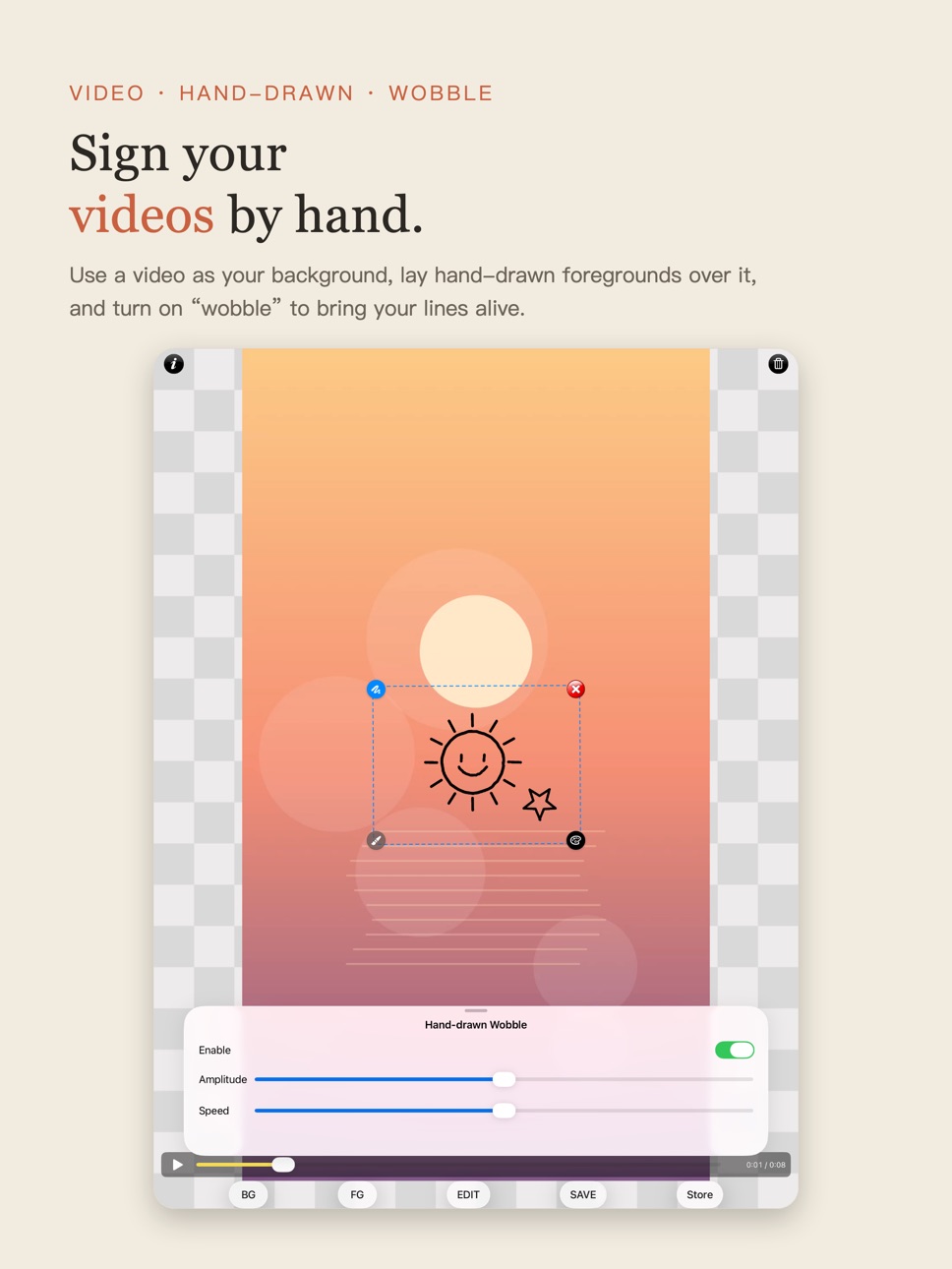
Introducing video signatures! Everything you know — and everything you've purchased — stays the same, and the new video features are free to use in full.
• Video backgrounds: pick a video from your library, or record one right in the app
• Foregrounds over video: drag, scale and rotate your hand-drawn signatures and doodles, as always
• Boiling-line wobble: one tap to bring your lines alive, with adjustable amplitude and speed
• Quick line-color palette: switch colors in a tap
• Dashed selection outline: see at a glance which foreground is selected
• High-quality export: frame-by-frame compositing; save to Photos or share anywhere
Free video exports include a small tiled SigNote logo. "SigNote Video Pro" — a one-time purchase, no subscriptions — unlocks clean exports. Photo features and existing purchases are unaffected.
Description
A sheet of paper, a pen, and two fingers — SigNote makes you a hand-drawn photo artist. Three easy steps!
Step 1 — Pick a photo as your "background."
Step 2 — Doodle on paper and snap it. SigNote removes the background and transfers your doodle as a "foreground."
Step 3 — With your fingers: scale, rotate, erase, recolor — and open the coloring editor to paint it by hand.
With SigNote, a photo with your own style is this easy!
—— New in this version ——
• New — video signatures: use a video from your library, or record one with the camera, as your "background," and lay hand-drawn signatures over it
• Boiling-line wobble: quick toggle plus a panel for amplitude and speed — your lines come alive
• High-quality video export: frame-by-frame compositing; save to Photos or share anywhere
• Quick line-color palette and dashed selection outline for more intuitive editing
• Edit in portrait or landscape: turn your phone sideways and the editor and camera rotate with it — your photo recenters and fills the screen, just like the built-in Photos app. Exports are always upright and complete, whether you shot in portrait or landscape
• Pinch to zoom and pan: magnify and move around your photo to align and fine-tune with ease
• Shoot in landscape too: capture backgrounds and paper doodles for cutout while holding your phone sideways — what you see is what you get
• Unlimited foreground transfers (the old version capped at 7 layers)
• New coloring editor: paint bucket plus colored-pencil / marker / charcoal / airbrush texture brushes
• Re-edit any foreground anytime: change line color, adjust overall opacity, erase to touch up
• Coloring and line art on separate layers — edit each independently; your edits persist across restarts
• Cutout core rewritten on Apple's native imaging pipeline — faster and more efficient
• High-resolution compositing, one-tap share to Photos or any app
• Privacy first: all editing on your device; your photos are never uploaded. No account, no ads, no tracking
—— About purchases ——
Free to download, unlock what you need — no subscriptions, no monthly fees:
• SigNote Pro — all filters, hi-res & batch export, premium artwork, photo exports without the SigNote logo
• Coloring Pack — the foreground coloring editor and all texture brushes
• SigNote Video Pro — clean video exports (the video features themselves are free to use in full)
If you bought the old paid app, SigNote Pro unlocks automatically after updating, at no charge (tap "Restore Purchases" if needed).
—— For long-time users ——
The old "SigNote Cloud" foreground library is evolving into the new "SigNote Plaza" community, coming in a future update. Your work saved on your device is unaffected.
Made in Taiwan, with care. Questions? signote.app@gmail.com.
In-App Purchases US pricing
One-Time Purchases
SigNote Pro$2.99
Coloring Pack$3.99
SigNote Video Pro$3.99
Capabilities
In-App Purchases
Accessibility
ipadiphonemacrealityDevicetvoswatch
Version history 25 versions
Build 887941198v2.3.02026-07-09 12:38:15
Introducing video signatures! Everything you know — and everything you've purchased — stays the same, and the new video features are free to use in full.
• Video backgrounds: pick a video from your library, or record one right in the app
• Foregrounds over video: drag, scale and rotate your hand-drawn signatures and doodles, as always
• Boiling-line wobble: one tap to bring your lines alive, with adjustable amplitude and speed
• Quick line-color palette: switch colors in a tap
• Dashed selection outline: see at a glance which foreground is selected
• High-quality export: frame-by-frame compositing; save to Photos or share anywhere
Free video exports include a small tiled SigNote logo. "SigNote Video Pro" — a one-time purchase, no subscriptions — unlocks clean exports. Photo features and existing purchases are unaffected.
Build 887677948v2.2.02026-07-04 08:53:12
SigNote 2.2 — the hand-drawn transfer you love, evolved!
• For long-time users: if you bought the paid app, Pro unlocks automatically — never charged again (tap "Restore Purchases").
• Edit in portrait or landscape: turn your phone sideways and the editor and camera rotate with it — your photo recenters and fills the screen, just like the built-in Photos app. Exports stay upright and complete.
• Pinch to zoom and pan: magnify and move around your photo to inspect detail and fine-tune.
• Shoot in landscape too: capture backgrounds and paper doodles for cutout while holding your phone sideways — what you see is what you get.
• Unlimited foreground transfers (no more 7-layer cap).
• New coloring editor: colored pencil, marker, charcoal, airbrush texture brushes.
• Re-edit any foreground: change line color, adjust opacity, erase to touch up — anytime.
• Coloring and line art on separate layers, edited independently; your edits persist across restarts.
• Cutout core rewritten on Apple's native pipeline — faster and more efficient. Refreshed UI and app icon.
• The old "SigNote Cloud" library is becoming the new "SigNote Plaza" community, coming soon. Your on-device work is unaffected.
Build 849595182v1.62022-05-30 18:07:26
iOS 15.4 compatible.
Image loading bug fixes.
Build 837603753v1.5.62020-09-20 18:16:38
Add App Notification for future SigNote Cloud Update notices.
Add Google Analytics for better user experience update in future.
Build 836848389v1.5.52020-07-15 18:35:41
Fixes SigNote Cloud List.
Fixes iOS 13 foreground image processing crashes.
Fixes UI color display in iOS Dark display mode.
Build 829811884v1.5.42019-01-06 19:40:32
Fixes full screen UI supports.
Fixes first time launch instruction prompt.
Change to new server for SigNote Cloud images.
Build 829386118v1.5.32018-11-23 20:41:23
Fixes the image error of load F.G. from album after using foreground camera.
Fixes the Report Issues function.
Removed invalid social network photo sharing function, and it will be recovering after fixes.
Build 829347408v1.5.22018-11-21 15:00:29
Fixes the Permissions of camera and album for iOS 12
iOS 12 supports
Build 822286992v1.5.12017-05-30 00:51:03
64-bit supports
Fixes iOS Facebook share image
Build 654112701v1.52014-08-01 23:42:24
SigNote Cloud image list fixes
SigNote Cloud Update Notification
Facebook sharing adjusting
Supporting iOS changed to iOS 6.1
Build 582452924v1.42014-05-09 23:24:05
Due to the Internet link will change to use more security server, if you're using SigNote Cloud please upgrade to SigNote v1.4 before June 27.
changed to iOS 5.1 and above supported
if you found crashes in any situation,
please mail to signote.app@gmail.com
Build 214712632v1.32013-12-10 01:34:22
iOS Universal
SigNote from Taiwan. Thank you for supporting us.
Build 82672656v1.2.32013-10-11 18:08:54
Supporting for iOS 5.1
Build 79702636v1.2.22013-10-08 07:30:00
Fixed FG camera capture bug
Build 66072736v1.2.12013-10-02 13:29:27
1. Supporting iOS 7, 4-inch display
2. Bug Fixes
3. Add FG Photo Albums
Build 10137261v1.22012-08-24 03:17:45
Image Transparency
Sharing for Instagram and Twitter
Steply Community is removed due to login issue
Build 6751584v1.12012-03-03 00:11:40
Categorization of SigNote Cloud
Build 4071103v1.0.92011-08-30 08:01:11
1. 2 extra foregrounds added
2. Size adjustable eraser added
3. Steply social network integration added
1.0.9
Add instruction page
Minor bug fixes
Build 4014156v1.0.82011-08-20 12:48:00
1. 2 extra foregrounds added
2. Size adjustable eraser added
3. Steply social network integration added
Build 3948721v1.0.72011-08-02 01:44:39
-SigNote Cloud list fixes
-SigNote 雲清單顯示修正
Build 3883787v1.0.62011-07-15 15:37:37
★ Better SigNote Cloud
★ SigNote Cloud Upload and Share
★ 更方便的 SigNote 雲
★ SigNote 雲前景圖上傳分享
Build 3839140v1.0.52011-06-24 01:21:35
Bug Fixed - Clear the foreground gray BG.
前景殘留灰底修正
Build 3827563v1.0.42011-06-16 19:09:33
• All photo sizes supported
• SigNote Cloud link
• Add a button for clear all foreground images
• 各種相片尺寸格式支援
• SigNote 雲 連結
• 清除全部前景功能
Build 3765145v1.0.3.12011-05-30 18:30:28
★★★ High Resolution image exporting.
★★★ Fixed distortion of captured images.
★★★ Saving FG images.
★★★ Erased FG images restore.
★★★ Eraser bugs fixed.
★★★ Improving many user interfaces.
★★★ 高解係度影像輸出 ★★★
★★★ 修正前景影像變形 ★★★
★★★ 截取前景影像儲存 ★★★
★★★ 前景影像復原功能 ★★★
★★★ 橡皮擦工具的修正 ★★★
★★★ 改進許多使用界面 ★★★
Build 3680175v1.0.22011-05-04 14:00:54
- Bug fixed, ios memory issues.
- Bug fixed, removing everything after using camera(FG, BG)
- BUG 修正, 使用攝影機後前景,背景消失等不正常狀態.
Price history by region
Currency
Show
Columns
Search
Availability 1 of 1 storefronts
| Region | Language | Price | Ratings | Avg | Version |
|---|---|---|---|---|---|
| US | en-US | Free | 7 | 4.3 | 2.3.0 |
Change log 29 changes · US
✎
releaseNotes updated
Introducing video signatures! Everything you know — and everything you've purchased — stays the same, and the new video features are free to use in full.
• Vid
✎
description updated
A sheet of paper, a pen, and two fingers — SigNote makes you a hand-drawn photo artist. Three easy steps!
Step 1 — Pick a photo as your "background."
Step 2 —
✎
subtitle updated
Paper doodles into photo art
✎
name updated
SigNote — Doodle onto Photos
◆
Version 2.3.0 released
Introducing video signatures! Everything you know — and everything you've purchased — stays the same, and the new video features are free to use in full.
• Video backgrounds: pick a video from your library, or record one right in the app
•
◆
Version 2.2.0 released
SigNote 2.2 — the hand-drawn transfer you love, evolved!
• For long-time users: if you bought the paid app, Pro unlocks automatically — never charged again (tap "Restore Purchases").
• Edit in portrait or landscape: turn your phone sideway
◆
Version 1.6 released
iOS 15.4 compatible.
Image loading bug fixes.
◆
Version 1.5.6 released
Add App Notification for future SigNote Cloud Update notices.
Add Google Analytics for better user experience update in future.
◆
Version 1.5.5 released
Fixes SigNote Cloud List.
Fixes iOS 13 foreground image processing crashes.
Fixes UI color display in iOS Dark display mode.
◆
Version 1.5.4 released
Fixes full screen UI supports.
Fixes first time launch instruction prompt.
Change to new server for SigNote Cloud images.
◆
Version 1.5.3 released
Fixes the image error of load F.G. from album after using foreground camera.
Fixes the Report Issues function.
Removed invalid social network photo sharing function, and it will be recovering after fixes.
◆
Version 1.5.2 released
Fixes the Permissions of camera and album for iOS 12
iOS 12 supports
◆
Version 1.5.1 released
64-bit supports
Fixes iOS Facebook share image
◆
Version 1.5 released
SigNote Cloud image list fixes
SigNote Cloud Update Notification
Facebook sharing adjusting
Supporting iOS changed to iOS 6.1
◆
Version 1.4 released
Due to the Internet link will change to use more security server, if you're using SigNote Cloud please upgrade to SigNote v1.4 before June 27.
changed to iOS 5.1 and above supported
if you found crashes in any situation,
please mail to sig
◆
Version 1.3 released
iOS Universal
SigNote from Taiwan. Thank you for supporting us.
◆
Version 1.2.3 released
Supporting for iOS 5.1
◆
Version 1.2.2 released
Fixed FG camera capture bug
◆
Version 1.2.1 released
1. Supporting iOS 7, 4-inch display
2. Bug Fixes
3. Add FG Photo Albums
◆
Version 1.2 released
Image Transparency
Sharing for Instagram and Twitter
Steply Community is removed due to login issue
◆
Version 1.1 released
Categorization of SigNote Cloud
◆
Version 1.0.9 released
1. 2 extra foregrounds added
2. Size adjustable eraser added
3. Steply social network integration added
1.0.9
Add instruction page
Minor bug fixes
◆
Version 1.0.8 released
1. 2 extra foregrounds added
2. Size adjustable eraser added
3. Steply social network integration added
◆
Version 1.0.7 released
-SigNote Cloud list fixes
-SigNote 雲清單顯示修正
◆
Version 1.0.6 released
★ Better SigNote Cloud
★ SigNote Cloud Upload and Share
★ 更方便的 SigNote 雲
★ SigNote 雲前景圖上傳分享
◆
Version 1.0.5 released
Bug Fixed - Clear the foreground gray BG.
前景殘留灰底修正
◆
Version 1.0.4 released
• All photo sizes supported
• SigNote Cloud link
• Add a button for clear all foreground images
• 各種相片尺寸格式支援
• SigNote 雲 連結
• 清除全部前景功能
◆
Version 1.0.3.1 released
★★★ High Resolution image exporting.
★★★ Fixed distortion of captured images.
★★★ Saving FG images.
★★★ Erased FG images restore.
★★★ Eraser bugs fixed.
★★★ Improving many user interfaces.
★★★ 高解係度影像輸出 ★★★
★★★ 修正前景影像變形 ★★★
★★★ 截取前景影像儲存 ★
◆
Version 1.0.2 released
- Bug fixed, ios memory issues.
- Bug fixed, removing everything after using camera(FG, BG)
- BUG 修正, 使用攝影機後前景,背景消失等不正常狀態.