Home › Utilities

 US
US
1 of 1 storefronts
Content in en-US
Content in en-US
Information
Preview 1 platform
iPhone 5 images


What’s New Version 1.10.1
Stability and bug fixes for recent versions of iOS
Description
The iQuad app was designed to be used specifically with Quadzilla Adrenaline Performance Modules. iQuad gives you all of the features previously only available with proprietary displays. This is the ONLY wirelessly controlled, on-the fly module/display combination available! You can watch up to10 monitored parameters at one time. iQuad has up to 40+ user selected gauges you can choose with simple finger swipes and never having to leave the main display! As with all Quadzilla products you also have the ability to set multiple safety settings as well as enable and modify many useful features.
To change power levels simply touch the + or – on the main display to instantly change your engines performance.
This app works with ALL Adrenaline modules regardless of vehicle make or model. You will have the ability to choose your specific vehicle once iQuad is installed on your device.
iQuad Features:
Wireless Control
On the Fly Power Changes
Up to 40+ monitored parameters (# of parameters is based on specific year models)
Turbo Timer Control
De-fueling Control
Transmission De-fueling Control
High Idle Control (98-02 Dodge Only)
Regeneration Monitoring
New Features Enabled for V1.9.34!
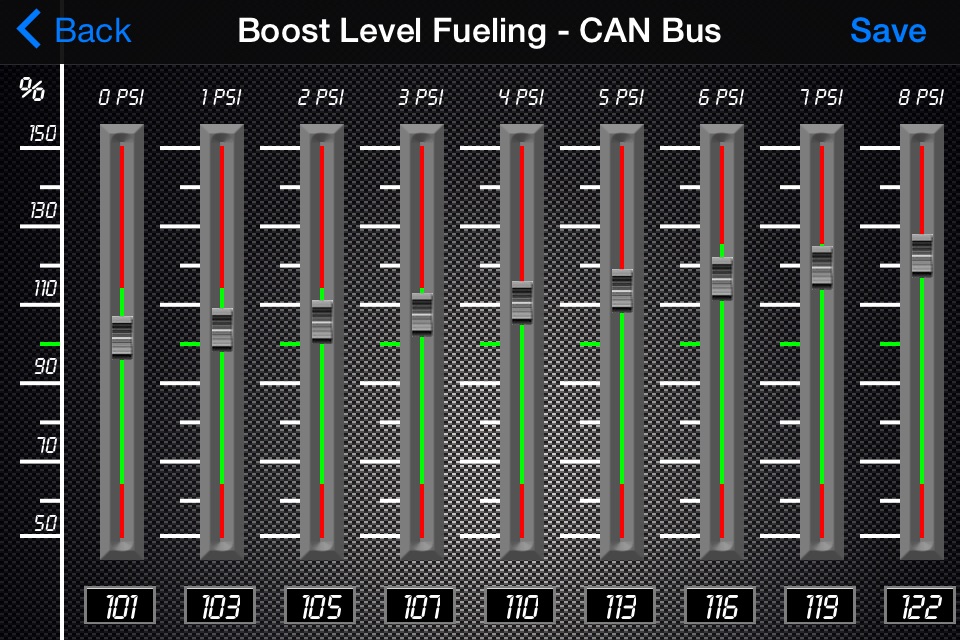
V2 tuning extended support. Tune with an equalizer like interface. Enable/Disable all warnings and set the sensor warning levels. Data Logging for export increased to 100,000 lines (roughly 3.5 hours of continuous logs).
This is not another OBD2 app, we not only display the OBD2 parameters but, also a host of manufacturer specific parameters such as transmission slip %, rail pressure, converter lockup status, regeneration status, EGT, FP, and many more.
iQuad works on all devices running iOS 5.1.1 and up.
iPad specific app will be released as well.
Cellular connectivity is not required, iQuad will work anywhere you go!
** This product requires the use of the iQuad Wifi Module**
Installation is simple, just plug the wifi module into the port where your previous controller was installed. Then connect via wireless and get started!
This app is FREE! Download it and play with it. The dashboard and settings menus are fully functional. See how easy it is to change up the dashboard to your preferences. See how easy it is to change vehicles and we know you will agree that this is the greatest advancement in vehicle performance in a long time!
Accessibility
ipadiphonemacrealityDevicetvoswatch
Version history 20 versions
Build 852400823v1.10.12022-09-25 12:21:14
Stability and bug fixes for recent versions of iOS
Build 843302006v1.9.832021-07-28 00:01:28
- Address issue where settings didn't allow for toggle and sensor warnings didn't allow for audible alert changes
Build 842711031v1.9.822021-06-18 22:17:03
- Audible sensor alerts
- Stability improvements
Build 836341546v1.9.682020-06-12 21:49:59
- More compatible connection with older modules
Build 835908235v1.9.622020-05-16 08:23:12
- Enhanced the bottom drawer toggle
- Using a v2 tuning now has updated default gauges
Build 833466220v1.9.542019-11-05 15:53:07
- General fixes and improvements for iOS 13
Build 832355973v1.9.452019-08-28 19:11:39
- Fix issue on newer iOS devices with custom tuning imports
Build 826275957v1.9.432018-03-13 19:09:42
- Reduce memory requirements for logging, also watch for low memory and clear out logging if that happens
- Fix issue where level changes weren’t updating the UI in the alternative screen views
- Fix issue where we were not showing a warning status on digital displays
- Fix issue where a crash happens if changing boost
Build 823024408v1.9.392017-07-25 23:31:51
- Added ability to import and export custom tunes for sharing
Build 822040999v1.9.342017-05-17 21:54:33
- Equalizer Screen for increased custom tuning.
- Warning level customization and disabling.
- Increased data-log length.
Build 816644995v1.9.182016-03-10 21:03:04
- General fixes to better support Force Touch devices
Build 814443477v1.9.162015-11-24 04:06:57
- Ability to export data logs
- Stability fix for iOS 5.1.1 devices
Build 813139708v1.9.112015-08-24 22:39:45
- The ability to rotate the app in both landscape orientations
Build 813070028v1.9.92015-08-13 21:47:25
- Updated to support iPhone 5/6/6+ displays without letter-boxing
- General updates and bug fixes
Build 9375492v1.8.22012-07-17 19:57:59
Minor bug fix in Vehicle Setup menu
Build 6759463v1.82012-03-03 00:34:55
Improved gauge response
Build 6583488v1.72012-02-24 21:27:49
Sensor Labels added to icons when "hovering" in the sensor bar.
Vehicle configuration changes.
Bug fixes.
Build 3644491v1.32011-04-26 14:53:52
DTC support
Data Logging
Additional display layout selections
Support for both landscape orientations
Fixed memory issue and Crash issue with 4.3 and 4.3.1
Build 3357951v1.12011-01-24 18:26:07
- Custom Tuning
- Fix for iPhone4 high-res screen
Build 3164764v1.02010-11-23 02:16:15
No pricing data captured yet — comparisons appear once the app has paid storefronts or in-app purchases.
Availability 1 of 1 storefronts
| Region | Language | Price | Ratings | Avg | Version |
|---|---|---|---|---|---|
| US | en-US | Free | 44 | 3.9 | 1.10.1 |
Change log 23 changes · US
✎
releaseNotes updated
Stability and bug fixes for recent versions of iOS
✎
description updated
The iQuad app was designed to be used specifically with Quadzilla Adrenaline Performance Modules. iQuad gives you all of the features previously only available
✎
name updated
iQuad by Quadzilla
◆
Version 1.10.1 released
Stability and bug fixes for recent versions of iOS
◆
Version 1.9.83 released
- Address issue where settings didn't allow for toggle and sensor warnings didn't allow for audible alert changes
◆
Version 1.9.82 released
- Audible sensor alerts
- Stability improvements
◆
Version 1.9.68 released
- More compatible connection with older modules
◆
Version 1.9.62 released
- Enhanced the bottom drawer toggle
- Using a v2 tuning now has updated default gauges
◆
Version 1.9.54 released
- General fixes and improvements for iOS 13
◆
Version 1.9.45 released
- Fix issue on newer iOS devices with custom tuning imports
◆
Version 1.9.43 released
- Reduce memory requirements for logging, also watch for low memory and clear out logging if that happens
- Fix issue where level changes weren’t updating the UI in the alternative screen views
- Fix issue where we were not showing a warnin
◆
Version 1.9.39 released
- Added ability to import and export custom tunes for sharing
◆
Version 1.9.34 released
- Equalizer Screen for increased custom tuning.
- Warning level customization and disabling.
- Increased data-log length.
◆
Version 1.9.18 released
- General fixes to better support Force Touch devices
◆
Version 1.9.16 released
- Ability to export data logs
- Stability fix for iOS 5.1.1 devices
◆
Version 1.9.11 released
- The ability to rotate the app in both landscape orientations
◆
Version 1.9.9 released
- Updated to support iPhone 5/6/6+ displays without letter-boxing
- General updates and bug fixes
◆
Version 1.8.2 released
Minor bug fix in Vehicle Setup menu
◆
Version 1.8 released
Improved gauge response
◆
Version 1.7 released
Sensor Labels added to icons when "hovering" in the sensor bar.
Vehicle configuration changes.
Bug fixes.
◆
Version 1.3 released
DTC support
Data Logging
Additional display layout selections
Support for both landscape orientations
Fixed memory issue and Crash issue with 4.3 and 4.3.1
◆
Version 1.1 released
- Custom Tuning
- Fix for iPhone4 high-res screen
◆
Version 1.0 released