Home › Business

 US
US
1 of 1 storefronts
Content in en-US
Content in en-US
Information
Preview 2 platforms
iPhone 5 images




iPad 5 images


What’s New Version 3.50
■ Dark Mode Support
· The app now supports both Light Mode and Dark Mode.
Description
Denomination calculation of Japan is a computer made simply.
It plays an active part in various scenes, such as the time of payroll calculation, at the time of register settlement of accounts of the compute total amount of the contents of the wallet, a retail store, etc.
■ Feature
- An item displays each bill and coin beside an item in a pattern intelligibly.
- When an item hides with simple operation of only a ten key, and a ten key, it scrolls automatically and can input.
■ The main functions
- Both the input from number of sheets and the input from the amount of money can be performed.
- The contents of work are memorized at the time of an end, and a start-up is also resumed by the same contents next time.
■ The operation method
- Carry out a tap (it pushes) to the number-of-sheets item of a denomination (a 10,000 yen bill - a 1 yen coin) to input, or an amount-of-money item at the time.
- Since a ten key comes out, if the button after inputting a number "Done" is pushed or a tap is carried out to other input items, a ten key will be stored and the sum total will be calculated automatically.
- If the tap of the "clearance" button is carried out, all the input items will be eliminated.
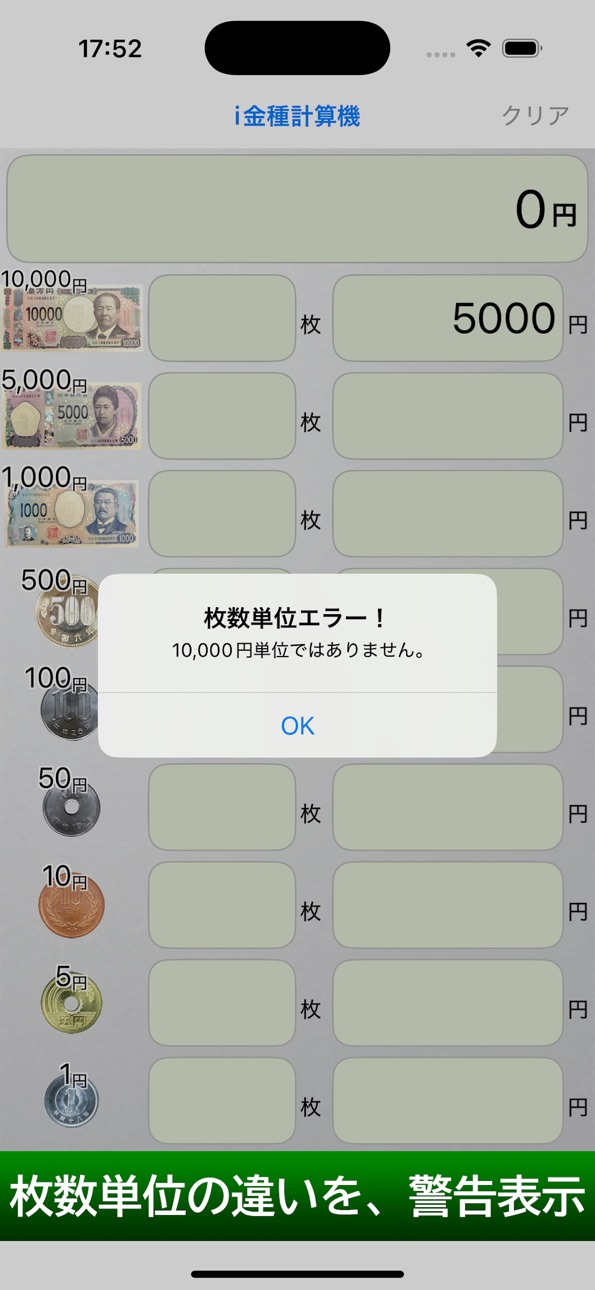
- Since warning is displayed when the number which is not a unit of an input bill and a coin is inputted by the input item of the amount of money, please give me correction of the amount of money promptly.
(* attention: Since I am not doing correction processing automatically, the compute total amount of the amount of money as it is is displayed and carried out.)
* Notes
- Although I am doing the test thoroughgoing about calculation, since we do not offer a guarantee at all about the case where trouble should attain to business etc. by a calculation result, please use it after approving of that.
Please connect with a support site about the words, the question, and fault of demand and encouragement.
Accessibility
ipadiphonemacrealityDevicetvoswatch
Version history 11 versions
Build 887033709v3.502026-06-16 21:12:07
■ Dark Mode Support
· The app now supports both Light Mode and Dark Mode.
Build 870745586v3.102024-11-28 07:27:01
New Icons
・New banknotes and coin designs.
New Banknotes and Coins, Correspondence
・New banknotes for 10,000 yen, 5,000 yen, and 1,000 yen will be issued (from 2024 onward).
・New 500 yen coin will be issued (from 2021 onward).
Build 870500244v3.002024-11-26 19:30:24
New banknotes and coins available.
・10,000 yen banknotes changed to new ones.
・5,000 yen banknotes changed to new ones.
・1,000 yen banknotes changed to new ones.
・500 yen coins changed to new ones.
Build 825502097v2.002018-01-08 19:05:09
This update from Apple will improve the functionality of this app. No new features are included.
Both 32bit and 64bit correspondence!
Supports up to 5 digits for 32 bit compatible devices and 8 digits for 64 bit correspondence.
iPhoneX compliant · Universal application, iPad support.
Added a completion · arrow button at the top of the keyboard. (Done button abolished accordingly)
I changed Swift 4 programming language, I rebuilt the program from scratch.
Build 812209335v1.62015-04-29 02:52:00
A problem that a DONE button isn't effective in iOS8.3 at the time of numerical value input by an update is canceled.
Build 811407077v1.52015-01-05 21:02:36
The new function of the version 1.5
■ iPhone5, 6, 4 in 6Plus, 4.7 and 5.5 inches correspond to the screen size.
-The space of each bill and the coin is self-adjusted.
■ It's fixed so as not to do scrolling of a keyboard which is the total amount screen and depends at the time of input.
■ The design of DONE is changed.
■ An icon start screen is renewed.
■ Design change in the part bill and the coin
Build 735042655v1.42014-10-10 00:35:44
The new function of the version 1.4
■ Correspond to iOS8.
- The problem as which correspondence and Done are not displayed on iOS8 was solved.
Build 11222855v1.32012-10-12 20:02:18
■ Ratina display correspondence
- By Ratina display correspondence, a bill and a coin, and the Appli icon were clearer, and it became beautiful.
■ iPhone5 correspondence
- Since the vertical screen became long by iPhone5, scrolling became only a coin 5 yen and 1 yen, and became legible.
■ Clear-izing at the time of a bill and a coin input
- At the time of an input, the present input part became intelligible by emphasizing a bill and a coin greatly.
■ 5 figures corresponds number of sheets.
- By demand of the visitor of 4 or more figures, number of sheets corresponded to 5 figures.
■ It is a comma numeric format also with a bill and a coin.
- a bill and a coin unit -- the comma numeric format of a triple figure unit -- it came to carry out.
■ Omit the card bill of 2000 yen.
- The card bill of 2000 yen was omitted.
■ Advertising addition
- An advertisement is displayed on the lower part.
Build 2908350v1.22010-08-19 07:54:12
■機能追加
・合計から金額が入力可能になりました。合計金額から自動的に金種計算が出来るようになりました。(2千円札は省略いたしました。)
Build 2784852v1.12010-07-09 03:23:56
Ver.1.1
■機能追加
・iOS 4対応、以前一部バージョンでDone表示されていない問題を解決いたしました。
・マルチタスク対応、終了時に作業内容が保存され、次回起動時に作業が再開出来るようになりました。
Build 2680018v1.02010-06-08 01:46:46
No pricing data captured yet — comparisons appear once the app has paid storefronts or in-app purchases.
Availability 1 of 1 storefronts
| Region | Language | Price | Ratings | Avg | Version |
|---|---|---|---|---|---|
| US | en-US | Free | 0 | — | 3.50 |
Change log 14 changes · US
✎
releaseNotes updated
■ Dark Mode Support
· The app now supports both Light Mode and Dark Mode.
✎
description updated
Denomination calculation of Japan is a computer made simply.
It plays an active part in various scenes, such as the time of payroll calculation, at the time of
✎
name updated
iDenomiCalc
◆
Version 3.50 released
■ Dark Mode Support
· The app now supports both Light Mode and Dark Mode.
◆
Version 3.10 released
New Icons
・New banknotes and coin designs.
New Banknotes and Coins, Correspondence
・New banknotes for 10,000 yen, 5,000 yen, and 1,000 yen will be issued (from 2024 onward).
・New 500 yen coin will be issued (from 2021 onward).
◆
Version 3.00 released
New banknotes and coins available.
・10,000 yen banknotes changed to new ones.
・5,000 yen banknotes changed to new ones.
・1,000 yen banknotes changed to new ones.
・500 yen coins changed to new ones.
◆
Version 2.00 released
This update from Apple will improve the functionality of this app. No new features are included.
Both 32bit and 64bit correspondence!
Supports up to 5 digits for 32 bit compatible devices and 8 digits for 64 bit correspondence.
iPhoneX com
◆
Version 1.6 released
A problem that a DONE button isn't effective in iOS8.3 at the time of numerical value input by an update is canceled.
◆
Version 1.5 released
The new function of the version 1.5
■ iPhone5, 6, 4 in 6Plus, 4.7 and 5.5 inches correspond to the screen size.
-The space of each bill and the coin is self-adjusted.
■ It's fixed so as not to do scrolling of a keyboard which is the total a
◆
Version 1.4 released
The new function of the version 1.4
■ Correspond to iOS8.
- The problem as which correspondence and Done are not displayed on iOS8 was solved.
◆
Version 1.3 released
■ Ratina display correspondence
- By Ratina display correspondence, a bill and a coin, and the Appli icon were clearer, and it became beautiful.
■ iPhone5 correspondence
- Since the vertical screen became long by iPhone5, scrolling becam
◆
Version 1.2 released
■機能追加
・合計から金額が入力可能になりました。合計金額から自動的に金種計算が出来るようになりました。(2千円札は省略いたしました。)
◆
Version 1.1 released
Ver.1.1
■機能追加
・iOS 4対応、以前一部バージョンでDone表示されていない問題を解決いたしました。
・マルチタスク対応、終了時に作業内容が保存され、次回起動時に作業が再開出来るようになりました。
◆
Version 1.0 released