Home › Music

 US
US
1 of 1 storefronts
Content in en-US
Content in en-US
Information
Preview 2 platforms
iPhone 6 images


iPad 3 images


What’s New Version 2.3
Note playback with different sounds for the pro version
Localized in Spanish and French
Description
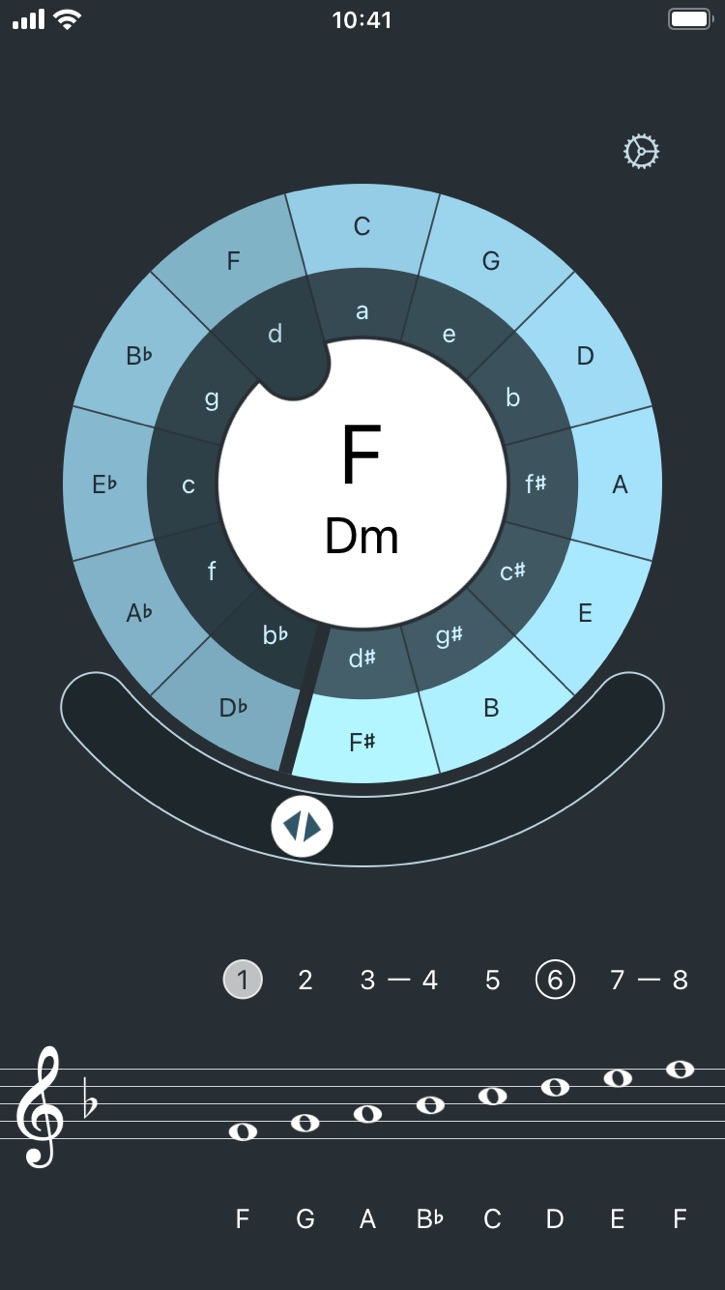
Quinterval is an interactive circle of fifths including the display of the corresponding scales.
A key in the circle can be selected either by touching the tonic or by turning the slider in the middle. The circle displays both the respective major and parallel minor scales. The display ranges from F-flat major (D-flat minor) to G-sharp major (E-sharp minor). A second slider can be used to move the visible circle section accordingly.
The note names can be set between german, english or italian notation.
The lower area shows the related major scale with its key signature. The first step and the sixth step with the corresponding minor scale are highlighted. The notes can be displayed with G-Clef, C-Clef or F-Clef. The accidentals can also be displayed before the individual notes.
Additional functionality is available as an InApp purchase:
- Display the notes of the parallel minor scale
- Display triads with their chord names
- Playback notes by tapping on them
In-App Purchases US pricing
One-Time Purchases
Enhanced Version$0.99
Capabilities
In-App Purchases
Accessibility
ipadiphonemacrealityDevicetvoswatch
Version history 18 versions
Build 866725034v2.32024-10-29 09:45:14
Note playback with different sounds for the pro version
Localized in Spanish and French
Build 860226725v2.22023-10-10 09:51:18
On the iPad in landscape mode, the top of the circle could have been cut off.
New icon for the settings.
Build 838265752v2.12020-10-23 14:00:44
The circle can now display scales from F-flat major (D-flat minor) to G-sharp major (E-sharp minor). The visible part of the circle is adjusted by an additional slider
Also, the design was modified a little bit.
Build 837370052v2.0.22020-08-18 15:12:11
For chords in the higher registers, the accidentals were not taken into account during playback.
Mails from the imprint used the wrong subject
Build 835524046v2.02020-05-12 06:21:28
Instead of as key signature, the accidentals can also be displayed before the individual notes
Display of the semitone steps as hyphens
Additional functionality as InApp purchase:
- Parallel minor scale
- Triads with chord names
- Playback notes
Build 832873694v1.7.12019-09-25 17:52:05
Notenames below the scale are not truncated with larger fonts
Last selected scale is saved again on exit
Build 832599527v1.72019-09-17 09:23:54
Dark Mode for the Settings
Support for larger text size
Build 830282329v1.6.22019-02-14 21:52:31
Added Privacy Policy and License Information
Build 825512888v1.6.12018-01-03 21:13:12
- Languages like english get the correct default labels C-D-E-F-G-A-B
- When using the C-D-E-F-G-A-H labels, the flat H is correctly labeled B
Build 824352689v1.62017-11-23 15:35:40
- Adjustments for iOS 11 and iPhone X
- The names of the notes can be defined (e. g. english or german stlye)
- The selected scale is displayed in the middle of the circle.
- Selected note names and clef are synched via iCloud
Build 811802644v1.52015-10-05 12:28:26
Adjustments for iOS 9
Build 593533690v1.42014-06-02 21:49:11
Redesigned for iOS 7
Alto Clef now included
Build 15642473v1.32013-07-16 19:34:52
Note view can be switched between bass and treble clef.
Build 11564162v1.2.12012-10-13 00:14:28
Program crash at startup is fixed.
Build 11227651v1.22012-10-09 20:52:55
The minor keys are now displayed in the circle.
Adjustments for iPad 3 and iPhone 5
Adjustments for iOS 6.
This version requires iOS 4.3!
Build 6873358v1.12012-03-17 01:36:13
Support for iPad
Build 3282626v1.0.12011-01-05 21:22:59
Adjustements for iOS 4 and Retina Display
Build 2652893v1.02010-05-26 21:28:00
Price history by region
Currency
Show
Columns
Search
Availability 1 of 1 storefronts
| Region | Language | Price | Ratings | Avg | Version |
|---|---|---|---|---|---|
| US | en-US | Free | 20 | 4.3 | 2.3 |
Change log 22 changes · US
✎
releaseNotes updated
Note playback with different sounds for the pro version
Localized in Spanish and French
✎
description updated
Quinterval is an interactive circle of fifths including the display of the corresponding scales.
A key in the circle can be selected either by touching the ton
✎
subtitle updated
Circle of Fifths with Scales
✎
name updated
Quinterval
◆
Version 2.3 released
Note playback with different sounds for the pro version
Localized in Spanish and French
◆
Version 2.2 released
On the iPad in landscape mode, the top of the circle could have been cut off.
New icon for the settings.
◆
Version 2.1 released
The circle can now display scales from F-flat major (D-flat minor) to G-sharp major (E-sharp minor). The visible part of the circle is adjusted by an additional slider
Also, the design was modified a little bit.
◆
Version 2.0.2 released
For chords in the higher registers, the accidentals were not taken into account during playback.
Mails from the imprint used the wrong subject
◆
Version 2.0 released
Instead of as key signature, the accidentals can also be displayed before the individual notes
Display of the semitone steps as hyphens
Additional functionality as InApp purchase:
- Parallel minor scale
- Triads with chord names
- Playback
◆
Version 1.7.1 released
Notenames below the scale are not truncated with larger fonts
Last selected scale is saved again on exit
◆
Version 1.7 released
Dark Mode for the Settings
Support for larger text size
◆
Version 1.6.2 released
Added Privacy Policy and License Information
◆
Version 1.6.1 released
- Languages like english get the correct default labels C-D-E-F-G-A-B
- When using the C-D-E-F-G-A-H labels, the flat H is correctly labeled B
◆
Version 1.6 released
- Adjustments for iOS 11 and iPhone X
- The names of the notes can be defined (e. g. english or german stlye)
- The selected scale is displayed in the middle of the circle.
- Selected note names and clef are synched via iCloud
◆
Version 1.5 released
Adjustments for iOS 9
◆
Version 1.4 released
Redesigned for iOS 7
Alto Clef now included
◆
Version 1.3 released
Note view can be switched between bass and treble clef.
◆
Version 1.2.1 released
Program crash at startup is fixed.
◆
Version 1.2 released
The minor keys are now displayed in the circle.
Adjustments for iPad 3 and iPhone 5
Adjustments for iOS 6.
This version requires iOS 4.3!
◆
Version 1.1 released
Support for iPad
◆
Version 1.0.1 released
Adjustements for iOS 4 and Retina Display
◆
Version 1.0 released