Home › Sports

 US
US
1 of 1 storefronts
Content in en-US
Content in en-US
Information
Preview 2 platforms
iPhone 5 images



iPad 5 images


What’s New Version 6.1
Just some minor updates, including support for the latest iOS.
Description
How Fast Is Your Break? Break Speed Powered By Predator can tell you!
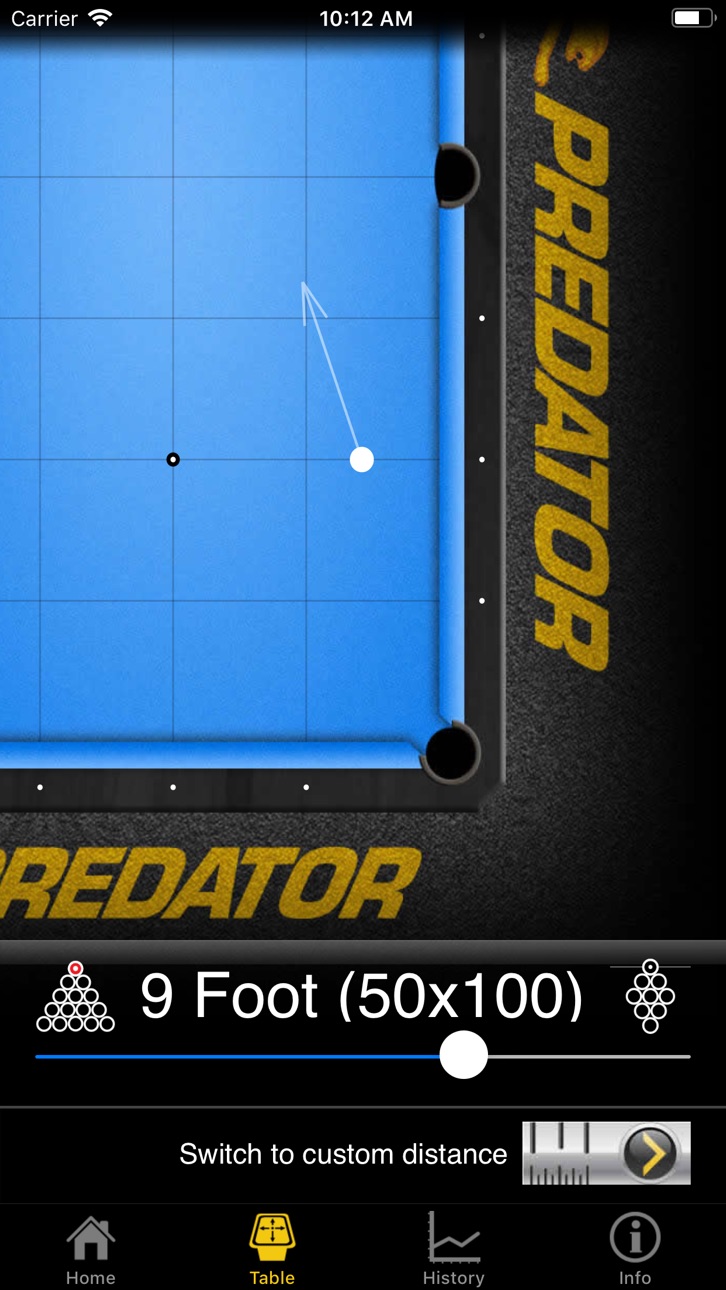
To use the app, set your phone on the rail and tap the screen. Now you're ready to break. Tap the screen once again after your break and the app will display your Break Speed speed.
Break Speed is more than 10x the accuracy of a radar gun and has become the standard for break shot speed measurements, privately and professionally. With such high precision, you can use Break Speed to provide that feedback you need to improve your breaks. Break harder and more consistently with Break Speed.
Don't worry about others breaking around you or other pool hall noise. Even shouting players won't fool our Break Recognition technology.
Find out why professional pool players are using and recommending Break Speed to others.
Our collaboration with Predator has been very effective. It's been great to work with a team that understands the science of billiards. The Predator R&D team has been testing the application along side their own speed measurement equipment and the Iron Willie robot, following a number of testing sessions, the Predator R&D team found the application so accurate that a partnership in pool science began.
"The application is really spot on. During my many testing sessions with the Predator Team there was very little deviation between the Predator testing equipment and the application," said Predator Pro Mike Dechaine.
If you're a serious player, and you don't have Break Speed Powered By Predator, what are you waiting for?
Accessibility
ipadiphonemacrealityDevicetvoswatch
Version history 25 versions
Build 869162940v6.12024-09-21 18:11:37
Just some minor updates, including support for the latest iOS.
Build 867786853v6.0.92024-07-28 03:58:13
Added support for the latest version of iOS
Fixed a rare crash in the history view
Build 854521220v6.0.82023-01-21 17:43:17
This update greatly improves break recognition. If you've been having trouble getting good results, this version should resolve the issue for you.
Build 850419210v6.0.72022-06-24 22:53:56
Fixes a couple nasties:
* A minor visual glitch in the history view when there are fewer than two breaks in the history
* A crash bug in the audio recording code
Build 845823890v6.0.62021-12-09 18:37:41
Fixed a crash bug when zooming into the waveform
Build 843610854v6.0.52021-08-15 12:05:28
Fixed a bug in the waveform rendering code
Build 839314768v6.0.42020-11-22 15:52:18
A complete list of what's new:
- Fixed a crash bug
(That's it. We didn't say it would be a long list.)
Build 837084089v6.0.32020-07-30 19:56:25
Fixed a crash on startup for devices running iOS 11.
Build 836397377v6.0.22020-06-13 15:29:58
Fixed a couple bugs in how the keyboard is handled when setting custom distance.
Build 835946480v6.0.12020-05-14 08:35:52
Put a few bugs out of their misery.
Build 835585454v6.02020-04-18 23:21:24
This is a maintenance update to meet the latest Apple requirements.
Build 829885737v5.5.22019-01-09 21:04:45
Fixed a bug that would populate empty history with test data. This would only happen if your history was empty. This update will not alter your existing history data. If you have this test data, you can either delete them individually or get back to an empty state by clicking the "Delete all" button (three times to confirm) in the history view.
Build 829869076v5.5.12019-01-08 18:10:53
Resolved an issue in the history view where the rolling average sometimes goes wonky.
Build 828687310v5.5.02018-09-23 23:21:36
* Added support for 2nd ball break (look for the 8-ball rack icon)
* Added support for racking with the center ball on the spot (look for the 9-ball rack icon.)
Forget to set one or both before the break? That's OK, you can change them after you've captured a break and your speed will be re-calculated automatically.
Shoot well!
Build 828587873v5.0.22018-09-14 15:57:44
Support for iOS 12 and new devices.
Build 812264981v5.02015-05-07 01:05:04
Full-featured history has arrived!
* History is backed up to iCloud and synchronized across all of your devices
* Track your break speeds over time with beautiful charts
* Compare results against a rolling average to measure consistency
* Rolling average, min and max speeds
* All-time average, min and max speeds
* Delete individual breaks or all history
*** IMPORTANT ***
As the new history feature has been completely redesigned from the ground up, it is not compatible with the old version. Don't fret - the old history only kept the most recent 10 breaks - the new history will store hundreds!
Build 812006971v4.02015-04-07 23:09:53
* Support for iOS 8 (also raised minimum iOS version to 7.0.)
* Native support for iPhone 6 devices.
* You no longer need to set your system of measurement (MPH, KPH, etc.) Break Speed will start with a default setting appropriate for your locale. To use a different system of measurement or units, simply swipe across the displayed speed and it will rotate through available choices.
* Never miss a break again! Break Speed will automatically fallback to the alternate recognizer (a less strict listening method) if it cannot find a break shot. An alert icon is presented to inform you when this happens.
* Facebook and Twitter support now uses the accounts registered with your iPhone.
* New language: Chinese
Build 67922740v3.2.02013-10-01 00:26:30
Optimized for IOS 7 with support for 4" screens.
Optimized audio recorder, including IOS 7 updates to audio management.
Increased fidelity for some graphics, while reducing memory usage by 20%.
A brand new icon!
Build 14371045v3.1.12013-02-28 19:21:37
Just a small update to drop the requirements down to support iOS 4.1.
Build 11823547v3.1.02012-11-08 16:02:59
The new Break Speed, Powered By Predator!
(Also, a few minor bug fixes)
Build 5150843v3.0.02011-12-03 02:08:46
This is a HUGE update. There is too much to list here, but these are the big points:
A brand new icon - keep an eye out for it on your home screen.
All new user interface (same great break recognition technology.)
Fixed a bug with audio initialization causing some users to receive errors before capturing a break shot.
Better memory management for long breaks, uses less memory.
Full support for tablets.
A gorgeous new timer count-down screen with animated gears. Be careful not to stare at this too long, it's pretty mesmerizing!
The app now stores history - your most recent 10 breaks are available to view from the home screen. You can also edit the location and notes for each break when it is stored in the history (use the round icon on the speed display screen.)
Added support for users to enter a custom distance measurement (between cue and target ball) for unusual table sizes or other break types (9-on-the-spot, second-ball break, etc.)
...and more. Enjoy!
Build 3163893v2.0.32010-11-16 00:12:00
Facebook posting has been fixed. Post your speeds to Facebook and compete with your friends.
Build 3095602v2.0.22010-10-26 00:05:55
Improved diagnostic messages for Facebook posts and audio recording.
Build 3019142v2.0.12010-09-25 17:20:03
Post your speed on Facebook & Twitter - compete with your friends online!
Added help animations
UI Improvements
Fixed an issue with upgrading from previous versions
Build 2995294v2.0.02010-09-23 21:29:25
#### IMPORTANT #### You MUST uninstall before upgrading, otherwise the app will shut down on start.
You can now post your break speeds to Facebook & Twitter! Support for the BreakRAK has been added, many UI enhancements, including context-sensitive help.
Price history by region
Currency
Show
Columns
Search
Availability 1 of 1 storefronts
| Region | Language | Price | Ratings | Avg | Version |
|---|---|---|---|---|---|
| US | en-US | USD 4.99 | 19 | 3.9 | 6.1 |
Change log 29 changes · US
✎
releaseNotes updated
Just some minor updates, including support for the latest iOS.
✎
description updated
How Fast Is Your Break? Break Speed Powered By Predator can tell you!
To use the app, set your phone on the rail and tap the screen. Now you're ready to break.
✎
subtitle updated
How fast is your break?
✎
name updated
Break Speed
◆
Version 6.1 released
Just some minor updates, including support for the latest iOS.
◆
Version 6.0.9 released
Added support for the latest version of iOS
Fixed a rare crash in the history view
◆
Version 6.0.8 released
This update greatly improves break recognition. If you've been having trouble getting good results, this version should resolve the issue for you.
◆
Version 6.0.7 released
Fixes a couple nasties:
* A minor visual glitch in the history view when there are fewer than two breaks in the history
* A crash bug in the audio recording code
◆
Version 6.0.6 released
Fixed a crash bug when zooming into the waveform
◆
Version 6.0.5 released
Fixed a bug in the waveform rendering code
◆
Version 6.0.4 released
A complete list of what's new:
- Fixed a crash bug
(That's it. We didn't say it would be a long list.)
◆
Version 6.0.3 released
Fixed a crash on startup for devices running iOS 11.
◆
Version 6.0.2 released
Fixed a couple bugs in how the keyboard is handled when setting custom distance.
◆
Version 6.0.1 released
Put a few bugs out of their misery.
◆
Version 6.0 released
This is a maintenance update to meet the latest Apple requirements.
◆
Version 5.5.2 released
Fixed a bug that would populate empty history with test data. This would only happen if your history was empty. This update will not alter your existing history data. If you have this test data, you can either delete them individually or ge
◆
Version 5.5.1 released
Resolved an issue in the history view where the rolling average sometimes goes wonky.
◆
Version 5.5.0 released
* Added support for 2nd ball break (look for the 8-ball rack icon)
* Added support for racking with the center ball on the spot (look for the 9-ball rack icon.)
Forget to set one or both before the break? That's OK, you can change them aft
◆
Version 5.0.2 released
Support for iOS 12 and new devices.
◆
Version 5.0 released
Full-featured history has arrived!
* History is backed up to iCloud and synchronized across all of your devices
* Track your break speeds over time with beautiful charts
* Compare results against a rolling average to measure consistency
*
◆
Version 4.0 released
* Support for iOS 8 (also raised minimum iOS version to 7.0.)
* Native support for iPhone 6 devices.
* You no longer need to set your system of measurement (MPH, KPH, etc.) Break Speed will start with a default setting appropriate for your
◆
Version 3.2.0 released
Optimized for IOS 7 with support for 4" screens.
Optimized audio recorder, including IOS 7 updates to audio management.
Increased fidelity for some graphics, while reducing memory usage by 20%.
A brand new icon!
◆
Version 3.1.1 released
Just a small update to drop the requirements down to support iOS 4.1.
◆
Version 3.1.0 released
The new Break Speed, Powered By Predator!
(Also, a few minor bug fixes)
◆
Version 3.0.0 released
This is a HUGE update. There is too much to list here, but these are the big points:
A brand new icon - keep an eye out for it on your home screen.
All new user interface (same great break recognition technology.)
Fixed a bug with audio
◆
Version 2.0.3 released
Facebook posting has been fixed. Post your speeds to Facebook and compete with your friends.
◆
Version 2.0.2 released
Improved diagnostic messages for Facebook posts and audio recording.
◆
Version 2.0.1 released
Post your speed on Facebook & Twitter - compete with your friends online!
Added help animations
UI Improvements
Fixed an issue with upgrading from previous versions
◆
Version 2.0.0 released
#### IMPORTANT #### You MUST uninstall before upgrading, otherwise the app will shut down on start.
You can now post your break speeds to Facebook & Twitter! Support for the BreakRAK has been added, many UI enhancements, including context