Home › Travel

 US
US
1 of 1 storefronts
Content in en-US
Content in en-US
Information
Preview 1 platform
iPhone 5 images



What’s New Version 3.2
- Dark Mode
- iOS 13 Support
- Search in Routes
- Support for new routes added by VTA on Dec 28, 2019
Description
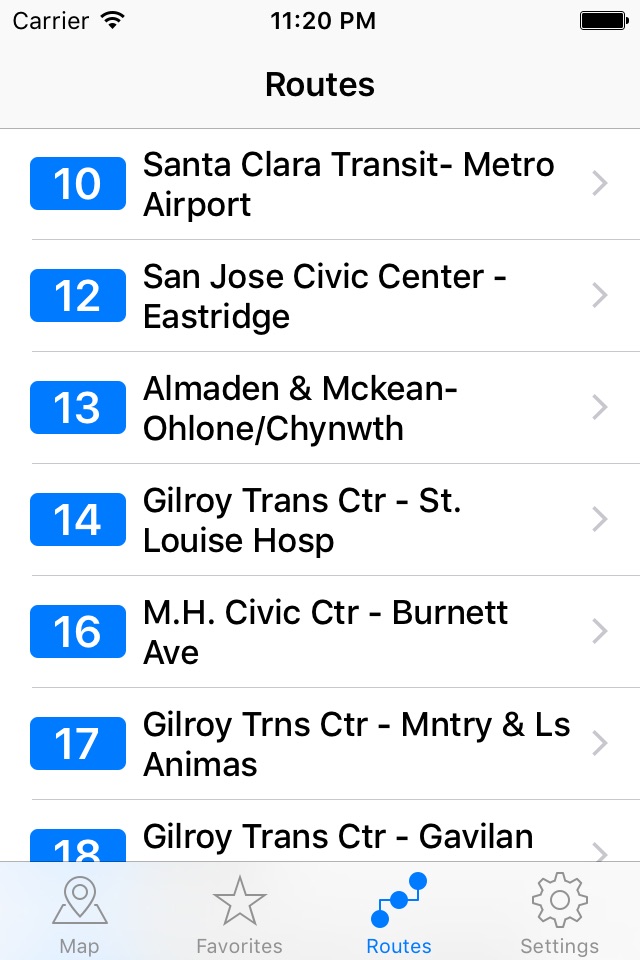
San Jose Transit provides easy access to VTA(Santa Clara Valley Transportation Authority) bus as well as light rail services. It lets you browse through stop timings and trips offline without any active internet connection.
San Jose Transit 3 is here! Completed redone from ground up. This new version makes it intuitive to browse through the routes and their schedules.
Features:
- Easy navigation through the UI.
- Consolidated directional routes. Sub routes won't show up as separate routes if they are all in the same direction.
- View stops and routes on map.
- See all the VTA stops around you on a Map.
- Search by zip code, address or city name.
- Add stops and routes as favorites.
- View all trips of a specific route (inbound or outbound) passing through a specific stop at any time.
- Easy schedule updates with automatic daily update checks.
- Stop time interpolation. The app shows timings for stops which don't show up on vta.org.
All the schedules are still fully offline. The maps do require internet connection though ;-)
Please report any mis timings to sanjosetransit@gmail.com or at https://github.com/jvashishtha/San-Jose-Transit/issues.
As always feedback is much appreciated. So write me up at sanjosetransit@gmail.com
Enjoy! :)
Note: This application or its developer are in no way related to VTA or any such organizations. This application is developed for the convenience of VTA riders.
NOTE: I would sugggest you email to sanjosetransit@gmail.com if you face any crashes. Writing bad reviews does not help solve the problem. Thank you.
Accessibility
ipadiphonemacrealityDevicetvoswatch
Version history 24 versions
Build 834186557v3.22020-01-06 16:46:08
- Dark Mode
- iOS 13 Support
- Search in Routes
- Support for new routes added by VTA on Dec 28, 2019
Build 825361653v3.12017-12-18 19:27:12
Support for iPhone X.
Build 820193208v3.0.22016-12-16 21:48:42
- Fixes a crash which happened when viewing some routes on a map
- Fixes an issue where the route map would show incorrect path
Build 817068989v3.0.12016-10-13 17:37:51
- Fixes an issue where the newest schedule update wouldn't show up
- Various other bug fixes
Build 812207236v3.02016-04-14 19:49:40
San Jose Transit 3.0 is here! Completed redone from ground up. This new version makes it intuitive to browse through the routes and their schedules.
- Easier navigation.
- Consolidated directional routes. Now sub routes won't show up as separate routes if they are all in the same direction.
- View stops and routes on map.
- Search by zip code, address or city name.
- Better favorites.
- View all trips of a specific route (inbound or outbound) passing through a specific stop at any time.
- Support for 3D Touch shortcuts from the home screen (On iPhone 6s and 6s Plus).
Build 13324642v2.3.22013-01-12 04:37:56
-Update System map(update via the updates tab)
-Bug fixes
Build 11098441v2.3.12012-10-01 20:07:30
-iOS 6 and iPhone 5 support
-Update system map to July 2012 version
-Bug fixes
Build 10901441v2.32012-09-25 17:04:28
-iOS 6 and iPhone 5 support
-Bug fixes
Build 5888781v2.2.22012-02-08 03:15:09
-Fix a crash for iOS 4 where the app crashed immediately on update(Thank you for the crash reports!)
-Faster System map viewing
Build 5750613v2.22012-01-05 21:26:33
-Improved UI
-Stability and bug fixes
-Speed improvements
-Better display of important information like bus times
-Better display of Stops on the map
-NEW! Sub routes now show up on the same view as the routes
-NEW! Sub routes popover when you view Route stop times(Tap + button in the routes to view the sub routes).
-In built Crash Reporter which will be activated upon a crash, so that you can send me the crash reports easily for fixing.
Build 4613824v2.1.12011-10-24 17:50:09
-iOS 5 bug fixes
-Fixed crashes for while opening stop times
*Routes still take a little more than usual to load. I am working on that. An update will be released soon.
Build 4336928v2.12011-10-04 01:13:45
-Caching stops in Maps(Does not reload the whole map everytime you pan the map)
-Location warning if you are outside the service area
-All stop times for specific trips for a stop(Can be found by tapping any stop in the Routes tab)
-Offline maps in routes for iPod Touch and bandwidth aware users(Requires latest schedule update. Check for updates in the Updates tab)
-Added a Major/Minor stop time toggle in Routes Tab for toggling between major(VTA provided stop times) and the minor(interpolated stop times)
-Added a toggle for setting time format(24/12 hour format. Can be found in the Settings tab)
-More visible Favorites button. Now also shown as ★ on top right corner in both Routes and Stop tabs
-You can add Routes as favorites now. Look for a Add to Favorites or ★ button while browsing the route times(Requires latest schedule update. Check for updates in the Updates tab)
-Search Routes by number or by name
-More understandable UI messages
-Removed the Reload button and instead added Pull to Refresh to both Routes and Stops
-Few UI refinements
-Few bug fixes
Build 4138447v2.02011-09-13 00:07:42
San Jose Transit v2.0 is here with lot of improvements!
New features:
- See all the VTA stops around you on a Map
- Search for VTA stops around a specific address from the map
- See the routes passing through a stop
- Get trip wise timings of all the routes
- Plot the stops of a specific route on the Map trip wise
- Get timings for individual route trips passing through a stop
- Search through stops by their name
- Add individual stops to favorites
- Full system map
- Updates to the schedules will now be available from within app. No painful app updates now.
Most importantly. An experimental feature introduced with this version. Get the timings for the stops for which the timings are not on the VTA website. The stop times for all those stops is interpolated based on all the times made available by VTA. The stop times might be off by 1 or 2 mins but it will give you a good approximation of the stop timings. To distinguish between original timings and interpolated times, the original stops are bold and the interpolated times are with a ~ in front of the times. For eg, ~13:23:20. Please report any mis timings to sanjosetransit@gmail.com or at https://github.com/jvashishtha/San-Jose-Transit/issues
Regarding updates. The updates can be checked from within the app from the Updates tab and if an update is available the schedules will be updated.
All the schedules are still fully offline. The maps do require internet connection though ;-)
As always feedback is much appreciated. So write me up at sanjosetransit@gmail.com
Enjoy! :)
Build 3968988v1.7.12011-07-29 04:08:32
Fixed an annoying bug that din't update the Favorites view stop timings with the current time.
Thanks for all your feedback guys!
Build 3899742v1.72011-07-11 18:33:58
-Update the schedules for July 11 changes
-Update maps
-Bug fixes
-901 Express timings have been integrated in 901 route
Build 3577047v1.62011-04-01 14:15:53
-Schedule updated for April 4th changes
-Maps updated
NOTES:
1) If the application crashes PLEASE relaunch. If it still crashes re-install(uninstall and re-install) the application
2) Some of the favorites will have empty times - That means either the route you have favorited was deleted or it does not have any timings
Build 3405665v1.5.12011-02-09 01:29:55
-Fixes the crash issue some users are facing
-Updated the wrong Route 181 schedule
Extremely sorry for the faulty update. Hope you can change your ratings.
If the application fails to launch the first time, please relaunch.
I would sugggest you email to sanjosetransit@gmail.com if you face any crashes. Writing bad reviews does not help solve the problem. Thank you.
Build 3298421v1.52011-01-10 05:16:11
-Updated schedules for January 10 changes
-Few bug fixes
-If you experience any crashes after this update, please uninstall any previous versions that you have and then re install again. You wont have to pay again for this update.
Build 3112736v1.42010-11-02 20:35:24
-Added 901 Commuter Express Light Rail [Visible as blue colored 901 and as 901EX in favorites]
-Retina display support
{NOTES ONLY FOR PREVIOUS OWNERS}
NOTE 1: If the application crashes after launches, please uninstall the previous version[if any] and reinstall the application.
NOTE 2: Close application from the active applications dock and restart to reflect the changes in favorites
Build 2806046v1.32010-07-18 19:19:45
-Updated application to reflect July 12 Schedule changes
-Bug fixes
-iOS 4 support
Build 2532329v1.2.12010-04-08 17:59:47
-Added the missing bus route no. 65
Build 2512782v1.22010-04-05 21:19:47
-Added a favorites section for individual bus/rail stops
-New UI
-Updated the application logo
-Added a new help section
-Bug fixes
Build 2407688v1.12010-03-03 00:22:23
-Updated logo and name
Build 2392743v1.02010-02-26 21:19:53
No pricing data captured yet — comparisons appear once the app has paid storefronts or in-app purchases.
Availability 1 of 1 storefronts
| Region | Language | Price | Ratings | Avg | Version |
|---|---|---|---|---|---|
| US | en-US | Free | 7 | 2.9 | 3.2 |
Change log 27 changes · US
✎
releaseNotes updated
- Dark Mode
- iOS 13 Support
- Search in Routes
- Support for new routes added by VTA on Dec 28, 2019
✎
description updated
San Jose Transit provides easy access to VTA(Santa Clara Valley Transportation Authority) bus as well as light rail services. It lets you browse through stop ti
✎
name updated
San Jose Transit
◆
Version 3.2 released
- Dark Mode
- iOS 13 Support
- Search in Routes
- Support for new routes added by VTA on Dec 28, 2019
◆
Version 3.1 released
Support for iPhone X.
◆
Version 3.0.2 released
- Fixes a crash which happened when viewing some routes on a map
- Fixes an issue where the route map would show incorrect path
◆
Version 3.0.1 released
- Fixes an issue where the newest schedule update wouldn't show up
- Various other bug fixes
◆
Version 3.0 released
San Jose Transit 3.0 is here! Completed redone from ground up. This new version makes it intuitive to browse through the routes and their schedules.
- Easier navigation.
- Consolidated directional routes. Now sub routes won't show up as se
◆
Version 2.3.2 released
-Update System map(update via the updates tab)
-Bug fixes
◆
Version 2.3.1 released
-iOS 6 and iPhone 5 support
-Update system map to July 2012 version
-Bug fixes
◆
Version 2.3 released
-iOS 6 and iPhone 5 support
-Bug fixes
◆
Version 2.2.2 released
-Fix a crash for iOS 4 where the app crashed immediately on update(Thank you for the crash reports!)
-Faster System map viewing
◆
Version 2.2 released
-Improved UI
-Stability and bug fixes
-Speed improvements
-Better display of important information like bus times
-Better display of Stops on the map
-NEW! Sub routes now show up on the same view as the routes
-NEW! Sub routes popover when
◆
Version 2.1.1 released
-iOS 5 bug fixes
-Fixed crashes for while opening stop times
*Routes still take a little more than usual to load. I am working on that. An update will be released soon.
◆
Version 2.1 released
-Caching stops in Maps(Does not reload the whole map everytime you pan the map)
-Location warning if you are outside the service area
-All stop times for specific trips for a stop(Can be found by tapping any stop in the Routes tab)
-Offline
◆
Version 2.0 released
San Jose Transit v2.0 is here with lot of improvements!
New features:
- See all the VTA stops around you on a Map
- Search for VTA stops around a specific address from the map
- See the routes passing through a stop
- Get trip wise timings
◆
Version 1.7.1 released
Fixed an annoying bug that din't update the Favorites view stop timings with the current time.
Thanks for all your feedback guys!
◆
Version 1.7 released
-Update the schedules for July 11 changes
-Update maps
-Bug fixes
-901 Express timings have been integrated in 901 route
◆
Version 1.6 released
-Schedule updated for April 4th changes
-Maps updated
NOTES:
1) If the application crashes PLEASE relaunch. If it still crashes re-install(uninstall and re-install) the application
2) Some of the favorites will have empty times - T
◆
Version 1.5.1 released
-Fixes the crash issue some users are facing
-Updated the wrong Route 181 schedule
Extremely sorry for the faulty update. Hope you can change your ratings.
If the application fails to launch the first time, please relaunch.
I would sugg
◆
Version 1.5 released
-Updated schedules for January 10 changes
-Few bug fixes
-If you experience any crashes after this update, please uninstall any previous versions that you have and then re install again. You wont have to pay again for this update.
◆
Version 1.4 released
-Added 901 Commuter Express Light Rail [Visible as blue colored 901 and as 901EX in favorites]
-Retina display support
{NOTES ONLY FOR PREVIOUS OWNERS}
NOTE 1: If the application crashes after launches, please uninstall the previous ve
◆
Version 1.3 released
-Updated application to reflect July 12 Schedule changes
-Bug fixes
-iOS 4 support
◆
Version 1.2.1 released
-Added the missing bus route no. 65
◆
Version 1.2 released
-Added a favorites section for individual bus/rail stops
-New UI
-Updated the application logo
-Added a new help section
-Bug fixes
◆
Version 1.1 released
-Updated logo and name
◆
Version 1.0 released