Home › Sports

 US
US
1 of 1 storefronts
Content in en-US
Content in en-US
Information
Preview 2 platforms
iPhone 8 images


iPad 8 images




What’s New Version 2.8.1
Now add stat overlays, shot clock and reffing details to OBS.
Performance improvements.
Description
iRefFoos – Find the Tells
Foosball players are constantly searching for tells — the small habits and patterns that reveal how an opponent plays. Until now, discovering those tells relied on instinct and years of experience.
iRefFoos changes that.
Built by Pro-Master player Eric Dunn, iRefFoos analyzes matches, reveals possession patterns, and lets players instantly review key moments so they can understand what’s really happening on the table.
FIND THE TELLS
Detailed possession timelines and visual bar charts reveal patterns that are difficult to see during live play. Spot tendencies, passing patterns, and defensive habits players rely on to gain an edge.
REVIEW THE MOMENT
Record your match and instantly jump to the possessions you want to study — even while the match is still being played. Get the information you need when it matters most.
ANALYZE ANY GAME
Import match footage and process it with Auto-Timer to generate full possession timelines and statistics — just like a live game.
TRAIN THE RIGHT HABITS
The Training Center uses structured challenges designed to build consistency, timing, and the habits the best players use to reach the highest levels.
Whether you're competing in weekly events, studying tournament footage, or practicing for the next level, iRefFoos helps you see the game differently.
Each session begins by choosing how you want to foos: Referee, Practice, Compete, Stream/Share, or Fun Mode — and the app configures itself instantly.
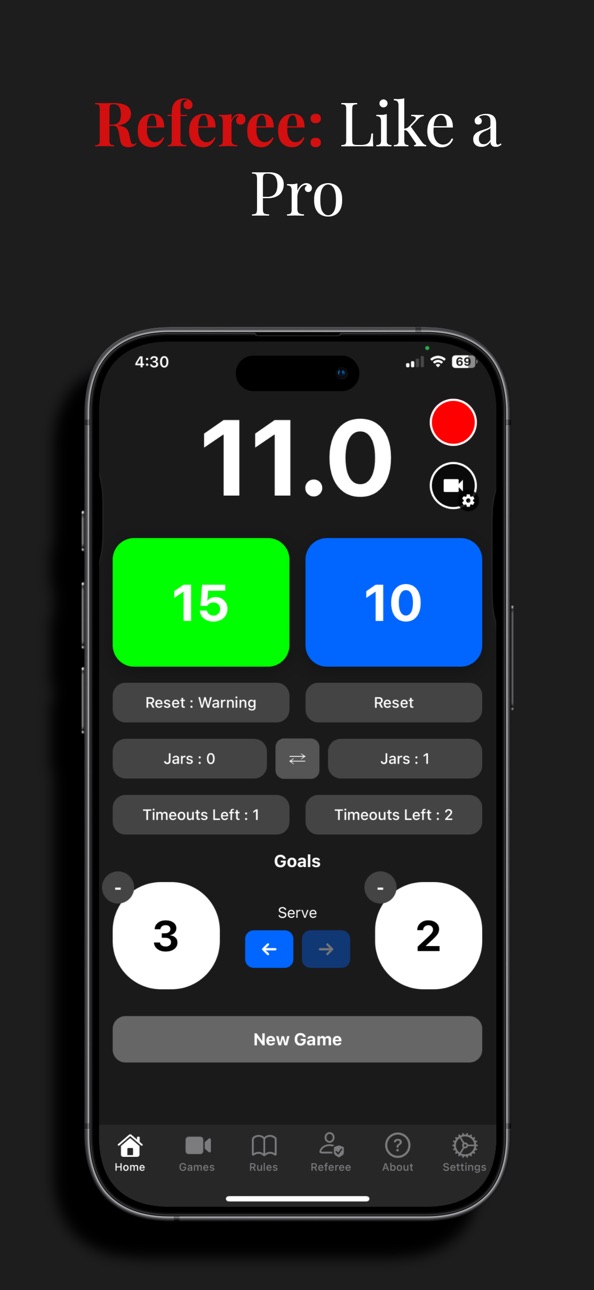
REFEREE
Run matches confidently without taking your eyes off the table.
• ITSF shot clocks with tenth-second precision
• Reset → Warning → Technical progression
• Score tracking, timeouts, and serve indicator
• Hands-free controls using volume buttons
• Customizable layout and automatic game recovery
• Track jars across an entire match.
VAR Recording lets you review key moments if a call is questioned.
Remote Viewing shares scores and timers via QR code so spectators can follow along.
PRACTICE
Train smarter.
Auto-Timer detects the ball with your camera and automatically starts the correct shot clock.
Practice mode includes zone highlighting, audio cues, and countdown alerts to help players master tournament timing.
Training Center (Premium) provides structured challenges that track every attempt so you can see real progress over time. Modeled specially after the practice games and techniques pro-master players use to reach the highest level.
COMPETE
Turn your phone into a personal foosball coach.
Auto-Timer records games and generates detailed statistics including possession charts and zone success rates. Between games or timeouts you can quickly review video clips, analyze defenses, and identify patterns that help you mid-game.
HIGHLIGHTS & MATCH REVIEW
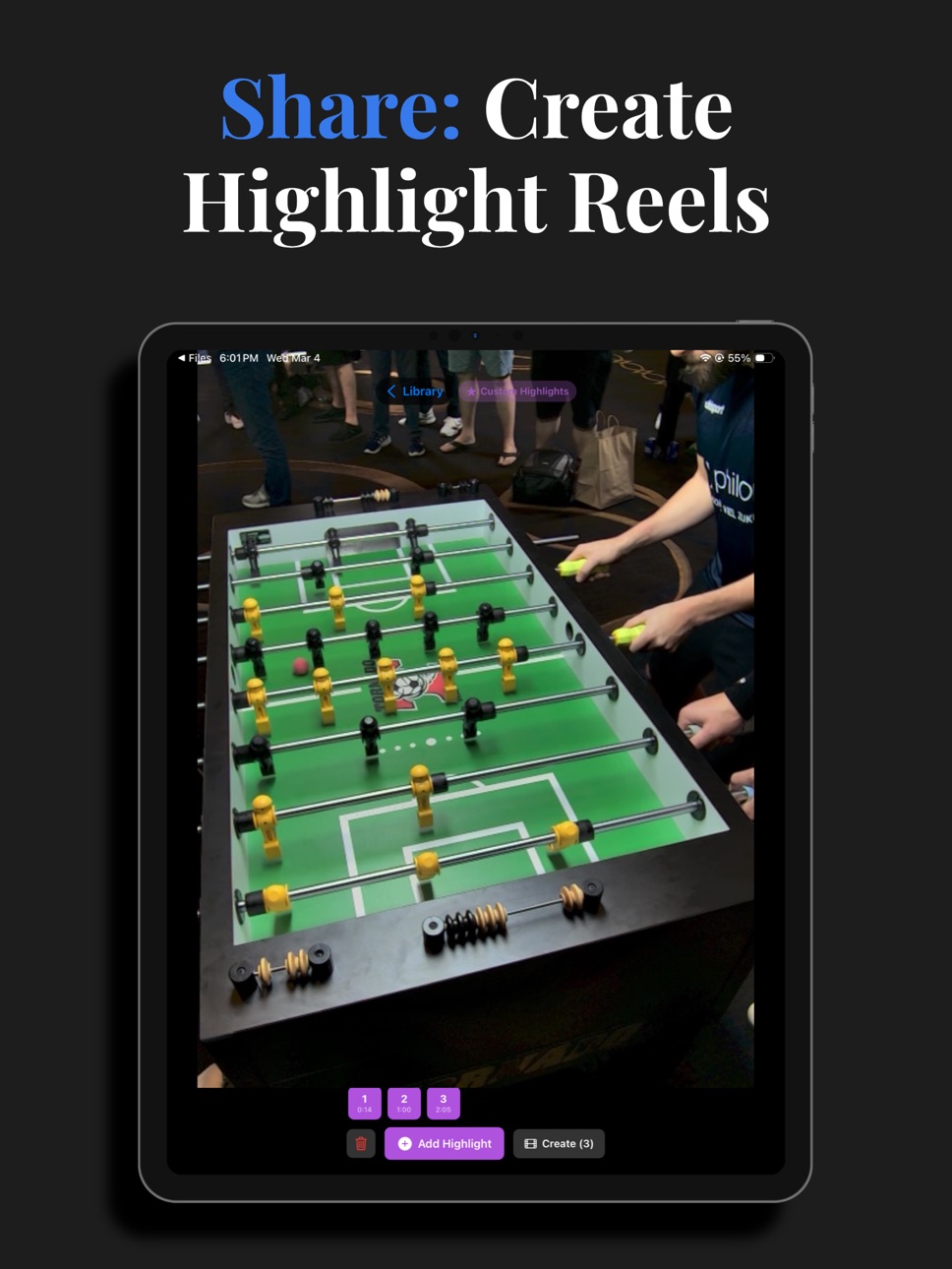
Create highlight reels automatically from goals and passes, or mark moments manually while reviewing recordings.
Import existing match videos to generate full timelines and possession statistics.
STREAM & SHARE
Share live match statistics with spectators using a QR code.
Display stats on a TV via AirPlay/HDMI or stream with your favorite broadcasting app.
Remote Control allows a second device to manage scores, matches, and highlights from a phone or web browser.
FUN MODE
Perfect for clubs and youth groups.
Players connect on their own device and earn badges for passes, shots, blocks, streaks, and milestones — no accounts required.
FREE vs PREMIUM
Free
• Referee timing tools
• VAR recording and sharing
• Auto-Timer practice mode
• Highlight reel creation
• Game playback and camera roll saves
• Training Center demo
• Fun Mode
Premium
• Training Center challenges
• Quick Jump match review filters
• Video analysis statistics
• Automatic highlight reels for streams
Whether you're learning the game, refereeing, or competing at the highest level, iRefFoos helps you see foosball like never before.
Terms of Use: https://www.apple.com/legal/internet-services/itunes/dev/stdeula/
In-App Purchases US pricing
IRefFoos Premium Group Subscription
iRefFoos Premium Monthly · Monthly$2.99
iRefFoos Premium Yearly · Yearly$29.99
Capabilities
In-App Purchases
Accessibility
ipadiphonemacrealityDevicetvoswatch
Version history 15 versions
Build 885702927v2.8.12026-05-15 22:54:08
Now add stat overlays, shot clock and reffing details to OBS.
Performance improvements.
Build 883075838v2.82026-03-11 20:12:38
Every auto-timer based game in your VAR Game Library now has a stats button. Click to see detailed possession breakdown, and success percentages per zone.
You can now import game video files, and have the auto-timer analyze them. Save the video into the Files app, and share with iRefFoos. Choose the 'Compete' Role in the role wizard. Then in camera setup, choose the file as an input source into the auto-timer. Configure auto-timer as normal, and press the Analyze Video button. Possession and timeline data will be added to the game, and now you can view statistics, see possession breakdown, even auto create highlights.
Build 880785297v2.7.02025-12-18 16:23:27
Auto-Timer is finally here - this has been a long time goal of mine, and I'm so excited for you to see it.
Auto-Timer tracks the ball on the table, knows what zone has possession and starts the appropriate count down timer. Yes it actually works!
Tri-pod required.
New Camera Setup
You have full control to choose what lens and resolution to use.
Shared between VAR and Auto-Timer
New rolling recording option
Constantly record the last 60 seconds - never miss a play, keeping storage required to a minimum.
What's New System
Every update for now on will highlight what features are new - look for it in the new About tab
Build 880172531v2.6.22025-11-29 20:00:24
Can now record in 480p - enable in settings.
Premium now shifted towards players receiving game video and not targeted towards refs.
- Referees ref matches and record, and after, share games with players. All Free.
- Players subscribe to premium to be able to view full game videos shared with them. Without, they get 30 second preview.
All users now have full access to all games in their Game Library.
Premium now required to save game videos to camera roll.
Build 880089715v2.6.12025-11-26 14:08:05
Updated screen shots to reflect current features (iPad too).
Permissions for camera and audio only requested when attempting to use VAR camera.
Active game now highlighted in Game Library.
Shared game recordings (.ireffoos files) are now cross-platform compatible. Complete with timeline data.
Build 879805571v2.6.02025-11-24 01:45:55
VAR now records referee actions and displays them during video playback (in app only).
Record and Camera View buttons moved to Home tab.
New Game Library in VAR tab where all game videos are saved.
Video clips are automatically merged into a single video for easy viewing. So you can stop and start recording as many times as you need. Merged videos also contain referee actions on playback.
Game videos can be saved to camera roll via the Game Library now.
Premium Subscription now available - allows you access to all your saved games, and allows sharing (AirDrop) of game videos. So game footage can be shared with players and other refs. Must view in iRefFoos to see referee actions and clock during playback.
Build 879439379v2.5.02025-11-03 03:55:31
VAR: (Video Assisted Recording) That's right we've added the ability to record from your camera while you ref the match. If you have a wide angle lens on your camera it'll take advantage of it. Got a tough call to make, this will give you a chance to see the footage, and make a quick call with another point a view - rewind, even screen share. Optionally you can save the video to your camera roll as well. For best results hold your phone a bit more vertically, and you should get a good view of the table. The goal of this is not to capture good game footage, but to have a chance at taking another look - and maybe VAR caught it.
Volume buttons can now be used as 10 and 15 second timer buttons. - use the Swap 10 and 15 buttons setting to swap which volume button controls which timer.
Build 879452748v2.5.12025-11-03 22:28:42
fixed bug with volume buttons as timers getting confused. also volume buttons only effect timers when in home tab - in other tabs they behave as normal volume buttons (as they should)
Build 878753645v2.3.12025-10-09 03:08:44
New Player Mode. Players looking for refs can now set the App Mode to 'Player' (in Settings), and the Referee tab changes to the Player tab, where players can see what refs are available and request refs.
Players also get push notifications if a ref accepts their match or cancels.
Build 878642957v2.3.02025-10-04 20:54:07
Improved ref / device id issues. Refs now have user accounts, and all their devices are tied to that single account. No matter where you are and what device you are using, you'll never miss a notification again. Sign in only required for Referee tab access.
Added stripe integration so players can now pay refs electronically for their services. Full international currency support. Ref sets their own custom rate, and players can choose their desired ref.
Removed any mention of cash rates / amounts - as many organizations handle ref payments outside of the system, so any amounts suggested here would lead to confusion.
Build 878102054v2.2.12025-09-17 16:36:00
Privacy policy updated - as app now can collect location information. Used to ensure ref requests only come from those in your area.
Based on feedback from ITSF, the following changes have been made:
- Reset : Technical changed to Reset : Penalty.
- 5 second count down after goals.
- Ability to swap positions of 10 and 15 second buttons.
Build 877949404v2.22025-09-09 13:04:12
Get push notifications from players using https://get-a-ref.com to request a ref, and if you're close to them (and mark yourself available), you'll get alerted when a ref is needed. Right within the app, you can accept the reffing request and you'll be told what table to go to.
In Settings you can now turn on haptic feedback when 10 or 15 second timer buttons are pushed.
Build 876851724v2.12025-08-07 20:42:32
New Rules tab: Search ITSF rules by keyword (like Jar, Reset, Time Out), quickly filters down rules to just those sections that contain the keyword. Rules are grouped for easy navigation, with expandable and collapsible sections.
New UI Configuration section in Settings. Given the various sizes of phones (and people's thumbs), you can now order the UI elements wherever you like on the screen (from top to bottom). Move the 10 and 15 seconds buttons so they are in close range of your thumb to match how you like to hold the phone.
Improved count down timer precision.
Build 876524473v2.02025-07-20 08:06:20
Version 2.0 totally rebuilt from scratch - will allow for further development.
New Settings panel - allows you to control flash (on or off), and how long flash lasts - also control how long time outs and in between games are.
Can now decrease goals scored if score button pressed by accident.
Build 1909380v1.02009-08-28 20:01:58
Price history by region
Currency
Show
Columns
Search
Availability 1 of 1 storefronts
| Region | Language | Price | Ratings | Avg | Version |
|---|---|---|---|---|---|
| US | en-US | Free | 2 | 5.0 | 2.8.1 |
Change log 19 changes · US
✎
releaseNotes updated
Now add stat overlays, shot clock and reffing details to OBS.
Performance improvements.
✎
description updated
iRefFoos – Find the Tells
Foosball players are constantly searching for tells — the small habits and patterns that reveal how an opponent plays. Until now, dis
✎
subtitle updated
Foosball reffing at its finest
✎
name updated
iRefFoos
◆
Version 2.8.1 released
Now add stat overlays, shot clock and reffing details to OBS.
Performance improvements.
◆
Version 2.8 released
Every auto-timer based game in your VAR Game Library now has a stats button. Click to see detailed possession breakdown, and success percentages per zone.
You can now import game video files, and have the auto-timer analyze them. Save t
◆
Version 2.7.0 released
Auto-Timer is finally here - this has been a long time goal of mine, and I'm so excited for you to see it.
Auto-Timer tracks the ball on the table, knows what zone has possession and starts the appropriate count down timer. Yes it actuall
◆
Version 2.6.2 released
Can now record in 480p - enable in settings.
Premium now shifted towards players receiving game video and not targeted towards refs.
- Referees ref matches and record, and after, share games with players. All Free.
- Players subscribe to
◆
Version 2.6.1 released
Updated screen shots to reflect current features (iPad too).
Permissions for camera and audio only requested when attempting to use VAR camera.
Active game now highlighted in Game Library.
Shared game recordings (.ireffoos files) are now cr
◆
Version 2.6.0 released
VAR now records referee actions and displays them during video playback (in app only).
Record and Camera View buttons moved to Home tab.
New Game Library in VAR tab where all game videos are saved.
Video clips are automatically merged i
◆
Version 2.5.1 released
fixed bug with volume buttons as timers getting confused. also volume buttons only effect timers when in home tab - in other tabs they behave as normal volume buttons (as they should)
◆
Version 2.5.0 released
VAR: (Video Assisted Recording) That's right we've added the ability to record from your camera while you ref the match. If you have a wide angle lens on your camera it'll take advantage of it. Got a tough call to make, this will give y
◆
Version 2.3.1 released
New Player Mode. Players looking for refs can now set the App Mode to 'Player' (in Settings), and the Referee tab changes to the Player tab, where players can see what refs are available and request refs.
Players also get push notificati
◆
Version 2.3.0 released
Improved ref / device id issues. Refs now have user accounts, and all their devices are tied to that single account. No matter where you are and what device you are using, you'll never miss a notification again. Sign in only required
◆
Version 2.2.1 released
Privacy policy updated - as app now can collect location information. Used to ensure ref requests only come from those in your area.
Based on feedback from ITSF, the following changes have been made:
- Reset : Technical changed to Reset
◆
Version 2.2 released
Get push notifications from players using https://get-a-ref.com to request a ref, and if you're close to them (and mark yourself available), you'll get alerted when a ref is needed. Right within the app, you can accept the reffing request
◆
Version 2.1 released
New Rules tab: Search ITSF rules by keyword (like Jar, Reset, Time Out), quickly filters down rules to just those sections that contain the keyword. Rules are grouped for easy navigation, with expandable and collapsible sections.
New UI
◆
Version 2.0 released
Version 2.0 totally rebuilt from scratch - will allow for further development.
New Settings panel - allows you to control flash (on or off), and how long flash lasts - also control how long time outs and in between games are.
Can now decr
◆
Version 1.0 released