Home › Productivity

 US
US
1 of 1 storefronts
Content in en-US
Content in en-US
Information
Apple ID318095638
Bundle IDcom.yoctoville.errands
SellerSeller
Min iOS9.0
Min macOS11.0
Device familiesiphone, ipad, ipod
Released2009-09-12
Copyright© 2009-2017 David Mandell
WebsiteLink ↗
Preview 2 platforms
iPhone 5 images


iPad 3 images


What’s New Version 5.0.1
This update from Apple will improve the functionality of this app. No new features are included.
• Ready for iOS 11 (64-bit)
• New calendar display (swipe up/down to move between months)
• Bug fixes and performance improvements.
• Version 5.0.1 contains additional bug fixes and performance improvements.
Please spread the word to your friends and be sure to write a review on the App Store if you are so inclined ... it is greatly appreciated!
Description
Errands is a task manager with a pleasing design and is easy to learn and use. Crafted with a blend of basic and advanced features: Folders, Checklists, Task Images, Scheduling & Repeating, Alerts (alarms), Automatic Badge Updating, Calendar View, Mail Tasks, Multiple View Modes, Search and more!
KEY BENEFITS AND FEATURES
• The overall user interface is tastefully designed with careful attention to detail and functionality.
• A universal app with full support for the iPhone and iPad
• Supports iCloud Sync (Premium). This allows you to keep Errands in sync on multiple iOS devices (iPhone, iPad).
• Alerts (reminders) for tasks, with choice of sound and several repeat options. Plus automatic updating of the app icon badge. Both of these work even when Errands is not actively running.
• Customizable folders, so you can organize your tasks to best suit your needs (for example, Work, Home, Errands). You can have as many folders as you wish and folder attributes (name, icon, checkbox) are fully customizable.
• A Focus Folder which is based on a "star" system. You can toggle the "star" state for any task by tapping on the star icon. When a task comes due it will be auto-starred. This makes the Focus Folder very useful for quickly glancing at what you need to do NOW. The badge icon will reflect the number of tasks in the Focus Folder, keeping you up-to-date on what tasks need attention.
• A monthly calendar view for tasks with due dates. To access it, tap on the calendar icon on the bottom toolbar. The calendar displays items based on the current folder you are in. To see all tasks, choose the calendar from the All Tasks folder.
• View options allows you to switch between normal view (4 tasks per screen) and condensed view (8 tasks per screen).
• Mail tasks (single tasks as well as entire folders).
• You can select from a built-in collection of image icons, choose a photo from your library, or take a new photo to customize your tasks.
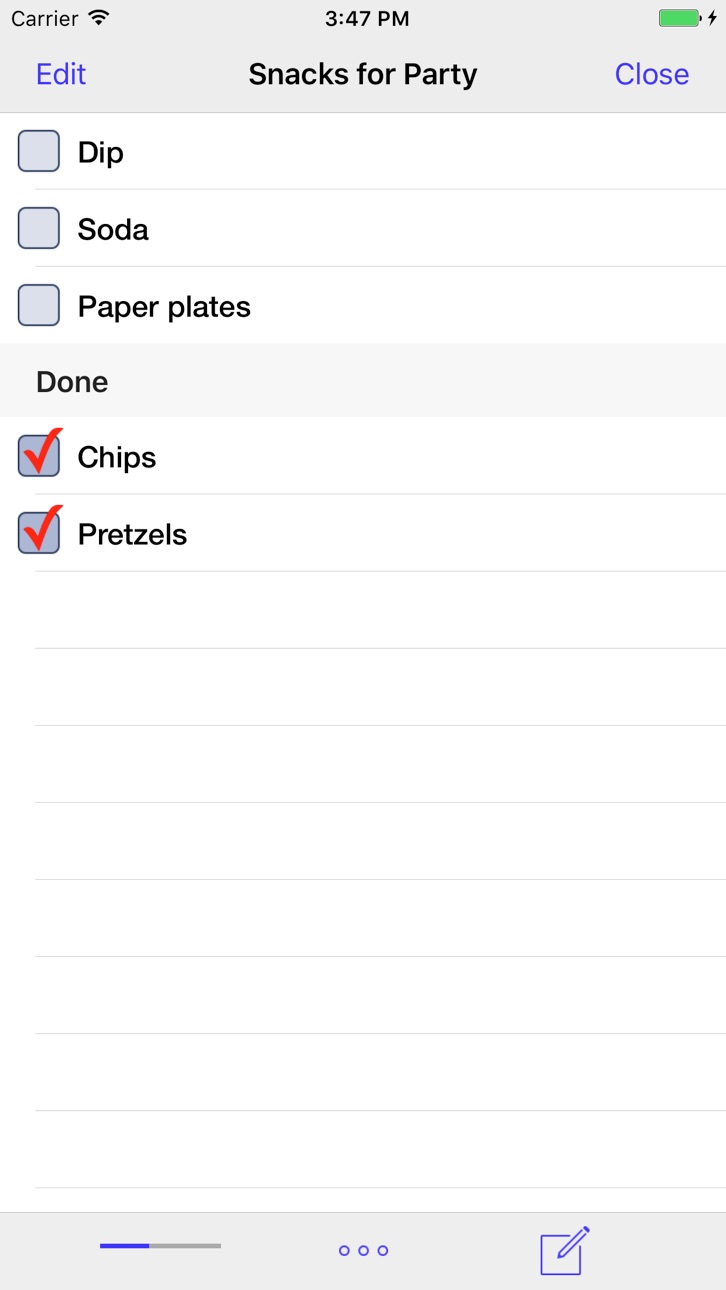
• A unique feature allows notes to be viewed as a checklist. This is particularly handy for small shopping lists, multi-step tasks, etc.
• Tasks can be scheduled with a due date / time. There is a full range of repeating options.
• A convenient Recycle Bin allows you to easily create new tasks from previously completed entries. This is a big time-saver given that many tasks are things that are done again (and again). And saving data-bits from the virtual landfill makes you feel good!
• Tasks can be sorted by various schemes as well as arranged manually.
• Each task has a title along with separate detail and notes fields.
• Customize Errands to fit your tastes using the in-app Settings.
ABOUT THE PREMIUM UPGRADE
Errands is NOT a lite version or crippled in any way. It is the complete app! If you enjoy it, please consider purchasing the Premium Upgrade. It will provide food for me and my dog as well as support continued development. Thanks for your support!
HOW TO GET THE MOST FROM ERRANDS
• Explore the app, play around with its features and settings.
• There is a Mini User's Guide in the Settings.
• Please visit yoctoville.com for answers to Frequently Asked Questions and other support info.
Capabilities
In-App Purchases
Accessibility
ipadiphonemacrealityDevicetvoswatch
Version history 25 versions
Build 823867388v5.0.12017-10-02 15:12:55
This update from Apple will improve the functionality of this app. No new features are included.
• Ready for iOS 11 (64-bit)
• New calendar display (swipe up/down to move between months)
• Bug fixes and performance improvements.
• Version 5.0.1 contains additional bug fixes and performance improvements.
Please spread the word to your friends and be sure to write a review on the App Store if you are so inclined ... it is greatly appreciated!
Build 823663719v5.02017-09-15 19:29:54
• Ready for iOS 11 (64-bit)
• New calendar display (swipe up/down to move between months)
• Bug fixes and performance improvements.
Please spread the word to your friends and be sure to write a review on the App Store if you are so inclined ... it is greatly appreciated!
Build 59483185v4.0.22013-09-25 20:31:36
• Design refresh for iOS 7.
• Major improvements to Errands iCloud Sync for iOS 7 (easier setup, faster sync, more reliable).
• Supports Background App Refresh, a new feature of iOS 7 which helps keep your devices in sync with each other.
• Added Settings > General > Alerts & Sounds for full control (especially useful if you are running Errands on multiple devices).
• Many bug fixes and small enhancements.
• 4.0.2 fixes a few small bugs in the 4.0 release.
NOTE: Errands retains support for iOS 5 & 6, but the codebase and design remain largely unchanged for these older versions of iOS. It is recommended that you update to iOS 7 for the best experience with Errands.
** If you are enjoying Errands, please leave a new rating in the App Store. It really means a lot!
Build 44862689v4.0.12013-09-20 20:05:16
• Design refresh for iOS 7.
• Major improvements to Errands iCloud Sync for iOS 7 (easier setup, faster sync, more reliable).
• Supports Background App Refresh, a new feature of iOS 7 which helps keep your devices in sync with each other.
• Added Settings > General > Alerts & Sounds for full control (especially useful if you are running Errands on multiple devices).
• Many bug fixes and small enhancements.
• 4.0.1 fixes a few bugs in the 4.0 release.
NOTE: Errands retains support for iOS 5 & 6, but the codebase and design remain largely unchanged for these older versions of iOS. It is recommended that you update to iOS 7 for the best experience with Errands.
** If you are enjoying Errands, please leave a new rating in the App Store. It really means a lot!
Build 22464343v4.02013-09-18 06:38:08
• Design refresh for iOS 7.
• Major improvements to Errands iCloud Sync for iOS 7 (easier setup, faster sync, more reliable).
• Supports Background App Refresh, a new feature of iOS 7 which helps keep your devices in sync with each other.
• Many bug fixes and small enhancements.
NOTE: Errands retains support for iOS 5 & 6, but the codebase and design remain largely unchanged for these older versions of iOS. It is recommended that you update to iOS 7 for the best experience with Errands.
** If you are enjoying Errands, please leave a new rating in the App Store. It really means a lot!
Build 13800013v3.2.32013-02-04 16:06:09
- Small (but important) bug fix. Corrects an issue that could result in some task alerts not firing at the scheduled time.
** NOTE: If you are enjoying Errands, please leave a new rating on the App Store. It really means a lot!
Build 13617234v3.2.22013-01-29 15:05:45
- Fine tuning and bug fixing.
** If you are enjoying Errands, please leave a new rating on the App Store. It really means a lot!
Build 13009635v3.2.12012-12-19 22:05:04
- NOTE: Errands now requires iOS 5 or higher.
- Full support for 4" Retina displays (iPhone 5 & iPod touch 5th generation).
- New and improved Task Options menu.
- Ability to edit task completion dates.
- Passcode Lock now available on iPad.
- Condensed View for tasks now available on iPad.
- Taking a photo for task images now available on iPad.
- Notes for tasks have a larger window on iPad.
- Setting for a More button when adding a new task. Tapping Done (or the Next key) will instantly create a new task with the default options as defined in Settings > Tasks. The More button is used to access the full set of options when adding a new task.
- Setting for Alert Remind default when creating a new task.
- Setting to Auto-Capitalize Titles.
- Lots of fine-tuning and bug-fixing for iCloud Sync (yay!)
- Plus many bug fixes and small enhancements.
- NOTE: Errands 3.2.1 includes bug fixes for issues introduced in 3.2.
** If you are enjoying Errands, please leave a new rating on the App Store. It really means a lot!
Build 12898840v3.22012-12-13 18:48:35
NOTE: There is a bug in Errands 3.2 which will cause it to crash if you try to set an alert and there is not a default value set. I have submitted Errands 3.2.1 to rectify this problem. In the meantime, go to Settings > Tasks > Alert (Due Time) and set it to anything other than "None".
- Errands now requires iOS 5 or higher.
- Full support for 4" Retina displays (iPhone 5 & iPod touch 5th generation).
- New and improved Task Options menu.
- Ability to edit task completion dates.
- Passcode Lock now available on iPad.
- Condensed View for tasks now available on iPad.
- Taking a photo for task images now available on iPad.
- Notes for tasks have a larger window on iPad.
- Setting for a More button when adding a new task. Tapping Done (or the Next key) will instantly create a new task with the default options as defined in Settings > Tasks. The More button is used to access the full set of options when adding a new task.
- Setting for Alert Remind default when creating a new task.
- Setting to Auto-Capitalize Titles.
- Lots of fine-tuning and bug-fixing for iCloud Sync (yay!)
- Plus many bug fixes and small enhancements.
** If you are enjoying Errands, please leave a new rating on the App Store. It really means a lot!
Build 11371631v3.1.52012-10-12 01:12:10
- Important bugfix for Errands iCloud Sync. Note that this is the ONLY fix in this update. Much more to come in future updates!
** If you are enjoying Errands, please leave a new rating on the App Store. It really means a lot!
Build 11038433v3.1.42012-10-02 01:17:53
- Important bugfix for Errands iCloud Sync on iOS 6. This resolves a problem where date/time fields would shift by several hours when syncing via iCloud. Note that this is the ONLY fix in this update. Much more to come in future updates!
** If you are enjoying Errands, please leave a new rating on the App Store. It really means a lot!
Build 7081838v3.1.32012-03-23 01:23:02
- Optimized for the Retina display on the new iPad
- Several bug fixes
** If you are enjoying Errands, please leave a new rating on the App Store. It really means a lot!
Build 6506637v3.1.22012-02-15 23:35:45
- Added Auto Purge for Logbook & Recycle Bin. It is enabled via Settings | Tasks | Auto Purge and is recommended for use with iCloud syncing.
- Several bug fixes and performance tweaks.
** If you are enjoying Errands, please leave a new rating on the App Store. It really means a lot!
Build 6165802v3.1.12012-02-09 02:50:40
- Performance optimizations for iCloud sync.
- Plus many bug fixes and small enhancements.
** If you are enjoying Errands, please leave a new rating on the App Store. It really means a lot!
Build 5933826v3.12012-01-24 00:42:20
- iCloud syncing (premium) -- allows you to automatically keep multiple iOS devices in sync with each other.
- iCloud syncing of selected preferences.
- Alternate Checklist Mode (no checkbox, tap anywhere on a cell to toggle checked / unchecked; items remain in place).
- Folder List now displays custom folder icons.
- Plus many bug fixes and small enhancements.
** If you are enjoying Errands, please leave a new rating on the App Store. It really means a lot!
Build 4979851v3.0.42011-11-20 22:21:49
- Added "Auto Reset Checklists" option (Settings | Tasks). If this is turned OFF, checklists will not be reset when they are repeated, recycled or duplicated.
- Added 11 high-quality custom alert sounds (Premium only)
- Plus many bug fixes and small enhancements.
- This update requires iOS 4.0 or higher. Please do not attempt updating if you are still using iOS 3.x.
Note for iOS5 Users -- Open the main Settings app (located on your home screen with gears in the icon), tap on Notifications, and find Errands in the list. Ensure that everything is ON (Banners/Alerts, Badge App Icon, Sounds, Show in Lock Screen, Notification Center).
** If you are enjoying Errands, please leave a new rating on the App Store. It really means a lot!
Build 4755391v3.0.32011-11-03 21:41:41
- Configurable app badge modes (focus and overdue/due).
- New auto-star options (from disabled to 28 days in advance).
- Folder paging (swipe mode) can now be disabled.
- Long press gesture to bring up notes / checklists.
- Plus many bug fixes and small enhancements.
- This update requires iOS 4.0 or higher. Please do not attempt updating if you are still using iOS 3.x.
Note for iOS5 Users -- Open the main Settings app (located on your home screen with gears in the icon), tap on Notifications, and find Errands in the list. Ensure that everything is ON (Banners/Alerts, Badge App Icon, Sounds, Show in Lock Screen, Notification Center).
** If you are enjoying Errands, please leave a new rating on the App Store. It really means a lot!
Build 4603187v3.0.22011-10-26 22:18:39
- Major UI redesign. Lots of new and improved functionality.
- Native iPad support (universal app)
- Plus LOTS of little tweaks and enhancements.
- This update requires iOS 4.0 or higher. Please do not attempt updating if you are still using iOS 3.x.
- 3.0.2 contains many bug fixes and some fine-tuning.
- More updates are on the way :)
Note for iOS5 Users -- Open the main Settings app (located on your home screen with gears in the icon), tap on Notifications, and find Errands in the list. Ensure that everything is ON (Banners/Alerts, Badge App Icon, Sounds, Show in Lock Screen, Notification Center).
** If you are enjoying Errands, please leave a new rating on the App Store. It really means a lot!
Build 4570975v3.0.12011-10-20 01:07:20
- Major UI redesign. Lots of new and improved functionality.
- Native iPad support (universal app)
- Important fixes for iOS 5
- Plus LOTS of little tweaks and enhancements.
- This update requires iOS 4.0 or higher. Please do not attempt updating if you are still using iOS 3.x.
- 3.0.1 fixes many bugs which cropped up in the 3.0 update.
- There is still a problem with auto-starring and badge updating. This is fixed in Errands 3.0.2 which has been submitted to the App Store and will be available soon.
Note for iOS5 Users -- Open the main Settings app (located on your home screen with gears in the icon), tap on Notifications, and find Errands in the list. Ensure that everything is ON (Banners/Alerts, Badge App Icon, Sounds, Show in Lock Screen, Notification Center).
** If you are enjoying Errands, please leave a new rating in the App Store. It really means a lot!
Build 4439871v3.02011-10-17 17:57:44
Please see IMPORTANT notes below!
- Major UI redesign. Lots of new and improved functionality.
- Native iPad support (universal app)
- Important fixes for iOS 5
- Plus LOTS of little tweaks and enhancements.
- This update requires iOS 4.0 or higher. Please do not attempt updating if you are still using iOS 3.x.
- New Users -- Oops! A silly bug will cause the base folders to get replicated each time the app is cold-started. I am submitting a fixed version today. In the meantime, you can just delete the extra folders.
- Existing Users - There is a bug in the update process which causes all undated tasks to get "starred" which creates some obvious confusion. To rectify, simply tap on the star to unstar all tasks you don't want to show up in the focus folder.
- A note regarding the Focus Folder -- The new version uses a "star" system for the Focus Folder. It is MUCH more flexible than the old solution. You can toggle the "star" state for any task by tapping on the star icon. When a task comes due it will be auto-starred. This makes the Focus Folder much more useful as you can very easily determine what you need to work on NOW. The badge icon will reflect the number of tasks in the Focus Folder, keeping you up-to-date on what tasks need attention.
** If you are enjoying Errands, please leave a new rating in the App Store. It really means a lot!
Build 3161003v2.2.12010-11-24 01:16:50
- Added search capability (finally!). You can search the title, detail and notes fields.
- Menu option to directly edit a checklist from the Task Details screen.
- Fixed settings bugs with Cool Date Format and Flip Titlebar Buttons
- Fixed a bug which resulted in a sound being played even if the alert for a given task was set to "none".
- Fixed bug that wouldn't allow selection of a built-in image after using a photo for a default folder image.
- Better handling of displaying due dates.
- Other small fixes and tweaks.
** NOTE: If you are enjoying Errands, please leave a new rating in the App Store. It really means a lot!
Build 3102364v2.22010-11-07 00:47:25
- Major improvements to the Notes as Checklist feature. More powerful than ever!
- Added sort by folder for All Tasks, Focus and Completed folders (Turn it on in Settings | Other | Sort By Folder)
- Extra alert sounds that were formerly part of the Early Access Features are now made available in the free version!
- Passcode Lock (a new Premium Early Access Feature).
- All graphics in Errands now support Retina Display resolutions, including all the Built-In Image Icons.
- 20 additional Built-In Image Icons, including a selection of holiday-themed images.
- Photo images used for task icons now support Retina graphics (must reselect images to convert to higher resolution)
- When taking a photo from within Errands, the original is saved to the photo library.
- Settings have been overhauled, several new features!
- Task defaults for priority, due date, folder and alerts.
- Alerts are now configurable on a per-task basis.
- Fully updated the Mini User's Guide in the Settings view.
- App load times have been improved, particularly if you have a lot of tasks.
- Renamed the "Inbox" folder to "Unassigned", which is more descriptive.
- Fixed a problem where tasks with a due time of today didn't have the option to "Put Off Till Tomorrow".
- Fixed a problem which sometimes caused the date on a condensed view to get truncated / shifted left.
- Fixed a rare problem when changing time zones.
- Many other smaller bug fixes and minor enhancements.
** NOTE: If you are enjoying Errands, please leave a new rating in the App Store. It really means a lot!
Build 2953747v2.1.22010-09-14 01:02:49
- Added a calendar view for tasks with due dates. To access it, tap on the calendar icon on the bottom toolbar. The calendar displays items based on the current folder you are in. To see all tasks, choose the calendar from the All Tasks folder.
- Changed the view button (the "eye" icon) to show a screen for setting both the View Mode and Sort Mode for the current folder.
- Fixed a bug that sometimes made the Premium Upgrade unavailable to purchase.
- Fine-tuning of the badge updating logic.
- Fine-tuning of alert logic.
- Many graphics updated for the high resolution Retina display.
- New priority images with easier selection.
** NOTE: If you are enjoying Errands, please leave a new rating in the App Store. It really means a lot!
Build 2861494v2.1.12010-08-06 21:55:35
- Fixed Automatic (Live Updating) of the app icon badge for Focus Tasks.
- Fixed an issue that caused the due-date calendar to display the incorrect current date.
- Updated the icon (I went for simple...)
Build 2834456v2.12010-07-30 17:45:02
- This release introduces an In App Purchase upgrade to Errands Premium, which helps support continued development and adds early access to certain features before they are available in the free version. Thanks in advance for your support!
- Added custom sounds and customizable lead-time to alerts (global settings for now, per-task options coming soon). Note that custom sounds are currently a Premium Early Access Feature.
- Automatic (Live Updating) of the app icon is still broken for Focus Tasks (sorry about that!). Another update will be out soon.
- Several small performance enhancements.
- Updated Tips & Tricks to include info on managing folders.
No pricing data captured yet — comparisons appear once the app has paid storefronts or in-app purchases.
Availability 1 of 1 storefronts
| Region | Language | Price | Ratings | Avg | Version |
|---|---|---|---|---|---|
| US | en-US | Free | 10.6k | 4.7 | 5.0.1 |
Change log 29 changes · US
✎
releaseNotes updated
This update from Apple will improve the functionality of this app. No new features are included.
• Ready for iOS 11 (64-bit)
• New calendar display (swipe up/d
✎
description updated
Errands is a task manager with a pleasing design and is easy to learn and use. Crafted with a blend of basic and advanced features: Folders, Checklists, Task Im
✎
subtitle updated
Keeps Your Life On Track
✎
name updated
Errands To-Do List
◆
Version 5.0.1 released
This update from Apple will improve the functionality of this app. No new features are included.
• Ready for iOS 11 (64-bit)
• New calendar display (swipe up/down to move between months)
• Bug fixes and performance improvements.
• Version
◆
Version 5.0 released
• Ready for iOS 11 (64-bit)
• New calendar display (swipe up/down to move between months)
• Bug fixes and performance improvements.
Please spread the word to your friends and be sure to write a review on the App Store if you are so incline
◆
Version 4.0.2 released
• Design refresh for iOS 7.
• Major improvements to Errands iCloud Sync for iOS 7 (easier setup, faster sync, more reliable).
• Supports Background App Refresh, a new feature of iOS 7 which helps keep your devices in sync with each other.
•
◆
Version 4.0.1 released
• Design refresh for iOS 7.
• Major improvements to Errands iCloud Sync for iOS 7 (easier setup, faster sync, more reliable).
• Supports Background App Refresh, a new feature of iOS 7 which helps keep your devices in sync with each other.
•
◆
Version 4.0 released
• Design refresh for iOS 7.
• Major improvements to Errands iCloud Sync for iOS 7 (easier setup, faster sync, more reliable).
• Supports Background App Refresh, a new feature of iOS 7 which helps keep your devices in sync with each other.
•
◆
Version 3.2.3 released
- Small (but important) bug fix. Corrects an issue that could result in some task alerts not firing at the scheduled time.
** NOTE: If you are enjoying Errands, please leave a new rating on the App Store. It really means a lot!
◆
Version 3.2.2 released
- Fine tuning and bug fixing.
** If you are enjoying Errands, please leave a new rating on the App Store. It really means a lot!
◆
Version 3.2.1 released
- NOTE: Errands now requires iOS 5 or higher.
- Full support for 4" Retina displays (iPhone 5 & iPod touch 5th generation).
- New and improved Task Options menu.
- Ability to edit task completion dates.
- Passcode Lock now available on iPad
◆
Version 3.2 released
NOTE: There is a bug in Errands 3.2 which will cause it to crash if you try to set an alert and there is not a default value set. I have submitted Errands 3.2.1 to rectify this problem. In the meantime, go to Settings > Tasks > Alert (Due T
◆
Version 3.1.5 released
- Important bugfix for Errands iCloud Sync. Note that this is the ONLY fix in this update. Much more to come in future updates!
** If you are enjoying Errands, please leave a new rating on the App Store. It really means a lot!
◆
Version 3.1.4 released
- Important bugfix for Errands iCloud Sync on iOS 6. This resolves a problem where date/time fields would shift by several hours when syncing via iCloud. Note that this is the ONLY fix in this update. Much more to come in future updates!
*
◆
Version 3.1.3 released
- Optimized for the Retina display on the new iPad
- Several bug fixes
** If you are enjoying Errands, please leave a new rating on the App Store. It really means a lot!
◆
Version 3.1.2 released
- Added Auto Purge for Logbook & Recycle Bin. It is enabled via Settings | Tasks | Auto Purge and is recommended for use with iCloud syncing.
- Several bug fixes and performance tweaks.
** If you are enjoying Errands, please leave a new ra
◆
Version 3.1.1 released
- Performance optimizations for iCloud sync.
- Plus many bug fixes and small enhancements.
** If you are enjoying Errands, please leave a new rating on the App Store. It really means a lot!
◆
Version 3.1 released
- iCloud syncing (premium) -- allows you to automatically keep multiple iOS devices in sync with each other.
- iCloud syncing of selected preferences.
- Alternate Checklist Mode (no checkbox, tap anywhere on a cell to toggle checked / unche
◆
Version 3.0.4 released
- Added "Auto Reset Checklists" option (Settings | Tasks). If this is turned OFF, checklists will not be reset when they are repeated, recycled or duplicated.
- Added 11 high-quality custom alert sounds (Premium only)
- Plus many bug fixes
◆
Version 3.0.3 released
- Configurable app badge modes (focus and overdue/due).
- New auto-star options (from disabled to 28 days in advance).
- Folder paging (swipe mode) can now be disabled.
- Long press gesture to bring up notes / checklists.
- Plus many bug fi
◆
Version 3.0.2 released
- Major UI redesign. Lots of new and improved functionality.
- Native iPad support (universal app)
- Plus LOTS of little tweaks and enhancements.
- This update requires iOS 4.0 or higher. Please do not attempt updating if you are still us
◆
Version 3.0.1 released
- Major UI redesign. Lots of new and improved functionality.
- Native iPad support (universal app)
- Important fixes for iOS 5
- Plus LOTS of little tweaks and enhancements.
- This update requires iOS 4.0 or higher. Please do not attempt
◆
Version 3.0 released
Please see IMPORTANT notes below!
- Major UI redesign. Lots of new and improved functionality.
- Native iPad support (universal app)
- Important fixes for iOS 5
- Plus LOTS of little tweaks and enhancements.
- This update requires iOS 4.
◆
Version 2.2.1 released
- Added search capability (finally!). You can search the title, detail and notes fields.
- Menu option to directly edit a checklist from the Task Details screen.
- Fixed settings bugs with Cool Date Format and Flip Titlebar Buttons
- Fixed
◆
Version 2.2 released
- Major improvements to the Notes as Checklist feature. More powerful than ever!
- Added sort by folder for All Tasks, Focus and Completed folders (Turn it on in Settings | Other | Sort By Folder)
- Extra alert sounds that were formerly par
◆
Version 2.1.2 released
- Added a calendar view for tasks with due dates. To access it, tap on the calendar icon on the bottom toolbar. The calendar displays items based on the current folder you are in. To see all tasks, choose the calendar from the All Tasks fol
◆
Version 2.1.1 released
- Fixed Automatic (Live Updating) of the app icon badge for Focus Tasks.
- Fixed an issue that caused the due-date calendar to display the incorrect current date.
- Updated the icon (I went for simple...)
◆
Version 2.1 released
- This release introduces an In App Purchase upgrade to Errands Premium, which helps support continued development and adds early access to certain features before they are available in the free version. Thanks in advance for your support!