Home › Reference

 US
US
1 of 1 storefronts
Content in en-US
Content in en-US
Information
Preview 2 platforms
iPhone 6 images


iPad 5 images



What’s New Version 5.3
- Alternate ISS orbital data server
- iOS updates
- Darkmode updates
- Option to share pass alerts to calendar
- SpaceX spacecraft images and information updated
- Starlink satellites added
- New Debris icon
- Https used by default
- Iridium flares removed (sad to see them go!)
- Increased maximum number of notifications
- Bug fixes
Have a special satellite you want added? Please contact support to explore how we can get it into the app for you.
Description
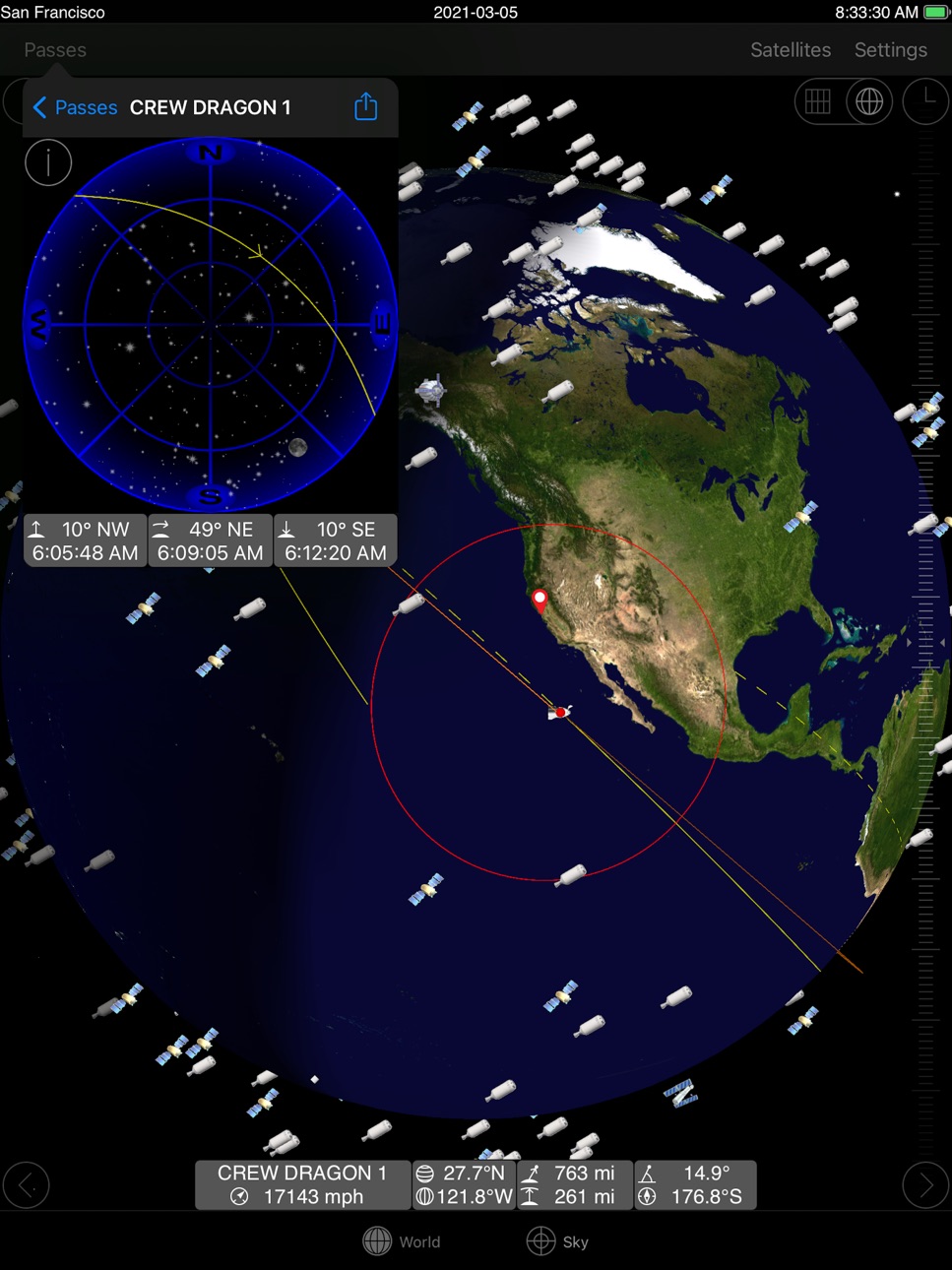
Real time satellite tracking on your iPhone, iPad or iPod touch. Find out when and where any satellite including the international space station can be seen from any location in the world. Easily identify satellites seen in the sky with real time tracking.
SpaceX spacecraft Crew Dragon, Dragon CRS and Starlink included.
Can also be used to accurately determine dish orientation for geostationary satellites using iPhone GPS location.
Features:
- World map view with orbit track
- Overhead sky track view
- Visible and 24 hour pass predictions
- Pass alerts
- Supports landscape or portrait orientation
- One touch orbit data update
- Customizable satellite sets
- Easy setup using Apple location or city list
* Requires occasional data network or WiFi access to update satellite orbital data.
See web site for more information.
Accessibility
ipadiphonemacrealityDevicetvoswatch
Version history 18 versions
Build 840907632v5.32021-03-16 14:01:47
- Alternate ISS orbital data server
- iOS updates
- Darkmode updates
- Option to share pass alerts to calendar
- SpaceX spacecraft images and information updated
- Starlink satellites added
- New Debris icon
- Https used by default
- Iridium flares removed (sad to see them go!)
- Increased maximum number of notifications
- Bug fixes
Have a special satellite you want added? Please contact support to explore how we can get it into the app for you.
Build 840834866v5.22021-03-11 16:37:13
- Alternate ISS orbital data server
- iOS updates
- Darkmode updates
- Option to share pass alerts to calendar
- SpaceX spacecraft images and information updated
- Starlink satellites added
- New Debris icon
- Https used by default
- Iridium flares removed (sad to see them go!)
- Increased maximum number of notifications
- Bug fixes
Have a special satellite you want added? Please contact support to explore how we can get it into the app for you.
Build 840751541v5.12021-03-06 19:36:13
- Alternate ISS orbital data server
- iOS updates
- Darkmode updates
- Option to share pass alerts to calendar
- SpaceX spacecraft images and information updated
- Starlink satellites added
- New Debris icon
- Https used by default
- Iridium flares removed (sad to see them go!)
Have a special satellite you want added? Please contact support to explore how we can get it into the app for you.
Build 823803310v5.02017-12-04 06:05:05
- iOS 11 updates
- iPhone X support
- Battery status indication
- Cache to reduce network data usage
- Bug fixes
Build 823600302v4.32017-09-10 15:18:48
- Added ground track, footprint and orbit color preferences for world view
Some people are reporting with the iOS 11 update that the passes list gets stuck updating when the app is first launched. A work around is to switch to another tab and return the passes list. Working on an update to address this as soon as possible. Please contact gosatwatch_support @ gosoftworks.com if you still see problems after the iOS 11 update.
Build 823315185v4.22017-08-16 19:04:43
- Bug fixes
Build 822210117v4.12017-06-05 22:30:36
- Bug fixes including multiple notifications bug
- Improved device motion tracking
- Option to display NORAD catalog number with name
- Option to not automatically select new satellites
- Increased Earth map resolution
- Changed viewing location icon
- Added satellite information button to pass details sky view
- Updated satellite information database
- Updated compass geomagnetic model
- Centre view on viewing location on startup
- iOS updates
Build 818658285v4.02016-09-06 21:45:02
- Updated look
- New icon based on the first satellite Sputnik
- Native support for newer devices
- Added world view tracking controls
- New side orbit tracking view
- iOS updates
- Multi-day passes list
- Built in satellite information database
- High resolution images of popular satellites
- NASA and wikipedia links
For support please see help web site as we are unable to respond directly to App Store comments.
Build 16663644v3.22013-09-16 05:56:24
Currently the sky view motion control is not working properly with the new iPhone 6s and 6s plus. This will be fixed with the next update. In the mean time motion control can be turned off in the preferences for manual control.
A recent review incorrectly states that the location is always tracked the background. Location is only used when the app is first started to correctly set the sky view and is then turned off to save power. Due to recent iOS security changes any app not updated for iOS 8 or later will default to showing location "Always" even if it is not always used.
Build 16262057v3.12013-08-25 05:01:23
Version 3.1
- Bug fixes
Version 3.0
- Iridium flares with notifications
- AOS/LOS/Flare time in status bar
- NTP time synchronization
- Selection of alert sounds
- Start of pass sound
- iOS 6 updates
- Retina display updates
- Satellite images added: Dragon, Orbcomm, Globalstar, Tiangong, Shenzhou
- Satellite azimuth and elevation now shown in iPad world view
- Bug fixes
Build 15850465v3.02013-08-01 07:19:36
- Iridium flares with notifications
- AOS/LOS/Flare time in status bar
- NTP time synchronization
- Selection of alert sounds
- Start of pass sound
- iOS 6 updates
- Retina display updates
- Satellite images added: Dragon, Orbcomm, Globalstar, Tiangong, Shenzhou
- Satellite azimuth and elevation now shown in iPad world view
- Bug fixes
Build 3847910v2.02011-06-27 22:54:02
* Requires iOS 3.2 or later
- Native iPad support
- iPhone 4 retina display
- Local notifications (requires iOS 4 or later)
- 3D globe view
- New time control
- Time lapse control
- Pinch to zoom gestures
- Motion control sky view
- Auto satellite data update
- Sunset and sunrise times adjusted
Build 2379522v1.52010-02-20 01:56:57
- Update for Apple OS 3.0
- iPhone 3GS compass support
- Drag and double tap sky view direction adjustment
- Automatic sky view north-south flip
- Red mode to preserve night vision
- More satellite icon types (Soyuz, Progress, Iridium, HTV, Envisat, Genesis)
- E-mail pass predictions
- Midnight divider in pass predictions
- Satellite name editing
- More cities added to selections
- Improved iPhone location
- Minor bug fixes
Build 2018225v1.42009-10-15 00:20:59
- Pass alerts
- What's up next display
- Passes cache
Build 1699432v1.32009-05-13 00:50:14
- Star chart display
- Sun and moon position
- Extended daylight threshold for visible passes
- Pass daylight indication
- Rotation lock on sky view screens
- Increased button touch area
- Fix for geosynchronous satellites
- Fix to remove space shuttle elements after mission
Build 1451332v1.22009-02-01 22:27:20
Build 1435051v1.12009-01-14 19:30:07
Build 1415732v1.02008-12-22 17:10:57
Price history by region
Currency
Show
Columns
Search
Availability 1 of 1 storefronts
| Region | Language | Price | Ratings | Avg | Version |
|---|---|---|---|---|---|
| US | en-US | USD 9.99 | 58 | 3.6 | 5.3 |
Change log 22 changes · US
✎
releaseNotes updated
- Alternate ISS orbital data server
- iOS updates
- Darkmode updates
- Option to share pass alerts to calendar
- SpaceX spacecraft images and information update
✎
description updated
Real time satellite tracking on your iPhone, iPad or iPod touch. Find out when and where any satellite including the international space station can be seen fro
✎
subtitle updated
Satellite Tracking
✎
name updated
GoSatWatch Satellite Tracking
◆
Version 5.3 released
- Alternate ISS orbital data server
- iOS updates
- Darkmode updates
- Option to share pass alerts to calendar
- SpaceX spacecraft images and information updated
- Starlink satellites added
- New Debris icon
- Https used by default
- Iridiu
◆
Version 5.2 released
- Alternate ISS orbital data server
- iOS updates
- Darkmode updates
- Option to share pass alerts to calendar
- SpaceX spacecraft images and information updated
- Starlink satellites added
- New Debris icon
- Https used by default
- Iridiu
◆
Version 5.1 released
- Alternate ISS orbital data server
- iOS updates
- Darkmode updates
- Option to share pass alerts to calendar
- SpaceX spacecraft images and information updated
- Starlink satellites added
- New Debris icon
- Https used by default
- Iridiu
◆
Version 5.0 released
- iOS 11 updates
- iPhone X support
- Battery status indication
- Cache to reduce network data usage
- Bug fixes
◆
Version 4.3 released
- Added ground track, footprint and orbit color preferences for world view
Some people are reporting with the iOS 11 update that the passes list gets stuck updating when the app is first launched. A work around is to switch to another tab
◆
Version 4.2 released
- Bug fixes
◆
Version 4.1 released
- Bug fixes including multiple notifications bug
- Improved device motion tracking
- Option to display NORAD catalog number with name
- Option to not automatically select new satellites
- Increased Earth map resolution
- Changed viewing loc
◆
Version 4.0 released
- Updated look
- New icon based on the first satellite Sputnik
- Native support for newer devices
- Added world view tracking controls
- New side orbit tracking view
- iOS updates
- Multi-day passes list
- Built in satellite information dat
◆
Version 3.2 released
Currently the sky view motion control is not working properly with the new iPhone 6s and 6s plus. This will be fixed with the next update. In the mean time motion control can be turned off in the preferences for manual control.
A recent re
◆
Version 3.1 released
Version 3.1
- Bug fixes
Version 3.0
- Iridium flares with notifications
- AOS/LOS/Flare time in status bar
- NTP time synchronization
- Selection of alert sounds
- Start of pass sound
- iOS 6 updates
- Retina display update
◆
Version 3.0 released
- Iridium flares with notifications
- AOS/LOS/Flare time in status bar
- NTP time synchronization
- Selection of alert sounds
- Start of pass sound
- iOS 6 updates
- Retina display updates
- Satellite images added: Dragon, Orbcomm, Globalst
◆
Version 2.0 released
* Requires iOS 3.2 or later
- Native iPad support
- iPhone 4 retina display
- Local notifications (requires iOS 4 or later)
- 3D globe view
- New time control
- Time lapse control
- Pinch to zoom gestures
- Motion control sky view
- Auto sa
◆
Version 1.5 released
- Update for Apple OS 3.0
- iPhone 3GS compass support
- Drag and double tap sky view direction adjustment
- Automatic sky view north-south flip
- Red mode to preserve night vision
- More satellite icon types (Soyuz, Progress, Iridium, HTV,
◆
Version 1.4 released
- Pass alerts
- What's up next display
- Passes cache
◆
Version 1.3 released
- Star chart display
- Sun and moon position
- Extended daylight threshold for visible passes
- Pass daylight indication
- Rotation lock on sky view screens
- Increased button touch area
- Fix for geosynchronous satellites
- Fix to r
◆
Version 1.2 released
◆
Version 1.1 released
◆
Version 1.0 released