Home › Productivity

 US
US
1 of 1 storefronts
Content in en-US
Content in en-US
Information
Preview 3 platforms
iPhone 5 images


iPad 7 images




Apple Watch 5 images


What’s New Version 1.5.105
- New Google Drive picker
- Added a switch to show all-day events in the small 1x1 widget
- Added an option to remove countdown events from the today widget
- Bug fixes
Description
CalenGoo gives you a fast and easy way to access and modify your Google Calendar with your iPhone, iPod Touch or iPad. It can also be used when you have no Internet connection, using the cached data. Changes are saved and uploaded the next time you are connected.
The calendar view is similar to the web view of Google Calendar. Events are displayed using the same calendar colors that you use in your Google Calendar, even Google's event colors are supported (please see http://www.calengoo.com/cc ). It also recognizes which calendars are visible and which are hidden. So the view should match the view of your Google Calendar as much as possible.
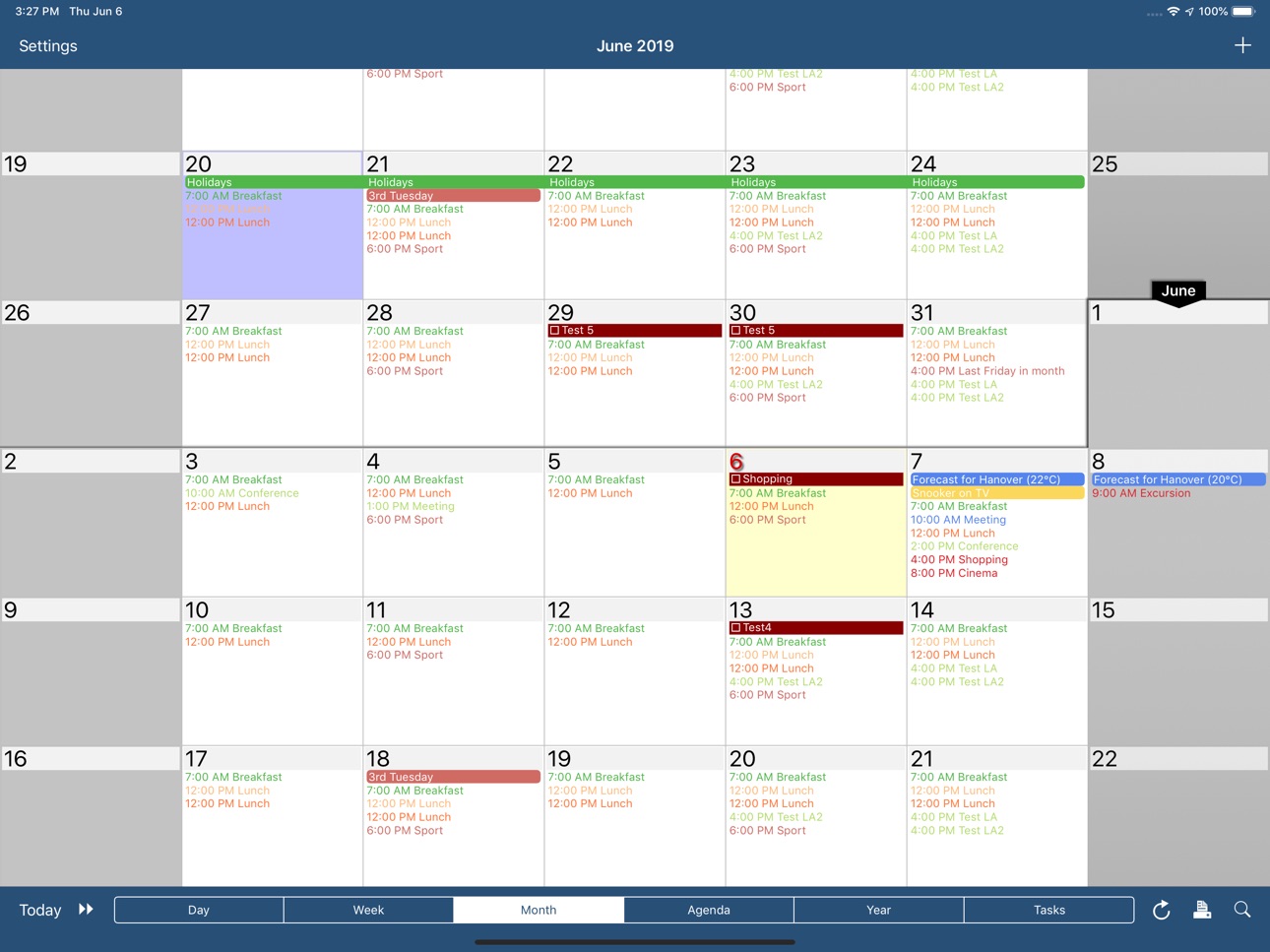
CalenGoo also has a month view similar to that of Google Calendar. It can be zoomed and panned to quickly get an overview over the events of a month. Zooming the month is done by using the two-finger-zoom gesture that you know from Safari and the photo application. A double tap opens the tapped day.
It also supports the same kinds of recurrence rules as Google Calendar and displays recurring events correctly even when you are offline or scroll far into the future.
You can also use Google Calendar's feature to invite people to events and see their status (accepted, declined, maybe, no answer). They will get an invitation email with links to e.g. accept or decline the invitation.
Google Calendar has an integrated task list, called Google Tasks. Tasks with a due date are displayed on the corresponding days of the calendar. CalenGoo can do the same, it can sync this list, display your tasks in the calendar views and in a list view and it even makes your tasks available offline. You can edit and add tasks and the changes will be synced with Google Tasks.
You either need a (free) Google Calendar account to use this app or you can use it with your iOS calendars. However using it with Google Calendar has a few advantages.
To get more information, screenshots and a tutorial, please go to http://www.calengoo.com
If you have any problems or suggestions, please send an email to calengoo@dgunia.de or take a look at CalenGoo's support website to get help.
If you think the font is too small and hard to read, you can increase the font size of all calendar views in the settings under "Settings", "Display and Use".
Features ( http://www.calengoo.com ):
- Drag&drop to quickly copy and move events
- Templates to quickly create similar events again. They can even be combined, e.g. one template for the location of an event and another for the attendees
- Print/PDF function to print the day, week, month or agenda view via AirPrint or to email it as a PDF file
- Supports the same recurrence rules as Google Calendar
- Supports Google Calendar's event colors when syncing via OAuth2
- Icons can be assigned to Google Calendar events
- Date/time can be entered using the iOS wheels or by using a keypad
- Fast search function
- Show/edit iOS calendars in addition to Google calendars (or instead of Google calendars)
- Sync with Google Tasks and iOS Reminders
- Reminders can be snoozed and they can be (optionally) repeated every minute
- Birthdays and anniversaries of your contacts can be displayed
- Zoomable month view, which can be configured to scroll horizontally (month by month) or vertically (week by week)
- Events can be linked to contacts
- Floating events and completable events
- Photos and PDF files can be created and attached to events (via Google Drive)
- Calendar selection bar to quickly show and hide single calendars
- The location of an event can be opened with Apple Maps, Google Maps, Navigon, TomTom, Skobbler, Sygic, iGo or Waze
- View/edit calendars that are shared with others via Google Calendar
- Many configuration options to change the way the app looks and works
Accessibility
ipadiphonemacrealityDevicetvoswatch
Version history 25 versions
Build 884716807v1.5.1052026-04-21 08:10:59
- New Google Drive picker
- Added a switch to show all-day events in the small 1x1 widget
- Added an option to remove countdown events from the today widget
- Bug fixes
Build 884532294v1.5.1042026-04-17 05:23:55
- New Google Drive picker
- Added a switch to show all-day events in the small 1x1 widget
- Added an option to remove countdown events from the today widget
- Bug fixes
Build 881283566v1.5.1032026-01-09 10:05:23
- Added a search&replace function in the search view
- Bug fixes
Build 874328696v1.5.1022025-04-29 08:55:46
- Improvements for Google login
- Additional settings and bug fixes
Build 874219477v1.5.1012025-04-23 19:30:12
- Improvements for Google login
- Additional settings and bug fixes
Build 871031290v1.5.1002024-12-12 07:07:22
Google has changed the way how birthdays are saved in Google Calendar. This new version can handle the new "eventType" field. You can find further information here: https://www.calengoo.com/documentation/posts/birthdays.html
Build 870829704v1.5.992024-12-05 06:54:13
Bug fixes and small improvements
Build 870133585v1.5.982024-11-02 21:10:49
Bug fixes for the event edit screen
Build 869790670v1.5.972024-10-21 06:36:59
Improvements and bug fixes for iOS 18, e.g. for the widgets
Build 868290592v1.5.962024-08-24 13:18:40
- Added a copy function for iOS reminders.
- Added a way to limit how many days in advance a countdown event should be displayed.
- Bug fixes
Build 866661093v1.5.952024-06-13 16:50:45
Bug fixes for the year widget and the search view.
Build 866406941v1.5.942024-06-04 16:13:30
- Changes for Google Drive
- Added a Spanish translation
- Bug fixes
Build 862234852v1.5.932023-12-19 09:50:46
- Added support for countdown events in Google calendars and local calendars.
- Added settings to show the weekday name in agenda compact mode and to show the separator lines only between the days (with a longer line between weeks).
- The search view can now use colored boxes to display the events.
- Bug fixes
Build 859911006v1.5.922023-09-15 12:27:41
- Added support for countdown events in Google calendars and local calendars.
- Added settings to show the weekday name in agenda compact mode and to show the separator lines only between the days (with a longer line between weeks).
- The search view can now use colored boxes to display the events.
- Bug fix for the day view
- Further bug fixes
Build 859761017v1.5.912023-09-13 06:53:32
- Added support for countdown events in Google calendars and local calendars.
- Added settings to show the weekday name in agenda compact mode and to show the separator lines only between the days (with a longer line between weeks).
- The search view can now use colored boxes to display the events.
- Bug fixes
Build 852624042v1.5.902022-10-07 15:25:37
Added two lock screen widgets for iOS 16.
Build 851201500v1.5.892022-08-01 08:29:30
Many new configuration options were added and a few bugs were fixed.
Build 842633556v1.5.882021-06-13 07:40:30
- Tasks in events can be displayed/edited over multiple lines ("Settings > Display and Use > Edit view > Advanced > Tasks in events > Multiline").
- Added a configuration option for the "Google Meet" row in the edit screen ("Settings > Display and Use > Edit view > Advanced > Allow creation of Google Meet links").
- Added a switch for the landscape day view to make weekends smaller and/or the current day larger.
- Added an optional small month view to the portrait week view ("Settings > Display and Use > Week view > Layout").
- Added a long press menu to the agenda view.
- Added a new sort order "Sort (priority reverse, due date)" for tasks in calendar views.
- Bug fixes and other improvements
Build 838347264v1.5.872020-10-28 08:59:50
Bug fixes and further improvements for the new iOS 14 widgets.
Build 838160071v1.5.862020-10-14 07:01:19
- New settings for the iOS 14 widgets.
- Bug fixes
Build 838043971v1.5.852020-10-02 06:13:38
- Bug fix for the action menu button in the task edit screen on iPads on iOS 14.
- Bug fix for the search view on iOS 13.
- New configuration options and a few bug fixes for the new iOS 14 widgets.
Build 837972455v1.5.842020-09-29 07:20:30
Bug fixes for the widgets and the "export settings" function.
Build 837883873v1.5.832020-09-25 06:59:51
- Added iOS 14 widgets ("next event" widget and "agenda" widget)
- Bug fixes for iOS 14
Build 836562757v1.5.822020-07-01 08:13:54
- Templates can now contain more than one calendar if "Settings > Display and Use > Edit view > Expert > Save into multiple calendars" is turned on.
- Added support for displaying priority icons of tasks in the today widget and other improvements for displaying tasks in the today widget.
- Added a new option "Settings > Display and Use > Agenda view > Advanced > Show empty hours".
- Added a function to search all Evernote notebooks at once.
- Added support for "TomTom Go".
- Bug fixes
Build 834318922v1.5.812020-02-09 09:26:13
- When inserting a contact into an event you can now choose the format ("Default", "First name Last name", "Last name First name" or "Last name, First name") under "Settings > Display and Use > Edit view > Advanced > Contact name format".
- Bug fixes
Price history by region
Currency
Show
Columns
Search
Availability 1 of 1 storefronts
| Region | Language | Price | Ratings | Avg | Version |
|---|---|---|---|---|---|
| US | en-US | USD 6.99 | 296 | 4.6 | 1.5.105 |
Change log 29 changes · US
✎
releaseNotes updated
- New Google Drive picker
- Added a switch to show all-day events in the small 1x1 widget
- Added an option to remove countdown events from the today widget
- B
✎
description updated
CalenGoo gives you a fast and easy way to access and modify your Google Calendar with your iPhone, iPod Touch or iPad. It can also be used when you have no Inte
✎
subtitle updated
for Google Calendar and iCloud
✎
name updated
CalenGoo Calendar
◆
Version 1.5.105 released
- New Google Drive picker
- Added a switch to show all-day events in the small 1x1 widget
- Added an option to remove countdown events from the today widget
- Bug fixes
◆
Version 1.5.104 released
- New Google Drive picker
- Added a switch to show all-day events in the small 1x1 widget
- Added an option to remove countdown events from the today widget
- Bug fixes
◆
Version 1.5.103 released
- Added a search&replace function in the search view
- Bug fixes
◆
Version 1.5.102 released
- Improvements for Google login
- Additional settings and bug fixes
◆
Version 1.5.101 released
- Improvements for Google login
- Additional settings and bug fixes
◆
Version 1.5.100 released
Google has changed the way how birthdays are saved in Google Calendar. This new version can handle the new "eventType" field. You can find further information here: https://www.calengoo.com/documentation/posts/birthdays.html
◆
Version 1.5.99 released
Bug fixes and small improvements
◆
Version 1.5.98 released
Bug fixes for the event edit screen
◆
Version 1.5.97 released
Improvements and bug fixes for iOS 18, e.g. for the widgets
◆
Version 1.5.96 released
- Added a copy function for iOS reminders.
- Added a way to limit how many days in advance a countdown event should be displayed.
- Bug fixes
◆
Version 1.5.95 released
Bug fixes for the year widget and the search view.
◆
Version 1.5.94 released
- Changes for Google Drive
- Added a Spanish translation
- Bug fixes
◆
Version 1.5.93 released
- Added support for countdown events in Google calendars and local calendars.
- Added settings to show the weekday name in agenda compact mode and to show the separator lines only between the days (with a longer line between weeks).
- The s
◆
Version 1.5.92 released
- Added support for countdown events in Google calendars and local calendars.
- Added settings to show the weekday name in agenda compact mode and to show the separator lines only between the days (with a longer line between weeks).
- The s
◆
Version 1.5.91 released
- Added support for countdown events in Google calendars and local calendars.
- Added settings to show the weekday name in agenda compact mode and to show the separator lines only between the days (with a longer line between weeks).
- The s
◆
Version 1.5.90 released
Added two lock screen widgets for iOS 16.
◆
Version 1.5.89 released
Many new configuration options were added and a few bugs were fixed.
◆
Version 1.5.88 released
- Tasks in events can be displayed/edited over multiple lines ("Settings > Display and Use > Edit view > Advanced > Tasks in events > Multiline").
- Added a configuration option for the "Google Meet" row in the edit screen ("Settings > Disp
◆
Version 1.5.87 released
Bug fixes and further improvements for the new iOS 14 widgets.
◆
Version 1.5.86 released
- New settings for the iOS 14 widgets.
- Bug fixes
◆
Version 1.5.85 released
- Bug fix for the action menu button in the task edit screen on iPads on iOS 14.
- Bug fix for the search view on iOS 13.
- New configuration options and a few bug fixes for the new iOS 14 widgets.
◆
Version 1.5.84 released
Bug fixes for the widgets and the "export settings" function.
◆
Version 1.5.83 released
- Added iOS 14 widgets ("next event" widget and "agenda" widget)
- Bug fixes for iOS 14
◆
Version 1.5.82 released
- Templates can now contain more than one calendar if "Settings > Display and Use > Edit view > Expert > Save into multiple calendars" is turned on.
- Added support for displaying priority icons of tasks in the today widget and other improv
◆
Version 1.5.81 released
- When inserting a contact into an event you can now choose the format ("Default", "First name Last name", "Last name First name" or "Last name, First name") under "Settings > Display and Use > Edit view > Advanced > Contact name format".
-