Home › Reference

 US
US
1 of 1 storefronts
Content in en-US
Content in en-US
Information
Preview 4 platforms
iPhone 6 images


iPad 6 images


Mac 5 images




Apple Watch 4 images


What’s New Version 4.8.3
UI improvements and bugfixes, including ability to re-size the reader view to full-screen.
Description
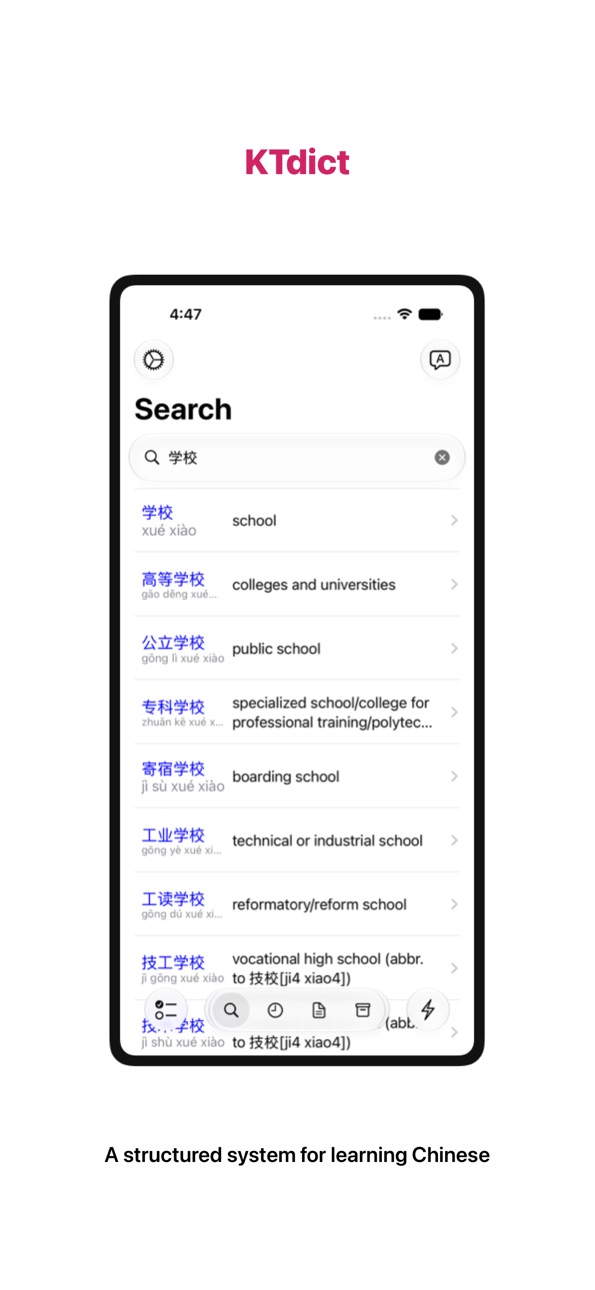
KTdict is a structured system for learning Chinese independently.
Designed for serious learners, KTdict combines dictionary depth, integrated reading tools, and built-in spaced repetition in one focused environment.
No subscriptions. No distractions. No internet required.
LEARN WITH DEPTH
Access over 300,000 entries from trusted sources including CC-CEDICT, HanDeDict, CFDict, Unihan, and Make-me-a-Hanzi.
Each entry includes:
– Definitions in English, German, and French
– Tone-marked Pinyin
– Traditional and simplified forms
– Audio pronunciation
– Stroke order diagrams
Understand words completely — not just their translation.
READ CHINESE WITH CONFIDENCE
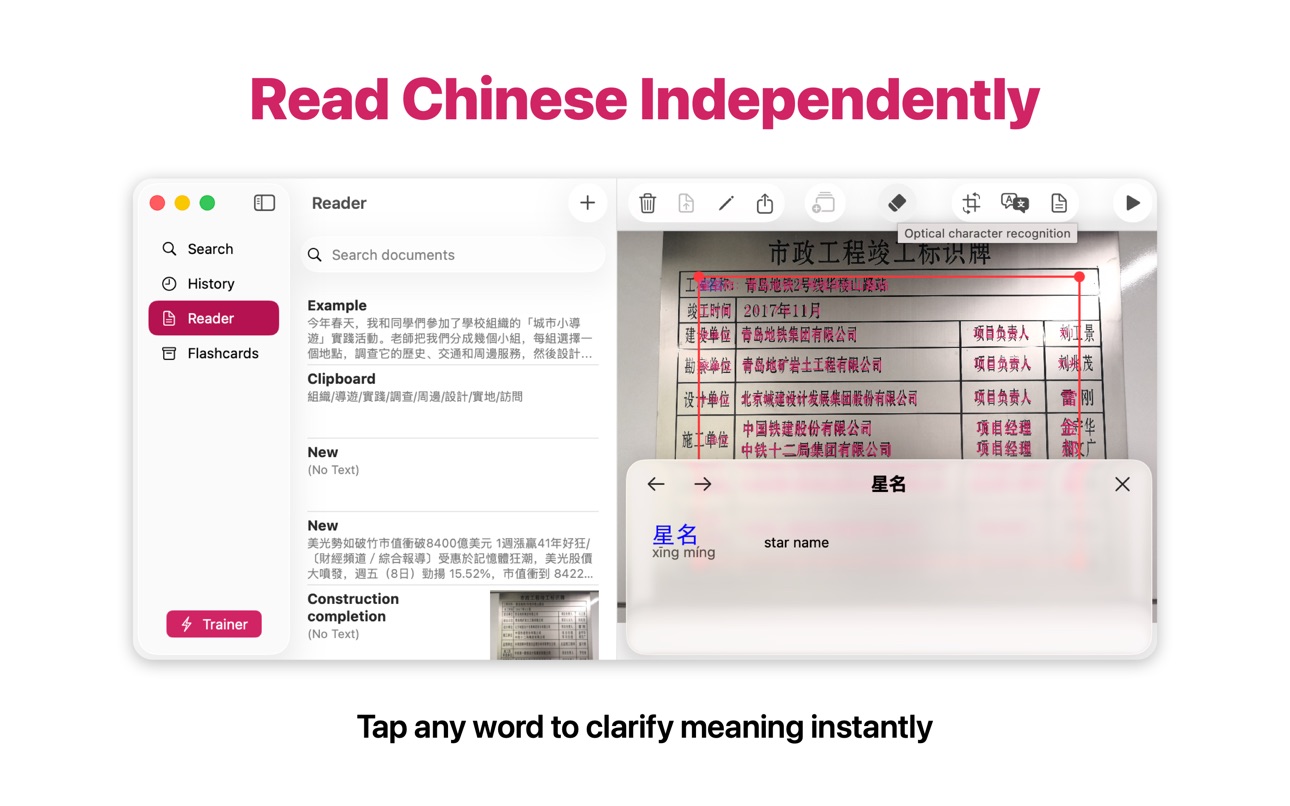
– Tap any word in imported texts to clarify meaning instantly
– Scan printed Chinese using built-in OCR
– Turn real-world material into structured study content
Develop reading independence without switching between apps.
REMEMBER WHAT YOU LEARN
Create flashcards directly from dictionary entries and review them using built-in spaced repetition (Leitner method).
– Personalized vocabulary lists
– Daily review sessions
– Import and export via CSV
– iCloud synchronization across devices
Study systematically. Retain long-term.
BUILT FOR THE APPLE ECOSYSTEM
Available on iPhone, iPad, Mac, and Apple Watch.
Your learning data syncs seamlessly across devices.
Reader and OCR features are not available on Apple Watch.
ONE-TIME PURCHASE
KTdict is free to try with ads.
Unlock all features with a single in-app purchase.
No subscriptions.
Download KTdict and build lasting Chinese proficiency
In-App Purchases US pricing
One-Time Purchases
Upgrade to pro version$3.99
Capabilities
In-App Purchases
Accessibility
ipadiphonemacrealityDevicetvoswatch
Version history 25 versions
Build 887520862v4.8.32026-06-27 20:12:12
UI improvements and bugfixes, including ability to re-size the reader view to full-screen.
Build 886939461v4.8.22026-06-14 23:21:41
Fixed an issue where the flashcard trainer ignored your settings.
Build 886747896v4.8.12026-06-10 01:49:18
Critical Issue Resolutions
Build 874677545v4.82026-06-06 21:32:34
• Modernized interface across all devices for a clearer, distraction-free study environment
• Full-text translation added to the Reader — quickly grasp the meaning of entire texts
• Various performance and usability improvements
Build 860325829v4.72023-12-25 16:58:42
Master Chinese Characters with Animated Stroke Order Diagrams
Build 858821049v4.62023-08-05 17:13:11
Bugfixes
Build 852279532v4.42023-07-23 01:50:04
- user interface improvements
- update to newest versions of CC-CEDIT, HanDeDict and CFDict
Build 849764649v4.3.12022-06-12 14:00:26
Bugfixes
Build 849553173v4.32022-05-31 23:30:18
Improved search algorithm: most frequent words will show on top
Build 847821623v4.22022-03-21 01:15:32
- support for undo/redo
- keyboard-shortcuts on iPad
- bugfixes and performance improvements
Build 843841048v4.1.12021-08-29 15:57:26
- Improved performance of reader to handle large documents.
Build 843385042v4.12021-08-22 11:47:57
- Dictionary data updated to latest versions of CC-CEDICT, HanDeDict and CFDict
- Several bug fixes
Build 842741816v4.0.32021-07-03 20:59:09
Further layout improvements and bug fixes.
Build 842647964v4.0.22021-06-14 18:15:18
- Improved readability Chinese text
Build 842631762v4.0.12021-06-12 15:45:56
- Search for multiple sequential words
- Adjustment of font-size
- Bugfixes
Build 842436525v4.02021-06-08 01:24:40
This is.a major new version of KTdict. It includes the following new features:
- Chinese-English, Chinese-German and Chinese-French in one single application (change in settings)
- Support for Apple Watch: runs on Apple Watch without a phone or network connection
- Chinese OCR drastically improved
- More reliable synchronization between devices
KTdict was completely re-written and modernized under the hood using using latest Apple technologies like SwiftUI and CloudKit.
Build 835414777v3.2.22020-04-05 15:27:13
Bug fixes
Build 831819983v3.2.12020-01-02 14:41:36
Update of dictionary to latest version of CC-CEDICT. Support for dark mode (iOS 13).
Build 829166472v3.22018-11-14 13:34:14
- Update of dictionary data to latest version of CC-CEDICT
- Support for new iPad Pro
- Bugfixes
Build 828607851v3.12018-09-24 21:57:13
- Support for new iPhone models (iPhone XS Max, XR)
- Latest version of CC-CEDICT dictionary
- Bug fixes
Build 825439506v3.02018-02-16 16:54:14
- Support for iPhone X
- Dictionary updated to latest version of CC-CEDICT
- Bugfixes
Build 815537379v2.9.12016-05-09 19:45:23
Bug fixes.
Build 813763009v2.92015-11-16 20:55:40
- Support for multitasking on iPad
- Fix for compatibility issues on iOS 9
Build 811403609v2.82015-03-06 18:42:35
- Longer Chinese input will be automatically broken into words for translation
- Bug fixes related to speech output (Hongkong voice) and iCloud support
- French localization
Build 797442693v2.7.12014-11-18 22:03:18
Fix for an issue preventing some users to add words from the dictionary to the flashcard trainer
Enhancements of with version 2.7:
- optimized for iOS 8 (iOS 7 supported as well)
- export/import to iCloud drive and other cloud storage services
- support of iPhone 6 and iPhone 6 PLUS
Price history by region
Currency
Show
Columns
Search
Availability 1 of 1 storefronts
| Region | Language | Price | Ratings | Avg | Version |
|---|---|---|---|---|---|
| US | en-US | Free | 1.2k | 4.7 | 4.8.3 |
Change log 29 changes · US
✎
releaseNotes updated
UI improvements and bugfixes, including ability to re-size the reader view to full-screen.
✎
description updated
KTdict is a structured system for learning Chinese independently.
Designed for serious learners, KTdict combines dictionary depth, integrated reading tools, an
✎
subtitle updated
OCR, Flashcards, Trainer
✎
name updated
KTdict Chinese Dictionary
◆
Version 4.8.3 released
UI improvements and bugfixes, including ability to re-size the reader view to full-screen.
◆
Version 4.8.2 released
Fixed an issue where the flashcard trainer ignored your settings.
◆
Version 4.8.1 released
Critical Issue Resolutions
◆
Version 4.8 released
• Modernized interface across all devices for a clearer, distraction-free study environment
• Full-text translation added to the Reader — quickly grasp the meaning of entire texts
• Various performance and usability improvements
◆
Version 4.7 released
Master Chinese Characters with Animated Stroke Order Diagrams
◆
Version 4.6 released
Bugfixes
◆
Version 4.4 released
- user interface improvements
- update to newest versions of CC-CEDIT, HanDeDict and CFDict
◆
Version 4.3.1 released
Bugfixes
◆
Version 4.3 released
Improved search algorithm: most frequent words will show on top
◆
Version 4.2 released
- support for undo/redo
- keyboard-shortcuts on iPad
- bugfixes and performance improvements
◆
Version 4.1.1 released
- Improved performance of reader to handle large documents.
◆
Version 4.1 released
- Dictionary data updated to latest versions of CC-CEDICT, HanDeDict and CFDict
- Several bug fixes
◆
Version 4.0.3 released
Further layout improvements and bug fixes.
◆
Version 4.0.2 released
- Improved readability Chinese text
◆
Version 4.0.1 released
- Search for multiple sequential words
- Adjustment of font-size
- Bugfixes
◆
Version 4.0 released
This is.a major new version of KTdict. It includes the following new features:
- Chinese-English, Chinese-German and Chinese-French in one single application (change in settings)
- Support for Apple Watch: runs on Apple Watch without a
◆
Version 3.2.2 released
Bug fixes
◆
Version 3.2.1 released
Update of dictionary to latest version of CC-CEDICT. Support for dark mode (iOS 13).
◆
Version 3.2 released
- Update of dictionary data to latest version of CC-CEDICT
- Support for new iPad Pro
- Bugfixes
◆
Version 3.1 released
- Support for new iPhone models (iPhone XS Max, XR)
- Latest version of CC-CEDICT dictionary
- Bug fixes
◆
Version 3.0 released
- Support for iPhone X
- Dictionary updated to latest version of CC-CEDICT
- Bugfixes
◆
Version 2.9.1 released
Bug fixes.
◆
Version 2.9 released
- Support for multitasking on iPad
- Fix for compatibility issues on iOS 9
◆
Version 2.8 released
- Longer Chinese input will be automatically broken into words for translation
- Bug fixes related to speech output (Hongkong voice) and iCloud support
- French localization
◆
Version 2.7.1 released
Fix for an issue preventing some users to add words from the dictionary to the flashcard trainer
Enhancements of with version 2.7:
- optimized for iOS 8 (iOS 7 supported as well)
- export/import to iCloud drive and other cloud storage serv