Home › Health & Fitness

 US
US
1 of 1 storefronts
Content in en-US
Content in en-US
Information
Preview 2 platforms
iPhone 4 images

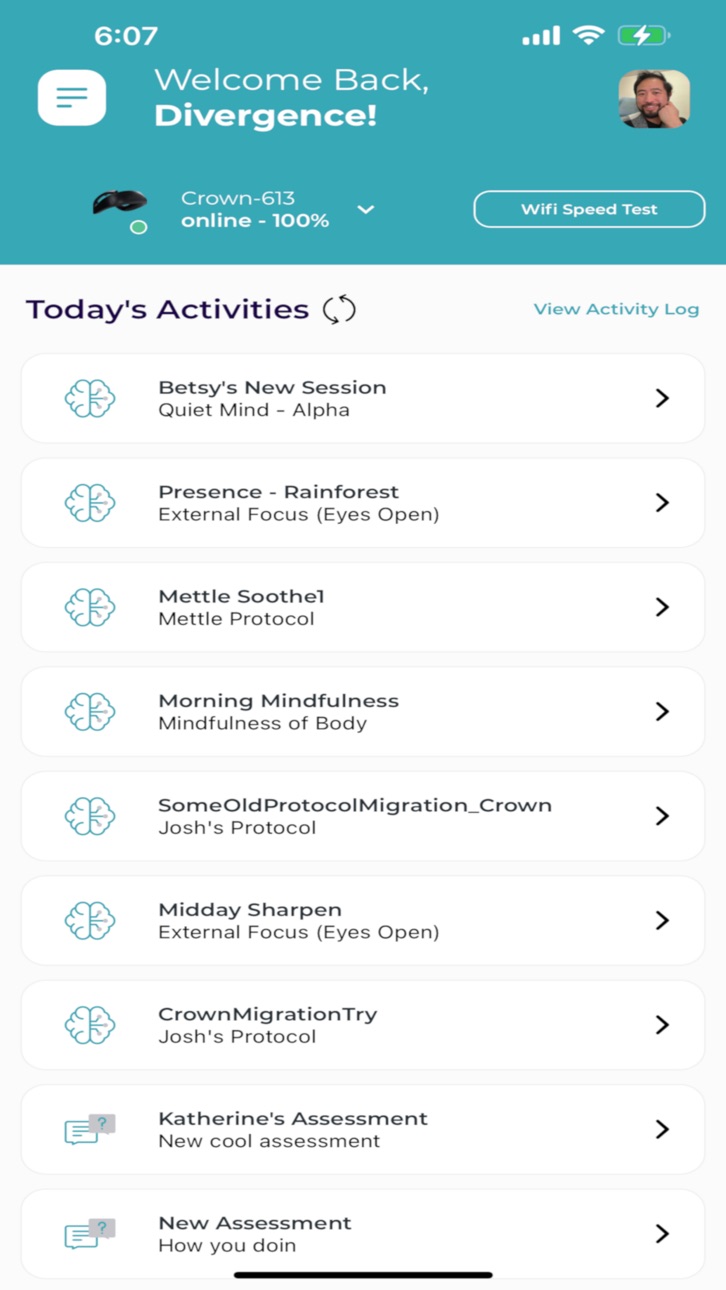


iPad 3 images


What’s New Version 2.18.0
New Device Support
- Added support for the DragonEEG device.
- Added support for Synchroni Octo and Neo.
New Language
- The app is now available in Spanish.
Session & Biofeedback Improvements
- Refreshed breathing and respiration activities for a smoother, more guided experience.
- Session results are now more personalized and configurable based on your protocol.
- Improved biofeedback accuracy and responsiveness during sessions.
- Picture-in-Picture support — watch videos, take calls, or use any PiP-enabled app in a floating window while running your session inside app.
Device Connectivity
- Better stability and performance when connecting Synchroni, BrainBit, and Mobio devices.
- Improved TPS device performance.
Audio & Speech
- Enhanced text-to-speech quality for a more natural listening experience during sessions.
- Improved audio playback reliability.
App Experience
- Faster app performance — data loads and saves more quickly throughout the app.
- Smoother navigation between screens.
- More consistent and polished visual design across the app.
- Improved screen brightness control during sessions.
Description
This app allows for remote brain training to be enabled by BrainCode to any user working with BrainCode.
Accessibility
ipadiphonemacrealityDevicetvoswatch
Version history 25 versions
Build 886494848v2.18.02026-06-08 14:57:02
New Device Support
- Added support for the DragonEEG device.
- Added support for Synchroni Octo and Neo.
New Language
- The app is now available in Spanish.
Session & Biofeedback Improvements
- Refreshed breathing and respiration activities for a smoother, more guided experience.
- Session results are now more personalized and configurable based on your protocol.
- Improved biofeedback accuracy and responsiveness during sessions.
- Picture-in-Picture support — watch videos, take calls, or use any PiP-enabled app in a floating window while running your session inside app.
Device Connectivity
- Better stability and performance when connecting Synchroni, BrainBit, and Mobio devices.
- Improved TPS device performance.
Audio & Speech
- Enhanced text-to-speech quality for a more natural listening experience during sessions.
- Improved audio playback reliability.
App Experience
- Faster app performance — data loads and saves more quickly throughout the app.
- Smoother navigation between screens.
- More consistent and polished visual design across the app.
- Improved screen brightness control during sessions.
Build 883562707v2.16.02026-04-08 19:47:53
- Clinician mode: clinicians can now log in, select a client, and manage sessions on their behalf
- Mark your favorite feedback videos for quick access during sessions
- Improved signal quality alerts — get notified when EEG, breathing, or conductance signals are weak
- Logout moved from Profile to Drawer for easier access.
- Performance improvements and bug fixes
Build 878835841v2.15.02025-12-15 13:20:45
- New game UI experience
- Mobio scan for stress detection
- Impedance upgrade
- Various usability improvements
Build 876848684v2.14.42025-07-31 08:19:16
Fix video sound disappearing issue;
Also version number is now visible from login screen.
Build 876479619v2.14.32025-07-18 17:07:12
Introduced new result UI and performance improvement
Build 875239578v2.13.52025-06-03 17:34:52
We are improving the back-end of our platform for better performance, security, and other enhancements. When you are invited, you will receive an email with a temporary password to use in Dive. Once you've logged in and verified their account, you'll be prompted to set a password. Forgot password is now integrated into the mobile app, allowing clients to reset their password without contacting you. You can also enjoy the new respiration guide experiences!
Build 873947923v2.13.02025-04-15 11:57:43
- Improved Session completion logic
- Over-the-Air (OTA) update support
- Support for new 10-10 electrode montage
- Signal & Data Improvements and Tracked Information
- Improved internationalization.
Fixes:
- Fixed an issue with Calibrate Thresholds parts that have odd-numbered duration periods.
Build 872669996v2.12.12025-02-24 15:18:19
Fix discrete combined audio feedback
French and German language support
More descriptive error messages for TheraQ save failures
Build 872424168v2.12.02025-02-13 12:29:35
* supporting static threshold as well as dynamic threshold
* difficulty control buttons for protocols
* bugfix: notch frequency now updates without needing to reconnect devices
* I18N support
* more accurate frequency measures for neurofeedback
* remove wifi speed test
Build 871072892v2.11.12024-12-12 00:18:53
Fix for session refresh issue after app has been backgrounded.
Refresh animations and pull-down refresh from home screen.
Today’s Activity update issue.
Refreshes after app is re-foregrounded.
Build 869881774v2.10.52024-10-28 11:03:26
Enhanced time synchronization feature to effective control time drift caused by devices that are not properly synced with NTP servers.
New session completion logic does not require explicit saving or completion of the entire session to save the parts that have been completed. Parts will be saved as the user completes each part in the protocol. If a protocol is completed (all the parts included in it are completed) then it will be marked as "COMPLETE", if some parts are completed and others are not, then it will be marked as "PARTIAL".
Streamlined options from the in-protocol modal ("X" button) to contain fewer options to minimize confusion.
Build 869251048v2.10.42024-09-25 09:00:21
A more refined video selection experience allowing the preview to be always displayed on top of the selection area (or side for landscape) to make it easier to choose video.
Build 869219067v2.10.32024-09-24 12:32:36
Enabling tag-based filtering and search on video selection screen.
Build 868964099v2.10.22024-09-12 17:42:40
Fixing login related issue with emails containing longer domains.
Build 868285972v2.9.02024-08-19 11:10:11
Major update with new protocol structure and functional improvements on how protocols work:
* Multiple consecutive biofeedback parts in one protocol
* Introduction part with custom prompts
* Resting parts
* Fixes for progress chart
* New notification sound
* Minimum duration between reward for discrete sound feedback
Build 868217733v2.8.12024-08-15 01:35:31
Upgrade prompt and safeguard for users who are still on the current version (2.8.x) of app post protocol migration.
Build 865340701v2.8.02024-04-23 13:57:16
Background mode: protocols that run while using other apps can modulate system volume.
Stability in backgrounding of non-background-mode protocols: video, audio, and animation protocols can be safely backgrounded and re-opened without interfering with the stimuli or causing strange behaviour. The protocol will continue to run in the background.
Push notifications for new protocol / assessment / questionnaire.
Instructional videos no longer need to be downloaded more than once.
Build 864735694v2.7.32024-03-27 15:45:21
Automatically pull up videos for users who don't get a decent signal after a minute of calibration
Make signal strength video menu more obvious with improved wording & colouring
Automatically abort protocols when users fail to get signal strength > 50 for more than a minute
Skip edit video feedback view when no feedback video options are available
Fix Serena expired auth bug
Fix disabled accounts bug
Fix questionnaire endless loading spinner bug
Fix session selection ordering bug
Build 863957621v2.7.12024-02-27 16:24:29
Remove unwanted airplay icon for iOS devices
Fix a delay in the signal strength line while in landscape mode
Fix a case where aborting video downloads then retrying them would lead to repeated download failures
Fix crashes when navigating away from videos in Signal Strength video menu
Fix editing information issue in the profile screen
Build 863876467v2.7.02024-02-20 23:58:27
* Video guides on how to wear devices correctly
* Signal strength metric during calibration
* Art of Signal Strength mini series on how to get better signal
* Auto-pause when signal strength is low
* Signal strength reporting
Build 863655829v2.6.02024-02-12 13:00:40
Improved noise tolerance for protocols
AI Help chatbot named Serena
Min & max volume control for videos
Confirm before exiting protocols & removal of skip-to-end button
Videos autorestart once completed & removal of restart video button
Protocol and assessment API failure message UI improvement
Fix for support issue messaging system
Build 862213592v2.5.42024-01-03 20:56:54
Fix for retried sessions after a network disconnection hanging
Serial number device names for bb flex and headband
Performance improvements for protocols and assessments
Fix for pressing card multiple times while device is connecting
Show grey signal quality indicators when no signal is present
Fix gong and chime sounds at end/beginning of protocols
Fix timezone-awareness for sessions based on local time
Build 861544002v2.5.32023-11-16 22:29:42
BrainBit SDK upgrade: reliability for users with more than one device switching devices
Fix for Theraq crashes
Fix for Callibri device adding issue
Callibri purchase links and specs
Build 861314585v2.5.12023-11-07 21:54:40
Fixes for 2.5.0 issues seen:
Assessment screen dimming during TheraQ
Refresh token / session disconnect requiring re-login
Edit video feedback screen responsiveness & scrolling on larger screens
Brainbit iOS scans not working after disconnections
Build 861171694v2.5.02023-11-02 13:24:24
* signal quality floor to detect flatlined EEG
* one-shot sessions / do all selections in order instead of returning to homescreen
* no more 4-hour relogin (now uses a refresh token)
* faster homescreen experience
* handling of wifi & network disconnections
* removal of signal transients at the beginnings of protocols and assessments
* retry save button for protocols and assessments that fail to save
* remove the need to add devices thru device menu before using them
* removal of the whole device-adding UI
* user no longer needs to select an appropriate device on the home screen before starting a protocol or assessment
* Enhanced video features: restarting video, video last played timestamp memory, video start-from timestamp inclusion on URL
No pricing data captured yet — comparisons appear once the app has paid storefronts or in-app purchases.
Availability 1 of 1 storefronts
| Region | Language | Price | Ratings | Avg | Version |
|---|---|---|---|---|---|
| US | en-US | Free | 6 | 5.0 | 2.18.0 |
Change log 29 changes · US
✎
releaseNotes updated
New Device Support
- Added support for the DragonEEG device.
- Added support for Synchroni Octo and Neo.
New Language
- The app is now available in Spani
✎
description updated
This app allows for remote brain training to be enabled by BrainCode to any user working with BrainCode.
✎
subtitle updated
A step to better mental health
✎
name updated
BrainCode Remote
◆
Version 2.18.0 released
New Device Support
- Added support for the DragonEEG device.
- Added support for Synchroni Octo and Neo.
New Language
- The app is now available in Spanish.
Session & Biofeedback Improvements
- Refreshed breathing and respiration
◆
Version 2.16.0 released
- Clinician mode: clinicians can now log in, select a client, and manage sessions on their behalf
- Mark your favorite feedback videos for quick access during sessions
- Improved signal quality alerts — get notified when EEG, breathing, or
◆
Version 2.15.0 released
- New game UI experience
- Mobio scan for stress detection
- Impedance upgrade
- Various usability improvements
◆
Version 2.14.4 released
Fix video sound disappearing issue;
Also version number is now visible from login screen.
◆
Version 2.14.3 released
Introduced new result UI and performance improvement
◆
Version 2.13.5 released
We are improving the back-end of our platform for better performance, security, and other enhancements. When you are invited, you will receive an email with a temporary password to use in Dive. Once you've logged in and verified their accou
◆
Version 2.13.0 released
- Improved Session completion logic
- Over-the-Air (OTA) update support
- Support for new 10-10 electrode montage
- Signal & Data Improvements and Tracked Information
- Improved internationalization.
Fixes:
- Fixed an issue with Calibrat
◆
Version 2.12.1 released
Fix discrete combined audio feedback
French and German language support
More descriptive error messages for TheraQ save failures
◆
Version 2.12.0 released
* supporting static threshold as well as dynamic threshold
* difficulty control buttons for protocols
* bugfix: notch frequency now updates without needing to reconnect devices
* I18N support
* more accurate frequency measures for neurofe
◆
Version 2.11.1 released
Fix for session refresh issue after app has been backgrounded.
Refresh animations and pull-down refresh from home screen.
Today’s Activity update issue.
Refreshes after app is re-foregrounded.
◆
Version 2.10.5 released
Enhanced time synchronization feature to effective control time drift caused by devices that are not properly synced with NTP servers.
New session completion logic does not require explicit saving or completion of the entire session to save
◆
Version 2.10.4 released
A more refined video selection experience allowing the preview to be always displayed on top of the selection area (or side for landscape) to make it easier to choose video.
◆
Version 2.10.3 released
Enabling tag-based filtering and search on video selection screen.
◆
Version 2.10.2 released
Fixing login related issue with emails containing longer domains.
◆
Version 2.9.0 released
Major update with new protocol structure and functional improvements on how protocols work:
* Multiple consecutive biofeedback parts in one protocol
* Introduction part with custom prompts
* Resting parts
* Fixes for progress chart
* N
◆
Version 2.8.1 released
Upgrade prompt and safeguard for users who are still on the current version (2.8.x) of app post protocol migration.
◆
Version 2.8.0 released
Background mode: protocols that run while using other apps can modulate system volume.
Stability in backgrounding of non-background-mode protocols: video, audio, and animation protocols can be safely backgrounded and re-opened without inter
◆
Version 2.7.3 released
Automatically pull up videos for users who don't get a decent signal after a minute of calibration
Make signal strength video menu more obvious with improved wording & colouring
Automatically abort protocols when users fail to get signal st
◆
Version 2.7.1 released
Remove unwanted airplay icon for iOS devices
Fix a delay in the signal strength line while in landscape mode
Fix a case where aborting video downloads then retrying them would lead to repeated download failures
Fix crashes when navigating a
◆
Version 2.7.0 released
* Video guides on how to wear devices correctly
* Signal strength metric during calibration
* Art of Signal Strength mini series on how to get better signal
* Auto-pause when signal strength is low
* Signal strength reporting
◆
Version 2.6.0 released
Improved noise tolerance for protocols
AI Help chatbot named Serena
Min & max volume control for videos
Confirm before exiting protocols & removal of skip-to-end button
Videos autorestart once completed & removal of restart video button
Pro
◆
Version 2.5.4 released
Fix for retried sessions after a network disconnection hanging
Serial number device names for bb flex and headband
Performance improvements for protocols and assessments
Fix for pressing card multiple times while device is connecting
Show g
◆
Version 2.5.3 released
BrainBit SDK upgrade: reliability for users with more than one device switching devices
Fix for Theraq crashes
Fix for Callibri device adding issue
Callibri purchase links and specs
◆
Version 2.5.1 released
Fixes for 2.5.0 issues seen:
Assessment screen dimming during TheraQ
Refresh token / session disconnect requiring re-login
Edit video feedback screen responsiveness & scrolling on larger screens
Brainbit iOS scans not working after disconne
◆
Version 2.5.0 released
* signal quality floor to detect flatlined EEG
* one-shot sessions / do all selections in order instead of returning to homescreen
* no more 4-hour relogin (now uses a refresh token)
* faster homescreen experience
* handling of wifi & netwo