Home › Utilities

 US
US
1 of 1 storefronts
Content in en-US
Content in en-US
Information
Preview 2 platforms
iPhone 3 images
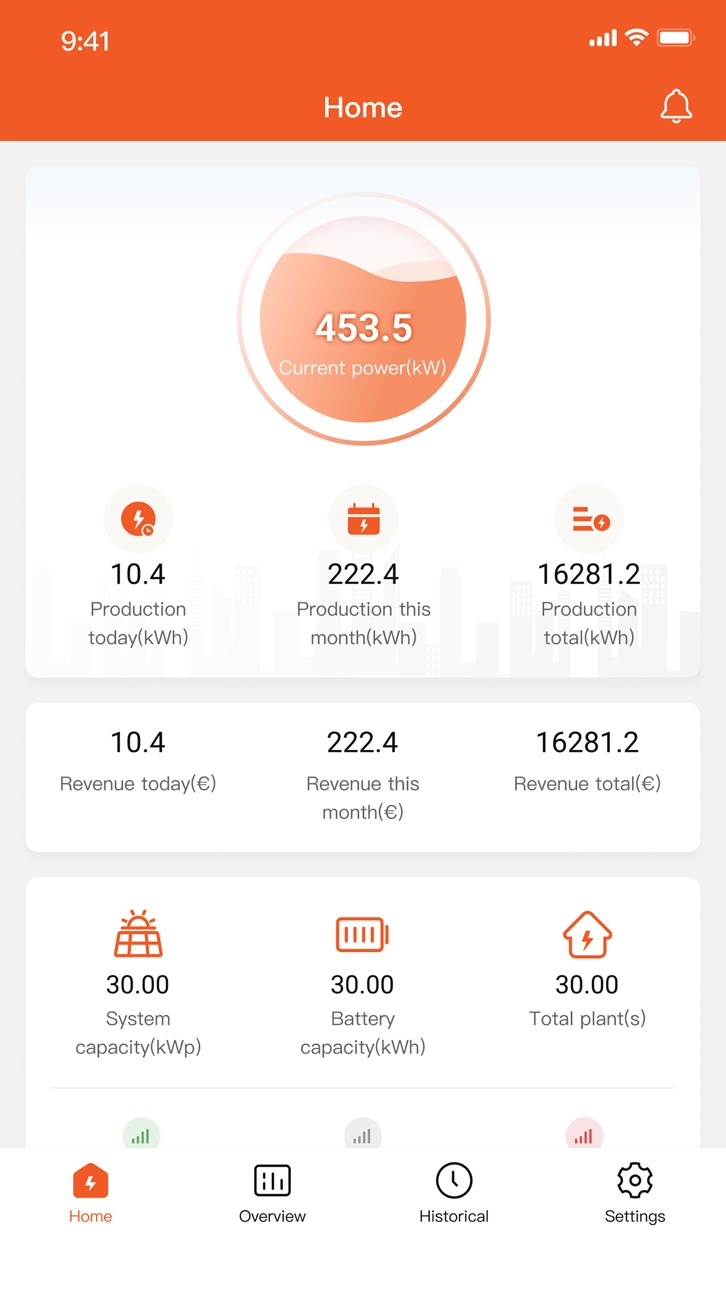


iPad 3 images


What’s New Version 4.0.9
1. Brand new UI design.
2. More professional statistics function .
3. Two in one (local control / remote control).
4. Clearer vivid flow chart.
5. Plant share.
6. Remote control at any time & anywhere.
Description
The SheenPlus app is a home energy management app that allows you to manage and monitor your inverter both remotely and via direct local connection. Get a real-time overview of your home's PV energy use and production. And optimize the mode of energy use to raise the profits of household electricity use.
Accessibility
ipadiphonemacrealityDevicetvoswatch
Version history 14 versions
Build 876089999v4.0.92025-07-09 02:37:40
1. Brand new UI design.
2. More professional statistics function .
3. Two in one (local control / remote control).
4. Clearer vivid flow chart.
5. Plant share.
6. Remote control at any time & anywhere.
Build 871759578v4.0.82025-02-12 08:44:37
1. Brand new UI design.
2. More professional statistics function .
3. Two in one (local control / remote control).
4. Clearer vivid flow chart.
5. Plant share.
6. Remote control at any time & anywhere.
Build 870825666v4.0.62024-12-03 02:26:47
1. Brand new UI design.
2. More professional statistics function .
3. Two in one (local control / remote control).
4. Clearer vivid flow chart.
5. Plant share.
6. Remote control at any time & anywhere.
Build 868739061v4.0.52024-09-13 02:23:07
1. Brand new UI design.
2. More professional statistics function .
3. Two in one (local control / remote control).
4. Clearer vivid flow chart.
5. Plant share.
6. Remote control at any time & anywhere.
Build 867845926v4.0.42024-07-31 07:18:41
1. Brand new UI design.
2. More professional statistics function
3. Two in one (local control / remote control).
4. Clearer vivid flow chart.
5. Plant share
6. Remote control at any time & anywhere.
Build 867771097v4.0.32024-07-29 01:16:30
1. Brand new UI design.
2. More professional statistics function
3. Two in one (local control / remote control).
4. Clearer vivid flow chart.
5. Plant share
6. Remote control at any time & anywhere.
Build 863081052v3.3.22024-04-08 02:41:42
Updated with a brand new splash screen
Build 859997136v3.3.12023-09-19 10:34:34
1. Fixed known issues.
Build 859905227v3.3.02023-09-15 01:13:50
1. Update function of CT test in Parameter settings
2. Add the sharing function of power station
3. Add function of Upgrade firmware
4. Parameter settings Add Grid Connection Parameter
5. Parameter settings Add Auto Test
Build 858606561v3.2.02023-07-21 02:19:47
1. Update parameter settings function
2. Add SOC display in the plant
3. Optimize known defects
Build 857431982v3.1.12023-06-02 01:12:28
1. fix the known problems.
Build 856619137v3.1.02023-05-22 21:21:51
1. ui style adjustment, unified font;
2. change of equipment type;
3. add devices to add RMK.
4. RMK support parameters setting;
5. parameter setting new maintenance category, new part of parameters;
6. parameter settings support exporting PDF;
7. fix the known problems.
Build 855668519v2.3.02023-03-20 06:30:42
1. Fixed the known issues.
Build 854152767v2.2.02023-03-14 00:03:03
No pricing data captured yet — comparisons appear once the app has paid storefronts or in-app purchases.
Availability 1 of 1 storefronts
| Region | Language | Price | Ratings | Avg | Version |
|---|---|---|---|---|---|
| US | en-US | Free | 0 | — | 4.0.9 |
Change log 18 changes · US
✎
releaseNotes updated
1. Brand new UI design.
2. More professional statistics function .
3. Two in one (local control / remote control).
4. Clearer vivid flow chart.
5. Plant share.
✎
description updated
The SheenPlus app is a home energy management app that allows you to manage and monitor your inverter both remotely and via direct local connection. Get a real-
✎
subtitle updated
SheenPlus
✎
name updated
SheenPlus
◆
Version 4.0.9 released
1. Brand new UI design.
2. More professional statistics function .
3. Two in one (local control / remote control).
4. Clearer vivid flow chart.
5. Plant share.
6. Remote control at any time & anywhere.
◆
Version 4.0.8 released
1. Brand new UI design.
2. More professional statistics function .
3. Two in one (local control / remote control).
4. Clearer vivid flow chart.
5. Plant share.
6. Remote control at any time & anywhere.
◆
Version 4.0.6 released
1. Brand new UI design.
2. More professional statistics function .
3. Two in one (local control / remote control).
4. Clearer vivid flow chart.
5. Plant share.
6. Remote control at any time & anywhere.
◆
Version 4.0.5 released
1. Brand new UI design.
2. More professional statistics function .
3. Two in one (local control / remote control).
4. Clearer vivid flow chart.
5. Plant share.
6. Remote control at any time & anywhere.
◆
Version 4.0.4 released
1. Brand new UI design.
2. More professional statistics function
3. Two in one (local control / remote control).
4. Clearer vivid flow chart.
5. Plant share
6. Remote control at any time & anywhere.
◆
Version 4.0.3 released
1. Brand new UI design.
2. More professional statistics function
3. Two in one (local control / remote control).
4. Clearer vivid flow chart.
5. Plant share
6. Remote control at any time & anywhere.
◆
Version 3.3.2 released
Updated with a brand new splash screen
◆
Version 3.3.1 released
1. Fixed known issues.
◆
Version 3.3.0 released
1. Update function of CT test in Parameter settings
2. Add the sharing function of power station
3. Add function of Upgrade firmware
4. Parameter settings Add Grid Connection Parameter
5. Parameter settings Add Auto Test
◆
Version 3.2.0 released
1. Update parameter settings function
2. Add SOC display in the plant
3. Optimize known defects
◆
Version 3.1.1 released
1. fix the known problems.
◆
Version 3.1.0 released
1. ui style adjustment, unified font;
2. change of equipment type;
3. add devices to add RMK.
4. RMK support parameters setting;
5. parameter setting new maintenance category, new part of parameters;
6. parameter settings support exporting
◆
Version 2.3.0 released
1. Fixed the known issues.
◆
Version 2.2.0 released