Home › Graphics & Design

 US
US
1 of 1 storefronts
Content in en-US
Content in en-US
Information
Preview 3 platforms
iPhone 5 images


iPad 6 images


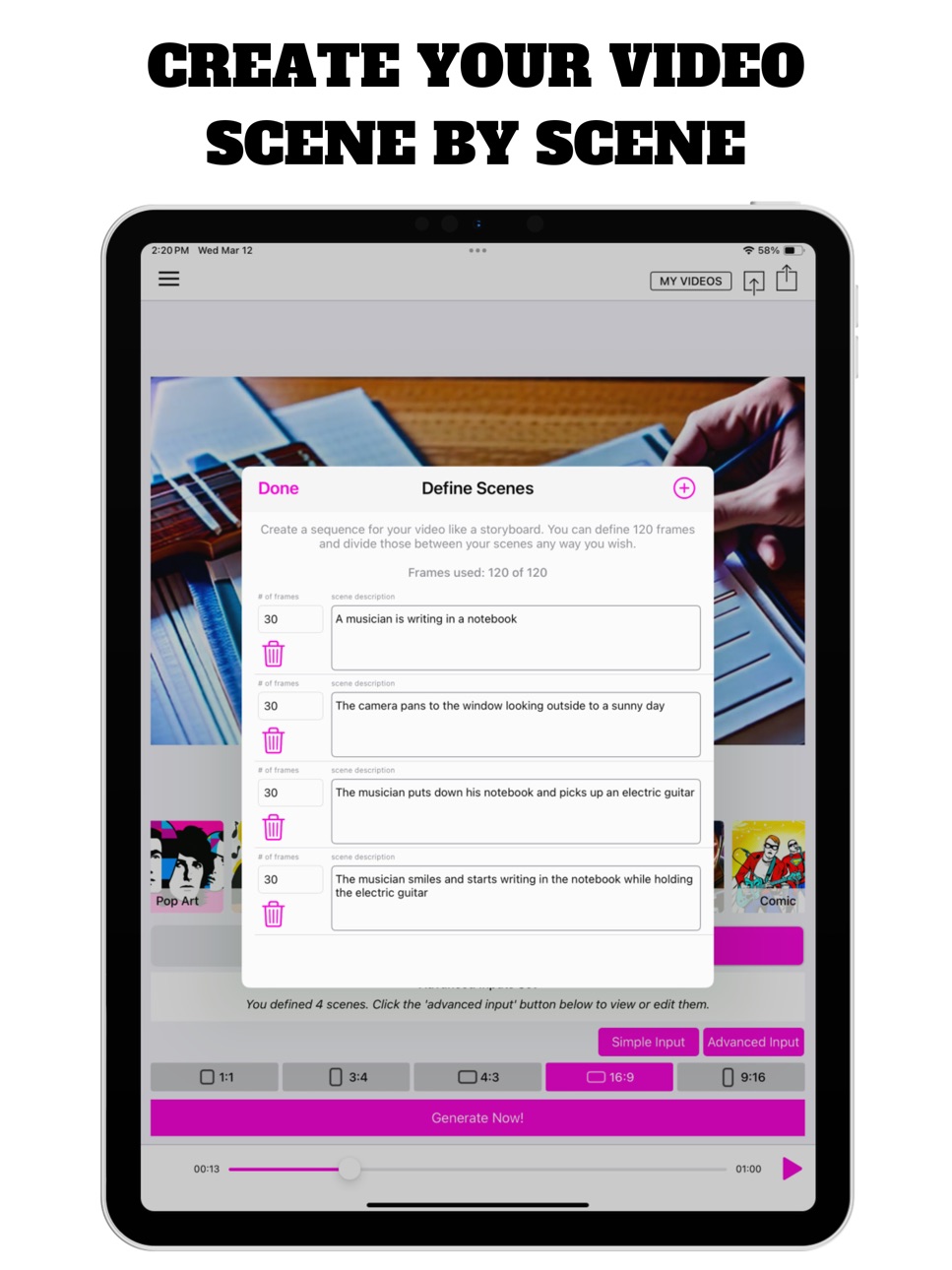


Mac 5 images


What’s New Version 4.4
HUGE UPDATE!!!
New Video Models
Choose from 3 different video models
Have ideas for features? We're all ears!
Reach out to us via the app's side menu and let us know what you’d like to see!
Thank you for being a part of the MAIVE community.
Happy creating!
— Future-Moments.com —
Description
Turn words into AI Videos of any length. Enter a text prompt, pick a style and let MAIVE do its magic and bring your ideas to life! Import any audio to make music videos and reels, or just generate AI Videos to use with your music or podcast.
++ CREATE AI VIDEOS OF ANY LENGTH ++
Choose a style, Import audio then generate AI Video to go with it. Export and share anywhere! Let the magic happen!
++ CREATE REELS ++
Import audio, choose a piece of audio and then generate an image to go with it. You can even animate it to your liking. Voilà, let the magic happen before your eyes!
Please email us through the side menu of the app if we can ever help. We answer quickly!
Choose a subscription that best matches your needs. Note that each subscription comes with a different amount of credits.
An AI Video costs 3 credits.
ALSO BY FUTURE MOMENTS:
Podcast Cleaner
Remove Noise from Audio
Video Audio Splitter MSV Remix
Remix the Audio of Your Video
MicSwap Remix
AI Audio Stem Separator
Audio Cleaner
AI Audio Cleanup Magic
MAIVE
Ai Video Generator
VideoVerb
Add Reverb to Your Videos
Hear Boost
Get Super Hearing & Recording
MicSwap
Mic Modeler & Recorder
MicSwap MultiTrack
Multitrack Mic Modeler & Recorder
MicSwap Video
Edit Video Audio with Mic Models & FX
MicSwap Camera
The Best Sounding Video Camera
AudioFix
Denoise & Clean the Sound of Your Video
VideoMaster
Instant Audio Post-Production for Videos
AudioVerb
Add Reverb & Delay to Your Audio
AudioMaster
Audio Mastering for Podcasts & Music
Volume Booster
Easily Boost the Sound of Your Audio or Video
---
Privacy Policy: https://future-moments.com/termsandprivacy#privacy
Terms of Use: https://future-moments.com/termsandprivacy
In-App Purchases US pricing
Pro Subscription
Artist · Monthly$14.99
fessional · Monthly 3-day free trial$19.99
Hobbyist · 7 days$4.99
One-Time Purchases
Credit Pack with 50 Credits$4.99
Credit Pack with 100 Credits$8.99
Credit Pack with 250 credits$19.99
Capabilities
In-App Purchases
Accessibility
ipadiphonemacrealityDevicetvoswatch
Version history 25 versions
Build 887494794v4.42026-06-30 23:15:37
HUGE UPDATE!!!
New Video Models
Choose from 3 different video models
Have ideas for features? We're all ears!
Reach out to us via the app's side menu and let us know what you’d like to see!
Thank you for being a part of the MAIVE community.
Happy creating!
— Future-Moments.com —
Build 884384293v4.32026-04-10 22:44:29
HUGE UPDATE!!!
2 New Video Models
Choose from 3 Video Models
Have ideas for features? We're all ears!
Reach out to us via the app's side menu and let us know what you’d like to see!
Thank you for being a part of the MAIVE community.
Happy creating!
— Future-Moments.com —
Build 883028108v4.12026-03-11 17:15:24
HUGE UPDATE!!!
2 New Video Models
Choose from 3 Video Models
Updated Image Models
Have ideas for features? We're all ears!
Reach out to us via the app's side menu and let us know what you’d like to see!
Thank you for being a part of the MAIVE community.
Happy creating!
— Future-Moments.com —
Build 882158666v4.02026-03-03 16:48:44
HUGE UPDATE!!!
2 New Video Models
Choose from 3 Video Models
Updated Image Models
Have ideas for features? We're all ears!
Reach out to us via the app's side menu and let us know what you’d like to see!
Thank you for being a part of the MAIVE community.
Happy creating!
— Future-Moments.com —
Build 881944091v3.62026-02-04 15:01:08
AI Music Videos of Any Duration
Storyboard videos frame by frame
Write them out scene by scene
Buy Extra Credits
Have ideas for features? We're all ears!
Reach out to us via the app's side menu and let us know what you’d like to see!
Thank you for being a part of the MAIVE community.
Happy creating!
— Future-Moments.com —
Build 879714110v3.52025-11-21 07:04:35
NEW FEATURES!
Storyboard videos frame by frame
Write them out scene by scene
Buy Extra Credits
Have ideas for features?
We're all ears! Reach out to us via the app's side menu and let us know what you’d like to see!
Thank you for being a part of the MAIVE community.
Happy creating!
— Future-Moments.com —
Build 876841231v3.42025-07-31 14:13:17
NEW FEATURES!
Storyboard your videos frame by frame
Write them out scene by scene!
Buy Extra Credits
Have ideas for new features?
We're all ears! Reach out to us via the app's side menu and let us know what you’d like to see next.
Thank you for being a part of the MAIVE community.
Happy creating!
— Future-Moments.com —
Build 875032076v3.32025-05-28 17:38:01
NEW FEATURES!
Storyboard your videos frame by frame
Write them out scene by scene!
Buy Extra Credits
Have ideas for new features?
We're all ears! Reach out to us via the app's side menu and let us know what you’d like to see next.
Thank you for being a part of the MAIVE community.
Happy creating!
Build 873553551v3.22025-03-26 21:37:03
NEW FEATURE!
You can now storyboard your videos.
Write them out scene by scene!
Have ideas for new features?
We're all ears! Reach out to us via the app's side menu and let us know what you’d like to see next.
Thank you for being a part of the MAIVE community.
Happy creating!
Build 873183601v3.12025-03-15 00:02:45
UNIQUE UPDATE!
You can now storyboard your videos.
Write them out scene by scene!
Have ideas for new features?
We're all ears! Reach out to us via the app's side menu and let us know what you’d like to see next.
Thank you for being a part of the MAIVE community.
Happy creating!
Build 871751409v3.02025-02-26 12:48:17
OUR BIGGEST UPDATE YET!
No More Waiting: Say goodbye to waiting for your videos to generate! We've optimized our process so you can get creative without delays.
Background Processing: You now have the freedom to close the generation window whenever you want, or even exit the app completely. Your video will continue to generate in the background, and you can check its progress anytime in ‘My Videos’.
Automatic Video Storage: Every video you create is automatically stored in ‘My Videos’, making it easy to access your projects anytime.
One-Click Reload: Click on any generated video to instantly reload it into the main interface, complete with your original prompt, style, size, and audio selections.
Effortless Management: Easily manage your library by deleting videos you no longer need, directly through the user interface.
New Language Support: We've expanded our language offerings! MAIVE now supports Chinese (Simplified), Japanese, Korean, German, French, Spanish, Russian, Portuguese (Brazilian), Arabic, Turkish, and Hindi. Enjoy a more personalized experience in your preferred language.
We Want Your Feedback: Have ideas for new features? We're all ears! Reach out to us via the app's side menu and let us know what you’d like to see next.
Thank you for being a part of the MAIVE community. Happy creating!
Build 870461797v2.72025-01-06 16:30:28
HUGE UPDATE!!
• No waiting for videos to generate!
• You can now close the generation window whenever you want, even close the app. Generation will continue and you can check back later in ‘My Videos'
• Any video you generate will now be stored in ‘My Videos'
• You can now close the generation window whenever you want, even close the app. Generation will continue and you can check back later in ‘My Videos'
• If you leave ‘My Videos' open while videos are generating, it will automatically update the UI once the video is ready. If you close it and come back later, it will download the video at that time and update the UI too.
• You can click on a generated video and it will reload it into the main UI including the prompt, style, size and audio you chose before.
• You can also delete videos you generated through the UI
Any features you'd like us to add? Please email us through the side menu of the app so we can add it!
Build 868282108v2.62024-08-18 09:59:52
NEW FEATURE!
• Choose Video Sizes
• UI Update
Any features you'd like us to add? Your feedback is appreciated!
Please email us through the side menu of the app so we can add it!
Build 867661921v2.52024-07-23 16:53:52
NEW FEATURE!
• New Video Sizes
• Bug Fixes
Any features you'd like us to add? Your feedback is appreciated!
Please email us through the side menu of the app so we can add it!
Build 866380339v2.42024-06-03 01:25:06
MAJOR UPDATE!
+ New AI Video Generator!
+ Add Fades to Audio & Video!
+ Generate AI Videos of any Length!
+ Import Audio & the Video Matches it!
Any features you'd like us to add? Your feedback is appreciated!
Please email us through the side menu of the app so we can add it!
Build 865620221v2.32024-05-07 21:42:06
MAJOR UPDATE!
+ New AI Video Generator!
+ Add Fades to Audio & Video!
+ Generate AI Videos of any Length!
+ Import Audio & the Video Matches it!
Any features you'd like us to add? Your feedback is appreciated!
Please email us through the side menu of the app so we can add it!
Build 865074722v2.22024-04-13 22:23:53
MAJOR UPDATE!
+ New AI Video Generator!
+ Generate AI Videos of any Length!
+ Import Audio & Video Matches it!
Have any features you'd like us to add? Please email us through the side menu of the app so we can add it!
Build 864654508v2.12024-03-24 18:44:16
MAJOR UPDATE!
+ New AI Video Generator!
+ Generate AI Videos of any length!
Have any features you'd like us to add? Please email us through the side menu of the app so we can add it!
Build 864534880v2.02024-03-20 14:40:42
MAJOR UPDATE!
+ New AI Video Generator!
+ Generate AI Videos of any length!
Have any features you'd like us to add? Please email us through the side menu of the app so we can add it!
Build 857245441v1.52023-05-24 11:35:32
Optimizations!
Build 855509289v1.42023-03-23 20:26:16
MAJOR UPDATE!
• New Animation Presets
• Add-On Effects
• Create Your Own Animations
• More to Come!
Any features you'd like us to add? Don't hesitate to email us (help@micswap.com) or through the side menu of the app and let us know!
For tutorials and tips, please subscribe to our YouTube channel @futuremoments
Build 854737015v1.32023-02-08 16:08:02
Now you can send MAIVE audio directly from AudioMaster, MicSwap and MicSwap MultiTrack!
Build 854587370v1.22023-02-01 10:33:39
We made MAIVE even more fun to use by adding a glow every time you generate artwork!
Build 854514844v1.12023-01-23 23:44:12
We just made MAIVE a bit better for you!
Build 853979237v1.02023-01-20 03:36:16
Price history by region
Currency
Show
Columns
Search
Availability 1 of 1 storefronts
| Region | Language | Price | Ratings | Avg | Version |
|---|---|---|---|---|---|
| US | en-US | Free | 490 | 4.0 | 4.4 |
Change log 29 changes · US
✎
releaseNotes updated
HUGE UPDATE!!!
New Video Models
Choose from 3 different video models
Have ideas for features? We're all ears!
Reach out to us via the app's side menu and let
✎
description updated
Turn words into AI Videos of any length. Enter a text prompt, pick a style and let MAIVE do its magic and bring your ideas to life! Import any audio to make mu
✎
subtitle updated
MV Creator for Reels & Shorts
✎
name updated
MAIVE: Music Video Maker, Song
◆
Version 4.4 released
HUGE UPDATE!!!
New Video Models
Choose from 3 different video models
Have ideas for features? We're all ears!
Reach out to us via the app's side menu and let us know what you’d like to see!
Thank you for being a part of the MAIVE commun
◆
Version 4.3 released
HUGE UPDATE!!!
2 New Video Models
Choose from 3 Video Models
Have ideas for features? We're all ears!
Reach out to us via the app's side menu and let us know what you’d like to see!
Thank you for being a part of the MAIVE community.
Ha
◆
Version 4.1 released
HUGE UPDATE!!!
2 New Video Models
Choose from 3 Video Models
Updated Image Models
Have ideas for features? We're all ears!
Reach out to us via the app's side menu and let us know what you’d like to see!
Thank you for being a part of the
◆
Version 4.0 released
HUGE UPDATE!!!
2 New Video Models
Choose from 3 Video Models
Updated Image Models
Have ideas for features? We're all ears!
Reach out to us via the app's side menu and let us know what you’d like to see!
Thank you for being a part of the
◆
Version 3.6 released
AI Music Videos of Any Duration
Storyboard videos frame by frame
Write them out scene by scene
Buy Extra Credits
Have ideas for features? We're all ears!
Reach out to us via the app's side menu and let us know what you’d like to see!
Th
◆
Version 3.5 released
NEW FEATURES!
Storyboard videos frame by frame
Write them out scene by scene
Buy Extra Credits
Have ideas for features?
We're all ears! Reach out to us via the app's side menu and let us know what you’d like to see!
Thank you for being
◆
Version 3.4 released
NEW FEATURES!
Storyboard your videos frame by frame
Write them out scene by scene!
Buy Extra Credits
Have ideas for new features?
We're all ears! Reach out to us via the app's side menu and let us know what you’d like to see next.
Thank
◆
Version 3.3 released
NEW FEATURES!
Storyboard your videos frame by frame
Write them out scene by scene!
Buy Extra Credits
Have ideas for new features?
We're all ears! Reach out to us via the app's side menu and let us know what you’d like to see next.
Thank
◆
Version 3.2 released
NEW FEATURE!
You can now storyboard your videos.
Write them out scene by scene!
Have ideas for new features?
We're all ears! Reach out to us via the app's side menu and let us know what you’d like to see next.
Thank you for being a part
◆
Version 3.1 released
UNIQUE UPDATE!
You can now storyboard your videos.
Write them out scene by scene!
Have ideas for new features?
We're all ears! Reach out to us via the app's side menu and let us know what you’d like to see next.
Thank you for being a par
◆
Version 3.0 released
OUR BIGGEST UPDATE YET!
No More Waiting: Say goodbye to waiting for your videos to generate! We've optimized our process so you can get creative without delays.
Background Processing: You now have the freedom to close the generation windo
◆
Version 2.7 released
HUGE UPDATE!!
• No waiting for videos to generate!
• You can now close the generation window whenever you want, even close the app. Generation will continue and you can check back later in ‘My Videos'
• Any video you generate will now be
◆
Version 2.6 released
NEW FEATURE!
• Choose Video Sizes
• UI Update
Any features you'd like us to add? Your feedback is appreciated!
Please email us through the side menu of the app so we can add it!
◆
Version 2.5 released
NEW FEATURE!
• New Video Sizes
• Bug Fixes
Any features you'd like us to add? Your feedback is appreciated!
Please email us through the side menu of the app so we can add it!
◆
Version 2.4 released
MAJOR UPDATE!
+ New AI Video Generator!
+ Add Fades to Audio & Video!
+ Generate AI Videos of any Length!
+ Import Audio & the Video Matches it!
Any features you'd like us to add? Your feedback is appreciated!
Please email us through the
◆
Version 2.3 released
MAJOR UPDATE!
+ New AI Video Generator!
+ Add Fades to Audio & Video!
+ Generate AI Videos of any Length!
+ Import Audio & the Video Matches it!
Any features you'd like us to add? Your feedback is appreciated!
Please email us through the
◆
Version 2.2 released
MAJOR UPDATE!
+ New AI Video Generator!
+ Generate AI Videos of any Length!
+ Import Audio & Video Matches it!
Have any features you'd like us to add? Please email us through the side menu of the app so we can add it!
◆
Version 2.1 released
MAJOR UPDATE!
+ New AI Video Generator!
+ Generate AI Videos of any length!
Have any features you'd like us to add? Please email us through the side menu of the app so we can add it!
◆
Version 2.0 released
MAJOR UPDATE!
+ New AI Video Generator!
+ Generate AI Videos of any length!
Have any features you'd like us to add? Please email us through the side menu of the app so we can add it!
◆
Version 1.5 released
Optimizations!
◆
Version 1.4 released
MAJOR UPDATE!
• New Animation Presets
• Add-On Effects
• Create Your Own Animations
• More to Come!
Any features you'd like us to add? Don't hesitate to email us (help@micswap.com) or through the side menu of the app and let us know!
Fo
◆
Version 1.3 released
Now you can send MAIVE audio directly from AudioMaster, MicSwap and MicSwap MultiTrack!
◆
Version 1.2 released
We made MAIVE even more fun to use by adding a glow every time you generate artwork!
◆
Version 1.1 released
We just made MAIVE a bit better for you!
◆
Version 1.0 released