Home › Photo & Video

 US
US
1 of 1 storefronts
Content in en-US
Content in en-US
Information
Preview 2 platforms
iPhone 6 images



iPad 6 images


What’s New Version 4.2
What's New in v4.2
- Trim your videos — drag the handles on the film strip to keep just the part you need, just like the Photos app
- Crop the frame — set any aspect ratio (9:16, 1:1 and more) and preview it live before compressing
- Minor improvements and stability fixes
Description
Free up storage without losing quality. Video Compressor – Save Space cuts file size by up to 90% while keeping HD detail, letting you process batches of clips with smart presets that do the heavy lifting.
Why creators choose us
- One-tap presets from Highest to Smallest with real-time size estimates.
- Side-by-side preview to compare original and compressed versions instantly.
- Advanced bitrate, resolution, and frame-rate controls when you need them.
Track your savings
- Savings Report shows all-time, monthly, and weekly totals at a glance.
- A 7-day bar chart lets you see daily compression trends.
- Home Screen widget keeps your total savings visible without opening the app.
- Smart notifications remind you of savings and suggest new compressions.
Perfect for
- Sending long clips over chat or email without hitting limits.
- Backing up travel videos without maxing out cloud storage.
- Sharing 4K footage that still looks sharp on social media.
Start compressing now and keep every memory without the storage stress.
Pro features
- Remove all ads and unlock unlimited batch compression.
- Set exact output size or target percentage from 1% to 99%.
- Preserve metadata and export directly to Files, Photos, or cloud drives.
In-App Purchases US pricing
One-Time Purchases
Pro$4.99
Capabilities
In-App Purchases
Accessibility
ipadiphonemacrealityDevicetvoswatch
Version history 25 versions
Build 887892556v4.22026-07-08 23:21:22
What's New in v4.2
- Trim your videos — drag the handles on the film strip to keep just the part you need, just like the Photos app
- Crop the frame — set any aspect ratio (9:16, 1:1 and more) and preview it live before compressing
- Minor improvements and stability fixes
Build 887591094v4.12026-06-30 19:20:09
What's New in v4.1
- Your compression settings are now remembered — compression level, audio, and preset carry over to your next video
- Minor improvements and stability fixes
Build 887419237v4.0.12026-06-25 18:02:51
What's New in v4.0.1
- Performance and stability improvements
- Minor bug fixes
Build 886883958v4.02026-06-12 21:51:55
What's New in v4.0
- All-new compression engine — faster and more stable
- HDR videos now keep their colors when compressed
- New Premium perk: High-Speed Compression
Build 886101085v3.7.12026-05-25 20:41:23
What's New in v3.7.1
- Bug fixes and performance improvements
Build 885715897v3.72026-05-20 16:59:04
What's New in v3.7
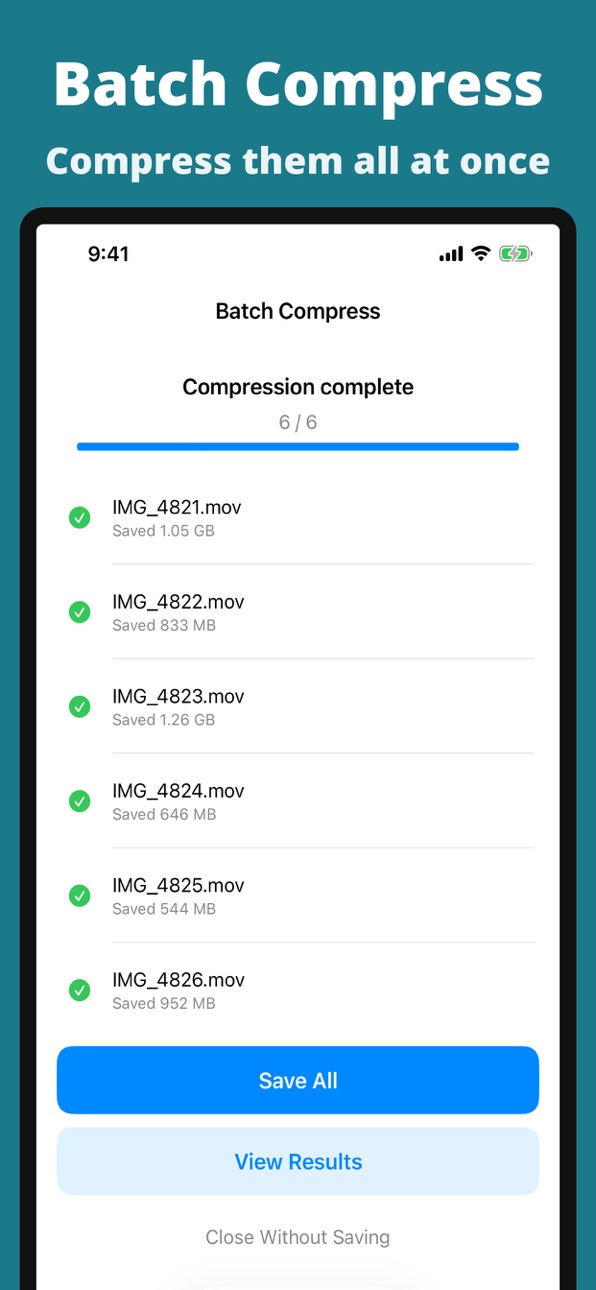
- Compress multiple videos at once with Batch Compress (Premium)
- Bug fixes and performance improvements
Build 885546426v3.6.12026-05-12 20:55:08
What's New in v3.6.1
- Bug fixes and performance improvements
Build 885208076v3.62026-05-04 17:28:17
What's New in v3.6
- New playback speed control (0.5×, 1×, 1.5×, 2×, 2.5×)
- Audio pitch is preserved while changing speed
- Bug fixes and performance improvements
Build 884961916v3.5.12026-04-27 20:30:29
What's New in v3.5.1
- Updated app screenshots
- Bug fixes and performance improvements
Build 884396763v3.52026-04-12 17:02:49
What's New in v3.5
- New: Video Resize — Change resolution and aspect ratio (16:9, 9:16, 1:1, 4:3)
- Bug fixes and performance improvements
Build 883869718v3.4.12026-03-29 21:36:05
What's New in v3.4.1
- Improved app experience for smoother interactions
- Bug fixes and performance improvements
Build 883392894v3.42026-03-16 17:35:19
- Added in-app feedback: share your thoughts, bug reports, and feature requests directly from Settings.
- Minor fixes and stability improvements.
Build 883159145v3.3.12026-03-09 20:49:18
- Improved the compression result screen so saved size is easier to understand.
- Smoother save and share flow after compression.
- Minor fixes and stability improvements.
Build 883100233v3.32026-03-07 18:40:29
- Added video format conversion (MOV / MP4, fast & lossless with no re-encoding)
- Access audio extraction and format conversion directly from the compression screen menu
Build 882930974v3.2.12026-03-02 19:26:28
- Fixed a bug where the widget did not update after compression
- Localized save-related alerts for all supported languages
Build 882880485v3.22026-02-28 22:14:06
- Added a mini-game (Bubble Pop) to play while waiting for compression
- Fixed translation errors across multiple languages
Build 882697995v3.12026-02-24 20:40:39
- Added a mini-game (Bubble Pop) to play while waiting for compression
- Fixed translation errors across multiple languages
Build 881631124v3.02026-01-20 21:20:07
Added audio extraction feature.
Build 881606353v2.3.22026-01-19 06:07:01
Metadata has been updated
Build 881262260v2.3.12026-01-07 11:07:13
Metadata updated
Build 881158889v2.32026-01-04 01:25:03
Added presets
Build 880158626v2.22025-11-29 01:25:27
Bug fixes
Ad display improvements
Build 879906208v2.1.22025-11-20 22:34:32
Bug fixes
Ad display improvements
Build 879378272v2.1.12025-10-31 18:53:51
We've made minor fixes.
Build 879104642v2.12025-10-28 07:14:28
We made some minor fixes.
Price history by region
Currency
Show
Columns
Search
Availability 1 of 1 storefronts
| Region | Language | Price | Ratings | Avg | Version |
|---|---|---|---|---|---|
| US | en-US | Free | 23 | 4.3 | 4.2 |
Change log 29 changes · US
✎
releaseNotes updated
What's New in v4.2
- Trim your videos — drag the handles on the film strip to keep just the part you need, just like the Photos app
- Crop the frame — set any a
✎
description updated
Free up storage without losing quality. Video Compressor – Save Space cuts file size by up to 90% while keeping HD detail, letting you process batches of clips
✎
subtitle updated
Shrink File Size, Keep Quality
✎
name updated
Video Compressor – Shrink HD
◆
Version 4.2 released
What's New in v4.2
- Trim your videos — drag the handles on the film strip to keep just the part you need, just like the Photos app
- Crop the frame — set any aspect ratio (9:16, 1:1 and more) and preview it live before compressing
- Minor
◆
Version 4.1 released
What's New in v4.1
- Your compression settings are now remembered — compression level, audio, and preset carry over to your next video
- Minor improvements and stability fixes
◆
Version 4.0.1 released
What's New in v4.0.1
- Performance and stability improvements
- Minor bug fixes
◆
Version 4.0 released
What's New in v4.0
- All-new compression engine — faster and more stable
- HDR videos now keep their colors when compressed
- New Premium perk: High-Speed Compression
◆
Version 3.7.1 released
What's New in v3.7.1
- Bug fixes and performance improvements
◆
Version 3.7 released
What's New in v3.7
- Compress multiple videos at once with Batch Compress (Premium)
- Bug fixes and performance improvements
◆
Version 3.6.1 released
What's New in v3.6.1
- Bug fixes and performance improvements
◆
Version 3.6 released
What's New in v3.6
- New playback speed control (0.5×, 1×, 1.5×, 2×, 2.5×)
- Audio pitch is preserved while changing speed
- Bug fixes and performance improvements
◆
Version 3.5.1 released
What's New in v3.5.1
- Updated app screenshots
- Bug fixes and performance improvements
◆
Version 3.5 released
What's New in v3.5
- New: Video Resize — Change resolution and aspect ratio (16:9, 9:16, 1:1, 4:3)
- Bug fixes and performance improvements
◆
Version 3.4.1 released
What's New in v3.4.1
- Improved app experience for smoother interactions
- Bug fixes and performance improvements
◆
Version 3.4 released
- Added in-app feedback: share your thoughts, bug reports, and feature requests directly from Settings.
- Minor fixes and stability improvements.
◆
Version 3.3.1 released
- Improved the compression result screen so saved size is easier to understand.
- Smoother save and share flow after compression.
- Minor fixes and stability improvements.
◆
Version 3.3 released
- Added video format conversion (MOV / MP4, fast & lossless with no re-encoding)
- Access audio extraction and format conversion directly from the compression screen menu
◆
Version 3.2.1 released
- Fixed a bug where the widget did not update after compression
- Localized save-related alerts for all supported languages
◆
Version 3.2 released
- Added a mini-game (Bubble Pop) to play while waiting for compression
- Fixed translation errors across multiple languages
◆
Version 3.1 released
- Added a mini-game (Bubble Pop) to play while waiting for compression
- Fixed translation errors across multiple languages
◆
Version 3.0 released
Added audio extraction feature.
◆
Version 2.3.2 released
Metadata has been updated
◆
Version 2.3.1 released
Metadata updated
◆
Version 2.3 released
Added presets
◆
Version 2.2 released
Bug fixes
Ad display improvements
◆
Version 2.1.2 released
Bug fixes
Ad display improvements
◆
Version 2.1.1 released
We've made minor fixes.
◆
Version 2.1 released
We made some minor fixes.