Home › Lifestyle

Avery Home for HomeKit
Control smart accessorie in 3D
 US
US
1 of 1 storefronts
Content in en-US
Content in en-US
Information
Preview 2 platforms
iPhone 9 images


iPad 5 images


What’s New Version 4.9.7
1, adapt iOS 26
2, fixed a query bug with add accessories
Description
Avery Home for HomeKit – Make Smart Home Control More Intuitive and Efficient
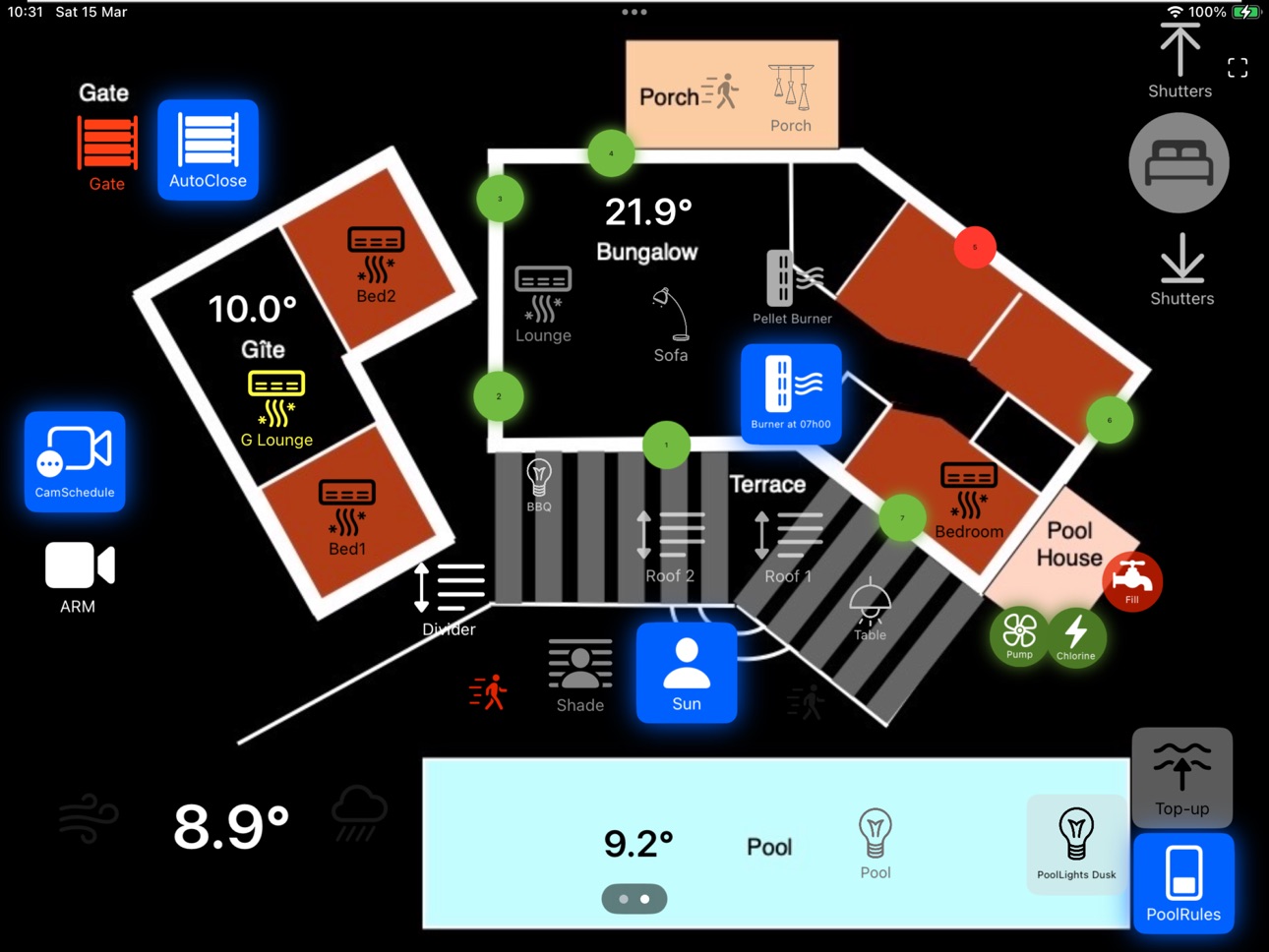
Avery Home for HomeKit is a smart home control app designed specifically for the Apple HomeKit ecosystem. It allows you to easily design personalized control panels using your iPhone or iPad and experience 3D visual control, making smart home management more intuitive and convenient.
Key Features:
• Visual control panels – Drag-and-drop editing lets you design your smart home control interface freely, making interactions more intuitive.
• 3D floor plan layout – Place lights, sensors, cameras, and other devices directly on a floor plan, eliminating the need to search through lists and making it easier to monitor your home’s status.
• Real-time sensor monitoring – Add temperature sensors to track climate changes in different rooms and motion sensors to detect activity, enabling smarter automation.
• Seamless Apple HomeKit integration – Directly control HomeKit devices and integrate with Siri for a more convenient smart home experience.
Why Choose Avery Home?
• Easy to use, perfect for all HomeKit users – Whether you’re new to smart homes or an advanced HomeKit user, you can quickly set up and customize your smart home interface.
• Unleash your creativity, build a personalized smart hub – Supports various panel designs, making your smart home management not only efficient but also futuristic and stylish.
• Continuous updates, dedicated to improving your experience – As a long-term supported app, we constantly optimize features to enhance your HomeKit experience.
If you are looking for a more intuitive and powerful HomeKit control app, Avery Home is a must-try.
For any usage questions, custom design requests, or smart home implementation ideas, feel free to contact us anytime.
• Email: firefrog@averyhome.top
• WeChat: AveryHome918
User Agreement: https://www.apple.com/legal/internet-services/itunes/dev/stdeula/
Privacy Policy: https://www.freeprivacypolicy.com/live/278edc78-6eda-402d-8a60-991ad6336cbe
In-App Purchases US pricing
Premium Subscription
Monthly Subscription · Monthly$1.99
Annual Subscription · Yearly 7-day free trial$14.99
One-Time Purchases
Lifetime License$9.99
Permanent Buyout(Family Share)$24.99
Permanent Buyout (Family)$24.99
Capabilities
In-App Purchases
Accessibility
ipadiphonemacrealityDevicetvoswatch
Version history 25 versions
Build 878324291v4.9.72025-09-22 20:24:52
1, adapt iOS 26
2, fixed a query bug with add accessories
Build 878099638v4.9.62025-09-14 18:11:26
fixed one bug
Build 875838434v4.9.52025-06-24 18:19:19
1. **Auto-Refresh for HMCharacteristics**
Professional-grade interval configuration (1min-24hrs) for HomeKit device status updates, optimizing real-time responsiveness vs power consumption
2. **One-Tap Gift Card Redemption**
Direct portal to App Store code redemption in Account Settings, supporting 16/12-digit gift code activation
Build 874244377v4.9.42025-04-23 18:16:00
Thank you, Murray, for your feedback
Fix a fatal bug
New internal purchase users should be able to encounter it, with no impact on other users
Build 874003340v4.9.32025-04-14 13:46:34
Dear Customers,
To better serve diverse usage needs, we're refining our lifetime purchase options:
1,Original Family Plan (Existing)
Supports sharing with 5 family members
No additional fees for multi-user access
Recommended for households/multi-device scenarios
2,New Individual Plan (Launched)
Designed for single-user scenarios
Lower entry price point
While both options remain available, the Family Plan still delivers superior value per user for shared usage environments. This adjustment aims to provide flexibility without compromising the core benefits of our original offering.
Thank you for being part of our community.
Build 873447431v4.9.22025-03-24 13:24:34
Fix the bug where showIcon is not working in the export function.
Build 873264197v4.9.12025-03-16 15:45:40
fixed export bug
Build 873247152v4.9.02025-03-14 22:11:13
1,Optimize the launch screen
2,Add Avery file export/import functionality
3,Enable iCloud sync for free-tier users
Build 871636331v4.8.02025-01-13 16:52:14
1. Add garage door support
2. Fix known bugs
Build 871387976v4.7.22024-12-28 21:12:43
• Added support for scenes.
Build 870820533v4.7.12024-12-02 22:10:21
1. Add support for door locks
2. Add support for air purifiers
3. Add missing localization support
4. Fix known bugs
Build 870414589v4.7.02024-11-14 16:33:57
1. Add panel copy functionality (Swipe left on the manage panel page)
2. Russian language support
Thanks to Dávid Süli for the feedback.
Build 870329027v4.6.12024-11-11 15:27:14
1. Urgent bug fix
2. Keyword optimization
Build 870315381v4.6.02024-11-10 15:21:03
1. Add localization for several countries.
2. Accessory services localization.
3. Add search functionality for binding accessories.
Build 869613322v4.5.12024-10-10 16:12:54
fixed bugs
Build 869515550v4.5.02024-10-06 14:49:37
1. New Wall-Mount Feature: A new option has been added for wall-mount settings, allowing the screen brightness to be automatically adjusted based on the presence of people detected by sensors.
2. Software Update Notification: With the latest version, a software update alert has been implemented. If a new version is available, a download button will appear in the top-right corner of the settings page, which redirects you to the App Store for easy updating.
3. Purchase Restoration Optimization: The restore purchase flow has been improved to provide a smoother and more reliable user experience.
Build 869283698v4.4.02024-09-26 15:11:08
1. Fix the padding misalignment issue on the iOS 18 configuration page.
2. Optimize the IPA size; the installation package should now be under 10 MB.
3. Unable to resist the user’s request, it has been given a Chinese name: 家庭映像
Build 867833104v4.3.72024-08-08 17:51:50
折中优化叠加图片的清晰度和压缩比例
Build 867154159v4.3.52024-07-22 15:06:30
fixed 2 bugs
panel cover image not work well
Build 867044608v4.3.42024-06-29 21:02:43
Some users have reported a stuck bug on the management panel page, but it works fine on several of my devices and cannot be replicated. Therefore, I have tried to modify the possible cause of this problem. If users have this problem, they can try updating it. If there is no such problem, there is no need to upgrade.
Build 865877036v4.3.32024-05-13 15:27:34
fixed no back action button in service detail page
Build 864823239v4.3.22024-04-01 20:58:50
Fix the bug of unresponsive button vibration feedback when clicked
No need to update without this issue
Build 864757903v4.3.12024-03-28 16:28:27
1,fixed a crash bug in iOS 17.4.1
2,delete service of label service type in HomeView
3,add row of Meta Type in Service Detail View
Build 864433176v4.3.02024-03-20 00:21:20
1. Add a simple style clock and weather. The first version is relatively simple, and will be modified based on feedback later
2. Add panel development to edit the size of the main image, as the canvas size is defined based on the main image. Therefore, after modification, there may be issues with the previous layout
3. Apple's SFSymbol icon has been added, and there are now many options available, but the search bar only supports English searches, and the official SF Symbol App is the same.
4. Fixed several bugs reported by users, such as ineffective button vibration feedback and the possibility of editing buttons disappearing on the iPad.
5. Remove annual subscriptions
Build 864199231v4.2.02024-03-05 14:48:13
1. Rewrote some parts of SwiftUI with UIKit, resulting in improved self-test speed
2. The uploaded image has been compressed. Although it is stored locally, the image is too large and cannot be processed by the CPU. Therefore, compression has been applied here
3. Added optional styles
4. Optimized some logic
5. Free users can preview themes
Price history by region
Currency
Show
Columns
Search
Availability 1 of 1 storefronts
| Region | Language | Price | Ratings | Avg | Version |
|---|---|---|---|---|---|
| US | en-US | Free | 4 | 4.8 | 4.9.7 |
Change log 29 changes · US
✎
releaseNotes updated
1, adapt iOS 26
2, fixed a query bug with add accessories
✎
description updated
Avery Home for HomeKit – Make Smart Home Control More Intuitive and Efficient
Avery Home for HomeKit is a smart home control app designed specifically for the
✎
subtitle updated
Control smart accessorie in 3D
✎
name updated
Avery Home for HomeKit
◆
Version 4.9.7 released
1, adapt iOS 26
2, fixed a query bug with add accessories
◆
Version 4.9.6 released
fixed one bug
◆
Version 4.9.5 released
1. **Auto-Refresh for HMCharacteristics**
Professional-grade interval configuration (1min-24hrs) for HomeKit device status updates, optimizing real-time responsiveness vs power consumption
2. **One-Tap Gift Card Redemption**
Dire
◆
Version 4.9.4 released
Thank you, Murray, for your feedback
Fix a fatal bug
New internal purchase users should be able to encounter it, with no impact on other users
◆
Version 4.9.3 released
Dear Customers,
To better serve diverse usage needs, we're refining our lifetime purchase options:
1,Original Family Plan (Existing)
Supports sharing with 5 family members
No additional fees for multi-user access
Recommended for household
◆
Version 4.9.2 released
Fix the bug where showIcon is not working in the export function.
◆
Version 4.9.1 released
fixed export bug
◆
Version 4.9.0 released
1,Optimize the launch screen
2,Add Avery file export/import functionality
3,Enable iCloud sync for free-tier users
◆
Version 4.8.0 released
1. Add garage door support
2. Fix known bugs
◆
Version 4.7.2 released
• Added support for scenes.
◆
Version 4.7.1 released
1. Add support for door locks
2. Add support for air purifiers
3. Add missing localization support
4. Fix known bugs
◆
Version 4.7.0 released
1. Add panel copy functionality (Swipe left on the manage panel page)
2. Russian language support
Thanks to Dávid Süli for the feedback.
◆
Version 4.6.1 released
1. Urgent bug fix
2. Keyword optimization
◆
Version 4.6.0 released
1. Add localization for several countries.
2. Accessory services localization.
3. Add search functionality for binding accessories.
◆
Version 4.5.1 released
fixed bugs
◆
Version 4.5.0 released
1. New Wall-Mount Feature: A new option has been added for wall-mount settings, allowing the screen brightness to be automatically adjusted based on the presence of people detected by sensors.
2. Software Update Notification: With the lat
◆
Version 4.4.0 released
1. Fix the padding misalignment issue on the iOS 18 configuration page.
2. Optimize the IPA size; the installation package should now be under 10 MB.
3. Unable to resist the user’s request, it has been given a Chinese name: 家庭映像
◆
Version 4.3.7 released
折中优化叠加图片的清晰度和压缩比例
◆
Version 4.3.5 released
fixed 2 bugs
panel cover image not work well
◆
Version 4.3.4 released
Some users have reported a stuck bug on the management panel page, but it works fine on several of my devices and cannot be replicated. Therefore, I have tried to modify the possible cause of this problem. If users have this problem, they c
◆
Version 4.3.3 released
fixed no back action button in service detail page
◆
Version 4.3.2 released
Fix the bug of unresponsive button vibration feedback when clicked
No need to update without this issue
◆
Version 4.3.1 released
1,fixed a crash bug in iOS 17.4.1
2,delete service of label service type in HomeView
3,add row of Meta Type in Service Detail View
◆
Version 4.3.0 released
1. Add a simple style clock and weather. The first version is relatively simple, and will be modified based on feedback later
2. Add panel development to edit the size of the main image, as the canvas size is defined based on the main image
◆
Version 4.2.0 released
1. Rewrote some parts of SwiftUI with UIKit, resulting in improved self-test speed
2. The uploaded image has been compressed. Although it is stored locally, the image is too large and cannot be processed by the CPU. Therefore, compression h