Home › Utilities

 US
US
1 of 1 storefronts
Content in en-US
Content in en-US
Information
Preview 2 platforms
iPhone 8 images


Apple Watch 10 images




What’s New Version 1.18
- Fixed the critical bug where entirely different keys were entered in the previous version
Description
WatchType allows you to use the missing QWERTY keyboard on Apple Watch, including old models.
FEATURES:
- Sending a message via Messages
- Full QWERTY keyboard on your wrist
- Easy typing on Apple Watch, including old models
- Language-specific keyboard layouts: Native layouts for each language, including AZERTY (French) and QWERTZ (German)
- Multi-language keyboard support: Select multiple languages and switch between them freely while typing
- Support 162 extended Latin characters, including the following: à, á, â, ä, å, æ, ç, è, é, ê, ë, ì, í, î, ï, ð, ñ, ò, ..., for English, French, German, Spanish, Italian, Portuguese, Dutch, Swedish, Danish, Norwegian, Finnish, Icelandic, Polish, Czech, Slovak, Hungarian, Romanian, Croatian, Slovenian, Estonian, Latvian, Lithuanian, Malay, Indonesian, Turkish, Vietnamese.
- 60+ Awesome Fonts included
- 40+ Color Themes on the keyboard
- 700+ Cool GIFs included
- Numbers, Symbols
- Full Unicode Emojis
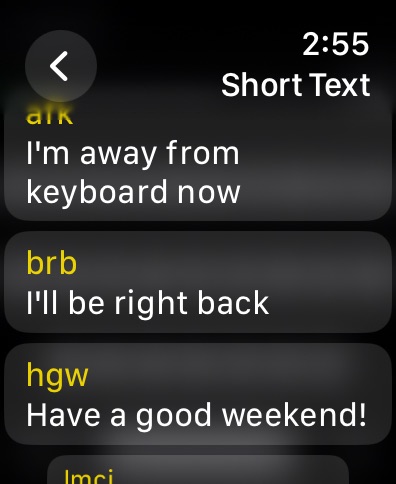
- Support custom short text (abbreviation)
- Support watch complications to launch the app on the watch face quickly (It's useful when sending a reply message) (watchOS 9 or higher)
- Double-tapping the space bar adds a dot(.) to the text.
- Pressing the backspace button for 2+ seconds clears all text.
- All configurations are stored on iCloud
You can send messages quickly using the familiar QWERTY keyboard on your wrist without speaking in a quiet place or using the scribble keyboard.
Privacy Policy: https://watchtype.app/pp/
Terms & Conditions: https://watchtype.app/tnc/
Support: https://support.bitsbaker.com/watchtype
In-App Purchases US pricing
WatchType Pro Subscription Subscription
Monthly · Monthly$3.99
Yearly · Yearly 3-day free trial$6.99
One-Time Purchases
Lifetime$9.99
Capabilities
In-App Purchases
Accessibility
ipadiphonemacrealityDevicetvoswatch
Version history 19 versions
Build 881802896v1.182026-01-24 07:33:57
- Fixed the critical bug where entirely different keys were entered in the previous version
Build 880831090v1.172026-01-22 22:08:10
- Multi-language keyboard support: Select multiple languages and switch between them freely while typing
- Language-specific keyboard layouts: Native layouts for each language, including AZERTY (French) and QWERTZ (German)
- Language indicator: See which language is currently active when switching keyboards
- 27 languages supported: English, French, German, Spanish, Italian, Portuguese, Dutch, Swedish, Danish, Norwegian, Finnish, Icelandic, Polish, Czech, Slovak, Hungarian, Romanian, Croatian, Slovenian, Estonian, Latvian, Lithuanian, Turkish, Vietnamese, Malay, Indonesian, Korean
- Since this version, the Korean keyboard layout is supported
Build 880465675v1.162025-12-10 01:17:03
Bug fixes
Build 878197700v1.152025-09-18 13:45:30
Update for iOS 26 and watchOS 26
Build 872804754v1.142025-02-26 11:41:53
Add localization to screenshots.
Build 872610122v1.132025-02-19 18:00:34
Add support for extended latin characters in the keyboard when long pressing a character. Now, you can type in English, French, German, Spanish, Italian, Portuguese, Dutch, Swedish, Danish, Norwegian, Finnish, Icelandic, Polish, Czech, Slovak, Hungarian, Romanian, Croatian, Slovenian, Estonian, Latvian, Lithuanian, Malay, Indonesian, Turkish, Vietnamese, and etc.
Build 872404826v1.122025-02-13 11:42:31
Add support for extended latin characters in the keyboard when long pressing a character. Now, you can type in English, French, German, Spanish, Italian, Portuguese, Dutch, Swedish, Danish, Norwegian, Finnish, Icelandic, Polish, Czech, Slovak, Hungarian, Romanian, Croatian, Slovenian, Estonian, Latvian, Lithuanian, Malay, Indonesian, Turkish, Vietnamese, and etc.
Build 868316540v1.112024-08-19 21:15:03
- Supports watchOS app running without iOS app installation
- Family Sharing is available for all in-app purchases
Build 865142486v1.102024-04-12 08:12:42
Updated the URL of Privacy Policy and Terms and Conditions.
Build 863413597v1.92024-02-06 10:32:33
- Improved channels for contacting support from the app.
Build 862999177v1.82024-01-21 18:33:35
Updated links to Privacy Policy and Terms and Conditions.
Build 860949890v1.72023-10-25 07:23:15
- Double-tapping the space bar adds a dot(.) to the text.
- Pressing the backspace button for 2+ seconds clears all text.
- The FAQ link in the Settings menu was added.
Build 860109373v1.62023-10-12 07:18:34
Supports watchOS 10 UI
Build 857715811v1.52023-06-09 22:34:45
Bug fixes
Build 856015545v1.42023-04-04 08:19:01
- (NEW) All configurations are stored in iCloud.
- (NEW)Users can control the config and change color theme or font on iPhone.
- (NEW) Supports Short Text (abbreviation). Users can add some custom abbreviations for quickly typing on the watch.
- (NEW) Supports Watch Complications. Users can launch the app on the watch face. It's useful when users want to send a reply message quickly.
Build 854661984v1.32023-02-01 19:56:16
- Add the full sentence preview feature on watch.
- Add app introduction on iOS.
Build 854466991v1.22023-01-19 16:11:56
Fix in-app purchases issues.
Build 854310330v1.12023-01-17 13:49:54
Added new features with in-app purchases for Pro users.
- 700+ Cool GIFs
- 60+ Awesome Fonts
- 40+ Color Themes on the keyboard
Also, there were many UI/UX improvements.
Build 853777277v1.02022-12-12 06:02:52
Price history by region
Currency
Show
Columns
Search
Availability 1 of 1 storefronts
| Region | Language | Price | Ratings | Avg | Version |
|---|---|---|---|---|---|
| US | en-US | Free | 163 | 4.3 | 1.18 |
Change log 23 changes · US
✎
releaseNotes updated
- Fixed the critical bug where entirely different keys were entered in the previous version
✎
description updated
WatchType allows you to use the missing QWERTY keyboard on Apple Watch, including old models.
FEATURES:
- Sending a message via Messages
- Full QWERTY keyboar
✎
subtitle updated
#1 QWERTY Keyboard for Watch
✎
name updated
WatchType - Watch Keyboard
◆
Version 1.18 released
- Fixed the critical bug where entirely different keys were entered in the previous version
◆
Version 1.17 released
- Multi-language keyboard support: Select multiple languages and switch between them freely while typing
- Language-specific keyboard layouts: Native layouts for each language, including AZERTY (French) and QWERTZ (German)
- Language indica
◆
Version 1.16 released
Bug fixes
◆
Version 1.15 released
Update for iOS 26 and watchOS 26
◆
Version 1.14 released
Add localization to screenshots.
◆
Version 1.13 released
Add support for extended latin characters in the keyboard when long pressing a character. Now, you can type in English, French, German, Spanish, Italian, Portuguese, Dutch, Swedish, Danish, Norwegian, Finnish, Icelandic, Polish, Czech, Slov
◆
Version 1.12 released
Add support for extended latin characters in the keyboard when long pressing a character. Now, you can type in English, French, German, Spanish, Italian, Portuguese, Dutch, Swedish, Danish, Norwegian, Finnish, Icelandic, Polish, Czech, Slov
◆
Version 1.11 released
- Supports watchOS app running without iOS app installation
- Family Sharing is available for all in-app purchases
◆
Version 1.10 released
Updated the URL of Privacy Policy and Terms and Conditions.
◆
Version 1.9 released
- Improved channels for contacting support from the app.
◆
Version 1.8 released
Updated links to Privacy Policy and Terms and Conditions.
◆
Version 1.7 released
- Double-tapping the space bar adds a dot(.) to the text.
- Pressing the backspace button for 2+ seconds clears all text.
- The FAQ link in the Settings menu was added.
◆
Version 1.6 released
Supports watchOS 10 UI
◆
Version 1.5 released
Bug fixes
◆
Version 1.4 released
- (NEW) All configurations are stored in iCloud.
- (NEW)Users can control the config and change color theme or font on iPhone.
- (NEW) Supports Short Text (abbreviation). Users can add some custom abbreviations for quickly typing on the wat
◆
Version 1.3 released
- Add the full sentence preview feature on watch.
- Add app introduction on iOS.
◆
Version 1.2 released
Fix in-app purchases issues.
◆
Version 1.1 released
Added new features with in-app purchases for Pro users.
- 700+ Cool GIFs
- 60+ Awesome Fonts
- 40+ Color Themes on the keyboard
Also, there were many UI/UX improvements.
◆
Version 1.0 released